# Best Version Control Software for Small Business

  *By [Adam Crivello](https://research.g2.com/insights/author/adam-crivello)*

   Products classified in the overall Version Control Software category are similar in many regards and help companies of all sizes solve their business problems. However, small business features, pricing, setup, and installation differ from businesses of other sizes, which is why we match buyers to the right Small Business Version Control Software to fit their needs. Compare product ratings based on reviews from enterprise users or connect with one of G2&#39;s buying advisors to find the right solutions within the Small Business Version Control Software category.

In addition to qualifying for inclusion in the Version Control Software category, to qualify for inclusion in the Small Business Version Control Software category, a product must have at least 10 reviews left by a reviewer from a small business.


## Category Overview

**Total Products under this Category:** 49


## Trust & Credibility Stats

**Why You Can Trust G2's Software Rankings:**

- 30 Analysts and Data Experts
- 1,600+ Authentic Reviews
- 49+ Products
- Unbiased Rankings

G2's software rankings are built on verified user reviews, rigorous moderation, and a consistent research methodology maintained by a team of analysts and data experts. Each product is measured using the same transparent criteria, with no paid placement or vendor influence. While reviews reflect real user experiences, which can be subjective, they offer valuable insight into how software performs in the hands of professionals. Together, these inputs power the G2 Score, a standardized way to compare tools within every category.


---

**Sponsored**

### Redgate Flyway

Redgate Flyway enables teams to deploy stable, secure database changes with confidence. With Flyway’s best-in-class technology and market-leading flexibility, teams have all they need for strong database governance, reliable deployments and the freedom to innovate faster. Redgate’s portfolio of solutions, including Flyway, help organizations reliably solve the complex challenges of database change management across the Database DevOps lifecycle. We make life easier for IT leaders, development and operations teams, increasing efficiency, reducing errors and protecting business-critical data. More than 200,000 data professionals across the globe, including 92% of the Fortune 100, rely on Redgate’s solutions to enable automation, resilience and efficiency throughout the database lifecycle, ensuring they get the most value out of their databases.


[Visit website](https://www.g2.com/external_clickthroughs/record?secure%5Bad_program%5D=ppc&amp;secure%5Bad_slot%5D=category_product_list&amp;secure%5Bcategory_id%5D=227&amp;secure%5Bdisplayable_resource_id%5D=227&amp;secure%5Bdisplayable_resource_type%5D=Category&amp;secure%5Bmedium%5D=sponsored&amp;secure%5Bplacement_reason%5D=page_category&amp;secure%5Bplacement_resource_ids%5D%5B%5D=227&amp;secure%5Bprioritized%5D=false&amp;secure%5Bproduct_id%5D=78698&amp;secure%5Bresource_id%5D=227&amp;secure%5Bresource_type%5D=Category&amp;secure%5Bsource_type%5D=category_page&amp;secure%5Bsource_url%5D=https%3A%2F%2Fwww.g2.com%2Fcategories%2Fversion-control-software%2Fsmall-business&amp;secure%5Btoken%5D=5483a31beadce451b0b63ae528f46f176ee8d35c7bffa0f17e384281aab2358d&amp;secure%5Burl%5D=https%3A%2F%2Fwww.red-gate.com%2Fproducts%2Fflyway%2Fenterprise%2F%3Futm_source%3Dg2%26utm_medium%3Dcpc%26utm_campaign%3Dmc-202603-flyway-g2-clicks-gm-all&amp;secure%5Burl_type%5D=free_trial)

---

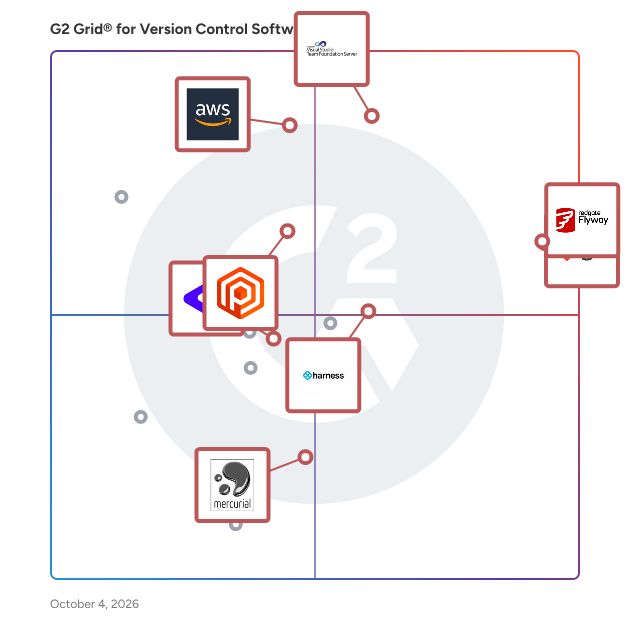
## Top-Rated Products (Ranked by G2 Score)
### 1. [Git](https://www.g2.com/products/git/reviews)
  Git is a fast, scalable, and distributed version control system designed to handle everything from small to very large projects with speed and efficiency. Originally developed for the Linux kernel, Git has become the de facto standard for version control, utilized by millions of developers worldwide. Its distributed architecture allows each developer to have a complete history of the project, enabling robust collaboration and offline work capabilities. Key Features and Functionality: - Distributed Version Control: Every developer has a full copy of the repository, allowing for independent work and reducing reliance on a central server. - High Performance: Git is optimized for speed, efficiently handling large repositories with millions of files and commits. - Data Integrity: Every file and commit is checksummed and retrieved by its checksum, ensuring the integrity of the repository. - Branching and Merging: Git offers powerful branching and merging capabilities, facilitating parallel development and feature integration. - Staging Area: The staging area allows developers to prepare commits by selecting changes to include, providing greater control over the commit history. - Free and Open Source: Released under the GNU General Public License version 2.0, Git is free to use and modify, promoting collaboration and transparency. Primary Value and User Solutions: Git addresses the challenges of collaborative software development by providing a reliable and efficient system for tracking changes, coordinating work among multiple developers, and maintaining a comprehensive history of project evolution. Its distributed nature ensures that developers can work offline and merge changes seamlessly, reducing conflicts and enhancing productivity. By offering a robust set of tools for version control, Git empowers teams to manage their codebases effectively, leading to more stable and maintainable software projects.


  **Average Rating:** 4.7/5.0
  **Total Reviews:** 517

**User Satisfaction Scores:**

- **Ease of Admin:** 8.2/10 (Category avg: 8.2/10)
- **Ease of Use:** 8.2/10 (Category avg: 8.1/10)
- **Ease of Setup:** 9.0/10 (Category avg: 8.3/10)
- **Has the product been a good partner in doing business?:** 8.7/10 (Category avg: 8.6/10)


**Seller Details:**

- **Seller:** [Git](https://www.g2.com/sellers/git)
- **Year Founded:** 2007
- **HQ Location:** New York
- **Twitter:** @BestGit (1,760 Twitter followers)
- **LinkedIn® Page:** https://www.linkedin.com/company/18556818/ (5 employees on LinkedIn®)

**Reviewer Demographics:**
  - **Who Uses This:** Software Engineer, Senior Software Engineer
  - **Top Industries:** Computer Software, Information Technology and Services
  - **Company Size:** 37% Small-Business, 35% Enterprise


### 2. [AWS CodeCommit](https://www.g2.com/products/aws-codecommit/reviews)
  AWS CodeCommit is a fully-managed source control service that makes it easy for companies to host secure and highly scalable private Git repositories. You can use CodeCommit to securely store anything from source code to binaries, and it works seamlessly with your existing Git tools.


  **Average Rating:** 4.2/5.0
  **Total Reviews:** 81

**User Satisfaction Scores:**

- **Ease of Admin:** 8.3/10 (Category avg: 8.2/10)
- **Ease of Use:** 8.6/10 (Category avg: 8.1/10)
- **Ease of Setup:** 8.5/10 (Category avg: 8.3/10)
- **Has the product been a good partner in doing business?:** 8.5/10 (Category avg: 8.6/10)


**Seller Details:**

- **Seller:** [Amazon Web Services (AWS)](https://www.g2.com/sellers/amazon-web-services-aws-3e93cc28-2e9b-4961-b258-c6ce0feec7dd)
- **Year Founded:** 2006
- **HQ Location:** Seattle, WA
- **Twitter:** @awscloud (2,225,864 Twitter followers)
- **LinkedIn® Page:** https://www.linkedin.com/company/amazon-web-services/ (156,424 employees on LinkedIn®)
- **Ownership:** NASDAQ: AMZN

**Reviewer Demographics:**
  - **Who Uses This:** Software Engineer
  - **Top Industries:** Computer Software, Information Technology and Services
  - **Company Size:** 48% Small-Business, 31% Mid-Market


#### Pros & Cons

**Pros:**

- Cloud Services (1 reviews)
- Collaboration (1 reviews)
- Integrations (1 reviews)
- Scalability (1 reviews)
- Security Protection (1 reviews)

**Cons:**

- Complexity Issues (1 reviews)
- Cost Management (1 reviews)
- Learning Curve (1 reviews)

### 3. [Redgate Flyway](https://www.g2.com/products/redgate-flyway/reviews)
  Redgate Flyway enables teams to deploy stable, secure database changes with confidence. With Flyway’s best-in-class technology and market-leading flexibility, teams have all they need for strong database governance, reliable deployments and the freedom to innovate faster. Redgate’s portfolio of solutions, including Flyway, help organizations reliably solve the complex challenges of database change management across the Database DevOps lifecycle. We make life easier for IT leaders, development and operations teams, increasing efficiency, reducing errors and protecting business-critical data. More than 200,000 data professionals across the globe, including 92% of the Fortune 100, rely on Redgate’s solutions to enable automation, resilience and efficiency throughout the database lifecycle, ensuring they get the most value out of their databases.


  **Average Rating:** 4.5/5.0
  **Total Reviews:** 82

**User Satisfaction Scores:**

- **Ease of Admin:** 8.7/10 (Category avg: 8.2/10)
- **Ease of Use:** 9.1/10 (Category avg: 8.1/10)
- **Ease of Setup:** 8.4/10 (Category avg: 8.3/10)
- **Has the product been a good partner in doing business?:** 8.8/10 (Category avg: 8.6/10)


**Seller Details:**

- **Seller:** [Redgate Software](https://www.g2.com/sellers/redgate-software)
- **Company Website:** https://www.red-gate.com
- **Year Founded:** 1999
- **HQ Location:** Cambridge, United Kingdom
- **Twitter:** @redgate (16,125 Twitter followers)
- **LinkedIn® Page:** https://www.linkedin.com/company/39481/ (551 employees on LinkedIn®)

**Reviewer Demographics:**
  - **Who Uses This:** Associate Data Engineer, Data Engineer
  - **Top Industries:** Computer Software, Information Technology and Services
  - **Company Size:** 55% Mid-Market, 24% Enterprise


#### Pros & Cons

**Pros:**

- Ease of Use (36 reviews)
- Version Control (20 reviews)
- Easy Integrations (10 reviews)
- Reliability (10 reviews)
- Deployment Ease (8 reviews)

**Cons:**

- Learning Curve (8 reviews)
- Missing Features (7 reviews)
- Error Handling (6 reviews)
- Expensive (6 reviews)
- Feature Issues (6 reviews)

### 4. [Azure DevOps Server](https://www.g2.com/products/azure-devops-server/reviews)
  Azure DevOps Server, formerly known as Team Foundation Server (TFS), is a comprehensive on-premises solution developed by Microsoft for managing the entire application lifecycle. It integrates version control, project management, build automation, testing, and release management into a unified platform, facilitating collaboration among development teams. Designed to support both agile and waterfall methodologies, Azure DevOps Server enables organizations to plan, develop, test, and deliver software efficiently within their own infrastructure. Key Features and Functionality: - Version Control: Offers robust source code management through Team Foundation Version Control (TFVC) and Git, allowing teams to choose between centralized or distributed version control systems. - Project Management: Provides agile planning tools, including configurable Kanban boards and backlogs, to plan, track, and discuss work across teams. - Build Automation: Enables continuous integration and continuous delivery (CI/CD) pipelines to build, test, and deploy applications across various platforms and environments. - Testing: Includes manual and exploratory testing tools to ensure code quality and support the entire testing lifecycle. - Release Management: Facilitates controlled and automated deployment of applications to different environments, ensuring consistent and reliable releases. - Extensibility: Supports integration with various development environments, including Microsoft Visual Studio and Eclipse, and offers APIs for custom extensions. Primary Value and User Benefits: Azure DevOps Server addresses the challenges of managing complex software development projects by providing a centralized platform that enhances collaboration, streamlines workflows, and improves code quality. By integrating various development tools and processes, it reduces the overhead associated with managing multiple disparate systems. Organizations benefit from increased transparency, better project tracking, and faster delivery times, all while maintaining control over their data within their own infrastructure. This makes Azure DevOps Server particularly valuable for enterprises with strict compliance requirements or those operating in environments where cloud-based solutions are not feasible.


  **Average Rating:** 4.2/5.0
  **Total Reviews:** 192

**User Satisfaction Scores:**

- **Ease of Admin:** 7.4/10 (Category avg: 8.2/10)
- **Ease of Use:** 7.9/10 (Category avg: 8.1/10)
- **Ease of Setup:** 7.2/10 (Category avg: 8.3/10)
- **Has the product been a good partner in doing business?:** 7.6/10 (Category avg: 8.6/10)


**Seller Details:**

- **Seller:** [Microsoft](https://www.g2.com/sellers/microsoft)
- **Year Founded:** 1975
- **HQ Location:** Redmond, Washington
- **Twitter:** @microsoft (13,114,353 Twitter followers)
- **LinkedIn® Page:** https://www.linkedin.com/company/microsoft/ (227,697 employees on LinkedIn®)
- **Ownership:** MSFT

**Reviewer Demographics:**
  - **Who Uses This:** Software Engineer, Senior Software Engineer
  - **Top Industries:** Information Technology and Services, Computer Software
  - **Company Size:** 40% Enterprise, 39% Mid-Market


#### Pros & Cons

**Pros:**

- Automation (2 reviews)
- Collaboration (2 reviews)
- Convenience (2 reviews)
- Customer Support (2 reviews)
- Deployment (2 reviews)

**Cons:**

- Complex Setup (2 reviews)
- Difficulty (2 reviews)
- Complexity (1 reviews)
- Complex Management (1 reviews)
- Difficult Configuration (1 reviews)

### 5. [Plastic SCM](https://www.g2.com/products/plastic-scm/reviews)
  Version control is the operating system of software development. It can solve problems efficiently and silently, or it can create more. Plastic SCM is a distributed version control, but can work centralized too. It is excellent with branching and merging, can deal with huge projects and big binary assets natively, and it comes with GUIs and tools to make everything simpler. Plastic solves problems.


  **Average Rating:** 4.2/5.0
  **Total Reviews:** 34

**User Satisfaction Scores:**

- **Ease of Admin:** 7.7/10 (Category avg: 8.2/10)
- **Ease of Use:** 7.9/10 (Category avg: 8.1/10)
- **Ease of Setup:** 8.0/10 (Category avg: 8.3/10)
- **Has the product been a good partner in doing business?:** 8.5/10 (Category avg: 8.6/10)


**Seller Details:**

- **Seller:** [Unity](https://www.g2.com/sellers/unity-09a71e5d-4725-47cd-9ed0-2699e3d54cad)
- **Year Founded:** 2010
- **HQ Location:** San Fransisco
- **Twitter:** @unity (112,874 Twitter followers)
- **LinkedIn® Page:** https://www.linkedin.com/company/unity/ (7,133 employees on LinkedIn®)

**Reviewer Demographics:**
  - **Top Industries:** Computer Games
  - **Company Size:** 64% Small-Business, 22% Enterprise


### 6. [P4](https://www.g2.com/products/p4/reviews)
  P4 (formerly Helix Core) is enterprise-class version control for faster, more collaborative development for teams of any size. With P4, developers can use their preferred tools — like Git and Visual Studio — while enjoying lightning-fast workflows, support for all file types, and faster builds from a single source of truth. Organizations around the globe rely on Helix Core to build and deliver complex digital products faster and with higher quality. P4 is trusted by the world’s most innovative brands, including Pixar, NVIDIA, Scania, EA, Ubisoft, and VMware.


  **Average Rating:** 4.2/5.0
  **Total Reviews:** 93

**User Satisfaction Scores:**

- **Ease of Admin:** 7.7/10 (Category avg: 8.2/10)
- **Ease of Use:** 7.7/10 (Category avg: 8.1/10)
- **Ease of Setup:** 7.3/10 (Category avg: 8.3/10)
- **Has the product been a good partner in doing business?:** 8.6/10 (Category avg: 8.6/10)


**Seller Details:**

- **Seller:** [Perforce](https://www.g2.com/sellers/perforce)
- **Year Founded:** 1995
- **HQ Location:** Minneapolis, MN
- **Twitter:** @perforce (5,097 Twitter followers)
- **LinkedIn® Page:** https://www.linkedin.com/company/perforce/ (2,032 employees on LinkedIn®)

**Reviewer Demographics:**
  - **Who Uses This:** Principal Software Engineer
  - **Top Industries:** Computer Games, Computer Software
  - **Company Size:** 39% Enterprise, 36% Mid-Market


### 7. [Harness Platform](https://www.g2.com/products/harness-platform/reviews)
  Simplify your developer experience with the world&#39;s first AI-augmented software delivery platform. Upgrade your software delivery with Harness&#39; innovative CI/CD, Feature Flags, Infrastructure as Code Management, and Chaos Engineering tools. We are a software delivery platform that helps developers and infrastructure engineers build and ship code for cloud and on-premise projects. We automate the continuous integration and continuous delivery (CI/CD) process to help teams build faster, ship more frequently, and improve quality, efficiency, and governance. We help companies in four key areas: Number one, we accelerate innovation through DevOps modernization. We provide an approach for software delivery that automates processes, reduces manual interventions, consolidates tools, and accelerates time-to-market for new products, features, and fixes. Number two, we improve developer experience. We give you the ability to attract, retain, and onboard high-caliber engineering talent while fostering a culture of continuous innovation and improvement. Number three, we secure software delivery. We give you the ability to integrate security into every phase of the SDLC. And last but not least is, we optimize cloud costs. We give you the ability to eliminate waste and to ensure that appropriate cloud resources are allocated at the right place at the right time.


  **Average Rating:** 4.6/5.0
  **Total Reviews:** 277

**User Satisfaction Scores:**

- **Ease of Admin:** 8.8/10 (Category avg: 8.2/10)
- **Ease of Use:** 8.8/10 (Category avg: 8.1/10)
- **Ease of Setup:** 8.6/10 (Category avg: 8.3/10)
- **Has the product been a good partner in doing business?:** 9.2/10 (Category avg: 8.6/10)


**Seller Details:**

- **Seller:** [Harness](https://www.g2.com/sellers/harness-25016f40-e80f-4417-bea8-39412055d17a)
- **Company Website:** https://harness.io/
- **Year Founded:** 2018
- **HQ Location:** San Francisco
- **Twitter:** @HarnessWealth (1,405 Twitter followers)
- **LinkedIn® Page:** https://www.linkedin.com/company/harnessinc/ (1,611 employees on LinkedIn®)

**Reviewer Demographics:**
  - **Who Uses This:** Software Engineer, DevOps Engineer
  - **Top Industries:** Computer Software, Financial Services
  - **Company Size:** 41% Enterprise, 39% Mid-Market


#### Pros & Cons

**Pros:**

- Ease of Use (113 reviews)
- Features (72 reviews)
- Feature Flags (49 reviews)
- Easy Setup (40 reviews)
- Easy Integrations (31 reviews)

**Cons:**

- Missing Features (23 reviews)
- Limitations (20 reviews)
- Limited Features (20 reviews)
- Learning Curve (17 reviews)
- Poor UI (16 reviews)

### 8. [Subversion](https://www.g2.com/products/subversion/reviews)
  Subversion is an open source version control system. Founded in 2000 by CollabNet, Inc., the Subversion project and software have seen incredible success over the past decade. Subversion has enjoyed and continues to enjoy widespread adoption in both the open source arena and the corporate world.


  **Average Rating:** 3.9/5.0
  **Total Reviews:** 63

**User Satisfaction Scores:**

- **Ease of Admin:** 7.7/10 (Category avg: 8.2/10)
- **Ease of Use:** 8.0/10 (Category avg: 8.1/10)
- **Ease of Setup:** 7.9/10 (Category avg: 8.3/10)
- **Has the product been a good partner in doing business?:** 7.8/10 (Category avg: 8.6/10)


**Seller Details:**

- **Seller:** [The Apache Software Foundation](https://www.g2.com/sellers/the-apache-software-foundation)
- **Year Founded:** 1999
- **HQ Location:** Wakefield, MA
- **Twitter:** @TheASF (66,154 Twitter followers)
- **LinkedIn® Page:** https://www.linkedin.com/company/215982/ (2,408 employees on LinkedIn®)

**Reviewer Demographics:**
  - **Who Uses This:** Software Engineer
  - **Top Industries:** Information Technology and Services, Computer Software
  - **Company Size:** 42% Enterprise, 42% Mid-Market


### 9. [Mercurial](https://www.g2.com/products/mercurial/reviews)
  Mercurial is a free, distributed source control management tool. It efficiently handles projects of any size and offers an easy and intuitive interface.


  **Average Rating:** 4.2/5.0
  **Total Reviews:** 31

**User Satisfaction Scores:**

- **Ease of Admin:** 8.3/10 (Category avg: 8.2/10)
- **Ease of Use:** 8.8/10 (Category avg: 8.1/10)
- **Ease of Setup:** 9.1/10 (Category avg: 8.3/10)
- **Has the product been a good partner in doing business?:** 8.1/10 (Category avg: 8.6/10)


**Seller Details:**

- **Seller:** [Mercurial Open Source Project](https://www.g2.com/sellers/mercurial-open-source-project)
- **Year Founded:** 2005
- **HQ Location:** Boston, MA
- **Twitter:** @MercurialScm (223 Twitter followers)
- **LinkedIn® Page:** https://www.linkedin.com/company/3515984/ (1 employees on LinkedIn®)

**Reviewer Demographics:**
  - **Who Uses This:** Software Engineer
  - **Top Industries:** Computer Software, Information Technology and Services
  - **Company Size:** 55% Small-Business, 35% Mid-Market


## Parent Category

[Source Code Management Software](https://www.g2.com/categories/source-code-management)


## Related Categories

- [Version Control Hosting Software](https://www.g2.com/categories/version-control-hosting)


---

## Buyer Guide

### What You Should Know About Version Control Software

### What is Version Control Software?

Version control software tracks changes in software development projects, allowing users to collaborate and change the same files without compromising the overall build. Also known as revision control or source control systems, version control systems enable developers to work simultaneously on code. Each user or portion of a larger development team can isolate their own work through what are known as branches. By branching code into isolated segments, users can protect good code while tinkering with feature additions or fixes. These branches can then be merged together when they are finished. Merge to merge, a version history is maintained so developers can revert back to an earlier build if severe problems appear throughout the process. These systems also alert users to errors and conflicts on code merges, giving developers the opportunity to resolve issues. Version control software allows developers to automatically track their work, see a history of all changes, and access previous versions of a project when necessary. This functionality can be thought of as the development equivalent of keeping progressive drafts of a writing project. All code changes and branches are kept in a repository.

Version control solutions streamline the development process for both solo developers and full development teams. Users can manage code for multiple projects simultaneously, accomplish multiple projects at once, and maintain a history of changes. These systems must often be paired with the right [version control hosting software](https://www.g2.com/categories/version-control-hosting), which hosts numerous code repositories on the cloud. While version control software provides the raw functionality for maintaining version history and enabling developer collaboration, version control hosting software hosts the master code repository on which they can make and track changes. To make interfacing with version control systems more intuitive, developers often use [version control clients](https://www.g2.com/categories/version-control-clients) as part of their version control framework. Version control clients enhance the features of version control systems by keeping track of multiple projects, providing a graphical user interface (GUI) for easier control, and allowing development integration to move faster.

Key Benefits of Version Control Software

- Boost productivity and streamline development by facilitating simultaneous development collaboration
- Keep track of project changes as development progresses with version history
- Keep existing builds protected while making changes to projects via branches

### Why Use Version Control Software?

Version control software is virtually necessary for any modern development environment. This software significantly reduces development time and promotes efficient teamwork by enabling simultaneous development collaboration. Developers also save time and energy thanks to these systems that work to constantly maintain version histories, protecting successful progress from being compromised by new code issues.

**Simultaneous collaboration —** Thanks to version control systems’ code branching functionality, developers can work on different sections of an overall build simultaneously. Changes made by each developer can be isolated from the rest of the project until they reach a finished state. Once finished, developers can safely merge their branches. Version control software also notifies users of errors or merge conflicts to resolve them safely.

**Version history —** Version control software provides developers with a constantly maintained version history for their projects. This protects projects from costly errors by preserving iterative progress, which developers can revert back to if necessary. Beyond keeping projects safe, version history also provides developers with a roadmap to keep track of changes for better organization. Version history can even help developers track down bugs—if a bug exists in one version of the project but not another, users can zero in on the possible changes that might have caused the bug.

### Who Uses Version Control Software?

Version control software presents vital mechanisms for development teams of all sizes. These systems’ simultaneous collaboration functions are as useful to teams of 5 as they are to teams of 50. Even solo developers rely on version control systems to facilitate streamlined development.

**Software development teams —** Software development teams use version control software to achieve organized collaboration and parallel development via branching. With version control systems, team members can work on separate tasks simultaneously while keeping the master repository intact. They can also use version control history to track changes made by other members of the team, helping keep everyone on the same page.

**Solo developers —** The benefits of version control software extend beyond team collaboration. Solo developers rely on version control systems’ branching functionality to safely make changes to their projects without breaking their builds. If a branch merge or other issue ruins a project, solo developers can easily revert to a prior version to preserve their overall progress.

### Kinds of Version Control Software

**Local —** Local version control systems function on a single system, making them commonplace for solo developers. These setups don’t lend themselves to collaboration, but they do allow solo developers to take advantage of version history and safely make changes to projects. While simple and handy, these setups are prone to error because it is difficult to make a complete copy of the repository.

**Centralized —** Centralized version control software relies upon a shared server, which different users can access from their own machines to work on files. Users make changes to working copies of files on the server, and any committed change a user makes is then instantly shared with the server and, therefore, other users. This setup relies on a strong internet connection to facilitate remote work if team members aren’t working in the same location.

**Distributed —** Distributed version control software is peer-to-peer, and each user in the distributed network has a clone of the full repository. Changes are committed to each user’s local repository, and those changes can then be exchanged with other repositories in the network. These systems make full backups easy because each user has a full copy of the repository.

### Version Control Software Features

**Code branching —** Version control software enables developers to isolate segments of code from the rest of the project in what is called a “branch.&quot; Changes made within these branches do not impact the overall project until merged, allowing developers to work simultaneously without causing major errors.

**Merge error detection —** Sometimes when developers merge finished branches, unforeseen bugs and errors occur. These errors are referred to as “merge conflicts,&quot; as they are the result of new code in the branch conflicting with the rest of the project. Version control software alerts developers to potential merge conflicts and errors on merge, allowing users to resolve these issues more effectively.

**Progress tracking —** Thanks to these systems’ constantly updated version history, developers can easily track progress on their projects’ development goals. This visibility helps developers working on different branches maintain a comprehensive understanding of the project at large. Such transparency minimizes merge errors and other bugs caused by outdated build comprehension.

**Project backups —** Version control systems’ constantly maintained version history protects projects from bugs and errors by acting as a backup. Users can revert back to previous versions when things go wrong, preserving the overall progress made. The more iterative and comprehensive the version history, the more protection is granted to users’ progress.

### Software and Services Related to Version Control Software

[**Version control hosting**](https://www.g2.com/categories/version-control-hosting) **—** Version control hosting solutions are products that host multiple code repositories in the cloud and integrate with online tools that enhance the use of version control software. Version control hosting software gives developers the ability to collaborate remotely in real-time, making it a vital piece of the version control framework.

[**Version control clients**](https://www.g2.com/categories/version-control-clients) **—** Version control clients are software tools developers use on their computers to interact with version control systems. Version control clients enhance the features of version control software by keeping track of multiple projects, providing a graphical user interface (GUI) for easier control, and allowing development integration to move faster. These tools also integrate with version control hosting software to provide a comprehensive version control framework.

[**Static code analysis**](https://www.g2.com/categories/static-code-analysis) **—** Static code analysis is the analysis of computer software performed without actually executing the code. Static code analysis software scans all code in a project and seeks out vulnerabilities, validates code against industry best practices, and some software tools validate against company-specific project specifications. Static code analysis software coexists with version control frameworks to give developers a complete tool kit for transparent, flexible source code management.

[**Configuration management software**](https://www.g2.com/categories/configuration-management) **—** Configuration management tracks changes to applications and their infrastructure to ensure that configurations are in a known and trusted state and configuration details don’t rely on the tribal knowledge of the development team. Configuration management software is an accurate historical record of the system state, which is helpful for project management, auditing, and debugging. This software integrates with version control software to help manage application infrastructure and ensure visibility across the team.


