# Best Software Testing Tools - Page 20

  *By [Adam Crivello](https://research.g2.com/insights/author/adam-crivello)*

   Software testing software gives development teams the methods and tools to determine the quality of their software creation and improvement projects. Development teams use software testing tools to assess whether software is usable, performs properly, meets development team goals, and meets overall requirements. Software testing tools also include other test management solutions like [bug tracking software](https://www.g2.com/categories/bug-tracking) and [project management software](https://www.g2.com/categories/project-management). Some solutions include features that support collaboration between software testers and developers. To monitor testing activities and analyze results, most solutions offer reporting and dashboards, with pre-defined metrics and KPIs.

Integration with other testing tools or with software development solutions is also provided. Such integration is important for other activities that are part of the development lifecycle such as [build automation software](https://www.g2.com/categories/build-automation), [continuous delivery software](https://www.g2.com/categories/continuous-delivery), and [continuous deployment software](https://www.g2.com/categories/continuous-deployment).

To qualify for inclusion in the Software Testing category, a product must:

- Include options for different testing methodologies such as waterfall or agile
- Provide iterative testing processes to find new or related issues when a problem is fixed
- Allow for different types of testing such as functional, performance, scalability, and usability
- Deliver reporting and metrics on tests, which can be used to evaluate the quality of the solution
- Integrate with third-party software development solutions and platforms


## Category Overview

**Total Products under this Category:** 324


## Trust & Credibility Stats

**Why You Can Trust G2's Software Rankings:**

- 30 Analysts and Data Experts
- 19,300+ Authentic Reviews
- 324+ Products
- Unbiased Rankings

G2's software rankings are built on verified user reviews, rigorous moderation, and a consistent research methodology maintained by a team of analysts and data experts. Each product is measured using the same transparent criteria, with no paid placement or vendor influence. While reviews reflect real user experiences, which can be subjective, they offer valuable insight into how software performs in the hands of professionals. Together, these inputs power the G2 Score, a standardized way to compare tools within every category.
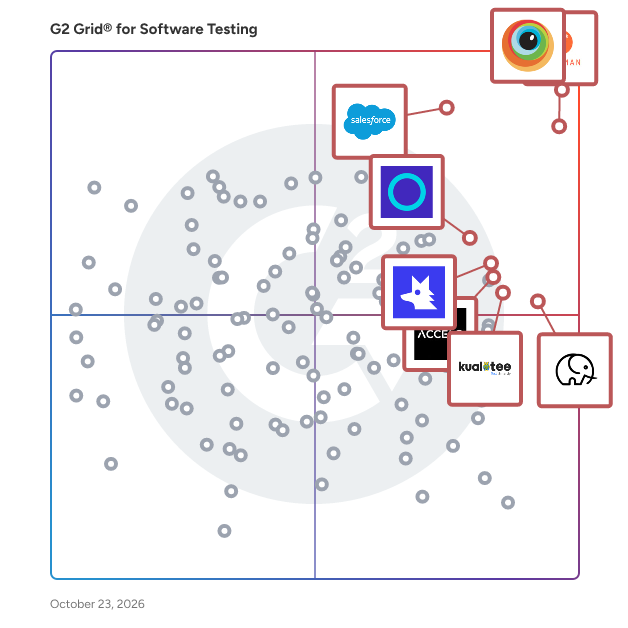

## Best Software Testing Tools At A Glance

- **Leader:** [BrowserStack](https://www.g2.com/products/browserstack/reviews)
- **Highest Performer:** [Tuskr](https://www.g2.com/products/tuskr/reviews)
- **Easiest to Use:** [Postman](https://www.g2.com/products/postman/reviews)
- **Top Trending:** [Qodex.ai](https://www.g2.com/products/qodex-ai/reviews)
- **Best Free Software:** [BrowserStack](https://www.g2.com/products/browserstack/reviews)


---

**Sponsored**

### BotGauge

BotGauge is a fully managed Autonomous QA partner for engineering teams that ship fast. Powered by agentic AI, BotGauge deploys AI QA agents paired with domain QA experts to generate, execute, and maintain test coverage across your entire product, without adding headcount or management overhead.


[Visit company website](https://www.g2.com/external_clickthroughs/record?secure%5Bad_program%5D=ppc&amp;secure%5Bad_slot%5D=category_product_list&amp;secure%5Bcategory_id%5D=314&amp;secure%5Bdisplayable_resource_id%5D=314&amp;secure%5Bdisplayable_resource_type%5D=Category&amp;secure%5Bmedium%5D=sponsored&amp;secure%5Bplacement_reason%5D=page_category&amp;secure%5Bplacement_resource_ids%5D%5B%5D=314&amp;secure%5Bprioritized%5D=false&amp;secure%5Bproduct_id%5D=1398105&amp;secure%5Bresource_id%5D=314&amp;secure%5Bresource_type%5D=Category&amp;secure%5Bsource_type%5D=category_page&amp;secure%5Bsource_url%5D=https%3A%2F%2Fwww.g2.com%2Fcategories%2Fsoftware-testing%3Fpage%3D20&amp;secure%5Btoken%5D=f32256e54e44ecdd8f88889abd8c8ee0f88e90bd45da3e14f21bd719b35385e1&amp;secure%5Burl%5D=https%3A%2F%2Fbotgauge.com%2F&amp;secure%5Burl_type%5D=company_website)

---


## Parent Category

[Development Software](https://www.g2.com/categories/development)


## Related Categories

- [Automation Testing Tools](https://www.g2.com/categories/automation-testing-tools)
- [Test Management Tools](https://www.g2.com/categories/test-management)
- [AI Software Testing Tools](https://www.g2.com/categories/ai-software-testing-tools)


---

## Buyer Guide

### What You Should Know About Software Testing Software

### What is Software Testing Software?

Software testing tools help users gain information about their software’s functionality, usability, and performance. Quality assurance is one of the greatest benefits to software testing solutions. Users can diagnose issues, track bugs, manage development timelines, and improve their overall product.

**Quality Assurance Planning —** Quality assurance is one of the largest components of the application lifecycle and can be assisted through software testing features like project statuses and quality reporting. Reporting tools can outline the project work scope, while project status features help alert users of issues, schedule tests, and meet deadlines. Planning tools can be greatly beneficial when working in agile structures, as schedules can change rapidly.

Customizability can also be crucial to ensuring your application meets your specific functionality and performance specifications. Software testing products are better suited for resolving specific issues, but general add-on tools may help track bugs and diagnose issues. Some users reported great benefits when working with custom products they’d created for clients. Each individual application can have different metrics, standards, and assessments.

**Manual and Automated Testing —** Manual software testing and issue tracking can be tedious but are often necessary. Aside from tasks easily solved by testing scripts, instances may demand ad hoc ticketing, end-to-end situational analysis, or manual security audits. Users have reported benefits from being able to manually assign tests or resolutions to individual specialists. Software testing users have also described benefits in planning and executing user tests with random and in-house individuals.

However, users often want to limit the need for manual testing, which is far and away the most commonly cited business problem solved using software testing solutions. These products can usually automate test runs or scripts to continuously examine a product’s functionality. This often reduces testing time and frees up developers to find solutions, resolve issues, and develop new features or products.

In the end, a hybrid approach tends to be the most common. Ideal solutions allow users to expedite and optimize their processes by managing and separating manual and automatable tasks. This allows teams to tailor their process to team and project needs. Once that organization is concrete, automating iterative tasks can take place while individuals manually sift through and test issues requiring manual effort.

Other Business Problems Solved with Software Testing Products

Regardless of your product’s audience or basic functionality, all development teams desire performance optimization. Software testing solutions can keep products running more swiftly while simultaneously monitoring and testing them as new issues arise.

Some of the other business problems solved with software testing products include:

- Reporting and documenting performance data and trends
- Maintaining performance over extended periods of time
- Managing software requirements or standards
- Tracking time, managing cases, and optimizing performance

Key Benefits of Software Testing Software

- Build software faster with automated test management
- Enhance overall quality of the product with continuous application testing
- Ensure that software works correctly and focuses on the tasks it is meant to achieve
- Discover faults early before they manifest into larger issues
- Demonstrate to stakeholders and potential buyers that the product works

### Why Use Software Testing Software?

**Quality assurance —** Nobody likes running across functionality issues in their software, especially software that they might have just spent money on. Software testing tools help minimize these occurrences. Breaks shouldn’t occur in finalized products, and software testing software helps ensure breaks don’t happen.

**Customer satisfaction —** Software stability helps to bring in customers and keep them. The more often your software functions without a hitch, the more likely your customers will keep coming back for more, and more importantly, the more likely they are to recommend your products to others. Software testing software helps your company create quality software that makes customers happy.

**Costs saved —** Hotfixes and software updates after a product’s release are costly in both labor hours and resource needs. Software testing software helps to minimize the need for post-production tweaks, letting your teams focus on new projects instead of correcting old ones.

### Who Uses Software Testing Software?

Testing software is an integral part of the development lifecycle. Understanding what functionalities are and are not working, as well as identifying potential snags or missed opportunities, is critical to a successful product release.

No matter the development framework, the target platform, or the software type, every development team should have access to and be using software testing software in some form during development. This helps developers stay on top of potential issues in code, and they can identify potential breakpoints that only happen during nonstandard application use.

User experience (UX) teams also can benefit from utilizing software testing software. By combining software testing with evaluations of the user experience, teams can create more fluid software that fits and functions to the consumer’s exact needs.

### Kinds of Software Testing Software

**Static vs. dynamic testing —** Static testing focuses more on implicit testing, like when a programmer edits software. Dynamic testing involves running a software project against a set of tests to determine if it will pass the testing. Development teams may implement both methods when creating a project, but it is important to understand which testing method a team will use when selecting a software testing product.

**White-box vs. black-box testing —** White-box testing involves programmers testing a project from the inside. The white-box method tests how software is performing its function. The black box tests software only for functionality to see if a project performs the tasks it’s designed for. Software testing tools may be designed for a specific method. Development teams should consider this when choosing a software testing tool.

**Suite vs. best-of-breed —** Some software testing tools incorporate many solutions into one suite product. These suite products often combine features like software testing, version control, bug tracking, test automation, project management, and more. Best-of-breed products, on the other hand, focus on only one of these solutions. Software teams should consider which model is best for them when choosing a software testing product.

### Software Testing Software Features

**Test case management —** Lay out the test cases your teams need, create new ones, or remove cases that are no longer valid.

**Issue tracking —** Identify issues in the application’s function, track those issues through resolution, and verify that issue resolution did not cause any other incidental issues.

**Variable testing methods and types —** Whether worried about scalability, performance under stress, or general functionality, software testing software should have the capability to run tests on any areas of concern.

**Reporting and metrics —** Software testing software can keep track of all testing results, revealing metrics around tests and generating reports or dashboards for any testing your team runs.

**Third-party integration —** As an integral part of the development lifecycle, software testing tools can integrate into other development lifecycle tools to centralize all relevant information.

### Trends Related to Software Testing Software

**Machine learning —** Growth in the fields of artificial intelligence (AI) and machine learning has greatly bolstered software testing. Current testing is reactive to the current software configurations. [Machine learning software](https://www.g2.com/categories/machine-learning) changes the game by allowing for predictive development as well, looking at trends in past development and creating new parameters from those trends.

**Big data and IoT —** As two of the hottest trending fields in the technology space, big data and internet of things (IoT) don’t appear to be falling to irrelevancy anytime soon. A lot of software will need to be able to deal with massive data volumes and a diverse range of endpoints. Testing software can help ensure these needs get met.

**Test automation —** As continuous development and delivery increase in popularity alongside agile development methods, software testing is driven more and more to keep pace. Test automation reduces the time spent running tests down to just creating the test cases, saving valuable production time.

**API —** The world is more interconnected than ever, and consumers are increasingly looking to connect functionalities as well. APIs allow companies to integrate their own software components with other, non-proprietary software, creating a more cohesive and fluid user experience. We may see software testing tools gain increasing focus on connected design to help companies produce more software products that integrate well.

### Potential Issues with Software Testing Software

Software testing tools greatly increase efficacy and quality during the development process, but there are some considerations that should be kept in mind when seeking out the right testing tool for your team.

**Development models —** Development teams build software projects from a number of different models (e.g., agile, lean, scrum, and waterfall). Software testing tools can be designed for a specific development method. The methodology development teams implement for their projects will also affect when they will need software testing tools in the project’s lifecycle. Development teams should consider these factors when choosing a software testing tool.

**Frameworks —** Development teams have choices in frameworks when building software. Frameworks allow developers to focus on building their software without needing to also build their development environment. Software testing tools can be designed with a specific framework in mind, so consider your team’s framework(s) when searching for a new product.

**Integrations —** Some software testing products allow for integrations with other existing software tools. Many software testing best-of-breed products have integration features (e.g., bug tracking) with best-of-breed solutions. Development teams should consider their current software solutions and whether they will be compatible with a potential new software testing tool.

### Software and Services Related to Software Testing Software

Software testing tools tend to include other test management features like [bug tracking software](https://www.g2.com/categories/bug-tracking) and [project management software](https://www.g2.com/categories/project-management). These offer reporting and dashboards to assist in the testing process, track changes and workflows, and help keep teams up to date on testing.

Software testing software often also offers integration with other testing tools or with software development solutions. Testing is only one part of the development lifecycle, so most testing software will have integration capabilities with [build automation software](https://www.g2.com/categories/build-automation), [continuous delivery software](https://www.g2.com/categories/continuous-delivery), and [continuous deployment software](https://www.g2.com/categories/continuous-deployment) to stay fluid with the rest of development.


