Best Payroll Software - Page 5

How Many Payroll Software Products Does G2 Track?

Total Products under this Category: 866

Category Stats (Oct 2026)

  • Average Rating: 4.36/5 (↑0.01 vs Sep 2026) The average rating of products in this category, based on all submitted ratings
  • Top Trending Product: GreatDay HR (+28.35%) - Among all products in this category, GreatDay HR recorded the largest rating increase compared to last month

Last updated: October 22, 2026

How Does G2 Rank Payroll Software Products?

Why You Can Trust G2's Software Rankings:

  • 30 Analysts and Data Experts
  • 143,200+ Authentic Reviews
  • 866+ Products
  • Unbiased Rankings

G2's software rankings are built on verified user reviews, rigorous moderation, and a consistent research methodology maintained by a team of analysts and data experts. Each product is measured using the same transparent criteria, with no paid placement or vendor influence. While reviews reflect real user experiences, which can be subjective, they offer valuable insight into how software performs in the hands of professionals. Together, these inputs power the G2 Score, a standardized way to compare tools within every category.

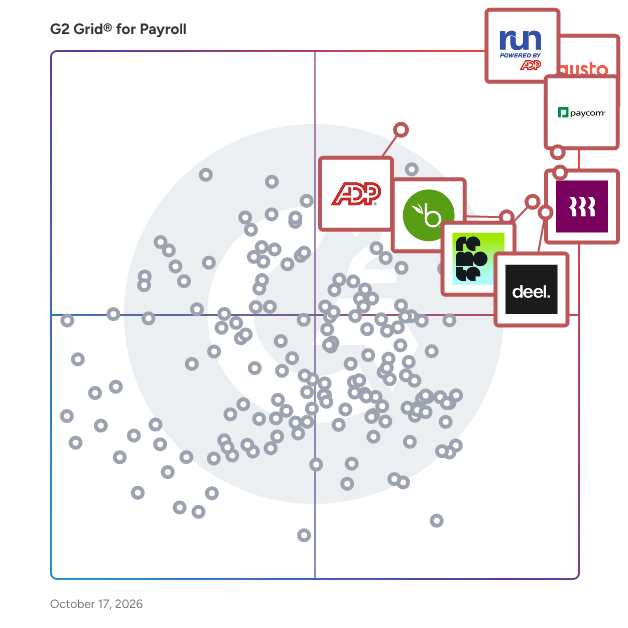
G2 Grid® for Payroll Software

G2 Grid® for Payroll Software plotting products by satisfaction and market presence

Highlighted products: RUN Powered by ADP, Gusto, Paycom, Rippling, Deel Payroll, Remote, BambooHR, and ADP Workforce Now.

Underlying data: [Grid® JSON](https://www.g2.com/categories/payroll/grids.json?focus%5B%5D=run-powered-by-adp&focus%5B%5D=gusto&focus%5B%5D=paycom&focus%5B%5D=rippling&focus%5B%5D=deel-payroll&focus%5B%5D=remote&focus%5B%5D=bamboohr&focus%5B%5D=adp-workforce-now)

Pocket HRMS

Pocket HRMS is India's leading AI-powered HR software designed to simplify and automate the complete employee lifecycle from hiring to retirement. Built specifically for modern Indian businesses, this comprehensive cloud-based HR platform combines payroll processing, attendance tracking, leave management, recruitment, and performance analytics into one unified system. Trusted by over 2000 businesses across India, Pocket HRMS helps startups, SMBs, and large enterprises reduce manual HR tasks, ensure absolute payroll accuracy, and maintain strict statutory compliance. With advanced conversational AI tools like smHRty, HRMS Copilot, and smHRt searcHR, human resource teams can shift their focus from daily administration to strategic workforce planning and delivering a smarter employee experience. Why Choose Pocket HRMS for Your Business? AI-Powered HR Automation: Automate repetitive HR workflows, payroll processing, and employee queries with smart AI assistants to drastically reduce manual intervention. Custom Built for Indian Businesses: Seamlessly handle complex Indian payroll processes, statutory compliance updates, multi-location workforce management, and local industry requirements. Comprehensive Hire to Retire Platform: Manage everything from candidate recruitment, digital onboarding, and daily attendance to performance appraisals and exit management in a single HR system. Future Ready AI Tools: Leverage conversational AI assistants and intelligent search functions to resolve employee queries instantly and analyze workforce data in real time. Mobile First Employee Experience: Empower your team with a dedicated mobile HRMS app to access payslips, apply for leave, submit expenses, and mark attendance on the go. Automated Payroll and Compliance: Eliminate errors in statutory deductions, tax updates, PF, ESI, PT, TDS, and Form 16 generation with compliance-ready payroll software. Scalable and Integration Ready: Easily scale your HR operations and integrate the platform with biometric attendance devices, ERP systems, and third-party accounting applications. Dedicated Customer Support: Ensure a smooth implementation process and continuous success with a reliable support team focused on quick issue resolution. What are the Key Features of Pocket HRMS? Smart Payroll Processing: Automate salary calculations, tax deductions, reimbursements, full and final settlements, and generate accurate payslips instantly. AI Attendance Management: Track employee time in real time using biometric device integration, facial recognition, geo-tagging, geo-fencing, and mobile punch-ins. Flexible Leave Management: Configure custom company leave policies, manage approval workflows, track leave balances, and automate holiday calendars and comp-offs. Employee Self-Service Portal: Provide employees with a secure portal to submit expense claims, download tax documents, and manage HR requests independently. Digital Recruitment and Onboarding: Streamline your hiring process from candidate sourcing and offer letter generation to paperless onboarding and digital document collection. Performance Management System: Drive employee growth by setting clear KPIs, tracking goals, managing appraisal cycles, and gathering continuous manager feedback. AI HR Assistants: Use HRMS Copilot and smHRty to deliver instant round the clock support for company policy answers and routine HR self-help tasks. Intelligent Workforce Analytics: Make data driven decisions with customizable dashboards and detailed MIS reports covering payroll, compliance, and attendance trends. Expense and Helpdesk Tracking: Enable staff to raise internal support tickets and expense claims quickly, allowing HR and finance teams to resolve and approve them efficiently.

Average Rating: 4.6/5.0

Total Reviews: 33

How Do G2 Users Rate Pocket HRMS?

  • Has the product been a good partner in doing business?: 8.3/10 (Category avg: 8.7/10)
  • Performance and Reliability: 7.2/10 (Category avg: 8.7/10)
  • Scalability: 7.4/10 (Category avg: 8.7/10)
  • User, Role, and Access Management: 7.5/10 (Category avg: 8.7/10)

Who Is the Company Behind Pocket HRMS?

  • Seller: Pocket HRMS
  • Year Founded: 2013
  • HQ Location: Mumbai, Maharashtra
  • Twitter: @PocketHRMS
    3,526 Twitter followers
  • LinkedIn® Page: vi.linkedin.com
    117 employees on LinkedIn®
  • Phone: +91 99871 44643

Who Uses This Product?

  • Top Industries: Information Technology and Services
  • Company Size: 82% Medium, 12% Large

What Do G2 Reviewers Say About Pocket HRMS?

AI-generated summary from verified user reviews

Pros
  • Users appreciate the ease of use of Pocket HRMS, finding the interface intuitive and user-friendly.
  • Users find the payroll process fast and efficient with convenient data access and excellent support.
  • Users appreciate the comprehensive features of Pocket HRMS, finding it easy, user-friendly, and meeting all their requirements.
  • Customers highlight the helpful and quick customer support from Pocket HRMS, enhancing user satisfaction and experience.
  • Users find Pocket HRMS to enhance efficiency by streamlining processes and providing quick solutions for payroll and data management.
Cons
  • Users face date issues in Pocket HRMS, such as attendance not updating and ineffective tax calculation.
  • Users feel the need for limited features in Pocket HRMS, particularly requesting enhanced ATS functionalities and advanced tools.
  • Users express dissatisfaction with the poor customer support of Pocket HRMS, citing slow responses and lack of clarity.
  • Users experience occasional minor bugs with the punch in/out feature, affecting their overall experience with Pocket HRMS.
  • Users struggle with the restricted functionality of Pocket HRMS due to its inadequate customization of HR processes.

What Are Recent G2 Reviews of Pocket HRMS?

What Are G2 Users Discussing About Pocket HRMS?

Asanify AI

Asanify is an AI-powered global HR, payroll, and Employer of Record (EOR) platform that enables companies to hire, manage, and pay teams across countries—without setting up local entities or stitching together multiple tools. Built for speed and simplicity, Asanify replaces fragmented HR operations with an intelligent system that automates workflows, reduces manual effort, and ensures compliance across geographies. From onboarding to payroll to global contractor payouts, Asanify acts as a single operating system for people operations—helping founders, HR, and finance teams run global teams with minimal overhead. Key capabilities include: • AI-assisted onboarding, payroll processing, and HR workflows to reduce manual intervention • Global hiring through Employer of Record (EOR) across multiple countries without entity setup • Automated multi-country payroll and contractor payments with built-in compliance • Unified employee data layer with real-time insights and reporting • Integrations and automation that eliminate repetitive HR and finance tasks Asanify is designed to be intuitive from day one—requiring minimal training and enabling teams to go live quickly without heavy implementation. Rated #1 globally for ease of use on G2, Asanify helps companies scale global teams without scaling operational complexity.

Average Rating: 4.9/5.0

Total Reviews: 373

How Do G2 Users Rate Asanify AI?

  • Has the product been a good partner in doing business?: 9.6/10 (Category avg: 8.7/10)
  • Performance and Reliability: 9.2/10 (Category avg: 8.7/10)
  • Scalability: 8.6/10 (Category avg: 8.7/10)
  • User, Role, and Access Management: 9.2/10 (Category avg: 8.7/10)

Who Is the Company Behind Asanify AI?

Who Uses This Product?

  • Who Uses This: Associate Developer, Senior Executive
  • Top Industries: Information Technology and Services, Hospital & Health Care
  • Company Size: 61% Small, 39% Medium

What Do G2 Reviewers Say About Asanify AI?

AI-generated summary from verified user reviews

Pros
  • Users find Asanify AI extremely easy to use, simplifying attendance and leave management across various platforms seamlessly.
  • Users love the simplicity and user-friendliness of Asanify AI, finding tasks like attendance and salary generation relaxing.
  • Users value the user-friendly payroll system of Asanify, streamlining attendance and payslip management effortlessly.
  • Users love the tracking ease of Asanify AI, making time management and leave applications hassle-free.
  • Users praise Asanify for its effective payroll automation, significantly reducing time spent on employee payments and compliance.
Cons
  • Users are disappointed by the absence of essential features like work-from-home applications and employee photograph uploads.
  • Users find Asanify AI's features limited and clumsy, particularly for larger teams and advanced needs.
  • Users find the limited customization options frustrating, as more flexibility in features would enhance their experience.
  • Users express frustration over the lack of a dedicated mobile app, requesting availability on both Android and iOS platforms.
  • Users find missing features like hiring and analytics clumsy, limiting usability for larger teams and startups.

What Are Recent G2 Reviews of Asanify AI?

SunFish by DataOn

SunFish is an employee-centric HCM platform that integrates tools to effectively manage all aspects of the employee lifecycle from digitalization of employee records to payroll to Talent Management to HR as a Business Service Partner including new work trends and work relationships in one single platform and one single source of truth. It is a next-generation digital platform catered to the specific needs and requirements of businesses in markets in Southeast Asia to help them in through the different stages of their HR transformation journey.

Average Rating: 4.5/5.0

Total Reviews: 214

How Do G2 Users Rate SunFish by DataOn?

  • Has the product been a good partner in doing business?: 9.0/10 (Category avg: 8.7/10)
  • Performance and Reliability: 8.8/10 (Category avg: 8.7/10)
  • Scalability: 8.8/10 (Category avg: 8.7/10)
  • User, Role, and Access Management: 9.1/10 (Category avg: 8.7/10)

Who Is the Company Behind SunFish by DataOn?

Who Uses This Product?

  • Top Industries: Manufacturing, Financial Services
  • Company Size: 61% Medium, 35% Large

What Do G2 Reviewers Say About SunFish by DataOn?

AI-generated summary from verified user reviews

Pros
  • Users find SunFish's ease of use essential for improving efficiency in Human Resources tasks and applications.
  • Users appreciate the fast, accessible after-sales service of SunFish, enhancing their overall experience and satisfaction.
  • Users highlight the efficiency of SunFish, streamlining HR tasks and enhancing operational workflows significantly.
  • Users appreciate the efficiency in managing HR tasks with SunFish, noting its intuitive interface and flexibility.
  • Users appreciate the comprehensive attendance management features in SunFish, simplifying HR tasks and improving efficiency.
Cons
  • Users often face slow loading times that diminish the overall usage experience with DataOn's SunFish.
  • Users report slow performance in SunFish, affecting responsiveness and complicating data navigation and access to features.
  • Users are frustrated by the limited customization in SunFish, affecting performance management and report generation.
  • Users feel the limited features of SunFish hinder full utilization, particularly on the mobile app and reports.
  • Users experience frequent software bugs that disrupt functionality, particularly during periods of low internet connectivity.

What Are Recent G2 Reviews of SunFish by DataOn?

AI can help you find the answers. G2 helps you trust them.

Connect G2 to Claude or ChatGPT for answers grounded in G2's trusted reviews, comparisons, and pricing from real user insights.

How it works

isolved

isolved is a provider of human capital management (HCM) solutions that help organizations recruit, retain and elevate their workforce. More than 195,000 employers and 8 million employees rely on isolved's software and services to streamline human resource (HR) operations and deliver employee experiences that matter. isolved People Cloud™ is a unified yet modular HCM platform with built-in artificial intelligence (AI) and analytics that connects HR, payroll, benefits, and workforce and talent management into a single solution that drives better business outcomes. Through the Sidekick Advantage™, isolved also provides expert guidance, embedded services and an engaged community that empowers People Heroes™ to grow their companies and careers. Learn more at www.isolvedhcm.com.

Average Rating: 4.3/5.0

Total Reviews: 1,295

How Do G2 Users Rate isolved?

  • Has the product been a good partner in doing business?: 8.5/10 (Category avg: 8.7/10)
  • Performance and Reliability: 8.6/10 (Category avg: 8.7/10)
  • Scalability: 8.5/10 (Category avg: 8.7/10)
  • User, Role, and Access Management: 8.4/10 (Category avg: 8.7/10)

Who Is the Company Behind isolved?

  • Seller: isolved HCM
  • Company Website:
  • Year Founded: 1986
  • HQ Location: Charlotte, NC
  • Twitter: @iSolvedHCM
    2,254 Twitter followers
  • LinkedIn® Page: www.linkedin.com
    1,983 employees on LinkedIn®

Who Uses This Product?

  • Who Uses This: HR Manager, Office Manager
  • Top Industries: Hospital & Health Care, Non-Profit Organization Management
  • Company Size: 54% Medium, 41% Small

What Do G2 Reviewers Say About isolved?

AI-generated summary from verified user reviews

Pros
  • Users appreciate the easy access to help and assistance provided by Isolved, enhancing overall satisfaction and experience.
  • Users commend the exceptional customer support of iSolved, appreciating the helpful assistance throughout payroll processes.
  • Users appreciate the ease of use of isolved, enhanced by excellent customer service and helpful features.
  • Users value the quick response time of isolved, which enhances support and resolves issues effectively.
  • Users appreciate the robust payroll management features of iSolved, making processes seamless and efficient.
Cons
  • Users express frustration with poor customer support from isolved, facing inefficient response times and unresolved inquiries.
  • Users find isolved not user-friendly, facing navigation issues, inefficient support, and complex integration challenges.
  • Users find isolved's interface not intuitive, leading to significant challenges in navigating basic features and functionality.
  • Users find the limited features of isolved frustrating, feeling that basic functionalities need significant improvement.
  • Users express frustration over the missing features in isolved, leading to complications and inefficiencies during updates.

What Are Recent G2 Reviews of isolved?

What Are G2 Users Discussing About isolved?

Inova Payroll

nova is a fully unified payroll, HR, and benefits solution designed to help organizations automate their most critical workforce management tasks. This comprehensive platform addresses the evolving needs of employees while ensuring compliance with changing employer regulations. By centralizing key HR functions, Inova streamlines the management of the entire employee lifecycle, making it an essential tool for businesses looking to enhance operational efficiency—especially those that rely on industry-specific and financial system integrations. Inova caters to organizations of all sizes that require a robust system to manage payroll, benefits, and employee relations. The platform is particularly beneficial for companies in industries such as construction, field services, and property management, with deep integrations to leading industry platforms like ServiceTitan, Aspire Software, and M3. Inova also connects seamlessly with popular ERP and accounting systems including Acumatica, Sage Intacct, and QuickBooks Online, ensuring accurate data flow between workforce and financial operations. Inova’s key features include: Payroll and tax filing Time and attendance tracking Scheduling Recruiting and applicant tracking Employee onboarding Benefits administration Performance management Compliance reporting Each of these components works seamlessly together within a single database, ensuring employee information is consistent, accurate, and always up to date. Through its native and integrated ecosystem, Inova reduces manual data entry, minimizes errors, and simplifies complex workflows—allowing HR and finance teams to focus on strategic initiatives rather than administrative tasks. The platform’s user-friendly web and mobile interface enhances accessibility, enabling employees and managers to engage with the system from anywhere. This flexibility supports a modern workforce that values convenience and efficiency. Inova’s compliance reporting tools further help organizations stay ahead of regulatory changes, reducing risk and supporting adherence to federal, state, and local labor laws. Overall, Inova stands out in the HR technology landscape by offering a comprehensive, integration-ready solution that brings payroll, HR, benefits, and industry-specific systems together into one cohesive platform. By leveraging Inova, organizations can improve workforce management, enhance employee satisfaction, and maintain compliance with confidence—ultimately driving better business outcomes.

Average Rating: 4.4/5.0

Total Reviews: 631

How Do G2 Users Rate Inova Payroll?

  • Has the product been a good partner in doing business?: 9.3/10 (Category avg: 8.7/10)
  • Performance and Reliability: 8.9/10 (Category avg: 8.7/10)
  • Scalability: 8.8/10 (Category avg: 8.7/10)
  • User, Role, and Access Management: 8.6/10 (Category avg: 8.7/10)

Who Is the Company Behind Inova Payroll?

  • Seller: Inova Payroll, Inc.
  • Year Founded: 2011
  • HQ Location: Nashville, TN
  • Twitter: @InovaPayroll
    566 Twitter followers
  • LinkedIn® Page: www.linkedin.com
    182 employees on LinkedIn®

Who Uses This Product?

  • Who Uses This: Office Manager, HR Manager
  • Top Industries: Construction, Non-Profit Organization Management
  • Company Size: 53% Medium, 42% Small

What Do G2 Reviewers Say About Inova Payroll?

AI-generated summary from verified user reviews

Pros
  • Users praise Inova Payroll for its exceptional customer support, highlighting quick responses and helpful representatives like Lynda.
  • Users commend Inova Payroll for its exceptional customer support, consistently responsive and knowledgeable in addressing concerns.
  • Users appreciate the ease of use of Inova Payroll, finding the process straightforward and stress-free.
  • Users commend Inova Payroll for its fantastic customer service, highlighting the personal touch and responsiveness of support staff.
  • Users value the quick response time from Inova Payroll's customer support, enhancing their overall service experience.
Cons
  • Users find Inova Payroll to be not intuitive, making it challenging and frustrating to navigate and use effectively.
  • Users face a steep learning curve with Inova Payroll, finding navigation and reporting challenging initially.
  • Users find the complex reporting difficult to navigate, often struggling to access specific or past reports effectively.
  • Users find navigation difficult, complicating their ability to access necessary reports quickly and efficiently.
  • Users report poor customer support, highlighting issues with communication and frustrating assistance from representatives.

What Are Recent G2 Reviews of Inova Payroll?

What Are G2 Users Discussing About Inova Payroll?

Workforce.com

Workforce.com is a workforce, HR, and payroll platform purpose-built for teams that run on hourly and shift-based labor. Instead of juggling multiple systems for scheduling, time tracking, HR, and payroll, Workforce.com brings everything together in one unified platform so businesses can run frontline operations with clarity, accuracy, and speed. With Workforce.com, managers can create optimal / efficient schedules, forecast staffing needs, monitor attendance in real time, and approve clean, compliant timesheets in just a few clicks. The system automatically applies complex pay rules—like overtime, shift differentials, multi-role pay, and compliance requirements—so payroll is accurate before it even begins. Employees benefit from a simple mobile experience that lets them clock in, swap shifts, request PTO, access their information, and stay connected to their workplace. The platform scales easily for single-location operators as well as multi-site businesses, offering consolidated wage visibility, multi-team management, and integrations with major payroll, POS, and HR systems. Workforce.com is trusted across industries like hospitality, retail, healthcare, staffing, manufacturing, and entertainment. By automating manual tasks and giving leaders real-time insight into wage costs and staffing needs, Workforce.com helps businesses operate more efficiently, stay compliant, and create better experiences for both managers and employees

Average Rating: 4.5/5.0

Total Reviews: 135

How Do G2 Users Rate Workforce.com?

  • Has the product been a good partner in doing business?: 8.9/10 (Category avg: 8.7/10)
  • Performance and Reliability: 9.7/10 (Category avg: 8.7/10)
  • Scalability: 9.7/10 (Category avg: 8.7/10)
  • User, Role, and Access Management: 9.4/10 (Category avg: 8.7/10)

Who Is the Company Behind Workforce.com?

  • Seller: Workforce.com
  • Year Founded: 2012
  • HQ Location: Chicago, Illinois, United States
  • Twitter: @workforcedotcom
    19,237 Twitter followers
  • LinkedIn® Page: www.linkedin.com
    100 employees on LinkedIn®

Who Uses This Product?

  • Who Uses This: Operations Manager, Director
  • Top Industries: Hospitality, Hospital & Health Care
  • Company Size: 49% Medium, 42% Small

What Do G2 Reviewers Say About Workforce.com?

AI-generated summary from verified user reviews

Pros
  • Users highlight the intuitive ease of use of Employee Scheduling Software, enhancing team engagement and operational efficiency.
  • Users commend the exceptional customer support and seamless implementation of Employee Scheduling Software, enhancing overall experience and efficiency.
  • Users highlight the outstanding customer support, noting excellent service during implementation and ongoing assistance.
  • Users appreciate the easy setup process of Workforce.com, facilitating seamless use and quick employee onboarding.
  • Users find that Workforce offers significant time-saving benefits by streamlining scheduling and simplifying payroll processes.
Cons
  • Users find the software not user-friendly, with challenging navigation and complicated setups despite having prior experience.
  • Users find the initial setup and navigation complicated, often wishing for a simpler interface to improve usability.
  • Users find the difficult navigation frustrating, often requiring assistance and guidance for setup and usage.
  • Users find the difficult setup of the Employee Scheduling Software frustrating, even with prior experience in similar systems.
  • Users find the learning curve steep, preferring more intuitive navigation and improved training resources for quicker adaptation.

What Are Recent G2 Reviews of Workforce.com?

What Are G2 Users Discussing About Workforce.com?

Hammr

Construction payroll, HR, and field operations platform. Offering tools to manage a mobile workforce, certified payroll, prevailing wage, union rates, labor compliance, and job costing.

Average Rating: 4.9/5.0

Total Reviews: 18

How Do G2 Users Rate Hammr?

  • Has the product been a good partner in doing business?: 9.9/10 (Category avg: 8.7/10)
  • Performance and Reliability: 9.3/10 (Category avg: 8.7/10)
  • Scalability: 10.0/10 (Category avg: 8.7/10)
  • User, Role, and Access Management: 9.8/10 (Category avg: 8.7/10)

Who Is the Company Behind Hammr?

  • Seller: Hammr
  • HQ Location: San Francisco, US
  • LinkedIn® Page: www.linkedin.com
    11 employees on LinkedIn®

Who Uses This Product?

  • Top Industries: Construction
  • Company Size: 61% Small, 39% Medium

What Are Recent G2 Reviews of Hammr?

Cavu HCM

CAVU HCM by IRIS is a comprehensive Human Capital Management solution offering services designed to streamline payroll and HR processes for US-based businesses. With an intuitive platform, CAVU HCM automates payroll, manages employee data, and simplifies compliance with regulatory requirements. Tailored for small to mid-sized companies, the solution integrates seamlessly with HR workflows, offering tools for workforce management, time and attendance tracking, and employee self-service. By choosing CAVU HCM by IRIS, businesses can reduce administrative burdens, ensure accurate payroll processing, and focus more on strategic growth.

Average Rating: 4.9/5.0

Total Reviews: 137

How Do G2 Users Rate Cavu HCM?

  • Has the product been a good partner in doing business?: 9.8/10 (Category avg: 8.7/10)
  • Performance and Reliability: 9.6/10 (Category avg: 8.7/10)
  • Scalability: 9.3/10 (Category avg: 8.7/10)
  • User, Role, and Access Management: 9.7/10 (Category avg: 8.7/10)

Who Is the Company Behind Cavu HCM?

  • Seller: IRIS Software Group
  • Company Website:
  • Year Founded: 1978
  • HQ Location: Alpharetta, GA
  • Twitter: @IRISSoftwareGrp
    1,340 Twitter followers
  • LinkedIn® Page: www.linkedin.com
    3,115 employees on LinkedIn®

Who Uses This Product?

  • Who Uses This: Owner, President
  • Top Industries: Construction, Hospital & Health Care
  • Company Size: 82% Small, 18% Medium

What Do G2 Reviewers Say About Cavu HCM?

AI-generated summary from verified user reviews

Pros
  • Users appreciate the knowledgeable and friendly customer support of Cavu HCM, enhancing their overall experience.
  • Users value the efficient payroll process and appreciate the prompt support from knowledgeable representatives like Joyce.
  • Users find Cavu HCM's helpful customer service efficient and responsive, making their experience significantly better.
  • Users find Cavu HCM easy to use, appreciating the friendly and knowledgeable customer service provided.
  • Users appreciate the prompt response time of Cavu HCM, highlighting excellent communication and support throughout the process.
Cons
  • Users experience occasional slow loading times, particularly when performing multiple operations, affecting their efficiency.
  • Users report facing payroll issues such as double payments and technical errors within the Cavu HCM system.
  • Users have experienced account management issues, such as accidental double payments when processing off-schedule transactions.
  • Users report occasional billing issues leading to double payments, though such incidents are infrequent over the years.
  • Users find the reporting function confusing for first-time users, impacting their overall experience with Cavu HCM.

What Are Recent G2 Reviews of Cavu HCM?

What Are G2 Users Discussing About Cavu HCM?

Friday

Friday is a cloud-based team management and payroll software for small businesses with 1-50 employees. The platform offers time tracking, payroll management, and mobile access. Key features include clock in/out, automated payroll processing, and a mobile app enabling remote work hour tracking. This helps companies track employee hours, calculate payroll, and manage teams.

Average Rating: 5.0/5.0

Total Reviews: 16

How Do G2 Users Rate Friday?

  • Has the product been a good partner in doing business?: 10.0/10 (Category avg: 8.7/10)
  • Performance and Reliability: 9.8/10 (Category avg: 8.7/10)
  • Scalability: 10.0/10 (Category avg: 8.7/10)

Who Is the Company Behind Friday?

  • Seller: FRIDAY Inc
  • Year Founded: 2022
  • HQ Location: Brooklyn, NY
  • Twitter: @FridayAppHQ
    11 Twitter followers
  • LinkedIn® Page: www.linkedin.com
    56 employees on LinkedIn®

Who Uses This Product?

  • Company Size: 100% Small

What Do G2 Reviewers Say About Friday?

AI-generated summary from verified user reviews

Pros
  • Users highlight the exceptionally responsive customer support of Friday, ensuring quick resolutions and assistance at any time.
  • Users rave about the ease of use of Friday, appreciating its simplicity and responsive customer support.
  • Users love the simplicity and ease of use of Friday, making payroll processing quick and hassle-free.
  • Users commend the easy setup and quick payroll processing, highlighting excellent customer service throughout the experience.
  • Users highlight the easy setup of Friday, making payroll processing and employee onboarding straightforward and efficient.
Cons
  • Users feel that email issues hinder timely reminders about holidays affecting payroll and miss celebratory notifications.
  • Users find the limited features of Friday restrict their ability to fully utilize the platform's potential.

What Are Recent G2 Reviews of Friday?

OnTheClock Employee Time Clock

OnTheClock is easy-to-use employee time clock, time tracking, scheduling, PTO management, and payroll software built for small and medium-sized businesses, especially those with hourly employees. Designed with simplicity in mind for everyone, from employees clocking in to managers approving timecards and administrators running payroll, OnTheClock makes managing employee time and pay easier without complicated software, extensive training, or unnecessary administrative work. Founded in 2004, OnTheClock serves more than 16,000 businesses and approximately 160,000 employees. Its intuitive, user-friendly platform makes it easy for employees to track their hours, managers to oversee their teams, and business owners to turn timecards into accurate paychecks. **Simple Employee Time Clock and Time Tracking Software** OnTheClock provides a simple, cloud-based employee time clock that makes tracking hourly employees easy. Its online time clock allows employees to clock in and out using a mobile app, web browser, or shared time clock kiosk, whether they work on-site, remotely, or across multiple locations. The employee time clock is designed to make clocking in and out quick and straightforward, while giving managers and administrators an equally simple way to review timesheets, correct missed punches, approve employee hours, and monitor attendance. Advanced time clock features include GPS location tracking, geofencing, biometric fingerprint recognition, IP address restrictions, break and overtime tracking, and employee attendance monitoring. These tools help businesses maintain accurate employee timesheets, manage labor costs, and reduce unauthorized clock-ins. **Easy Payroll Connected to Time Tracking** OnTheClock combines employee time tracking and built-in payroll in one connected system. Approved timecards flow directly into payroll, reducing manual data entry and the risk of errors. Businesses can calculate wages, pay hourly and salaried employees, and process direct deposits without switching between separate platforms. **OnTheClock also calculates, files, and pays payroll taxes on behalf of businesses**, helping simplify tax compliance and reducing the administrative burden of managing payroll taxes. Designed for small business owners and administrators, OnTheClock simplifies payroll processing without requiring extensive payroll expertise. Its straightforward workflow helps businesses process payroll quickly, accurately, and confidently. For businesses that prefer their current provider, OnTheClock also integrates with QuickBooks, ADP, Gusto, Square, Thomson Reuters, Paychex, Sage, and Paylocity. These integrations help businesses transfer time data into their existing payroll workflows, making payroll preparation easier and more efficient. **Simple Employee Scheduling, PTO, and Job Tracking** OnTheClock makes it easy to create employee schedules, track paid time off (PTO) and accruals, review attendance, and monitor overtime. Managers can organize employees by department, assign jobs, track time spent on projects, and use reports to understand hours worked and labor costs. Employees can easily view their schedules, review their hours, and request time off through self-service tools. Managers and administrators can review requests, approve timecards, and manage employee information without complicated workflows. **Easy for Employees, Managers, and Administrators** Unlike complicated workforce management systems, OnTheClock is designed to be intuitive for everyone who uses it. Hourly employees can clock in and out with minimal training, managers can easily oversee attendance and schedules, and administrators can manage timecards and payroll from one connected platform. By simplifying everyday tasks for every user, OnTheClock reduces administrative work, minimizes training requirements, and helps businesses spend less time managing employee time and more time running their operations. **Built for Small Businesses With Hourly Employees** OnTheClock is especially useful for businesses with hourly, shift-based, mobile, or multi-location teams, including construction, restaurants, retail, healthcare, manufacturing, professional services, and field services. Whether a business has a handful of employees or teams working across multiple locations, OnTheClock provides straightforward employee time clock, scheduling, attendance, and payroll tools without the complexity of enterprise workforce management software or the need for a dedicated payroll department. **Real People, Real Support** Simple software should come with simple support. OnTheClock offers access to U.S.-based customer support representatives through phone, live chat, and email to help businesses get started and answer questions. With more than two decades of experience, OnTheClock helps small businesses simplify employee management with an easy-to-use employee time clock, time tracking, scheduling, PTO management, and integrated payroll. Whether it's an hourly employee clocking in, a manager building schedules, or a business owner processing payroll, OnTheClock makes everyday tasks simple for everyone. **Everything you need to pay your team. Nothing you don't.**

Average Rating: 4.4/5.0

Total Reviews: 291

How Do G2 Users Rate OnTheClock Employee Time Clock?

  • Has the product been a good partner in doing business?: 9.3/10 (Category avg: 8.7/10)
  • Performance and Reliability: 9.1/10 (Category avg: 8.7/10)
  • Scalability: 9.2/10 (Category avg: 8.7/10)
  • User, Role, and Access Management: 8.6/10 (Category avg: 8.7/10)

Who Is the Company Behind OnTheClock Employee Time Clock?

  • Seller: OnTheClock
  • Company Website:
  • Year Founded: 2004
  • HQ Location: Clinton Township, Michigan
  • Twitter: @OnTheClockLLC
    226 Twitter followers
  • LinkedIn® Page: www.linkedin.com
    36 employees on LinkedIn®

Who Uses This Product?

  • Who Uses This: Office Manager
  • Top Industries: Hospital & Health Care, Medical Practice
  • Company Size: 80% Small, 19% Medium

What Do G2 Reviewers Say About OnTheClock Employee Time Clock?

AI-generated summary from verified user reviews

Pros
  • Users love the ease of use of OnTheClock, appreciating its quick onboarding and accessibility across devices.
  • Users value the ease of time tracking with OnTheClock, finding it simple and convenient to manage work hours.
  • Users appreciate the ease of tracking work hours and schedules with OnTheClock, enhancing their time management experience.
  • Users appreciate the simplicity and straightforwardness of OnTheClock, making time management effortless and efficient.
  • Users appreciate the time-saving convenience of OnTheClock, enabling quick clocking in and out to focus on work.
Cons
  • Users face clocking issues due to lack of automatic clock out and inability to edit their own time.
  • Users experience punching issues due to connection problems and lack of flexibility for clocking out remotely.
  • Users experience slow loading issues, with delays affecting their ability to clock in and out efficiently.
  • Users struggle with time tracking issues, experiencing delays in corrections and difficulties managing time off requests.
  • Users find the limited features of OnTheClock inadequate for tracking and managing employee clock-in data effectively.

What Are Recent G2 Reviews of OnTheClock Employee Time Clock?

What Are G2 Users Discussing About OnTheClock Employee Time Clock?

QuickBooks Desktop Pro

QuickBooks helps you organize your business finances all in one place so you can complete your frequent tasks in fewer steps. Easily get set up, learn and use. No accounting knowledge is necessary and you can quickly import your data from a spreadsheet. Easily create invoices and manage expenses. And, QuickBooks ensures you’ll have reliable records for tax time. Have questions? Step-by-step tutorials show you how to create invoices, record expenses and more. Includes a 60 day money-back guarantee.

Average Rating: 4.3/5.0

Total Reviews: 1,711

How Do G2 Users Rate QuickBooks Desktop Pro?

  • Has the product been a good partner in doing business?: 8.2/10 (Category avg: 8.7/10)
  • Performance and Reliability: 8.7/10 (Category avg: 8.7/10)
  • Scalability: 8.7/10 (Category avg: 8.7/10)
  • User, Role, and Access Management: 8.9/10 (Category avg: 8.7/10)

Who Is the Company Behind QuickBooks Desktop Pro?

  • Seller: Intuit
  • Year Founded: 1983
  • HQ Location: Mountain View, California
  • Twitter: @Intuit
    80,559 Twitter followers
  • LinkedIn® Page: www.linkedin.com
    15,963 employees on LinkedIn®
  • Ownership: VIE:INTU

Who Uses This Product?

  • Who Uses This: Owner, Office Manager
  • Top Industries: Accounting, Construction
  • Company Size: 80% Small, 15% Medium

What Do G2 Reviewers Say About QuickBooks Desktop Pro?

AI-generated summary from verified user reviews

Pros
  • Users find QuickBooks Desktop Pro to be very user-friendly, making transaction logging and report generation effortless.
  • Users value the robustness and reliability of QuickBooks Desktop Pro for managing complex accounting tasks effectively.
  • Users value the comprehensive features of QuickBooks Desktop Pro, especially for its flexibility and robust accounting capabilities.
  • Users commend the clear and customizable reporting features of QuickBooks Desktop Pro, enhancing accessibility for all users.
  • Users value the customization options in QuickBooks Desktop Pro, enhancing usability and streamlining accounting tasks effectively.
Cons
  • Users often find limited features in QuickBooks Desktop Pro, making it less fulfilling and more challenging to use.
  • Users experience missing features in QuickBooks Desktop Pro, limiting its utility and complicating navigation and usability.
  • Users express concerns about the expensive pricing and inadequate support from QuickBooks Desktop Pro, leading to frustration.
  • Users face poor customer support, often experiencing unresolved issues and inefficiency in getting help and solutions.
  • Users find the limited customization options in QuickBooks Desktop Pro restrict their workflow and efficiency significantly.

What Are Recent G2 Reviews of QuickBooks Desktop Pro?

What Are G2 Users Discussing About QuickBooks Desktop Pro?

QuickBooks Desktop Enterprise

Enhanced visibility and control to help power your business. QuickBooks Enterprise helps improve decision-making, efficiency, and productivity with a clear line of sight across your business. Manage more of your business with Enterprise • Get best-in-class accounting, inventory management, reporting, pricing rules, job costing, integrated payroll*, time tracking, and more • Capacity for 1 million customers, vendors and inventory items, 100,000 classes, 45 custom fields, and up to 40 users • Boost productivity, enhance collaboration and free your team to work from anywhere with hosting • Automate your work with our best integrated time tracking and payroll tools, plus the optional Salesforce CRM connector. And plug in more than 200 applications to extend the value of your Enterprise Improve your productivity and make quicker decisions by seeing of more of your data in real-time • Industry-focused editions give you tools and reporting built with your business in mind. Specialized industry editions offer customized capabilities, reports, and features designed for your company type and industry. • Store vendors, inventory, pricing, and customer information all right in QuickBooks for easy access, faster workflows, and better decision making • Work faster with batch transactions to speed up your workflows and reduce data entry • Get a picture of with what’s incoming and outgoing with a cash flow hub to track payments, bills, invoices, sales receipts, and more Get more transparency-more efficiently • Maintain control of your data with out-of-the box (# here) user permissions and custom user permissions - you decide who has access to what data • Work with multiple companies. Seamlessly track and report on intercompany transactions from one simple dashboard. Manage inventory more effectively • Organize and track inventory across warehouses right down to the specific bin or pallet with intuitive, multi-level categorization • Manage sales orders and inventory from a single dashboard with Enhanced Pick, Pack and Ship • Reduce business losses by assigning expiration dates to inventory Call Intuit to partner with one of our Customer Success Managers to help you choose the right edition of Enterprise for your business, and work with our best on-boarding specialists to get you up and running quickly. * Additional fees may apply

Average Rating: 4.3/5.0

Total Reviews: 1,036

How Do G2 Users Rate QuickBooks Desktop Enterprise?

  • Has the product been a good partner in doing business?: 8.4/10 (Category avg: 8.7/10)
  • Performance and Reliability: 8.4/10 (Category avg: 8.7/10)
  • Scalability: 8.3/10 (Category avg: 8.7/10)
  • User, Role, and Access Management: 8.5/10 (Category avg: 8.7/10)

Who Is the Company Behind QuickBooks Desktop Enterprise?

  • Seller: Intuit
  • Company Website:
  • Year Founded: 1983
  • HQ Location: Mountain View, California
  • Twitter: @Intuit
    80,559 Twitter followers
  • LinkedIn® Page: www.linkedin.com
    15,963 employees on LinkedIn®

Who Uses This Product?

  • Who Uses This: Accountant, Controller
  • Top Industries: Accounting, Construction
  • Company Size: 67% Small, 29% Medium

What Do G2 Reviewers Say About QuickBooks Desktop Enterprise?

AI-generated summary from verified user reviews

Pros
  • Users find QuickBooks Desktop Enterprise to be very easy to use, facilitating data entry and report generation effortlessly.
  • Users value the excellent reporting features of QuickBooks Desktop Enterprise, making data analysis straightforward and effective.
  • Users appreciate the excellent reporting features of QuickBooks Desktop Enterprise, making complex accounting tasks much easier.
  • Users appreciate the user-friendly interface of QuickBooks Desktop Enterprise, enhancing organization and simplifying multi-user collaboration.
  • Users value the organization and control QuickBooks Desktop Enterprise provides, making tracking and reporting seamless and efficient.
Cons
  • Users find the high cost of QuickBooks Desktop Enterprise limits its accessibility and adds to upgrade expenses.
  • Users often express frustration over missing features in QuickBooks Desktop Enterprise, complicating tasks and support interactions.
  • Users find the high fees for QuickBooks Desktop Enterprise to be a drawback, impacting overall satisfaction.
  • Users find QuickBooks Desktop Enterprise user-unfriendly, struggling with an outdated interface and a complicated setup for new staff.
  • Users find the complex reporting features limiting, lacking flexibility and essential key reports for improved analysis.

What Are Recent G2 Reviews of QuickBooks Desktop Enterprise?

What Are G2 Users Discussing About QuickBooks Desktop Enterprise?

ProLiant

Who is ProLiant? ProLiant is a payroll and HR technology provider dedicated to striking the perfect balance between service and technology. We offer fully integrated, cloud-based tools that simplify processes while improving accuracy and ensuring compliance. Our solutions include: - Applicant Tracking & Recruitment - Employee Onboarding - Time & Labor Management - Payroll & Tax Services - HR & Benefits Administration - Performance Management - Early Wage Access (ReadyPay Today) - Learning Management System At ProLiant, we combine our robust suite of products with a CPA-like approach to our clients’ needs. We care about the small details and listen; we strive to find a solution to even the most demanding challenges, and we make decisions based on data. This approach has helped us regularly achieve an NPS score greater than 80, making us a leader in our industry and other recognizable companies. What can we say? When you’ve been delivering powerful technology and services for over 30 years and have over 5,000 customers, people pay attention. We approach everything we do here at ProLiant with you in mind. We’re ready to offer you frictionless tools that empower your workforce. We’re committed to providing personalized and memorable support. And we’ll do it all with absolute accuracy. Let’s get started!

Average Rating: 4.3/5.0

Total Reviews: 758

How Do G2 Users Rate ProLiant?

  • Has the product been a good partner in doing business?: 8.8/10 (Category avg: 8.7/10)
  • Performance and Reliability: 8.6/10 (Category avg: 8.7/10)
  • Scalability: 8.5/10 (Category avg: 8.7/10)
  • User, Role, and Access Management: 8.4/10 (Category avg: 8.7/10)

Who Is the Company Behind ProLiant?

  • Seller: ProLiant
  • Company Website:
  • Year Founded: 1993
  • HQ Location: Atlanta, Georgia, United States
  • Twitter: @ProliantInc
    254 Twitter followers
  • LinkedIn® Page: www.linkedin.com
    332 employees on LinkedIn®

Who Uses This Product?

  • Who Uses This: Controller, Office Manager
  • Top Industries: Restaurants, Hospital & Health Care
  • Company Size: 57% Medium, 37% Small

What Do G2 Reviewers Say About ProLiant?

AI-generated summary from verified user reviews

Pros
  • Users find ProLiant's platform easy to navigate, providing quick access to payroll and employee information.
  • Users value the timely and effective customer support, enhancing their experience with ProLiant's features and setup.
  • Users appreciate the exceptional customer service and effortless navigation, making payroll management simple and efficient.
  • Users appreciate the streamlined payroll process of ProLiant, allowing for quick and efficient management.
  • Users appreciate the timely response of customer service which enhances their overall experience with ProLiant.
Cons
  • Users express frustration with ProLiant's poor customer support, citing inadequate assistance and unresolved issues over time.
  • Users find the interface not intuitive, making it difficult to navigate and manage essential payroll functions.
  • Users find the complex reporting system overwhelming, making it challenging to locate necessary reports efficiently.
  • Users find the steep learning curve of ProLiant challenging, often struggling with limited training and complex navigation.
  • Users find the limited customization of ProLiant's reports restrictive and the dashboard difficult to navigate.

What Are Recent G2 Reviews of ProLiant?

What Are G2 Users Discussing About ProLiant?

Workstream

Workstream is the modern HR, payroll, and hiring platform built specifically for multi-location restaurants. Trusted by 46 of the top 50 restaurant brands, Workstream centralizes the entire employee lifecycle, from sourcing and onboarding to scheduling, payroll, benefits, and compliance, in one mobile-first and multi-lingual system. With Workstream, restaurants can grow with confidence, build repeatable systems, and reduce compliance risk while navigating complex wage rules, multi-location operations, and high-turnover hiring. From text-to-apply recruiting to ACA compliance and labor optimization, Workstream is designed to support restaurant operators and their teams at every stage of growth, accelerated by AI solutions that automate tasks and surface smarter insights. Workstream is headquartered in San Francisco, CA and serves more than 35,000+ locations across the U.S. and is backed by Founders Fund, CRV, GGV Capital, Basis Set, Coatue, and more.

Average Rating: 4.6/5.0

Total Reviews: 65

How Do G2 Users Rate Workstream?

  • Has the product been a good partner in doing business?: 9.4/10 (Category avg: 8.7/10)
  • Performance and Reliability: 10.0/10 (Category avg: 8.7/10)
  • Scalability: 10.0/10 (Category avg: 8.7/10)
  • User, Role, and Access Management: 10.0/10 (Category avg: 8.7/10)

Who Is the Company Behind Workstream?

  • Seller: Workstream
  • Company Website:
  • Year Founded: 2017
  • HQ Location: San Francisco, California
  • Twitter: @workstream_us
    625 Twitter followers
  • LinkedIn® Page: www.linkedin.com
    273 employees on LinkedIn®

Who Uses This Product?

  • Top Industries: Food & Beverages, Restaurants
  • Company Size: 64% Medium, 28% Small

What Do G2 Reviewers Say About Workstream?

AI-generated summary from verified user reviews

Pros
  • Users find the ease of use of Workstream essential, simplifying recruitment tasks and enhancing overall efficiency.
  • Users highlight the exceptional customer support of Workstream, noting responsiveness and helpfulness during inquiries.
  • Users value the excellent customer service of Workstream, making onboarding and hiring processes smoother and more efficient.
  • Users highlight the time-saving efficiency of Workstream, streamlining hiring processes and candidate communication effectively.
  • Users value the easy onboarding process and swift customer support, streamlining hiring efficiently.
Cons
  • Users highlight integration issues with corporate systems, limiting compatibility and functionality with proprietary tools.
  • Users face challenges with reporting issues, citing confusion and inconsistent support impacting essential operations like payroll.
  • Users face challenges with change management in Workstream, as updates can disrupt reliability and lead to confusion.
  • Users find the difficult setup of Workstream time-consuming and sometimes confusing, impacting their overall experience.
  • Users find the missing features frustrating, affecting hiring efficiency and complicating payroll integration and support access.

What Are Recent G2 Reviews of Workstream?

What Are G2 Users Discussing About Workstream?

Avanti Software

We’re Avanti Software. We’ve been processing payrolls and developing HR technology in Canada for over four decades. Our cloud-based People Management solution helps mid-sized Canadian companies empower and engage their team to build better workplaces – no matter the complexity. Featuring a robust, configurable range of tools, our all-in-one platform specializes in transforming and automating processes for all your organizational needs:    Payroll & Benefits - Automate payroll, Easily build reports, Manage multiple payrolls    People Management - Manage employee profiles all in one place, Access information faster   Workforce Management - Configure complex scheduling rules, say goodbye to re-entering time data for your payroll   Talent Acquisition - Manage and recruit talent, Streamline the onboarding experience 

Average Rating: 4.6/5.0

Total Reviews: 17

How Do G2 Users Rate Avanti Software?

  • Has the product been a good partner in doing business?: 9.5/10 (Category avg: 8.7/10)
  • Performance and Reliability: 9.6/10 (Category avg: 8.7/10)
  • Scalability: 10.0/10 (Category avg: 8.7/10)
  • User, Role, and Access Management: 9.7/10 (Category avg: 8.7/10)

Who Is the Company Behind Avanti Software?

  • Seller: Avanti Software
  • Year Founded: 1980
  • HQ Location: Calgary, AB
  • Twitter: @AvantiHCM
    259 Twitter followers
  • LinkedIn® Page: www.linkedin.com
    106 employees on LinkedIn®

Who Uses This Product?

  • Company Size: 83% Medium, 6% Large

What Do G2 Reviewers Say About Avanti Software?

AI-generated summary from verified user reviews

Pros
  • Users highlight the ease of use of Avanti Software, appreciating its intuitive processes and straightforward access to information.
  • Users appreciate the automation and reporting features of Avanti Software, which enhance efficiency and streamline HR processes.
  • Users value the comprehensive features of Avanti Software, appreciating its powerful integration and user-friendly design.
  • Users value the quick and proactive customer support from Avanti Software, enhancing their overall experience and efficiency.
  • Users find easy access to employee information and support, enhancing efficiency in various HR processes with Avanti.
Cons
  • Users find the learning curve steep for Avanti Software's advanced Report Designer, requiring time to master its features.
  • Users find the difficult learning curve for the advanced Report Designer requires time and effort to master.
  • Users find the steeper learning curve for the advanced Report Designer requires time and effort to master effectively.
  • Users find the inadequate reporting guidance challenging, making it hard to create complex reports efficiently.
  • Users find the insufficient information in Avanti Software complicates mastering the advanced Report Designer features.

What Are Recent G2 Reviews of Avanti Software?

What Are G2 Users Discussing About Avanti Software?

Inia Debnath
ID
Researched and written by Inia Debnath
Updated April 9, 2026