# Best Enterprise Help Desk Software

*By [Jeffrey Lin](https://research.g2.com/insights/author/jeffrey-lin)*


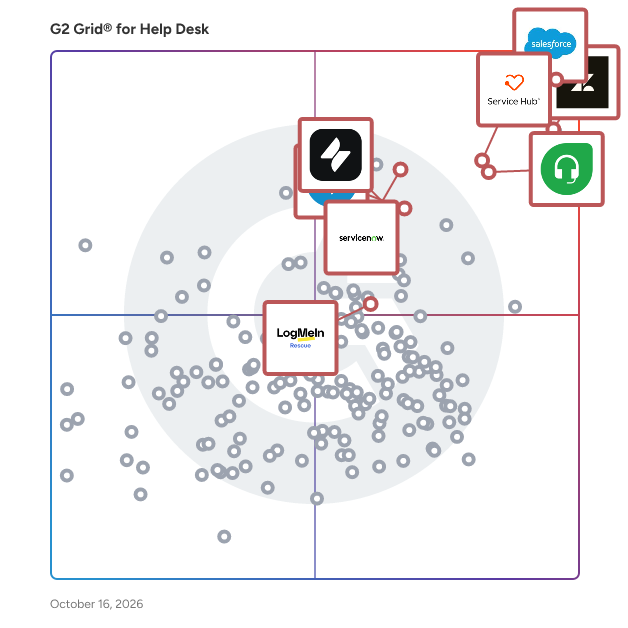
Products classified in the overall Help Desk category are similar in many regards and help companies of all sizes solve their business problems. However, enterprise business features, pricing, setup, and installation differ from businesses of other sizes, which is why we match buyers to the right Enterprise Business Help Desk to fit their needs. Compare product ratings based on reviews from enterprise users or connect with one of G2&#39;s buying advisors to find the right solutions within the Enterprise Business Help Desk category.

In addition to qualifying for inclusion in the Help Desk Software category, to qualify for inclusion in the Enterprise Business Help Desk Software category, a product must have at least 10 reviews left by a reviewer from an enterprise business.


## Top Help Desk Software at a Glance
| # | Product | Rating | Best For | What Users Say |
|---|---------|--------|----------|----------------|
| 1 | [Agentforce Service (formerly Salesforce Service Cloud)](https://www.g2.com/products/agentforce-service-formerly-salesforce-service-cloud/reviews) | 4.4/5.0 (6,967 reviews) | Enterprise case management with AI and CRM context | "[“Daily Use Review of Salesforce Service Cloud in Collections”](https://www.g2.com/survey_responses/agentforce-service-formerly-salesforce-service-cloud-review-12938648)" |
| 2 | [Zendesk for Customer Service](https://www.g2.com/products/zendesk-for-customer-service/reviews) | 4.3/5.0 (6,629 reviews) | Omnichannel customer support and ticket tracking | "[Great Complete CRM](https://www.g2.com/survey_responses/zendesk-for-customer-service-review-4530447)" |
| 3 | [Zoho Desk](https://www.g2.com/products/zoho-desk/reviews) | 4.4/5.0 (7,483 reviews) | Customizable ticketing for growing support teams | "[Powerful, Cost-Effective Help Desk with Excellent Automation and AI Features](https://www.g2.com/survey_responses/zoho-desk-review-13056674)" |
| 4 | [Freshdesk](https://www.g2.com/products/freshdesk/reviews) | 4.4/5.0 (3,674 reviews) | Easy ticket intake and support workflow tracking | "[A support tool that quietly made our response process less chaotic, smooth, flexible, an](https://www.g2.com/survey_responses/freshdesk-review-12879809)" |
| 5 | [HubSpot Service Hub](https://www.g2.com/products/hubspot-service-hub/reviews) | 4.4/5.0 (2,818 reviews) | CRM-connected support tickets and customer history | "[Ticket management and centralized support with automations that enhance the experience](https://www.g2.com/survey_responses/hubspot-service-hub-review-12873336)" |
| 6 | [Fin](https://www.g2.com/products/fin/reviews) | 4.5/5.0 (3,710 reviews) | AI support deflection from help content | "[Finn: Natural Language, Seamless Integrations, Fast Performance &amp; Helpful Support](https://www.g2.com/survey_responses/fin-review-13052905)" |
| 7 | [ServiceNow Customer Service Management](https://www.g2.com/products/servicenow-customer-service-management/reviews) | 4.4/5.0 (416 reviews) | Cross-team case workflows and service visibility | "[Efficient platform for managing customer support workflows](https://www.g2.com/survey_responses/servicenow-customer-service-management-review-12817726)" |
| 8 | [Atera](https://www.g2.com/products/atera/reviews) | 4.6/5.0 (1,185 reviews) | IT help desk with remote monitoring and automation | "[Atera: All-in-One IT Management with Strong Integrations, Automation, and ROI](https://www.g2.com/survey_responses/atera-review-12982693)" |
| 9 | [Freshservice](https://www.g2.com/products/freshservice/reviews) | 4.6/5.0 (1,290 reviews) | — | "[Strong visibility and control, but takes effort to get it right](https://www.g2.com/survey_responses/freshservice-review-12723378)" |
| 10 | [Jira Service Management](https://www.g2.com/products/jira-service-management/reviews) | 4.3/5.0 (961 reviews) | Request portals and IT service workflows | "[Jira Service Management for Efficient Ticket Tracking and Support Workflow](https://www.g2.com/survey_responses/jira-service-management-review-12817846)" |


## How Many Help Desk Software Products Does G2 Track?
**Total Products under this Category:** 507

### Category Stats (Jul 2026)
- **Average Rating**: 4.44/5 The average rating of products in this category, based on all submitted ratings
- **Top Trending Product**: monday service (+1.6%) - Among all products in this category, monday service recorded the largest rating increase compared to last month
*Last updated: July 04, 2026*


## How Does G2 Rank Help Desk Software Products?

**Why You Can Trust G2's Software Rankings:**

- 30 Analysts and Data Experts
- 77,600+ Authentic Reviews
- 507+ Products
- Unbiased Rankings

G2's software rankings are built on verified user reviews, rigorous moderation, and a consistent research methodology maintained by a team of analysts and data experts. Each product is measured using the same transparent criteria, with no paid placement or vendor influence. While reviews reflect real user experiences, which can be subjective, they offer valuable insight into how software performs in the hands of professionals. Together, these inputs power the G2 Score, a standardized way to compare tools within every category.


---

**Sponsored**

### SAP Service Cloud

SAP Service Cloud is an intelligent customer service solution that helps you reimagine customer service and deliver on your brand promise. It enables you to build connected, insightful and adaptive service that increases customer loyalty. Connect channels, people and processes to quickly solve customer issues: activate the entire enterprise to resolve customer issues and increase productivity. Leverage AI-powered insight for speed and efficiency: empower your service teams with a unified agent desktop and rich insights, supported by AI-based automation and recommendations Adapt and thrive in the era of constant change: quickly adapt your customer service when needed with the composable, scalable solution


[Visit website](https://www.g2.com/external_clickthroughs/record?secure%5Bad_program%5D=paid_promo&amp;secure%5Bad_slot%5D=category_product_list&amp;secure%5Bcategory_id%5D=58&amp;secure%5Bchosen_at%5D=2026-07-05T09%3A18%3A56Z&amp;secure%5Bmedium%5D=sponsored&amp;secure%5Bprioritized%5D=false&amp;secure%5Bproduct_id%5D=135229&amp;secure%5Bresource_id%5D=58&amp;secure%5Bresource_type%5D=Category&amp;secure%5Bsource_type%5D=category_page&amp;secure%5Bsource_url%5D=https%3A%2F%2Fwww.g2.com%2Fcategories%2Fhelp-desk%2Fenterprise%3Fpage%3D3&amp;secure%5Btoken%5D=8063ec7158411ad7959b5842993d4af6d0840c38e18273f0f085bcabc38903c2&amp;secure%5Burl%5D=https%3A%2F%2Fwww.sap.com%2Fproducts%2Fcrm%2Fservice-cloud.html&amp;secure%5Burl_type%5D=paid_promos)

---


## Help Desk Software Features & Capabilities

### What are the Best Help Desk Software with Social Integration?
Integration to social networks such as Twitter and Facebook to allow customers and agents to communicate via social networks

**Top-rated Help Desk Software for Social Integration:**
- [Agentforce Service (formerly Salesforce Service Cloud)](https://www.g2.com/products/agentforce-service-formerly-salesforce-service-cloud/reviews)
- [Zendesk for Customer Service](https://www.g2.com/products/zendesk-for-customer-service/reviews)
- [Zoho Desk](https://www.g2.com/products/zoho-desk/reviews)
[Explore Help Desk Software with Social Integration](https://www.g2.com/categories/help-desk/f/social-integration)

### What are the Best Help Desk Software with Ticket Collaboration?
Share and collaborate on tickets with multiple customer service representatives

**Top-rated Help Desk Software for Ticket Collaboration:**
- [Agentforce Service (formerly Salesforce Service Cloud)](https://www.g2.com/products/agentforce-service-formerly-salesforce-service-cloud/reviews)
- [Zendesk for Customer Service](https://www.g2.com/products/zendesk-for-customer-service/reviews)
- [Zoho Desk](https://www.g2.com/products/zoho-desk/reviews)
[Explore Help Desk Software with Ticket Collaboration](https://www.g2.com/categories/help-desk/f/ticket-collaboration)

### What are the Best Help Desk Software with Mobile User Support?
Allows software to be easily used on multiple mobile devices include phone and tablet devices.

**Top-rated Help Desk Software for Mobile User Support:**
- [Agentforce Service (formerly Salesforce Service Cloud)](https://www.g2.com/products/agentforce-service-formerly-salesforce-service-cloud/reviews)
- [Zendesk for Customer Service](https://www.g2.com/products/zendesk-for-customer-service/reviews)
- [Zoho Desk](https://www.g2.com/products/zoho-desk/reviews)
[Explore Help Desk Software with Mobile User Support](https://www.g2.com/categories/help-desk/f/mobile-user-support)

### What are the Best Help Desk Software with Attachments/Screencasts?
Documents and files can be attached to the ticket to communicate with customer issues/resolutions

**Top-rated Help Desk Software for Attachments/Screencasts:**
- [Agentforce Service (formerly Salesforce Service Cloud)](https://www.g2.com/products/agentforce-service-formerly-salesforce-service-cloud/reviews)
- [Zendesk for Customer Service](https://www.g2.com/products/zendesk-for-customer-service/reviews)
- [Zoho Desk](https://www.g2.com/products/zoho-desk/reviews)
[Explore Help Desk Software with Attachments/Screencasts](https://www.g2.com/categories/help-desk/f/attachments-screencasts)

### What are the Best Help Desk Software with Chat/Live Support?
Ability for customer service agents to communicate with customers via live chat to solve problems live

**Top-rated Help Desk Software for Chat/Live Support:**
- [Agentforce Service (formerly Salesforce Service Cloud)](https://www.g2.com/products/agentforce-service-formerly-salesforce-service-cloud/reviews)
- [Zendesk for Customer Service](https://www.g2.com/products/zendesk-for-customer-service/reviews)
- [Zoho Desk](https://www.g2.com/products/zoho-desk/reviews)
[Explore Help Desk Software with Chat/Live Support](https://www.g2.com/categories/help-desk/f/chat-live-support)


## What Are the Top-Rated Help Desk Software Products in 2026?
### 1. [Agentforce Service (formerly Salesforce Service Cloud)](https://www.g2.com/products/agentforce-service-formerly-salesforce-service-cloud/reviews)
Salesforce Service Cloud is the world&#39;s #1 AI CRM for service, where humans with AI agents drive customer success together. Service Cloud enables seamless collaboration between AI agents and humans, for every type of service, on any channel, and across any industry to deliver effortless experiences from first contact to final resolution. With autonomous agents, you can transform low-touch, high-volume interactions into no-touch experiences, seamlessly handing them off to your human agents only when needed for high-touch more complex interactions. AI integrated into the flow of work helps your service teams achieve new levels of productivity, drive better customer satisfaction and to drive growth. All of these capabilities are built on the Salesforce Platform with Agentforce and Data Cloud allowing service organizations around the world to : - Deliver proactive support with data from your products, assets &amp; services - Provide 24/7 cross-channel service &amp; resolve issues fast with AI agents - Boost productivity and accelerate growth with one integrated platform


**Average Rating:** 4.4/5.0
**Total Reviews:** 6,967
**How Do G2 Users Rate Agentforce Service (formerly Salesforce Service Cloud)?**

- **Has the product been a good partner in doing business?:** 8.7/10 (Category avg: 9.0/10)
- **Workflow:** 8.4/10 (Category avg: 8.7/10)
- **Customization :** 8.3/10 (Category avg: 8.4/10)
- **Customer Portal:** 8.4/10 (Category avg: 8.6/10)

**Who Is the Company Behind Agentforce Service (formerly Salesforce Service Cloud)?**

- **Seller:** [Salesforce](https://www.g2.com/sellers/salesforce)
- **Company Website:** https://www.salesforce.com/
- **Year Founded:** 1999
- **HQ Location:** San Francisco, CA
- **Twitter:** @salesforce (579,511 Twitter followers)
- **LinkedIn® Page:** https://www.linkedin.com/company/3185/ (83,223 employees on LinkedIn®)

**Who Uses This Product?**
- **Who Uses This:** Salesforce Administrator, Salesforce Developer
- **Top Industries:** Information Technology and Services, Computer Software
- **Company Size:** 42% Mid-Market, 37% Enterprise


#### What Are Agentforce Service (formerly Salesforce Service Cloud)'s Pros and Cons?

**Pros:**

- Ease of Use (1705 reviews)
- Features (1497 reviews)
- Case Management (1479 reviews)
- Efficiency (1297 reviews)
- Integrations (678 reviews)

**Cons:**

- Complexity (912 reviews)
- Learning Curve (787 reviews)
- Expensive (585 reviews)
- Missing Features (584 reviews)
- Limited Customization (501 reviews)


### What Do G2 Reviewers Say About Agentforce Service (formerly Salesforce Service Cloud)?
*AI-generated summary from verified user reviews*

**Pros:**

- Users appreciate the **ease of use** of Agentforce Service, which simplifies configuration and management processes effectively.
- Users appreciate the **centralized management of customer support** interactions, enhancing efficiency and satisfaction through AI-driven automation.
- Users appreciate the **efficient case management** feature, enabling quick access to comprehensive information for superior customer service.
- Users appreciate the **efficiency** of Agentforce Service, as it boosts productivity and streamlines case management in one portal.
- Users value the **seamless SFDC integration** , enhancing customer service efficiency and providing instant access to crucial data.

**Cons:**

- Users find the **system complexity** challenging, struggling with configuration and integration across various platforms and data sources.
- Users find the **steep learning curve** of Agentforce Service challenging, often needing expert assistance for effective use.
- Users find the **cost of Agentforce Service** to be a significant barrier, especially with escalating prices for additional features.
- Users find **missing features** like clunky macros and inadequate AI functionality hinder their overall experience with Agentforce Service.
- Users find **limited customization** options challenging, often requiring advanced knowledge or expert assistance for effective implementation.

#### What Are Recent G2 Reviews of Agentforce Service (formerly Salesforce Service Cloud)?

**"[The Evolution of Service: Bridging the Gap Between Data and Action.](https://www.g2.com/survey_responses/agentforce-service-formerly-salesforce-service-cloud-review-12796220)"**

**Rating:** 4.0/5.0 stars
*— Naampreet K.*

[Read full review](https://www.g2.com/survey_responses/agentforce-service-formerly-salesforce-service-cloud-review-12796220)

---

**"[“Daily Use Review of Salesforce Service Cloud in Collections”](https://www.g2.com/survey_responses/agentforce-service-formerly-salesforce-service-cloud-review-12938648)"**

**Rating:** 5.0/5.0 stars
*— Arnold D.*

[Read full review](https://www.g2.com/survey_responses/agentforce-service-formerly-salesforce-service-cloud-review-12938648)

---


#### What Are G2 Users Discussing About Agentforce Service (formerly Salesforce Service Cloud)?

- [How does Salesforce Service Cloud contribute to creating a more responsive and efficient customer service experience?](https://www.g2.com/discussions/how-does-salesforce-service-cloud-contribute-to-creating-a-more-responsive-and-efficient-customer-service-experience) - 3 comments, 1 upvote
- [How is Salesforce Service Cloud being used to enhance operational efficiency and user experience in its specific field?](https://www.g2.com/discussions/how-is-salesforce-service-cloud-being-used-to-enhance-operational-efficiency-and-user-experience-in-its-specific-field) - 4 comments
- [What does customer self service require?](https://www.g2.com/discussions/what-does-customer-self-service-require)
- [What is Salesforce customer community?](https://www.g2.com/discussions/what-is-salesforce-customer-community) - 2 comments
- [What is feedback management system?](https://www.g2.com/discussions/what-is-feedback-management-system)

### 2. [Zendesk for Customer Service](https://www.g2.com/products/zendesk-for-customer-service/reviews)
&quot;Zendesk for Customer Service is an AI-powered service solution that’s easy to set up, use, and scale. It offers out-of-the-box functionality that’s simple to modify, helping businesses move faster. Leveraging AI built on billions of CX interactions, Zendesk enhances the entire service experience—from self-service to agents and admins—improving efficiency at scale. Zendesk equips agents with tools, insights, and context to deliver personalized service across all channels, including social messaging, phone, and email. It unifies personalized conversations, omnichannel case management, AI workflows, automation, and a Marketplace of 1800+ apps under one platform. Zendesk QA uses AI to evaluate and improve agent performance, while Workforce Management optimizes scheduling and productivity to ensure readiness during peak times. The solution is easy to implement and adjust without needing IT or developers. Zendesk’s mission is to simplify business complexity and enable meaningful customer connections for companies of all sizes. Serving 130K+ global brands in 30+ languages, Zendesk is headquartered in San Francisco with offices worldwide.&quot;


**Average Rating:** 4.3/5.0
**Total Reviews:** 6,629
**How Do G2 Users Rate Zendesk for Customer Service?**

- **Has the product been a good partner in doing business?:** 8.4/10 (Category avg: 9.0/10)
- **Workflow:** 8.5/10 (Category avg: 8.7/10)
- **Customization :** 8.0/10 (Category avg: 8.4/10)
- **Customer Portal:** 8.5/10 (Category avg: 8.6/10)

**Who Is the Company Behind Zendesk for Customer Service?**

- **Seller:** [Zendesk](https://www.g2.com/sellers/zendesk)
- **Company Website:** https://www.zendesk.com
- **Year Founded:** 2007
- **HQ Location:** San Francisco, CA
- **Twitter:** @Zendesk (102,672 Twitter followers)
- **LinkedIn® Page:** https://www.linkedin.com/company/418095/ (7,302 employees on LinkedIn®)

**Who Uses This Product?**
- **Who Uses This:** Customer Success Manager, Customer Service Manager
- **Top Industries:** Computer Software, Information Technology and Services
- **Company Size:** 45% Mid-Market, 40% Small-Business


#### What Are Zendesk for Customer Service's Pros and Cons?

**Pros:**

- Ease of Use (526 reviews)
- Features (395 reviews)
- Customer Support (286 reviews)
- Helpful (274 reviews)
- Ticket Management (252 reviews)

**Cons:**

- Missing Features (216 reviews)
- Limited Features (180 reviews)
- Learning Curve (179 reviews)
- Limited Customization (158 reviews)
- Complexity (137 reviews)


### What Do G2 Reviewers Say About Zendesk for Customer Service?
*AI-generated summary from verified user reviews*

**Pros:**

- Users appreciate the **ease of use** in Zendesk, noting its seamless integration and efficient workflow enhancements.
- Users value the **centralized communication and automation features** of Zendesk, enhancing response times and operational efficiency.
- Users value the **fast and organized customer support** provided by Zendesk, enhancing efficiency and response times.
- Users appreciate the **ease of use** of Zendesk, finding navigation and email communication convenient and efficient.
- Users value the **efficient ticket management** in Zendesk, enhancing collaboration and tracking customer queries seamlessly.

**Cons:**

- Users find the **missing features** in Zendesk limiting, impacting usability and customization options considerably.
- Users find **limited features** in Zendesk, particularly with ZD Sell, impacting ease of use and customization.
- Users find the **steep learning curve** of Zendesk&#39;s advanced features can be challenging for those lacking technical expertise.
- Users find **limited customization** options frustrating, as it requires considerable time and understanding to optimize Zendesk.
- Users find Zendesk&#39;s **complexity and learning curve** challenging, especially for first-time users navigating advanced features.

#### What Are Recent G2 Reviews of Zendesk for Customer Service?

**"[Great Complete CRM](https://www.g2.com/survey_responses/zendesk-for-customer-service-review-4530447)"**

**Rating:** 4.5/5.0 stars
*— Lisa M.*

[Read full review](https://www.g2.com/survey_responses/zendesk-for-customer-service-review-4530447)

---

**"[Organized, Efficient Customer Support with Powerful Automation in Zendesk](https://www.g2.com/survey_responses/zendesk-for-customer-service-review-12919644)"**

**Rating:** 5.0/5.0 stars
*— David A.*

[Read full review](https://www.g2.com/survey_responses/zendesk-for-customer-service-review-12919644)

---


#### What Are G2 Users Discussing About Zendesk for Customer Service?

- [How is Zendesk Support Suite transforming the customer service experience in various industries?](https://www.g2.com/discussions/how-is-zendesk-support-suite-transforming-the-customer-service-experience-in-various-industries) - 6 comments, 4 upvotes
- [What is Zendesk Support Suite used for?](https://www.g2.com/discussions/what-is-zendesk-support-suite-used-for) - 3 comments, 2 upvotes
- [Is there a free version of Zendesk?](https://www.g2.com/discussions/is-there-a-free-version-of-zendesk) - 7 comments, 1 upvote
- [Is zendesk any good?](https://www.g2.com/discussions/is-zendesk-any-good) - 8 comments, 1 upvote
- [What can you do with Zendesk?](https://www.g2.com/discussions/what-can-you-do-with-zendesk) - 3 comments, 3 upvotes

### 3. [Freshdesk](https://www.g2.com/products/freshdesk/reviews)
Freshdesk (a product of Freshworks Inc.) is a modern, AI-powered customer service solution with enterprise capability without the enterprise complexity. Freshdesk unifies channels, conversations, AI capabilities, customer insights, and advanced ticketing into one place in the Freshdesk Command Center so agents are ready to resolve. With Freddy, People-first AI, customer service teams can take AI agents live in minutes to fully resolve complex and simple queries, get response and resolution assistance from AI copilot, and stay ahead with AI insights. Freshdesk also comes packed with advanced workflows, automations, and self service so you can easily set up and scale customer service on any channel–whether you’re a support team of 10 or 500. Freshdesk is quick to set up, easy to use, and designed for rapid impact - it delivers 225% ROI, 95% omnichannel first contact resolution rate, and up to 80% resolutions with AI agents.


**Average Rating:** 4.4/5.0
**Total Reviews:** 3,674
**How Do G2 Users Rate Freshdesk?**

- **Has the product been a good partner in doing business?:** 8.8/10 (Category avg: 9.0/10)
- **Workflow:** 8.5/10 (Category avg: 8.7/10)
- **Customization :** 8.1/10 (Category avg: 8.4/10)
- **Customer Portal:** 8.6/10 (Category avg: 8.6/10)

**Who Is the Company Behind Freshdesk?**

- **Seller:** [Freshworks](https://www.g2.com/sellers/freshworks)
- **Company Website:** https://www.freshworks.com/
- **Year Founded:** 2010
- **HQ Location:** San Mateo, CA
- **Twitter:** @FreshworksInc (19,020 Twitter followers)
- **LinkedIn® Page:** https://www.linkedin.com/company/freshworks-inc/ (7,505 employees on LinkedIn®)

**Who Uses This Product?**
- **Who Uses This:** Manager, Owner
- **Top Industries:** Information Technology and Services, Computer Software
- **Company Size:** 48% Small-Business, 40% Mid-Market


#### What Are Freshdesk's Pros and Cons?

**Pros:**

- Ease of Use (352 reviews)
- Features (237 reviews)
- Automation (179 reviews)
- Ticket Management (170 reviews)
- Helpful (163 reviews)

**Cons:**

- Ticketing Issues (93 reviews)
- Ticket Management (93 reviews)
- Limitations (83 reviews)
- Limited Customization (80 reviews)
- Slow Loading (80 reviews)


### What Do G2 Reviewers Say About Freshdesk?
*AI-generated summary from verified user reviews*

**Pros:**

- Users appreciate the **ease of use** of Freshdesk, allowing quick adaptation and efficient management of tickets.
- Users appreciate the **ease of use** of Freshdesk, allowing for quick ticket management and smooth implementation.
- Users appreciate the **automation features** of Freshdesk, enhancing efficiency and significantly reducing manual workload.
- Users appreciate the **effective ticket organization** in Freshdesk, enabling better tracking and timely responses.
- Users find **Freshdesk&#39;s ticketing system user-friendly and efficient** , significantly improving productivity and response times.

**Cons:**

- Users report frequent **ticketing issues** such as duplicate tickets and slow loading times during high volume periods.
- Users experience **duplicate ticket creation** and slow loading during high volume, impacting resolution times negatively.
- Users find **advanced features limited** to higher pricing plans, which can restrict smaller team&#39;s capabilities and customization options.
- Users find **limited customization** options in Freshdesk, restricting flexibility and complicating ticket management for smaller teams.
- Users experience **slow loading times** with Freshdesk, especially during high ticket volumes, affecting resolution efficiency.

#### What Are Recent G2 Reviews of Freshdesk?

**"[A support tool that quietly made our response process less chaotic, smooth, flexible, an](https://www.g2.com/survey_responses/freshdesk-review-12879809)"**

**Rating:** 4.0/5.0 stars
*— Neelakshi S.*

[Read full review](https://www.g2.com/survey_responses/freshdesk-review-12879809)

---

**"[Simple, Powerful, and Effective Helpdesk Software](https://www.g2.com/survey_responses/freshdesk-review-12954417)"**

**Rating:** 4.5/5.0 stars
*— Aditya S.*

[Read full review](https://www.g2.com/survey_responses/freshdesk-review-12954417)

---


#### What Are G2 Users Discussing About Freshdesk?

- [What innovative customer service strategies are companies implementing using Freshdesk?](https://www.g2.com/discussions/what-innovative-customer-service-strategies-are-companies-implementing-using-freshdesk) - 1 comment
- [How is Freshdesk being used to enhance operational efficiency and user experience in its specific field?](https://www.g2.com/discussions/how-is-freshdesk-being-used-to-enhance-operational-efficiency-and-user-experience-in-its-specific-field) - 1 comment
- [What is Freshdesk used for?](https://www.g2.com/discussions/what-is-freshdesk-used-for) - 4 comments, 1 upvote
- [What is the difference between freshdesk and Freshservice?](https://www.g2.com/discussions/what-is-the-difference-between-freshdesk-and-freshservice) - 2 comments
- [Is freshdesk a CRM?](https://www.g2.com/discussions/is-freshdesk-a-crm) - 3 comments

### 4. [ServiceNow Customer Service Management](https://www.g2.com/products/servicenow-customer-service-management/reviews)
ServiceNow&#39;s Customer Service Management (CSM) transforms customer service experiences with AI-powered workflows and AI agents that help you accelerate customer self-service, boost agent productivity, and speed up resolution time. With CSM, your organization can: - Deflect calls and increase satisfaction by enabling customers to self-serve answers and actions via an AI-powered conversational chat. - Increase capacity to handle more cases, extend business hours, and manage routine tasks with AI agents. - Save agents time with AI-generated case histories, case summaries, and suggested resolutions. - Integrate with top CCaaS solutions to unify routing, centralize call and work management, and boost agent efficiency on one AI-powered workspace. - Resolve issues quickly and consistently by automating tasks, uncovering bottlenecks, and improving processes. - Get up and running quickly and maintain a low TCO with continuous innovation in one extensible AI platform. Harness the power of AI, data and workflows to delight customers and deliver on what they want quickly, drive unprecedented agent productivity, and foster a whole new level of customer loyalty.


**Average Rating:** 4.4/5.0
**Total Reviews:** 416
**How Do G2 Users Rate ServiceNow Customer Service Management?**

- **Has the product been a good partner in doing business?:** 8.5/10 (Category avg: 9.0/10)
- **Workflow:** 8.7/10 (Category avg: 8.7/10)
- **Customization :** 8.3/10 (Category avg: 8.4/10)
- **Customer Portal:** 8.6/10 (Category avg: 8.6/10)

**Who Is the Company Behind ServiceNow Customer Service Management?**

- **Seller:** [ServiceNow](https://www.g2.com/sellers/servicenow)
- **Company Website:** https://www.servicenow.com/
- **Year Founded:** 2004
- **HQ Location:** Santa Clara, CA
- **Twitter:** @servicenow (55,548 Twitter followers)
- **LinkedIn® Page:** https://www.linkedin.com/company/29352/ (35,081 employees on LinkedIn®)

**Who Uses This Product?**
- **Top Industries:** Information Technology and Services, Telecommunications
- **Company Size:** 45% Enterprise, 28% Mid-Market


#### What Are ServiceNow Customer Service Management's Pros and Cons?

**Pros:**

- Ease of Use (34 reviews)
- Features (26 reviews)
- Efficiency (21 reviews)
- Case Management (20 reviews)
- Automation (18 reviews)

**Cons:**

- Learning Curve (18 reviews)
- Steep Learning Curve (15 reviews)
- Limited Customization (13 reviews)
- Complexity (12 reviews)
- Improvements Needed (9 reviews)


### What Do G2 Reviewers Say About ServiceNow Customer Service Management?
*AI-generated summary from verified user reviews*

**Pros:**

- Users appreciate the **ease of use** of ServiceNow, praising its intuitive UI and efficient ticket management.
- Users benefit from the **seamless functionality** of ServiceNow CSM, enhancing customer lifecycle management and workflow automation.
- Users appreciate the **efficiency** of ServiceNow CSM, streamlining interactions and speeding up issue resolutions with automation.
- Users appreciate the **smooth workflow and flexibility** of ServiceNow&#39;s case management features, enhancing efficiency and agent support.
- Users value the **automation capabilities** of ServiceNow CSM, enhancing efficiency and speeding up issue resolution significantly.

**Cons:**

- Users find the **learning curve complicated** , making it challenging to navigate the onboarding and integration processes effectively.
- Users find the **steep learning curve** of ServiceNow Customer Service Management challenging, necessitating skilled personnel and robust training.
- Users find the **limited customization options** challenging, impacting functionality and overall project tracking efficiency.
- Users find the **complexity** of ServiceNow CSM&#39;s setup daunting, requiring extensive planning and practice to navigate effectively.
- Users request **interface improvements** for better branding and flexibility, along with AI search and setup simplification.

#### What Are Recent G2 Reviews of ServiceNow Customer Service Management?

**"[Efficient platform for managing customer support workflows](https://www.g2.com/survey_responses/servicenow-customer-service-management-review-12817726)"**

**Rating:** 4.5/5.0 stars
*— Dharamveer p.*

[Read full review](https://www.g2.com/survey_responses/servicenow-customer-service-management-review-12817726)

---

**"[Facilitate Problem Management with Detailed Ticketing](https://www.g2.com/survey_responses/servicenow-customer-service-management-review-13023317)"**

**Rating:** 5.0/5.0 stars
*— David C.*

[Read full review](https://www.g2.com/survey_responses/servicenow-customer-service-management-review-13023317)

---


#### What Are G2 Users Discussing About ServiceNow Customer Service Management?

- [What is ServiceNow Customer Service Management used for?](https://www.g2.com/discussions/what-is-servicenow-customer-service-management-used-for) - 1 comment
- [What does ServiceNow Customer Service Management do?](https://www.g2.com/discussions/what-does-servicenow-customer-service-management-do)
- [What is ServiceNow service management?](https://www.g2.com/discussions/what-is-servicenow-service-management) - 1 comment
- [Is service now a CRM tool?](https://www.g2.com/discussions/is-service-now-a-crm-tool) - 2 comments
- [What is ServiceNow customer service management?](https://www.g2.com/discussions/what-is-servicenow-customer-service-management) - 1 comment

### 5. [Freshservice](https://www.g2.com/products/freshservice/reviews)
Freshservice by Freshworks is an AI-powered ServiceOps platform built for modern enterprises that need to move fast without sacrificing control. By unifying ITSM, ITOM, IT asset management, and enterprise service management on a single platform with a shared data layer, Freshservice eliminates the tool sprawl and visibility gaps that slow teams down - creating one source of truth across services, assets, and infrastructure. IT teams get full visibility into their environment: automated discovery, a robust CMDB for impact analysis and root cause resolution, and streamlined incident, problem, change, and major incident management. Beyond IT, Freshservice extends seamlessly to HR, finance, and facilities - giving every business team the same consistent, efficient service experience without the complexity of separate tools. Freshservice comes with a natively embedded AI layer called Freddy AI, that helps agents resolve issues faster, automates employee service requests, and gives leaders the insights they need to make better decisions. The result isn&#39;t just faster service; it&#39;s a fundamentally more proactive operation that surfaces and resolves issues before they impact employees.


**Average Rating:** 4.6/5.0
**Total Reviews:** 1,290
**How Do G2 Users Rate Freshservice?**

- **Has the product been a good partner in doing business?:** 9.1/10 (Category avg: 9.0/10)
- **Workflow:** 9.2/10 (Category avg: 8.7/10)
- **Customization :** 9.2/10 (Category avg: 8.4/10)
- **Customer Portal:** 9.2/10 (Category avg: 8.6/10)

**Who Is the Company Behind Freshservice?**

- **Seller:** [Freshworks](https://www.g2.com/sellers/freshworks)
- **Company Website:** https://www.freshworks.com/
- **Year Founded:** 2010
- **HQ Location:** San Mateo, CA
- **Twitter:** @FreshworksInc (19,020 Twitter followers)
- **LinkedIn® Page:** https://www.linkedin.com/company/freshworks-inc/ (7,505 employees on LinkedIn®)

**Who Uses This Product?**
- **Who Uses This:** IT Manager, IT Director
- **Top Industries:** Information Technology and Services, Computer Software
- **Company Size:** 61% Mid-Market, 21% Enterprise


#### What Are Freshservice's Pros and Cons?

**Pros:**

- Ease of Use (229 reviews)
- Features (116 reviews)
- Automation (101 reviews)
- Ticketing System (101 reviews)
- Ticket Management (92 reviews)

**Cons:**

- Missing Features (83 reviews)
- Limited Features (56 reviews)
- Limited Customization (47 reviews)
- Learning Curve (45 reviews)
- Ticketing Issues (44 reviews)


### What Do G2 Reviewers Say About Freshservice?
*AI-generated summary from verified user reviews*

**Pros:**

- Users appreciate the **ease of use** of Freshservice, finding it intuitive and user-friendly for managing tickets.
- Users love the **user-friendly interface** and extensive features of Freshservice that simplify task management and automation.
- Users love the **automation capabilities** of Freshservice, enhancing efficiency in managing tasks and workflows seamlessly.
- Users value the **ease of use** in Freshservice&#39;s ticketing system, streamlining requests and improving team efficiency significantly.
- Users appreciate the **ease of use** in Freshservice, streamlining ticket submissions and improving team efficiency significantly.

**Cons:**

- Users are frustrated by **missing features** and the high costs of additional licenses for limited usage.
- Users face **limited features** in Freshservice, lacking essential functionality that impacts usability compared to competitors like Zendesk.
- Users express frustration with **limited customization** options, making it difficult to achieve desired branding and functionality.
- Users find the **steep learning curve** challenging due to a lack of tutorials and complex customization options.
- Users report **ticketing issues** with Freshservice, including limitations and missing features compared to competitors like Zendesk.

#### What Are Recent G2 Reviews of Freshservice?

**"[Strong visibility and control, but takes effort to get it right](https://www.g2.com/survey_responses/freshservice-review-12723378)"**

**Rating:** 4.5/5.0 stars
*— Brooks A.*

[Read full review](https://www.g2.com/survey_responses/freshservice-review-12723378)

---

**"[Powerful Ticketing, SLAs, Automations, and Analytics That Boost Agent Organization](https://www.g2.com/survey_responses/freshservice-review-12805161)"**

**Rating:** 4.0/5.0 stars
*— Davi A.*

[Read full review](https://www.g2.com/survey_responses/freshservice-review-12805161)

---


#### What Are G2 Users Discussing About Freshservice?

- [What is Freshservice used for?](https://www.g2.com/discussions/what-is-freshservice-used-for) - 3 comments, 1 upvote

### 6. [Jira Service Management](https://www.g2.com/products/jira-service-management/reviews)
Jira Service Management is an IT Service Management (ITSM) solution. Built on the Atlassian platform, Jira Service Management enables teams to deliver and manage services for internal and external stakeholders. Teams from Development to IT to HR use Jira Service Management to intake requests from employees, respond to incidents, deploy changes to improve products or services, track assets, surface knowledge, and automate workflows.


**Average Rating:** 4.3/5.0
**Total Reviews:** 961
**How Do G2 Users Rate Jira Service Management?**

- **Has the product been a good partner in doing business?:** 8.7/10 (Category avg: 9.0/10)
- **Workflow:** 8.9/10 (Category avg: 8.7/10)
- **Customization :** 8.4/10 (Category avg: 8.4/10)
- **Customer Portal:** 8.9/10 (Category avg: 8.6/10)

**Who Is the Company Behind Jira Service Management?**

- **Seller:** [Atlassian](https://www.g2.com/sellers/atlassian)
- **Company Website:** https://www.atlassian.com/
- **Year Founded:** 2002
- **HQ Location:** Sydney and San Francisco
- **Twitter:** @Atlassian (106,496 Twitter followers)
- **LinkedIn® Page:** https://www.linkedin.com/company/atlassian (21,081 employees on LinkedIn®)

**Who Uses This Product?**
- **Who Uses This:** Software Engineer, Senior Software Engineer
- **Top Industries:** Information Technology and Services, Computer Software
- **Company Size:** 42% Mid-Market, 38% Enterprise


#### What Are Jira Service Management's Pros and Cons?

**Pros:**

- Ease of Use (49 reviews)
- Integrations (33 reviews)
- Automation (32 reviews)
- Ticket Management (31 reviews)
- Features (29 reviews)

**Cons:**

- Learning Curve (35 reviews)
- Complexity (29 reviews)
- Steep Learning Curve (29 reviews)
- Complex Setup (22 reviews)
- Complex UI (16 reviews)


### What Do G2 Reviewers Say About Jira Service Management?
*AI-generated summary from verified user reviews*

**Pros:**

- Users find Jira Service Management to be **extremely user-friendly** , enhancing daily processes and overall service efficiency.
- Users value the **seamless integration** with Jira and development tools, enhancing efficiency in their IT support processes.
- Users value the **customizable workflows and automation** in Jira Service Management, enhancing efficiency in IT support processes.
- Users value the **efficient ticket management** in Jira Service Management, enhancing accountability and streamlining workflows for teams.
- Users love the **customizable workflows and automation** , enhancing efficiency and adaptability in managing service requests.

**Cons:**

- Users find the **learning curve steep** , requiring significant time and training to navigate Jira Service Management effectively.
- Users find the **complexity of setup and configuration** can overwhelm new users and smaller teams without support.
- Users note the **steep learning curve** of Jira Service Management, making onboarding difficult for new or non-technical users.
- Users find the **complex setup** of Jira Service Management challenging, especially for new or non-technical teams.
- Users often find the **complex UI** of Jira Service Management overwhelming, complicating onboarding and overall usability.

#### What Are Recent G2 Reviews of Jira Service Management?

**"[JIRA review on panel](https://www.g2.com/survey_responses/jira-service-management-review-11356967)"**

**Rating:** 4.5/5.0 stars
*— Gaurav S.*

[Read full review](https://www.g2.com/survey_responses/jira-service-management-review-11356967)

---

**"[Jira Service Management for Efficient Ticket Tracking and Support Workflow](https://www.g2.com/survey_responses/jira-service-management-review-12817846)"**

**Rating:** 5.0/5.0 stars
*— Priyanka B.*

[Read full review](https://www.g2.com/survey_responses/jira-service-management-review-12817846)

---


#### What Are G2 Users Discussing About Jira Service Management?

- [What is Jira Service Management used for?](https://www.g2.com/discussions/what-is-jira-service-management-used-for) - 2 comments, 1 upvote
- [What does Jira Service Desk do?](https://www.g2.com/discussions/what-does-jira-service-desk-do) - 1 comment
- [Does Jira Service Desk include JIRA software?](https://www.g2.com/discussions/does-jira-service-desk-include-jira-software)
- [What are the features of JIRA?](https://www.g2.com/discussions/jira-service-management-what-are-the-features-of-jira) - 1 comment
- [Is Jira a service management tool?](https://www.g2.com/discussions/is-jira-a-service-management-tool) - 2 comments

### 7. [SAP Service Cloud](https://www.g2.com/products/sap-service-cloud/reviews)
SAP Service Cloud is an intelligent customer service solution that helps you reimagine customer service and deliver on your brand promise. It enables you to build connected, insightful and adaptive service that increases customer loyalty. Connect channels, people and processes to quickly solve customer issues: activate the entire enterprise to resolve customer issues and increase productivity. Leverage AI-powered insight for speed and efficiency: empower your service teams with a unified agent desktop and rich insights, supported by AI-based automation and recommendations Adapt and thrive in the era of constant change: quickly adapt your customer service when needed with the composable, scalable solution


**Average Rating:** 4.4/5.0
**Total Reviews:** 248
**How Do G2 Users Rate SAP Service Cloud?**

- **Has the product been a good partner in doing business?:** 8.8/10 (Category avg: 9.0/10)
- **Workflow:** 8.7/10 (Category avg: 8.7/10)
- **Customization :** 8.2/10 (Category avg: 8.4/10)
- **Customer Portal:** 9.0/10 (Category avg: 8.6/10)

**Who Is the Company Behind SAP Service Cloud?**

- **Seller:** [SAP](https://www.g2.com/sellers/sap)
- **Company Website:** https://www.sap.com/
- **Year Founded:** 1972
- **HQ Location:** Walldorf
- **Twitter:** @SAP (297,052 Twitter followers)
- **LinkedIn® Page:** https://www.linkedin.com/company/sap/ (141,955 employees on LinkedIn®)

**Who Uses This Product?**
- **Who Uses This:** Software Engineer, Consultant
- **Top Industries:** Information Technology and Services, Computer Software
- **Company Size:** 39% Mid-Market, 34% Enterprise


#### What Are SAP Service Cloud's Pros and Cons?

**Pros:**

- Customer Support (37 reviews)
- User Interface (30 reviews)
- Simple (26 reviews)
- Ease of Use (25 reviews)
- Features (22 reviews)

**Cons:**

- Complexity (41 reviews)
- Slow Performance (22 reviews)
- Learning Curve (21 reviews)
- Steep Learning Curve (18 reviews)
- Interface Issues (15 reviews)


### What Do G2 Reviewers Say About SAP Service Cloud?
*AI-generated summary from verified user reviews*

**Pros:**

- Users value the **exceptional customer support** from SAP Service Cloud, enhancing productivity and ensuring seamless operations.
- Users enjoy the **ease of use** of SAP Service Cloud, finding it simplifies customer interactions and boosts efficiency.
- Users value the **robust customization tools** and features in SAP Service Cloud that enhance efficiency and service quality.
- Users value the **efficiency** of SAP Service Cloud, enjoying streamlined operations and improved response times across all channels.
- Users value the **centralized visibility** SAP Service Cloud offers, enhancing customer service operations and support efficiency.

**Cons:**

- Users find the **complexity of the interface** overwhelming, hindering navigation and requiring extensive training for effective use.
- Users find the **steep learning curve** of SAP Service Cloud challenging, complicating configuration and customization efforts.
- Users find SAP Service Cloud&#39;s **steep learning curve** overwhelming, with complex configurations and the need for extensive understanding.
- Users find the **interface issues** of SAP Service Cloud to be challenging, especially for newcomers navigating its complexity.
- Users find the **complex interface** of SAP Service Cloud challenging, making navigation difficult for newcomers and complicating usage.

#### What Are Recent G2 Reviews of SAP Service Cloud?

**"[Comprehensive Integration and Insights, Minor UI Hurdles](https://www.g2.com/survey_responses/sap-service-cloud-review-11765561)"**

**Rating:** 5.0/5.0 stars
*— Carl N.*

[Read full review](https://www.g2.com/survey_responses/sap-service-cloud-review-11765561)

---

**"[Modern UI and SAP Integration Impress](https://www.g2.com/survey_responses/sap-service-cloud-review-12250759)"**

**Rating:** 4.5/5.0 stars
*— Dragan B.*

[Read full review](https://www.g2.com/survey_responses/sap-service-cloud-review-12250759)

---


#### What Are G2 Users Discussing About SAP Service Cloud?

- [What is SAP Service Cloud used for?](https://www.g2.com/discussions/what-is-sap-service-cloud-used-for)

### 8. [Zoho Desk](https://www.g2.com/products/zoho-desk/reviews)
Zoho Desk is a web-based help desk software solution designed to assist organizations in providing exceptional customer support experiences. This platform serves as a centralized hub for managing customer interactions across multiple channels, allowing businesses to streamline their support processes and enhance overall customer satisfaction. By focusing on the needs of both customers and support agents, Zoho Desk aims to create a more efficient and effective help desk environment. Targeted primarily at businesses of all sizes, Zoho Desk caters to customer support teams looking to improve their service delivery and operational efficiency. The software is particularly beneficial for organizations that require a robust system to manage inquiries from various communication channels, including email, chat, social media, and phone. With its comprehensive feature set, Zoho Desk is well-suited for industries such as retail, technology, healthcare, and finance, where customer engagement and support are critical to success. One of the standout features of Zoho Desk is its omnichannel support capability, which allows businesses to engage with customers seamlessly across different platforms. This ensures that customers receive consistent and timely responses, regardless of how they choose to reach out. Additionally, the platform enhances agent productivity through automation tools that handle repetitive tasks, enabling support teams to focus on more complex customer issues. The integration of AI capabilities further empowers agents by providing them with insights and suggestions based on historical data and customer interactions. Zoho Desk also offers extensive customization options, allowing organizations to tailor the help desk experience to their specific needs. Users can create custom workflows, set up automated responses, and design personalized dashboards to monitor performance metrics. This level of customization ensures that businesses can adapt the software to fit their unique operational requirements, ultimately leading to improved service delivery and customer satisfaction. Furthermore, Zoho Desk provides real-time performance insights, enabling support managers to track key metrics and make data-driven decisions. The ability to analyze customer interactions and agent performance helps organizations identify areas for improvement and optimize their support strategies. With its cost-effective pricing model, Zoho Desk stands out as a practical solution for businesses seeking to enhance their customer support capabilities without incurring excessive expenses.


**Average Rating:** 4.4/5.0
**Total Reviews:** 7,483
**How Do G2 Users Rate Zoho Desk?**

- **Has the product been a good partner in doing business?:** 8.4/10 (Category avg: 9.0/10)
- **Workflow:** 8.4/10 (Category avg: 8.7/10)
- **Customization :** 8.2/10 (Category avg: 8.4/10)
- **Customer Portal:** 8.3/10 (Category avg: 8.6/10)

**Who Is the Company Behind Zoho Desk?**

- **Seller:** [Zoho](https://www.g2.com/sellers/zoho-b00ca9d5-bca8-41b5-a8ad-275480841704)
- **Company Website:** https://www.zoho.com
- **Year Founded:** 1996
- **HQ Location:** Austin, TX
- **Twitter:** @Zoho (137,880 Twitter followers)
- **LinkedIn® Page:** https://www.linkedin.com/company/38373/ (30,766 employees on LinkedIn®)

**Who Uses This Product?**
- **Who Uses This:** CEO, Director
- **Top Industries:** Information Technology and Services, Computer Software
- **Company Size:** 73% Small-Business, 23% Mid-Market


#### What Are Zoho Desk's Pros and Cons?

**Pros:**

- Ease of Use (622 reviews)
- Features (462 reviews)
- Ticket Management (337 reviews)
- Integrations (317 reviews)
- Intuitive (312 reviews)

**Cons:**

- Learning Curve (297 reviews)
- Steep Learning Curve (211 reviews)
- Limited Customization (183 reviews)
- Complexity (166 reviews)
- Not Intuitive (159 reviews)


### What Do G2 Reviewers Say About Zoho Desk?
*AI-generated summary from verified user reviews*

**Pros:**

- Users appreciate the **ease of use** of Zoho Desk, noting its simple setup and robust functionality.
- Users appreciate the **intuitive interface and customization** of Zoho Desk, enhancing team efficiency and collaboration.
- Users highly value the **efficient ticket management** in Zoho Desk, facilitating streamlined operations and effective communication.
- Users value the **seamless integrations** of Zoho Desk, enhancing collaboration and communication across multiple platforms.
- Users love the **intuitive interface** of Zoho Desk, which simplifies ticket management and enhances customer support efficiency.

**Cons:**

- Users find the **learning curve steep** , as the interface can be overwhelming and setup confusing for newcomers.
- Users note a **steep learning curve** with Zoho Desk, finding the interface and setup initially confusing and overwhelming.
- Users find **limited customization** options sometimes confusing, affecting the overall usability and experience with Zoho Desk.
- Users find the **complexity of the UI and reporting** to be cumbersome, hindering workflow and efficiency.
- Users find the **interface not intuitive** , feeling overwhelmed by complexity and hidden elements in Zoho Desk.

#### What Are Recent G2 Reviews of Zoho Desk?

**"[Powerful, Cost-Effective Help Desk with Excellent Automation and AI Features](https://www.g2.com/survey_responses/zoho-desk-review-13056674)"**

**Rating:** 4.5/5.0 stars
*— Tiago Q.*

[Read full review](https://www.g2.com/survey_responses/zoho-desk-review-13056674)

---

**"[Organized, User-Friendly Ticketing That Makes Support Fast and Efficient](https://www.g2.com/survey_responses/zoho-desk-review-12861349)"**

**Rating:** 5.0/5.0 stars
*— Javier C.*

[Read full review](https://www.g2.com/survey_responses/zoho-desk-review-12861349)

---


#### What Are G2 Users Discussing About Zoho Desk?

- [How is Zoho Desk enhancing customer service management in diverse business sectors?](https://www.g2.com/discussions/how-is-zoho-desk-enhancing-customer-service-management-in-diverse-business-sectors) - 1 comment, 1 upvote
- [How does Zoho Desk streamline customer service operations for businesses of all sizes?](https://www.g2.com/discussions/how-does-zoho-desk-streamline-customer-service-operations-for-businesses-of-all-sizes) - 1 comment, 1 upvote
- [What is Zoho Desk used for?](https://www.g2.com/discussions/what-is-zoho-desk-used-for) - 1 comment, 1 upvote

### 9. [Sprinklr Service](https://www.g2.com/products/sprinklr-service/reviews)
Sprinklr Service is a cloud-native unified customer service platform powered by AI that enables seamless customer &amp; agent experience across 30+ digital, social and voice channels, and delivers real-time actionable &amp; scalable insights – eliminating the need for any other point solution. - Enables customers to interact with your brand on their preferred channel for consistent brand experience leading to customer delight. - Empowers agents with unified/360 customer view and recommends the most relevant responses with the power of AI to improve agent productivity and experience. - Provides meaningful and actionable insights to supervisors to drive growth and operational excellence - Helps leaders uncover opportunities for growth, transformation and innovation through real- time contact center insights scalable across the enterprise.


**Average Rating:** 4.3/5.0
**Total Reviews:** 675
**How Do G2 Users Rate Sprinklr Service?**

- **Has the product been a good partner in doing business?:** 8.6/10 (Category avg: 9.0/10)
- **Workflow:** 8.6/10 (Category avg: 8.7/10)
- **Customization :** 7.9/10 (Category avg: 8.4/10)
- **Customer Portal:** 8.2/10 (Category avg: 8.6/10)

**Who Is the Company Behind Sprinklr Service?**

- **Seller:** [Sprinklr](https://www.g2.com/sellers/sprinklr)
- **Company Website:** https://www.sprinklr.com
- **Year Founded:** 2009
- **HQ Location:** New York
- **Twitter:** @Sprinklr (38,047 Twitter followers)
- **LinkedIn® Page:** https://www.linkedin.com/company/399351/ (4,380 employees on LinkedIn®)

**Who Uses This Product?**
- **Who Uses This:** Social Media Manager, Community Manager
- **Top Industries:** Consumer Services, Marketing and Advertising
- **Company Size:** 41% Enterprise, 30% Mid-Market


#### What Are Sprinklr Service's Pros and Cons?

**Pros:**

- Ease of Use (81 reviews)
- Features (64 reviews)
- Helpful (52 reviews)
- Efficiency (47 reviews)
- Customer Support (37 reviews)

**Cons:**

- Complexity (29 reviews)
- Learning Curve (27 reviews)
- Missing Features (26 reviews)
- Slow Loading (23 reviews)
- Steep Learning Curve (21 reviews)


### What Do G2 Reviewers Say About Sprinklr Service?
*AI-generated summary from verified user reviews*

**Pros:**

- Users appreciate the **ease of use** of Sprinklr Service, finding it a simple yet powerful tool for improving CX.
- Users love the **user-friendly interface** of Sprinklr, making social media management effortless and efficient.
- Users value the **professional and cooperative team** behind Sprinklr, enhancing their experience with skilled support and services.
- Users value the **efficiency** of Sprinklr Service, enjoying seamless management of all channels in one interface.
- Users value the **excellent customer support** from Sprinklr Service, praising its responsiveness and commitment to user experience.

**Cons:**

- Users find the platform&#39;s **complexity overwhelming** , particularly for smaller teams and new users requiring extensive training.
- Users experience a **steep learning curve** with Sprinklr Service, requiring considerable training for effective platform usage.
- Users experience **missing features** with Sprinklr Service, requiring native posting and facing performance issues during multi-tab use.
- Users experience **slow loading** times with Sprinklr Service, impacting efficiency and usability during critical tasks.
- Users face a **steep learning curve** with Sprinklr Service, making it challenging for new or small teams to adapt.

#### What Are Recent G2 Reviews of Sprinklr Service?

**"[Love the features!](https://www.g2.com/survey_responses/sprinklr-service-review-11373889)"**

**Rating:** 4.0/5.0 stars
*— Megan L.*

[Read full review](https://www.g2.com/survey_responses/sprinklr-service-review-11373889)

---

**"[Streamlines Social Media Management Perfectly](https://www.g2.com/survey_responses/sprinklr-service-review-8587157)"**

**Rating:** 5.0/5.0 stars
*— Waqar A.*

[Read full review](https://www.g2.com/survey_responses/sprinklr-service-review-8587157)

---


### 10. [Front](https://www.g2.com/products/front/reviews)
Front is a modern customer experience (CX) platform designed to help businesses prioritize customer interactions. This solution provides a unified workspace for managing all customer conversations, including individual inboxes and internal collaboration tools. By offering a single pane-of-glass view of customer interactions, Front enhances agent productivity by minimizing the need for app switching, ensuring that responses are not only fast but also accurate and personalized. The platform is particularly beneficial for customer-first organizations that require a streamlined approach to communication. Front is tailored for businesses of all sizes, from startups to established enterprises, enabling them to manage customer inquiries efficiently. Specific use cases include handling customer support tickets, managing sales inquiries, and facilitating team collaboration on customer-related tasks. This versatility makes Front an essential tool for any organization looking to improve its customer engagement strategies. One of the key features of Front is its advanced AI capabilities. Unlike traditional customer service AI solutions that often adopt a mistakes-first approach, Front AI is designed to start intelligently and continuously improve over time. It learns from every customer interaction in real time, allowing businesses to scale their operations safely from day one. This proactive learning capability ensures that agents have access to relevant insights and suggestions, enhancing their ability to provide exceptional service. Additionally, Front stands out due to its user-friendly interface and ease of configuration. Businesses can customize the platform to fit their unique workflows without the need for extensive IT resources or third-party consultants. This level of control over the customer experience empowers organizations to adapt quickly to changing customer needs and preferences, ultimately fostering stronger relationships with their clients. With over 9,000 businesses, including notable names like ClickUp, Uber Freight, and Reed &amp; Mackay, trusting Front for their customer engagement needs, the platform demonstrates its effectiveness in delivering efficiency and actionable insights. Front is committed to providing industry-leading customer service to all users, regardless of team size, ensuring that every organization can maintain a customer-first approach in their operations.


**Average Rating:** 4.7/5.0
**Total Reviews:** 2,438
**How Do G2 Users Rate Front?**

- **Has the product been a good partner in doing business?:** 9.2/10 (Category avg: 9.0/10)
- **Workflow:** 8.9/10 (Category avg: 8.7/10)
- **Customization :** 8.4/10 (Category avg: 8.4/10)
- **Customer Portal:** 8.7/10 (Category avg: 8.6/10)

**Who Is the Company Behind Front?**

- **Seller:** [Front App](https://www.g2.com/sellers/front-app)
- **Company Website:** https://frontapp.com
- **Year Founded:** 2014
- **HQ Location:** San Francisco, CA
- **Twitter:** @FrontHQ (9,411 Twitter followers)
- **LinkedIn® Page:** https://www.linkedin.com/company/fronthq/ (536 employees on LinkedIn®)

**Who Uses This Product?**
- **Who Uses This:** Customer Success Manager, Account Manager
- **Top Industries:** Logistics and Supply Chain, Computer Software
- **Company Size:** 48% Small-Business, 42% Mid-Market


#### What Are Front's Pros and Cons?

**Pros:**

- Ease of Use (340 reviews)
- Communication (258 reviews)
- Team Collaboration (258 reviews)
- Features (230 reviews)
- Email Management (190 reviews)

**Cons:**

- Missing Features (137 reviews)
- Email Issues (127 reviews)
- Email Management (107 reviews)
- Email Management Issues (78 reviews)
- Email Communication Issues (74 reviews)


### What Do G2 Reviewers Say About Front?
*AI-generated summary from verified user reviews*

**Pros:**

- Users find Front to be **easy to use** , facilitating smooth implementation and efficient daily client support.
- Users value the **effective communication features** of Front, enhancing collaboration and streamlining internal interactions.
- Users love the **seamless team collaboration** in Front, enhancing communication across departments and time zones.
- Users value Front&#39;s **user-friendly features** , which enhance team collaboration and provide insightful analytics for decision-making.
- Users highlight the **efficient email management** in Front, streamlining communication and enhancing organization across teams.

**Cons:**

- Users find the **calendar feature lacking** , experiencing sync issues and interface limitations that hinder usability.
- Users face **email duplication issues** in Front, leading to a cumbersome inbox management experience, especially after time away.
- Users experience **duplicate emails** in Front, which complicates inbox management and reduces clarity after time away.
- Users often struggle with **email management issues** , facing duplicate emails and disorganization, especially after time away.
- Users experience **email communication issues** with threading complexity, search difficulties, and limited mobile app functionalities.

#### What Are Recent G2 Reviews of Front?

**"[Front: A Blessing for Our Team](https://www.g2.com/survey_responses/front-review-12997871)"**

**Rating:** 4.5/5.0 stars
*— Zoe M.*

[Read full review](https://www.g2.com/survey_responses/front-review-12997871)

---

**"[A Powerful Solution for Team Collaboration and Customer Communication](https://www.g2.com/survey_responses/front-review-13019442)"**

**Rating:** 5.0/5.0 stars
*— Victoire P.*

[Read full review](https://www.g2.com/survey_responses/front-review-13019442)

---


#### What Are G2 Users Discussing About Front?

- [What are some advanced integrations and use cases of Front in managing customer communications in e-commerce?](https://www.g2.com/discussions/what-are-some-advanced-integrations-and-use-cases-of-front-in-managing-customer-communications-in-e-commerce)
- [What is Front used for?](https://www.g2.com/discussions/what-is-front-used-for) - 2 comments

### 11. [SysAid](https://www.g2.com/products/sysaid/reviews)
SysAid is a robust IT Service Management (ITSM) platform powered by Agentic AI, automating the repetitive, time-consuming work that keeps teams stuck in reactive mode. Adding a powerful new operational layer to IT, AI Agents take the first action, freeing IT teams to focus on optimization, innovation, and bigger challenges. Go live in weeks with fast onboarding, no heavy migrations, or steep learning curves. SysAid’s AI is purpose-built for IT, with security and governance built in. With our award-winning support, you’re set up for success. ITSM run by AI, and you.


**Average Rating:** 4.5/5.0
**Total Reviews:** 714
**How Do G2 Users Rate SysAid?**

- **Has the product been a good partner in doing business?:** 9.1/10 (Category avg: 9.0/10)
- **Workflow:** 8.4/10 (Category avg: 8.7/10)
- **Customization :** 8.3/10 (Category avg: 8.4/10)
- **Customer Portal:** 8.7/10 (Category avg: 8.6/10)

**Who Is the Company Behind SysAid?**

- **Seller:** [SysAid](https://www.g2.com/sellers/sysaid)
- **Company Website:** https://www.sysaid.com
- **Year Founded:** 2002
- **HQ Location:** Toronto, Canada
- **Twitter:** @sysaid (9,591 Twitter followers)
- **LinkedIn® Page:** https://www.linkedin.com/company/132666/ (259 employees on LinkedIn®)

**Who Uses This Product?**
- **Who Uses This:** IT Manager, System Administrator
- **Top Industries:** Information Technology and Services, Hospital &amp; Health Care
- **Company Size:** 60% Mid-Market, 30% Enterprise


#### What Are SysAid's Pros and Cons?

**Pros:**

- Customer Support (33 reviews)
- Ease of Use (33 reviews)
- Automation (27 reviews)
- Features (26 reviews)
- Ticket Management (24 reviews)

**Cons:**

- Missing Features (12 reviews)
- Steep Learning Curve (11 reviews)
- Clunky Interface (9 reviews)
- Limited Customization (9 reviews)
- Poor Customer Support (9 reviews)


### What Do G2 Reviewers Say About SysAid?
*AI-generated summary from verified user reviews*

**Pros:**

- Users appreciate the **fast response from customer support** of SysAid, enhancing their overall experience with the product.
- Users praise the **ease of use** of SysAid, enjoying its intuitive interface and efficient ticket management.
- Users value the **automation features** of SysAid, enhancing efficiency and speeding up response times effortlessly.
- Users appreciate the **comprehensive features** of SysAid, enhancing productivity with its user-friendly interface and automation.
- Users value the **robust ticket management** capabilities of SysAid, enhancing efficiency and streamlining workflows significantly.

**Cons:**

- Users find **missing features** frustrating, as important tools are hard to locate and some integrations are lacking.
- Users experience a **steep learning curve** with SysAid due to complex setups and extensive customization options.
- Users find the **clunky interface** of SysAid cumbersome, impacting efficiency and user experience during interactions.
- Users find **limited customization** options frustrating, as professional support and advanced features are challenging to navigate.
- Users report **poor customer support** , highlighting delays in responses and inadequate assistance during critical issues.

#### What Are Recent G2 Reviews of SysAid?

**"[The chatbot, AI, and license management stand out in the SysAid experience](https://www.g2.com/survey_responses/sysaid-review-4973421)"**

**Rating:** 4.5/5.0 stars
*— Ander V.*

[Read full review](https://www.g2.com/survey_responses/sysaid-review-4973421)

---

**"[SysAid a cost effective tool for ITSM](https://www.g2.com/survey_responses/sysaid-review-7467088)"**

**Rating:** 5.0/5.0 stars
*— peter a.*

[Read full review](https://www.g2.com/survey_responses/sysaid-review-7467088)

---


#### What Are G2 Users Discussing About SysAid?

- [What is SysAid used for?](https://www.g2.com/discussions/what-is-sysaid-used-for) - 1 comment
- [How do I upgrade my SysAid?](https://www.g2.com/discussions/how-do-i-upgrade-my-sysaid) - 1 comment
- [Why did you choose service management program?](https://www.g2.com/discussions/why-did-you-choose-service-management-program) - 1 comment
- [How much are Sysaids?](https://www.g2.com/discussions/how-much-are-sysaids)
- [Are Sysaids free?](https://www.g2.com/discussions/are-sysaids-free) - 1 comment

### 12. [HubSpot Service Hub](https://www.g2.com/products/hubspot-service-hub/reviews)
Service Hub delivers AI-powered customer service at scale by unifying customer insights, providing omnichannel support tools, and enabling efficient self-service options within a single platform. Core Value Proposition: Service Hub addresses three critical customer service challenges: scaling support teams without proportional headcount increases, maintaining service quality across multiple communication channels, and leveraging customer data to drive retention and growth. The platform connects customer service data with information from sales and marketing, providing support representatives with complete customer context. Key Capabilities: Omnichannel Help Desk: Service Hub consolidates support requests from multiple communication channels into a single interface. Teams manage all customer communications without switching between tools, ensuring consistent response quality across channels. AI-Powered Efficiency: The platform includes AI features that automate ticket routing, suggest relevant knowledge base articles, and identify patterns in customer issues to improve resolution speed and support team productivity. Self-Service Tools: Service Hub provides knowledge base creation, chatbot functionality, and customer portal capabilities enabling customers to find answers independently. This reduces ticket volume and support team workload while improving customer satisfaction. Data-Driven Retention: The platform offers customer health scoring, efficiency reporting, and trend analysis that help service leaders identify at-risk accounts, optimize team performance, and connect support activities to business growth metrics. Service Hub vs. Alternatives: Unlike standalone ticketing systems operating in isolation, Service Hub shares customer data with sales and marketing platforms, enabling support teams to see complete customer journey context. Representatives can access purchase history, marketing interactions, and sales conversations without needing to request information from other departments. Service Hub eliminates the need to purchase and integrate separate tools for live chat, knowledge base management, customer feedback collection, and service analytics by providing these capabilities within the unified HubSpot platform. Who Should Use Service Hub: Service Hub serves customer experience leaders seeking to scale support efficiently, support teams needing complete customer context for quality service delivery, and organizations wanting to connect service metrics to retention and growth outcomes. The platform enables CX leaders to focus on efficient reps empowered by AI. Outcome: Service Hub helps teams deliver delightful support at scale with unified customer insights, create efficient reps empowered by AI, and scale their company, not complexity.


**Average Rating:** 4.4/5.0
**Total Reviews:** 2,818
**How Do G2 Users Rate HubSpot Service Hub?**

- **Has the product been a good partner in doing business?:** 8.8/10 (Category avg: 9.0/10)
- **Workflow:** 8.4/10 (Category avg: 8.7/10)
- **Customization :** 8.1/10 (Category avg: 8.4/10)
- **Customer Portal:** 8.1/10 (Category avg: 8.6/10)

**Who Is the Company Behind HubSpot Service Hub?**

- **Seller:** [HubSpot](https://www.g2.com/sellers/hubspot)
- **Company Website:** https://hubspot.com
- **Year Founded:** 2006
- **HQ Location:** Cambridge, Massachusetts, United States
- **Twitter:** @HubSpot (784,270 Twitter followers)
- **LinkedIn® Page:** https://www.linkedin.com/company/68529/ (12,158 employees on LinkedIn®)

**Who Uses This Product?**
- **Who Uses This:** Customer Success Manager, Customer Success Specialist
- **Top Industries:** Computer Software, Information Technology and Services
- **Company Size:** 60% Small-Business, 37% Mid-Market


#### What Are HubSpot Service Hub's Pros and Cons?

**Pros:**

- Ease of Use (325 reviews)
- Features (214 reviews)
- Helpful (170 reviews)
- Efficiency (155 reviews)
- Case Management (147 reviews)

**Cons:**

- Missing Features (117 reviews)
- Limited Customization (93 reviews)
- Limited Features (88 reviews)
- Lack of Features (75 reviews)
- Ticket Management (75 reviews)


### What Do G2 Reviewers Say About HubSpot Service Hub?
*AI-generated summary from verified user reviews*

**Pros:**

- Users value the **ease of use** of HubSpot Service Hub, enabling seamless interactions and quick access to valuable insights.
- Users appreciate the **seamless connectivity and insightful reporting** of HubSpot Service Hub, enhancing their overall experience.
- Users value the **responsive customer support** of HubSpot Service Hub, ensuring quick and helpful assistance anytime needed.
- Users value the **efficiency** of HubSpot Service Hub, making daily tasks simpler and enhancing overall productivity.
- Users value the **efficient case management** of HubSpot Service Hub, enabling streamlined customer interactions in one system.

**Cons:**

- Users find the **missing features** in HubSpot Service Hub restrict their ability to scale and customize effectively.
- Users find **limited customization** frustrating, impacting their ability to tailor the HubSpot Service Hub to specific needs.
- Users feel frustrated by the **limited features** of HubSpot Service Hub, impacting customization and integration capabilities.
- Users find the **lack of features** in HubSpot Service Hub limits usability and complicates team collaboration.
- Users find the **limited ticket management features** of HubSpot Service Hub frustrating, leading to inefficient workflows.

#### What Are Recent G2 Reviews of HubSpot Service Hub?

**"[HubSpot Service Hub has helped streamline our support operations significantly. .](https://www.g2.com/survey_responses/hubspot-service-hub-review-11586632)"**

**Rating:** 4.0/5.0 stars
*— Ashish  P.*

[Read full review](https://www.g2.com/survey_responses/hubspot-service-hub-review-11586632)

---

**"[Ticket management and centralized support with automations that enhance the experience](https://www.g2.com/survey_responses/hubspot-service-hub-review-12873336)"**

**Rating:** 4.5/5.0 stars
*— Lizeth M.*

[Read full review](https://www.g2.com/survey_responses/hubspot-service-hub-review-12873336)

---


#### What Are G2 Users Discussing About HubSpot Service Hub?

- [How does HubSpot Service Hub contribute to creating a more cohesive and effective customer service experience?](https://www.g2.com/discussions/how-does-hubspot-service-hub-contribute-to-creating-a-more-cohesive-and-effective-customer-service-experience) - 3 comments, 1 upvote
- [What is HubSpot Service Hub used for?](https://www.g2.com/discussions/what-is-hubspot-service-hub-used-for) - 2 comments, 1 upvote
- [What does HubSpot software do?](https://www.g2.com/discussions/hubspot-service-hub-what-does-hubspot-software-do) - 2 comments
- [Which of the following features are available on the HubSpot platform?](https://www.g2.com/discussions/which-of-the-following-features-are-available-on-the-hubspot-platform) - 1 comment
- [What is service hub?](https://www.g2.com/discussions/what-is-service-hub) - 2 comments

### 13. [Kustomer](https://www.g2.com/products/kustomer/reviews)
Kustomer is the Intelligent Customer Experience Platform empowering brands to put customers at the center of every interaction. By unifying customer data, conversations, and AI-powered workflows into one seamless workspace, teams deliver service that delights, retains, and drives growth. With Kustomer, support becomes faster, smarter, and more personal.


**Average Rating:** 4.4/5.0
**Total Reviews:** 529
**How Do G2 Users Rate Kustomer?**

- **Has the product been a good partner in doing business?:** 8.8/10 (Category avg: 9.0/10)
- **Workflow:** 8.9/10 (Category avg: 8.7/10)
- **Customization :** 8.7/10 (Category avg: 8.4/10)
- **Customer Portal:** 8.9/10 (Category avg: 8.6/10)

**Who Is the Company Behind Kustomer?**

- **Seller:** [Kustomer](https://www.g2.com/sellers/kustomer)
- **Company Website:** https://www.kustomer.com
- **Year Founded:** 2015
- **HQ Location:** Short Hills, US
- **Twitter:** @kustomer (2,203 Twitter followers)
- **LinkedIn® Page:** https://www.linkedin.com/company/10517045/ (292 employees on LinkedIn®)

**Who Uses This Product?**
- **Who Uses This:** Customer Service Representative, Member Experience Associate
- **Top Industries:** Consumer Services, Retail
- **Company Size:** 65% Mid-Market, 21% Small-Business


#### What Are Kustomer's Pros and Cons?

**Pros:**

- Ease of Use (56 reviews)
- Features (42 reviews)
- Helpful (37 reviews)
- Efficiency (30 reviews)
- Automation (20 reviews)

**Cons:**

- Slow Performance (21 reviews)
- Slow Loading (17 reviews)
- Learning Curve (16 reviews)
- Complexity (14 reviews)
- Not Intuitive (13 reviews)


### What Do G2 Reviewers Say About Kustomer?
*AI-generated summary from verified user reviews*

**Pros:**

- Users appreciate the **ease of use** of Kustomer, thanks to its intuitive interface and centralized customer information.
- Users appreciate the **intuitive interface** of Kustomer, enjoying centralized customer information and seamless communication.
- Users highlight the **centralized customer information** in Kustomer, making operations easier and more efficient for teams.
- Users value the **efficiency** of Kustomer, appreciating its intuitive design and seamless integration with other platforms.
- Users value the **automation features** of Kustomer for efficiently completing tasks and enhancing overall productivity.

**Cons:**

- Users experience **slow performance** with Kustomer, affecting workflow and productivity due to lagging load times and interface issues.
- Users often experience **slow loading** issues with Kustomer, impacting productivity during busy periods and case management.
- Users find the **learning curve steep** and the interface clunky, complicating initial usage and navigation.
- Users find Kustomer&#39;s **complexity** challenging, noting a steep learning curve and navigation difficulties for newcomers.
- Users find the **interface complex and challenging** , leading to confusion and a lengthy onboarding process.

#### What Are Recent G2 Reviews of Kustomer?

**"[All-in-One Customer Support Hub with an Appealing UI](https://www.g2.com/survey_responses/kustomer-review-12847358)"**

**Rating:** 5.0/5.0 stars
*— Ashwin B.*

[Read full review](https://www.g2.com/survey_responses/kustomer-review-12847358)

---

**"[Unified View and Workflow Ease with Kustomer](https://www.g2.com/survey_responses/kustomer-review-11826298)"**

**Rating:** 4.5/5.0 stars
*— Austin J.*

[Read full review](https://www.g2.com/survey_responses/kustomer-review-11826298)

---


#### What Are G2 Users Discussing About Kustomer?

- [What is Kustomer used for?](https://www.g2.com/discussions/what-is-kustomer-used-for)

### 14. [Atera](https://www.g2.com/products/atera/reviews)
The first and only Agentic AI platform for IT management, offers a digital workforce of AI agents that proactively and autonomously support your entire IT operation. Atera’s all-in-one IT management platform consolidates RMM, helpdesk, ticketing, advanced reporting and automation- thus empowering IT teams and MSPs to efficiently manage and protect infrastructure, automate tasks, and boost service quality by reducing downtime and improving SLAs. Introducing Robin by Atera: It isn’t another IT solution, it’s a transformation in how organization scale IT. This evolution paves the way for Autonomous IT, shifting the modus operandi from reactive or routine automation to proactive and preemptive action. (1) Cut 40% of your IT workload: Eliminate 100% of tasks that drain your team’s time. Robin doesn’t just assist, it acts and resolves. (2) Always-on. No downtime: Deliver 24/7/365 IT support, no vacations, no sick leave. (3) A personal IT tech for every employee: Intelligent, context-aware AI agent that understands your environment, adapts to each user, responds instantly, and resolves autonomously. Plus, early-adopters have said it’s also quite polite. Atera is pioneering the shift from automation to AI-powered autonomy in IT. With our AI agents, IT teams can offload repetitive tasks, resolve issues faster, ensure better service, and focus on strategy rather than fix/break or firefighting. We maintain the highest security and compliance standards and follow responsible AI frameworks, ensuring our AI can be a trusted extension of your IT team. Trusted by over 13K customers in 120+ countries, Atera offers a scalable solution enabling organizations to drive sustainable growth and maximize organizational efficiency. Discover how Atera can help you achieve unparalleled IT efficiency. Try Atera free for 30 days at: www.atera.com


**Average Rating:** 4.6/5.0
**Total Reviews:** 1,185
**How Do G2 Users Rate Atera?**

- **Has the product been a good partner in doing business?:** 9.2/10 (Category avg: 9.0/10)
- **Workflow:** 8.5/10 (Category avg: 8.7/10)
- **Customization :** 7.8/10 (Category avg: 8.4/10)
- **Customer Portal:** 8.2/10 (Category avg: 8.6/10)

**Who Is the Company Behind Atera?**

- **Seller:** [Atera](https://www.g2.com/sellers/atera)
- **Company Website:** https://www.atera.com
- **Year Founded:** 2011
- **HQ Location:** Tel Aviv
- **Twitter:** @AteraCloud (1,675 Twitter followers)
- **LinkedIn® Page:** https://www.linkedin.com/company/98739/ (404 employees on LinkedIn®)

**Who Uses This Product?**
- **Who Uses This:** Owner, IT Manager
- **Top Industries:** Information Technology and Services, Computer &amp; Network Security
- **Company Size:** 57% Small-Business, 31% Mid-Market


#### What Are Atera's Pros and Cons?

**Pros:**

- Ease of Use (386 reviews)
- Automation (273 reviews)
- Features (260 reviews)
- Efficiency (210 reviews)
- Monitoring (184 reviews)

**Cons:**

- Missing Features (161 reviews)
- Limited Features (135 reviews)
- Improvement Needed (96 reviews)
- Needs Improvement (91 reviews)
- Feature Issues (84 reviews)


### What Do G2 Reviewers Say About Atera?
*AI-generated summary from verified user reviews*

**Pros:**

- Users find Atera to be **extremely easy to use** , offering a seamless experience for managing multiple devices efficiently.
- Users value the **powerful automation tools** in Atera, streamlining workstation management and enhancing efficiency.
- Users appreciate Atera&#39;s **unified all-in-one dashboard** , which streamlines remote access, monitoring, and ticketing efficiently.
- Users value the **efficiency** of Atera, appreciating its automation and ease of use for improved workflow and results.
- Users value the **unified monitoring** capabilities of Atera, streamlining their workflow and improving efficiency through integration.

**Cons:**

- Users find the **missing features** in Atera, such as workflow/checklist/tasks, limit functionality and increase frustration.
- Users find the **limited features** in Atera&#39;s mobile app a drawback compared to the web dashboard and pricing structure.
- Users note the need for **improvements in interface consistency** and the agent installation process for Atera.
- Users find that **report loading times and limited customization** hinder the overall experience with Atera.
- Users experience **feature issues** with Atera, including billing increments and remote access reliability disrupting workflows.

#### What Are Recent G2 Reviews of Atera?

**"[Comprehensive IT Management Made Easy with Powerful Add-Ons](https://www.g2.com/survey_responses/atera-review-12159122)"**

**Rating:** 5.0/5.0 stars
*— Marc Verjans T.*

[Read full review](https://www.g2.com/survey_responses/atera-review-12159122)

---

**"[Atera: All-in-One IT Management with Strong Integrations, Automation, and ROI](https://www.g2.com/survey_responses/atera-review-12982693)"**

**Rating:** 4.5/5.0 stars
*— Emil C.*

[Read full review](https://www.g2.com/survey_responses/atera-review-12982693)

---


#### What Are G2 Users Discussing About Atera?

- [What is Atera used for?](https://www.g2.com/discussions/what-is-atera-used-for) - 1 comment
- [What is the best RMM tool?](https://www.g2.com/discussions/what-is-the-best-rmm-tool) - 1 comment
- [Is atera safe?](https://www.g2.com/discussions/is-atera-safe) - 2 comments
- [What is atera RMM?](https://www.g2.com/discussions/what-is-atera-rmm) - 1 comment
- [What is atera software?](https://www.g2.com/discussions/what-is-atera-software) - 1 comment

### 15. [ConnectWise PSA](https://www.g2.com/products/connectwise-psa/reviews)
ConnectWise PSA is the most complete business management platform built specifically for companies that sell, service, and support technology. Designed for Managed Service Providers (MSPs) and IT service organizations, it centralizes operations, strengthens accountability, and improves service delivery by bringing every core workflow into one modern platform. ConnectWise PSA helps MSPs reduce manual effort and streamline operations through adaptive workflows, automated billing, and structured service processes. From ticket management and customer service to sales, project delivery, and business analytics, ConnectWise PSA gives teams the tools they need to work smarter, faster, and with greater consistency. As a unified command center for the business, ConnectWise PSA provides real-time visibility across service, finance, and operations. This holistic approach allows MSPs to eliminate swivel-chair work, reduce errors, and make data-driven decisions that support growth and customer satisfaction. Routine tasks become automated, freeing technicians and leaders to focus on strategic initiatives rather than administrative overhead. Built for small to mid-sized technology firms and MSPs, ConnectWise PSA supports the full lifecycle of managed services. Users rely on it to track and resolve service tickets, automate recurring and one-time invoicing, manage projects, oversee sales activity, and monitor key performance metrics—all from a single platform that scales with the business. Core capabilities include an advanced service desk for efficient ticket routing and resolution, reliable integrations with major accounting platforms, robust quoting and invoicing tools for accelerating cash flow, and comprehensive project management to keep teams aligned. Built-in dashboards and analytics surface trends and insights that help leaders improve performance and operate proactively. Backed by more than 40 years of experience in the technology services industry, ConnectWise stands apart through its global community, deep ecosystem, and continuous innovation. ConnectWise PSA gives MSPs the foundation they need to run and grow their business today while preparing for a future powered by automation and intelligent service delivery.


**Average Rating:** 4.0/5.0
**Total Reviews:** 555
**How Do G2 Users Rate ConnectWise PSA?**

- **Has the product been a good partner in doing business?:** 7.7/10 (Category avg: 9.0/10)
- **Workflow:** 8.3/10 (Category avg: 8.7/10)
- **Customization :** 7.7/10 (Category avg: 8.4/10)
- **Customer Portal:** 7.6/10 (Category avg: 8.6/10)

**Who Is the Company Behind ConnectWise PSA?**

- **Seller:** [ConnectWise](https://www.g2.com/sellers/connectwise)
- **Company Website:** https://www.connectwise.com/
- **Year Founded:** 1982
- **HQ Location:** Tampa, FL
- **Twitter:** @ConnectWise (14,926 Twitter followers)
- **LinkedIn® Page:** https://www.linkedin.com/company/48576/ (3,388 employees on LinkedIn®)

**Who Uses This Product?**
- **Who Uses This:** President, Network Engineer
- **Top Industries:** Information Technology and Services, Computer &amp; Network Security
- **Company Size:** 66% Small-Business, 28% Mid-Market


#### What Are ConnectWise PSA's Pros and Cons?

**Pros:**

- Ease of Use (36 reviews)
- Integration (21 reviews)
- Integrations (16 reviews)
- Feature Richness (15 reviews)
- Customer Support (13 reviews)

**Cons:**

- Learning Curve (24 reviews)
- Poor Customer Support (16 reviews)
- Complex Usability (15 reviews)
- Missing Features (13 reviews)
- Performance Issues (10 reviews)


### What Do G2 Reviewers Say About ConnectWise PSA?
*AI-generated summary from verified user reviews*

**Pros:**

- Users appreciate the **ease of use** of ConnectWise PSA, finding it simple to manage tickets and client information.
- Users value the **seamless integration** of ConnectWise PSA, enhancing workflow automation and providing an all-in-one solution.
- Users appreciate the **strong integration capabilities** of ConnectWise PSA, enhancing efficiency across various tools and workflows.
- Users value the **feature richness** of ConnectWise PSA, enjoying its all-in-one capabilities and strong integrations.
- Users value the **high-quality customer support** from ConnectWise PSA, which enhances user experience and project management.

**Cons:**

- Users find the **learning curve challenging** with ConnectWise PSA, requiring complex configurations for effective use.
- Users report **poor customer support** , experiencing unresponsive service and unresolved issues consistently.
- Users find the **complex usability** of ConnectWise PSA frustrating, with tedious processes and excessive click requirements for tasks.
- Users wish for **missing features** like more keyboard shortcuts and a better mobile app to enhance ConnectWise PSA.
- Users experience significant **performance issues** with ConnectWise PSA, including slow responses and frustrating system glitches.

#### What Are Recent G2 Reviews of ConnectWise PSA?

**"[Efficient Tool That Simplifies Daily Tasks](https://www.g2.com/survey_responses/connectwise-psa-review-12026815)"**

**Rating:** 5.0/5.0 stars
*— Imran I.*

[Read full review](https://www.g2.com/survey_responses/connectwise-psa-review-12026815)

---

**"[Great PSA system is you take the time to set it up according to your needs](https://www.g2.com/survey_responses/connectwise-psa-review-12892759)"**

**Rating:** 4.5/5.0 stars
*— Verified User in Information Technology and Services*

[Read full review](https://www.g2.com/survey_responses/connectwise-psa-review-12892759)

---


#### What Are G2 Users Discussing About ConnectWise PSA?

- [What is SmileBack used for?](https://www.g2.com/discussions/what-is-smileback-used-for)
- [What is BrightGauge used for?](https://www.g2.com/discussions/what-is-brightgauge-used-for)
- [What is BrightGuage used for?](https://www.g2.com/discussions/what-is-brightguage-used-for) - 1 comment
- [How do I disable ConnectWise control?](https://www.g2.com/discussions/connectwise-psa-how-do-i-disable-connectwise-control)
- [How do I download ConnectWise manage client?](https://www.g2.com/discussions/how-do-i-download-connectwise-manage-client)

### 16. [Fin](https://www.g2.com/products/fin/reviews)
Fin is a single Customer Agent that can take on different roles, depending on what the conversation needs. Fin can handle sales, service, and more - all as part of one continuous experience for the customer. Key benefits of Fin AI Agent: - Automates complex tasks such as refunds, transaction disputes, and technical troubleshooting. - Easy to configure with a no-code experience that anyone on your team can manage. - Works with any helpdesk, including Salesforce, HubSpot, and Freshdesk – no migration required. - Affordable at scale with pricing starting at just $0.99 per outcome. - Provides complete visibility and control through tools to analyze, train, test, and deploy Fin across all channels. - Engages buyers as they explore your site, providing instant, relevant answers when intent is highest. - Moves prospects closer to a decision, answering questions about pricing and features, addressing objections, and matching solutions to their needs. - Closes opportunities by guiding qualified buyers to the right next step – booking meetings, starting trials, or handing off to sales with full context. How it works: Fin combines generative AI with deterministic rules to act just like your best human agents. You can give Fin detailed, step-by-step instructions, and it will follow them with speed and reliability –&amp;nbsp;reducing time to resolution and improving customer satisfaction. Under the hood, Fin is powered by Fin APEX 1.0, the highest-performing, fastest model for customer service. Every layer is optimized for accuracy, speed, and reliability, so Fin can handle high volumes and complex queries with confidence. Proof of performance: - Fin resolves 67% of customer queries on average, with rates as high as 93% for some teams. - Trusted by 6,000+ customer service teams, including the world’s leading AI companies like Anthropic. - In independent tests, Fin consistently outperformed competitors, delivering higher resolution rates than Forethought, Decagon, and others. Ranked #1 AI Agent on G2, with the highest number of reviews.


**Average Rating:** 4.5/5.0
**Total Reviews:** 3,710
**How Do G2 Users Rate Fin?**

- **Has the product been a good partner in doing business?:** 8.8/10 (Category avg: 9.0/10)
- **Workflow:** 8.7/10 (Category avg: 8.7/10)
- **Customization :** 8.2/10 (Category avg: 8.4/10)
- **Customer Portal:** 8.8/10 (Category avg: 8.6/10)

**Who Is the Company Behind Fin?**

- **Seller:** [Intercom, Inc.](https://www.g2.com/sellers/intercom-inc)
- **Company Website:** https://www.intercom.com/
- **Year Founded:** 2011
- **HQ Location:** San Francisco, CA
- **Twitter:** @fin_ai (45,225 Twitter followers)
- **LinkedIn® Page:** https://www.linkedin.com/company/fin/ (953 employees on LinkedIn®)

**Who Uses This Product?**
- **Who Uses This:** Customer Success Manager, CEO
- **Top Industries:** Computer Software, Information Technology and Services
- **Company Size:** 57% Small-Business, 37% Mid-Market


#### What Are Fin's Pros and Cons?

**Pros:**

- Helpful (378 reviews)
- Ease of Use (356 reviews)
- Features (289 reviews)
- Efficiency (237 reviews)
- Customer Support (226 reviews)

**Cons:**

- Missing Features (135 reviews)
- AI Limitations (117 reviews)
- Limited Features (103 reviews)
- Learning Curve (102 reviews)
- Poor Customer Support (81 reviews)


### What Do G2 Reviewers Say About Fin?
*AI-generated summary from verified user reviews*

**Pros:**

- Users find Fin to be **extremely helpful** , quickly resolving queries with reliable responses and a great user interface.
- Users appreciate the **ease of use** of Fin, praising its straightforward interface and quick accessibility to information.
- Users love Fin&#39;s **powerful query resolution** and fast scanning of Knowledge Base, emphasizing its ease of use and customization.
- Users value Fin&#39;s **efficiency in handling queries** , enabling seamless communication and significant time savings for support teams.
- Users highlight the **excellent customer support** from Intercom, appreciating quick responses and informative webinars.

**Cons:**

- Users find Fin lacking in **essential features** , hindering effective communication and complicating troubleshooting processes.
- Users express concerns over **AI limitations** in Fin, citing issues with critical thinking and handling unique data formats.
- Users express frustration over **limited features** , especially in controlling conversations and understanding procedures effectively.
- Users experience a **steep learning curve** with Fin, requiring constant supervision and attention to understand its functionalities.
- Users express frustration with **poor customer support** , experiencing long response times and inadequate assistance from agents.

#### What Are Recent G2 Reviews of Fin?

**"[Finn: Natural Language, Seamless Integrations, Fast Performance &amp; Helpful Support](https://www.g2.com/survey_responses/fin-review-13052905)"**

**Rating:** 4.0/5.0 stars
*— Leor M.*

[Read full review](https://www.g2.com/survey_responses/fin-review-13052905)

---

**"[Fin solves a lot more than I expected](https://www.g2.com/survey_responses/fin-review-13048290)"**

**Rating:** 5.0/5.0 stars
*— Valeria B.*

[Read full review](https://www.g2.com/survey_responses/fin-review-13048290)

---


#### What Are G2 Users Discussing About Fin?

- [How is Intercom reshaping the landscape of customer communication and engagement?](https://www.g2.com/discussions/how-is-intercom-reshaping-the-landscape-of-customer-communication-and-engagement) - 1 comment
- [What is Intercom used for?](https://www.g2.com/discussions/what-is-intercom-used-for) - 3 comments
- [Does intercom have live chat?](https://www.g2.com/discussions/does-intercom-have-live-chat) - 2 comments
- [What is intercom app used for?](https://www.g2.com/discussions/what-is-intercom-app-used-for) - 1 comment
- [How does Intercom chat work?](https://www.g2.com/discussions/how-does-intercom-chat-work) - 1 comment

### 17. [Vivantio](https://www.g2.com/products/vivantio/reviews)
Vivantio is service management software that helps IT teams, service desks, and customer support teams implement quickly, scale efficiently, and adapt workflows without added complexity. Vivantio helps service teams manage complexity without adding more of it. Built for IT service management, customer service operations, and enterprise service delivery, Vivantio gives teams the structure, flexibility, and visibility they need to improve service over time. Teams use Vivantio to implement faster, standardize workflows, automate manual work, and continuously improve service performance across departments. Key capabilities include: Fast, structured implementation Flexible workflows, forms, and processes Role-based workspaces and automation Reporting and dashboards for service improvement Self-service, knowledge management, and omni-channel support Vivantio is a strong fit for organizations that need powerful service management without forcing teams into rigid, overbuilt systems.


**Average Rating:** 4.3/5.0
**Total Reviews:** 294
**How Do G2 Users Rate Vivantio?**

- **Has the product been a good partner in doing business?:** 8.9/10 (Category avg: 9.0/10)
- **Workflow:** 8.5/10 (Category avg: 8.7/10)
- **Customization :** 8.1/10 (Category avg: 8.4/10)
- **Customer Portal:** 8.4/10 (Category avg: 8.6/10)

**Who Is the Company Behind Vivantio?**

- **Seller:** [Vivantio](https://www.g2.com/sellers/vivantio)
- **Year Founded:** 2003
- **HQ Location:** Boston, MA
- **Twitter:** @Vivantio (110 Twitter followers)
- **LinkedIn® Page:** https://www.linkedin.com/company/563989/ (30 employees on LinkedIn®)

**Who Uses This Product?**
- **Who Uses This:** IT Manager
- **Top Industries:** Information Technology and Services, Outsourcing/Offshoring
- **Company Size:** 58% Mid-Market, 28% Enterprise


#### What Are Vivantio's Pros and Cons?

**Pros:**

- Ease of Use (41 reviews)
- Efficiency (25 reviews)
- Customizability (23 reviews)
- Customization (23 reviews)
- Features (23 reviews)

**Cons:**

- Learning Curve (14 reviews)
- Complexity (11 reviews)
- Improvement Needed (11 reviews)
- Limited Customization (10 reviews)
- Missing Features (10 reviews)


### What Do G2 Reviewers Say About Vivantio?
*AI-generated summary from verified user reviews*

**Pros:**

- Users find Vivantio to be **easy to use** , allowing seamless implementation and efficient handling of service management tasks.
- Users value the **efficiency** of Vivantio, enhancing productivity by automating complex tasks and improving service management.
- Users value the **customizability** of Vivantio, making it simple to create tailored dashboards and reports effortlessly.
- Users value the **customizability** of Vivantio, allowing tailored configurations and efficient management of various ITSM processes.
- Users appreciate the **customization capabilities** of Vivantio, enhancing ITIL alignment and improving customer service efficiency.

**Cons:**

- Users struggle with a **high learning curve** due to complex configurations and limited automation in Vivantio.
- Users find Vivantio&#39;s interface **complex and outdated** , making administrative tasks and report management challenging.
- Users note a **high learning curve** with Vivantio, requiring significant planning and improved documentation for effective use.
- Users find the **limited customization** of standard forms in Vivantio hampers their workflow and adaptability.
- Users point out the **missing features** in Vivantio, affecting efficiency and limiting operational capabilities.

#### What Are Recent G2 Reviews of Vivantio?

**"[Powerful ITSM with Deep Configuration, but Pricing and Mobile App Need Improvement](https://www.g2.com/survey_responses/vivantio-review-11827921)"**

**Rating:** 4.0/5.0 stars
*— Ifeoma E.*

[Read full review](https://www.g2.com/survey_responses/vivantio-review-11827921)

---

**"[Versatile Service Management Platform That Boosts Productivity, But Initial Set Up May take time](https://www.g2.com/survey_responses/vivantio-review-11939774)"**

**Rating:** 4.5/5.0 stars
*— Satish K.*

[Read full review](https://www.g2.com/survey_responses/vivantio-review-11939774)

---


#### What Are G2 Users Discussing About Vivantio?

- [What is Vivantio used for?](https://www.g2.com/discussions/what-is-vivantio-used-for)

### 18. [Gladly](https://www.g2.com/products/gladly/reviews)
The world’s most customer-centric brands use Gladly’s CX platform to drive down costs, nurture relationships, and increase loyalty. Powered by proprietary Customer AI, Gladly is the only CX platform that puts the customer, not tickets, at the center of every conversation. Gladly is simple to use, maintains a continuous conversation across channels, and balances human connection with intelligent and empathetic automation. For B2C leaders who refuse to compromise, Gladly delivers radically efficient service and radically personal experiences. Customer experience isn’t broken—it’s just built on the wrong foundation. Gladly reimagines CX with AI that gets it right. Explore how it works at www.gladly.ai/get-started/.


**Average Rating:** 4.7/5.0
**Total Reviews:** 1,085
**How Do G2 Users Rate Gladly?**

- **Has the product been a good partner in doing business?:** 9.5/10 (Category avg: 9.0/10)
- **Workflow:** 9.2/10 (Category avg: 8.7/10)
- **Customization :** 8.6/10 (Category avg: 8.4/10)
- **Customer Portal:** 9.4/10 (Category avg: 8.6/10)

**Who Is the Company Behind Gladly?**

- **Seller:** [Gladly](https://www.g2.com/sellers/gladly)
- **Company Website:** https://www.gladly.ai
- **Year Founded:** 2014
- **HQ Location:** San Francisco, California
- **Twitter:** @gladly (4,071 Twitter followers)
- **LinkedIn® Page:** https://www.linkedin.com/company/7950938/ (225 employees on LinkedIn®)

**Who Uses This Product?**
- **Who Uses This:** Customer Service Representative, Customer Experience Advisor
- **Top Industries:** Retail, Consumer Services
- **Company Size:** 61% Mid-Market, 22% Small-Business


#### What Are Gladly's Pros and Cons?

**Pros:**

- Ease of Use (191 reviews)
- Helpful (135 reviews)
- Features (128 reviews)
- Efficiency (105 reviews)
- Customer Support (78 reviews)

**Cons:**

- Missing Features (40 reviews)
- Complexity (31 reviews)
- Limited Features (31 reviews)
- Learning Curve (30 reviews)
- Limited Customization (30 reviews)


### What Do G2 Reviewers Say About Gladly?
*AI-generated summary from verified user reviews*

**Pros:**

- Users appreciate the **ease of use** of Gladly, finding it beginner-friendly and updated for a seamless experience.
- Users find Gladly **exceptionally helpful** , simplifying organization and ensuring agents have all tools for efficient customer support.
- Users appreciate the **innovative features** of Gladly, enhancing customer support efficiency and ensuring seamless interactions.
- Users commend Gladly for its **efficiency** , enhancing customer experience and simplifying support workflows for faster responses.
- Users praise **collaborative tools** of Gladly that simplify customer service workflows and improve overall efficiency.

**Cons:**

- Users face challenges due to **missing features** in Gladly, impacting efficiency and overall user experience.
- Users find the **complexity** of Gladly can clutter interactions, complicating quick access to critical information.
- Users find Gladly&#39;s **limited features** hinder their efficiency, lacking essential tools and support for integrations.
- Users note a **slight learning curve** that can hinder initial experience, though onboarding support helps ease the process.
- Users feel that Gladly&#39;s **limited customization** hinders in-depth reporting and personalized experiences for individual needs.

#### What Are Recent G2 Reviews of Gladly?

**"[managing home care visits using gladly](https://www.g2.com/survey_responses/gladly-review-12765926)"**

**Rating:** 4.5/5.0 stars
*— Ranjit K.*

[Read full review](https://www.g2.com/survey_responses/gladly-review-12765926)

---

**"[Intuitive, Unified Customer Conversations with Powerful Analytics](https://www.g2.com/survey_responses/gladly-review-12917752)"**

**Rating:** 4.5/5.0 stars
*— Luciana S.*

[Read full review](https://www.g2.com/survey_responses/gladly-review-12917752)

---


#### What Are G2 Users Discussing About Gladly?

- [What is Gladly used for?](https://www.g2.com/discussions/gladly-what-is-gladly-used-for) - 2 comments
- [What is Gladly used for?](https://www.g2.com/discussions/what-is-gladly-used-for)

### 19. [Creatio](https://www.g2.com/products/creatio/reviews)
Creatio is an AI CRM and workflow platform where people and AI agents work together -with no limits on users, agents, or scale. Creatio helps midsize and large organizations run customer workflows in the AI era. This innovative platform enables organizations to create and manage workflows effortlessly, allowing users to focus on their core business activities while automating routine tasks. With millions of workflows operating daily, Creatio supports a diverse clientele across 100 countries, emphasizing a commitment to genuine care for its clients and partners. The platform is particularly beneficial for businesses seeking to enhance their operational efficiency without requiring extensive technical expertise. Its target audience includes small to large enterprises across various industries, particularly those looking to leverage technology to improve customer engagement and internal processes. Creatio&#39;s offerings cater to a wide range of use cases, from marketing automation and sales management to customer service optimization, making it a versatile solution for businesses aiming to adapt to the evolving market landscape. Key features of Creatio include the Creatio Studio, a no-code platform that allows users to build custom applications and AI agents using intuitive visual designers and natural language processing. This empowers users to create tailored solutions that meet their specific business needs without relying on traditional coding methods. Additionally, the CRM suite integrates embedded AI agents across Creatio Marketing, Sales, and Service, enhancing user experience and providing actionable insights to drive decision-making. Creatio also offers a specialized Financial Services CRM platform and industry-specific workflows across 19 verticals, ensuring that businesses can find solutions that resonate with their unique operational requirements. The availability of a marketplace with various add-ons further extends the platform&#39;s capabilities, allowing organizations to customize their experience and enhance functionality as needed. Recognized as a Leader and Strong Performer in prestigious Gartner and Forrester reports, Creatio stands out in its category by combining user-friendly design with powerful automation and AI-driven insights, making it an attractive option for businesses aiming to elevate their customer relationship management efforts. With its headquarters in Boston, MA, and a global presence of 850 employees across ten offices in 25 countries, Creatio has established long-lasting relationships with thousands of customers and over 500 partners worldwide. This extensive network underscores the platform&#39;s reliability and commitment to delivering value to its users, positioning Creatio as a trusted partner in the realm of AI agents, CRM, and workflow automation.


**Average Rating:** 4.6/5.0
**Total Reviews:** 314
**How Do G2 Users Rate Creatio?**

- **Has the product been a good partner in doing business?:** 9.2/10 (Category avg: 9.0/10)
- **Workflow:** 10.0/10 (Category avg: 8.7/10)
- **Customization :** 8.8/10 (Category avg: 8.4/10)
- **Customer Portal:** 9.2/10 (Category avg: 8.6/10)

**Who Is the Company Behind Creatio?**

- **Seller:** [Creatio](https://www.g2.com/sellers/creatio)
- **Company Website:** https://www.creatio.com
- **Year Founded:** 2014
- **HQ Location:** Boston, Massachusetts
- **Twitter:** @Creatio_Global (3,977 Twitter followers)
- **LinkedIn® Page:** https://www.linkedin.com/company/creatioglobal/ (1,150 employees on LinkedIn®)

**Who Uses This Product?**
- **Who Uses This:** CEO
- **Top Industries:** Information Technology and Services, Computer Software
- **Company Size:** 43% Small-Business, 42% Mid-Market


#### What Are Creatio's Pros and Cons?

**Pros:**

- Ease of Use (32 reviews)
- Efficiency (21 reviews)
- Customizability (19 reviews)
- Customization (19 reviews)
- Customization Options (17 reviews)

**Cons:**

- Learning Curve (10 reviews)
- Missing Features (10 reviews)
- Limited Features (8 reviews)
- Limited Customization (6 reviews)
- Limited Options (5 reviews)


### What Do G2 Reviewers Say About Creatio?
*AI-generated summary from verified user reviews*

**Pros:**

- Users find Sales Creatio to be **easy to use** , facilitating a seamless experience and effective sales operations.
- Users find Creatio to greatly enhance **efficiency** by balancing power and usability while offering excellent sales guidance.
- Users appreciate the **adaptable customizability** of Creatio, allowing for tailored solutions without extensive technical skills.
- Users appreciate the **unlimited customization options** of Creatio, enhancing functionality without requiring technical expertise.
- Users appreciate the **unlimited customization options** of Creatio, making it adaptable for various business needs without technical expertise.

**Cons:**

- Users note a **learning curve** with Creatio, but resources are available to overcome initial challenges smoothly.
- Users find the **limited features** of Creatio constrain efficiency, especially in contact uploading and tool selection.
- Users find the **limited selection of features** in Creatio Marketplace restricts their options for customized solutions.
- Users struggle with **limited customization** options in Creatio, hindering their ability to tailor the product effectively.
- Users find the **limited options** in Creatio&#39;s Marketplace restrictive, impacting efficiency and functionality for service businesses.

#### What Are Recent G2 Reviews of Creatio?

**"[Empowers Customer Focus with Flexible, Bank-Ready Workflows](https://www.g2.com/survey_responses/creatio-review-12953782)"**

**Rating:** 4.5/5.0 stars
*— Tanner W.*

[Read full review](https://www.g2.com/survey_responses/creatio-review-12953782)

---

**"[Quick Setup, No-Code Magic, But ALM Needs Improvement](https://www.g2.com/survey_responses/creatio-review-12953072)"**

**Rating:** 5.0/5.0 stars
*— Jarema P.*

[Read full review](https://www.g2.com/survey_responses/creatio-review-12953072)

---


#### What Are G2 Users Discussing About Creatio?

- [What is Creatio used for?](https://www.g2.com/discussions/what-is-creatio-used-for) - 1 comment

### 20. [TeamSupport](https://www.g2.com/products/teamsupport/reviews)
TeamSupport takes you beyond the ticket to deliver the answers your customer, your team, and your business need. More than a ticket management tool, TeamSupport is a purpose-built AI customer success platform for growing B2B SaaS companies, where onboarding, support, and ongoing innovation are the keys to acquiring, growing, and retaining customer relationships. We focus on the actual use of your SaaS product — listening to the signals embedded in every onboarding call, every first-time question about a feature, and every persistent bug report. Those moments aren’t just support interactions; they’re a goldmine of product and customer insight. We ensure your customers are trained, guided through adoption, supported to get maximum value, and encouraged to expand their use. With our account-level insights and B2B-focused AI agent you can make better decisions, protect your customer base, and keep growing.


**Average Rating:** 4.4/5.0
**Total Reviews:** 877
**How Do G2 Users Rate TeamSupport?**

- **Has the product been a good partner in doing business?:** 9.2/10 (Category avg: 9.0/10)
- **Workflow:** 8.6/10 (Category avg: 8.7/10)
- **Customization :** 8.4/10 (Category avg: 8.4/10)
- **Customer Portal:** 8.6/10 (Category avg: 8.6/10)

**Who Is the Company Behind TeamSupport?**

- **Seller:** [TeamSupport](https://www.g2.com/sellers/teamsupport)
- **Year Founded:** 2008
- **HQ Location:** Dallas, TX
- **Twitter:** @TeamSupport (13,505 Twitter followers)
- **LinkedIn® Page:** https://www.linkedin.com/company/teamsupport-com/ (62 employees on LinkedIn®)
- **Phone:** +1 (800) 596-2820

**Who Uses This Product?**
- **Who Uses This:** Software Engineer, Software Developer
- **Top Industries:** Computer Software, Information Technology and Services
- **Company Size:** 44% Mid-Market, 39% Small-Business


#### What Are TeamSupport's Pros and Cons?

**Pros:**

- Features (17 reviews)
- Ease of Use (16 reviews)
- Helpful (15 reviews)
- Customer Support (12 reviews)
- Automation (8 reviews)

**Cons:**

- Search Functionality (5 reviews)
- Slow Loading (5 reviews)
- Ticketing Issues (5 reviews)
- Inadequate Search Functionality (4 reviews)
- Learning Curve (4 reviews)


### What Do G2 Reviewers Say About TeamSupport?
*AI-generated summary from verified user reviews*

**Pros:**

- Users appreciate the **comprehensive features** of TeamSupport, enhancing efficiency and improving team communication and transparency.
- Users appreciate the **ease of use** of TeamSupport, finding it simple and effective for daily tasks.
- Users find TeamSupport&#39;s **helpful features** valuable, particularly for organizing issue resolution and facilitating collaboration.
- Users commend the **exceptional customer support** of TeamSupport for their helpfulness and deep understanding of products.
- Users value the **automation capabilities** of TeamSupport, enhancing efficiency in customer support and data management.

**Cons:**

- Users find the **search functionality inadequate** , as it struggles with relevant results and lacks comprehensive content searching.
- Users experience **slow loading** issues with TeamSupport, causing frustration during urgent client interactions and email tracking.
- Users face **ticketing issues** like sluggish UI and inadequate filtering options, hindering effective ticket management.
- Users struggle with **inadequate search functionality** in TeamSupport, affecting their ability to efficiently manage and reference tickets.
- Users face a **steep learning curve** with TeamSupport, requiring time to master its features and navigate effectively.

#### What Are Recent G2 Reviews of TeamSupport?

**"[Excellent B2B Communication Office with Continuous Enhancements](https://www.g2.com/survey_responses/teamsupport-review-8885777)"**

**Rating:** 5.0/5.0 stars
*— Kari B.*

[Read full review](https://www.g2.com/survey_responses/teamsupport-review-8885777)

---

**"[TeamSupport Simplifies Multi-Client Ticket Tracking with Helpful Performance Metrics](https://www.g2.com/survey_responses/teamsupport-review-12433366)"**

**Rating:** 5.0/5.0 stars
*— Verified User in Computer Software*

[Read full review](https://www.g2.com/survey_responses/teamsupport-review-12433366)

---


#### What Are G2 Users Discussing About TeamSupport?

- [What is TeamSupport used for?](https://www.g2.com/discussions/what-is-teamsupport-used-for) - 1 comment, 1 upvote

### 21. [ManageEngine ServiceDesk Plus](https://www.g2.com/products/manageengine-servicedesk-plus/reviews)
ServiceDesk Plus is ITIL-ready help desk software with integrated Asset and Project Management capabilities. With advanced ITSM functionality and easy-to-use capability, ServiceDesk Plus helps IT support teams deliver world-class service to end users with reduced costs and complexity. It comes in three editions and is available in 29 different languages. Over 100,000 organizations and 750,000 technicians, across 185 countries, trust ServiceDesk Plus to optimize IT service desk performance. It is fully integrated and easy to set up - without extensive customization or integrations. It has rich automation that helps eliminate pesky manual processes for quicker ticket resolution and higher end user satisfaction. Furthermore, the Standard Edition is FREE forever for both the on-premise and on-demand models upto 5 technicians! Don&#39;t take our word for it. Try the 30-day free trial and watch ServiceDesk Plus simplify your IT operations. https://www.manageengine.com/products/service-desk/download.html Features ServiceDesk Plus comes with a great balance of features to suit your business needs. The features available are listed below. Incident management: Gain control of your help desk With incident management you can pin incidents to the right technicians to ensure accountability and automate ticket workflows with automatic ticket dispatch, business rules, escalation, service level agreement, notification rules or alerts, preventive maintenance for timely ticket resolution. In other words, you can manage the entire lifecycle of an incident! Problem management: Go beyond firefighting Problem management helps you analyze the root cause and reduce recurring incidents in your IT, raise a new problem from within an incident, link related incidents to a problem and close them all at once! Further, you can provide temporary workarounds till you find a permanent fix to the problem. Change management: Manage changes with precision Manage your changes with precision. Streamline planning with roll out and back out plans, take informed decisions in the assessment, prioritization, and scheduling of changes with inputs from the Change Advisory Board (CAB), automated workflows to ensure that there are no more unauthorized or failed changes. Asset management: Track and manage assets with ease Discover, track, and manage your IT hardware and software assets in one place. Optimize asset utilization, avoid vulnerabilities, and ensure license compliance. IT project management: Deliver IT projects on time You can now manage multiple IT projects and requirements, plan releases, track progress, collaborate with team, and measure results, or in other words, manage all your IT projects efficiently. Break a full-blown project into milestones and tasks, set roles and provide access permissions, track the utilization of your resources, monitor the overall progress of your IT projects using colored Gantt charts, and do more to steer your IT projects to success! Purchases and contracts management: Track IT purchases and contracts Automate your supplier interactions and IT purchasing functions with full traceability and visibility, maintain master records for various vendors and track purchases from ordering to receipt and invoicing, reduce delays and cut unnecessary spending, track IT hardware and software contracts to improve compliance, associate assets and get proactively notified of contract expiry. Self service portal: Deflect tickets from your service desk Help users solve repeat incidents using a knowledge base and deflect tickets from your service desk, keep end users informed on ticket progress/approvals through automated notifications or make company-wide announcements of any outage or unplanned maintenance, auto suggest solutions during ticket creation and provide easy templates to create tickets. Service catalog: Showcase your IT services Showcase the offered IT services to your end user and give a new face to your IT. You can customize your workflow of delivering the service request specific to each service category. You can also setup approval process and service level agreements for each service request. CMDB: Get the bigger picture ServiceDesk Plus CMDB ensures effortless management of your entire IT infrastructure. Track and manage all configuration items and map their relationships and dependencies. Visually analyze the impact of changes and outages for informed decision-making. Service level agreement: Ensure timely service delivery Create SLAs and provide quality services on time to your end users. With the intuitive SLA management in ServiceDesk Plus, escalate proactively to four levels of hierarchy to ensure that your SLAs are met. Reports: Derive decisions with the right data Generate over 150+ inbuilt reports, custom reports, query reports and flash reports pertaining to various service desk modules like requests, problems, changes, assets, surveys, contracts, and purchase. Use real time dashboards to accurately reflect health of the service desk, create relevant custom reports and add them to your dashboard and take strategic decisions based on the current trend of your help desk performance! Extensions and integrations: Collaborate easily with other IT systems Enjoy tight integration with software that monitors and manages your networks, applications, desktops, and Active Directory. Get what you always wanted - 360 degree visibility of your IT!


**Average Rating:** 4.2/5.0
**Total Reviews:** 242
**How Do G2 Users Rate ManageEngine ServiceDesk Plus?**

- **Has the product been a good partner in doing business?:** 8.3/10 (Category avg: 9.0/10)
- **Workflow:** 8.7/10 (Category avg: 8.7/10)
- **Customization :** 7.9/10 (Category avg: 8.4/10)
- **Customer Portal:** 8.4/10 (Category avg: 8.6/10)

**Who Is the Company Behind ManageEngine ServiceDesk Plus?**

- **Seller:** [Zoho](https://www.g2.com/sellers/zoho-b00ca9d5-bca8-41b5-a8ad-275480841704)
- **Year Founded:** 1996
- **HQ Location:** Austin, TX
- **Twitter:** @Zoho (137,880 Twitter followers)
- **LinkedIn® Page:** https://www.linkedin.com/company/38373/ (30,766 employees on LinkedIn®)
- **Phone:** +1 (888) 900-9646 

**Who Uses This Product?**
- **Who Uses This:** System Administrator, IT Manager
- **Top Industries:** Information Technology and Services, Financial Services
- **Company Size:** 59% Mid-Market, 31% Enterprise


#### What Are ManageEngine ServiceDesk Plus's Pros and Cons?

**Pros:**

- Ease of Use (9 reviews)
- Features (8 reviews)
- User Interface (7 reviews)
- Asset Management (6 reviews)
- Customer Support (6 reviews)

**Cons:**

- Complexity (4 reviews)
- Complex Setup (4 reviews)
- Learning Curve (4 reviews)
- Steep Learning Curve (4 reviews)
- Limited Features (3 reviews)


### What Do G2 Reviewers Say About ManageEngine ServiceDesk Plus?
*AI-generated summary from verified user reviews*

**Pros:**

- Users find **ServiceDesk Plus very easy to use** , with a user-friendly interface and intuitive navigation for all team members.
- Users appreciate the **intuitive features and robust integrations** of ServiceDesk Plus, making daily operations seamless and efficient.
- Users appreciate the **user-friendly interface** of ManageEngine ServiceDesk Plus, making navigation intuitive and easy for everyone.
- Users appreciate the **comprehensive asset management** in ManageEngine ServiceDesk Plus, enhancing their inventory and problem tracking.
- Users appreciate the **fantastic customer support** from ManageEngine, enhancing their experience with ServiceDesk Plus significantly.

**Cons:**

- Users find the **complexity of setup and customization** in ManageEngine ServiceDesk Plus challenging, requiring significant time investment.
- Users find the **complex setup** of ManageEngine ServiceDesk Plus to be time-consuming and requiring additional training.
- Users find the **learning curve steep** due to time-consuming setups and complicated advanced features requiring additional training.
- Users find the **steep learning curve** of ManageEngine ServiceDesk Plus challenging due to complex setup and advanced feature requirements.
- Users find the **limited features** of ManageEngine ServiceDesk Plus hinder their ability to manage tickets efficiently.

#### What Are Recent G2 Reviews of ManageEngine ServiceDesk Plus?

**"[A feature rich tool for IT management.](https://www.g2.com/survey_responses/manageengine-servicedesk-plus-review-9456796)"**

**Rating:** 4.5/5.0 stars
*— Pawan K.*

[Read full review](https://www.g2.com/survey_responses/manageengine-servicedesk-plus-review-9456796)

---

**"[Highly Customizable ITSM with Room for Agile Improvements](https://www.g2.com/survey_responses/manageengine-servicedesk-plus-review-12584691)"**

**Rating:** 4.5/5.0 stars
*— Melih .*

[Read full review](https://www.g2.com/survey_responses/manageengine-servicedesk-plus-review-12584691)

---


#### What Are G2 Users Discussing About ManageEngine ServiceDesk Plus?

- [What is ManageEngine ServiceDesk Plus used for?](https://www.g2.com/discussions/what-is-manageengine-servicedesk-plus-used-for) - 1 comment, 1 upvote
- [What is ServiceDesk profile?](https://www.g2.com/discussions/what-is-servicedesk-profile) - 1 upvote
- [How much does ManageEngine cost?](https://www.g2.com/discussions/how-much-does-manageengine-cost)
- [What is ManageEngine software?](https://www.g2.com/discussions/what-is-manageengine-software)
- [What is ManageEngine ServiceDesk plus?](https://www.g2.com/discussions/what-is-manageengine-servicedesk-plus)

### 22. [LiveChat](https://www.g2.com/products/livechat/reviews)
LiveChat is a comprehensive customer communication platform that enables businesses to connect with their website visitors and customers in real-time, driving sales, delivering support, and enhancing customer satisfaction. Designed for ecommerce teams, the platform boosts AOV, upsell, and overall ROI by engaging shoppers at the right moment and converting more traffic into revenue. AI and advanced analytics surface sales opportunities, automate routine conversations, and give clear visibility into performance. All essential tools - including AI automation, analytics, a customizable chat widget, and agent apps - come together in one easy-to-deploy, no-code platform that delivers value quickly. ✅ Benefits • Higher conversions by capturing visitor attention at key moments through proactive, real-time engagement. • Lower operational overhead and greater agent productivity thanks to managing all communication channels in one unified workspace. • Better business decisions and clearer performance insights driven by transparent reporting on conversions, lead quality, and sales opportunities. • Faster responses and more time for high-value conversations enabled by AI that automates routine work and supports agents with smart assistance. • Stronger customer engagement and higher average order value through chat experiences tailored to your brand and optimized for upsell. 💬 Key features • Chat tools and widget: Real-time, two-way conversations with visitors, supported by file sharing, chat archives, automated greetings (like sneak-peek and inactivity prompts), seamless chat transfer, and post-chat ratings. • Multi-channel messaging: Manage all conversations from a single workspace - one license covers unlimited websites and apps, plus Facebook Messenger, WhatsApp Business, and email. • AI and automation: Leverage built-in AI features, including Copilot, reply suggestions, chat summaries, and insights extracted from high-volume conversations to boost efficiency and speed. • Analytics and reporting: Access intuitive dashboards that track agent performance, conversions, customer behavior, and more, with robust filtering and easy data export. • Customization and integrations: Tailor the widget’s appearance, language, and brand voice, and extend capabilities with 200+ integrations across CRMs, ecommerce platforms, help desks, and automation tools. • Easy implementation: Add LiveChat to your site with a simple code snippet-no heavy development or complex setup required. • Security and support: Benefit from enterprise-grade security, reliable infrastructure, and 24/7/365 customer support to keep your communication running flawlessly. 🌎 Trusted by teams worldwide to drive growth Thousands of companies worldwide utilize LiveChat to deliver fast and personalized customer interactions. Over 40% of customers prefer brands that offer live chat, and businesses that consistently use it see higher conversion rates and stronger engagement. LiveChat helps teams work more efficiently, improve satisfaction, and drive measurable growth. Adding specific customer results - like increases in conversions or agent productivity - can further highlight its impact. About Us LiveChat was created by Text S.A., a global software company headquartered in Wrocław, Poland. For over two decades, we’ve been dedicated to building tools that help businesses communicate better with their customers. LiveChat serves companies in more than 150 countries - from growing ecommerce stores to established B2B SaaS organizations - empowering them to deliver fast, personal, and effective customer service.


**Average Rating:** 4.5/5.0
**Total Reviews:** 786
**How Do G2 Users Rate LiveChat?**

- **Has the product been a good partner in doing business?:** 9.1/10 (Category avg: 9.0/10)
- **Workflow:** 9.0/10 (Category avg: 8.7/10)
- **Customization :** 8.4/10 (Category avg: 8.4/10)
- **Customer Portal:** 9.2/10 (Category avg: 8.6/10)

**Who Is the Company Behind LiveChat?**

- **Seller:** [Text](https://www.g2.com/sellers/text)
- **Company Website:** https://www.text.com/
- **Year Founded:** 2002
- **HQ Location:** Boston, MA, USA
- **Twitter:** @text_hq (150 Twitter followers)
- **LinkedIn® Page:** https://www.linkedin.com/company/text/ (381 employees on LinkedIn®)

**Who Uses This Product?**
- **Who Uses This:** Customer Service Representative, CEO
- **Top Industries:** Computer Software, Information Technology and Services
- **Company Size:** 44% Small-Business, 37% Mid-Market


#### What Are LiveChat's Pros and Cons?

**Pros:**

- Ease of Use (24 reviews)
- Features (20 reviews)
- Live Chat (19 reviews)
- Helpful (16 reviews)
- Easy Setup (14 reviews)

**Cons:**

- Not Intuitive (7 reviews)
- Chatbot Issues (6 reviews)
- Chat Management (5 reviews)
- Expensive (5 reviews)
- Improvements Needed (5 reviews)


### What Do G2 Reviewers Say About LiveChat?
*AI-generated summary from verified user reviews*

**Pros:**

- Users enjoy the **ease of use** of LiveChat, facilitating quick and effective communication with customers.
- Users appreciate the **intuitive analytics and valuable monitoring features** of LiveChat, enhancing lead tracking and engagement.
- Users appreciate the **real-time interaction** of LiveChat, enhancing communication efficiency and driving revenue in customer support.
- Users appreciate the **helpfulness** of LiveChat&#39;s features, simplifying support tasks and enhancing user engagement.
- Users find the **easy setup** of LiveChat enhances communication, making it efficient and user-friendly for both agents and customers.

**Cons:**

- Users find the **interface not intuitive** , often struggling to navigate functions and features during busy periods.
- Users experience **notification issues** , making it easy to miss chats and complicating communication during busy times.
- Users report issues with **notification sounds failing** , leading to missed chats and frustrating user experiences.
- Users find LiveChat to be **expensive** , especially for nonprofits, impacting affordability and accessibility of its features.
- Users suggest that LiveChat needs **improvements in AI integration and templated responses** to enhance user experience significantly.

#### What Are Recent G2 Reviews of LiveChat?

**"[I never thought reading customer conversations would be this useful](https://www.g2.com/survey_responses/livechat-review-13039388)"**

**Rating:** 4.5/5.0 stars
*— Yauhen D.*

[Read full review](https://www.g2.com/survey_responses/livechat-review-13039388)

---

**"[Message Sneak Peek Helps You Respond Faster and Stay Proactive](https://www.g2.com/survey_responses/livechat-review-12764598)"**

**Rating:** 4.0/5.0 stars
*— Sabina K.*

[Read full review](https://www.g2.com/survey_responses/livechat-review-12764598)

---


#### What Are G2 Users Discussing About LiveChat?

- [What is LiveChat used for?](https://www.g2.com/discussions/what-is-livechat-used-for)

### 23. [Incident IQ](https://www.g2.com/products/incident-iq/reviews)
Incident IQ is a workflow management solution built by K-12, exclusively for K-12. Headquartered in Atlanta, GA, Incident IQ is 170+ strong and made up of former educators, K-12 IT technicians, and district leadership. Our platform is designed to specifically meet the unique IT needs we experienced firsthand in our classrooms and districts. With thousands of learning devices spread throughout student homes, bare-bones ticketing and inventory solutions will no longer suffice. K-12 IT support teams need tools that are built for the job. From help desk ticketing and asset management to HR and Facility workflow management, Incident IQ has revolutionized how K-12 school districts provide and manage services. Our results speak for themselves: 98% of customers renew their Incident IQ subscription every year. Check out our content below to see our platform in action!


**Average Rating:** 4.6/5.0
**Total Reviews:** 218
**How Do G2 Users Rate Incident IQ?**

- **Has the product been a good partner in doing business?:** 9.3/10 (Category avg: 9.0/10)
- **Workflow:** 8.9/10 (Category avg: 8.7/10)
- **Customization :** 8.7/10 (Category avg: 8.4/10)
- **Customer Portal:** 8.7/10 (Category avg: 8.6/10)

**Who Is the Company Behind Incident IQ?**

- **Seller:** [Incident IQ](https://www.g2.com/sellers/incident-iq)
- **Year Founded:** 2016
- **HQ Location:** Atlanta, Georgia
- **Twitter:** @IncidentIQ (405 Twitter followers)
- **LinkedIn® Page:** https://www.linkedin.com/company/27206372/ (215 employees on LinkedIn®)

**Who Uses This Product?**
- **Who Uses This:** Technology Specialist
- **Top Industries:** Primary/Secondary Education, Information Technology and Services
- **Company Size:** 59% Mid-Market, 39% Enterprise


#### What Are Recent G2 Reviews of Incident IQ?

**"[User-Friendly Helpdesk for Classroom Tech Management](https://www.g2.com/survey_responses/incident-iq-review-12543516)"**

**Rating:** 4.5/5.0 stars
*— Angelene S.*

[Read full review](https://www.g2.com/survey_responses/incident-iq-review-12543516)

---

**"[Great System w/ Continous Possibilities](https://www.g2.com/survey_responses/incident-iq-review-9087323)"**

**Rating:** 5.0/5.0 stars
*— Cris W.*

[Read full review](https://www.g2.com/survey_responses/incident-iq-review-9087323)

---


#### What Are G2 Users Discussing About Incident IQ?

- [What is Incident IQ used for?](https://www.g2.com/discussions/what-is-incident-iq-used-for)

### 24. [Capacity](https://www.g2.com/products/capacity/reviews)
Capacity is a unified CX Automation Platform engineered to eliminate the operational chaos of rising support costs, fragmented technology, and increasing customer expectations. Built specifically for the modern contact center, Capacity connects your enterprise knowledge, data, and systems into a single AI Knowledge Orchestration Layer. This &quot;train once, use everywhere&quot; approach allows organizations to power virtual agents, agent assist, and outbound campaigns from one unified source of truth, ensuring consistent and accurate answers across every channel. Our Solution Suites Capacity replaces the need for 4–5 disconnected AI point solutions with an integrated end-to-end platform: AI Agent Suite (Inbound): Delivers 24/7 automated support across voice, chat, email, and SMS. It is designed to deflect high volumes of repetitive inquiries, significantly reducing the cost-to-serve while improving CSAT. Agent Assist Suite: Empowers human agents during live interactions with real-time guidance, instant answers, and next-best-action recommendations. This reduces Average Handle Time (AHT) and accelerates agent speed-to-competency. Post-Interaction Suite: Automates manual post-call work through Automated QA, which scores 100% of interactions , and Interaction Summaries that generate concise conversation logs for supervisors and downstream systems. Outbound Campaigns: Drives revenue by automating proactive outreach via SMS and voice to accelerate lead capture, manage bookings, and reduce appointment no-shows. Why Leading Contact Centers Choose Capacity Unified Intelligence: Unlike vendors that offer siloed tools for different channels, Capacity provides one implementation, one workflow, and one dashboard. Data-Driven Design: We use conversational intelligence to analyze your existing call transcripts and chat logs, ensuring your virtual agents are purpose-built on real performance data rather than guesswork. Continuous Optimization: Our built-in Learning Loop identifies new automation opportunities and coaching needs weekly, ensuring the platform gets smarter with every interaction. Rapid Time to Value: Leveraging a pre-trained conversational AI foundation (including proprietary LLMs, ASR, and TTS), Capacity can be deployed in weeks, not months. By unifying the entire customer journey, from proactive outreach to post-interaction analysis, Capacity helps organizations scale efficiently, reduce operational costs by millions, and deliver exceptional service.


**Average Rating:** 4.7/5.0
**Total Reviews:** 93
**How Do G2 Users Rate Capacity?**

- **Has the product been a good partner in doing business?:** 9.5/10 (Category avg: 9.0/10)
- **Workflow:** 9.3/10 (Category avg: 8.7/10)
- **Customization :** 9.2/10 (Category avg: 8.4/10)
- **Customer Portal:** 9.4/10 (Category avg: 8.6/10)

**Who Is the Company Behind Capacity?**

- **Seller:** [Capacity](https://www.g2.com/sellers/capacity)
- **Year Founded:** 2017
- **HQ Location:** University City, Missouri
- **Twitter:** @GoCapacity (522 Twitter followers)
- **LinkedIn® Page:** https://www.linkedin.com/company/teamcapacity/ (705 employees on LinkedIn®)

**Who Uses This Product?**
- **Top Industries:** Financial Services, Retail
- **Company Size:** 40% Mid-Market, 32% Small-Business


#### What Are Capacity's Pros and Cons?

**Pros:**

- Ease of Use (7 reviews)
- Helpful (7 reviews)
- Efficiency (6 reviews)
- Customer Support (5 reviews)
- Easy Setup (5 reviews)

**Cons:**

- Complex Setup (2 reviews)
- Difficult Setup (2 reviews)
- Inadequate Features (2 reviews)
- Lack of Features (2 reviews)
- Learning Curve (2 reviews)


### What Do G2 Reviewers Say About Capacity?
*AI-generated summary from verified user reviews*

**Pros:**

- Users find Capacity **extremely easy to use** , streamlining communication and enhancing productivity through customizable features and support.
- Users find Capacity&#39;s **support team and documentation highly helpful** , enhancing collaboration and customer service effectiveness.
- Users value the **efficiency** of Capacity, saving time and simplifying client communication with effective tools and automation.
- Users commend the **excellent customer support** at Capacity, noting their responsiveness and strong collaboration throughout projects.
- Users appreciate the **easy setup** of Capacity, making transitions and integrations seamless and efficient.

**Cons:**

- Users find the **complex setup** of Capacity time-consuming, requiring dedicated effort for optimal results.
- Users find the **difficult setup** of Capacity time-consuming, requiring dedicated resources for successful implementation.
- Users desire improved **feature set** in Capacity, particularly missing asset management capabilities that hinder collaborative efficiency.
- Users note the **lack of essential features** , such as asset management, limiting Capacity&#39;s effectiveness for support desk needs.
- Users note a significant **learning curve** for Capacity setup, emphasizing the need for prepared teams and resources.

#### What Are Recent G2 Reviews of Capacity?

**"[User-Friendly with Top-Notch Support](https://www.g2.com/survey_responses/capacity-review-12643822)"**

**Rating:** 5.0/5.0 stars
*— Brooke A.*

[Read full review](https://www.g2.com/survey_responses/capacity-review-12643822)

---

**"[Powerful Chatbots, Seamless Helpdesk Integration, and Outstanding Support](https://www.g2.com/survey_responses/capacity-review-12686140)"**

**Rating:** 5.0/5.0 stars
*— Verified User in Higher Education*

[Read full review](https://www.g2.com/survey_responses/capacity-review-12686140)

---


#### What Are G2 Users Discussing About Capacity?

- [What is LumenVox Automated Speech Recognition (ASR) used for?](https://www.g2.com/discussions/what-is-lumenvox-automated-speech-recognition-asr-used-for)
- [What is Textel used for?](https://www.g2.com/discussions/textel-what-is-textel-used-for)
- [What is Textel used for?](https://www.g2.com/discussions/what-is-textel-used-for)
- [What is Capacity used for?](https://www.g2.com/discussions/what-is-capacity-used-for) - 1 comment

### 25. [Oracle Service Cloud (formerly RightNow)](https://www.g2.com/products/oracle-service-cloud-formerly-rightnow/reviews)
Oracle Service Cloud, part of the Oracle CX Cloud Suite, is a cloud-based, omnichannel solution that captures a 360-degree view of every customer in a dynamic and unified agent desktop. Oracle Service Cloud’s innovative approach is driven by knowledge, automation, and evolving customer interaction channels, simplifying every service experience for service administrators and customers alike. By helping to differentiate your organization&#39;s service experience, Oracle Service Cloud delivers measurable business impacts across all industries. This flexible and scalable platform includes: Web Customer Service: Oracle’s Web Customer Service is a highly interactive and customized experience that lets customers engage with your business on their own terms via online or mobile devices. Powered by a customer portal, a syndicated widget framework, and self-learning technology, customers can self-serve by leveraging a dynamic knowledge base, Facebook pages or peer-based community, reducing operational cost costs. And they can escalate to assisted service via live chat, messaging, social networks like Twitter, email, or call appropriate agents to resolve their unique needs via intelligent routing. More and more, organizations can engage in automated or proactive service through virtual assistants, chat bots, or the Internet of Things. Cross-Channel Contact Center: Oracle’s Cross-Channel Contact Center empowers organizations to provide immediate, consistent, and even proactive service across multiple channels. By bringing together all customer interactions in a desktop or mobile application– from email, telephony, live chat, co-browse, SMS, messaging, or video chat–into one unified agent desktop, the Cross-Channel Contact Center captures a unique 360-degree view of every consumer, guiding agents to seamless resolution. The agent desktop can be dynamically delivered based upon brand or role, providing all relevant information (such as billing, orders, and commerce data) at the agent’s fingertips. Field Service Management (Formerly TOA Technologies): Built on a time-based, self-learning and predictive technology, Oracle’s Field Service Management automates and optimizes operations that take place in the field. By leveraging predictive forecasting tools, it eliminates customer uncertainty, exceeds their expectations, and ensures timely job completion all while increasing organizational productivity and efficiency. Knowledge Management: Oracle’s Knowledge Management provides a fully integrated cloud knowledge management solution that delivers a seamless and consistent experience across all channels, from self-service and contact centers to communities and social sites. It is the backbone of every omnichannel service strategy, increasing customer loyalty and organizational efficiencies across the board. Policy Automation: Oracle Policy Automation (OPA) delivers Smarter Advice. Smarter Advice empowers organizations to provide a more personal, richer interaction with customers.&amp;nbsp; OPA enables organizations, in any industry, to easily automate business process, rules, regulations and organizational policies. OPA automates decisions and delivers personalized experiences, provides agile management and increases transparency and compliance..


**Average Rating:** 3.9/5.0
**Total Reviews:** 113
**How Do G2 Users Rate Oracle Service Cloud (formerly RightNow)?**

- **Has the product been a good partner in doing business?:** 7.5/10 (Category avg: 9.0/10)
- **Workflow:** 8.2/10 (Category avg: 8.7/10)
- **Customization :** 8.0/10 (Category avg: 8.4/10)
- **Customer Portal:** 8.6/10 (Category avg: 8.6/10)

**Who Is the Company Behind Oracle Service Cloud (formerly RightNow)?**

- **Seller:** [Oracle](https://www.g2.com/sellers/oracle)
- **Year Founded:** 1977
- **HQ Location:** Austin, TX
- **Twitter:** @Oracle (827,997 Twitter followers)
- **LinkedIn® Page:** https://www.linkedin.com/company/1028/ (208,078 employees on LinkedIn®)
- **Ownership:** NYSE:ORCL

**Who Uses This Product?**
- **Top Industries:** Information Technology and Services, Retail
- **Company Size:** 56% Enterprise, 38% Mid-Market


#### What Are Oracle Service Cloud (formerly RightNow)'s Pros and Cons?

**Pros:**

- Ease of Use (2 reviews)
- Automation (1 reviews)
- Call Management (1 reviews)
- Case Management (1 reviews)
- Channel Management (1 reviews)

**Cons:**

- Bugs (1 reviews)
- Contact Management (1 reviews)
- Data Inconsistency (1 reviews)
- Data Management (1 reviews)
- Delayed Responses (1 reviews)


### What Do G2 Reviewers Say About Oracle Service Cloud (formerly RightNow)?
*AI-generated summary from verified user reviews*

**Pros:**

- Users appreciate the **ease of use** of Oracle Service Cloud, enhancing efficiency in managing ombudsman processes.
- Users value the **automation capabilities** of Oracle Service Cloud, streamlining their ombudsman channel management effectively.
- Users value the **digitization of processes** in Oracle Service Cloud, enhancing efficiency in ombudsman channel management.
- Users value the **digitization of processes** with Oracle Service Cloud, enhancing efficiency in channel management.
- Users value the **digitized channel management** capabilities of Oracle Service Cloud, enhancing efficiency and organization.

**Cons:**

- Users often face **bugs and errors** in Oracle Service Cloud that disrupt business operations and cause data loss.
- Users report issues with **automatic contact deletions** , which disrupt business operations and lead to bugs in Oracle Service Cloud.
- Users experience **data inconsistency** with Oracle Service Cloud, as reports often do not align with real data.
- Users often face **data inconsistency** issues with Oracle Service Cloud, leading to unreliable reporting and responses.
- Users face **delayed responses** and inaccurate reporting, leading to frustration and inefficiencies in their workflow.

#### What Are Recent G2 Reviews of Oracle Service Cloud (formerly RightNow)?

**"[Revolutionizing Customer Support by Oracle Service Cloud](https://www.g2.com/survey_responses/oracle-service-cloud-formerly-rightnow-review-9012410)"**

**Rating:** 5.0/5.0 stars
*— Vishal B.*

[Read full review](https://www.g2.com/survey_responses/oracle-service-cloud-formerly-rightnow-review-9012410)

---

**"[easy to use internally](https://www.g2.com/survey_responses/oracle-service-cloud-formerly-rightnow-review-9196856)"**

**Rating:** 4.0/5.0 stars
*— Alexandra Z.*

[Read full review](https://www.g2.com/survey_responses/oracle-service-cloud-formerly-rightnow-review-9196856)

---


#### What Are G2 Users Discussing About Oracle Service Cloud (formerly RightNow)?

- [What is Oracle Service Cloud (formerly RightNow) used for?](https://www.g2.com/discussions/what-is-oracle-service-cloud-formerly-rightnow-used-for)
- [What is Salesforce Service Cloud?](https://www.g2.com/discussions/what-is-salesforce-service-cloud)
- [What is POD in Oracle Cloud?](https://www.g2.com/discussions/what-is-pod-in-oracle-cloud)
- [In what year was RightNow acquired by Oracle?](https://www.g2.com/discussions/in-what-year-was-rightnow-acquired-by-oracle)
- [What is Oracle Service Cloud RightNow?](https://www.g2.com/discussions/what-is-oracle-service-cloud-rightnow)


## What Is Help Desk Software?

[Customer Service Software](https://www.g2.com/categories/customer-service)

## What Software Categories Are Similar to Help Desk Software?

- [Customer Self-Service Software](https://www.g2.com/categories/customer-self-service)
- [Live Chat Software](https://www.g2.com/categories/live-chat)
- [Digital Customer Service Platforms](https://www.g2.com/categories/digital-customer-service-platforms)


---

## How Do You Choose the Right Help Desk Software?

### What You Should Know About Help Desk Software

### Help desk software buying insights at a glance

[Help desk software](https://www.g2.com/categories/help-desk) helps organizations manage and resolve customer, employee, and partner support inquiries across channels like email, chat, phone, and social media. These platforms centralize communication, automate ticket routing, enforce SLAs, and deliver insights through analytics.

Organizations use help desk software for internal IT support, external customer service, SLA tracking, and workflow automation. Solutions vary from basic ticketing tools to enterprise-grade platforms with AI assistance, omnichannel engagement, and CRM integration. Some products are tailored for industries like healthcare, finance, or education.

Most help desk tools are priced per user monthly or annually. Plans range from free tiers for small teams to enterprise solutions costing up to $6,000 per user/year. The average annual license cost is $672.52 (approximately $56 per user/month), based on G2 pricing data across 100 product editions.

If you&#39;re evaluating help desk software, consider your team size, ticket volume, required integrations, support for customization, and deployment preferences. Ask vendors:

- How flexible is the platform for custom workflows and reports?
- What integrations are available (e.g., CRM, collaboration, ITSM)?
- How well does the system perform under high ticket volumes?
- What onboarding and support resources are offered?
- Does the solution include AI or automation features to boost productivity?

G2&#39;s top-rated helpdesk software currently includes Salesforce Service Cloud, Zoho Desk, Freshdesk, Zendesk Support Suite, and Intercom.

### What is help desk software?

G2 defines [help desk software](https://www.g2.com/categories/help-desk) as a category of solutions designed to streamline the handling of customer, employee, and partner inquiries. These platforms consolidate support requests from email, chat, phone, social media, and other channels into a centralized queue, allowing teams to prioritize tickets based on urgency and complexity.&amp;nbsp;

Essential capabilities typically include automated ticket routing, SLA management, knowledge base functionality, and analytics for tracking service performance.

Help desk software, sometimes called service desk software, is part of the broader landscape of customer service and support tools. Demand continues to climb in response to growing expectations for swift, personalized support. Vendors in this sector are expanding feature sets to include AI-driven chatbots, omnichannel engagement options, and advanced workflow automation.&amp;nbsp;

As a result, organizations benefit from improved resolution times, agent productivity, and deeper insights into support trends that inform strategic decision-making.

According to current market estimates, the global help desk software sector reached a valuation of approximately $9.9 billion in 2021. Over the next decade, the market is poised to maintain a solid 9.4% CAGR, culminating in an estimated worth of nearly $26.8 billion by the end of 2032. ([_Source 1_](https://www.futuremarketinsights.com/reports/help-desk-software-market))

G2 currently covers 449 help desk products, with 2995 reviews published in the last 12 months. ([_Source 2_](https://documentation.g2.com/docs/research-scoring-methodologies))

### What are the top reviewed helpdesk software on G2?

G2 scores the top-rated help desk tools based on a [proprietary algorithm](https://documentation.g2.com/docs/research-scoring-methodologies) that factors in real-user satisfaction ratings and popularity from review data. Here are the five highest-rated help desk products G2 for this category:

#### 1. [SF Service Cloud](https://www.g2.com/products/salesforce-service-cloud/reviews)

- Number of Reviews: 2,000
- Satisfaction: 96
- Market Presence: 99
- G2 Score: 98

#### 2. [Zoho Desk](https://www.g2.com/products/zoho-desk/reviews)

- Number of Reviews: 4,797
- Satisfaction: 99
- Market Presence: 92
- G2 Score: 95

#### 3. [Freshdesk](https://www.g2.com/products/freshdesk/reviews)

- Number of Reviews: 2,807
- Satisfaction: 95
- Market Presence: 88
- G2 Score: 91

#### 4. [Zendesk Support Suite](https://www.g2.com/products/zendesk-support-suite/reviews)

- Number of Reviews: 3,797
- Satisfaction: 84
- Market Presence: 92
- G2 Score: 88

#### 5. [Intercom](https://www.g2.com/products/intercom/reviews)

- Number of Reviews: 2,029
- Satisfaction: 87
- Market Presence: 83
- G2 Score: 85

These rankings are determined by combining verified user ratings and publicly available web search popularity data:

- The **Satisfaction Score** measures user satisfaction with software products based on user feedback, review quality, quantity, and recency. It helps buyers easily understand how well a product meets user expectations. ([_Source 2_](https://documentation.g2.com/docs/research-scoring-methodologies))
- The **Market Presence Score** measures a product&#39;s prominence in its market. It combines data from G2 user reviews and external sources, focusing primarily on product-specific factors to reflect real-world popularity and vendor influence. ([_Source 2_](https://documentation.g2.com/docs/research-scoring-methodologies))
- G2 ranks products using a unique scoring system, the **G2 Score** , calculated from genuine user reviews, online data, and social signals. This score makes it easy to compare and evaluate different software products within each G2 category. ([_Source 2_](https://documentation.g2.com/docs/research-scoring-methodologies))

### Help desk software pricing and cost considerations

Most help desk software solutions on the market are priced on a subscription basis, with costs typically calculated per user per month. Help desk software pricing varies significantly depending on the vendor, scale, complexity, and deployment model. Pricing categories usually include:

- Free tier: These [freemium offerings](https://www.g2.com/categories/help-desk/free) provide basic functionality, ideal for startups or small teams with limited support needs. They often include essential features such as ticket management and basic knowledge base tools, with restrictions on ticket volumes, integrations, or advanced support capabilities.
- Entry-level and mid-market tiers: Aimed at small to mid-sized organizations, these solutions come with moderate feature sets and are typically priced per user per month. They usually cover essential multi-channel support (email, chat, etc.), standard reporting, and [basic automation](https://www.g2.com/categories/help-desk/f/response-automation). According to G2 data covering 45 products across 100 editions, the average annual license cost is about $672.52—roughly $56 per user per month.
- Enterprise-level tiers: These comprehensive and highly customizable platforms offer advanced features, such as AI-assisted support, multiple inbox management, extensive automation, deep analytics, and enhanced security. Enterprise-level solutions include premium support, customizable workflows, [voice capabilities](https://www.g2.com/categories/help-desk/f/voice), and [SLA guarantees](https://www.g2.com/categories/help-desk/f/sla-management). High-end offerings can cost up to approximately $6,000 per user per year.

Most service desk software solutions are priced per user monthly, though annual payment options are also commonly available. Organizations should carefully evaluate the Total Cost of Ownership (TCO), considering hidden costs such as onboarding, integrations, training, and ongoing technical support. Additional factors such as hardware expenses, IT resources, and maintenance requirements must be considered for on-premises deployments.

### Types of help desk software on G2

Helpdesk software solutions typically fall into the following categories, each with distinctive functionalities suited to specific support and service management needs:

- Ticketing systems: These tools focus on centralizing support requests by converting them into actionable tickets, automating workflows, and providing tracking and reporting mechanisms to ensure issues are prioritized and resolved efficiently.
- [IT service management (ITSM) solutions](https://www.g2.com/categories/it-service-management-itsm-tools): ITSM tools integrate comprehensive IT service processes, including incident, problem, and change management, often leveraging frameworks like ITIL to streamline overall service delivery and asset management.
- Cloud-based help desk software: Such solutions are delivered via the cloud for scalable, always-accessible support platforms that reduce on-premise maintenance and offer flexible subscription models, seamless updates, and integration capabilities.
- On-premise help desk software: Installed and managed locally, such products offer high customization and data control for organizations with stringent security or regulatory requirements. They also require an upfront investment in hardware and ongoing maintenance.
- Integrated help desk and CRM solutions: Such tools merge core help desk capabilities with [customer relationship management tools](https://www.g2.com/categories/crm) to provide a unified view of customer interactions, aiding support efficiency and overall relationship management.
- [Self-service portals](https://www.g2.com/categories/customer-self-service) and [knowledge base systems](https://www.g2.com/categories/knowledge-base-software): These systems empower users to resolve common issues independently through well-organized knowledge bases, FAQs, and community forums, often supplemented with automation and chatbots for immediate assistance.
- [Mobile help desk solutions](https://www.g2.com/categories/help-desk/f/mobile-user-support): These solutions enable support agents and customers to manage tickets, communicate, and track service requests through dedicated mobile applications, thus facilitating on-the-go productivity and quick notifications.
- Specialized help desk software: Tailored to meet industry-specific requirements, these solutions include specialized compliance tools, advanced security measures, and custom workflows designed to address unique operational processes within healthcare, finance, and more.

### Top help desk software features rated by G2 reviewers

Most help desk solutions include foundational capabilities for organizing and addressing user inquiries. These range from basic ticket routing to self-service tools, helping customer support teams handle various communication channels, automate repetitive tasks, and monitor performance.

#### Core help desk software features

- Ticket management: Tracks the lifecycle of customer support requests or IT incidents from creation to resolution. This includes automated routing, prioritization, and [collaboration tools to ensure tickets reach the right agents](https://www.g2.com/categories/help-desk/f/ticket-collaboration).
- Knowledge base management: Enables creating, updating, and maintaining a repository of informational articles or FAQs. This resource helps end users find quick answers and minimizes repetitive inquiries directed to agents.

#### Highly rated common help desk software features

- [Live chat](https://www.g2.com/categories/help-desk/f/chat-live-support): This service provides real-time messaging capabilities for immediate customer support and faster resolution times. Many buyers report that live chat has a high impact on customer satisfaction.
- Alerts/escalation: Automatically send notifications when tickets meet specific criteria, such as reaching an SLA threshold or requiring higher-level assistance. This helps keep response times in check and prevents issues from being overlooked.
- Generative AI: Offers AI-powered text generation and summarization to expedite drafting replies or condense lengthy documentation. This feature is increasingly valued for saving time and improving consistency.
- Reporting &amp; analytics: Delivers insights into metrics like response times, resolution rates, and customer satisfaction. Buyers often rely on analytical tools to identify bottlenecks and track support efficiency.
- Multi-channel communication: Consolidates requests from phone, email, [social media](https://www.g2.com/categories/help-desk/f/social-integration), and other channels into a single dashboard. Having a unified view of customer interactions is crucial for seamless support.
- User roles &amp; access controls: Restricts data visibility and system functions based on defined roles or permissions. This ensures sensitive information remains protected while allowing easy collaboration.
- Self-service portal: This empowers end users to submit and track their own tickets, access knowledge base content, and even engage with community forums. Many organizations find that self-service options reduce agent workload and improve user autonomy.

Additional capabilities may include [email-to-case conversion](https://www.g2.com/categories/help-desk/f/email-to-case), [attachments and screencast sharing](https://www.g2.com/categories/help-desk/f/attachments-screencasts), and [customer and contact database features](https://www.g2.com/categories/help-desk/f/customer-and-contacts-database).

### Top service desk software benefits identified by G2 reviewers

Effective help desk software implementation offers multiple strategic benefits, including:

**Improved ticket resolution &amp; efficiency:** Help desk software streamlines ticket routing and management, ensuring rapid response times and swift issue resolution.

_“The tool handles ticket assignments and basic replies, saving me hours weekly. It’s benefiting me by giving me more time to focus on solving customer problems instead of just organizing them, and my response times have improved so much that my customers are noticeably happier”_ - [Ayush C., Founder](https://www.g2.com/products/zoho-desk/reviews/zoho-desk-review-10951396).

**Effective automation &amp; SLA management:** Service desk tools help with automated responses, proactive SLA tracking, and escalation processes that maintain consistent service quality and prevent delays.

_“Its automation features handle repetitive tasks, freeing the team to focus on complex customer needs. This has increased team productivity, customer satisfaction, and more efficient management of high support volumes.”_ - [Jenny P., Senior Operations Manager](https://www.g2.com/products/freshdesk/reviews/freshdesk-review-10742210).

**Actionable reporting &amp; analytics:** Helpdesk tools offer comprehensive dashboards and reporting features that deliver insights into performance metrics, supporting data-driven decision-making and continuous improvement.

“_The integration with our existing systems has been seamless, and the dashboards and reporting capabilities provide helpful insights into our customer service performance._” - [Eric A., Customer Service Manager](https://www.g2.com/products/salesforce-service-cloud/reviews/salesforce-service-cloud-review-10415064).

**User-friendly interface &amp; ease of use:** G2 reviewers also report that an intuitive design for service desk software minimizes training needs and accelerates agent adoption, contributing to smoother daily operations.

_“The interface is clean and very easy to navigate, the user guide is easy to follow, and the training process is less than 2 days.”_ - [Jennifer C., Client Services Senior Lead](https://www.g2.com/products/zendesk-support-suite/reviews/zendesk-support-suite-review-9874966).

### Top help desk tools challenges identified by G2 reviewers

Navigating help desk software requires careful consideration of potential obstacles. Insights gathered from user reviews on G2 reveal several recurring challenges that can significantly impact the software’s effectiveness and overall return on investment. Understanding these issues—and knowing the right questions to ask vendors—empowers buyers to make more informed decisions.

**1. Customization complexity &amp; limited flexibility:** Reviewers frequently express concerns over tailoring workflows, dashboards, and interfaces to match their unique business processes. This rigidity can hamper operational efficiency and obstruct the desired level of personalization.

- **Essential questions to ask your help desk software vendor:** How configurable is the platform for custom workflows and reporting? Can the helpdesk solution evolve with changing business processes without requiring extensive custom code?
- **How to overcome the challenge:** Look for service desk platforms that offer modular, scalable customization options. A flexible architecture allows for incremental enhancements and ensures the tool remains adaptable to future needs.

**2. Performance under high ticket volumes:** As support teams handle increasing inquiries, some help desk tools experience performance slowdowns or bottlenecks—especially during peak periods. This can negatively affect response times and overall productivity.

- **Essential questions to ask your help desk software vendor:** What performance benchmarks are available for high-volume environments? How does the system maintain speed and responsiveness during peak times?
- **How to overcome the challenge:** Evaluate help desk solutions with proven scalability, robust infrastructure, and real-world performance metrics in similar operational settings. Testing under simulated high-load conditions during pilot phases can provide valuable assurance.

**3. Integration limitations:** Many help desk reviewers express disappointment regarding the difficulty of integrating with legacy systems. Non-standard third-party tools can disrupt a unified customer support ecosystem, leading to fragmented data and inefficiencies in workflow.

- **Essential questions to ask your help desk software vendor:** Can you provide examples of integrations with popular CRM, collaboration, and ITSM tools? How does the solution handle integrations with older or custom systems?
- **How to overcome the challenge:** Choose help desk platforms with a comprehensive API ecosystem and flexible integration capabilities that minimize the need for complex, custom integrations.

### What is help desk software used for?

Analysis of help desk software reviews reveals the following common scenarios:

- **Internal IT support:** Organizations use help desk tools to track and resolve internal IT incidents and service requests, ensuring that technical issues are addressed quickly and internal operations remain smooth.
- **Customer service &amp; support:** Businesses rely on these platforms to manage external customer inquiries by consolidating communications from email, live chat, social media, and other channels into a single ticketing system. This centralization ensures customer issues are captured, prioritized, and resolved efficiently.
- **Multi-channel communication management:** Reviewers say help desk software streamlines interactions across multiple communication channels, such as phone, email, chat, and social media, ensuring that support teams have a unified view of all customer engagements and can respond effectively to each query.
- **Workflow automation and SLA tracking:** Reviewers highlight the importance of automated ticket routing, real-time notifications, and strict SLA management in maintaining high support quality.

### Who uses helpdesk software?

Help desk software users span various roles, from frontline support staff to strategic decision-makers. Based on G2 reviewer demographics, typical users include customer support managers, IT managers/administrators, and service desk analysts/technicians, with additional participation from directors of operations and business owners. Common industries include technology/SaaS, e-commerce/retail, and financial services, with significant representation in telecommunications, education, and healthcare.

### Common service desk software integrations

Extensive user review data reveals that help desk solutions are frequently integrated with several key categories of software to enhance operational efficiency and create a unified support environment:

- **CRM systems:** Integration with [customer relationship management platforms](https://www.g2.com/categories/crm) provides a unified view of customer interactions. This enables support teams to access comprehensive customer profiles and historical data, ensuring that every support case is handled with full context.
- **Collaboration &amp; communication platforms:** Connecting help desk software with [internal messaging and collaboration tools](https://www.g2.com/categories/internal-communications) streamlines communication among support teams. This integration facilitates real-time ticket updates and collaborative problem-solving, leading to faster resolution times and improved team coordination.
- **Email platforms &amp; automation tools:** Integrations with widely used [email](https://www.g2.com/categories/email) and automation systems allow for automatically converting incoming messages into support tickets. This reduces manual entry, maintains consistency in communication, and ensures that customer inquiries are efficiently tracked across channels.
- **Workflow and custom integration tools:** Help desk software can synchronize data across various applications, such as [project management](https://www.g2.com/categories/project-management) and [analytics tools](https://www.g2.com/categories/analytics-platforms), by leveraging flexible integration methods and workflow automation technologies. This enhances overall operational visibility and supports more efficient, data-driven decision-making.
- **Additional integrations:** Many users also value connections with other [task management](https://www.g2.com/categories/task-management-software) and [business intelligence tools](https://www.g2.com/categories/business-intelligence), further streamlining processes and ensuring that support performance aligns closely with broader organizational objectives.

### Future of helpdesk software

- **AI-powered automation and predictive support:** Helpdesk software is becoming increasingly intelligent, with AI and [machine learning](https://www.g2.com/articles/what-is-machine-learning) driving automation, faster ticket resolution, and smarter self-service. AI tools can prioritize tickets, suggest solutions, and even resolve routine issues autonomously, freeing up agents for complex queries. Predictive analytics will help identify recurring problems before they escalate, improving uptime and customer trust. ([_Source 3_](https://www.manageengine.com/products/service-desk/help-desk-software/future-help-desk-support-trends.html))
- **Omnichannel and conversational experiences:** Future-ready helpdesks will seamlessly integrate chat, email, social media, and voice into a unified interface. Conversational AI will humanize interactions, reduce friction, and offer 24/7 support. ([_Source 4_](https://www.zendesk.com/newsroom/press-releases/cx-trends-2024))
- **Mobility and remote support:** With the rise of hybrid work, mobile-first helpdesk apps will enable technicians to manage tickets and provide real-time support anywhere, increasing agility and responsiveness. ([_Source 3_](https://www.manageengine.com/products/service-desk/help-desk-software/future-help-desk-support-trends.html))

### Sources

1. [Help Desk Software Market Analysis – Demand &amp; Forecast 2022-2032](https://www.futuremarketinsights.com/reports/help-desk-software-market), Future Market Insights.
2. G2 reviews data: G2 reviews are sourced from verified software users and factor in satisfaction ratings, market presence, and real-time popularity data. Rankings in this guide are based on an analysis of G2 user reviews published within the last 12 months. For more details, read [G2’s full scoring methodology](https://documentation.g2.com/docs/research-scoring-methodologies).
3. [Future of help desk support](https://www.manageengine.com/products/service-desk/help-desk-software/future-help-desk-support-trends.html), ManageEngine.
4. [AI ushers in era of intelligent CX, fuels massive industry transformation](https://www.zendesk.com/newsroom/press-releases/cx-trends-2024)​, Zendesk.

###   


---
## What Are the Most Common Questions About Help Desk Software?
*AI-generated · Last updated: June  3, 2026*
### Most recommended tech support software for medium-sized apps
Based on G2 reviews, several products in the Help Desk category are repeatedly described as strong fits for organized ticketing, automation, and multichannel support.

- [Zendesk for Customer Service](https://www.g2.com/products/zendesk-for-customer-service) — scalable ticketing and automation workflows.
- [Zoho Desk](https://www.g2.com/products/zoho-desk) — centralized support with follow-up visibility.
- [Freshdesk](https://www.g2.com/products/freshdesk) — easy adoption with strong ticket organization.
- [HubSpot Service Hub](https://www.g2.com/products/hubspot-service-hub) — centralized customer context and ticketing.


### Best help desk software for small business IT support
Based on G2 reviews, buyers looking at help desk software for small business IT support often focus on ease of setup, ticket organization, and automation.

- [Freshdesk](https://www.g2.com/products/freshdesk) — centralized ticketing with easy setup.
- [Zoho Desk](https://www.g2.com/products/zoho-desk) — structured follow-up and visibility tools.
- [Freshservice](https://www.g2.com/products/freshservice) — asset visibility with IT request workflows.
- [Atera](https://www.g2.com/products/atera) — remote support with ticket management.


### Best customer support service software for software industries
Based on G2 reviews, buyers in software environments often prioritize multichannel support, workflow automation, and visibility into customer history.

- [Zendesk for Customer Service](https://www.g2.com/products/zendesk-for-customer-service) — omnichannel support with strong automation.
- [Freshdesk](https://www.g2.com/products/freshdesk) — centralized support for growing teams.
- [HubSpot Service Hub](https://www.g2.com/products/hubspot-service-hub) — unified customer context and ticketing.
- [Gorgias](https://www.g2.com/products/gorgias) — centralized conversations with ecommerce context.


### What are the most important features in help desk tools
According to verified users, the most important features in help desk tools are centralized ticket management, easy routing, automation, and visibility into customer history. Reviewers repeatedly mention that teams want one place for email, chat, calls, and support requests so work does not get lost between channels. Automation for assigning tickets, sending updates, and reducing repetitive work is also a recurring priority. Many reviews highlight reporting, dashboards, and knowledge base functionality as important for improving consistency and helping teams respond faster. Ease of setup and usability also matter because support teams need tools they can adopt quickly without creating more administrative work.


### How do teams use Help Desk for ticket management
G2 reviewers mention that teams use Help Desk platforms to collect requests from multiple channels, convert them into trackable tickets, and keep ownership clear through the full resolution process. Common workflows include assigning tickets to the right queue or agent, adding internal notes, using macros for repeat issues, and checking customer history before replying. Reviews also describe teams using dashboards and status views to monitor open work, prioritize urgent issues, and avoid duplicate responses. Across recent feedback, ticket management is often tied to faster handoffs, clearer accountability, and less time spent switching between inboxes, chats, and separate systems.


