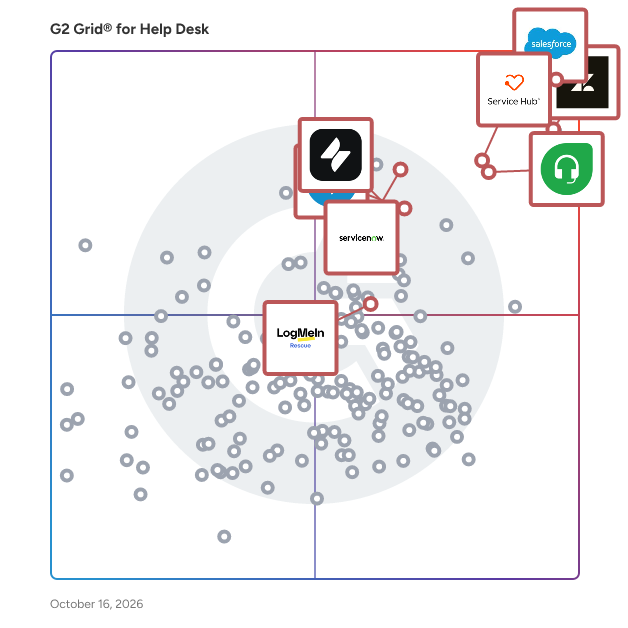
# Best Enterprise Help Desk Software - Page 2

*By [Jeffrey Lin](https://research.g2.com/insights/author/jeffrey-lin)*


Products classified in the overall Help Desk category are similar in many regards and help companies of all sizes solve their business problems. However, enterprise business features, pricing, setup, and installation differ from businesses of other sizes, which is why we match buyers to the right Enterprise Business Help Desk to fit their needs. Compare product ratings based on reviews from enterprise users or connect with one of G2&#39;s buying advisors to find the right solutions within the Enterprise Business Help Desk category.

In addition to qualifying for inclusion in the Help Desk Software category, to qualify for inclusion in the Enterprise Business Help Desk Software category, a product must have at least 10 reviews left by a reviewer from an enterprise business.


## Top Help Desk Software at a Glance
| # | Product | Rating | Best For | What Users Say |
|---|---------|--------|----------|----------------|
| 1 | [Agentforce Service (formerly Salesforce Service Cloud)](https://www.g2.com/products/agentforce-service-formerly-salesforce-service-cloud/reviews) | 4.4/5.0 (6,967 reviews) | Enterprise case management with AI and CRM context | "[“Daily Use Review of Salesforce Service Cloud in Collections”](https://www.g2.com/survey_responses/agentforce-service-formerly-salesforce-service-cloud-review-12938648)" |
| 2 | [Zendesk for Customer Service](https://www.g2.com/products/zendesk-for-customer-service/reviews) | 4.3/5.0 (6,629 reviews) | Omnichannel customer support and ticket tracking | "[Great Complete CRM](https://www.g2.com/survey_responses/zendesk-for-customer-service-review-4530447)" |
| 3 | [Zoho Desk](https://www.g2.com/products/zoho-desk/reviews) | 4.4/5.0 (7,483 reviews) | Customizable ticketing for growing support teams | "[Powerful, Cost-Effective Help Desk with Excellent Automation and AI Features](https://www.g2.com/survey_responses/zoho-desk-review-13056674)" |
| 4 | [Freshdesk](https://www.g2.com/products/freshdesk/reviews) | 4.4/5.0 (3,674 reviews) | Easy ticket intake and support workflow tracking | "[A support tool that quietly made our response process less chaotic, smooth, flexible, an](https://www.g2.com/survey_responses/freshdesk-review-12879809)" |
| 5 | [HubSpot Service Hub](https://www.g2.com/products/hubspot-service-hub/reviews) | 4.4/5.0 (2,818 reviews) | CRM-connected support tickets and customer history | "[Ticket management and centralized support with automations that enhance the experience](https://www.g2.com/survey_responses/hubspot-service-hub-review-12873336)" |
| 6 | [Fin](https://www.g2.com/products/fin/reviews) | 4.5/5.0 (3,710 reviews) | AI support deflection from help content | "[Finn: Natural Language, Seamless Integrations, Fast Performance &amp; Helpful Support](https://www.g2.com/survey_responses/fin-review-13052905)" |
| 7 | [ServiceNow Customer Service Management](https://www.g2.com/products/servicenow-customer-service-management/reviews) | 4.4/5.0 (416 reviews) | Cross-team case workflows and service visibility | "[Efficient platform for managing customer support workflows](https://www.g2.com/survey_responses/servicenow-customer-service-management-review-12817726)" |
| 8 | [Atera](https://www.g2.com/products/atera/reviews) | 4.6/5.0 (1,187 reviews) | IT help desk with remote monitoring and automation | "[Atera: All-in-One IT Management with Strong Integrations, Automation, and ROI](https://www.g2.com/survey_responses/atera-review-12982693)" |
| 9 | [Freshservice](https://www.g2.com/products/freshservice/reviews) | 4.6/5.0 (1,290 reviews) | — | "[Strong visibility and control, but takes effort to get it right](https://www.g2.com/survey_responses/freshservice-review-12723378)" |
| 10 | [Jira Service Management](https://www.g2.com/products/jira-service-management/reviews) | 4.3/5.0 (961 reviews) | Request portals and IT service workflows | "[Jira Service Management for Efficient Ticket Tracking and Support Workflow](https://www.g2.com/survey_responses/jira-service-management-review-12817846)" |


## How Many Help Desk Software Products Does G2 Track?
**Total Products under this Category:** 507

### Category Stats (Jul 2026)
- **Average Rating**: 4.44/5 The average rating of products in this category, based on all submitted ratings
- **Top Trending Product**: RingCX (+1.39%) - Among all products in this category, RingCX recorded the largest rating increase compared to last month
*Last updated: July 05, 2026*


## How Does G2 Rank Help Desk Software Products?

**Why You Can Trust G2's Software Rankings:**

- 30 Analysts and Data Experts
- 77,600+ Authentic Reviews
- 507+ Products
- Unbiased Rankings

G2's software rankings are built on verified user reviews, rigorous moderation, and a consistent research methodology maintained by a team of analysts and data experts. Each product is measured using the same transparent criteria, with no paid placement or vendor influence. While reviews reflect real user experiences, which can be subjective, they offer valuable insight into how software performs in the hands of professionals. Together, these inputs power the G2 Score, a standardized way to compare tools within every category.


---

**Sponsored**

### Pylon

Pylon is an All-in-one B2B Support Platform for modern B2B businesses. We help hundreds of fast growing companies like Deel, Hightouch, and Merge to scale their customer operations. Pylon helps companies manage their customers in shared Slack or Microsoft Teams channels, email, in-app chat, and Slack communities. Pylon automatically tracks customer issues across all the places you talk to your customer, giving a unified place to view, respond to, run workflows, and collect analytics on customer requests. Create views, custom fields, triggers, assignment policies and more. Use AI to auto tag conversations, sync customer Slack conversations to your CRM, send product updates across channels and view engagement.


[Visit website](https://www.g2.com/external_clickthroughs/record?secure%5Bad_program%5D=ppc&amp;secure%5Bad_slot%5D=category_product_list&amp;secure%5Bcategory_id%5D=58&amp;secure%5Bchosen_at%5D=2026-07-05T23%3A58%3A38Z&amp;secure%5Bdisplayable_resource_id%5D=58&amp;secure%5Bdisplayable_resource_type%5D=Category&amp;secure%5Bmedium%5D=sponsored&amp;secure%5Bplacement_reason%5D=page_category&amp;secure%5Bplacement_resource_ids%5D%5B%5D=58&amp;secure%5Bprioritized%5D=false&amp;secure%5Bproduct_id%5D=1265405&amp;secure%5Bresource_id%5D=58&amp;secure%5Bresource_type%5D=Category&amp;secure%5Bsource_type%5D=category_page&amp;secure%5Bsource_url%5D=https%3A%2F%2Fwww.g2.com%2Fcategories%2Fhelp-desk%2Fenterprise%3Fpage%3D2&amp;secure%5Btoken%5D=586b46ad207e5bf8a005c484a1546c2c8e9a720ed72da3ca6db41f1b35c0128f&amp;secure%5Burl%5D=https%3A%2F%2Fwww.usepylon.com%2F%3Futm_source%3Dg2%26utm_medium%3Dcpc&amp;secure%5Burl_type%5D=custom_url)

---


## Help Desk Software Features & Capabilities

### What are the Best Help Desk Software with Social Integration?
Integration to social networks such as Twitter and Facebook to allow customers and agents to communicate via social networks

**Top-rated Help Desk Software for Social Integration:**
- [Agentforce Service (formerly Salesforce Service Cloud)](https://www.g2.com/products/agentforce-service-formerly-salesforce-service-cloud/reviews)
- [Zendesk for Customer Service](https://www.g2.com/products/zendesk-for-customer-service/reviews)
- [Zoho Desk](https://www.g2.com/products/zoho-desk/reviews)
[Explore Help Desk Software with Social Integration](https://www.g2.com/categories/help-desk/f/social-integration)

### What are the Best Help Desk Software with Ticket Collaboration?
Share and collaborate on tickets with multiple customer service representatives

**Top-rated Help Desk Software for Ticket Collaboration:**
- [Agentforce Service (formerly Salesforce Service Cloud)](https://www.g2.com/products/agentforce-service-formerly-salesforce-service-cloud/reviews)
- [Zendesk for Customer Service](https://www.g2.com/products/zendesk-for-customer-service/reviews)
- [Zoho Desk](https://www.g2.com/products/zoho-desk/reviews)
[Explore Help Desk Software with Ticket Collaboration](https://www.g2.com/categories/help-desk/f/ticket-collaboration)

### What are the Best Help Desk Software with Mobile User Support?
Allows software to be easily used on multiple mobile devices include phone and tablet devices.

**Top-rated Help Desk Software for Mobile User Support:**
- [Agentforce Service (formerly Salesforce Service Cloud)](https://www.g2.com/products/agentforce-service-formerly-salesforce-service-cloud/reviews)
- [Zendesk for Customer Service](https://www.g2.com/products/zendesk-for-customer-service/reviews)
- [Zoho Desk](https://www.g2.com/products/zoho-desk/reviews)
[Explore Help Desk Software with Mobile User Support](https://www.g2.com/categories/help-desk/f/mobile-user-support)

### What are the Best Help Desk Software with Attachments/Screencasts?
Documents and files can be attached to the ticket to communicate with customer issues/resolutions

**Top-rated Help Desk Software for Attachments/Screencasts:**
- [Agentforce Service (formerly Salesforce Service Cloud)](https://www.g2.com/products/agentforce-service-formerly-salesforce-service-cloud/reviews)
- [Zendesk for Customer Service](https://www.g2.com/products/zendesk-for-customer-service/reviews)
- [Zoho Desk](https://www.g2.com/products/zoho-desk/reviews)
[Explore Help Desk Software with Attachments/Screencasts](https://www.g2.com/categories/help-desk/f/attachments-screencasts)

### What are the Best Help Desk Software with Chat/Live Support?
Ability for customer service agents to communicate with customers via live chat to solve problems live

**Top-rated Help Desk Software for Chat/Live Support:**
- [Agentforce Service (formerly Salesforce Service Cloud)](https://www.g2.com/products/agentforce-service-formerly-salesforce-service-cloud/reviews)
- [Zendesk for Customer Service](https://www.g2.com/products/zendesk-for-customer-service/reviews)
- [Zoho Desk](https://www.g2.com/products/zoho-desk/reviews)
[Explore Help Desk Software with Chat/Live Support](https://www.g2.com/categories/help-desk/f/chat-live-support)


## What Are the Top-Rated Help Desk Software Products in 2026?
### 1. [HappyFox Help Desk](https://www.g2.com/products/happyfox-help-desk/reviews)
HappyFox Help Desk is a comprehensive support and ticket management platform that consolidates customer and internal queries from multiple channels, including email, chat, and web portals. With a user-friendly interface, robust automation, and advanced reporting capabilities, it enhances response times and customer satisfaction. Trusted by over 12,000 companies in 70+ countries, HappyFox serves diverse industries such as education, IT, media, e-commerce, retail, manufacturing, non-profit, and government, ensuring seamless support operations across various sectors. HappyFox Help Desk is designed to deliver seamless support through omnichannel ticketing, which consolidates customer interactions into a single, unified interface. It offers efficient ticket management with customizable statuses and queues, enhanced team collaboration with private notes and task management, and powerful automation tools to streamline routine tasks. These features make it ideal for businesses of all sizes, as well as internal teams such as Facilities, IT, and HR, ensuring a productive and organized help desk environment. Enterprises choose HappyFox for its tailored solutions and comprehensive tech stack, which includes smart automation, SLA management, real-time reporting, and a robust knowledge base. Our consultative approach ensures customized solutions that fit unique requirements, supported by a dedicated expert team for rapid issue resolution. HappyFox&#39;s extensive knowledge base and seamless integrations with enterprise tools enable effortless implementation and scalability, making it the preferred choice for enterprises looking to enhance their support operations and achieve higher efficiency and customer satisfaction.


**Average Rating:** 4.5/5.0
**Total Reviews:** 137
**How Do G2 Users Rate HappyFox Help Desk?**

- **Has the product been a good partner in doing business?:** 9.2/10 (Category avg: 9.0/10)
- **Workflow:** 8.8/10 (Category avg: 8.7/10)
- **Customization :** 8.3/10 (Category avg: 8.4/10)
- **Customer Portal:** 8.9/10 (Category avg: 8.6/10)

**Who Is the Company Behind HappyFox Help Desk?**

- **Seller:** [HappyFox Inc.](https://www.g2.com/sellers/happyfox-inc)
- **Year Founded:** 2011
- **HQ Location:** Irvine, California
- **LinkedIn® Page:** https://www.linkedin.com/company/3190470/ (147 employees on LinkedIn®)
- **Phone:** +1 (949) 535-2220

**Who Uses This Product?**
- **Top Industries:** Information Technology and Services, Computer Software
- **Company Size:** 42% Mid-Market, 39% Small-Business


#### What Are HappyFox Help Desk's Pros and Cons?

**Pros:**

- Ease of Use (7 reviews)
- Customer Support (5 reviews)
- Automation (3 reviews)
- Easy Setup (3 reviews)
- Efficiency (3 reviews)

**Cons:**

- Call Functionality (1 reviews)
- Complex Usability (1 reviews)
- Email Communication Issues (1 reviews)
- Email Management Issues (1 reviews)
- Expensive (1 reviews)


### What Do G2 Reviewers Say About HappyFox Help Desk?
*AI-generated summary from verified user reviews*

**Pros:**

- Users find HappyFox Help Desk&#39;s **ease of use** exceptional, enhancing employee efficiency and customer service experiences.
- Users praise the **excellent customer support** of HappyFox Help Desk, especially during challenging situations like disasters.
- Users value the **automation features** of HappyFox Help Desk, enhancing ticket management and boosting overall productivity.
- Users love the **easy setup** of HappyFox Help Desk, appreciating its intuitive design and quick onboarding process.
- Users highlight the **boosted efficiency** of HappyFox Help Desk, simplifying workflows and enhancing productivity for teams.

**Cons:**

- Users experience **functionality issues** with call features, causing difficulties in CCing others and accessing shared tickets.
- Users find the **complex usability** of HappyFox Help Desk challenging compared to their previous GSuite Help Desk experience.
- Users find **email communication issues** with HappyFox Help Desk hinder efficient interactions and create delays in support responses.
- Users find the **email management issues** frustrating, complicating ticket assignments and clarity of notifications.
- Users feel that the product is **expensive** and wish for more affordable pricing to enhance accessibility.

#### What Are Recent G2 Reviews of HappyFox Help Desk?

**"[Excellent tool for managing insurance queries, keeping a check on timeline and responding quickly.](https://www.g2.com/survey_responses/happyfox-help-desk-review-11735735)"**

**Rating:** 5.0/5.0 stars
*— Verified User in Hospital &amp; Health Care*

[Read full review](https://www.g2.com/survey_responses/happyfox-help-desk-review-11735735)

---

**"[Simple and effective customer support](https://www.g2.com/survey_responses/happyfox-help-desk-review-11461071)"**

**Rating:** 4.5/5.0 stars
*— Jorge R.*

[Read full review](https://www.g2.com/survey_responses/happyfox-help-desk-review-11461071)

---


#### What Are G2 Users Discussing About HappyFox Help Desk?

- [What is HappyFox Help Desk used for?](https://www.g2.com/discussions/what-is-happyfox-help-desk-used-for)
- [How much does HappyFox cost?](https://www.g2.com/discussions/how-much-does-happyfox-cost)
- [What is a help desk ticket?](https://www.g2.com/discussions/what-is-a-help-desk-ticket)
- [What is the basic function of a help desk?](https://www.g2.com/discussions/what-is-the-basic-function-of-a-help-desk)
- [What is HappyFox?](https://www.g2.com/discussions/what-is-happyfox)

### 2. [NiCE CXone](https://www.g2.com/products/nice-cxone/reviews)
NiCE (NASDAQ: NICE) is transforming the world with AI that puts people first. Our purpose-built AI-powered platforms automate engagements into proactive, safe, intelligent actions, empowering individuals and organizations to innovate and act, from interaction to resolution. Trusted by organizations throughout 150+ countries worldwide, NiCE’s platforms are widely adopted across industries connecting people, systems, and workflows to work smarter at scale, elevating performance across the organization, delivering proven measurable outcomes. www.nice.com


**Average Rating:** 4.3/5.0
**Total Reviews:** 1,604
**How Do G2 Users Rate NiCE CXone?**

- **Has the product been a good partner in doing business?:** 8.2/10 (Category avg: 9.0/10)
- **Workflow:** 8.6/10 (Category avg: 8.7/10)
- **Customization :** 9.1/10 (Category avg: 8.4/10)
- **Customer Portal:** 9.4/10 (Category avg: 8.6/10)

**Who Is the Company Behind NiCE CXone?**

- **Seller:** [NiCE](https://www.g2.com/sellers/nice)
- **Year Founded:** 1986
- **HQ Location:** Hoboken, New Jersey
- **Twitter:** @NICELtd (14,655 Twitter followers)
- **LinkedIn® Page:** https://www.linkedin.com/company/nice-systems/ (14,099 employees on LinkedIn®)
- **Ownership:** NASDAQ: NICE

**Who Uses This Product?**
- **Who Uses This:** Customer Service Representative, Supervisor
- **Top Industries:** Consumer Services, Information Technology and Services
- **Company Size:** 52% Mid-Market, 34% Enterprise


#### What Are NiCE CXone's Pros and Cons?

**Pros:**

- Ease of Use (29 reviews)
- Features (21 reviews)
- Efficiency (20 reviews)
- Helpful (16 reviews)
- Intuitive (13 reviews)

**Cons:**

- Call Issues (12 reviews)
- Technical Issues (11 reviews)
- Missing Features (10 reviews)
- Poor Customer Support (10 reviews)
- Delays (8 reviews)


### What Do G2 Reviewers Say About NiCE CXone?
*AI-generated summary from verified user reviews*

**Pros:**

- Users value the **intuitive interface** of NiCE CXone, which simplifies onboarding and enhances user experience significantly.
- Users value the **intuitive interface and powerful features** of NiCE CXone, enhancing both employee training and customer service.
- Users value the **efficiency** of NiCE CXone, highlighting its intuitive interface and powerful tools for streamlined operations.
- Users value the **intuitive interface** of NiCE CXone, making it easy for new employees to adapt quickly.
- Users appreciate the **intuitive interface** of NiCE CXone, making it easy for new employees to navigate and utilize.

**Cons:**

- Users report frequent **call issues** with NiCE CXone, including dropped calls and difficulties in changing agent status.
- Users experience **technical issues** including lag, crashes, and outages, impacting training and service level agreements.
- Users are frustrated with the **missing features** in NiCE CXone, hindering training and quality assurance processes.
- Users report **poor customer support** in NiCE CXone, facing challenges in reaching out and receiving timely assistance.
- Users experience **delays** in information and support responses, which makes using NiCE CXone frustrating at times.

#### What Are Recent G2 Reviews of NiCE CXone?

**"[Reliable and Efficient Customer Experience Platform](https://www.g2.com/survey_responses/nice-cxone-review-11739091)"**

**Rating:** 4.5/5.0 stars
*— Alex L.*

[Read full review](https://www.g2.com/survey_responses/nice-cxone-review-11739091)

---

**"[Cxone Simplifies Calling and Scheduling in One Place](https://www.g2.com/survey_responses/nice-cxone-review-12717141)"**

**Rating:** 4.5/5.0 stars
*— Nilesh S.*

[Read full review](https://www.g2.com/survey_responses/nice-cxone-review-12717141)

---


#### What Are G2 Users Discussing About NiCE CXone?

- [How does NICE CXone enhance customer service, and what features should a new user focus on for maximum impact?](https://www.g2.com/discussions/how-does-nice-cxone-enhance-customer-service-and-what-features-should-a-new-user-focus-on-for-maximum-impact)
- [What is NICE CXone used for?](https://www.g2.com/discussions/what-is-nice-cxone-used-for) - 1 comment
- [What does NICE inContact do?](https://www.g2.com/discussions/what-does-nice-incontact-do)
- [When did nice acquire inContact?](https://www.g2.com/discussions/when-did-nice-acquire-incontact)
- [What is inContact?](https://www.g2.com/discussions/what-is-incontact)

### 3. [Helpdesk 365](https://www.g2.com/products/helpdesk-365/reviews)
Helpdesk 365 is a reliable AI-powered helpdesk software built to simplify internal support operations and boost team productivity. Designed for businesses using Microsoft 365, it integrates seamlessly with Microsoft Teams, Outlook, SharePoint, Power BI, and Power Automate and inbuilt MS Copilot so users can manage tickets without leaving the existing workflow. This versatile IT ticketing system supports multiple department mailboxes, integrates with asset management tools, blocks spam emails and domains, and is available in 10 languages. Employees can raise requests directly through Microsoft Forms, making it easier to capture and track every support need. AI-powered ticket summaries, intelligent routing, and automated workflows help agents resolve issues faster. SLA tracking, real-time notifications, and a self-service portal with a searchable knowledge base reduce repetitive inquiries and improve employee satisfaction. Whether for IT support, HR teams, or customer service, Helpdesk 365 delivers everything businesses need in one help desk software platform. Advanced analytics and reporting provide actionable insights into ticket trends, resolution times, and email-to-ticket conversions, enabling data-driven decisions that improve service quality. Built on Microsoft’s secure ecosystem, Helpdesk 365 offers enterprise-grade security with data encryption, role-based access, and compliance with Microsoft 365 standards ensuring sensitive information stays protected while allowing smooth collaboration across departments. With its no-code workflow configuration, Helpdesk 365 is easy to adapt for organizations of any size, helping teams save time, reduce costs, deliver a faster and more reliable support experience.


**Average Rating:** 4.7/5.0
**Total Reviews:** 237
**How Do G2 Users Rate Helpdesk 365?**

- **Has the product been a good partner in doing business?:** 9.3/10 (Category avg: 9.0/10)
- **Workflow:** 9.3/10 (Category avg: 8.7/10)
- **Customization :** 9.1/10 (Category avg: 8.4/10)
- **Customer Portal:** 9.0/10 (Category avg: 8.6/10)

**Who Is the Company Behind Helpdesk 365?**

- **Seller:** [CubicLogics](https://www.g2.com/sellers/cubiclogics)
- **Company Website:** https://www.apps365.com/
- **Year Founded:** 2015
- **HQ Location:** Wilmington, US
- **Twitter:** @cubiclogics (17 Twitter followers)
- **LinkedIn® Page:** https://www.linkedin.com/company/cubiclogics/ (133 employees on LinkedIn®)

**Who Uses This Product?**
- **Top Industries:** Insurance, Computer &amp; Network Security
- **Company Size:** 50% Mid-Market, 9% Enterprise


#### What Are Helpdesk 365's Pros and Cons?

**Pros:**

- Ease of Use (28 reviews)
- Customer Support (13 reviews)
- Helpful (11 reviews)
- Features (9 reviews)
- Ticket Management (9 reviews)

**Cons:**

- Slow Performance (5 reviews)
- Complex Setup (4 reviews)
- Performance Issues (4 reviews)
- Poor Performance (4 reviews)
- Bugs (3 reviews)


### What Do G2 Reviewers Say About Helpdesk 365?
*AI-generated summary from verified user reviews*

**Pros:**

- Users appreciate the **ease of use** of Helpdesk 365, finding it simple to implement and maintain.
- Users value the **helpful and responsive customer support** of Helpdesk 365, enhancing their overall user experience.
- Users find Helpdesk 365 to be a **helpful tool** that covers various needs and simplifies integration for organizations.
- Users value the **seamless integration** of Helpdesk 365 with O365 tools, enhancing workflows and simplifying user training.
- Users find Helpdesk 365&#39;s **ticket management** system effective for organization, status monitoring, and user-friendliness.

**Cons:**

- Users find the **slow performance** of Helpdesk 365 frustrating, often requiring additional support for smoother operation.
- Users find the **complex setup** of Helpdesk 365 challenging, requiring substantial manual configuration and support.
- Users report **performance issues** with Helpdesk 365, mentioning slow loading times and a need for smoother workflows.
- Users experience **poor performance** , noting slow load times and clunky operation hindering their overall experience.
- Users occasionally face **bugs** in Helpdesk 365, but support quickly resolves issues and minimizes disruption.

#### What Are Recent G2 Reviews of Helpdesk 365?

**"[Keeping everyone informed throughout the ticket lifecycle](https://www.g2.com/survey_responses/helpdesk-365-review-13035757)"**

**Rating:** 5.0/5.0 stars
*— Hannah F.*

[Read full review](https://www.g2.com/survey_responses/helpdesk-365-review-13035757)

---

**"[Highly Customizable and Exceeds Our Needs](https://www.g2.com/survey_responses/helpdesk-365-review-12775098)"**

**Rating:** 5.0/5.0 stars
*— Alan M.*

[Read full review](https://www.g2.com/survey_responses/helpdesk-365-review-12775098)

---


#### What Are G2 Users Discussing About Helpdesk 365?

- [What is HR365 - Helpdesk used for?](https://www.g2.com/discussions/what-is-hr365-helpdesk-used-for) - 1 comment

### 4. [Helpshift](https://www.g2.com/products/helpshift/reviews)
Helpshift is an AI-Native Customer Support and Engagement Platform designed to maximize Customer Lifetime Value (LTV) by facilitating meaningful interactions between brands and their customers. This solution integrates three foundational pillars: advanced technology that enhances the customer experience, AI that scales engagement efforts, and expert human services that deliver strategic value. Together, these elements create a comprehensive customer engagement framework that is both efficient and empathetic, applicable to digital-first businesses operating across mobile, web, and in-app environments. Targeted at customer experience leaders, support operations teams, product managers, and community directors, Helpshift caters to organizations seeking to optimize customer interactions and drive measurable business outcomes. The platform is particularly beneficial for teams looking to streamline support processes, enhance customer engagement, reduce churn, and maintain brand safety across digital touchpoints. With Helpshift, brands can effectively manage customer conversations and turn them into actionable insights that contribute to retention and growth. The platform&#39;s versatility allows it to address a range of use cases, from automated customer service and proactive engagement to community management and trust and safety operations. Helpshift offers four essential solutions: Support, Engagement, Trust and Safety, and Community. The Support solution delivers efficient AI-powered customer service through Care AI for instant resolution, Language AI for native multilingual support across 75+ languages, and AI Copilot for agent productivity, augmented by elite human specialists with 24/7 global coverage. The Engagement solution enables brands to create proactive experiences with Engage AI, which predicts churn risk and identifies upsell opportunities, supported by dedicated VIP Account Managers who deliver concierge service. The Trust and Safety solution combines best-in-class partner technology for automated moderation, age verification, and toxicity-detection filters with Guard AI for monitoring and quality assurance of AI- and human-agent conversations, plus expert moderators and threat analysts for nuanced content review and complex escalations. The Community solution uses Community AI to analyze sentiment trends across social platforms and pairs that intelligence with expert community managers who shape culture and engage directly with audiences. The platform&#39;s key features include a native SDK that embeds directly into mobile, web, and PC applications for seamless customer interactions without disrupting the user experience. Unified Orchestration connects in-app, web, and social touchpoints with shared context, while Real-Time Intelligence surfaces behavior insights that drive decisions. Enterprise-Grade Security includes SOC2, GDPR, HIPAA, and COPPA, among other certifications. By bridging the gap between operational efficiency and empathetic engagement, Helpshift empowers organizations to reduce operational costs, increase customer satisfaction, protect brand reputation, and foster stronger community health.


**Average Rating:** 4.3/5.0
**Total Reviews:** 338
**How Do G2 Users Rate Helpshift?**

- **Has the product been a good partner in doing business?:** 8.5/10 (Category avg: 9.0/10)
- **Workflow:** 8.5/10 (Category avg: 8.7/10)
- **Customization :** 8.1/10 (Category avg: 8.4/10)
- **Customer Portal:** 8.6/10 (Category avg: 8.6/10)

**Who Is the Company Behind Helpshift?**

- **Seller:** [Keywords Studios](https://www.g2.com/sellers/keywords-studios)
- **Company Website:** https://www.keywordsstudios.com
- **Year Founded:** 1998
- **HQ Location:** Dublin, County Dublin, Ireland
- **Twitter:** @KeywordsStudios (5,057 Twitter followers)
- **LinkedIn® Page:** https://www.linkedin.com/company/keywordsstudios (11,564 employees on LinkedIn®)

**Who Uses This Product?**
- **Who Uses This:** Customer Service Representative, Customer Support
- **Top Industries:** Computer Games, Entertainment
- **Company Size:** 62% Mid-Market, 22% Small-Business


#### What Are Helpshift's Pros and Cons?

**Pros:**

- Ease of Use (3 reviews)
- Features (3 reviews)
- Case Management (2 reviews)
- Efficiency (2 reviews)
- Navigation Ease (2 reviews)

**Cons:**

- Connection Issues (2 reviews)
- Software Unresponsiveness (2 reviews)
- Difficult Navigation (1 reviews)
- Downtime (1 reviews)
- Lack of Detail (1 reviews)


### What Do G2 Reviewers Say About Helpshift?
*AI-generated summary from verified user reviews*

**Pros:**

- Users value the **ease of use** of Helpshift, simplifying ticket management and enhancing customer interactions.
- Users value the **clear ticket management and automation tools** of Helpshift, enhancing efficiency and customer experience.
- Users value the **efficient case management** in Helpshift, enhancing organization and improving customer experience through automation.
- Users value the **efficiency** of Helpshift, thanks to its ticket management system and automation tools streamlining support tasks.
- Users value the **navigation ease** of Helpshift, finding it simple to track and manage customer support tickets.

**Cons:**

- Users experience **connection issues** and occasional unresponsiveness, impacting their overall usability of Helpshift.
- Users experience **software unresponsiveness** , facing issues with connection and loading that hinder their experience.
- Users find the lack of a mobile app and **difficult navigation** on smartphones frustrating and limiting.
- Users face **downtime issues** with Helpshift, experiencing connection problems and unresponsiveness at times.
- Users feel that the **reporting features lack detail** , particularly in tracking agent performance and customer satisfaction trends.

#### What Are Recent G2 Reviews of Helpshift?

**"[Helpshift helps in Revolutionizing Customer Service Experience](https://www.g2.com/survey_responses/helpshift-review-8195564)"**

**Rating:** 4.5/5.0 stars
*— SHIVAM A.*

[Read full review](https://www.g2.com/survey_responses/helpshift-review-8195564)

---

**"[Helpshift Review](https://www.g2.com/survey_responses/helpshift-review-10747632)"**

**Rating:** 5.0/5.0 stars
*— Nico C.*

[Read full review](https://www.g2.com/survey_responses/helpshift-review-10747632)

---


#### What Are G2 Users Discussing About Helpshift?

- [What is Helpshift used for?](https://www.g2.com/discussions/what-is-helpshift-used-for)

### 5. [LiveHelpNow](https://www.g2.com/products/livehelpnow/reviews)
LiveHelpNow is an AI-powered customer engagement platform that helps businesses manage conversations across live chat, SMS, and messaging channels from a single interface. It combines real-time chat, automation, and intelligent routing to improve response times and streamline support operations. Teams can use AI assistants, canned responses, and customizable workflows to handle high volumes of inquiries efficiently while maintaining a personalized experience. Proactive chat tools help capture and convert website visitors, while reporting and analytics provide insight into performance and customer behavior. LiveHelpNow integrates with existing systems to keep data connected and is designed to scale with growing teams looking to enhance both customer support and sales engagement.


**Average Rating:** 4.3/5.0
**Total Reviews:** 155
**How Do G2 Users Rate LiveHelpNow?**

- **Has the product been a good partner in doing business?:** 9.1/10 (Category avg: 9.0/10)
- **Workflow:** 8.8/10 (Category avg: 8.7/10)
- **Customization :** 8.4/10 (Category avg: 8.4/10)
- **Customer Portal:** 8.7/10 (Category avg: 8.6/10)

**Who Is the Company Behind LiveHelpNow?**

- **Seller:** [LiveHelpNow](https://www.g2.com/sellers/livehelpnow)
- **Company Website:** https://www.livehelpnow.net
- **Year Founded:** 2003
- **HQ Location:** Willow Grove, PA
- **Twitter:** @LiveHelpNow (3,746 Twitter followers)
- **LinkedIn® Page:** https://www.linkedin.com/company/903832/ (15 employees on LinkedIn®)

**Who Uses This Product?**
- **Top Industries:** Information Technology and Services, Retail
- **Company Size:** 48% Small-Business, 35% Mid-Market


#### What Are LiveHelpNow's Pros and Cons?

**Pros:**

- Customer Support (4 reviews)
- Helpful (4 reviews)
- Ease of Use (3 reviews)
- Chat Features (2 reviews)
- Features (2 reviews)

**Cons:**

- Admin Control Issues (1 reviews)
- Inadequate Reporting (1 reviews)
- Interface Issues (1 reviews)
- Lack of Features (1 reviews)
- Learning Curve (1 reviews)


### What Do G2 Reviewers Say About LiveHelpNow?
*AI-generated summary from verified user reviews*

**Pros:**

- Users value the **fast and reliable customer support** from LiveHelpNow, making issue resolution effortless and efficient.
- Users find **LiveHelpNow&#39;s support incredibly responsive** , ensuring quick resolutions and a seamless customer service experience.
- Users find LiveHelpNow&#39;s interface very intuitive, highlighting its **ease of use** and streamlined customer support features.
- Users value the **robust chat features** of LiveHelpNow, enhancing communication and streamlining customer support efficiently.
- Users appreciate the **integration of multiple support channels** in LiveHelpNow, streamlining customer service experiences effectively.

**Cons:**

- Users find the **difficulties with admin controls** frustrating, especially due to limited user roles and outdated interface.
- Users find the **reporting inadequate** , lacking precision and transferability, which hampers their overall experience.
- Users find the **difficult interface** of LiveHelpNow outdated, complicating usage for non-technical individuals.
- Users are frustrated by the **lack of features** like custom admin roles, limiting functionality for non-technical users.
- Users find the **learning curve steep** due to a dated interface and non-intuitive features for non-technical users.

#### What Are Recent G2 Reviews of LiveHelpNow?

**"[Solid product for a great price](https://www.g2.com/survey_responses/livehelpnow-review-9206243)"**

**Rating:** 4.5/5.0 stars
*— Sean W.*

[Read full review](https://www.g2.com/survey_responses/livehelpnow-review-9206243)

---

**"[Best Platform for Customer Service](https://www.g2.com/survey_responses/livehelpnow-review-9337808)"**

**Rating:** 5.0/5.0 stars
*— Marc V.*

[Read full review](https://www.g2.com/survey_responses/livehelpnow-review-9337808)

---


#### What Are G2 Users Discussing About LiveHelpNow?

- [What is LiveHelpNow used for?](https://www.g2.com/discussions/what-is-livehelpnow-used-for)

### 6. [LiveAgent](https://www.g2.com/products/liveagent/reviews)
LiveAgent is a comprehensive help desk and live chat software designed to revolutionize customer support. By offering an all-in-one solution, LiveAgent empowers businesses to deliver personalized interactions that leave a lasting impression. With the fastest chat widget available and a reputation as the #1 rated live chat software for SMBs in 2025, LiveAgent is trusted by industry leaders such as BMW, Yamaha, Huawei, and Oxford University. These companies use LiveAgent to provide top-tier customer service that stands out in a competitive marketplace. Key Features of LiveAgent LiveAgent combines an omnichannel universal inbox, real-time live chat, a built-in call center, and a robust customer service portal to streamline communication. Personalization is at the heart of the software, allowing businesses to enhance interactions through features such as customer segmentation, automation, a built-in CRM, and powerful analytics. Additionally, LiveAgent offers an intuitive customer knowledge base to further improve service efficiency. With access to over 175+ features and 200+ integrations, LiveAgent adapts to your unique business needs and scales as your company grows. Try LiveAgent for Free Start your journey with LiveAgent today with a 1-month free trial—no credit card required. Discover how this advanced tool can transform your customer support operations. 200+ Features Included: • POP3 accounts • Email piping • Forwarding • Departments • Priorities • Statuses • Tags • Rules • Ticket Routing • Canned/Predefined messages • Email templates • Voice integration • Real-time website monitoring and statistics • Chats • Facebook/Twitter/Instagram/Slack integration • Knowledge base • Live Suggestions as you type • Feedback and Contact forms • Agent rating and gamification • Multilingual support • Ticket filters • File sharing and attachments • Chat button templates and much more Exclusive for Startups LiveAgent’s Startup Program offers startups free access to the platform for the first 6 months. After this period, startups can continue enjoying the benefits of LiveAgent at a discounted rate. This program provides a cost-effective way for emerging businesses to leverage world-class customer support tools during their growth phase. Experience the power of LiveAgent and join the ranks of industry-leading companies that prioritize exceptional customer service.


**Average Rating:** 4.5/5.0
**Total Reviews:** 1,481
**How Do G2 Users Rate LiveAgent?**

- **Has the product been a good partner in doing business?:** 9.1/10 (Category avg: 9.0/10)
- **Workflow:** 8.7/10 (Category avg: 8.7/10)
- **Customization :** 8.4/10 (Category avg: 8.4/10)
- **Customer Portal:** 8.7/10 (Category avg: 8.6/10)

**Who Is the Company Behind LiveAgent?**

- **Seller:** [QualityUnit](https://www.g2.com/sellers/qualityunit)
- **Year Founded:** 2004
- **HQ Location:** Bratislava
- **Twitter:** @qualityunit (480 Twitter followers)
- **LinkedIn® Page:** https://www.linkedin.com/company/3516632/ (61 employees on LinkedIn®)

**Who Uses This Product?**
- **Who Uses This:** CEO, Owner
- **Top Industries:** Information Technology and Services, Computer Software
- **Company Size:** 68% Small-Business, 29% Mid-Market


#### What Are LiveAgent's Pros and Cons?

**Pros:**

- Ease of Use (58 reviews)
- Features (48 reviews)
- Customer Support (45 reviews)
- Helpful (42 reviews)
- Efficiency (36 reviews)

**Cons:**

- Learning Curve (12 reviews)
- Missing Features (11 reviews)
- Not Intuitive (10 reviews)
- Steep Learning Curve (10 reviews)
- Integration Issues (9 reviews)


### What Do G2 Reviewers Say About LiveAgent?
*AI-generated summary from verified user reviews*

**Pros:**

- Users appreciate the **ease of use** of LiveAgent, facilitating efficient communication and quick resolution of support requests.
- Users love the **user-friendly ticketing solution** of LiveAgent, enhancing collaboration and streamlining cross-channel customer interactions.
- Users value the **impressive customer support** of LiveAgent, benefiting from quick responses and efficient issue resolution.
- Users appreciate the **helpful support system** of LiveAgent, enhancing communication and resolving issues efficiently.
- Users value the **efficiency of LiveAgent** , especially its seamless integration and real-time chat capabilities for improved customer support.

**Cons:**

- Users experience a **steep learning curve** with LiveAgent due to its outdated interface and complex features.
- Users experience **missing features** in LiveAgent, including poor mobile functionality and limited customization options.
- Users find LiveAgent&#39;s interface **not intuitive** , requiring extensive time to navigate and understand its features.
- Users face a **steep learning curve** with LiveAgent due to its outdated interface and complex feature navigation.
- Users report **integration issues** with WhatsApp and Facebook, limiting interaction and functionality in LiveAgent.

#### What Are Recent G2 Reviews of LiveAgent?

**"[It supports simplified customer access to assistance services across all channels.](https://www.g2.com/survey_responses/liveagent-review-12558141)"**

**Rating:** 5.0/5.0 stars
*— Edjelie M.*

[Read full review](https://www.g2.com/survey_responses/liveagent-review-12558141)

---

**"[The ideal way to make us more efficient when responding to customer tickets.](https://www.g2.com/survey_responses/liveagent-review-11841064)"**

**Rating:** 5.0/5.0 stars
*— Ingy H.*

[Read full review](https://www.g2.com/survey_responses/liveagent-review-11841064)

---


#### What Are G2 Users Discussing About LiveAgent?

- [I&#39;m stuck on setting up automated ticketing in LiveAgent. How can I streamline customer support requests?](https://www.g2.com/discussions/i-m-stuck-on-setting-up-automated-ticketing-in-liveagent-how-can-i-streamline-customer-support-requests)
- [What is LiveAgent used for?](https://www.g2.com/discussions/what-is-liveagent-used-for) - 1 comment

### 7. [Mojo Helpdesk](https://www.g2.com/products/mojo-helpdesk/reviews)
Mojo Helpdesk makes customer service and IT support easy. Centralize requests, assign, automate, track progress, and get more done faster. The best alternative to managing requests with spreadsheets and emails, Mojo Helpdesk puts them all in a powerful but simple ticket tracking system. Cut down incoming requests with a self-service knowledge base, keep things organized by assigning and tagging tickets, and leverage automation for improved efficiency. With over 2.5 million happy users, Mojo Helpdesk is the top choice for IT professionals and customer service managers, and agents. Used by small and medium-sized businesses, schools and educational institutions, healthcare organizations, government agencies, and many others. Get started in minutes, connect to your company or organization’s Google Workspace, and begin managing requests, creating knowledge base articles, managing assets, setting SLA benchmarks, tracking and reporting.


**Average Rating:** 4.4/5.0
**Total Reviews:** 235
**How Do G2 Users Rate Mojo Helpdesk?**

- **Has the product been a good partner in doing business?:** 8.9/10 (Category avg: 9.0/10)
- **Workflow:** 8.6/10 (Category avg: 8.7/10)
- **Customization :** 7.5/10 (Category avg: 8.4/10)
- **Customer Portal:** 8.7/10 (Category avg: 8.6/10)

**Who Is the Company Behind Mojo Helpdesk?**

- **Seller:** [Mojo Helpdesk](https://www.g2.com/sellers/mojo-helpdesk)
- **Year Founded:** 2011
- **HQ Location:** Austin, Texas
- **Twitter:** @mojohelpdesk (705 Twitter followers)
- **LinkedIn® Page:** https://www.linkedin.com/company/mojo-helpdesk/ (2 employees on LinkedIn®)

**Who Uses This Product?**
- **Top Industries:** Information Technology and Services, Primary/Secondary Education
- **Company Size:** 55% Mid-Market, 30% Small-Business


#### What Are Mojo Helpdesk's Pros and Cons?


**Cons:**

- Bugs (1 reviews)
- Button Issues (1 reviews)
- Editing Difficulties (1 reviews)
- Formatting Issues (1 reviews)
- Layout Issues (1 reviews)


### What Do G2 Reviewers Say About Mojo Helpdesk?
*AI-generated summary from verified user reviews*


**Cons:**

- Users experience **bugs with layout transitions** and inconsistencies with screenshots in Mojo Helpdesk, impacting usability.
- Users face **button issues** that hinder layout consistency, dark mode usage, and screenshot functionalities in Mojo Helpdesk.
- Users face **editing difficulties** in Mojo Helpdesk, struggling with layout consistency and media handling.
- Users face **formatting issues** with layouts and dark mode, causing inconsistency and trouble with multimedia elements.
- Users face **layout issues** with Mojo Helpdesk, struggling to maintain consistency and utilize dark mode effectively.

#### What Are Recent G2 Reviews of Mojo Helpdesk?

**"[Good for Frequent Users](https://www.g2.com/survey_responses/mojo-helpdesk-review-8439190)"**

**Rating:** 4.0/5.0 stars
*— Chel M.*

[Read full review](https://www.g2.com/survey_responses/mojo-helpdesk-review-8439190)

---

**"[Perfect Integration, Simple Setup](https://www.g2.com/survey_responses/mojo-helpdesk-review-12839476)"**

**Rating:** 5.0/5.0 stars
*— Hugo I. D.*

[Read full review](https://www.g2.com/survey_responses/mojo-helpdesk-review-12839476)

---


#### What Are G2 Users Discussing About Mojo Helpdesk?

- [How much does Mojo Helpdesk cost?](https://www.g2.com/discussions/how-much-does-mojo-helpdesk-cost)
- [What is Mojo in software?](https://www.g2.com/discussions/what-is-mojo-in-software)
- [Is Mojo Helpdesk free?](https://www.g2.com/discussions/is-mojo-helpdesk-free) - 2 comments
- [What are the features of help desk software?](https://www.g2.com/discussions/mojo-helpdesk-what-are-the-features-of-help-desk-software) - 1 comment, 1 upvote

### 8. [LogMeIn Rescue](https://www.g2.com/products/logmein-rescue/reviews)
LogMeIn Rescue is an enterprise remote support platform that enables IT teams and customer support organizations to deliver fast, secure, and reliable technical support — to employees, customers, and remote devices — from a single, scalable solution. Built for moments when failure is not an option, Rescue combines purpose-built security, proven performance, and practical AI to help support teams resolve issues quickly and confidently — without compromising control, compliance, or end-user experience. Rescue is used by small help desks and the world&#39;s largest global enterprises alike, including organizations in regulated industries such as finance, healthcare, and the public sector. Whether supporting internal IT or external customer-facing teams, Rescue adapts to your environment, your workflows, and your scale. Key capabilities include: -Enterprise-grade security: 40+ granular permissions and controls, session audit logs, IP and device-based access restrictions, SSO/AD Sync, and data storage policies — purpose-built for compliance and governance requirements. -Fast, reliable connections: Sessions connect in ~20 seconds or less, backed by 99.99% uptime, 5B+ remote sessions, and 20+ years of proven enterprise performance. -Flexible support options: 12+ connection methods including PIN code, calling card, web link, and live chat — minimizing user friction across platforms and devices. -Practical AI: AI-powered diagnostics, session summaries, script building, and error analysis help technicians resolve issues faster and document more consistently. -Smart integrations: Pre-built connectors for ServiceNow, Nexthink, Salesforce and more, plus robust APIs that align Rescue with the tools and workflows where support already lives. -Multi-platform support: Support devices across Windows, Mac, iOS, Android, Linux and Chromebook. Rescue is trusted by support teams that need a solution that is secure by design, operationally dependable, and ready to evolve with the demands of AI-driven enterprise support.


**Average Rating:** 4.6/5.0
**Total Reviews:** 196
**How Do G2 Users Rate LogMeIn Rescue?**

- **Has the product been a good partner in doing business?:** 9.0/10 (Category avg: 9.0/10)
- **Workflow:** 9.0/10 (Category avg: 8.7/10)
- **Customization :** 8.9/10 (Category avg: 8.4/10)
- **Customer Portal:** 8.8/10 (Category avg: 8.6/10)

**Who Is the Company Behind LogMeIn Rescue?**

- **Seller:** [GoTo](https://www.g2.com/sellers/goto-e9cfa0d5-5de0-41fa-9bc6-a0e0ce54cb86)
- **Company Website:** https://www.goto.com
- **Year Founded:** 2003
- **HQ Location:** Boston, MA
- **Twitter:** @goto (41,211 Twitter followers)
- **LinkedIn® Page:** https://www.linkedin.com/company/37788/ (994 employees on LinkedIn®)

**Who Uses This Product?**
- **Who Uses This:** Owner
- **Top Industries:** Information Technology and Services, Computer Software
- **Company Size:** 38% Mid-Market, 34% Small-Business


#### What Are LogMeIn Rescue's Pros and Cons?

**Pros:**

- Ease of Use (5 reviews)
- Remote Access (5 reviews)
- Remote Support (5 reviews)
- Remote Control (4 reviews)
- Customer Support (3 reviews)

**Cons:**

- Expensive (3 reviews)
- Feature Limitations (2 reviews)
- Limited Features (2 reviews)
- Ticketing Issues (2 reviews)
- Admin (1 reviews)


### What Do G2 Reviewers Say About LogMeIn Rescue?
*AI-generated summary from verified user reviews*

**Pros:**

- Users value the **ease of use** in LogMeIn Rescue for seamless remote support and management.
- Users find LogMeIn Rescue&#39;s **remote access** effective and simple, facilitating support without physical interaction.
- Users value the **simple and effective remote support** that LogMeIn Rescue provides, enhancing IT support efficiency.
- Users appreciate the **ease of remote access** with LogMeIn Rescue, enabling efficient support without physical interaction.
- Users appreciate the **efficient customer support** of LogMeIn Rescue, enhancing issue resolution through effective remote connections.

**Cons:**

- Users find LogMeIn Rescue **quite expensive** , noting it lacks sufficient features compared to other remote software options.
- Users feel the **feature limitations** of LogMeIn Rescue don&#39;t justify its cost compared to competitors with more options.
- Users feel LogMeIn Rescue has **limited features** compared to alternatives, limiting its value for the price paid.
- Users report frustrating **ticketing issues** with inadequate support and challenges in managing accounts across different portals.
- Users experience frequent **application crashes** and inadequate support, leading to frustrating management challenges.

#### What Are Recent G2 Reviews of LogMeIn Rescue?

**"[Easy to Use with Seamless Connection and Great Screen Sharing Features](https://www.g2.com/survey_responses/logmein-rescue-review-12937006)"**

**Rating:** 5.0/5.0 stars
*— MOBOLAJI O.*

[Read full review](https://www.g2.com/survey_responses/logmein-rescue-review-12937006)

---

**"[Effortless Remote Support with Stellar Security](https://www.g2.com/survey_responses/logmein-rescue-review-12760322)"**

**Rating:** 4.5/5.0 stars
*— Reena S.*

[Read full review](https://www.g2.com/survey_responses/logmein-rescue-review-12760322)

---


#### What Are G2 Users Discussing About LogMeIn Rescue?

- [What is Rescue used for?](https://www.g2.com/discussions/what-is-rescue-used-for)

### 9. [JustCall](https://www.g2.com/products/saas-labs-justcall/reviews)
JustCall is the only AI-powered business communication platform that brings calls, texts, email, and WhatsApp together in one place. It helps customer-facing teams work more efficiently, respond faster, and connect better with prospects and customers. 6,000+ businesses worldwide use JustCall to: - Manage all customer conversations from a single platform - Automate routine tasks and workflows - Get real-time AI insights to improve conversations - Ensure 24/7 coverage with inbound AI Voice Agents (outbound support coming soon) Key features: - Calling: Global phone numbers, inbound/outbound calling, smart routing, auto/predictive/power dialers - Messaging: SMS &amp; MMS, workflows, bots, shared WhatsApp inbox, multi-level IVR, shared email inbox - AI tools: Real-time agent assist, AI coaching, sentiment analysis, call scoring, live monitoring, SMS Copilot, inbound AI Voice Agent - Integrations &amp; collaboration: 100+ CRM integrations, collaborative team workspace


**Average Rating:** 4.3/5.0
**Total Reviews:** 2,356
**How Do G2 Users Rate JustCall?**

- **Has the product been a good partner in doing business?:** 8.6/10 (Category avg: 9.0/10)
- **Workflow:** 7.9/10 (Category avg: 8.7/10)
- **Customization :** 7.8/10 (Category avg: 8.4/10)
- **Customer Portal:** 7.7/10 (Category avg: 8.6/10)

**Who Is the Company Behind JustCall?**

- **Seller:** [Saas Labs](https://www.g2.com/sellers/saas-labs)
- **Company Website:** https://www.saaslabs.co/
- **Year Founded:** 2016
- **HQ Location:** Palo Alto, California
- **Twitter:** @saas_labs (319 Twitter followers)
- **LinkedIn® Page:** https://www.linkedin.com/company/10436435/ (416 employees on LinkedIn®)

**Who Uses This Product?**
- **Who Uses This:** CEO, Account Executive
- **Top Industries:** Computer Software, Financial Services
- **Company Size:** 59% Small-Business, 31% Mid-Market


#### What Are JustCall's Pros and Cons?

**Pros:**

- Ease of Use (286 reviews)
- Features (207 reviews)
- Helpful (193 reviews)
- Customer Support (161 reviews)
- Call Management (154 reviews)

**Cons:**

- Call Issues (154 reviews)
- Call Functionality (99 reviews)
- Connection Issues (78 reviews)
- Missing Features (77 reviews)
- Poor Call Quality (66 reviews)


### What Do G2 Reviewers Say About JustCall?
*AI-generated summary from verified user reviews*

**Pros:**

- Users find JustCall&#39;s **ease of use** invaluable, making setup and communication seamless and intuitive.
- Users value the **seamless integration** of calling, SMS, and CRM, enhancing organization and saving time in communication.
- Users appreciate how JustCall enhances **business communication** with seamless integration and smooth setup, boosting efficiency.
- Users praise JustCall for its **excellent customer support** , resolving issues quickly and providing effective follow-up service.
- Users value the **quick call management** of JustCall, praising its user-friendly interface and seamless CRM integrations.

**Cons:**

- Users face frequent **call issues** with JustCall, including lag, transfer difficulties, and challenges with monitoring calls live.
- Users experience **inconvenient call functionalities** , including multiple clicks for dials and potential call quality drops.
- Users experience **connection issues** with JustCall, leading to call drops and interruptions during important conversations.
- Users find the **missing features** of JustCall limit functionality, requiring extra steps and lacking customization options.
- Users frequently experience **poor call quality** with JustCall, especially when internet connectivity is unstable.

#### What Are Recent G2 Reviews of JustCall?

**"[Efficient Communication Hub for Global Outreach and CRM Syncing](https://www.g2.com/survey_responses/justcall-review-12696120)"**

**Rating:** 4.5/5.0 stars
*— Soumyajit B.*

[Read full review](https://www.g2.com/survey_responses/justcall-review-12696120)

---

**"[Easy-to-Use Calling Platform with Reliable Performance and Helpful AI Insights](https://www.g2.com/survey_responses/justcall-review-12953018)"**

**Rating:** 5.0/5.0 stars
*— Richard L.*

[Read full review](https://www.g2.com/survey_responses/justcall-review-12953018)

---


### 10. [Help Scout](https://www.g2.com/products/help-scout/reviews)
Help Scout is the go-to support platform for growing businesses. It&#39;s quick to set up, easy to use, and allows teams to manage all support interactions—whether through email, live chat, social media, or self-service—in one unified platform. With advanced tools for collaboration and organization, teams using Help Scout are able to assist 52% more customers. Those who take advantage of our AI features see an additional 36% boost in productivity. Plus, you can build help centers and embed support options directly on your website or app, giving customers instant answers and reducing support volume by 30%. It&#39;s no wonder Help Scout is a favorite among support professionals and customers. You can get started in just 15 minutes and become a power user within a day. Teams using Help Scout achieve 25% higher CSAT scores than the industry average and consistently surpass their metrics, helping more customers while delivering exceptional service.


**Average Rating:** 4.4/5.0
**Total Reviews:** 418
**How Do G2 Users Rate Help Scout?**

- **Has the product been a good partner in doing business?:** 9.1/10 (Category avg: 9.0/10)
- **Workflow:** 8.6/10 (Category avg: 8.7/10)
- **Customization :** 7.7/10 (Category avg: 8.4/10)
- **Customer Portal:** 9.2/10 (Category avg: 8.6/10)

**Who Is the Company Behind Help Scout?**

- **Seller:** [Help Scout](https://www.g2.com/sellers/help-scout)
- **Company Website:** https://www.helpscout.com/
- **Year Founded:** 2011
- **HQ Location:** Boston, MA
- **Twitter:** @helpscout (11,601 Twitter followers)
- **LinkedIn® Page:** https://www.linkedin.com/company/1447019/ (291 employees on LinkedIn®)

**Who Uses This Product?**
- **Who Uses This:** Customer Success Manager, CEO
- **Top Industries:** Computer Software, Information Technology and Services
- **Company Size:** 60% Small-Business, 33% Mid-Market


#### What Are Help Scout's Pros and Cons?

**Pros:**

- Ease of Use (14 reviews)
- Features (11 reviews)
- Helpful (11 reviews)
- Customer Support (7 reviews)
- Knowledge Base (7 reviews)

**Cons:**

- Lack of Features (8 reviews)
- Limited Features (7 reviews)
- Missing Features (7 reviews)
- Limited Customization (4 reviews)
- Limited Functionality (4 reviews)


### What Do G2 Reviewers Say About Help Scout?
*AI-generated summary from verified user reviews*

**Pros:**

- Users appreciate the **ease of use** of Help Scout, enjoying its intuitive interface and efficient teamwork capabilities.
- Users value the **intuitive interface** of Help Scout, enhancing team collaboration and customer support efficiency.
- Users value the **helpful features** of Help Scout, enhancing team collaboration and streamlining customer support processes.
- Users value the **responsive customer support** from Help Scout, enhancing their overall support experience and operations.
- Users value the **accessible knowledge base** in Help Scout, empowering customers to find solutions independently.

**Cons:**

- Users find the **lack of features** in Help Scout limiting, particularly for advanced functionalities and customization.
- Users find the **limited features** of Help Scout restrict their capabilities, especially for reporting and custom workflows.
- Users find **missing features** in Help Scout, especially in reporting and customization compared to other platforms.
- Users find the **limited customization** options in Help Scout restrictive, impacting complex workflows and overall flexibility.
- Users express a desire for more **advanced functionality** in Help Scout and improved customization options.

#### What Are Recent G2 Reviews of Help Scout?

**"[Seamless, Human-Like Support Emails with Strong Behind-the-Scenes Collaboration](https://www.g2.com/survey_responses/help-scout-review-12844841)"**

**Rating:** 4.0/5.0 stars
*— Afzal M.*

[Read full review](https://www.g2.com/survey_responses/help-scout-review-12844841)

---

**"[Customer Context at a Glance with Human, Efficient Workflows](https://www.g2.com/survey_responses/help-scout-review-12639419)"**

**Rating:** 4.0/5.0 stars
*— Noxy P.*

[Read full review](https://www.g2.com/survey_responses/help-scout-review-12639419)

---


#### What Are G2 Users Discussing About Help Scout?

- [What is Help Scout used for?](https://www.g2.com/discussions/what-is-help-scout-used-for)
- [Is Helpscout a CRM?](https://www.g2.com/discussions/is-helpscout-a-crm) - 1 comment
- [What should I look for in a ticketing system?](https://www.g2.com/discussions/what-should-i-look-for-in-a-ticketing-system) - 2 comments
- [What is customer support software?](https://www.g2.com/discussions/what-is-customer-support-software) - 1 comment
- [What is help scout?](https://www.g2.com/discussions/what-is-help-scout) - 1 comment

### 11. [OTRS](https://www.g2.com/products/otrs/reviews)
OTRS is a comprehensive service management suite designed to streamline customer service operations by organizing and automating communication processes. It enables businesses to efficiently handle customer inquiries, support requests, and internal communications through a centralized platform. With its user-friendly web interface, OTRS ensures seamless ticket management, workflow automation, and multi-channel communication, including email, phone, and chat. This flexibility allows service teams to deliver timely and consistent support, enhancing overall customer satisfaction. Key Features and Functionality: - Ticket Management: Organizes and prioritizes customer inquiries to prevent requests from being lost, ensuring efficient tracking and resolution. - Workflow Automation: Automates repetitive tasks and processes, reducing manual effort and minimizing errors. - Multi-Channel Communication: Supports various communication channels, including email, phone, chat, and web forms, allowing customers to reach out through their preferred methods. - Customer Self-Service Portal: Provides customers with online access to submit requests, track their status, and access a knowledge base for self-help resources. - Reporting and Analytics: Offers robust reporting tools to monitor service performance, track key performance indicators (KPIs), and make data-driven decisions. - Customization and Integration: Allows for extensive customization to align with specific business needs and integrates seamlessly with existing systems like CRM and project management tools. Primary Value and Solutions Provided: OTRS enhances customer service quality by structuring communication and automating workflows, leading to faster response times and increased customer satisfaction. By centralizing all customer interactions and support processes, it ensures that no inquiry is overlooked, and service teams can manage their tasks more effectively. The self-service portal empowers customers to find solutions independently, reducing the volume of incoming requests and allowing agents to focus on more complex issues. Additionally, the comprehensive reporting capabilities enable businesses to monitor performance, identify areas for improvement, and make informed decisions to optimize their service operations.


**Average Rating:** 4.4/5.0
**Total Reviews:** 37
**How Do G2 Users Rate OTRS?**

- **Has the product been a good partner in doing business?:** 6.7/10 (Category avg: 9.0/10)
- **Workflow:** 8.9/10 (Category avg: 8.7/10)
- **Customization :** 6.7/10 (Category avg: 8.4/10)
- **Customer Portal:** 8.4/10 (Category avg: 8.6/10)

**Who Is the Company Behind OTRS?**

- **Seller:** [OTRS Group](https://www.g2.com/sellers/otrs-group)
- **Company Website:** https://www.otrs.com/
- **Year Founded:** 2003
- **HQ Location:** Oberursel, Germany
- **Twitter:** @OTRSGroup (2,639 Twitter followers)
- **LinkedIn® Page:** https://www.linkedin.com/company/154779/ (115 employees on LinkedIn®)

**Who Uses This Product?**
- **Top Industries:** Pharmaceuticals
- **Company Size:** 61% Enterprise, 32% Mid-Market


#### What Are OTRS's Pros and Cons?

**Pros:**

- Customizability (1 reviews)
- Customization (1 reviews)
- Ease of Use (1 reviews)
- Management Centralization (1 reviews)
- Organization (1 reviews)

**Cons:**

- Ticketing Issues (2 reviews)
- Access Control (1 reviews)
- Slow Loading (1 reviews)
- Slow Performance (1 reviews)


### What Do G2 Reviewers Say About OTRS?
*AI-generated summary from verified user reviews*

**Pros:**

- Users love the **customizability** of OTRS, finding it easy to tailor to their specific needs and preferences.
- Users value the **customization options** in OTRS, enhancing usability and tailoring the system to their needs.
- Users value the **ease of use** and customization options available in OTRS, enhancing their overall experience.
- Users value the **centralized management** of OTRS, facilitating organized communication with customers in a single platform.
- Users value the **organization** that OTRS provides, centralizing all customer communication seamlessly.

**Cons:**

- Users face **ticketing issues** with OTRS, including challenges in changing queues and occasional lags during ticket creation.
- Users face **limitations on simultaneous access** , which can hinder collaboration and efficiency in using OTRS.
- Users experience **slow loading** times, which cause frustrations during ticket creation and hinder productivity.
- Users experience **slow performance** with OTRS, leading to frustrations when creating tickets and managing tasks.

#### What Are Recent G2 Reviews of OTRS?

**"[Great Ticketing System](https://www.g2.com/survey_responses/otrs-review-11701969)"**

**Rating:** 4.0/5.0 stars
*— Verified User in Higher Education*

[Read full review](https://www.g2.com/survey_responses/otrs-review-11701969)

---

**"[Review for the software used on day to day basis](https://www.g2.com/survey_responses/otrs-review-10954006)"**

**Rating:** 5.0/5.0 stars
*— Verified User in Internet*

[Read full review](https://www.g2.com/survey_responses/otrs-review-10954006)

---


#### What Are G2 Users Discussing About OTRS?

- [What is OTRS used for?](https://www.g2.com/discussions/what-is-otrs-used-for)
- [Which module transforms data into required format in OTRS?](https://www.g2.com/discussions/which-module-transforms-data-into-required-format-in-otrs)
- [How much does Otrs cost?](https://www.g2.com/discussions/how-much-does-otrs-cost)
- [What does Otrs mean?](https://www.g2.com/discussions/what-does-otrs-mean)
- [Why is a system such as OTRS necessary for service desks?](https://www.g2.com/discussions/why-is-a-system-such-as-otrs-necessary-for-service-desks)

### 12. [Hiver in Gmail](https://www.g2.com/products/hiver-in-gmail/reviews)
Hiver in Gmail transforms Gmail into a powerful AI-native help desk. Support teams can manage shared inboxes, collaborate on conversations, automate workflows, and use AI to handle requests more efficiently, all without leaving the comfort and familiarity of their Gmail inbox. Key features of Hiver in Gmail: - Shared Inbox Management: Shared inboxes like support@, info@, or help@ can be managed directly inside Gmail. Every incoming email can be assigned to a specific person, and teammates can collaborate through internal notes without a single forward or CC. - AI across the support lifecycle: Every conversation is automatically tagged and triaged as it arrives. Agents get drafted responses based on your help docs and CRM data, and every reply is checked for tone, completeness, and accuracy before it goes out. - AI knowledge management: Instead of waiting for someone to audit your knowledge base, Hiver does it continuously. It flags outdated content, spots gaps, and auto-generates articles your team can review and publish. - Cross-team collaboration and escalation: Loop in teammates with internal notes, initiate Slack messages, link Jira issues, create ClickUp tasks, and log cases in Salesforce, all without leaving the conversation. Every handoff keeps the full context intact. - Analytics and reporting: Track response times, SLA compliance, and individual agent performance without leaving Gmail. Filter by customer tier, client, domain, or any custom field your team uses. - Workflow automation with a visual builder: Build automations that go beyond fixed rules. AI reads the context of each conversation, assigns it to the right agent, and extracts key details like order IDs or invoice numbers. Those details can then trigger downstream actions or update records in connected tools like Salesforce or Jira, without anyone doing it manually. Support teams at 10,000+ organizations, including the likes of Bynder, Epic Games, and Flexport, trust Hiver to run their support function. Part of what drives that trust is knowing Hiver in Gmail comes with 24x7 product support led by humans, on all its plans, regardless of what tier you’re on.


**Average Rating:** 4.6/5.0
**Total Reviews:** 1,251
**How Do G2 Users Rate Hiver in Gmail?**

- **Has the product been a good partner in doing business?:** 9.2/10 (Category avg: 9.0/10)
- **Workflow:** 8.6/10 (Category avg: 8.7/10)
- **Customization :** 7.8/10 (Category avg: 8.4/10)
- **Customer Portal:** 8.2/10 (Category avg: 8.6/10)

**Who Is the Company Behind Hiver in Gmail?**

- **Seller:** [Hiver](https://www.g2.com/sellers/hiver-bd5d22b3-3d5d-4b36-90d9-e569926f1908)
- **Company Website:** https://hiverhq.com
- **Year Founded:** 2011
- **HQ Location:** San Jose, CA
- **Twitter:** @hiverhq (5,617 Twitter followers)
- **LinkedIn® Page:** https://www.linkedin.com/company/1241281/ (294 employees on LinkedIn®)

**Who Uses This Product?**
- **Who Uses This:** Owner, CEO
- **Top Industries:** Computer Software, Information Technology and Services
- **Company Size:** 66% Small-Business, 27% Mid-Market


#### What Are Hiver in Gmail's Pros and Cons?

**Pros:**

- Ease of Use (182 reviews)
- Team Collaboration (149 reviews)
- Email Management (131 reviews)
- Communication (105 reviews)
- Collaboration (82 reviews)

**Cons:**

- Email Issues (72 reviews)
- Missing Features (47 reviews)
- Limited Features (34 reviews)
- Slow Loading (32 reviews)
- Bug Issues (28 reviews)


### What Do G2 Reviewers Say About Hiver in Gmail?
*AI-generated summary from verified user reviews*

**Pros:**

- Users value the **ease of use** of Hiver in Gmail, simplifying task assignments and email management.
- Users value the **seamless team collaboration** provided by Hiver, enhancing efficiency in managing shared email accounts.
- Users value the **efficient management of emails** in Hiver, enhancing teamwork and streamlining communication.
- Users commend Hiver for its **seamless communication** , greatly enhancing team collaboration and efficiency within Gmail.
- Users love the **seamless collaboration** enabled by Hiver, greatly enhancing team communication and workflow efficiency.

**Cons:**

- Users experience **email issues** such as glitches, slow loading, and difficulties with searching and reading threads.
- Users feel that the **missing features** prevent them from fully utilizing Hiver&#39;s potential and improving efficiency.
- Users find Hiver&#39;s **limited features** restrict their ability to manage workflows effectively, especially on mobile devices.
- Users experience **slow loading** in Hiver occasionally, affecting their ability to act quickly and efficiently.
- Users report **bug issues** with Hiver, including disconnects and performance slowdowns affecting overall email efficiency.

#### What Are Recent G2 Reviews of Hiver in Gmail?

**"[Effortless Email Management, Enhanced Customer Experience](https://www.g2.com/survey_responses/hiver-in-gmail-review-12082024)"**

**Rating:** 5.0/5.0 stars
*— Ronak S.*

[Read full review](https://www.g2.com/survey_responses/hiver-in-gmail-review-12082024)

---

**"[Efficient Inbox Management with Stellar Free Features](https://www.g2.com/survey_responses/hiver-in-gmail-review-11024153)"**

**Rating:** 5.0/5.0 stars
*— Nadia S.*

[Read full review](https://www.g2.com/survey_responses/hiver-in-gmail-review-11024153)

---


### 13. [Jitbit Helpdesk](https://www.g2.com/products/jitbit-helpdesk/reviews)
Jitbit Helpdesk is a great support ticketing system, offered both as a SaaS and &quot;on-premise&quot; versions at a very reasonable price. Comes with a mobile app, powerful integrations, SAML- and windows-integrated authentication. Not to mention all the standard helpdesk feature, like Knowledge base, file attachments, email integration, live updates, agent collision detection, and all the rest


**Average Rating:** 4.3/5.0
**Total Reviews:** 53
**How Do G2 Users Rate Jitbit Helpdesk?**

- **Has the product been a good partner in doing business?:** 8.8/10 (Category avg: 9.0/10)
- **Workflow:** 8.0/10 (Category avg: 8.7/10)
- **Customization :** 8.5/10 (Category avg: 8.4/10)
- **Customer Portal:** 8.4/10 (Category avg: 8.6/10)

**Who Is the Company Behind Jitbit Helpdesk?**

- **Seller:** [Jitbit Software](https://www.g2.com/sellers/jitbit-software-1d6d9da2-3fd1-44b2-b19c-a2b77e0ea122)
- **Year Founded:** 2004
- **HQ Location:** Edinburgh, Scotland
- **Twitter:** @jitbithelpdesk (350 Twitter followers)
- **LinkedIn® Page:** https://www.linkedin.com/company/352453/ (3 employees on LinkedIn®)

**Who Uses This Product?**
- **Top Industries:** Information Technology and Services
- **Company Size:** 66% Mid-Market, 26% Enterprise


#### What Are Jitbit Helpdesk's Pros and Cons?

**Pros:**

- Customizability (1 reviews)
- Customization (1 reviews)

**Cons:**

- Limitations (1 reviews)
- Limited Features (1 reviews)
- Poor Performance (1 reviews)


### What Do G2 Reviewers Say About Jitbit Helpdesk?
*AI-generated summary from verified user reviews*

**Pros:**

- Users appreciate the **customizability** of Jitbit Helpdesk, enhancing their ticketing system to meet specific needs.
- Users value the **customization** options in Jitbit Helpdesk, tailoring the ticketing system to fit their needs effectively.

**Cons:**

- Users note the **old school design** and **limited features** compared to pricier alternatives, impacting scalability.
- Users note the **limited features** of Jitbit Helpdesk compared to more expensive alternatives, affecting its scalability.
- Users highlight the **poor performance** of Jitbit Helpdesk due to its outdated design and limited features compared to competitors.

#### What Are Recent G2 Reviews of Jitbit Helpdesk?

**"[Streamlined Membership Support with Automation Enhancements](https://www.g2.com/survey_responses/jitbit-helpdesk-review-7590381)"**

**Rating:** 5.0/5.0 stars
*— Verified User in Legal Services*

[Read full review](https://www.g2.com/survey_responses/jitbit-helpdesk-review-7590381)

---

**"[Excellent Ticketing Tool for all Industry types](https://www.g2.com/survey_responses/jitbit-helpdesk-review-11388929)"**

**Rating:** 5.0/5.0 stars
*— Luis M.*

[Read full review](https://www.g2.com/survey_responses/jitbit-helpdesk-review-11388929)

---


#### What Are G2 Users Discussing About Jitbit Helpdesk?

- [What is Jitbit Helpdesk used for?](https://www.g2.com/discussions/what-is-jitbit-helpdesk-used-for)
- [How does help desk software work?](https://www.g2.com/discussions/jitbit-helpdesk-how-does-help-desk-software-work)
- [What is the best help desk software?](https://www.g2.com/discussions/what-is-the-best-help-desk-software)
- [What makes a good ticketing system?](https://www.g2.com/discussions/what-makes-a-good-ticketing-system)
- [What is jitbit?](https://www.g2.com/discussions/what-is-jitbit)

### 14. [DevRev](https://www.g2.com/products/devrev-devrev/reviews)
DevRev Computer is an AI-powered work platform that connects structured data (CRM records, tickets, log data) and unstructured data (documents, emails, meeting notes) into a unified knowledge graph. Data is synced from existing tools through a connector layer called AirSync. Computer searches across all connected systems, takes actions on behalf of users, automates workflows, and generates insights grounded in business context. It supports automated ticket resolution, customer account research, sales pipeline analysis, and cross-team reporting through purpose-built apps and custom AI agents. Available as a desktop app, mobile app, and browser interface.


**Average Rating:** 4.4/5.0
**Total Reviews:** 206
**How Do G2 Users Rate DevRev?**

- **Has the product been a good partner in doing business?:** 9.2/10 (Category avg: 9.0/10)
- **Workflow:** 8.5/10 (Category avg: 8.7/10)
- **Customization :** 7.7/10 (Category avg: 8.4/10)
- **Customer Portal:** 8.1/10 (Category avg: 8.6/10)

**Who Is the Company Behind DevRev?**

- **Seller:** [DevRev](https://www.g2.com/sellers/devrev)
- **Company Website:** https://devrev.ai/
- **Year Founded:** 2020
- **HQ Location:** Palo Alto, CA
- **Twitter:** @devrev (3,269 Twitter followers)
- **LinkedIn® Page:** https://www.linkedin.com/company/devrev/ (937 employees on LinkedIn®)

**Who Uses This Product?**
- **Who Uses This:** Product Manager, HR Specialist
- **Top Industries:** Computer Software, Financial Services
- **Company Size:** 53% Mid-Market, 33% Small-Business


#### What Are DevRev's Pros and Cons?

**Pros:**

- Ease of Use (51 reviews)
- Efficiency (48 reviews)
- Features (46 reviews)
- Helpful (36 reviews)
- Insights (27 reviews)

**Cons:**

- Missing Features (29 reviews)
- Limited Features (20 reviews)
- Lack of Features (18 reviews)
- Learning Curve (18 reviews)
- Not Intuitive (16 reviews)


### What Do G2 Reviewers Say About DevRev?
*AI-generated summary from verified user reviews*

**Pros:**

- Users appreciate the **ease of use** of DevRev, enjoying a smooth and intuitive platform for seamless collaboration.
- Users value the **high efficiency** of DevRev, praising its responsive support and streamlined processes for better productivity.
- Users appreciate the **intuitive AI chat feature** in DevRev, enhancing communication and streamlining workflows efficiently.
- Users appreciate the **intuitive and powerful platform** of DevRev, enhancing communication and operational efficiency seamlessly.
- Users are thrilled with the **robust and user-friendly insights** from DevRev, enhancing customer engagement and app improvement.

**Cons:**

- Users note several **missing features** in DevRev, limiting automation and reporting capabilities, though improvements are underway.
- Users find **limited features** in DevRev, noting gaps in automation, reporting, and user flow analysis.
- Users note a **lack of features** in DevRev, particularly in automation, reporting, and user flow tracking capabilities.
- Users find the **learning curve steep** , especially for non-tech individuals who require additional training and clarification.
- Users find DevRev to be **not intuitive** , complicating the onboarding and user experience for non-tech individuals.

#### What Are Recent G2 Reviews of DevRev?

**"[Powerful Traceability, Though Weighed Down by Complex Onboarding](https://www.g2.com/survey_responses/devrev-review-12756836)"**

**Rating:** 4.0/5.0 stars
*— Tushar M.*

[Read full review](https://www.g2.com/survey_responses/devrev-review-12756836)

---

**"[Great customer support agent and good set of connectors and nodes in workflow builder.](https://www.g2.com/survey_responses/devrev-review-10455174)"**

**Rating:** 4.5/5.0 stars
*— Vinod K.*

[Read full review](https://www.g2.com/survey_responses/devrev-review-10455174)

---


### 15. [Kapture CX](https://www.g2.com/products/kapture-cx/reviews)
Kapture is an enterprise-grade, generative AI-powered omnichannel customer experience management platform designed to enhance customer support and engagement. This innovative solution empowers businesses to adapt to the evolving expectations of their customers, transforming standard interactions into exceptional experiences. By leveraging advanced technology and a customer-centric approach, Kapture ensures that every engagement is personalized and relevant, addressing the unique needs of each individual. Targeted primarily at businesses in sectors such as retail, banking, financial services and insurance (BFSI), travel, and consumer durables, Kapture serves over 1,000 organizations across 16 countries. This diverse clientele benefits from Kapture&#39;s ability to streamline customer interactions across various channels, including social media, email, chat, and voice. The platform is particularly valuable for companies aiming to enhance their customer service capabilities, improve satisfaction rates, and foster lasting relationships with their customers. Kapture&#39;s key features include intelligent routing, real-time analytics, and a unified dashboard that provides a comprehensive view of customer interactions. The intelligent routing system ensures that inquiries are directed to the most suitable agents based on their expertise, leading to quicker and more effective resolutions. Real-time analytics empower businesses to monitor performance metrics, identify trends, and make data-driven decisions to enhance service quality. The unified dashboard consolidates information from multiple channels, enabling support teams to respond promptly and effectively to customer needs. Utilizing Kapture offers benefits that extend beyond improved customer satisfaction. By providing tailored experiences and leveraging AI-driven insights, businesses can increase operational efficiency and reduce response times. Kapture&#39;s focus on context and intelligence in every resolution helps organizations not only meet but exceed customer expectations. This capability is particularly crucial in competitive markets where customer loyalty is paramount. Kapture distinguishes itself in the customer experience management category by combining advanced technology with a deep understanding of customer needs. Its omnichannel approach ensures that businesses can engage with their customers seamlessly, regardless of the platform, while its generative AI capabilities facilitate continuous improvement in service delivery. This makes Kapture an essential tool for organizations looking to elevate their customer support and create meaningful, lasting connections with their clientele.


**Average Rating:** 4.5/5.0
**Total Reviews:** 330
**How Do G2 Users Rate Kapture CX?**

- **Has the product been a good partner in doing business?:** 8.9/10 (Category avg: 9.0/10)
- **Workflow:** 8.7/10 (Category avg: 8.7/10)
- **Customization :** 8.7/10 (Category avg: 8.4/10)
- **Customer Portal:** 8.9/10 (Category avg: 8.6/10)

**Who Is the Company Behind Kapture CX?**

- **Seller:** [Kapture CX](https://www.g2.com/sellers/kapture-cx)
- **Year Founded:** 2011
- **HQ Location:** Bangalore
- **Twitter:** @KaptureCX (142 Twitter followers)
- **LinkedIn® Page:** https://www.linkedin.com/company/9310674/ (629 employees on LinkedIn®)

**Who Uses This Product?**
- **Who Uses This:** Team Leader, Assistant Manager
- **Top Industries:** Consumer Services, Pharmaceuticals
- **Company Size:** 59% Mid-Market, 29% Small-Business


#### What Are Kapture CX's Pros and Cons?

**Pros:**

- Ease of Use (126 reviews)
- Features (92 reviews)
- Helpful (85 reviews)
- User-Friendly (77 reviews)
- Efficiency (76 reviews)

**Cons:**

- Slow Performance (58 reviews)
- Slow Loading (54 reviews)
- Slow Speed (46 reviews)
- Delays (42 reviews)
- Improvement Needed (39 reviews)


### What Do G2 Reviewers Say About Kapture CX?
*AI-generated summary from verified user reviews*

**Pros:**

- Users appreciate the **ease of use** of Kapture CX, finding it user-friendly and smooth for managing customer interactions.
- Users value the **customizable features** of Kapture CX, enhancing workflow and ensuring quick problem resolution.
- Users value the **automated report support** from Kapture, appreciating quick issue resolution and tailored feature additions.
- Users find Kapture CX very **user-friendly** , making navigation and customer support tasks efficient and straightforward.
- Users commend Kapture CX for its **enhanced efficiency** , significantly improving ticket resolution and overall workflow.

**Cons:**

- Users experience **slow performance** during high ticket volumes, causing frustration with lag and interruptions.
- Users report a **slow loading** experience during high ticket volumes, which hampers efficiency and responsiveness.
- Users often find the **slow speed** of Kapture CX frustrating, especially during high ticket volumes and report exports.
- Users face **delays** with latency and lagging issues, particularly during message sending and adding multiple Cx.
- Users experience occasional **glitches and non-intuitive dashboards** , hindering smooth usage and requiring multiple refreshes.

#### What Are Recent G2 Reviews of Kapture CX?

**"[Streamlining Support with Kapture: A Ticketing Tool That Delivers](https://www.g2.com/survey_responses/kapture-cx-review-11200090)"**

**Rating:** 5.0/5.0 stars
*— Ankit V.*

[Read full review](https://www.g2.com/survey_responses/kapture-cx-review-11200090)

---

**"[“Smart AI-Powered Customer Support Platform for Faster Resolution”](https://www.g2.com/survey_responses/kapture-cx-review-12775091)"**

**Rating:** 4.5/5.0 stars
*— Mithavachana H.*

[Read full review](https://www.g2.com/survey_responses/kapture-cx-review-12775091)

---


#### What Are G2 Users Discussing About Kapture CX?

- [What do you recommend for companies considering Kapture CX for customer experience management?](https://www.g2.com/discussions/what-do-you-recommend-for-companies-considering-kapture-cx-for-customer-experience-management) - 1 upvote
- [What is CRM customer Relationship Management What are the key features of CRM system?](https://www.g2.com/discussions/what-is-crm-customer-relationship-management-what-are-the-key-features-of-crm-system)
- [Which software is used to run a CRM software?](https://www.g2.com/discussions/which-software-is-used-to-run-a-crm-software)
- [What is CRM and its functions?](https://www.g2.com/discussions/kapture-crm-what-is-crm-and-its-functions) - 3 comments
- [What are key features of a CRM system?](https://www.g2.com/discussions/what-are-key-features-of-a-crm-system)

### 16. [Issuetrak](https://www.g2.com/products/issuetrak/reviews)
At Issuetrak, we’re dedicated to helping organizations achieve greater customer success with ticket tracking. If you’ve struggled to keep important user requests from slipping through the cracks, Issuetrak is here to help. We specialize in help desk, issue tracking, workflow, customer support, and complaint management. And with easy onboarding, custom configuration, and ongoing 99% rated support, your teams will be sure to knock out support requests and master workflow success. Our customizable software is a fit for hundreds of different industries and usages, from customer support to compliance to change management. Issuetrak helps businesses like yours track tickets, issues, and requests from submission to resolution and make sure no request gets lost or misplaced. Streamline your day-to-day processes and operations with workflow and reporting tools that bring visibility and accountability to your team. With Issuetrak you’ll cut down on wasted time and money, improve customer service, and increase communication among team members. Automation, Reporting, Custom Forms, Alerts, Workflows, and More: Automation that helps your team work faster and smarter Easy, omnichannel issue submission via email, mobile, web portal, or webform At-a-glance dashboard metrics plus detailed, customizable reporting Custom forms and user-defined fields to fit your unique organization Task management and workflow branching to keep everyone on track Add-on modules to meet specific needs: Asset Management for storing and reviewing information on your team’s assets Active Directory integration for improved organization and security Billing module for generating invoices, inputting billable time, and more Surveys module to gather and implement customer feedback and improve customer success!


**Average Rating:** 4.1/5.0
**Total Reviews:** 63
**How Do G2 Users Rate Issuetrak?**

- **Has the product been a good partner in doing business?:** 9.3/10 (Category avg: 9.0/10)
- **Workflow:** 7.9/10 (Category avg: 8.7/10)
- **Customization :** 7.7/10 (Category avg: 8.4/10)
- **Customer Portal:** 8.2/10 (Category avg: 8.6/10)

**Who Is the Company Behind Issuetrak?**

- **Seller:** [Issuetrak](https://www.g2.com/sellers/issuetrak)
- **Year Founded:** 1992
- **HQ Location:** Virginia Beach, Virginia
- **Twitter:** @Issuetrak (3,738 Twitter followers)
- **LinkedIn® Page:** https://www.linkedin.com/company/389461/ (39 employees on LinkedIn®)
- **Phone:** +1 (866) 477-8387

**Who Uses This Product?**
- **Top Industries:** Information Technology and Services, Hospital &amp; Health Care
- **Company Size:** 37% Mid-Market, 32% Enterprise


#### What Are Recent G2 Reviews of Issuetrak?

**"[Efficient Ticket Management with Excellent Time Tracking](https://www.g2.com/survey_responses/issuetrak-review-12666711)"**

**Rating:** 5.0/5.0 stars
*— Theresa H.*

[Read full review](https://www.g2.com/survey_responses/issuetrak-review-12666711)

---

**"[Extremely Satisfied](https://www.g2.com/survey_responses/issuetrak-review-6535080)"**

**Rating:** 5.0/5.0 stars
*— Dakota F.*

[Read full review](https://www.g2.com/survey_responses/issuetrak-review-6535080)

---


#### What Are G2 Users Discussing About Issuetrak?

- [What is Issuetrak used for?](https://www.g2.com/discussions/what-is-issuetrak-used-for) - 1 comment

### 17. [Kayako](https://www.g2.com/products/kayako/reviews)
Kayako is effortless customer service software that helps teams be more productive and build customer loyalty. Unlike legacy support tools, Kayako brings together your multi-channel conversations and customer information, so you can support customers as a team and keep the personal touch, even as you grow.


**Average Rating:** 4.1/5.0
**Total Reviews:** 225
**How Do G2 Users Rate Kayako?**

- **Has the product been a good partner in doing business?:** 8.3/10 (Category avg: 9.0/10)
- **Workflow:** 8.1/10 (Category avg: 8.7/10)
- **Customization :** 7.9/10 (Category avg: 8.4/10)
- **Customer Portal:** 8.4/10 (Category avg: 8.6/10)

**Who Is the Company Behind Kayako?**

- **Seller:** [Kayako](https://www.g2.com/sellers/kayako)
- **Year Founded:** 2001
- **HQ Location:** N/A
- **Twitter:** @Kayako (9,448 Twitter followers)
- **LinkedIn® Page:** https://www.linkedin.com/company/kayako/ (60 employees on LinkedIn®)
- **Phone:** +1 (888) 952-9256

**Who Uses This Product?**
- **Top Industries:** Information Technology and Services, Computer Software
- **Company Size:** 53% Small-Business, 35% Mid-Market


#### What Are Kayako's Pros and Cons?

**Pros:**

- AI Assistance (1 reviews)
- AI Efficiency (1 reviews)
- AI Technology (1 reviews)
- Automated Responses (1 reviews)
- Helpful (1 reviews)

**Cons:**

- Not Intuitive (1 reviews)
- Quality Issues (1 reviews)
- UX Design (1 reviews)
- UX Issues (1 reviews)


### What Do G2 Reviewers Say About Kayako?
*AI-generated summary from verified user reviews*

**Pros:**

- Users appreciate the **contextual AI assistance** that provides accurate suggestions, enhancing support agents&#39; efficiency and confidence.
- Users value the **contextual AI efficiency** of Kayako, enhancing support with relevant and accurate suggestions quickly.
- Users praise the **contextual AI technology** for providing accurate and relevant support suggestions, enhancing overall service quality.
- Users value the **contextual automated responses** from Kayako, which enhance support efficiency and accuracy significantly.
- Users value the **contextual AI responsiveness** of Kayako, enhancing support agent efficiency and customer satisfaction.

**Cons:**

- Users find the **mobile experience not intuitive** , making it challenging for agents using it in the field.
- Users find the **mobile experience lacking polish** , making it less than ideal for field agents or after-hour use.
- Users feel the mobile experience lacks **polish** , making it inconvenient for agents in the field or after hours.
- Users feel the **mobile experience could use polish** , as it is not ideal for field agents or after-hours use.

#### What Are Recent G2 Reviews of Kayako?

**"[Surprisingly Human, High-Quality AI Replies That Nail Customer Context](https://www.g2.com/survey_responses/kayako-review-12890475)"**

**Rating:** 4.5/5.0 stars
*— Syed H.*

[Read full review](https://www.g2.com/survey_responses/kayako-review-12890475)

---

**"[White-Glove Onboarding That Gets Kayako Working Fast](https://www.g2.com/survey_responses/kayako-review-12889028)"**

**Rating:** 5.0/5.0 stars
*— Deniz Y.*

[Read full review](https://www.g2.com/survey_responses/kayako-review-12889028)

---


#### What Are G2 Users Discussing About Kayako?

- [What is Kayako used for?](https://www.g2.com/discussions/kayako-what-is-kayako-used-for)
- [What is Kayako used for?](https://www.g2.com/discussions/what-is-kayako-used-for)
- [What is help support?](https://www.g2.com/discussions/what-is-help-support)
- [What is Kayako com?](https://www.g2.com/discussions/what-is-kayako-com)
- [What is Kayako ticketing system?](https://www.g2.com/discussions/what-is-kayako-ticketing-system)

### 18. [knock-ai](https://www.g2.com/products/knock-ai-knock-ai/reviews)
Knock AI is the first B2B buyer engagement platform built for the AI era, helping marketing teams turn demand into pipeline before buyers disappear. Modern buyers no longer wait for forms, follow-up emails, or slow sales handoffs. They research with AI, compare vendors instantly, and move on before most teams even respond. Knock AI helps companies move to a formless funnel, where every high-intent touchpoint can turn into an instant buyer conversation across Slack, WhatsApp, LinkedIn, Telegram, and other messaging channels. Knock customers are already generating up to 9x more deals from the same demand. The AI-powered platform identifies, enriches, qualifies, and routes leads in real time, helping sales teams save hours every day and focus only on buyers who are ready to engage. Knock AI is built for B2B marketing, demand generation, revenue, and sales teams that want to generate more pipeline from existing demand. Teams use Knock AI to convert demand from websites, pricing pages, demo pages, G2 profiles, LinkedIn, paid ads, events, webinars, ABM campaigns, email signatures, docs, GitHub, and other off-site channels. Key capabilities include formless lead capture, website DMs, off-site engagement, event conversion, account identification, website visitor de-anonymization, AI enrichment, AI qualification, smart lead routing, conversational scheduling, automated follow-up, buyer journey visibility, CRM sync, and pipeline attribution. Knock AI replaces forms, website chatbots, live chat tools, lead enrichment tools, lead routing tools, scheduling tools, event lead capture tools, intent tracking tools, manual SDR qualification, delayed email follow-up, and disconnected attribution reports. It’s time to replace the traditional marketing stack with the platform built for how buyers buy now.


**Average Rating:** 4.9/5.0
**Total Reviews:** 15
**How Do G2 Users Rate knock-ai?**

- **Workflow:** 10.0/10 (Category avg: 8.7/10)
- **Customization :** 10.0/10 (Category avg: 8.4/10)
- **Customer Portal:** 6.7/10 (Category avg: 8.6/10)

**Who Is the Company Behind knock-ai?**

- **Seller:** [Knock-ai](https://www.g2.com/sellers/knock-ai)
- **Year Founded:** 2023
- **HQ Location:** New York, US
- **LinkedIn® Page:** https://www.linkedin.com/company/knock-ai/about/ (19 employees on LinkedIn®)

**Who Uses This Product?**
- **Company Size:** 73% Enterprise, 20% Mid-Market


#### What Are knock-ai's Pros and Cons?

**Pros:**

- Communication (2 reviews)
- Easy Communication (2 reviews)
- Automation (1 reviews)
- Chat Features (1 reviews)
- Communication Improvement (1 reviews)

**Cons:**

- Limited Features (2 reviews)
- Comment Issues (1 reviews)
- Connectivity Issues (1 reviews)
- Email Communication Issues (1 reviews)
- Functionality Issues (1 reviews)


### What Do G2 Reviewers Say About knock-ai?
*AI-generated summary from verified user reviews*

**Pros:**

- Users appreciate the **effective communication** provided by Knock.ai, enhancing client interactions and streamlining appointment setups.
- Users value the **easy communication** offered by Knock.ai, enhancing client interactions and streamlining appointment scheduling.
- Users find Knock.ai&#39;s **automation features** enhance communication, streamline appointment scheduling, and efficiently prescreen leads.
- Users love the **seamless chat integrations** of Knock-AI, which enhance communication and provide personalized assistance.
- Users value the **improved communication** provided by Knock.ai, enhancing client interactions and streamlining appointment scheduling.

**Cons:**

- Users find the **limited features** of knock-ai, especially in integrations and screen sharing, frustrating and inconvenient.
- Users find **co-browsing inconvenient** due to lack of mark-up tools for effective screen sharing and application use.
- Users report occasional **connectivity issues** with knock-ai, particularly on some lower version devices.
- Users face **email communication issues** due to limited pre-built connectors and reliance on custom solutions or third-party apps.
- Users experience **connectivity issues** and compatibility problems with some older devices, impacting overall functionality.

#### What Are Recent G2 Reviews of knock-ai?

**"[Finally ditched the demo request form ](https://www.g2.com/survey_responses/knock-ai-review-12713343)"**

**Rating:** 5.0/5.0 stars
*— Joseph K.*

[Read full review](https://www.g2.com/survey_responses/knock-ai-review-12713343)

---

**"[Automatic Qualification and Routing That Makes Every SDR Conversation More Relevant](https://www.g2.com/survey_responses/knock-ai-review-12712650)"**

**Rating:** 5.0/5.0 stars
*— Jonathan L.*

[Read full review](https://www.g2.com/survey_responses/knock-ai-review-12712650)

---


### 19. [CRMdesk](https://www.g2.com/products/crmdesk/reviews)
What is CRMdesk? CRMdesk is a very efficient web-based help desk software for knowledgebase management and customer support automation over the Internet. Why use CRMdesk? The system is deployed as a cost-effective hosted solution to manage and analyze all of your customer requests from a centralized location. Who uses CRMdesk? From small companies to large enterprises, from specific manufactures to vertical business integration, CRMdesk is scalable enough to grow with your business needs.


**Average Rating:** 4.1/5.0
**Total Reviews:** 100
**How Do G2 Users Rate CRMdesk?**

- **Has the product been a good partner in doing business?:** 8.5/10 (Category avg: 9.0/10)
- **Workflow:** 8.3/10 (Category avg: 8.7/10)
- **Customization :** 7.7/10 (Category avg: 8.4/10)
- **Customer Portal:** 8.4/10 (Category avg: 8.6/10)

**Who Is the Company Behind CRMdesk?**

- **Seller:** [ForeSoft](https://www.g2.com/sellers/foresoft-cbfa28b0-bf39-4b2c-963e-cfb28ebae36e)
- **Year Founded:** 2016
- **HQ Location:** Secunderabad, Telangana
- **Twitter:** @Foresoft (16 Twitter followers)
- **LinkedIn® Page:** https://www.linkedin.com/company/fore-soft-technologies-pvt-ltd/ (19 employees on LinkedIn®)

**Who Uses This Product?**
- **Top Industries:** Information Technology and Services, Telecommunications
- **Company Size:** 41% Enterprise, 39% Mid-Market


#### What Are Recent G2 Reviews of CRMdesk?

**"[Awesome tool easy to use](https://www.g2.com/survey_responses/crmdesk-review-5164355)"**

**Rating:** 5.0/5.0 stars
*— Verified User in Executive Office*

[Read full review](https://www.g2.com/survey_responses/crmdesk-review-5164355)

---

**"[CRM desk has helped us improve customer service experience](https://www.g2.com/survey_responses/crmdesk-review-4477807)"**

**Rating:** 4.5/5.0 stars
*— Himanshu M.*

[Read full review](https://www.g2.com/survey_responses/crmdesk-review-4477807)

---


#### What Are G2 Users Discussing About CRMdesk?

- [How has CRMdesk supported your customer support operations, and what features do you find most valuable?](https://www.g2.com/discussions/how-has-crmdesk-supported-your-customer-support-operations-and-what-features-do-you-find-most-valuable)
- [What is CRMdesk used for?](https://www.g2.com/discussions/what-is-crmdesk-used-for)

### 20. [Agile CRM](https://www.g2.com/products/agile-crm/reviews)
Agile CRM is a fully integrated CRM with sales tracking, contact management, marketing automation, web analytics, 2-way emails, telephony, helpdesk with a clean modern interface. With Agile CRM, SMB&#39;s can now: - Automate their marketing, sales and customer retention process with simple and powerful drag-drop editor - Convert website visitors directly to leads in the CRM - Nurture, track and score leads automatically based on web or email activity - Enable multi channel communication with the ability to call or email or tweet to a contact from the same page - Monitor customer behavior and get real time alerts for customer activity - Manage helpdesk tickets with all of the customers history in one place - Have a detailed record of all of the customer&#39;s details and communication history in one page, sorted chronologically - See customer data from various other business apps on one page using extensive integrations


**Average Rating:** 4.0/5.0
**Total Reviews:** 364
**How Do G2 Users Rate Agile CRM?**

- **Has the product been a good partner in doing business?:** 8.0/10 (Category avg: 9.0/10)
- **Workflow:** 9.1/10 (Category avg: 8.7/10)
- **Customization :** 7.8/10 (Category avg: 8.4/10)
- **Customer Portal:** 9.3/10 (Category avg: 8.6/10)

**Who Is the Company Behind Agile CRM?**

- **Seller:** [Agile CRM](https://www.g2.com/sellers/agile-crm)
- **Year Founded:** 2013
- **HQ Location:** Dallas, TX
- **Twitter:** @agilecrm (6,703 Twitter followers)
- **LinkedIn® Page:** https://www.linkedin.com/company/3156418/ (103 employees on LinkedIn®)

**Who Uses This Product?**
- **Who Uses This:** Founder, CEO
- **Top Industries:** Marketing and Advertising, Information Technology and Services
- **Company Size:** 76% Small-Business, 16% Mid-Market


#### What Are Agile CRM's Pros and Cons?

**Pros:**

- Ease of Use (4 reviews)
- Effective (4 reviews)
- Features (4 reviews)
- Affordable (3 reviews)
- Automation (3 reviews)

**Cons:**

- Not Intuitive (4 reviews)
- Poor Customer Support (4 reviews)
- Interface Design (3 reviews)
- Slow Loading (3 reviews)
- Interface Issues (2 reviews)


### What Do G2 Reviewers Say About Agile CRM?
*AI-generated summary from verified user reviews*

**Pros:**

- Users value the **ease of use** of Agile CRM, enjoying its simple interface for managing sales and marketing.
- Users value the **consolidation of tools** in Agile CRM, enhancing effectiveness for small to mid-sized businesses.
- Users value the **affordable all-in-one toolset** of Agile CRM, appreciating its efficiency and automation features for small teams.
- Users value the **affordability** of Agile CRM, finding it effective for small to mid-sized business needs.
- Users value the **automation capabilities** of Agile CRM, enhancing their efficiency and organization in managing tasks.

**Cons:**

- Users find the interface **not intuitive** , creating challenges in navigation and understanding the software’s advanced features.
- Users experience **poor customer support** , often facing slow responses and delays in issue resolution.
- Users find the interface to be **dull and clunky** , making navigation and feature use more challenging than expected.
- Users experience **slow loading** times, especially with large datasets, hindering overall efficiency and workflow.
- Users find the **interface issues** with Agile CRM detract from functionality and clarity compared to competitors.

#### What Are Recent G2 Reviews of Agile CRM?

**"[Streamlined Compliance and Coordination for Aerospace](https://www.g2.com/survey_responses/agile-crm-review-12964314)"**

**Rating:** 4.0/5.0 stars
*— Alvi N.*

[Read full review](https://www.g2.com/survey_responses/agile-crm-review-12964314)

---

**"[All-in-One Customer &amp; Task Tracking with Agile CRM](https://www.g2.com/survey_responses/agile-crm-review-12835599)"**

**Rating:** 5.0/5.0 stars
*— Saman H.*

[Read full review](https://www.g2.com/survey_responses/agile-crm-review-12835599)

---


#### What Are G2 Users Discussing About Agile CRM?

- [What is Agile CRM used for?](https://www.g2.com/discussions/what-is-agile-crm-used-for) - 1 comment
- [Is agile CRM free?](https://www.g2.com/discussions/is-agile-crm-free)
- [What are the major components of CRM?](https://www.g2.com/discussions/what-are-the-major-components-of-crm)
- [How does agile CRM work?](https://www.g2.com/discussions/how-does-agile-crm-work)
- [What are some features of CRM?](https://www.g2.com/discussions/agile-crm-what-are-some-features-of-crm)

### 21. [Track-It!](https://www.g2.com/products/track-it/reviews)
Newly redesigned, fully web based integrated Help Desk and IT Asset Management system designed for small to medium sized companies to be affordable to own, easy to install and configure and easy to use. Track-It! includes modules for Help Desk, Asset Management, Endpoint Management, Software Deployment, Patch Management, Change Management, Purchasing, Self Service, Dashboards, Reporting, SLAs, Business Rules and more.


**Average Rating:** 3.7/5.0
**Total Reviews:** 98
**How Do G2 Users Rate Track-It!?**

- **Has the product been a good partner in doing business?:** 8.1/10 (Category avg: 9.0/10)
- **Workflow:** 8.0/10 (Category avg: 8.7/10)
- **Customization :** 8.5/10 (Category avg: 8.4/10)
- **Customer Portal:** 8.3/10 (Category avg: 8.6/10)

**Who Is the Company Behind Track-It!?**

- **Seller:** [BMC Helix](https://www.g2.com/sellers/bmc-helix)
- **Year Founded:** 2025
- **HQ Location:** N/A
- **LinkedIn® Page:** https://www.linkedin.com/company/bmchelix/ (1,266 employees on LinkedIn®)

**Who Uses This Product?**
- **Top Industries:** Information Technology and Services, Higher Education
- **Company Size:** 56% Mid-Market, 29% Enterprise


#### What Are Recent G2 Reviews of Track-It!?

**"[Nice tool with a great Name](https://www.g2.com/survey_responses/track-it-review-10177651)"**

**Rating:** 4.0/5.0 stars
*— Hector D.*

[Read full review](https://www.g2.com/survey_responses/track-it-review-10177651)

---

**"[A Solid Business help desk Tool](https://www.g2.com/survey_responses/track-it-review-9021286)"**

**Rating:** 4.0/5.0 stars
*— Aryan K.*

[Read full review](https://www.g2.com/survey_responses/track-it-review-9021286)

---


#### What Are G2 Users Discussing About Track-It!?

- [What needs improvement with Track-It! to better support your IT help desk operations?](https://www.g2.com/discussions/what-needs-improvement-with-track-it-to-better-support-your-it-help-desk-operations)
- [What is Track-It! used for?](https://www.g2.com/discussions/what-is-track-it-used-for)


## What Is Help Desk Software?

[Customer Service Software](https://www.g2.com/categories/customer-service)

## What Software Categories Are Similar to Help Desk Software?

- [Customer Self-Service Software](https://www.g2.com/categories/customer-self-service)
- [Live Chat Software](https://www.g2.com/categories/live-chat)
- [Digital Customer Service Platforms](https://www.g2.com/categories/digital-customer-service-platforms)


---

## How Do You Choose the Right Help Desk Software?

### What You Should Know About Help Desk Software

### Help desk software buying insights at a glance

[Help desk software](https://www.g2.com/categories/help-desk) helps organizations manage and resolve customer, employee, and partner support inquiries across channels like email, chat, phone, and social media. These platforms centralize communication, automate ticket routing, enforce SLAs, and deliver insights through analytics.

Organizations use help desk software for internal IT support, external customer service, SLA tracking, and workflow automation. Solutions vary from basic ticketing tools to enterprise-grade platforms with AI assistance, omnichannel engagement, and CRM integration. Some products are tailored for industries like healthcare, finance, or education.

Most help desk tools are priced per user monthly or annually. Plans range from free tiers for small teams to enterprise solutions costing up to $6,000 per user/year. The average annual license cost is $672.52 (approximately $56 per user/month), based on G2 pricing data across 100 product editions.

If you&#39;re evaluating help desk software, consider your team size, ticket volume, required integrations, support for customization, and deployment preferences. Ask vendors:

- How flexible is the platform for custom workflows and reports?
- What integrations are available (e.g., CRM, collaboration, ITSM)?
- How well does the system perform under high ticket volumes?
- What onboarding and support resources are offered?
- Does the solution include AI or automation features to boost productivity?

G2&#39;s top-rated helpdesk software currently includes Salesforce Service Cloud, Zoho Desk, Freshdesk, Zendesk Support Suite, and Intercom.

### What is help desk software?

G2 defines [help desk software](https://www.g2.com/categories/help-desk) as a category of solutions designed to streamline the handling of customer, employee, and partner inquiries. These platforms consolidate support requests from email, chat, phone, social media, and other channels into a centralized queue, allowing teams to prioritize tickets based on urgency and complexity.&amp;nbsp;

Essential capabilities typically include automated ticket routing, SLA management, knowledge base functionality, and analytics for tracking service performance.

Help desk software, sometimes called service desk software, is part of the broader landscape of customer service and support tools. Demand continues to climb in response to growing expectations for swift, personalized support. Vendors in this sector are expanding feature sets to include AI-driven chatbots, omnichannel engagement options, and advanced workflow automation.&amp;nbsp;

As a result, organizations benefit from improved resolution times, agent productivity, and deeper insights into support trends that inform strategic decision-making.

According to current market estimates, the global help desk software sector reached a valuation of approximately $9.9 billion in 2021. Over the next decade, the market is poised to maintain a solid 9.4% CAGR, culminating in an estimated worth of nearly $26.8 billion by the end of 2032. ([_Source 1_](https://www.futuremarketinsights.com/reports/help-desk-software-market))

G2 currently covers 449 help desk products, with 2995 reviews published in the last 12 months. ([_Source 2_](https://documentation.g2.com/docs/research-scoring-methodologies))

### What are the top reviewed helpdesk software on G2?

G2 scores the top-rated help desk tools based on a [proprietary algorithm](https://documentation.g2.com/docs/research-scoring-methodologies) that factors in real-user satisfaction ratings and popularity from review data. Here are the five highest-rated help desk products G2 for this category:

#### 1. [SF Service Cloud](https://www.g2.com/products/salesforce-service-cloud/reviews)

- Number of Reviews: 2,000
- Satisfaction: 96
- Market Presence: 99
- G2 Score: 98

#### 2. [Zoho Desk](https://www.g2.com/products/zoho-desk/reviews)

- Number of Reviews: 4,797
- Satisfaction: 99
- Market Presence: 92
- G2 Score: 95

#### 3. [Freshdesk](https://www.g2.com/products/freshdesk/reviews)

- Number of Reviews: 2,807
- Satisfaction: 95
- Market Presence: 88
- G2 Score: 91

#### 4. [Zendesk Support Suite](https://www.g2.com/products/zendesk-support-suite/reviews)

- Number of Reviews: 3,797
- Satisfaction: 84
- Market Presence: 92
- G2 Score: 88

#### 5. [Intercom](https://www.g2.com/products/intercom/reviews)

- Number of Reviews: 2,029
- Satisfaction: 87
- Market Presence: 83
- G2 Score: 85

These rankings are determined by combining verified user ratings and publicly available web search popularity data:

- The **Satisfaction Score** measures user satisfaction with software products based on user feedback, review quality, quantity, and recency. It helps buyers easily understand how well a product meets user expectations. ([_Source 2_](https://documentation.g2.com/docs/research-scoring-methodologies))
- The **Market Presence Score** measures a product&#39;s prominence in its market. It combines data from G2 user reviews and external sources, focusing primarily on product-specific factors to reflect real-world popularity and vendor influence. ([_Source 2_](https://documentation.g2.com/docs/research-scoring-methodologies))
- G2 ranks products using a unique scoring system, the **G2 Score** , calculated from genuine user reviews, online data, and social signals. This score makes it easy to compare and evaluate different software products within each G2 category. ([_Source 2_](https://documentation.g2.com/docs/research-scoring-methodologies))

### Help desk software pricing and cost considerations

Most help desk software solutions on the market are priced on a subscription basis, with costs typically calculated per user per month. Help desk software pricing varies significantly depending on the vendor, scale, complexity, and deployment model. Pricing categories usually include:

- Free tier: These [freemium offerings](https://www.g2.com/categories/help-desk/free) provide basic functionality, ideal for startups or small teams with limited support needs. They often include essential features such as ticket management and basic knowledge base tools, with restrictions on ticket volumes, integrations, or advanced support capabilities.
- Entry-level and mid-market tiers: Aimed at small to mid-sized organizations, these solutions come with moderate feature sets and are typically priced per user per month. They usually cover essential multi-channel support (email, chat, etc.), standard reporting, and [basic automation](https://www.g2.com/categories/help-desk/f/response-automation). According to G2 data covering 45 products across 100 editions, the average annual license cost is about $672.52—roughly $56 per user per month.
- Enterprise-level tiers: These comprehensive and highly customizable platforms offer advanced features, such as AI-assisted support, multiple inbox management, extensive automation, deep analytics, and enhanced security. Enterprise-level solutions include premium support, customizable workflows, [voice capabilities](https://www.g2.com/categories/help-desk/f/voice), and [SLA guarantees](https://www.g2.com/categories/help-desk/f/sla-management). High-end offerings can cost up to approximately $6,000 per user per year.

Most service desk software solutions are priced per user monthly, though annual payment options are also commonly available. Organizations should carefully evaluate the Total Cost of Ownership (TCO), considering hidden costs such as onboarding, integrations, training, and ongoing technical support. Additional factors such as hardware expenses, IT resources, and maintenance requirements must be considered for on-premises deployments.

### Types of help desk software on G2

Helpdesk software solutions typically fall into the following categories, each with distinctive functionalities suited to specific support and service management needs:

- Ticketing systems: These tools focus on centralizing support requests by converting them into actionable tickets, automating workflows, and providing tracking and reporting mechanisms to ensure issues are prioritized and resolved efficiently.
- [IT service management (ITSM) solutions](https://www.g2.com/categories/it-service-management-itsm-tools): ITSM tools integrate comprehensive IT service processes, including incident, problem, and change management, often leveraging frameworks like ITIL to streamline overall service delivery and asset management.
- Cloud-based help desk software: Such solutions are delivered via the cloud for scalable, always-accessible support platforms that reduce on-premise maintenance and offer flexible subscription models, seamless updates, and integration capabilities.
- On-premise help desk software: Installed and managed locally, such products offer high customization and data control for organizations with stringent security or regulatory requirements. They also require an upfront investment in hardware and ongoing maintenance.
- Integrated help desk and CRM solutions: Such tools merge core help desk capabilities with [customer relationship management tools](https://www.g2.com/categories/crm) to provide a unified view of customer interactions, aiding support efficiency and overall relationship management.
- [Self-service portals](https://www.g2.com/categories/customer-self-service) and [knowledge base systems](https://www.g2.com/categories/knowledge-base-software): These systems empower users to resolve common issues independently through well-organized knowledge bases, FAQs, and community forums, often supplemented with automation and chatbots for immediate assistance.
- [Mobile help desk solutions](https://www.g2.com/categories/help-desk/f/mobile-user-support): These solutions enable support agents and customers to manage tickets, communicate, and track service requests through dedicated mobile applications, thus facilitating on-the-go productivity and quick notifications.
- Specialized help desk software: Tailored to meet industry-specific requirements, these solutions include specialized compliance tools, advanced security measures, and custom workflows designed to address unique operational processes within healthcare, finance, and more.

### Top help desk software features rated by G2 reviewers

Most help desk solutions include foundational capabilities for organizing and addressing user inquiries. These range from basic ticket routing to self-service tools, helping customer support teams handle various communication channels, automate repetitive tasks, and monitor performance.

#### Core help desk software features

- Ticket management: Tracks the lifecycle of customer support requests or IT incidents from creation to resolution. This includes automated routing, prioritization, and [collaboration tools to ensure tickets reach the right agents](https://www.g2.com/categories/help-desk/f/ticket-collaboration).
- Knowledge base management: Enables creating, updating, and maintaining a repository of informational articles or FAQs. This resource helps end users find quick answers and minimizes repetitive inquiries directed to agents.

#### Highly rated common help desk software features

- [Live chat](https://www.g2.com/categories/help-desk/f/chat-live-support): This service provides real-time messaging capabilities for immediate customer support and faster resolution times. Many buyers report that live chat has a high impact on customer satisfaction.
- Alerts/escalation: Automatically send notifications when tickets meet specific criteria, such as reaching an SLA threshold or requiring higher-level assistance. This helps keep response times in check and prevents issues from being overlooked.
- Generative AI: Offers AI-powered text generation and summarization to expedite drafting replies or condense lengthy documentation. This feature is increasingly valued for saving time and improving consistency.
- Reporting &amp; analytics: Delivers insights into metrics like response times, resolution rates, and customer satisfaction. Buyers often rely on analytical tools to identify bottlenecks and track support efficiency.
- Multi-channel communication: Consolidates requests from phone, email, [social media](https://www.g2.com/categories/help-desk/f/social-integration), and other channels into a single dashboard. Having a unified view of customer interactions is crucial for seamless support.
- User roles &amp; access controls: Restricts data visibility and system functions based on defined roles or permissions. This ensures sensitive information remains protected while allowing easy collaboration.
- Self-service portal: This empowers end users to submit and track their own tickets, access knowledge base content, and even engage with community forums. Many organizations find that self-service options reduce agent workload and improve user autonomy.

Additional capabilities may include [email-to-case conversion](https://www.g2.com/categories/help-desk/f/email-to-case), [attachments and screencast sharing](https://www.g2.com/categories/help-desk/f/attachments-screencasts), and [customer and contact database features](https://www.g2.com/categories/help-desk/f/customer-and-contacts-database).

### Top service desk software benefits identified by G2 reviewers

Effective help desk software implementation offers multiple strategic benefits, including:

**Improved ticket resolution &amp; efficiency:** Help desk software streamlines ticket routing and management, ensuring rapid response times and swift issue resolution.

_“The tool handles ticket assignments and basic replies, saving me hours weekly. It’s benefiting me by giving me more time to focus on solving customer problems instead of just organizing them, and my response times have improved so much that my customers are noticeably happier”_ - [Ayush C., Founder](https://www.g2.com/products/zoho-desk/reviews/zoho-desk-review-10951396).

**Effective automation &amp; SLA management:** Service desk tools help with automated responses, proactive SLA tracking, and escalation processes that maintain consistent service quality and prevent delays.

_“Its automation features handle repetitive tasks, freeing the team to focus on complex customer needs. This has increased team productivity, customer satisfaction, and more efficient management of high support volumes.”_ - [Jenny P., Senior Operations Manager](https://www.g2.com/products/freshdesk/reviews/freshdesk-review-10742210).

**Actionable reporting &amp; analytics:** Helpdesk tools offer comprehensive dashboards and reporting features that deliver insights into performance metrics, supporting data-driven decision-making and continuous improvement.

“_The integration with our existing systems has been seamless, and the dashboards and reporting capabilities provide helpful insights into our customer service performance._” - [Eric A., Customer Service Manager](https://www.g2.com/products/salesforce-service-cloud/reviews/salesforce-service-cloud-review-10415064).

**User-friendly interface &amp; ease of use:** G2 reviewers also report that an intuitive design for service desk software minimizes training needs and accelerates agent adoption, contributing to smoother daily operations.

_“The interface is clean and very easy to navigate, the user guide is easy to follow, and the training process is less than 2 days.”_ - [Jennifer C., Client Services Senior Lead](https://www.g2.com/products/zendesk-support-suite/reviews/zendesk-support-suite-review-9874966).

### Top help desk tools challenges identified by G2 reviewers

Navigating help desk software requires careful consideration of potential obstacles. Insights gathered from user reviews on G2 reveal several recurring challenges that can significantly impact the software’s effectiveness and overall return on investment. Understanding these issues—and knowing the right questions to ask vendors—empowers buyers to make more informed decisions.

**1. Customization complexity &amp; limited flexibility:** Reviewers frequently express concerns over tailoring workflows, dashboards, and interfaces to match their unique business processes. This rigidity can hamper operational efficiency and obstruct the desired level of personalization.

- **Essential questions to ask your help desk software vendor:** How configurable is the platform for custom workflows and reporting? Can the helpdesk solution evolve with changing business processes without requiring extensive custom code?
- **How to overcome the challenge:** Look for service desk platforms that offer modular, scalable customization options. A flexible architecture allows for incremental enhancements and ensures the tool remains adaptable to future needs.

**2. Performance under high ticket volumes:** As support teams handle increasing inquiries, some help desk tools experience performance slowdowns or bottlenecks—especially during peak periods. This can negatively affect response times and overall productivity.

- **Essential questions to ask your help desk software vendor:** What performance benchmarks are available for high-volume environments? How does the system maintain speed and responsiveness during peak times?
- **How to overcome the challenge:** Evaluate help desk solutions with proven scalability, robust infrastructure, and real-world performance metrics in similar operational settings. Testing under simulated high-load conditions during pilot phases can provide valuable assurance.

**3. Integration limitations:** Many help desk reviewers express disappointment regarding the difficulty of integrating with legacy systems. Non-standard third-party tools can disrupt a unified customer support ecosystem, leading to fragmented data and inefficiencies in workflow.

- **Essential questions to ask your help desk software vendor:** Can you provide examples of integrations with popular CRM, collaboration, and ITSM tools? How does the solution handle integrations with older or custom systems?
- **How to overcome the challenge:** Choose help desk platforms with a comprehensive API ecosystem and flexible integration capabilities that minimize the need for complex, custom integrations.

### What is help desk software used for?

Analysis of help desk software reviews reveals the following common scenarios:

- **Internal IT support:** Organizations use help desk tools to track and resolve internal IT incidents and service requests, ensuring that technical issues are addressed quickly and internal operations remain smooth.
- **Customer service &amp; support:** Businesses rely on these platforms to manage external customer inquiries by consolidating communications from email, live chat, social media, and other channels into a single ticketing system. This centralization ensures customer issues are captured, prioritized, and resolved efficiently.
- **Multi-channel communication management:** Reviewers say help desk software streamlines interactions across multiple communication channels, such as phone, email, chat, and social media, ensuring that support teams have a unified view of all customer engagements and can respond effectively to each query.
- **Workflow automation and SLA tracking:** Reviewers highlight the importance of automated ticket routing, real-time notifications, and strict SLA management in maintaining high support quality.

### Who uses helpdesk software?

Help desk software users span various roles, from frontline support staff to strategic decision-makers. Based on G2 reviewer demographics, typical users include customer support managers, IT managers/administrators, and service desk analysts/technicians, with additional participation from directors of operations and business owners. Common industries include technology/SaaS, e-commerce/retail, and financial services, with significant representation in telecommunications, education, and healthcare.

### Common service desk software integrations

Extensive user review data reveals that help desk solutions are frequently integrated with several key categories of software to enhance operational efficiency and create a unified support environment:

- **CRM systems:** Integration with [customer relationship management platforms](https://www.g2.com/categories/crm) provides a unified view of customer interactions. This enables support teams to access comprehensive customer profiles and historical data, ensuring that every support case is handled with full context.
- **Collaboration &amp; communication platforms:** Connecting help desk software with [internal messaging and collaboration tools](https://www.g2.com/categories/internal-communications) streamlines communication among support teams. This integration facilitates real-time ticket updates and collaborative problem-solving, leading to faster resolution times and improved team coordination.
- **Email platforms &amp; automation tools:** Integrations with widely used [email](https://www.g2.com/categories/email) and automation systems allow for automatically converting incoming messages into support tickets. This reduces manual entry, maintains consistency in communication, and ensures that customer inquiries are efficiently tracked across channels.
- **Workflow and custom integration tools:** Help desk software can synchronize data across various applications, such as [project management](https://www.g2.com/categories/project-management) and [analytics tools](https://www.g2.com/categories/analytics-platforms), by leveraging flexible integration methods and workflow automation technologies. This enhances overall operational visibility and supports more efficient, data-driven decision-making.
- **Additional integrations:** Many users also value connections with other [task management](https://www.g2.com/categories/task-management-software) and [business intelligence tools](https://www.g2.com/categories/business-intelligence), further streamlining processes and ensuring that support performance aligns closely with broader organizational objectives.

### Future of helpdesk software

- **AI-powered automation and predictive support:** Helpdesk software is becoming increasingly intelligent, with AI and [machine learning](https://www.g2.com/articles/what-is-machine-learning) driving automation, faster ticket resolution, and smarter self-service. AI tools can prioritize tickets, suggest solutions, and even resolve routine issues autonomously, freeing up agents for complex queries. Predictive analytics will help identify recurring problems before they escalate, improving uptime and customer trust. ([_Source 3_](https://www.manageengine.com/products/service-desk/help-desk-software/future-help-desk-support-trends.html))
- **Omnichannel and conversational experiences:** Future-ready helpdesks will seamlessly integrate chat, email, social media, and voice into a unified interface. Conversational AI will humanize interactions, reduce friction, and offer 24/7 support. ([_Source 4_](https://www.zendesk.com/newsroom/press-releases/cx-trends-2024))
- **Mobility and remote support:** With the rise of hybrid work, mobile-first helpdesk apps will enable technicians to manage tickets and provide real-time support anywhere, increasing agility and responsiveness. ([_Source 3_](https://www.manageengine.com/products/service-desk/help-desk-software/future-help-desk-support-trends.html))

### Sources

1. [Help Desk Software Market Analysis – Demand &amp; Forecast 2022-2032](https://www.futuremarketinsights.com/reports/help-desk-software-market), Future Market Insights.
2. G2 reviews data: G2 reviews are sourced from verified software users and factor in satisfaction ratings, market presence, and real-time popularity data. Rankings in this guide are based on an analysis of G2 user reviews published within the last 12 months. For more details, read [G2’s full scoring methodology](https://documentation.g2.com/docs/research-scoring-methodologies).
3. [Future of help desk support](https://www.manageengine.com/products/service-desk/help-desk-software/future-help-desk-support-trends.html), ManageEngine.
4. [AI ushers in era of intelligent CX, fuels massive industry transformation](https://www.zendesk.com/newsroom/press-releases/cx-trends-2024)​, Zendesk.

###   


---
## What Are the Most Common Questions About Help Desk Software?
*AI-generated · Last updated: June  3, 2026*
### Most recommended tech support software for medium-sized apps
Based on G2 reviews, several products in the Help Desk category are repeatedly described as strong fits for organized ticketing, automation, and multichannel support.

- [Zendesk for Customer Service](https://www.g2.com/products/zendesk-for-customer-service) — scalable ticketing and automation workflows.
- [Zoho Desk](https://www.g2.com/products/zoho-desk) — centralized support with follow-up visibility.
- [Freshdesk](https://www.g2.com/products/freshdesk) — easy adoption with strong ticket organization.
- [HubSpot Service Hub](https://www.g2.com/products/hubspot-service-hub) — centralized customer context and ticketing.


### Best help desk software for small business IT support
Based on G2 reviews, buyers looking at help desk software for small business IT support often focus on ease of setup, ticket organization, and automation.

- [Freshdesk](https://www.g2.com/products/freshdesk) — centralized ticketing with easy setup.
- [Zoho Desk](https://www.g2.com/products/zoho-desk) — structured follow-up and visibility tools.
- [Freshservice](https://www.g2.com/products/freshservice) — asset visibility with IT request workflows.
- [Atera](https://www.g2.com/products/atera) — remote support with ticket management.


### Best customer support service software for software industries
Based on G2 reviews, buyers in software environments often prioritize multichannel support, workflow automation, and visibility into customer history.

- [Zendesk for Customer Service](https://www.g2.com/products/zendesk-for-customer-service) — omnichannel support with strong automation.
- [Freshdesk](https://www.g2.com/products/freshdesk) — centralized support for growing teams.
- [HubSpot Service Hub](https://www.g2.com/products/hubspot-service-hub) — unified customer context and ticketing.
- [Gorgias](https://www.g2.com/products/gorgias) — centralized conversations with ecommerce context.


### What are the most important features in help desk tools
According to verified users, the most important features in help desk tools are centralized ticket management, easy routing, automation, and visibility into customer history. Reviewers repeatedly mention that teams want one place for email, chat, calls, and support requests so work does not get lost between channels. Automation for assigning tickets, sending updates, and reducing repetitive work is also a recurring priority. Many reviews highlight reporting, dashboards, and knowledge base functionality as important for improving consistency and helping teams respond faster. Ease of setup and usability also matter because support teams need tools they can adopt quickly without creating more administrative work.


### How do teams use Help Desk for ticket management
G2 reviewers mention that teams use Help Desk platforms to collect requests from multiple channels, convert them into trackable tickets, and keep ownership clear through the full resolution process. Common workflows include assigning tickets to the right queue or agent, adding internal notes, using macros for repeat issues, and checking customer history before replying. Reviews also describe teams using dashboards and status views to monitor open work, prioritize urgent issues, and avoid duplicate responses. Across recent feedback, ticket management is often tied to faster handoffs, clearer accountability, and less time spent switching between inboxes, chats, and separate systems.


