# Best Employee Intranet Software for Small Business

*By [Neeraja Prakash](https://research.g2.com/insights/author/neeraja-prakash)*


Products classified in the overall Employee Intranet category are similar in many regards and help companies of all sizes solve their business problems. However, small business features, pricing, setup, and installation differ from businesses of other sizes, which is why we match buyers to the right Small Business Employee Intranet to fit their needs. Compare product ratings based on reviews from enterprise users or connect with one of G2&#39;s buying advisors to find the right solutions within the Small Business Employee Intranet category.

In addition to qualifying for inclusion in the Employee Intranet Software category, to qualify for inclusion in the Small Business Employee Intranet Software category, a product must have at least 10 reviews left by a reviewer from a small business.


## Top Employee Intranet Software at a Glance
| # | Product | Rating | Best For | What Users Say |
|---|---------|--------|----------|----------------|
| 1 | [Microsoft SharePoint](https://www.g2.com/products/microsoft-sharepoint/reviews) | 4.0/5.0 (8,665 reviews) | Microsoft 365-native intranet and document collaboration | "[Reliable System for Team Collaboration](https://www.g2.com/survey_responses/microsoft-sharepoint-review-12858498)" |
| 2 | [Workvivo](https://www.g2.com/products/workvivo/reviews) | 4.8/5.0 (2,612 reviews) | Social-feed intranet with employee recognition | "[Connecting Across Work and Hobbies](https://www.g2.com/survey_responses/workvivo-review-13089257)" |
| 3 | [SAP SuccessFactors HCM](https://www.g2.com/products/sap-sap-successfactors-hcm/reviews) | 4.1/5.0 (1,474 reviews) | Hire-to-retire employee self-service with SAP integration | "[Simplifies HR Processes and Improves Productivity](https://www.g2.com/survey_responses/sap-successfactors-hcm-review-12919619)" |
| 4 | [Connecteam](https://www.g2.com/products/connecteam/reviews) | 4.6/5.0 (3,491 reviews) | Mobile-first intranet with deskless workforce consolidation | "[Connecteam Review](https://www.g2.com/survey_responses/connecteam-review-10735494)" |
| 5 | [ClickUp](https://www.g2.com/products/clickup/reviews) | 4.6/5.0 (12,516 reviews) | Centralized ops wiki with no-code workflow automation | "[ClickUp Keeps Tasks, Docs, and Project Tracking Perfectly in One Place](https://www.g2.com/survey_responses/clickup-review-13095639)" |
| 6 | [Blink](https://www.g2.com/products/blink-blink/reviews) | 4.6/5.0 (392 reviews) | Frontline workforce intranet with social-feed engagement | "[All-in-One Convenience with a User-Friendly Interface and Powerful Hub](https://www.g2.com/survey_responses/blink-review-12933089)" |
| 7 | [Assembly by Quantum Workplace](https://www.g2.com/products/assembly-by-quantum-workplace/reviews) | 4.8/5.0 (4,082 reviews) | Peer recognition with redeemable rewards inside Slack | "[Friendly, Easy-to-Use Rewards with Convenient Gift Card Redemption](https://www.g2.com/survey_responses/assembly-by-quantum-workplace-review-13077925)" |
| 8 | [YOOBIC](https://www.g2.com/products/yoobic/reviews) | 4.6/5.0 (362 reviews) | — | "[Intuitive, Customizable, All-in-One Tool That Keeps Teams Connected](https://www.g2.com/survey_responses/yoobic-review-13084830)" |
| 9 | [Motivosity](https://www.g2.com/products/motivosity/reviews) | 4.7/5.0 (3,420 reviews) | Peer recognition-driven intranet with monetary rewards | "[A Simple and Effective Way to Appreciate Employees](https://www.g2.com/survey_responses/motivosity-review-13063885)" |
| 10 | [Jostle](https://www.g2.com/products/jostle/reviews) | 4.6/5.0 (230 reviews) | — | "[Excellent tool for communicating across the organziation.](https://www.g2.com/survey_responses/jostle-review-626652)" |

---
## What Are the Most Common Questions About Employee Intranet Software?
*AI-generated · Last updated: May 26, 2026*
### What top intranet software with easy collaboration tools?
Based on G2 reviews, buyers in the employee intranet software category consistently mention collaboration features such as shared updates, file access, centralized documents, team spaces, recognition, and real-time communication. According to verified users, Microsoft SharePoint is often used for document collaboration, version control, and department resource hubs, while Workvivo is praised for social-style communication and company-wide engagement. G2 reviewers mention Haystack as an easy-to-navigate hub for policies, updates, and team information. Across recent reviews, the strongest collaboration themes are keeping information in one place, helping distributed teams stay aligned, and reducing reliance on scattered emails or separate tools.

**Here are some of the top-rated products on G2:**

- [Microsoft SharePoint](https://www.g2.com/products/microsoft-sharepoint/reviews) – centralizes files, department resources, and version-controlled collaboration
- [Workvivo](https://www.g2.com/products/workvivo/reviews) – supports company updates, engagement, and social-style internal communication
- [Haystack](https://www.g2.com/products/haystack-2024-05-28/reviews) – gives teams a central place for news, policies, resources, and updates


### Which intranet platform is best for remote teams?
Based on G2 reviews, Workvivo stands out most strongly for remote and distributed teams in this category because verified users repeatedly describe it as a centralized hub for company news, documents, updates, schedules, and peer connection. According to verified users, its social-style interface helps remote employees feel informed and connected without relying on scattered emails. G2 reviewers mention that it supports communication, recognition, and access to company resources in one place, which is especially helpful for teams spread across locations. Reviews also highlight mobile and desktop accessibility, making it easier for employees to stay engaged whether they are commuting, working from home, or moving between locations.


### What most user-friendly office intranet software?
Based on G2 reviews, user-friendly employee intranet software is usually described as easy to navigate, simple to adopt, and familiar in layout. According to verified users, Workvivo, Haystack, and Microsoft SharePoint are all praised for usability, though in different ways. Workvivo reviewers often highlight its social-media-style interface and quick onboarding. Haystack reviewers frequently mention clear navigation, organized pages, and easy access to company information. G2 reviewers mention that Microsoft SharePoint can be easy for daily access to company files and resources, but some users also note a learning curve when managing permissions or more advanced setup. Overall, ease of use depends on whether buyers prioritize social communication, searchability, or document management.


### What intranet software that integrates with office 365?
Based on G2 reviews, Microsoft SharePoint is the clearest fit for buyers looking for employee intranet software that integrates with Office 365. According to verified users, the product is frequently used alongside Microsoft Teams, Outlook, OneDrive, Word, and other Microsoft tools to keep documents, communication, and shared resources connected in one environment. G2 reviewers mention that this integration helps teams centralize files, create department sites, manage permissions, and maintain a single source of truth without switching between disconnected systems. While some users mention a learning curve around setup and governance, the recurring benefit in recent reviews is how naturally SharePoint fits into Microsoft-based workflows for collaboration and internal communication.


### What is the best employee portal software reviews?
Based on G2 reviews, the strongest employee portal themes in this category are centralized communication, easy access to company resources, employee recognition, and mobile-friendly access for distributed workforces. According to verified users, products like Workvivo, Haystack, and Microsoft SharePoint are commonly used as employee portals because they help teams find updates, documents, policies, and internal resources in one place. G2 reviewers mention that buyers value platforms that reduce scattered communication and make daily information easier to access. Recent reviews also show that different products serve different priorities: some focus more on document and workflow management, while others emphasize engagement, social interaction, or easy access to company updates.

**Here are some of the top-rated products on G2:**

- [Microsoft SharePoint](https://www.g2.com/products/microsoft-sharepoint/reviews) – works well for central document access, department hubs, and resource sharing
- [Workvivo](https://www.g2.com/products/workvivo/reviews) – helps employees access news, updates, schedules, and shared resources in one hub
- [Haystack](https://www.g2.com/products/haystack-2024-05-28/reviews) – supports company-wide communication, searchable resources, and organized employee information


### What is the best-reviewed employee communication software?
Based on G2 reviews, employee communication software in this category is most often praised for centralizing updates, reducing email overload, and helping employees stay connected across locations. According to verified users, Workvivo, Haystack, and Microsoft SharePoint appear frequently in recent reviews for communication-related use cases. Workvivo is often described as a social-style platform that makes company communication more engaging, while Haystack is valued for quick access to announcements, resources, and company information. G2 reviewers mention that Microsoft SharePoint supports internal communication through intranet-style pages, shared resources, and company hubs. The best-reviewed tools are the ones users say help them stay informed without making communication feel fragmented or hard to find.

**Here are some of the top-rated products on G2:**

- [Workvivo](https://www.g2.com/products/workvivo/reviews) – ideal for social-style internal communication, company news, and employee engagement
- [Haystack](https://www.g2.com/products/haystack-2024-05-28/reviews) – organizes announcements, resources, and company information in one place
- [Microsoft SharePoint](https://www.g2.com/products/microsoft-sharepoint/reviews) – supports internal updates, intranet pages, and centralized resource sharing


### What most recommended intranet platforms for large corporations?
Based on G2 reviews, larger organizations often prioritize centralized communication, governance, broad document access, and the ability to support many teams or departments. According to verified users, Microsoft SharePoint is frequently used in large environments because it supports multiple sites, hubs, permissions, and cross-department collaboration. Workvivo is also mentioned for helping large companies improve engagement, connection, and communication across the business. G2 reviewers mention Haystack as a central hub for policies, directories, and company resources, which can be valuable for larger workforces as well. In recent reviews, the most recommended platforms for enterprise-scale use are the ones that help reduce information sprawl while keeping employees connected through one accessible destination.


### Which affordable intranet options for startups?
Based on G2 reviews, affordable employee intranet software for startups is usually associated with products that are easy to adopt, reduce tool sprawl, and provide quick access to updates, resources, and collaboration features without heavy administration. According to verified users, Workvivo is appreciated for centralizing communication and making intranets more engaging, while Haystack is praised for easy navigation and access to company resources. G2 reviewers mention Microsoft SharePoint as useful for teams already working within the Microsoft ecosystem, though some reviews note setup complexity compared with lighter tools. For startups, the most practical options in recent reviews are the ones that help teams communicate clearly, access documents quickly, and get employees using the platform without much friction.

**Here are some of the top-rated products on G2:**

- [Workvivo](https://www.g2.com/products/workvivo/reviews) – gives startups an engaging central hub for updates, resources, and team connection
- [Haystack](https://www.g2.com/products/haystack-2024-05-28/reviews) – offers a straightforward place for company resources, announcements, and internal information
- [Microsoft SharePoint](https://www.g2.com/products/microsoft-sharepoint/reviews) – fits startups already relying on Microsoft tools for files and collaboration


### What employee intranet solutions with mobile access?
Based on G2 reviews, mobile access is a recurring priority for employee intranet software, especially for remote, frontline, and distributed teams. According to verified users, Workvivo is frequently praised for working across mobile and desktop with a familiar social-style experience. G2 reviewers mention Haystack as a convenient way to access company updates, resources, and internal information without digging through folders or emails. Microsoft SharePoint is also cited for broad accessibility across devices, though some users mention the mobile experience is not always as strong as desktop navigation. In recent reviews, the most useful mobile-ready intranet solutions are the ones that help employees stay informed, find documents quickly, and engage with company updates wherever they work.


### What is the best employee intranet software for small tech company?
Based on G2 reviews, smaller tech-focused teams often value employee intranet software that is easy to manage, keeps information centralized, and supports collaboration without too much administrative overhead. According to verified users, Microsoft SharePoint is a common option for teams that need document sharing, version control, and Microsoft ecosystem integration. Workvivo is often highlighted for making internal communication more engaging and accessible through a social-style interface. G2 reviewers mention Haystack as a practical hub for policies, resources, and announcements with straightforward navigation. For small tech companies, recent reviews suggest the best fit depends on whether the team prioritizes structured document management, employee engagement, or simple access to internal updates and resources.

**Here are some of the top-rated products on G2:**

- [Microsoft SharePoint](https://www.g2.com/products/microsoft-sharepoint/reviews) – useful for tech teams that need structured files, permissions, and Microsoft integration
- [Workvivo](https://www.g2.com/products/workvivo/reviews) – helps smaller teams build engagement and keep communication visible in one place
- [Haystack](https://www.g2.com/products/haystack-2024-05-28/reviews) – supports quick access to internal resources, updates, and company information


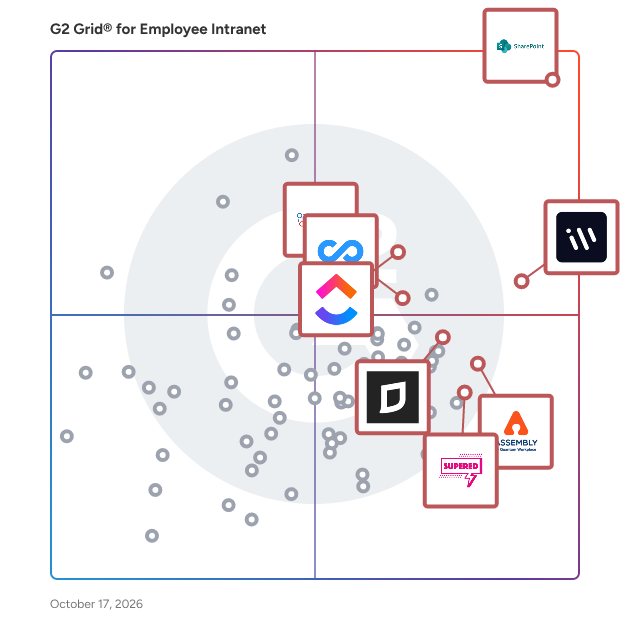
## G2 Grid® for Employee Intranet Software
![G2 Grid® for Employee Intranet Software plotting products by satisfaction and market presence](https://www.g2.com/categories/employee-intranet/grids.png?focus%5B%5D=424&focus%5B%5D=25675&focus%5B%5D=20433&focus%5B%5D=1351183&focus%5B%5D=155020&focus%5B%5D=15891&focus%5B%5D=263&focus%5B%5D=3333)
Highlighted products: Microsoft SharePoint, ClickUp, Connecteam, Supered, Softr, Zoho Connect, Basecamp, and Clinked.
Underlying data: [Grid® JSON](https://www.g2.com/categories/employee-intranet/grids.json?focus%5B%5D=microsoft-sharepoint&amp;focus%5B%5D=clickup&amp;focus%5B%5D=connecteam&amp;focus%5B%5D=supered&amp;focus%5B%5D=softr&amp;focus%5B%5D=zoho-connect&amp;focus%5B%5D=basecamp&amp;focus%5B%5D=clinked&amp;segment=small-business)


## How Many Employee Intranet Software Products Does G2 Track?
**Total Products under this Category:** 193

### Category Stats (Jul 2026)
- **Average Rating**: 4.46/5 The average rating of products in this category, based on all submitted ratings
- **Top Trending Product**: JUST SOCIAL (+1.76%) - Among all products in this category, JUST SOCIAL recorded the largest rating increase compared to last month
*Last updated: July 13, 2026*


## How Does G2 Rank Employee Intranet Software Products?

**Why You Can Trust G2's Software Rankings:**

- 30 Analysts and Data Experts
- 57,700+ Authentic Reviews
- 193+ Products
- Unbiased Rankings

G2's software rankings are built on verified user reviews, rigorous moderation, and a consistent research methodology maintained by a team of analysts and data experts. Each product is measured using the same transparent criteria, with no paid placement or vendor influence. While reviews reflect real user experiences, which can be subjective, they offer valuable insight into how software performs in the hands of professionals. Together, these inputs power the G2 Score, a standardized way to compare tools within every category.


---

**Sponsored**

### Tracknow

Tracknow is an affiliate marketing software. Tracknow offers advanced affiliate solution for affiliate marketing, Multi Level Marketing, Influencers, IB, and iGaming. With Tracknow, you can launch an advanced affiliate solution for your business. ✓ Enjoy a 14-day free trial. No Credit Card Required. ✓ No setup fee ✓ Customer Service 24/7 ✓ Cancel Anytime


[Visit website](https://www.g2.com/external_clickthroughs/record?secure%5Bad_program%5D=ppc&amp;secure%5Bad_slot%5D=category_product_list&amp;secure%5Bcategory_id%5D=1192&amp;secure%5Bchosen_at%5D=2026-07-13T22%3A02%3A06Z&amp;secure%5Bdisplayable_resource_id%5D=1850&amp;secure%5Bdisplayable_resource_type%5D=Category&amp;secure%5Bmedium%5D=sponsored&amp;secure%5Bplacement_reason%5D=retargeted_product&amp;secure%5Bplacement_resource_ids%5D%5B%5D=1314707&amp;secure%5Bprioritized%5D=false&amp;secure%5Bproduct_id%5D=1314707&amp;secure%5Bresource_id%5D=1192&amp;secure%5Bresource_type%5D=Category&amp;secure%5Bsource_type%5D=category_page&amp;secure%5Bsource_url%5D=https%3A%2F%2Fwww.g2.com%2Fcategories%2Femployee-intranet%2Fsmall-business&amp;secure%5Btoken%5D=0a9a8c29e2dd391bd9d4d1dd73c1e4142d8a1bf0a46d93cff7ed77ebbbe7259b&amp;secure%5Burl%5D=https%3A%2F%2Fwww.tracknow.io%2F&amp;secure%5Burl_type%5D=company_website)

---

## What Are the Top-Rated Employee Intranet Software Products in 2026?
### 1. [Microsoft SharePoint](https://www.g2.com/products/microsoft-sharepoint/reviews)
Microsoft SharePoint is a software designed to provide organizations with a centralized intranet and document collaboration platform. The software provides version management, retention scheduling, record declaration, and legal hold capabilities by leveraging Microsoft 365-native infrastructure. It automates content governance workflows and reduces the friction of managing traditional, web, and social content separately. Microsoft SharePoint addresses compliance and information management challenges by enabling teams to create, share, and control access to content across defined groups. The software supports internal website creation, audience-specific pages, and deep integration with other Microsoft products.


**Average Rating:** 4.0/5.0
**Total Reviews:** 8,665
**How Do G2 Users Rate Microsoft SharePoint?**

- **Quality of Support:** 8.0/10 (Category avg: 9.0/10)
- **Ease of Use:** 7.8/10 (Category avg: 8.9/10)
- **Has the product been a good partner in doing business?:** 8.2/10 (Category avg: 9.1/10)
- **Ease of Admin:** 7.6/10 (Category avg: 8.9/10)

**Who Is the Company Behind Microsoft SharePoint?**

- **Seller:** [Microsoft](https://www.g2.com/sellers/microsoft)
- **Year Founded:** 1975
- **HQ Location:** Redmond, Washington
- **Twitter:** @microsoft (13,091,739 Twitter followers)
- **LinkedIn® Page:** https://www.linkedin.com/company/microsoft/ (231,632 employees on LinkedIn®)
- **Ownership:** MSFT

**Who Uses This Product?**
- **Who Uses This:** Project Manager, Consultant
- **Top Industries:** Information Technology and Services, Financial Services
- **Company Size:** 50% Enterprise, 34% Mid-Market


#### What Are Microsoft SharePoint's Pros and Cons?

**Pros:**

- Ease of Use (130 reviews)
- Team Collaboration (113 reviews)
- Easy Integrations (95 reviews)
- Sharing Ease (87 reviews)
- Data Management (86 reviews)

**Cons:**

- Understanding Difficulty (43 reviews)
- Difficult Setup (41 reviews)
- Slow Performance (32 reviews)
- Not User-Friendly (31 reviews)
- Inefficient Searching (28 reviews)


### What Do G2 Reviewers Say About Microsoft SharePoint?
*AI-generated summary from verified user reviews*

**Pros:**

- Users appreciate the **ease of use** of Microsoft SharePoint, enabling simple document management and collaboration across teams.
- Users value the **seamless team collaboration** in SharePoint, enhancing efficiency and real-time information sharing.
- Users find the **easy integrations** with Microsoft 365 tools significantly enhances their operational efficiency and document management.
- Users value the **sharing ease** of SharePoint, enhancing team collaboration and document management effortlessly.
- Users appreciate the **effective document management** of Microsoft SharePoint, enhancing team collaboration and security in one central location.

**Cons:**

- Users find the **understanding difficulty** in SharePoint challenging, particularly for beginners navigating its complex features.
- Users find the **difficult setup** of Microsoft SharePoint challenging, especially without technical knowledge for managing users and permissions.
- Users frequently experience **slow performance** in SharePoint with larger files, impacting real-time data updates and functionality.
- Users find SharePoint **not user-friendly** , citing a steep learning curve and unintuitive navigation that complicates usage.
- Users find **inefficient searching** in SharePoint frustrating, struggling to quickly locate documents due to poor organization.

#### What Are Recent G2 Reviews of Microsoft SharePoint?

**"[Centralized Collaboration and Document Control with Seamless Microsoft Integration](https://www.g2.com/survey_responses/microsoft-sharepoint-review-12973714)"**

**Rating:** 4.5/5.0 stars
*— Tanzim S.*

[Read full review](https://www.g2.com/survey_responses/microsoft-sharepoint-review-12973714)

---

**"[Reliable System for Team Collaboration](https://www.g2.com/survey_responses/microsoft-sharepoint-review-12858498)"**

**Rating:** 5.0/5.0 stars
*— Shalu M.*

[Read full review](https://www.g2.com/survey_responses/microsoft-sharepoint-review-12858498)

---


#### What Are G2 Users Discussing About Microsoft SharePoint?

- [What are some innovative ways organizations are using Microsoft SharePoint to enhance internal collaboration?](https://www.g2.com/discussions/what-are-some-innovative-ways-organizations-are-using-microsoft-sharepoint-to-enhance-internal-collaboration) - 4 comments
- [What is Microsoft SharePoint used for?](https://www.g2.com/discussions/what-is-microsoft-sharepoint-used-for) - 5 comments, 1 upvote
- [What is SharePoint software used for?](https://www.g2.com/discussions/what-is-sharepoint-software-used-for) - 3 comments
- [What are the 6 features of SharePoint?](https://www.g2.com/discussions/what-are-the-6-features-of-sharepoint)

### 2. [ClickUp](https://www.g2.com/products/clickup/reviews)
ClickUp is a software designed to serve as a converged AI workspace that consolidates all work apps, data, and workflows into a single platform. The software provides task management, no-code workflow automation, wikis, and AI-assisted productivity tools by leveraging a unified data layer that gives teams complete context across projects. It automates repetitive operational processes and reduces the friction of switching between disconnected work applications. ClickUp addresses work sprawl by creating one centralized place for both human contributors and AI agents to collaborate on any type of work. The software supports over 20 million users worldwide and integrates with a broad ecosystem of third-party tools to serve teams across marketing, software development, and operations.


**Average Rating:** 4.6/5.0
**Total Reviews:** 12,516
**How Do G2 Users Rate ClickUp?**

- **Quality of Support:** 8.8/10 (Category avg: 9.0/10)
- **Ease of Use:** 8.5/10 (Category avg: 8.9/10)
- **Has the product been a good partner in doing business?:** 9.0/10 (Category avg: 9.1/10)
- **Ease of Admin:** 8.6/10 (Category avg: 8.9/10)

**Who Is the Company Behind ClickUp?**

- **Seller:** [ClickUp](https://www.g2.com/sellers/clickup)
- **Company Website:** https://ClickUp.com
- **Year Founded:** 2017
- **HQ Location:** San Diego, California
- **Twitter:** @clickup (69,539 Twitter followers)
- **LinkedIn® Page:** https://www.linkedin.com/company/12949663/ (1,526 employees on LinkedIn®)

**Who Uses This Product?**
- **Who Uses This:** CEO, Project Manager
- **Top Industries:** Marketing and Advertising, Computer Software
- **Company Size:** 77% Small-Business, 19% Mid-Market


#### What Are ClickUp's Pros and Cons?

**Pros:**

- Ease of Use (4220 reviews)
- Task Management (3219 reviews)
- Features (3119 reviews)
- Project Management (2788 reviews)
- Organization (2589 reviews)

**Cons:**

- Missing Features (2039 reviews)
- Learning Curve (1751 reviews)
- Limited Features (1334 reviews)
- Not Intuitive (1181 reviews)
- Slow Loading (1156 reviews)


### What Do G2 Reviewers Say About ClickUp?
*AI-generated summary from verified user reviews*

**Pros:**

- Users find ClickUp&#39;s **ease of use** crucial for effective collaboration, organization, and streamlined project management.
- Users value the **robust task management** of ClickUp, enhancing organization, productivity, and team collaboration effectively.
- Users value the **robust and extensive features** of ClickUp, enhancing productivity and tailoring workflows to their needs.
- Users value the **flexibility and integration** of ClickUp for seamless project management and team collaboration.
- Users appreciate ClickUp for its **effective organization** , streamlining collaboration and task management on a single platform.

**Cons:**

- Users find that **many features are locked behind a paywall** , limiting accessibility and complicating their workflow.
- Users note a **steep learning curve** for beginners, making initial adjustments to the system challenging.
- Users find ClickUp has **limited features** , lacking integrations and flexibility in plans for individual users.
- Users find ClickUp **not intuitive** , often struggling to navigate features and manage their workspace efficiently.
- Users often experience **slow loading** times in ClickUp, which can hinder their overall productivity and workflow.

#### What Are Recent G2 Reviews of ClickUp?

**"[Flexible, Fast, and Easy to Use Across Teams—With Great Integrations and Inbox](https://www.g2.com/survey_responses/clickup-review-13095325)"**

**Rating:** 4.0/5.0 stars
*— Jon C.*

[Read full review](https://www.g2.com/survey_responses/clickup-review-13095325)

---

**"[ClickUp Keeps Tasks, Docs, and Project Tracking Perfectly in One Place](https://www.g2.com/survey_responses/clickup-review-13095639)"**

**Rating:** 5.0/5.0 stars
*— Kas C.*

[Read full review](https://www.g2.com/survey_responses/clickup-review-13095639)

---


#### What Are G2 Users Discussing About ClickUp?

- [What features of ClickUp make it a preferred choice for project management in agile teams?](https://www.g2.com/discussions/what-features-of-clickup-make-it-a-preferred-choice-for-project-management-in-agile-teams) - 6 comments, 6 upvotes
- [What is ClickUp used for?](https://www.g2.com/discussions/what-is-clickup-used-for) - 10 comments, 4 upvotes
- [Does Google use ClickUp?](https://www.g2.com/discussions/does-google-use-clickup) - 4 comments, 3 upvotes
- [Who uses ClickUp?](https://www.g2.com/discussions/who-uses-clickup) - 14 comments, 4 upvotes
- [Is ClickUp really free?](https://www.g2.com/discussions/is-clickup-really-free) - 12 comments, 3 upvotes

### 3. [Connecteam](https://www.g2.com/products/connecteam/reviews)
Connecteam is a software designed to help organizations with deskless and frontline teams manage scheduling, time tracking, communication, HR processes, and training from a single mobile-first app. The software provides AI-assisted scheduling, GPS time tracking, custom checklists, digital forms, and mobile course creation by leveraging an AI engine that handles availability, roles, and fairness automatically. It automates payroll-ready timesheets and new hire onboarding workflows and reduces the friction of switching between separate workforce management tools. Connecteam addresses the operational challenges of managing dispersed frontline teams by consolidating communication, task management, and training into one intuitive platform. The software supports Active Directory SSO, auto-translation of team updates into each employee&#39;s preferred language, and AI-powered in-chat guidance that surfaces answers directly from internal resources.


**Average Rating:** 4.6/5.0
**Total Reviews:** 3,491
**How Do G2 Users Rate Connecteam?**

- **Quality of Support:** 9.1/10 (Category avg: 9.0/10)
- **Ease of Use:** 9.0/10 (Category avg: 8.9/10)
- **Has the product been a good partner in doing business?:** 9.2/10 (Category avg: 9.1/10)
- **Ease of Admin:** 9.0/10 (Category avg: 8.9/10)

**Who Is the Company Behind Connecteam?**

- **Seller:** [Connecteam](https://www.g2.com/sellers/connecteam)
- **Year Founded:** 2015
- **HQ Location:** New York, NY
- **Twitter:** @ConnecteamApp (1,235 Twitter followers)
- **LinkedIn® Page:** https://www.linkedin.com/company/10591384/ (523 employees on LinkedIn®)

**Who Uses This Product?**
- **Who Uses This:** Owner, Manager
- **Top Industries:** Construction, Retail
- **Company Size:** 83% Small-Business, 14% Mid-Market


#### What Are Connecteam's Pros and Cons?

**Pros:**

- Ease of Use (1623 reviews)
- Features (950 reviews)
- Scheduling (870 reviews)
- Team Collaboration (726 reviews)
- User-Friendly (702 reviews)

**Cons:**

- Missing Features (442 reviews)
- Limited Features (424 reviews)
- Scheduling Issues (300 reviews)
- Improvement Needed (280 reviews)
- Learning Curve (280 reviews)


### What Do G2 Reviewers Say About Connecteam?
*AI-generated summary from verified user reviews*

**Pros:**

- Users find Connecteam to be incredibly **easy to use** , making onboarding and daily operations smooth and efficient.
- Users appreciate the **intuitive interface** of Connecteam, making task management and communication seamless and efficient.
- Users appreciate the **ease of scheduling** with Connecteam, enhancing team communication and minimizing missed clock-ins.
- Users appreciate the **seamless team collaboration** offered by Connecteam, enhancing communication and task management effortlessly.
- Users find Connecteam to be a **user-friendly platform** that simplifies staff management and communication effectively.

**Cons:**

- Users find the **missing features** on the mobile app limiting, wishing for more customizable options and convenience.
- Users express disappointment over **limited features** in the Connecteam app compared to the desktop version.
- Users find **scheduling issues** with Connecteam, particularly for complex needs and multiple department approvals, quite frustrating.
- Users note that **improvement is needed** in the time clock functionality and the clarity of the display.
- Users find the **learning curve challenging** , especially with features that are easier to access on desktop than mobile.

#### What Are Recent G2 Reviews of Connecteam?

**"[A Game-Changer for Small Businesses: Free, Easy Scheduling and Job Pay Tracking](https://www.g2.com/survey_responses/connecteam-review-12874312)"**

**Rating:** 5.0/5.0 stars
*— Verified User in Construction*

[Read full review](https://www.g2.com/survey_responses/connecteam-review-12874312)

---

**"[Connecteam Review](https://www.g2.com/survey_responses/connecteam-review-10735494)"**

**Rating:** 5.0/5.0 stars
*— Kurt B.*

[Read full review](https://www.g2.com/survey_responses/connecteam-review-10735494)

---


#### What Are G2 Users Discussing About Connecteam?

- [Is Connecteam secure?](https://www.g2.com/discussions/is-connecteam-secure) - 2 comments
- [How do you use Connecteam?](https://www.g2.com/discussions/how-do-you-use-connecteam) - 2 comments
- [Is Connecteam really free?](https://www.g2.com/discussions/is-connecteam-really-free)
- [Is Connecteam a good app?](https://www.g2.com/discussions/is-connecteam-a-good-app) - 2 comments

### 4. [Supered](https://www.g2.com/products/supered/reviews)
Supered is a software designed to improve sales playbook adoption and sales process execution directly inside CRM platforms. The software provides contextual, in-app guidance, executable sales playbooks, role-aware coaching, and manager visibility into deal execution by leveraging native integration with HubSpot and Salesforce to deliver just-in-time enablement at the moment of need. It automates the delivery of updated playbook guidance across the sales organization and reduces the friction of maintaining static documentation that goes unused outside the CRM. Supered addresses the gap between sales training and live selling behavior by making processes observable and enforceable within the systems reps already use every day. The software supports SOC 2 compliance, GDPR alignment, and existing CRM permissions, making it suitable for RevOps, sales operations, and enablement teams seeking consistent execution across regions and deal stages.


**Average Rating:** 4.9/5.0
**Total Reviews:** 79
**How Do G2 Users Rate Supered?**

- **Quality of Support:** 9.7/10 (Category avg: 9.0/10)
- **Ease of Use:** 9.2/10 (Category avg: 8.9/10)
- **Has the product been a good partner in doing business?:** 9.9/10 (Category avg: 9.1/10)
- **Ease of Admin:** 9.3/10 (Category avg: 8.9/10)

**Who Is the Company Behind Supered?**

- **Seller:** [Supered](https://www.g2.com/sellers/supered)
- **Company Website:** https://supered.io
- **Year Founded:** 2023
- **HQ Location:** Atlanta, US
- **LinkedIn® Page:** https://www.linkedin.com/company/getsupered/about/ (18 employees on LinkedIn®)

**Who Uses This Product?**
- **Top Industries:** Consulting, Information Technology and Services
- **Company Size:** 55% Small-Business, 23% Mid-Market


#### What Are Supered's Pros and Cons?

**Pros:**

- Ease of Use (28 reviews)
- Easy Setup (15 reviews)
- CRM Efficiency (9 reviews)
- Data Centralization (9 reviews)
- Simple (8 reviews)

**Cons:**

- Steep Learning Curve (4 reviews)
- Update Issues (4 reviews)
- Learning Curve (3 reviews)
- Not Intuitive (3 reviews)
- Poor User Experience (3 reviews)


### What Do G2 Reviewers Say About Supered?
*AI-generated summary from verified user reviews*

**Pros:**

- Users love the **ease of use** of Supered, enhancing efficiency and streamlining task management seamlessly in HubSpot.
- Users commend Supered for its **easy setup** , complemented by excellent support and valuable features for seamless implementation.
- Users appreciate the **CRM efficiency** of Supered, enhancing training and support directly within HubSpot workflows.
- Users value the **easy data centralization** in Supered, enhancing communication and streamlining training processes effectively.
- Users love the **simplicity and efficiency** of Supered, enhancing task management and ensuring process consistency.

**Cons:**

- Users experience a **steep learning curve** with Supered&#39;s interface, requiring time to adapt to new interactions.
- Users face challenges with **update issues** in Supered, as frequent changes can lead to missed features and functionality problems.
- Users experience a **learning curve** with Supered, requiring time to understand its interface and object interactions.
- Users find Supered&#39;s interface **not intuitive** , requiring time to learn object interactions and navigate effectively.
- Users find the **poor user experience** of Supered frustrating, highlighting its complexity and navigation challenges.

#### What Are Recent G2 Reviews of Supered?

**"[Easy to Implement, Seamless HubSpot Integration, and Streamlined 1:1s](https://www.g2.com/survey_responses/supered-review-12855142)"**

**Rating:** 5.0/5.0 stars
*— Amanda C.*

[Read full review](https://www.g2.com/survey_responses/supered-review-12855142)

---

**"[Intuitive Guides, Powerful Analytics, Exceptional Support](https://www.g2.com/survey_responses/supered-review-13052739)"**

**Rating:** 5.0/5.0 stars
*— Ryan G.*

[Read full review](https://www.g2.com/survey_responses/supered-review-13052739)

---


### 5. [Zoho Connect](https://www.g2.com/products/zoho-connect/reviews)
Zoho Connect is a software designed to unify employees, resources, and business applications within a modern intranet and employee experience platform. The software provides team spaces, knowledge base creation, discussion forums, peer recognition, custom app deployment, and event scheduling by leveraging native integration with the broader Zoho ecosystem. It automates internal communication and knowledge sharing workflows and reduces the friction of navigating multiple disconnected tools. Zoho Connect addresses collaboration gaps by giving employees a single place to connect, share ideas, manage work plans, and reach the right people. The software supports a community option for collaborating with external partners, customers, and agents, making it adaptable for organizations with diverse stakeholder needs.


**Average Rating:** 4.5/5.0
**Total Reviews:** 98
**How Do G2 Users Rate Zoho Connect?**

- **Quality of Support:** 8.6/10 (Category avg: 9.0/10)
- **Ease of Use:** 9.0/10 (Category avg: 8.9/10)
- **Has the product been a good partner in doing business?:** 8.8/10 (Category avg: 9.1/10)
- **Ease of Admin:** 8.2/10 (Category avg: 8.9/10)

**Who Is the Company Behind Zoho Connect?**

- **Seller:** [Zoho](https://www.g2.com/sellers/zoho-b00ca9d5-bca8-41b5-a8ad-275480841704)
- **Year Founded:** 1996
- **HQ Location:** Austin, TX
- **Twitter:** @Zoho (137,880 Twitter followers)
- **LinkedIn® Page:** https://www.linkedin.com/company/38373/ (30,766 employees on LinkedIn®)
- **Phone:** +1 (888) 900-9646 

**Who Uses This Product?**
- **Top Industries:** Information Technology and Services, Computer Software
- **Company Size:** 53% Small-Business, 31% Mid-Market


#### What Are Zoho Connect's Pros and Cons?

**Pros:**

- Ease of Use (6 reviews)
- Collaboration (3 reviews)
- Communication (3 reviews)
- Engagement (2 reviews)
- Helpful (2 reviews)

**Cons:**

- Limited Features (2 reviews)
- Integration Issues (1 reviews)
- Lack of Features (1 reviews)
- Learning Curve (1 reviews)
- Limited Customization (1 reviews)


### What Do G2 Reviewers Say About Zoho Connect?
*AI-generated summary from verified user reviews*

**Pros:**

- Users appreciate the **ease of use** in Zoho Connect, making collaboration and task management seamless and efficient.
- Users love the **seamless collaboration** in Zoho Connect, enhancing teamwork and communication effortlessly across the team.
- Users value the **effective communication** in Zoho Connect, enhancing teamwork and keeping everyone informed effortlessly.
- Users value the **enhanced engagement** in Zoho Connect, facilitating smooth and organized teamwork through direct communication.
- Users enjoy the **smooth and organized communication** in Zoho Connect, enhancing teamwork without complexity.

**Cons:**

- Users find the **limited features** in Zoho Connect lacking for specialized needs in document and presentation tasks.
- Users often face **integration issues** with social media accounts, making it challenging to synchronize effectively.
- Users find a **lack of features** in Zoho Connect, particularly in editing tasks and sharing multiple screens.
- Users note the **learning curve** with Zoho Connect, especially in adapting to a new communication culture.
- Users find **limited customization** frustrating, particularly in recurring tasks and screen sharing options.

#### What Are Recent G2 Reviews of Zoho Connect?

**"[Keeping My Clinic Discussions and Daily Work Notes in One Place](https://www.g2.com/survey_responses/zoho-connect-review-12713565)"**

**Rating:** 5.0/5.0 stars
*— Ishan S.*

[Read full review](https://www.g2.com/survey_responses/zoho-connect-review-12713565)

---

**"[If you are looking for task management zoho connect one stop solution](https://www.g2.com/survey_responses/zoho-connect-review-11745212)"**

**Rating:** 5.0/5.0 stars
*— Rishabh P.*

[Read full review](https://www.g2.com/survey_responses/zoho-connect-review-11745212)

---


#### What Are G2 Users Discussing About Zoho Connect?

- [What is your experience with Zoho Connect for team collaboration, and what improvements could be made?](https://www.g2.com/discussions/what-is-your-experience-with-zoho-connect-for-team-collaboration-and-what-improvements-could-be-made)
- [What is Zoho Connect used for?](https://www.g2.com/discussions/zoho-connect-what-is-zoho-connect-used-for)
- [What does Zoho Connect do?](https://www.g2.com/discussions/what-does-zoho-connect-do) - 1 comment
- [What is Zoho workplace?](https://www.g2.com/discussions/what-is-zoho-workplace)
- [What is Zoho connect?](https://www.g2.com/discussions/what-is-zoho-connect)

### 6. [Softr](https://www.g2.com/products/softr/reviews)
Softr is the leading AI platform for building business software — including apps, databases, workflow automation, and forms — without code. Most teams are held back by fragmented systems: work is scattered across spreadsheets, docs, messages, and tools that don&#39;t connect. Softr replaces that fragmentation with a single platform for building software tailored to your exact workflows and business logic — without waiting on developers, IT, or outside help. Start with the AI app builder, then switch to visual editing anytime. Add features, adjust logic, and make changes yourself as your business evolves. No technical overhead, no tickets, no waiting. With Softr, you can build client portals, internal tools, CRMs, project trackers, dashboards, employee intranets, inventory management systems, partner portals, ERP systems, lead capture forms, and more. Key features: - All-in-one platform: Build and connect apps, databases, workflow automation, and forms in a single platform, without having to switch between tools. - Native databases and 17+ data source integrations: Store and manage data in Softr Databases, or sync in real time with external sources, including Airtable, HubSpot, Notion, monday.com, Coda, ClickUp, Google Sheets, SQL data sources, and more. - Production-ready infrastructure: User management, hosting, and security are built in from day one, making your apps ready to deploy securely. - AI-powered building: Describe what you need in plain language and get a working app, then customize visually without writing code. - Custom user groups and granular permissions: Control exactly who can see, access, and edit what across your apps. - Built to scale: Add features, make changes, and grow your software as your business evolves, all without technical debt or developer dependencies. Softr is used by operations, HR, finance, sales, customer success, and business teams at organizations of all sizes, as well as agencies and consultants who need professional, branded software without hiring a developer. Trusted by 1M+ organizations worldwide, from Fortune 500s to fast-growing startups.


**Average Rating:** 4.7/5.0
**Total Reviews:** 698
**How Do G2 Users Rate Softr?**

- **Quality of Support:** 9.6/10 (Category avg: 9.0/10)
- **Ease of Use:** 9.1/10 (Category avg: 8.9/10)
- **Has the product been a good partner in doing business?:** 9.2/10 (Category avg: 9.1/10)
- **Ease of Admin:** 9.0/10 (Category avg: 8.9/10)

**Who Is the Company Behind Softr?**

- **Seller:** [Softr](https://www.g2.com/sellers/softr)
- **Company Website:** https://softr.io/
- **Year Founded:** 2020
- **HQ Location:** Berlin, DE
- **Twitter:** @softr_io (15,629 Twitter followers)
- **LinkedIn® Page:** https://www.linkedin.com/company/softr/ (77 employees on LinkedIn®)

**Who Uses This Product?**
- **Who Uses This:** Founder, CEO
- **Top Industries:** Computer Software, Consulting
- **Company Size:** 87% Small-Business, 7% Mid-Market


#### What Are Softr's Pros and Cons?

**Pros:**

- Ease of Use (169 reviews)
- Customer Support (110 reviews)
- Easy Setup (96 reviews)
- Integrations (85 reviews)
- Easy Integration (83 reviews)

**Cons:**

- Limited Customization (75 reviews)
- Missing Features (67 reviews)
- Limited Features (64 reviews)
- Limitations (31 reviews)
- Expensive (30 reviews)


### What Do G2 Reviewers Say About Softr?
*AI-generated summary from verified user reviews*

**Pros:**

- Users appreciate the **ease of use** of Softr, facilitating seamless project setup and integration, even for beginners.
- Users value the **excellent customer support** from Softr, noting fast replies and effective problem-solving.
- Users love the **easy setup** of Softr, allowing effortless implementation and experimentation even for beginners.
- Users value the **easy integrations** with Airtable and Monday.com, enhancing their app-building experience effectively.
- Users praise Softr for its **easy integration** with various platforms, enhancing their app development experience significantly.

**Cons:**

- Users desire more **customization options** in Softr&#39;s interface to enhance personal branding and design flexibility.
- Users find **missing features** like limited action buttons and less practical blogging affect the functionality of Softr.
- Users find the **limited features** of Softr restrictive, impacting their app development needs and project flexibility.
- Users find **limitations in customization and functionality** with Softr, impacting their ability to create as desired.
- Users find Softr **expensive** , especially as pricing increases quickly with scaling, impacting long-term project considerations.

#### What Are Recent G2 Reviews of Softr?

**"[Softr Helped Me Build Professional Web Apps Without Coding](https://www.g2.com/survey_responses/softr-review-13036562)"**

**Rating:** 5.0/5.0 stars
*— Kathy UGC Creator .*

[Read full review](https://www.g2.com/survey_responses/softr-review-13036562)

---

**"[Rapid No-Code App Launches with Softr’s Clean Blocks and Easy Data Connections](https://www.g2.com/survey_responses/softr-review-13066660)"**

**Rating:** 5.0/5.0 stars
*— NacwAiBiotechHealthcare D.*

[Read full review](https://www.g2.com/survey_responses/softr-review-13066660)

---


#### What Are G2 Users Discussing About Softr?

- [What is Softr used for?](https://www.g2.com/discussions/what-is-softr-used-for)

### 7. [Basecamp](https://www.g2.com/products/basecamp/reviews)
Basecamp is a software designed to help teams manage projects, communicate, and stay organized in one centralized collaboration platform. The software provides document collaboration, project scheduling, task visibility, and team messaging by leveraging a straightforward interface that replaces the need for frequent meetings and email threads. It automates project organization and status visibility and reduces the friction of coordinating work across teammates and clients in different locations. Basecamp addresses communication and project management sprawl by giving every team a single, structured place where all work-related activity is visible and accessible. The software supports hundreds of thousands of teams worldwide and is suitable for both internal team collaboration and client-facing project coordination.


**Average Rating:** 4.1/5.0
**Total Reviews:** 5,356
**How Do G2 Users Rate Basecamp?**

- **Quality of Support:** 8.4/10 (Category avg: 9.0/10)
- **Ease of Use:** 8.5/10 (Category avg: 8.9/10)
- **Has the product been a good partner in doing business?:** 8.7/10 (Category avg: 9.1/10)
- **Ease of Admin:** 8.6/10 (Category avg: 8.9/10)

**Who Is the Company Behind Basecamp?**

- **Seller:** [37signals](https://www.g2.com/sellers/37signals)
- **Year Founded:** 1999
- **HQ Location:** Chicago, IL
- **Twitter:** @basecamp (7,061 Twitter followers)
- **LinkedIn® Page:** https://www.linkedin.com/company/98003/ (175 employees on LinkedIn®)

**Who Uses This Product?**
- **Who Uses This:** Project Manager, Marketing Manager
- **Top Industries:** Marketing and Advertising, Information Technology and Services
- **Company Size:** 50% Small-Business, 34% Mid-Market


#### What Are Basecamp's Pros and Cons?

**Pros:**

- Ease of Use (90 reviews)
- Team Collaboration (69 reviews)
- Project Management (59 reviews)
- Organization (49 reviews)
- Task Management (43 reviews)

**Cons:**

- Limited Features (36 reviews)
- Missing Features (30 reviews)
- Limited Functionality (24 reviews)
- Project Management (21 reviews)
- Lack of Features (18 reviews)


### What Do G2 Reviewers Say About Basecamp?
*AI-generated summary from verified user reviews*

**Pros:**

- Users appreciate the **ease of use** of Basecamp, enjoying a straightforward and organized project management experience.
- Users love the **streamlined team collaboration** in Basecamp, enhancing project coordination and communication effortlessly.
- Users value the **collaboration tools** of Basecamp, enabling effective teamwork and streamlined project management.
- Users value the **organization capabilities** of Basecamp, enhancing project management and streamlining communication seamlessly.
- Users appreciate the **intuitive task management** of Basecamp, simplifying complex projects and enhancing team collaboration.

**Cons:**

- Users find that Basecamp has **limited features** , lacking advanced tools and improved scheduling options compared to competitors.
- Users find Basecamp has **missing features** that limit project management, especially in reporting and scheduling options.
- Users find Basecamp&#39;s **limited functionality** frustrating for complex workflows, hindering management and scheduling efficiency.
- Users find Basecamp&#39;s **flat structure confusing** , especially for managing complex projects and tracking dependencies effectively.
- Users find a **lack of features** in Basecamp that limits functionality compared to other software options available.

#### What Are Recent G2 Reviews of Basecamp?

**"[Basecamp keeps projects simple, organized, and easy to follow](https://www.g2.com/survey_responses/basecamp-review-13091559)"**

**Rating:** 4.5/5.0 stars
*— Samantha V.*

[Read full review](https://www.g2.com/survey_responses/basecamp-review-13091559)

---

**"[Message Boards and To-dos cut out a lot of unnecessary follow-ups](https://www.g2.com/survey_responses/basecamp-review-13051748)"**

**Rating:** 5.0/5.0 stars
*— Alamgir H.*

[Read full review](https://www.g2.com/survey_responses/basecamp-review-13051748)

---


#### What Are G2 Users Discussing About Basecamp?

- [What makes Basecamp a preferred tool for project management in remote work settings?](https://www.g2.com/discussions/basecamp-what-makes-basecamp-a-preferred-tool-for-project-management-in-remote-work-settings) - 2 comments
- [What makes Basecamp a preferred tool for project management in remote work settings?](https://www.g2.com/discussions/what-makes-basecamp-a-preferred-tool-for-project-management-in-remote-work-settings) - 2 comments
- [What is Basecamp used for?](https://www.g2.com/discussions/basecamp-what-is-basecamp-used-for) - 4 comments
- [Is basecamp the best project management software?](https://www.g2.com/discussions/is-basecamp-the-best-project-management-software) - 3 comments
- [What is the best way to use Basecamp?](https://www.g2.com/discussions/what-is-the-best-way-to-use-basecamp) - 1 comment

### 8. [Assembly by Quantum Workplace](https://www.g2.com/products/assembly-by-quantum-workplace/reviews)
Assembly by Quantum Workplace is a software designed to help HR teams build high-performing, connected cultures through employee recognition and engagement. The software provides peer and manager recognition, automated milestone celebrations, gamified challenges, and a flexible rewards catalog by leveraging AI-powered tools including DoraAI for engagement insights and an AI assistant for crafting personalized recognition messages. It automates birthday, work anniversary, and new hire celebration workflows and reduces the friction of manually tracking and rewarding employee contributions. Assembly by Quantum Workplace addresses retention and morale challenges by making continuous, values-aligned appreciation easy for every level of the organization. The software supports integration with Microsoft Teams and Slack, multilingual participation for distributed teams, and custom branding to align recognition programs with company identity.


**Average Rating:** 4.8/5.0
**Total Reviews:** 4,082
**How Do G2 Users Rate Assembly by Quantum Workplace?**

- **Quality of Support:** 9.5/10 (Category avg: 9.0/10)
- **Ease of Use:** 9.5/10 (Category avg: 8.9/10)
- **Has the product been a good partner in doing business?:** 9.6/10 (Category avg: 9.1/10)
- **Ease of Admin:** 9.5/10 (Category avg: 8.9/10)

**Who Is the Company Behind Assembly by Quantum Workplace?**

- **Seller:** [Quantum Workplace](https://www.g2.com/sellers/quantum-workplace)
- **Company Website:** https://www.quantumworkplace.com
- **Year Founded:** 2002
- **HQ Location:** Omaha, NE
- **Twitter:** @QuantumWork (1,904 Twitter followers)
- **LinkedIn® Page:** https://www.linkedin.com/company/350249/ (162 employees on LinkedIn®)

**Who Uses This Product?**
- **Who Uses This:** Software Engineer, Manager
- **Top Industries:** Computer Software, Information Technology and Services
- **Company Size:** 67% Mid-Market, 18% Enterprise


#### What Are Assembly by Quantum Workplace's Pros and Cons?

**Pros:**

- Recognition (1330 reviews)
- Ease of Use (1061 reviews)
- Appreciation (979 reviews)
- Peer Recognition (949 reviews)
- Rewards (937 reviews)

**Cons:**

- Limited Options (168 reviews)
- Limited Points (158 reviews)
- Reward Limitations (146 reviews)
- Not User-Friendly (114 reviews)
- Confusion (102 reviews)


### What Do G2 Reviewers Say About Assembly by Quantum Workplace?
*AI-generated summary from verified user reviews*

**Pros:**

- Users value the **easy recognition process** in Assembly, enhancing workplace culture and meaningful connections among coworkers.
- Users find Assembly by Quantum Workplace to be **very user-friendly** , enhancing employee engagement and making participation enjoyable.
- Users appreciate the **focus on peer recognition** with Assembly, enhancing team bonding and workplace culture effectively.
- Users love the **easy peer recognition** in Assembly, enhancing community and aligning with company values through rewards.
- Users value the **easy rewards system** of Assembly, enhancing peer recognition and promoting team collaboration.

**Cons:**

- Users find the **limited options for redemption** restrictive, impacting their overall experience with the Assembly product.
- Users find the **limited points system** frustrating, as it hinders their ability to redeem meaningful rewards.
- Users dislike the **expiration of rewards** at the end of the month, preferring more flexible cash-out options.
- Users find the **navigation difficult** , requiring extra steps to access important features like birthdays and anniversaries.
- Users find the **navigation confusing** in Assembly, wishing for a more intuitive interface or a simpler app.

#### What Are Recent G2 Reviews of Assembly by Quantum Workplace?

**"[Friendly, Easy-to-Use Rewards with Convenient Gift Card Redemption](https://www.g2.com/survey_responses/assembly-by-quantum-workplace-review-13077925)"**

**Rating:** 5.0/5.0 stars
*— Claudia D.*

[Read full review](https://www.g2.com/survey_responses/assembly-by-quantum-workplace-review-13077925)

---

**"[Great Platform for Building Visibility and uplifting Team Morale](https://www.g2.com/survey_responses/assembly-by-quantum-workplace-review-13087300)"**

**Rating:** 5.0/5.0 stars
*— Laura L.*

[Read full review](https://www.g2.com/survey_responses/assembly-by-quantum-workplace-review-13087300)

---


#### What Are G2 Users Discussing About Assembly by Quantum Workplace?

- [What is the importance of employee recognition?](https://www.g2.com/discussions/what-is-the-importance-of-employee-recognition)
- [How do you motivate employees with recognition?](https://www.g2.com/discussions/how-do-you-motivate-employees-with-recognition)
- [Which is the purpose of the assembly website and slack integration?](https://www.g2.com/discussions/assembly-which-is-the-purpose-of-the-assembly-website-and-slack-integration)
- [What are employee recognition programs?](https://www.g2.com/discussions/what-are-employee-recognition-programs) - 1 comment

### 9. [Jostle](https://www.g2.com/products/jostle/reviews)
Jostle is a software designed to help employees connect, communicate, and celebrate at work through a dedicated employee success platform. The software provides announcements, documentation management, SSO integration, and participation-focused engagement tools by leveraging a design approach centered on belonging and contribution for employees anywhere and anytime. It automates internal communication distribution and reduces the friction of driving company-wide adoption of a shared digital workplace. Jostle addresses the challenge of building an engaged, connected workforce by creating a platform with industry-leading participation rates across more than 1,000 organizations. The software supports secure SSO login, efficient content management, and a responsive support team to help organizations sustain ongoing employee engagement.


**Average Rating:** 4.6/5.0
**Total Reviews:** 230
**How Do G2 Users Rate Jostle?**

- **Quality of Support:** 9.2/10 (Category avg: 9.0/10)
- **Ease of Use:** 9.1/10 (Category avg: 8.9/10)
- **Has the product been a good partner in doing business?:** 9.4/10 (Category avg: 9.1/10)
- **Ease of Admin:** 8.9/10 (Category avg: 8.9/10)

**Who Is the Company Behind Jostle?**

- **Seller:** [Jostle Corporation](https://www.g2.com/sellers/jostle-corporation)
- **Company Website:** https://www.jostle.me
- **Year Founded:** 2009
- **HQ Location:** Vancouver
- **Twitter:** @JostleMe (4,305 Twitter followers)
- **LinkedIn® Page:** https://www.linkedin.com/company/393050/ (57 employees on LinkedIn®)

**Who Uses This Product?**
- **Who Uses This:** Marketing Manager
- **Top Industries:** Non-Profit Organization Management, Construction
- **Company Size:** 75% Mid-Market, 14% Small-Business


#### What Are Jostle's Pros and Cons?

**Pros:**

- Ease of Use (16 reviews)
- Features (10 reviews)
- Team Collaboration (9 reviews)
- Communication (8 reviews)
- Engagement (7 reviews)

**Cons:**

- Slow Loading (4 reviews)
- Missing Features (3 reviews)
- Inefficient Searching (2 reviews)
- Login Issues (2 reviews)
- Mobile App Issues (2 reviews)


### What Do G2 Reviewers Say About Jostle?
*AI-generated summary from verified user reviews*

**Pros:**

- Users find Jostle to be **intuitive and easy to use** , facilitating smooth navigation and effective communication across diverse teams.
- Users appreciate the **versatile features** of Jostle, enhancing communication and team connections within their organizations.
- Users appreciate how Jostle enhances **team collaboration** , fostering community and simplifying access to essential tools and information.
- Users appreciate the **effective communication tools** Jostle offers, enhancing connectivity and information sharing across their organization.
- Users value the **engaging features** of Jostle, enhancing communication and collaboration in a hybrid work environment.

**Cons:**

- Users experience **slow loading times** , especially during initial setup and bulk uploads, impacting overall usability.
- Users find the lack of **important notification settings** and mobile news post creation to be limiting in Jostle.
- Users find the **inefficient searching** process cumbersome, highlighting inconsistencies that disrupt their content-finding experience.
- Users face **login issues** occasionally, though support team resolves them quickly, impacting overall user experience.
- Users experience **mobile app issues** , noting instability and limitations in creating news posts on mobile devices.

#### What Are Recent G2 Reviews of Jostle?

**"[Excellent tool for communicating across the organziation.](https://www.g2.com/survey_responses/jostle-review-626652)"**

**Rating:** 5.0/5.0 stars
*— Debbie C.*

[Read full review](https://www.g2.com/survey_responses/jostle-review-626652)

---

**"[People-First Platform That Boosts Communication, Connection, and Employee Engagement](https://www.g2.com/survey_responses/jostle-review-13048501)"**

**Rating:** 5.0/5.0 stars
*— Chirag P.*

[Read full review](https://www.g2.com/survey_responses/jostle-review-13048501)

---


#### What Are G2 Users Discussing About Jostle?

- [What is Jostle used for?](https://www.g2.com/discussions/what-is-jostle-used-for)

### 10. [Clinked](https://www.g2.com/products/clinked/reviews)
Clinked is a software designed to streamline communication, file sharing, and collaboration for teams, project groups, and business clients within a secure, cloud-based portal environment. The software provides white-labeled client portals, virtual data rooms, real-time document editing, task management with Kanban boards, and robust communication tools by leveraging ISO 27001 certified infrastructure with 256-bit SSL encryption, AES encryption at rest, and compliance with GDPR, HIPAA, and SOC 2. It automates file organization and client update workflows and reduces the friction of managing secure document exchange across multiple stakeholders. Clinked addresses the need for a branded, professional client-facing workspace by enabling organizations to deploy custom-domain portals with their own logos, colors, and native mobile apps on Android and iOS. The software supports native integrations with Google Workspace, Acrobat Sign, DocuSign, and JotForm, and connects to over 7,000 apps via Zapier and a public API.


**Average Rating:** 4.8/5.0
**Total Reviews:** 143
**How Do G2 Users Rate Clinked?**

- **Quality of Support:** 9.7/10 (Category avg: 9.0/10)
- **Ease of Use:** 9.7/10 (Category avg: 8.9/10)
- **Has the product been a good partner in doing business?:** 9.7/10 (Category avg: 9.1/10)
- **Ease of Admin:** 9.6/10 (Category avg: 8.9/10)

**Who Is the Company Behind Clinked?**

- **Seller:** [Clinked](https://www.g2.com/sellers/clinked)
- **Company Website:** https://clinked.com/
- **Year Founded:** 2008
- **HQ Location:** Cambridge, UK
- **Twitter:** @clinked (1,295 Twitter followers)
- **LinkedIn® Page:** https://www.linkedin.com/company/clinked/about (17 employees on LinkedIn®)

**Who Uses This Product?**
- **Top Industries:** Computer Software, Marketing and Advertising
- **Company Size:** 66% Small-Business, 25% Mid-Market


#### What Are Clinked's Pros and Cons?

**Pros:**

- Ease of Use (235 reviews)
- Collaboration (202 reviews)
- Team Collaboration (181 reviews)
- File Sharing (117 reviews)
- Functionality (117 reviews)

**Cons:**

- Limited Customization (32 reviews)
- Learning Curve (22 reviews)
- Missing Features (21 reviews)
- Integration Issues (20 reviews)
- Limited Features (17 reviews)


### What Do G2 Reviewers Say About Clinked?
*AI-generated summary from verified user reviews*

**Pros:**

- Users find Clinked to be **quick and easy to use** , streamlining document sharing with clients effortlessly.
- Users value the **easy collaboration** features of Clinked, enhancing organization and streamlining communication across projects.
- Users value the **seamless team collaboration** in Clinked, enhancing communication and project management efficiency.
- Users value the **easy and efficient file sharing** capabilities of Clinked, streamlining client communication and project management.
- Users value the **all-in-one functionality** of Clinked, streamlining project management and enhancing client communication effectively.

**Cons:**

- Users feel that the **limited customization** options hinder personalized experiences and effective project management in Clinked.
- Users find the **learning curve steep** , requiring extra time to become comfortable with Clinked&#39;s features.
- Users note the **missing features** in Clinked, particularly the lack of enhanced chat and email syncing capabilities.
- Users face **integration issues** with Clinked, although customer support is responsive and helpful in resolving them.
- Users identify **limited features** in Clinked&#39;s mobile app compared to the desktop version, impacting task management on the go.

#### What Are Recent G2 Reviews of Clinked?

**"[Easy to Use with Smooth External Feature Integration](https://www.g2.com/survey_responses/clinked-review-12988424)"**

**Rating:** 5.0/5.0 stars
*— Verified User in Consulting*

[Read full review](https://www.g2.com/survey_responses/clinked-review-12988424)

---

**"[Reliable platform for client collaboration and secure document sharing](https://www.g2.com/survey_responses/clinked-review-12299037)"**

**Rating:** 4.0/5.0 stars
*— Christian K.*

[Read full review](https://www.g2.com/survey_responses/clinked-review-12299037)

---


#### What Are G2 Users Discussing About Clinked?

- [What does Clinked do?](https://www.g2.com/discussions/what-does-clinked-do)
- [What should be included in a client portal?](https://www.g2.com/discussions/what-should-be-included-in-a-client-portal)
- [What does a client portal do?](https://www.g2.com/discussions/what-does-a-client-portal-do) - 2 comments, 1 upvote
- [What is Clinked com?](https://www.g2.com/discussions/what-is-clinked-com) - 2 comments

### 11. [Workvivo](https://www.g2.com/products/workvivo/reviews)
Workvivo is a software designed to unify internal communications, employee engagement, intranet, and employee listening in one modern, mobile-first hub. The software provides social-style recognition, livestreaming, podcasts, surveys, and digital signage by leveraging an intuitive platform built for distributed, hybrid, and frontline organizations. It automates employee lifecycle journeys such as onboarding and role transitions and reduces the friction of switching between disconnected communication tools. Workvivo addresses the challenge of keeping a dispersed workforce informed and connected by giving every employee a shared digital space tied to company purpose and culture. The software supports integration with Microsoft 365, Google Workspace, Zoom, and leading HRIS platforms, and includes AI-powered content creation, real-time sentiment analytics, and extensibility through APIs and custom widgets.


**Average Rating:** 4.8/5.0
**Total Reviews:** 2,612
**How Do G2 Users Rate Workvivo?**

- **Quality of Support:** 9.5/10 (Category avg: 9.0/10)
- **Ease of Use:** 9.5/10 (Category avg: 8.9/10)
- **Has the product been a good partner in doing business?:** 9.7/10 (Category avg: 9.1/10)
- **Ease of Admin:** 9.5/10 (Category avg: 8.9/10)

**Who Is the Company Behind Workvivo?**

- **Seller:** [Zoom](https://www.g2.com/sellers/zoom-a5000ea1-6d30-4ab4-b591-20723189ac97)
- **Company Website:** https://www.zoom.com
- **Year Founded:** 2011
- **HQ Location:** San Jose, CA
- **Twitter:** @zoom (1,042,714 Twitter followers)
- **LinkedIn® Page:** https://www.linkedin.com/company/2532259/ (13,494 employees on LinkedIn®)

**Who Uses This Product?**
- **Who Uses This:** SPS Associate, Software Engineer
- **Top Industries:** Consumer Services, Information Technology and Services
- **Company Size:** 57% Enterprise, 29% Mid-Market


#### What Are Workvivo's Pros and Cons?

**Pros:**

- Ease of Use (406 reviews)
- Engagement (319 reviews)
- Employee Engagement (233 reviews)
- Communication (231 reviews)
- Peer Recognition (208 reviews)

**Cons:**

- Slow Loading (98 reviews)
- Lack of Notifications (67 reviews)
- Notification Issues (63 reviews)
- Not User-Friendly (62 reviews)
- Excessive Notifications (59 reviews)


### What Do G2 Reviewers Say About Workvivo?
*AI-generated summary from verified user reviews*

**Pros:**

- Users appreciate the **ease of use** of Workvivo, enjoying its intuitive design and natural social interaction.
- Users appreciate the **engaging environment** of Workvivo, fostering authentic connections and a sense of unity among colleagues.
- Users value the **strong employee engagement** fostered by Workvivo, enhancing connections and collaboration in a unified environment.
- Users appreciate the **effective communication** of Workvivo, fostering unity and connection among remote and hybrid teams.
- Users value the **peer recognition** features of Workvivo, fostering authentic connections and celebrating achievements in a supportive environment.

**Cons:**

- Users often experience **slow loading speeds** , leading to frustration and impacting overall platform effectiveness.
- Users express concerns about the **lack of reliable notifications** , causing missed updates and overwhelming irrelevant alerts.
- Users find the **notification issues** in Workvivo frustrating, with important updates often lost among less critical posts.
- Users find the **interface not user-friendly** , with issues like hidden post likes and frustrating navigation experiences.
- Users struggle with **excessive notifications** from Workvivo, often missing important announcements due to information overload.

#### What Are Recent G2 Reviews of Workvivo?

**"[Simplified Communication, Simple Config](https://www.g2.com/survey_responses/workvivo-review-9719524)"**

**Rating:** 4.5/5.0 stars
*— Yanick L.*

[Read full review](https://www.g2.com/survey_responses/workvivo-review-9719524)

---

**"[Connecting Across Work and Hobbies](https://www.g2.com/survey_responses/workvivo-review-13089257)"**

**Rating:** 5.0/5.0 stars
*— Erin H.*

[Read full review](https://www.g2.com/survey_responses/workvivo-review-13089257)

---


#### What Are G2 Users Discussing About Workvivo?

- [I&#39;m trying to use Workvivo for internal communications, but I&#39;m not sure how to engage my team effectively. Any suggestions?](https://www.g2.com/discussions/i-m-trying-to-use-workvivo-for-internal-communications-but-i-m-not-sure-how-to-engage-my-team-effectively-any-suggestions) - 4 comments, 2 upvotes
- [What is Workvivo used for?](https://www.g2.com/discussions/what-is-workvivo-used-for) - 6 comments, 2 upvotes

### 12. [Blink](https://www.g2.com/products/blink-blink/reviews)
Blink is a software designed to connect frontline and deskless employees to the tools, information, and actions they need for effective work performance through a mobile-first digital front door. The software provides a social-style news feed, priority posts, push notifications, two-way messaging, peer recognition, surveys, shift scheduling, and a centralized intranet hub by leveraging built-in AI capabilities for search, content creation, and analytics. It automates onboarding flows and workforce communications and reduces the friction of the digital divide between desk-based and non-desk employees who lack a company email address or fixed workstation. Blink addresses disengagement and high attrition in frontline industries such as healthcare, transportation, logistics, manufacturing, hospitality, and retail by giving every worker a single, intuitive platform accessible via SSO on mobile. The software supports integration with HR tools and third-party applications and has delivered measurable outcomes including a 95% employee activation rate, an average of seven app opens per day per user, and up to a 25% reduction in frontline attrition for clients including McDonald&#39;s, Domino&#39;s, and Nokia.


**Average Rating:** 4.6/5.0
**Total Reviews:** 392
**How Do G2 Users Rate Blink?**

- **Quality of Support:** 9.2/10 (Category avg: 9.0/10)
- **Ease of Use:** 9.2/10 (Category avg: 8.9/10)
- **Has the product been a good partner in doing business?:** 9.4/10 (Category avg: 9.1/10)
- **Ease of Admin:** 9.0/10 (Category avg: 8.9/10)

**Who Is the Company Behind Blink?**

- **Seller:** [Blink](https://www.g2.com/sellers/blink)
- **Company Website:** https://joinblink.com/
- **Year Founded:** 2015
- **HQ Location:** Boston, MA
- **Twitter:** @joinBlink (2,743 Twitter followers)
- **LinkedIn® Page:** https://www.linkedin.com/company/10402501/ (317 employees on LinkedIn®)

**Who Uses This Product?**
- **Who Uses This:** Operations Manager, Assistant Operations Manager
- **Top Industries:** Transportation/Trucking/Railroad, Hospital &amp; Health Care
- **Company Size:** 46% Enterprise, 42% Mid-Market


#### What Are Blink's Pros and Cons?

**Pros:**

- Ease of Use (10 reviews)
- Access Ease (5 reviews)
- Communication (5 reviews)
- Features (5 reviews)
- Setup Ease (5 reviews)

**Cons:**

- Missing Features (6 reviews)
- Messaging Issues (4 reviews)
- File Sharing Issues (3 reviews)
- Insufficient Details (3 reviews)
- Lacking Features (3 reviews)


### What Do G2 Reviewers Say About Blink?
*AI-generated summary from verified user reviews*

**Pros:**

- Users find Blink to be **easy to set up and use** , enhancing daily communication and collaboration effortlessly.
- Users love the **easy setup and intuitive use** of Blink, enhancing their daily operations and collaboration.
- Users love the **easy-to-use communication** features of Blink, enhancing employee engagement and collaboration effortlessly.
- Users enjoy the **user-friendly mobile app** and appreciate Blink’s ease of use and responsive customer support.
- Users praise the **setup ease** of Blink, appreciating its intuitive design and quick implementation for seamless use.

**Cons:**

- Users express concern over **missing features** in Blink, limiting customization and collaboration capabilities compared to other tools.
- Users find the **messaging issues** in Blink frustrating, particularly with photo sending limitations and email clutter.
- Users face **file sharing issues** due to sync problems and lack of email notifications, impacting timely communication.
- Users find the **insufficient details** in Blink frustrating, particularly regarding message searching and file archiving.
- Users express frustration with Blink&#39;s **limited features** , noting a lack of APIs, integrations, and customization options.

#### What Are Recent G2 Reviews of Blink?

**"[All-in-One Convenience with a User-Friendly Interface and Powerful Hub](https://www.g2.com/survey_responses/blink-review-12933089)"**

**Rating:** 5.0/5.0 stars
*— Lindsay Mae C.*

[Read full review](https://www.g2.com/survey_responses/blink-review-12933089)

---

**"[Easy Company-Wide Comms with AI, Analytics, and Office 365 Integration](https://www.g2.com/survey_responses/blink-review-12932059)"**

**Rating:** 4.0/5.0 stars
*— Colin M.*

[Read full review](https://www.g2.com/survey_responses/blink-review-12932059)

---


### 13. [Haystack](https://www.g2.com/products/haystack-2024-05-28/reviews)
Haystack is a software designed to enhance the digital workplace experience for organizations focused on employee engagement and productivity. The software provides powerful AI-driven search, seamless tool integrations, team alignment features, and a consumer-grade navigation experience by leveraging artificial intelligence and a design philosophy built around how employees naturally seek and share information. It automates information discovery and onboarding workflows and reduces the friction of navigating complex intranet structures in fast-paced work environments. Haystack addresses low engagement and poor internal alignment by delivering a customized, intuitive experience that encourages participation and keeps employees connected to company knowledge and culture. The software supports integrations across a broad ecosystem of workplace tools and has driven measurable improvements in employee engagement and productivity for clients including WeightWatchers, Credit Karma, and BuzzFeed.


**Average Rating:** 4.7/5.0
**Total Reviews:** 252
**How Do G2 Users Rate Haystack?**

- **Quality of Support:** 9.3/10 (Category avg: 9.0/10)
- **Ease of Use:** 9.3/10 (Category avg: 8.9/10)
- **Has the product been a good partner in doing business?:** 9.6/10 (Category avg: 9.1/10)
- **Ease of Admin:** 9.4/10 (Category avg: 8.9/10)

**Who Is the Company Behind Haystack?**

- **Seller:** [Haystack Team](https://www.g2.com/sellers/haystack-team)
- **Company Website:** https://www.haystackteam.com
- **Year Founded:** 2019
- **HQ Location:** Los Angeles, US
- **LinkedIn® Page:** https://www.linkedin.com/company/gohaystack (51 employees on LinkedIn®)

**Who Uses This Product?**
- **Top Industries:** Information Technology and Services, Financial Services
- **Company Size:** 67% Mid-Market, 17% Enterprise


#### What Are Haystack's Pros and Cons?

**Pros:**

- Ease of Use (60 reviews)
- Navigation Ease (28 reviews)
- Intuitive (18 reviews)
- Easy Access (14 reviews)
- Setup Ease (14 reviews)

**Cons:**

- Search Difficulty (8 reviews)
- Confusion (6 reviews)
- Difficult Navigation (6 reviews)
- Inefficient Searching (6 reviews)
- Login Issues (5 reviews)


### What Do G2 Reviewers Say About Haystack?
*AI-generated summary from verified user reviews*

**Pros:**

- Users find Haystack&#39;s **intuitive design** enhances navigation and simplifies management, making it a top choice for collaboration.
- Users appreciate the **navigation ease** of Haystack, enjoying seamless access to consolidated information and resources.
- Users love Haystack for its **intuitive design** , making information management and communication effortless and efficient.
- Users appreciate the **easy access** to company resources, enhancing communication and efficiency within their teams.
- Users commend the **setup ease** of Haystack, facilitating a smooth transition and quick adoption for teams.

**Cons:**

- Users find the **search difficulty** in Haystack frustrating, often receiving irrelevant results and struggling to find specific policies.
- Users experience **confusion** navigating Haystack due to a cluttered layout and ineffective search features.
- Users find the **difficult navigation** of Haystack challenging, often feeling lost and struggling to locate specific documents.
- Users find the **search functionality inefficient** , often struggling to find specific items and needing constant adjustments.
- Users frequently face **login issues** with Haystack, experiencing disconnections and email update limitations that hinder access.

#### What Are Recent G2 Reviews of Haystack?

**"[Organized Intranet with Stellar Support](https://www.g2.com/survey_responses/haystack-review-12919180)"**

**Rating:** 4.5/5.0 stars
*— Michael J.*

[Read full review](https://www.g2.com/survey_responses/haystack-review-12919180)

---

**"[Essential Communication Tool with Room for Visual Improvement](https://www.g2.com/survey_responses/haystack-review-12733832)"**

**Rating:** 5.0/5.0 stars
*— Lester S.*

[Read full review](https://www.g2.com/survey_responses/haystack-review-12733832)

---


### 14. [YOOBIC](https://www.g2.com/products/yoobic/reviews)
YOOBIC is a frontline intelligence and execution platform specifically designed for the retail sector, aimed at bridging the gap between corporate strategies and actual in-store operations. This innovative platform integrates a robust intelligence engine with proven execution capabilities, allowing retailers to harness their data effectively. By utilizing machine learning, YOOBIC identifies critical actions and presents them through an intuitive, mobile-first interface tailored for frontline retail teams. This empowers users to execute tasks efficiently, communicate seamlessly, and engage in ongoing learning, ensuring that they not only know what to do but also accomplish it correctly the first time. The platform serves a diverse range of retail brands, including fashion retailers, supermarkets, hospitality, and quick-service restaurants (QSR). With over 350 global brands leveraging YOOBIC, it has become an essential tool for organizations aiming to enhance operational efficiency and drive sales performance. The target audience encompasses store associates, district and store managers, and corporate teams who require a comprehensive solution to manage daily operations effectively. YOOBIC offers role-specific views that deliver pertinent insights to the right individuals at the right time, moving away from a generic approach to operational management. Key use cases for YOOBIC include intelligent task management, enhanced communication, continuous learning, and performance analytics. The platform integrates with existing retail systems—such as point-of-sale (POS), inventory management, workforce management, and customer feedback systems—transforming this data into actionable recommendations. Store teams benefit from real-time updates and clear priorities, ensuring alignment on essential tasks. Furthermore, YOOBIC&#39;s communication features help dismantle silos that can impede operational efficiency, fostering a collaborative environment. What sets YOOBIC apart in the retail operations landscape is its unique blend of intelligence and execution within a single, connected ecosystem, complemented by a user-friendly design tailored for frontline teams. The platform automates routine tasks and delivers data-driven recommendations through specialized co-pilots for each role, from store associates to headquarters. This integration of insights into actionable tasks, communications, and learning ensures that retail teams are not merely executing tasks but are actively engaged, coached, and continuously improving their performance. In essence, YOOBIC provides a comprehensive solution for retail brands seeking to operate on intelligence while excelling in execution. By merging advanced technology with practical, role-specific applications, it creates a framework for continuous improvement and operational excellence. This ensures that strategic initiatives are effectively implemented at the store level, ultimately contributing to a more efficient and profitable retail environment.


**Average Rating:** 4.6/5.0
**Total Reviews:** 362
**How Do G2 Users Rate YOOBIC?**

- **Quality of Support:** 9.3/10 (Category avg: 9.0/10)
- **Ease of Use:** 9.1/10 (Category avg: 8.9/10)
- **Has the product been a good partner in doing business?:** 9.3/10 (Category avg: 9.1/10)
- **Ease of Admin:** 8.6/10 (Category avg: 8.9/10)

**Who Is the Company Behind YOOBIC?**

- **Seller:** [YOOBIC](https://www.g2.com/sellers/yoobic)
- **Company Website:** https://www.yoobic.com/
- **Year Founded:** 2014
- **HQ Location:** New York, New York
- **Twitter:** @YOOBIC (781 Twitter followers)
- **LinkedIn® Page:** https://www.linkedin.com/company/yoobic/ (200 employees on LinkedIn®)

**Who Uses This Product?**
- **Who Uses This:** Store Manager, Store manager
- **Top Industries:** Retail, Apparel &amp; Fashion
- **Company Size:** 47% Enterprise, 38% Mid-Market


#### What Are YOOBIC's Pros and Cons?

**Pros:**

- Ease of Use (52 reviews)
- Communication (20 reviews)
- Communication Efficiency (20 reviews)
- Helpful (19 reviews)
- Navigation Ease (19 reviews)

**Cons:**

- Confusion (13 reviews)
- Understanding Difficulty (9 reviews)
- Learning Curve (7 reviews)
- Limited Access (6 reviews)
- Missing Features (6 reviews)


### What Do G2 Reviewers Say About YOOBIC?
*AI-generated summary from verified user reviews*

**Pros:**

- Users commend the **ease of use** of YOOBIC, making information access and task completion quick and effortless.
- Users value the **smooth communication** facilitated by YOOBIC, enhancing connections and interactions across teams.
- Users value the **communication efficiency** of YOOBIC, enhancing interaction and support across teams and locations.
- Users appreciate the **centralized task management** of YOOBIC, enhancing collaboration and oversight across teams.
- Users appreciate the **navigation ease** of YOOBIC, enjoying its organized sections and simple design for quick access.

**Cons:**

- Users often experience **confusion** with the reporting and frequent updates, making it challenging to access necessary data.
- Users find **understanding difficulty** with Yoobic due to its complex features and frequent updates, though learning improves over time.
- Users find the **learning curve challenging** initially, causing confusion, though it improves over time with usage.
- Users experience **limited access** due to frequent re-logins and inability to check scorecards outside the platform.
- Users are frustrated by the **missing features** in YOOBIC, wishing for improvements like a chat unread option and enhanced dashboards.

#### What Are Recent G2 Reviews of YOOBIC?

**"[Intuitive, Customizable, All-in-One Tool That Keeps Teams Connected](https://www.g2.com/survey_responses/yoobic-review-13084830)"**

**Rating:** 4.5/5.0 stars
*— Faustine M.*

[Read full review](https://www.g2.com/survey_responses/yoobic-review-13084830)

---

**"[Centralizes Retail Workflows in One Easy-to-Use Tool](https://www.g2.com/survey_responses/yoobic-review-13088902)"**

**Rating:** 4.5/5.0 stars
*— Victoire V.*

[Read full review](https://www.g2.com/survey_responses/yoobic-review-13088902)

---


#### What Are G2 Users Discussing About YOOBIC?

- [What do you like most about YOOBIC for frontline employee management, and what could be improved?](https://www.g2.com/discussions/what-do-you-like-most-about-yoobic-for-frontline-employee-management-and-what-could-be-improved)
- [Is there a free version of Yoobic?](https://www.g2.com/discussions/is-there-a-free-version-of-yoobic)
- [Who owns YOOBIC?](https://www.g2.com/discussions/who-owns-yoobic)
- [How do you use Yoobic?](https://www.g2.com/discussions/how-do-you-use-yoobic)

### 15. [SAP SuccessFactors HCM](https://www.g2.com/products/sap-sap-successfactors-hcm/reviews)
SAP SuccessFactors HCM is a software designed to support the full employee lifecycle from hire to retire across global organizations. The software provides real-time visibility into core HR, payroll, talent management, learning, analytics, and employee experience by leveraging an AI-powered cloud infrastructure with 100+ localizations. It automates workforce decisions and self-service processes and reduces the friction of managing disparate HR systems across regions. SAP SuccessFactors HCM addresses compliance and talent development challenges by embedding built-in legal and regulatory updates tailored to local business requirements. The software supports integration with SAP&#39;s broader ecosystem and enables organizations to accelerate time to value through proven HR best practices and a global partner network.


**Average Rating:** 4.1/5.0
**Total Reviews:** 1,474
**How Do G2 Users Rate SAP SuccessFactors HCM?**

- **Quality of Support:** 8.1/10 (Category avg: 9.0/10)
- **Ease of Use:** 8.2/10 (Category avg: 8.9/10)
- **Has the product been a good partner in doing business?:** 8.3/10 (Category avg: 9.1/10)
- **Ease of Admin:** 8.1/10 (Category avg: 8.9/10)

**Who Is the Company Behind SAP SuccessFactors HCM?**

- **Seller:** [SAP](https://www.g2.com/sellers/sap)
- **Company Website:** https://www.sap.com/
- **Year Founded:** 1972
- **HQ Location:** Walldorf
- **Twitter:** @SAP (297,052 Twitter followers)
- **LinkedIn® Page:** https://www.linkedin.com/company/sap/ (141,955 employees on LinkedIn®)

**Who Uses This Product?**
- **Who Uses This:** Recruiter, Consultant
- **Top Industries:** Information Technology and Services, Computer Software
- **Company Size:** 56% Enterprise, 34% Mid-Market


#### What Are SAP SuccessFactors HCM's Pros and Cons?

**Pros:**

- Ease of Use (217 reviews)
- Features (118 reviews)
- HR Management (113 reviews)
- Comprehensive Features (104 reviews)
- Simple (93 reviews)

**Cons:**

- Limited Customization (83 reviews)
- Not User-Friendly (80 reviews)
- Not Intuitive (76 reviews)
- Learning Curve (74 reviews)
- Limited Features (69 reviews)


### What Do G2 Reviewers Say About SAP SuccessFactors HCM?
*AI-generated summary from verified user reviews*

**Pros:**

- Users appreciate the **user-friendly interface** of SAP SuccessFactors HCM, simplifying navigation and supporting various HR tasks.
- Users appreciate the **seamless integration and comprehensive modules** of SAP SuccessFactors, streamlining all HR activities in one app.
- Users appreciate the **centralization of HR information** in SAP SuccessFactors, enhancing efficiency and usability significantly.
- Users appreciate the **comprehensive features** of SAP SuccessFactors HCM, noting its intuitive structure and easy data management.
- Users value the **clear structure and intuitive design** of SAP SuccessFactors HCM, enhancing everyday task management.

**Cons:**

- Users find **limited customization** in SAP SuccessFactors HCM frustrating, wishing for more flexibility and options.
- Users find the **user interface lacking** , with complexity hindering quick understanding and overall experience.
- Users find SAP SuccessFactors HCM to be **not intuitive** , requiring time to learn and adapt to its features.
- Users find the **learning curve challenging** , as the system requires extensive training and has a complex interface.
- Users find the **limited features** of SAP SuccessFactors HCM restrict productivity and clarity in various processes.

#### What Are Recent G2 Reviews of SAP SuccessFactors HCM?

**"[Simple, Easy and Efficient HR Management with SAP SuccessFactors HCM](https://www.g2.com/survey_responses/sap-successfactors-hcm-review-12763697)"**

**Rating:** 4.5/5.0 stars
*— Sayan P.*

[Read full review](https://www.g2.com/survey_responses/sap-successfactors-hcm-review-12763697)

---

**"[Simplifies HR Processes and Improves Productivity](https://www.g2.com/survey_responses/sap-successfactors-hcm-review-12919619)"**

**Rating:** 5.0/5.0 stars
*— Madhavi G.*

[Read full review](https://www.g2.com/survey_responses/sap-successfactors-hcm-review-12919619)

---


#### What Are G2 Users Discussing About SAP SuccessFactors HCM?

- [What is your experience with SAP SuccessFactors Employee Central Payroll, and what improvements would you suggest?](https://www.g2.com/discussions/what-is-your-experience-with-sap-successfactors-employee-central-payroll-and-what-improvements-would-you-suggest)
- [What is SAP SuccessFactors used for?](https://www.g2.com/discussions/sap-successfactors-what-is-sap-successfactors-used-for) - 1 comment
- [What is SmartRecruiters used for?](https://www.g2.com/discussions/smartrecruiters-what-is-smartrecruiters-used-for)
- [What is SAP SuccessFactors used for?](https://www.g2.com/discussions/what-is-sap-successfactors-used-for)
- [What is SmartRecruiters used for?](https://www.g2.com/discussions/what-is-smartrecruiters-used-for)

### 16. [Hub](https://www.g2.com/products/pancentric-digital-hub/reviews)
HUB is a people-focused intranet solution designed to enhance internal communication and employee engagement within organizations. This digital workplace platform creates a connected environment where employees feel valued and heard, moving away from traditional, cumbersome communication methods to foster a more vibrant company culture. HUB is specifically tailored for HR, Marketing, and Communications teams, providing an intuitive interface that simplifies knowledge management and promotes collaboration. 🎯Perfect for growing teams and Mid-Sized organisations, HUB serves as a comprehensive tool that can be easily customized to meet different business needs, such as employee intranets, client portals, and franchise networks. It effectively addresses common challenges faced by organizations, including information overload and ineffective communication channels. By offering a centralized platform for news updates, people directories, polls, and forms, HUB streamlines the flow of information, reduces email clutter, and encourages two-way feedback between teams and management, ultimately enhancing workplace communication. 💪HUB offers a robust set of features designed to meet the diverse needs of its users. These include one-click single sign-on, multi-site environments, custom branding, and user alerts. Organizations can create a tailored experience for their employees through content personalization and smart tagging, ensuring that the right content reaches the appropriate audience. Additionally, HUB provides over 20 management reports that track site usage and engagement levels, allowing organizations to assess the effectiveness of their intranet and gain valuable insights into employee interactions with the platform. 🌳A notable aspect of HUB is its commitment to sustainability. Operating on low-carbon servers powered by renewable energy, HUB partners with the reforestation charity One Tree Planted to plant 50 trees for every HUB sold. This initiative not only supports environmental sustainability but also contributes to community-based reforestation projects, making HUB an appealing choice for organizations that prioritize corporate social responsibility and wish to make a positive impact on the environment. 🚀With secure Google Cloud hosting, unlimited data storage, and award-winning customer support, HUB positions itself as a reliable partner for organizations seeking to maximize the long-term value of their intranet solution. By focusing on user engagement, sustainability, and effective communication, HUB stands out in its category, offering a comprehensive solution that meets the evolving needs of modern workplaces.


**Average Rating:** 4.5/5.0
**Total Reviews:** 116
**How Do G2 Users Rate Hub?**

- **Quality of Support:** 9.6/10 (Category avg: 9.0/10)
- **Ease of Use:** 8.8/10 (Category avg: 8.9/10)
- **Has the product been a good partner in doing business?:** 9.4/10 (Category avg: 9.1/10)
- **Ease of Admin:** 8.7/10 (Category avg: 8.9/10)

**Who Is the Company Behind Hub?**

- **Seller:** [Pancentric Digital](https://www.g2.com/sellers/pancentric-digital)
- **Company Website:** https://www.pancentric.com/
- **Year Founded:** 2003
- **HQ Location:** London, England
- **Twitter:** @pancentric (2,220 Twitter followers)
- **LinkedIn® Page:** https://www.linkedin.com/company/130315/ (23 employees on LinkedIn®)

**Who Uses This Product?**
- **Who Uses This:** HR Manager
- **Top Industries:** Insurance, Hospital &amp; Health Care
- **Company Size:** 75% Mid-Market, 15% Small-Business


#### What Are Hub's Pros and Cons?

**Pros:**

- Ease of Use (17 reviews)
- Customer Support (11 reviews)
- Features (8 reviews)
- Customization (7 reviews)
- Helpful (7 reviews)

**Cons:**

- Limited Customization (7 reviews)
- Lack of Customization (4 reviews)
- Limited Functionality (4 reviews)
- Missing Features (4 reviews)
- Lack of Features (3 reviews)


### What Do G2 Reviewers Say About Hub?
*AI-generated summary from verified user reviews*

**Pros:**

- Users value the **ease of use** of Hub, thanks to its intuitive design and responsive support team.
- Users appreciate the **exceptional customer support** from HUB, noting quick responses and helpful assistance throughout their experience.
- Users praise the **user-friendly interface** of Hub, benefiting from excellent support and continuous feature enhancements.
- Users love the **high customization** of the Hub, creating tailored solutions that enhance communication and efficiency.
- Users praise the **user-friendly interface** of HUB, appreciating its intuitive design and excellent customer support.

**Cons:**

- Users find the **limited customization options** in Hub restrict their ability to tailor the platform to their needs.
- Users find a **lack of customization** in Hub&#39;s visuals and templates, wishing for more flexibility to enhance engagement.
- Users feel the **limited functionality** of HUB restricts usability, especially with integrations and certain features lacking flexibility.
- Users feel the **missing features** hinder their experience, seeking better customization and improved functionality across the platform.
- Users express a **lack of features** in Hub, wishing for improved customization, scheduling, and search functionalities.

#### What Are Recent G2 Reviews of Hub?

**"[Easy-to-Use One-Stop Hub for Policies, Updates, and Collaboration](https://www.g2.com/survey_responses/hub-review-12969705)"**

**Rating:** 5.0/5.0 stars
*— Natalie G.*

[Read full review](https://www.g2.com/survey_responses/hub-review-12969705)

---

**"[A True Central Communication Hub with Intuitive UI and Strong Support](https://www.g2.com/survey_responses/hub-review-12763307)"**

**Rating:** 5.0/5.0 stars
*— Carly  C.*

[Read full review](https://www.g2.com/survey_responses/hub-review-12763307)

---


#### What Are G2 Users Discussing About Hub?

- [What does Hub Intranet do?](https://www.g2.com/discussions/what-does-hub-intranet-do) - 1 comment
- [What is my hub?](https://www.g2.com/discussions/what-is-my-hub)
- [What are intranet softwares?](https://www.g2.com/discussions/what-are-intranet-softwares) - 1 comment
- [What is an intranet hub?](https://www.g2.com/discussions/what-is-an-intranet-hub) - 1 comment

### 17. [Viva Engage](https://www.g2.com/products/viva-engage/reviews)
Yammer is a Private Social Network for Your Company Collaborate securely across departments, geographies, content and business applications.


**Average Rating:** 3.6/5.0
**Total Reviews:** 1,423
**How Do G2 Users Rate Viva Engage?**

- **Quality of Support:** 7.8/10 (Category avg: 9.0/10)
- **Ease of Use:** 8.1/10 (Category avg: 8.9/10)
- **Has the product been a good partner in doing business?:** 7.8/10 (Category avg: 9.1/10)
- **Ease of Admin:** 7.7/10 (Category avg: 8.9/10)

**Who Is the Company Behind Viva Engage?**

- **Seller:** [Microsoft](https://www.g2.com/sellers/microsoft)
- **Year Founded:** 1975
- **HQ Location:** Redmond, Washington
- **Twitter:** @microsoft (13,091,739 Twitter followers)
- **LinkedIn® Page:** https://www.linkedin.com/company/microsoft/ (231,632 employees on LinkedIn®)
- **Ownership:** MSFT

**Who Uses This Product?**
- **Who Uses This:** Software Engineer, Administrative Assistant
- **Top Industries:** Information Technology and Services, Computer Software
- **Company Size:** 60% Enterprise, 30% Mid-Market


#### What Are Viva Engage's Pros and Cons?

**Pros:**

- Ease of Use (3 reviews)
- Sharing Ease (3 reviews)
- Connectivity (2 reviews)
- Content Sharing (2 reviews)
- Intuitive UI (2 reviews)

**Cons:**

- Distraction (2 reviews)
- Lack of Notifications (2 reviews)
- Low Engagement (2 reviews)
- Cluttered Interface (1 reviews)
- Difficult Navigation (1 reviews)


### What Do G2 Reviewers Say About Viva Engage?
*AI-generated summary from verified user reviews*

**Pros:**

- Users find Viva Engage to be **easy to use** , facilitating seamless communication and connection among employees.
- Users appreciate the **sharing ease** of Viva Engage, enhancing connectivity and community across diverse teams and regions.
- Users value the **strong connectivity** of Viva Engage, allowing easy sharing and collaboration across teams and locations.
- Users enjoy the **easy content sharing** capabilities of Viva Engage, fostering social connections and knowledge exchange within organizations.
- Users find the **intuitive UI** of Viva Engage essential for seamless communication and community building across teams.

**Cons:**

- Users note that **distraction from important posts** on Viva Engage can hinder effective communication and knowledge sharing.
- Users struggle with **lack of notifications** , often missing important updates amid crowded threads and noise on the platform.
- Users experience **low engagement** on Viva Engage, with important posts often getting lost in the crowded platform.
- Users find the **cluttered interface** of Viva Engage can lead to missed updates and buried important posts.
- Users find the **difficult navigation** of Viva Engage frustrating, leading to confusion and disappointing search results.

#### What Are Recent G2 Reviews of Viva Engage?

**"[Viva Engage Makes Internal Social Networking Easy](https://www.g2.com/survey_responses/viva-engage-review-13039611)"**

**Rating:** 4.5/5.0 stars
*— Verified User in Information Technology and Services*

[Read full review](https://www.g2.com/survey_responses/viva-engage-review-13039611)

---

**"[Great social media tool for internal use](https://www.g2.com/survey_responses/viva-engage-review-144233)"**

**Rating:** 5.0/5.0 stars
*— Erin H.*

[Read full review](https://www.g2.com/survey_responses/viva-engage-review-144233)

---


#### What Are G2 Users Discussing About Viva Engage?

- [I&#39;m new to Yammer and unsure how to engage my team in company-wide discussions. Any advice?](https://www.g2.com/discussions/i-m-new-to-yammer-and-unsure-how-to-engage-my-team-in-company-wide-discussions-any-advice) - 2 comments
- [What is Yammer used for?](https://www.g2.com/discussions/what-is-yammer-used-for)
- [Is yammer any good?](https://www.g2.com/discussions/is-yammer-any-good) - 1 comment
- [What can yammer be used for?](https://www.g2.com/discussions/what-can-yammer-be-used-for) - 1 comment
- [What are the features of yammer?](https://www.g2.com/discussions/what-are-the-features-of-yammer)

### 18. [Lark](https://www.g2.com/products/lark-lark/reviews)
Lark is an all-in-one collaboration platform for teams looking to streamline workflows and achieve business results faster. With a seamless user experience across desktop and mobile devices, Lark ensures that teams can work efficiently from anywhere. Lark is the super app for work that consolidates chats, workflows, emails, documents, sheets, project management, and meetings in one place. Your team can plan, execute, and sync on work without disruption and focus on what matters to your business.


**Average Rating:** 4.5/5.0
**Total Reviews:** 167
**How Do G2 Users Rate Lark?**

- **Quality of Support:** 8.9/10 (Category avg: 9.0/10)
- **Ease of Use:** 9.1/10 (Category avg: 8.9/10)
- **Has the product been a good partner in doing business?:** 9.4/10 (Category avg: 9.1/10)
- **Ease of Admin:** 8.9/10 (Category avg: 8.9/10)

**Who Is the Company Behind Lark?**

- **Seller:** [Lark Technologies](https://www.g2.com/sellers/lark-technologies-ab8d4472-aa71-4552-8d1c-06f9cf7661e6)
- **Year Founded:** 2003
- **HQ Location:** Singapore, Singapore
- **Twitter:** @lark (471 Twitter followers)
- **LinkedIn® Page:** https://www.linkedin.com/company/larksuite/ (210 employees on LinkedIn®)

**Who Uses This Product?**
- **Top Industries:** Information Technology and Services, Computer Software
- **Company Size:** 48% Small-Business, 31% Mid-Market


#### What Are Lark's Pros and Cons?

**Pros:**

- Remote Work (15 reviews)
- Automations (10 reviews)
- Ease of Use (10 reviews)
- Features (9 reviews)
- Reminders (7 reviews)

**Cons:**

- Glitches (5 reviews)
- Overwhelming Experience (5 reviews)
- Overwhelming Features (5 reviews)
- Limited Integrations (4 reviews)
- Software Glitches (4 reviews)


### What Do G2 Reviewers Say About Lark?
*AI-generated summary from verified user reviews*

**Pros:**

- Users appreciate Lark&#39;s **seamless remote work capabilities** , enabling effective collaboration and productivity from anywhere.
- Users love Lark&#39;s **powerful automation features** , enabling seamless workflows and efficient task management within the platform.
- Users appreciate the **ease of use** of Lark, enhancing productivity and streamlining team collaboration effortlessly.
- Users highlight Lark&#39;s **integrated features** that enhance collaboration, productivity, and make workflows seamless and organized.
- Users love the **reminder feature** of Lark, enhancing productivity and ensuring timely task management effortlessly.

**Cons:**

- Users experience **occasional glitches** and lag in the PC version, impacting performance and usability at times.
- Users find the **experience overwhelming** at first due to Lark&#39;s extensive features and complex onboarding process.
- Users find the **overwhelming features** of Lark complicated, making onboarding and navigation challenging for first-time use.
- Users feel there is a **need for more integrations** with other platforms to enhance functionality.
- Users often face **software glitches** that hinder functionality and can complicate the overall user experience.

#### What Are Recent G2 Reviews of Lark?

**"[Feature-Rich and Stable, A Top Choice for Team Collaboration](https://www.g2.com/survey_responses/lark-review-11952160)"**

**Rating:** 5.0/5.0 stars
*— Surendra B.*

[Read full review](https://www.g2.com/survey_responses/lark-review-11952160)

---

**"[Lark: An All-in-One Powerhouse](https://www.g2.com/survey_responses/lark-review-12704712)"**

**Rating:** 5.0/5.0 stars
*— Karol Z.*

[Read full review](https://www.g2.com/survey_responses/lark-review-12704712)

---


#### What Are G2 Users Discussing About Lark?

- [Is Lark a Chinese app?](https://www.g2.com/discussions/is-lark-a-chinese-app)
- [How good is Lark?](https://www.g2.com/discussions/lark-how-good-is-lark)
- [How does Lark app work?](https://www.g2.com/discussions/lark-how-does-lark-app-work) - 1 comment
- [What is the use of Lark app?](https://www.g2.com/discussions/lark-what-is-the-use-of-lark-app)

### 19. [AgilityPortal](https://www.g2.com/products/agilityportal/reviews)
AgilityPortal is an award-winning Employee Intranet Software, Employee Portal Software, Partner Portal Software, and Digital Workplace Platform designed to help organizations improve communication, engagement, collaboration, and knowledge sharing across hybrid, remote, frontline, and distributed workforces. Unlike traditional intranet solutions that require multiple disconnected tools, AgilityPortal combines employee communications, employee engagement, knowledge management, document management, onboarding, learning management, workflow automation, collaboration, and secure partner portals into a single integrated platform. Whether you&#39;re managing 100 employees or 100,000+, AgilityPortal provides one central hub where employees, partners, suppliers, contractors, and customers can access information, communicate, collaborate, and stay connected from any device. As a modern alternative to Microsoft SharePoint, Microsoft Viva, Workplace from Meta, Workvivo, Staffbase, Slack, and other fragmented workplace solutions, AgilityPortal helps organizations simplify their technology stack while delivering a better employee and partner experience. Why Organizations Choose AgilityPortal: ✓ One Platform Instead of Multiple Tools - Reduce software sprawl by combining intranet, employee communications, employee engagement, knowledge management, learning management, forms, workflows, document management, collaboration, and partner enablement capabilities within a single platform. ✓ Employee Intranet Software - Create a centralized digital workplace where employees can access company news, policies, documents, resources, directories, events, and business-critical information from one secure location. ✓ Internal Communications Software - Keep employees informed and aligned with company announcements, news feeds, targeted communications, alerts, notifications, social communities, and real-time messaging tools. ✓ Employee Engagement Platform - Build a stronger workplace culture through employee recognition, surveys, polls, feedback tools, social engagement features, communities, and employee advocacy programs. ✓ Knowledge Management Software - Eliminate information silos by centralizing policies, procedures, training materials, knowledge bases, FAQs, and business documentation in a searchable knowledge hub. ✓ Document Management and Collaboration - Store, organize, manage, and share files securely with permissions, version control, online collaboration, and seamless integration with Microsoft 365 and Google Workspace. ✓ Employee Onboarding and Learning Management - Accelerate employee onboarding and continuous learning through structured learning pathways, courses, certifications, assessments, compliance training, and knowledge-sharing initiatives. ✓ Workflow Automation and Digital Forms - Streamline approvals, requests, operational processes, HR workflows, compliance activities, and internal business processes through configurable forms and automated workflows. ✓ Partner Portal and Extranet Software - Extend collaboration beyond employees by providing secure access to partners, suppliers, distributors, franchisees, contractors, vendors, and customers through dedicated Partner Portals and Extranets. AgilityPortal enables organizations to centralize partner onboarding, document sharing, training materials, knowledge bases, announcements, deal registration, forms, workflows, and communication channels within a secure branded environment. Role-based permissions ensure external users only access relevant information while administrators maintain complete visibility, governance, and control. Frontline and Hybrid Workforce Communication Keep deskless, frontline, field-based, remote, and hybrid employees connected through a mobile-first experience available across desktop, tablet, iOS, and Android devices. ✓ Powerful Integrations - Connect seamlessly with Microsoft 365, Google Workspace, SharePoint, OneDrive, Teams, Outlook, Zoom, Slack, Dropbox, HR systems, CRM platforms, and hundreds of business applications. ✓ Advanced Analytics and Insights - Measure employee engagement, communication effectiveness, adoption rates, content performance, and workforce trends with powerful dashboards and reporting tools. ✓ Built for Modern Organizations - Organizations across healthcare, financial services, manufacturing, education, government, technology, hospitality, retail, logistics, and nonprofit sectors use AgilityPortal to create more connected, productive, and engaged workforces. By bringing people, communication, knowledge, documents, training, workflows, and partner collaboration into a single platform, AgilityPortal helps organizations reduce complexity, eliminate information silos, improve engagement, accelerate onboarding, and increase operational efficiency. Recognized by users as one of the easiest employee intranet and digital workplace platforms to deploy and manage, AgilityPortal empowers organizations to modernize internal communications, strengthen employee engagement, and create exceptional workplace experiences. If you&#39;re looking for a SharePoint alternative, Employee Intranet Software, Employee Engagement Platform, Internal Communications Software, Partner Portal Software, Extranet Platform, Knowledge Management Solution, or Digital Workplace Platform, AgilityPortal delivers everything your organization needs in one secure, scalable, and easy-to-use solution. Empower your employees. Enable your partners. Simplify your technology stack. Build a connected digital workplace with AgilityPortal.


**Average Rating:** 4.8/5.0
**Total Reviews:** 30
**How Do G2 Users Rate AgilityPortal?**

- **Quality of Support:** 9.8/10 (Category avg: 9.0/10)
- **Ease of Use:** 9.7/10 (Category avg: 8.9/10)
- **Has the product been a good partner in doing business?:** 10.0/10 (Category avg: 9.1/10)
- **Ease of Admin:** 9.0/10 (Category avg: 8.9/10)

**Who Is the Company Behind AgilityPortal?**

- **Seller:** [AgilityPortal](https://www.g2.com/sellers/agilityportal)
- **Year Founded:** 2020
- **HQ Location:** London, GB
- **Twitter:** @AgilityPortal (307 Twitter followers)
- **LinkedIn® Page:** https://www.linkedin.com/company/agility-portal/ (4 employees on LinkedIn®)

**Who Uses This Product?**
- **Top Industries:** Non-Profit Organization Management
- **Company Size:** 48% Mid-Market, 45% Small-Business


#### What Are AgilityPortal's Pros and Cons?

**Pros:**

- Ease of Use (7 reviews)
- Features (7 reviews)
- Customer Support (5 reviews)
- Intuitive UI (4 reviews)
- Communication (3 reviews)

**Cons:**

- Insufficient Information (1 reviews)
- Lack of Customization (1 reviews)
- Learning Curve (1 reviews)
- Poor Customer Support (1 reviews)


### What Do G2 Reviewers Say About AgilityPortal?
*AI-generated summary from verified user reviews*

**Pros:**

- Users appreciate the **ease of use** of AgilityPortal, thanks to its intuitive design and responsive support team.
- Users praise the **intuitive design** and **responsive customer support** of AgilityPortal, enhancing user experience and ease of use.
- Users commend the **responsive customer support** of AgilityPortal, noting their quick help and thorough guidance.
- Users praise the **intuitive UI** of AgilityPortal, enhancing user experience and facilitating natural adoption.
- Users value the **effective communication** capabilities of AgilityPortal, enhancing collaboration and productivity across teams.

**Cons:**

- Users express a need for more **how-to articles and videos** to enhance learning and usage of AgilityPortal.
- Users desire more **customization options** in AgilityPortal to enhance their experience and efficiency with the platform.
- Users express a need for more **tutorials and training resources** to enhance their initial experience with AgilityPortal.
- Users experience **poor customer support** during the trial, though it improves significantly at the point of commitment.

#### What Are Recent G2 Reviews of AgilityPortal?

**"[Agility Portal: A Smart, Scalable Intranet Solution](https://www.g2.com/survey_responses/agilityportal-review-11369600)"**

**Rating:** 4.5/5.0 stars
*— Bennet J.*

[Read full review](https://www.g2.com/survey_responses/agilityportal-review-11369600)

---

**"[Agility Portal – A Smart, User-Friendly Intranet for Collaboration and Engagement](https://www.g2.com/survey_responses/agilityportal-review-11363558)"**

**Rating:** 5.0/5.0 stars
*— Ramya Sree N.*

[Read full review](https://www.g2.com/survey_responses/agilityportal-review-11363558)

---


#### What Are G2 Users Discussing About AgilityPortal?

- [What is AgilityPortal used for?](https://www.g2.com/discussions/what-is-agilityportal-used-for) - 1 comment, 1 upvote

### 20. [HCL Connections](https://www.g2.com/products/hcl-connections/reviews)
Connections delivers a collaborative platform that keeps your employees connected and engaged. Connections helps create a personalized, well-designed, digital office with role-based content and tools to keep your teams focused on achieving business goals and objectives. Connections offers a cohesive framework based on transparency, engagement, application interoperability and knowledge transfer. Connections focuses on how your employees actually work, not on tools and applications, and integrates seamlessly with existing applications to breakdown these silos. It puts people, not content, at the center of how your teams collaborate. Facilitate rich interactions and learning opportunities between leadership, management and employees. The built-in features of Connections allow for two-way communication, giving employees a voice and managers real insight. Count on enterprise-grade security and control, whether in the cloud or on-premises. You can customize levels of access to content and files for both internal and external users, and the robust security and privacy features ensure effective compliance and lower risk.


**Average Rating:** 3.9/5.0
**Total Reviews:** 474
**How Do G2 Users Rate HCL Connections?**

- **Quality of Support:** 8.0/10 (Category avg: 9.0/10)
- **Ease of Use:** 8.2/10 (Category avg: 8.9/10)
- **Has the product been a good partner in doing business?:** 8.1/10 (Category avg: 9.1/10)
- **Ease of Admin:** 7.4/10 (Category avg: 8.9/10)

**Who Is the Company Behind HCL Connections?**

- **Seller:** [HCL Technologies](https://www.g2.com/sellers/hcl-technologies)
- **Year Founded:** 1999
- **HQ Location:** Noida, Uttar Pradesh
- **Twitter:** @hcltech (425,043 Twitter followers)
- **LinkedIn® Page:** https://www.linkedin.com/company/1756/ (246,058 employees on LinkedIn®)
- **Ownership:** NSE - National Stock Exchange of India

**Who Uses This Product?**
- **Who Uses This:** Customer Service Representative, Consultant
- **Top Industries:** Information Technology and Services, Hospital &amp; Health Care
- **Company Size:** 49% Enterprise, 27% Mid-Market


#### What Are Recent G2 Reviews of HCL Connections?

**"[IBM software ](https://www.g2.com/survey_responses/hcl-connections-review-348351)"**

**Rating:** 5.0/5.0 stars
*— Iris H.*

[Read full review](https://www.g2.com/survey_responses/hcl-connections-review-348351)

---

**"[One of bestest option available in market for creating a huge intranet connection in organisation](https://www.g2.com/survey_responses/hcl-connections-review-6477689)"**

**Rating:** 5.0/5.0 stars
*— Yash J.*

[Read full review](https://www.g2.com/survey_responses/hcl-connections-review-6477689)

---


#### What Are G2 Users Discussing About HCL Connections?

- [What is HCL Connections used for?](https://www.g2.com/discussions/what-is-hcl-connections-used-for)

### 21. [Motivosity](https://www.g2.com/products/motivosity/reviews)
Motivosity is a software designed to help mid-market and enterprise organizations build unified, high-performing cultures through peer-to-peer recognition, rewards, and social community building. The software provides automated milestone celebrations, nomination-based awards, gamified challenges, spot bonuses, and a global rewards marketplace supporting 140+ countries by leveraging science-backed engagement strategies and integration with Slack, Microsoft Teams, and leading HRIS platforms including Workday, BambooHR, ADP, and Paylocity. It automates recognition programs tied to company values and reduces the friction of managing employee appreciation across distributed locations and work styles. Motivosity addresses employee disengagement and turnover by combining a central social feed, employee profiles, and internal community spaces that make recognition visible and inclusive as part of everyday work life. The software supports Lifestyle Spending Accounts via the ThanksMatters Visa card, custom swag stores, 70+ languages, and organizations using it report a 36% reduction in employee turnover and a 196% increase in eNPS.


**Average Rating:** 4.7/5.0
**Total Reviews:** 3,420
**How Do G2 Users Rate Motivosity?**

- **Quality of Support:** 9.3/10 (Category avg: 9.0/10)
- **Ease of Use:** 9.4/10 (Category avg: 8.9/10)
- **Has the product been a good partner in doing business?:** 9.4/10 (Category avg: 9.1/10)
- **Ease of Admin:** 8.9/10 (Category avg: 8.9/10)

**Who Is the Company Behind Motivosity?**

- **Seller:** [Motivosity](https://www.g2.com/sellers/motivosity)
- **Company Website:** https://www.motivosity.com
- **Year Founded:** 2013
- **HQ Location:** Lehi, Utah
- **Twitter:** @Motivosity (1,129 Twitter followers)
- **LinkedIn® Page:** https://www.linkedin.com/company/motivosity/ (87 employees on LinkedIn®)

**Who Uses This Product?**
- **Who Uses This:** Manager, Team Lead
- **Top Industries:** Computer Software, Hospital &amp; Health Care
- **Company Size:** 38% Mid-Market, 17% Enterprise


#### What Are Motivosity's Pros and Cons?

**Pros:**

- Appreciation (491 reviews)
- Peer Recognition (345 reviews)
- Recognition (333 reviews)
- Employee Recognition (331 reviews)
- Motivation (280 reviews)

**Cons:**

- Limited Options (69 reviews)
- Reward Limitations (59 reviews)
- Navigation Difficulty (39 reviews)
- Not User-Friendly (35 reviews)
- Insufficient Points (33 reviews)


### What Do G2 Reviewers Say About Motivosity?
*AI-generated summary from verified user reviews*

**Pros:**

- Users enjoy the **easy recognition and fun interactions** with Motivosity, fostering a culture of appreciation among coworkers.
- Users love the **easy peer recognition** that fosters encouragement and visibility for outstanding work among coworkers.
- Users love the **easy recognition** process, fostering a fun and supportive atmosphere across the workplace.
- Users value the **effective employee recognition** system in Motivosity, enhancing appreciation and teamwork across the organization.
- Users love the **motivation and positivity** fostered by Motivosity, enhancing workplace appreciation and camaraderie.

**Cons:**

- Users feel that having a **limited amount of giving money** restricts recognition of all deserving coworkers, impacting team morale.
- Users are disappointed by **reward limitations** , feeling the need for higher giving caps and better customization options.
- Users face **navigation difficulties** with Motivosity, struggling to locate features and manage notifications effectively.
- Users find Motivosity&#39;s interface **not user-friendly** , expressing frustration with navigation and difficulty in accessing features efficiently.
- Users feel there are **insufficient points** to reward others, limiting their ability to recognize contributions effectively.

#### What Are Recent G2 Reviews of Motivosity?

**"[A Simple and Effective Way to Appreciate Employees](https://www.g2.com/survey_responses/motivosity-review-13063885)"**

**Rating:** 5.0/5.0 stars

[Read full review](https://www.g2.com/survey_responses/motivosity-review-13063885)

---

**"[Strengthens Accountability and Recognition Across Teams](https://www.g2.com/survey_responses/motivosity-review-12924366)"**

**Rating:** 4.5/5.0 stars
*— Jimmie H.*

[Read full review](https://www.g2.com/survey_responses/motivosity-review-12924366)

---


#### What Are G2 Users Discussing About Motivosity?

- [What is Motivosity used for?](https://www.g2.com/discussions/what-is-motivosity-used-for) - 1 comment

### 22. [Talkspirit](https://www.g2.com/products/talkspirit/reviews)
Talkspirit is a collaborative platform for teamwork. Providing a full range of features to connect, communicate and collaborate in one simple overview. All the features are located right were you’d expect them to be, and cover three essential areas: 1) Collaboration Provide a collaborative workspace through groups: organise projects, gather feedback, create events and share ideas, knowledge &amp; documents. 2) Communication Provide instant communication through work chat: ask questions, brainstorm ideas, form decisions, launch video chats, quickly send files and occasionally send GIFS to lighten the mood. 3) Connectivity Provide a personalized information hub through the newsfeed: every co-worker is always on top of new relevant information as soon as it happens, ready to take action. talkspirit works together seamlessly with all the apps, tools and services that your business already uses. It provides a bunch of native integrations that are easy to set up and easy to use – over 500 integrations are available. All content is searchable too, secure and available while on the move through the mobile app for Android and iOS. Available in 8 languages (FR, EN, DE, IT, PT, ES, NL &amp; PL).


**Average Rating:** 4.6/5.0
**Total Reviews:** 116
**How Do G2 Users Rate Talkspirit?**

- **Quality of Support:** 9.2/10 (Category avg: 9.0/10)
- **Ease of Use:** 9.1/10 (Category avg: 8.9/10)
- **Has the product been a good partner in doing business?:** 8.9/10 (Category avg: 9.1/10)
- **Ease of Admin:** 9.2/10 (Category avg: 8.9/10)

**Who Is the Company Behind Talkspirit?**

- **Seller:** [Talkspirit](https://www.g2.com/sellers/talkspirit)
- **Year Founded:** 2004
- **HQ Location:** Paris, Ile de France
- **Twitter:** @talkSpirit (9,346 Twitter followers)
- **LinkedIn® Page:** https://www.linkedin.com/company/690632/ (26 employees on LinkedIn®)

**Who Uses This Product?**
- **Top Industries:** Computer Software, Information Technology and Services
- **Company Size:** 40% Mid-Market, 40% Small-Business


#### What Are Talkspirit's Pros and Cons?

**Pros:**

- Communication (6 reviews)
- Ease of Use (6 reviews)
- Connectivity (4 reviews)
- Access Ease (3 reviews)
- Easy Setup (3 reviews)

**Cons:**

- File Sharing Issues (3 reviews)
- Limited Features (2 reviews)
- Integration Issues (1 reviews)
- Lacking Features (1 reviews)
- Lack of Communication Features (1 reviews)


### What Do G2 Reviewers Say About Talkspirit?
*AI-generated summary from verified user reviews*

**Pros:**

- Users value the **effective communication** features of Talkspirit, enhancing teamwork and real-time collaboration across departments.
- Users appreciate the **ease of use** of Talkspirit, facilitating smooth communication and collaboration across teams.
- Users value the **fast networking** of Talkspirit, facilitating efficient communication and strong connections within teams.
- Users value the **user-friendly integration** of Talkspirit, enabling quick onboarding and effective collaboration across teams.
- Users appreciate the **easy setup** of Talkspirit, facilitating quick onboarding and seamless integration for effective communication.

**Cons:**

- Users experience **slow file sharing and reliability issues** in Talkspirit, impacting overall functionality and user experience.
- Users find Talkspirit&#39;s **limited features** frustrating, noting poor third-party integration and unreliable file-sharing capabilities.
- Users find that **limited third-party integrations** and occasional lag hinder the efficiency of Talkspirit.
- Users find Talkspirit&#39;s **features lacking in maturity** , with issues in file sharing and the integrated slide editor.
- Users find the **lack of communication features** in Talkspirit limits their effective collaboration and user experience.

#### What Are Recent G2 Reviews of Talkspirit?

**"[Streamlined Communication and Up-to-Date Alerts](https://www.g2.com/survey_responses/talkspirit-review-12096470)"**

**Rating:** 4.5/5.0 stars
*— Sanchit J.*

[Read full review](https://www.g2.com/survey_responses/talkspirit-review-12096470)

---

**"[Effortless Onboarding and Seamless Collaboration for Teams](https://www.g2.com/survey_responses/talkspirit-review-12117858)"**

**Rating:** 4.5/5.0 stars
*— Shailesh S.*

[Read full review](https://www.g2.com/survey_responses/talkspirit-review-12117858)

---


#### What Are G2 Users Discussing About Talkspirit?

- [What is Talkspirit used for?](https://www.g2.com/discussions/what-is-talkspirit-used-for) - 1 comment, 1 upvote

### 23. [Xoxoday](https://www.g2.com/products/xoxoday-xoxoday/reviews)
Xoxoday powers rewards, incentives, and loyalty programs for 5,000+ companies worldwide, including Freshworks, Infosys, Capgemini, AT&amp;T, H&amp;M, and more, that help them engage and retain their employees, customers, and partners. With $1B+ annual GMV and 250+ integrations (MS Teams, Slack, Salesforce, HubSpot, SAP, and more), we make it simple for teams across HR, sales, marketing, and CX to drive measurable impact - boosting engagement, conversion, and retention. Headquartered across 12 global offices, including the US, Xoxoday delivers secure, scalable, global and flexible solutions. Our Suite of Products: 1. Empuls - Build a connected and motivated workplace with recognition, rewards, surveys, and an all-in-one employee engagement tool that also helps sales and channel leaders drive revenue, productivity, and motivation with real-time leaderboards, nudges, and automated payouts&amp;nbsp; 2. Plum - A global rewards marketplace with 10M+ options across 30+ categories including gift cards, experiences, travel, merchandise, digital subscriptions, wellness, and charity donations in 175+ countries&amp;nbsp; 3. Loyalife - An enterprise-grade loyalty solution for customers and channel partners to retain, engage, and maximize lifetime value with personalized and scalable rewards and also helps banks, payment providers, and reward platforms launch and manage merchant-funded promotions at scale


**Average Rating:** 4.6/5.0
**Total Reviews:** 1,527
**How Do G2 Users Rate Xoxoday?**

- **Quality of Support:** 9.1/10 (Category avg: 9.0/10)
- **Ease of Use:** 9.3/10 (Category avg: 8.9/10)
- **Has the product been a good partner in doing business?:** 9.1/10 (Category avg: 9.1/10)
- **Ease of Admin:** 9.1/10 (Category avg: 8.9/10)

**Who Is the Company Behind Xoxoday?**

- **Seller:** [Xoxoday](https://www.g2.com/sellers/xoxoday-ee37ccd5-de71-4852-b9af-f858174a8d72)
- **Company Website:** https://www.xoxoday.com/
- **Year Founded:** 2012
- **HQ Location:** Bangalore, India
- **LinkedIn® Page:** https://www.linkedin.com/company/xoxoday/ (604 employees on LinkedIn®)

**Who Uses This Product?**
- **Who Uses This:** Software Engineer, Manager
- **Top Industries:** Information Technology and Services, Computer Software
- **Company Size:** 47% Enterprise, 37% Mid-Market


#### What Are Xoxoday's Pros and Cons?

**Pros:**

- Ease of Use (192 reviews)
- Customer Support (167 reviews)
- Helpful (141 reviews)
- Rewards (118 reviews)
- Appreciation (80 reviews)

**Cons:**

- Redemption Issues (47 reviews)
- Technical Issues (45 reviews)
- Limited Options (39 reviews)
- Voucher Issues (37 reviews)
- Poor Customer Support (36 reviews)


### What Do G2 Reviewers Say About Xoxoday?
*AI-generated summary from verified user reviews*

**Pros:**

- Users find Xoxoday **incredibly easy to use** , appreciating its smooth interface and variety of gift card options.
- Users appreciate the **responsive customer support** of Xoxoday, ensuring quick resolutions and continuous follow-up.
- Users praise the **excellent customer support** of Xoxoday, noting quick responses and effective solutions for issues.
- Users appreciate the **flexibility and convenience** of Xoxoday&#39;s reward system, making employee recognition effortless.
- Users appreciate the **ease of recognizing and rewarding colleagues** with Empuls, boosting morale and engagement effectively.

**Cons:**

- Users find the **redemption process slow** and note issues with vouchers and unclear reward details.
- Users report **technical issues** with Xoxoday, including bugs, location errors, and system hang-ups.
- Users find the **limited options** for redeeming points and personalizing messages a drawback of Xoxoday.
- Users face occasional **voucher issues** , including non-functional codes and regional availability affecting access to rewards.
- Users report **poor customer support** with lengthy response times, affecting overall satisfaction with Xoxoday services.

#### What Are Recent G2 Reviews of Xoxoday?

**"[Streamlined Reward Platform, Excellent for Global Teams](https://www.g2.com/survey_responses/xoxoday-review-11632314)"**

**Rating:** 5.0/5.0 stars
*— Adam M.*

[Read full review](https://www.g2.com/survey_responses/xoxoday-review-11632314)

---

**"[Works like a Charm as Community Medium!](https://www.g2.com/survey_responses/xoxoday-review-6930143)"**

**Rating:** 4.0/5.0 stars
*— Shouvik C.*

[Read full review](https://www.g2.com/survey_responses/xoxoday-review-6930143)

---


#### What Are G2 Users Discussing About Xoxoday?

- [What is Xoxoday Compass used for?](https://www.g2.com/discussions/what-is-xoxoday-compass-used-for) - 1 comment
- [What is XoxoEngage?](https://www.g2.com/discussions/what-is-xoxoengage) - 2 comments, 1 upvote
- [How do I convert XOXO points to cash?](https://www.g2.com/discussions/how-do-i-convert-xoxo-points-to-cash) - 2 comments
- [How do I redeem my plum voucher?](https://www.g2.com/discussions/how-do-i-redeem-my-plum-voucher) - 2 comments
- [What is Plum by Xoxoday?](https://www.g2.com/discussions/what-is-plum-by-xoxoday) - 5 comments

### 24. [Axero](https://www.g2.com/products/axero/reviews)
Axero is a modern intranet and digital workplace platform that brings your people, content, and communication into one searchable, branded hub. Built for mid-size and enterprise companies, Axero is where HR leaders, internal communications teams, and IT administrators bring everything together — so employees can find information, collaborate on projects, and stay connected to what&#39;s happening across the company, no matter where they work. Key features and capabilities include: - Intranet &amp; communication hub — Company news, announcements, and updates in one place, where every employee can actually see them - Knowledge management — Organized document libraries and wikis so nothing gets buried and information stays current - Team collaboration — Workspaces, task management, and project tools that keep teams moving without the back-and-forth - Tool consolidation — A native form builder, newsletter manager, and LMS mean fewer tools to juggle. And with Axero App Manager, teams can build and deploy custom tools right inside the platform - People directory &amp; profiles — Find the right person fast with employee search and org charts that actually reflect how the company is structured - Integrations — Connects with SharePoint, Microsoft 365, Google Workspace, Slack, and more so teams aren&#39;t starting from scratch Axero works for everyone — from employees who want drag-and-drop tools, to developers who want REST APIs, CSS overrides, webhooks, and full control through Axero App Manager. The result is an intranet that looks like your brand and works the way your people do. Available in the cloud or on-premise, with role-based permissions and SSO support. And when you work with Axero, you get more than software — you get a dedicated client success team that&#39;s with you through implementation, adoption, and everything after.


**Average Rating:** 4.3/5.0
**Total Reviews:** 99
**How Do G2 Users Rate Axero?**

- **Quality of Support:** 8.9/10 (Category avg: 9.0/10)
- **Ease of Use:** 8.4/10 (Category avg: 8.9/10)
- **Has the product been a good partner in doing business?:** 9.1/10 (Category avg: 9.1/10)
- **Ease of Admin:** 8.3/10 (Category avg: 8.9/10)

**Who Is the Company Behind Axero?**

- **Seller:** [Axero Solutions, LLC](https://www.g2.com/sellers/axero-solutions-llc)
- **Company Website:** https://axerosolutions.com
- **Year Founded:** 2008
- **HQ Location:** New York, NY
- **Twitter:** @AxeroSolutions (417 Twitter followers)
- **LinkedIn® Page:** https://www.linkedin.com/company/217396/ (49 employees on LinkedIn®)

**Who Uses This Product?**
- **Top Industries:** Financial Services, Information Technology and Services
- **Company Size:** 55% Mid-Market, 24% Small-Business


#### What Are Axero's Pros and Cons?

**Pros:**

- Ease of Use (28 reviews)
- Customer Support (18 reviews)
- Easy Setup (12 reviews)
- Features (12 reviews)
- Helpful (11 reviews)

**Cons:**

- Learning Curve (6 reviews)
- Missing Features (6 reviews)
- Not Intuitive (5 reviews)
- Confusion (4 reviews)
- Inefficient Searching (4 reviews)


### What Do G2 Reviewers Say About Axero?
*AI-generated summary from verified user reviews*

**Pros:**

- Users value the **ease of use** of Axero, enhancing communication and streamlining workflow across the company.
- Users praise the **excellent customer support** from Axero, making their experience with the platform seamless and efficient.
- Users value the **easy setup** of Axero, appreciating its intuitive interface and seamless customization for content management.
- Users value Axero&#39;s **intuitive features** and exceptional support, enhancing communication and workflow across the organization.
- Users value the **exceptional support** from Axero, which enhances team communication and improves overall workflow significantly.

**Cons:**

- Users find the **learning curve steep** , needing coding skills and guidance to effectively use Axero&#39;s features.
- Users find the **missing features** in Axero limiting, particularly in reporting, templates, and video tracking capabilities.
- Users find Axero **not intuitive** , with complex navigation and limited search functionality that hampers usability.
- Users find Axero **confusing to learn** , often feeling overwhelmed by the numerous options and initial setup process.
- Users find the **inefficient searching** of Axero frustrating, as it limits access to needed options and content.

#### What Are Recent G2 Reviews of Axero?

**"[Constant Improvements, Great Uptime, and Attentive Support](https://www.g2.com/survey_responses/axero-review-12240765)"**

**Rating:** 5.0/5.0 stars
*— Verified User in Automotive*

[Read full review](https://www.g2.com/survey_responses/axero-review-12240765)

---

**"[Great Intranet Solution with Stellar Support](https://www.g2.com/survey_responses/axero-review-10872106)"**

**Rating:** 4.5/5.0 stars
*— Jade M.*

[Read full review](https://www.g2.com/survey_responses/axero-review-10872106)

---


#### What Are G2 Users Discussing About Axero?

- [What is Axero used for?](https://www.g2.com/discussions/what-is-axero-used-for)

### 25. [MangoApps](https://www.g2.com/products/mangoapps/reviews)
MangoApps is a leading intranet platform and employee hub that brings together your people, knowledge, tools, and AI in one secure, unified digital workplace. Whether you’re managing desk-based teams, frontline employees, or a mix of both, MangoApps replaces disconnected apps and outdated systems with a single source of truth—accessible anytime, anywhere, on any device. The platform combines a modern intranet, a frontline employee app, and an AI-powered knowledge experience to make work simpler, faster, and more connected. Employees can find information instantly, collaborate in real time, complete training, manage tasks, and engage with company culture—all in one place. Trusted by global brands across retail, healthcare, finance, manufacturing, and more, MangoApps helps organizations boost employee communication, strengthen employee engagement, and create a better overall employee experience. By reducing app overload and bridging the digital divide, MangoApps empowers every worker to focus on what matters most—getting work done. Key Highlights: - AI-powered search and chat for accurate, role-based answers - Mobile-first experience for frontline employee engagement - Streamlined communication and collaboration tools - Enterprise-grade security (HITRUST, ISO 27001, SOC 2 Type II) - Proven adoption rates of 90%+ in companies from 300 to 300,000+ employees Why Choose MangoApps? Organizations choose MangoApps because it delivers a digital workplace that works for everyone—desk, remote, and frontline employees alike. Instead of juggling multiple tools for intranet, chat, file sharing, training, and workflows, MangoApps gives you one integrated platform that’s easy to use, highly secure, and built for enterprise scale. With MangoApps, you can: - Centralize communications so every announcement, update, and resource is seen - Drive measurable gains in employee engagement with personalized, targeted content - Give frontline employees mobile access to schedules, tasks, and training in real time -Connect AI to your company’s knowledge for instant, reliable answers - Scale effortlessly from hundreds to hundreds of thousands of employees without losing performance or usability From replacing outdated intranets to creating a mobile-first employee communication platform, MangoApps is the employee experience solution that grows with your organization. It’s not just software—it’s a smarter way to connect people, knowledge, and work.


**Average Rating:** 4.2/5.0
**Total Reviews:** 118
**How Do G2 Users Rate MangoApps?**

- **Quality of Support:** 8.8/10 (Category avg: 9.0/10)
- **Ease of Use:** 8.4/10 (Category avg: 8.9/10)
- **Has the product been a good partner in doing business?:** 9.0/10 (Category avg: 9.1/10)
- **Ease of Admin:** 8.5/10 (Category avg: 8.9/10)

**Who Is the Company Behind MangoApps?**

- **Seller:** [MangoApps](https://www.g2.com/sellers/mangoapps)
- **Year Founded:** 2008
- **HQ Location:** Issaquah, WA
- **Twitter:** @mangoappsinc (1,254 Twitter followers)
- **LinkedIn® Page:** https://www.linkedin.com/company/83913/ (169 employees on LinkedIn®)

**Who Uses This Product?**
- **Who Uses This:** Project Manager
- **Top Industries:** Hospital &amp; Health Care, Information Technology and Services
- **Company Size:** 57% Mid-Market, 22% Enterprise


#### What Are MangoApps's Pros and Cons?

**Pros:**

- Ease of Use (4 reviews)
- Intuitive (4 reviews)
- Features (3 reviews)
- Team Collaboration (3 reviews)
- Collaboration (2 reviews)

**Cons:**

- Complex Features (1 reviews)
- Complexity (1 reviews)
- Complex Usability (1 reviews)
- Confusion (1 reviews)
- Difficult Learning (1 reviews)


### What Do G2 Reviewers Say About MangoApps?
*AI-generated summary from verified user reviews*

**Pros:**

- Users find MangoApps to be **user-friendly** , providing an engaging and intuitive experience for collaboration.
- Users find MangoApps to be **intuitive** and user-friendly, fostering collaboration across a diverse workforce effectively.
- Users appreciate the **centralized notification system** and diverse features that enhance employee experience and efficiency.
- Users value the **centralized team collaboration** in MangoApps, enhancing communication and efficiency across diverse teams.
- Users love the **collaboration features** of MangoApps, enabling seamless interaction and engagement across diverse teams.

**Cons:**

- Users find the **complex features** of MangoApps overwhelming, requiring significant time to learn and navigate effectively.
- Users find the **complexity** of MangoApps overwhelming, requiring time to learn amidst its many features.
- Users find the **complex usability** of MangoApps overwhelming, requiring time and effort to learn various features.
- Users find the **confusion from extensive features** can be overwhelming, though support resources are available to assist.
- Users find the **difficult learning curve** challenging, despite helpful support and resources available for guidance.

#### What Are Recent G2 Reviews of MangoApps?

**"[MangoApps is an AMAZING intranet platform!](https://www.g2.com/survey_responses/mangoapps-review-5096110)"**

**Rating:** 5.0/5.0 stars
*— Shannon E.*

[Read full review](https://www.g2.com/survey_responses/mangoapps-review-5096110)

---

**"[Great tool for teamwork and communication.](https://www.g2.com/survey_responses/mangoapps-review-9749566)"**

**Rating:** 4.5/5.0 stars
*— Nicolae R.*

[Read full review](https://www.g2.com/survey_responses/mangoapps-review-9749566)

---


#### What Are G2 Users Discussing About MangoApps?

- [What is MangoApps used for?](https://www.g2.com/discussions/what-is-mangoapps-used-for)


## What Is Employee Intranet Software?

[Team Collaboration Software](https://www.g2.com/categories/team-collaboration)

## What Software Categories Are Similar to Employee Intranet Software?

- [Employee Engagement Software](https://www.g2.com/categories/employee-engagement)
- [Employee Communications Software](https://www.g2.com/categories/employee-communications)
- [Frontline Worker Communication Platforms Software](https://www.g2.com/categories/frontline-worker-communication-platforms)


---

## How Do You Choose the Right Employee Intranet Software?

### What You Should Know About Employee Intranet Software 

### What is Employee Intranet Software?

Employee intranet software provides organizations with a collaboration suite within a private, secure network. These tools can serve as the focal point of a company’s collaboration software stack, combining features like messaging, file sharing, user profile building, and task distribution all on one branded platform. Users are able to access the intranet using a single sign on (SSO) login, and those outside of the organization will not be able to use the platform unless given login credentials.

Key Benefits of Employee Intranet Software

- Access company documents and media files
- Create a hub for communication and collaboration
- Push information company-wide
- Integrate with outside software solutions to make them accessible from one interface

### Why Use Employee Intranet Software?

**Consolidation —** Corporate intranets are stocked with features specifically determined by the business in question, allowing the software to be tailor-made for a given organization. This enables businesses to consolidate the features and functionality they would normally get out of multiple solutions and bundle them into a single platform. While the intranet may be expensive to build and maintain, in the long run, a company may save more money simply building one platform for their communication needs rather than buying multiple licenses for a handful of products.

**Security —** Given the amount of information handled within intranets, they will often require users to set up multi-factor authentication to access the portal. These tools are often more secure than other applications where users don’t need to provide extra credentials to prove their identity. Since users only have to remember one login to access all their communication channels, there is less risk that breach of security will occur because of a weakness in one application.

**Communication —** Many companies with social intranets will consolidate all their communication and collaboration channels into their intranet either natively or via integrations. Users become more responsive and engaged since they only have to check one portal for all their communication channels. It’s also easier on companies to disseminate information to their entire enterprise because they can rely on employees checking the intranet.

**Productivity —** Since intranets consolidate multiple functionalities into one product, employees spend less time switching between applications and communication channels. Some intranets can even bundle in native or integrated [content management](https://www.g2.com/categories/content-management), allowing users to seamlessly communicate and share content all within one application.

**Employee Engagement —** Some intranets have strong [employee engagement](https://www.g2.com/categories/employee-engagement) emphasis. These tools will offer additional features like employee feedback solicitation and employee recognition, allowing employees to respond to company changes via pulse surveys.

### Who Uses Employee Intranet Software?

Employee intranets are a popular staple for large organizations who require a lot of custom functionality within a branded portal. While intranets can be used by any organization, they are particularly commonplace among certain kinds of institutions.

**Education —** Most universities will have their own intranet where both employees and students can access news, study class materials, and request paperwork. How the intranet will look, and the functions within it, are based on the type of membership the user has. Students will have access to a different set of features compared to professors and administrators.

**Health Care —** Health care providers require software tools that are HIPAA compliant and will often bundle all the communication functionality they require into one intranet for the sake of convenience. Employee intranets for health care providers will often offer a [HIPAA compliant messaging software](https://www.g2.com/categories/hipaa-compliant-messaging) and [clinical communication and collaboration software](https://www.g2.com/categories/clinical-communication-and-collaboration) natively within one platform.

**Nonprofit Organizations —** Many nonprofit organizations require specific software functionality they otherwise cannot find in disparate software solutions. Instead, they choose to build all the features they need into an intranet portal for administrators, employees, and volunteers. While there are many [nonprofit software](https://www.g2.com/categories/nonprofit) solutions available, an intranet allows organizations to build in only the features they require and puts all that functionality in one place.

### Employee Intranet Software Features

Employee intranet solutions can include, but are not limited to, the features listed below:

**Internal Communications —** Allows users to engage in 1:1 or group discussion via instant messaging or commenting.

**Push Notifications —** Platform allows administrators to push company-wide notifications or news.

**Calendar —** Provides or integrates with a calendar where companies can plan events. This can also include calendars for individuals.

**Content Sharing —** Platform provides a newsfeed where companies can share and discuss content.

#### Additional Employee Intranet Features

**Pulse Surveys —** Distribute short, customizable culture-focused surveys or polls to employees to measure the various factors of employee engagement, including job, environment, and pay satisfaction.

**Peer Recognition —** Send and receive recognition in the form of digital badges, awards, or messages to colleagues, employees, and managers. Recognition is displayed in real time in the platform on a live activity feed.

### Potential Issues with Employee Intranet Software

**Redundancy —** While some employee intranets are built specifically for a particular company, many are sold as out-of-the-box solutions that don’t require a lot of setup. However, these products may provide features that are either not applicable to a company’s needs or are already provided by another software solution.

This is often the case with intranets that provide an internal communications component. Companies will often already employ a popular internal communications tool prior to implementation of an intranet, and unless the intranet can integrate with it, users are presented with redundant features. This can be confusing for employees, or an entire feature of the intranet will go ignored, reducing cost effectiveness.

**Cost —** Employee intranets are typically employed by very large organizations that need a singular space to allow communication and host their knowledge base. As a result, they can be very expensive, and midsized organizations may not have the capital to front the cost of an intranet, even if they’re in need of one.

While some products are specifically geared toward the mid-market, intranets still need to scale as an organization grows. The cost of development and maintenance of a social intranet together can scare potential companies away. Many businesses, instead, opt to employ a stack of communication tools that together can simulate an intranet.

### Employee Intranet Software FAQs

Employee intranet software has become a cornerstone of modern workplace communication, helping organizations centralize information, engage employees, and streamline internal operations. Whether you&#39;re evaluating options for the first time or benchmarking your current platform, the FAQs below draw on real user feedback to help you make a confident, informed decision.

### Most Popular FAQs

#### Which Employee Intranet Software has the best reviews?

Several platforms consistently earn top marks from verified users, with standout ratings for ease of use, quality of support, and overall employee engagement. Based on review volume and satisfaction scores, these platforms rise to the top:

- [Microsoft SharePoint](https://www.g2.com/products/microsoft-sharepoint/reviews) — The most widely deployed intranet platform, offering deep document management, collaboration, and customization capabilities for organizations of all sizes.
- [Workvivo](https://www.g2.com/products/workvivo/reviews) — An employee experience platform built around social engagement and internal communications, praised for its intuitive feed-based interface.
- [Interact](https://www.g2.com/products/interact-intranet/reviews) — A purpose-built intranet solution focused on employee engagement, content management, and measurable internal communications outcomes.
- [Haystack](https://www.g2.com/products/haystack/reviews) — A modern employee experience platform that connects distributed teams with company news, directories, and integrations with everyday tools.

#### Where can I find employee intranet software?

The best place to find, compare, and evaluate employee intranet platforms is[](https://www.g2.com/categories/employee-intranet)[G2&#39;s Employee Intranet Software category page](https://www.g2.com/categories/employee-intranet), where you can filter by company size, industry, rating, and features to find tools that fit your specific needs.

#### What are the best employee portal software reviews?

Users across industries consistently highlight platforms that balance ease of use with robust communication features. The top-reviewed employee portal solutions include:

- [Workvivo](https://www.g2.com/products/workvivo/reviews) — Earns high marks for its employee engagement capabilities and seamless mobile experience, particularly for distributed or frontline workforces.
- [Assembly by Quantum Workplace](https://www.g2.com/products/assembly/reviews) — A recognition and engagement hub frequently praised for its ease of setup and meaningful peer-to-peer recognition workflows.
- [Appspace](https://www.g2.com/products/appspace/reviews) — A digital workplace platform users commend for its blend of intranet functionality with digital signage and workplace communication tools.
- [Connecteam](https://www.g2.com/products/connecteam/reviews) — A mobile-first employee management platform popular among field and deskless workforce teams for its scheduling, communication, and training features.

#### Is there intranet software that integrates with Office 365?

Yes — Office 365 integration is one of the most commonly cited requirements in employee intranet reviews, and several platforms are built specifically around the Microsoft ecosystem. Leading options include:

- [Microsoft SharePoint](https://www.g2.com/products/microsoft-sharepoint/reviews) — Natively integrated with the full Microsoft 365 suite, including Teams, OneDrive, and Outlook, making it the default choice for Microsoft-centric organizations.
- [Unily](https://www.g2.com/products/unily/reviews) — A premium digital workplace platform designed to layer a rich intranet experience on top of Microsoft 365, offering advanced publishing and personalization.
- [Powell Intranet](https://www.g2.com/products/powell-intranet/reviews) — A Microsoft 365 and Teams-native intranet solution that allows organizations to build branded digital workplaces directly within their existing Microsoft environment.

#### What are intranet platforms?

Intranet platforms are private, internal digital environments that organizations use to share information, facilitate communication, manage documents, and foster employee engagement. Modern intranet platforms have evolved well beyond static document repositories — they now function as dynamic employee experience hubs that support social interaction, onboarding, HR services, and integrations with tools like Microsoft Teams, Slack, and HRIS systems. Leading examples include SharePoint, Workvivo, Interact, and Haystack, each serving different organizational sizes and use cases.

### Small Business FAQs

#### What is the most affordable Employee Intranet Software for SMBs?

[Small and mid-sized businesses](https://www.g2.com/categories/employee-intranet/small-business) benefit most from intranet platforms that offer straightforward pricing, fast setup, and minimal administrative overhead. Frequently reviewed and well-rated options for budget-conscious SMBs include:

- [Connecteam](https://www.g2.com/products/connecteam/reviews) — Offers a free plan for small teams and a feature-rich paid tier, making it one of the most accessible intranet and employee management tools for smaller organizations.
- [Assembly by Quantum Workplace](https://www.g2.com/products/assembly/reviews) — Provides a cost-effective engagement and recognition platform that scales with growing teams, with strong SMB adoption across its user base.
- [Haystack](https://www.g2.com/products/haystack/reviews) — A streamlined employee experience platform with transparent pricing, popular among SMBs for its ease of deployment and onboarding-friendly design.

#### What is the best Employee Intranet Software for startups?

Startups need intranet platforms that are fast to deploy, intuitive by default, and capable of scaling as the company grows. Based on review data from small companies, the [top picks for startups](https://www.g2.com/categories/employee-intranet/small-business) are:

- [Assembly by Quantum Workplace](https://www.g2.com/products/assembly/reviews) — Frequently adopted by startups for its recognition-first design and low administrative burden, helping young teams build culture early.
- [Haystack](https://www.g2.com/products/haystack/reviews) — Purpose-built for fast-growing companies, Haystack centralizes the employee directory, news, and resources in a clean, modern interface.
- [Connecteam](https://www.g2.com/products/connecteam/reviews) — A practical choice for startups with distributed or mobile employees, offering an all-in-one hub for communications, scheduling, and training.

#### Which Employee Intranet Software is the most user-friendly for startups?

User-friendliness is the most cited factor in SMB intranet reviews, and several platforms consistently score highest on ease of use among small-company reviewers. Top performers include:

- [Appspace](https://www.g2.com/products/appspace/reviews) — Earns top ease-of-use ratings from SMB users, praised for its clean interface and intuitive content management experience.
- [Assembly by Quantum Workplace](https://www.g2.com/products/assembly/reviews) — Repeatedly highlighted by small business reviewers for its simple onboarding and immediate usability without extensive configuration.
- [Connecteam](https://www.g2.com/products/connecteam/reviews) — Designed with frontline and non-desk employees in mind, Connecteam&#39;s mobile-first design delivers a low-friction experience for teams that aren&#39;t tech-heavy.

#### What is the most recommended Employee Intranet Software for non-profits?

Non-profits are among the most active reviewers of intranet software, often prioritizing affordability, volunteer management, and communication reach. Highly recommended platforms within this segment include:

- [Workvivo](https://www.g2.com/products/workvivo/reviews) — Popular with non-profits for its community-driven engagement features and ease of keeping distributed volunteer networks informed and connected.
- [Haystack](https://www.g2.com/products/haystack/reviews) — Valued by mission-driven organizations for its lightweight design and ability to quickly bring new staff or volunteers up to speed.
- [Assembly by Quantum Workplace](https://www.g2.com/products/assembly/reviews) — Frequently cited by non-profit reviewers for its recognition tools, which help sustain team morale in resource-constrained environments.

#### Which Employee Intranet Software is best for remote or hybrid teams at small companies?

Remote and hybrid work has become the norm for many SMBs, and intranet software now plays a critical role in maintaining culture and connection across distributed teams. Top-rated options for this use case include:

- [Workvivo](https://www.g2.com/products/workvivo/reviews) — Designed explicitly to replicate the energy of an in-person workplace in a digital format, with a social-media-style feed and mobile app that remote employees actively engage with.
- [Blink](https://www.g2.com/products/blink/reviews) — A frontline and remote employee intranet that combines communication, scheduling, and recognition in a single app with strong mobile usability.
- [Haystack](https://www.g2.com/products/haystack/reviews) — Helps remote-first SMBs maintain a strong sense of organizational culture through employee profiles, news sharing, and discovery features.

### Enterprise FAQs

#### What is the best-rated Employee Intranet Software for tech enterprises?

Technology companies operating at enterprise scale demand intranet platforms that integrate deeply with developer and productivity toolchains, support large user bases, and offer advanced customization. Based on [enterprise tech reviews](https://www.g2.com/categories/employee-intranet/enterprise), leading platforms include:

- [Microsoft SharePoint](https://www.g2.com/products/microsoft-sharepoint/reviews) — The dominant choice for tech enterprises already embedded in the Microsoft ecosystem, offering unmatched extensibility and integration with Azure, Teams, and the broader M365 stack.
- [Unily](https://www.g2.com/products/unily/reviews) — A premium digital workplace platform chosen by technology companies for its advanced personalization, analytics, and enterprise-grade governance.
- [Simpplr](https://www.g2.com/products/simpplr/reviews) — An AI-powered intranet platform increasingly favored by tech-sector enterprises for its automated content curation, employee listening tools, and clean user experience.

#### What is the most reliable Employee Intranet Software tool for enterprises?

Reliability at enterprise scale means consistent uptime, administrative control, strong support, and the ability to serve thousands of users across multiple locations. Enterprise reviewers consistently call out these platforms for dependable performance:

- [Microsoft SharePoint](https://www.g2.com/products/microsoft-sharepoint/reviews) — Backed by Microsoft&#39;s global infrastructure, SharePoint remains the most widely trusted intranet platform for enterprises requiring proven stability and compliance.
- [SAP SuccessFactors HCM](https://www.g2.com/products/sap-successfactors-hcm/reviews) — Chosen by large enterprises for its deep HR integration alongside intranet capabilities, with a reputation for enterprise-grade reliability in regulated industries.
- [Interact](https://www.g2.com/products/interact-intranet/reviews) — Consistently rated highly by enterprise reviewers for its administrative tools, uptime record, and responsive support team.

#### What is the best-reviewed Employee Intranet Software for enterprise app integration?

App integration is a critical evaluation criterion for enterprise buyers, who need their intranet to connect with HRIS platforms, productivity suites, SSO providers, and collaboration tools. Reviewers who cite integrations most frequently point to:

- [Microsoft SharePoint](https://www.g2.com/products/microsoft-sharepoint/reviews) — The integration leader by volume, with native connectivity across the Microsoft 365 ecosystem and an extensive third-party app marketplace via Power Platform.
- [SAP SuccessFactors HCM](https://www.g2.com/products/sap-successfactors-hcm/reviews) — Preferred by enterprises running SAP workloads, with deep integration into SAP ERP systems and a broad partner ecosystem for extended functionality.
- [Blink](https://www.g2.com/products/blink/reviews) — Earns strong integration scores among enterprise reviewers for its pre-built connectors to HR, payroll, and scheduling systems commonly used in large organizations.

#### What is the leading Employee Intranet Software for enterprises with a large deskless workforce?

Enterprises in industries like healthcare, logistics, manufacturing, and retail face a unique challenge: reaching employees who don&#39;t sit at a desk. Intranet platforms built for deskless scale consistently reviewed well in these sectors include:

- [Blink](https://www.g2.com/products/blink/reviews) — Built from the ground up for frontline and deskless workers, Blink delivers communications, shift management, and engagement tools through a mobile-first platform that requires no corporate email.
- [Workvivo](https://www.g2.com/products/workvivo/reviews) — Widely adopted by enterprises with large hourly or field-based workforces, offering a familiar social-media-like experience that drives high adoption without training overhead.
- [SAP SuccessFactors HCM](https://www.g2.com/products/sap-successfactors-hcm/reviews) — For enterprises already running SAP, SuccessFactors provides a unified platform that spans HR, communications, and workforce management for global, dispersed teams.

#### Which Employee Intranet Software is most recommended for enterprise change management and internal communications?

Large organizations undergoing transformation, M&amp;A activity, or major strategic shifts increasingly rely on intranet platforms to cascade messaging, manage change fatigue, and maintain employee trust. Highly recommended platforms for this use case include:

- [Interact](https://www.g2.com/products/interact-intranet/reviews) — Frequently selected by enterprise communications teams for its targeted publishing, audience segmentation, and analytics tools that make change communications measurable.
- [Unily](https://www.g2.com/products/unily/reviews) — A digital workplace platform chosen by enterprise communicators for its editorial workflow, multilingual publishing, and ability to reach every employee with consistent, branded messaging.
- [Workvivo](https://www.g2.com/products/workvivo/reviews) — Praised by enterprise leaders for driving authentic two-way communication, enabling leadership visibility, and creating a cultural anchor during periods of organizational change.

**Last updated on April 22, 2026**


