# Best Document Management Software - Page 15

  *By [Gauri Pawsey](https://research.g2.com/insights/author/gauri-pawsey)*

   Document management software captures, stores, manages, and securely shares company documents. These solutions store electronic documents, such as Word documents, PDFs, presentations, invoices, and scanned images of paper documents, in a centralized location. Document management software is designed to control the entire lifecycle of documents, including document retention, creation, and accessibility. They also manage audit trails, indexing, versioning, and workflows. Typically, organizations will have one central document management system that stores company-wide documents, but it is also common for different teams to have their own storage systems. This software helps organizations reduce the time it takes to search for and access documents, minimize the need for physical document storage, reduce the risk of non-compliance and security breaches, and improve collaboration and workflows.

While document management can exist as a standalone solution, it is often a module included in enterprise software applications, such as [enterprise content management systems](https://www.g2.com/categories/enterprise-content-management-ecm) and [cloud content collaboration software](https://www.g2.com/categories/cloud-content-collaboration).

To qualify for inclusion in the Document Management category, a product must:

- Store structured content across various file types in a centralized repository
- Enable users to find and manage documents through search and advanced filtering and tagging capabilities
- Offer version control to keep a record of various versions of documents
- Set access rights for individuals or departments using permissions structures
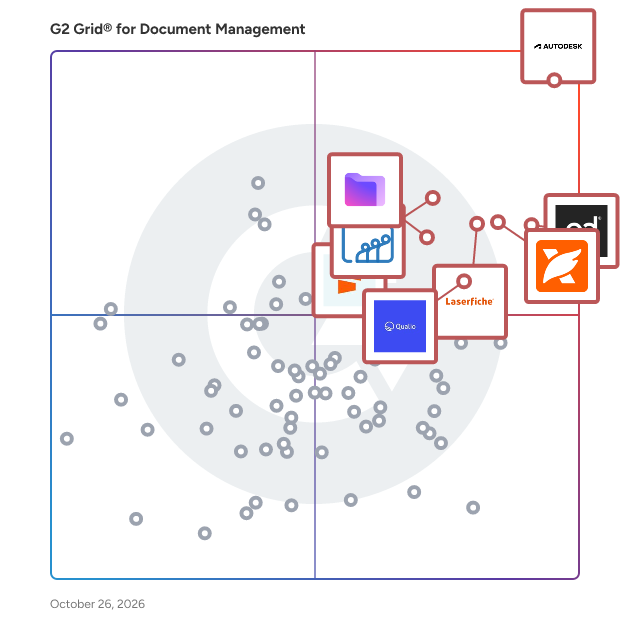


## Category Overview

**Total Products under this Category:** 345


## Trust & Credibility Stats

**Why You Can Trust G2's Software Rankings:**

- 30 Analysts and Data Experts
- 16,300+ Authentic Reviews
- 345+ Products
- Unbiased Rankings

G2's software rankings are built on verified user reviews, rigorous moderation, and a consistent research methodology maintained by a team of analysts and data experts. Each product is measured using the same transparent criteria, with no paid placement or vendor influence. While reviews reflect real user experiences, which can be subjective, they offer valuable insight into how software performs in the hands of professionals. Together, these inputs power the G2 Score, a standardized way to compare tools within every category.


## Best Document Management Software At A Glance

- **Leader:** [Laserfiche](https://www.g2.com/products/laserfiche/reviews)
- **Highest Performer:** [XfilesPro](https://www.g2.com/products/xfilespro/reviews)
- **Easiest to Use:** [Signify](https://www.g2.com/products/signify-signify/reviews)
- **Top Trending:** [Foxit PDF Editor](https://www.g2.com/products/foxit-pdf-editor/reviews)
- **Best Free Software:** [Zoho WorkDrive](https://www.g2.com/products/zoho-workdrive/reviews)


---

**Sponsored**

### SuiteFiles

SuiteFiles is an intelligent workspace solution specifically designed for professional service firms, aimed at streamlining the way teams manage their documents and client interactions. This comprehensive platform integrates essential functions such as document creation, review, approval, client collaboration, and digital signing into a single, cohesive system. By eliminating the need to juggle multiple folders, emails, and manual follow-ups, SuiteFiles provides a structured environment that enhances productivity and ensures efficient completion of work. The target audience for SuiteFiles encompasses a diverse range of professional service firms, including law offices, accounting firms, and consultancy agencies. These organizations often handle extensive documentation and require effective communication with clients. SuiteFiles addresses these challenges by creating a centralized workspace where all relevant documents, conversations, and approvals are easily accessible. This organization reduces the likelihood of important information being overlooked or lost, ultimately fostering better collaboration among team members and clients. Key features of SuiteFiles include seamless integration with widely-used tools such as Microsoft 365, Xero, Karbon, WorkflowMax, HubSpot, and QuickBooks Online. This compatibility allows firms to enhance their existing tech stack rather than complicate it with additional software. By connecting these tools, SuiteFiles helps create a more efficient workflow, enabling users to manage their tasks and client interactions without the hassle of switching between different applications. The platform’s ability to consolidate various functions into one interface simplifies the user experience and promotes a more streamlined approach to document management. The benefits of using SuiteFiles extend beyond mere organization; it empowers professional service firms to focus on their core competencies by minimizing busy work. With everything living in context, teams can spend less time chasing down documents or coordinating approvals and more time on delivering quality service to their clients. The platform promotes clarity and control, ensuring that all team members are aligned and that client confidence is maintained throughout the process. SuiteFiles is designed for firms that prioritize efficiency and client satisfaction. By providing an intelligent workspace that consolidates essential functions and integrates with existing tools, it enables professional service firms to work smarter, not harder, ultimately leading to more finished work and enhanced client relationships. This solution not only supports the operational needs of these firms but also contributes to a more collaborative and productive work environment.


[Visit website](https://www.g2.com/external_clickthroughs/record?secure%5Bad_program%5D=ppc&amp;secure%5Bad_slot%5D=category_product_list&amp;secure%5Bcategory_id%5D=1005458&amp;secure%5Bdisplayable_resource_id%5D=1005458&amp;secure%5Bdisplayable_resource_type%5D=Category&amp;secure%5Bmedium%5D=sponsored&amp;secure%5Bplacement_reason%5D=page_category&amp;secure%5Bplacement_resource_ids%5D%5B%5D=1005458&amp;secure%5Bprioritized%5D=false&amp;secure%5Bproduct_id%5D=165497&amp;secure%5Bresource_id%5D=1005458&amp;secure%5Bresource_type%5D=Category&amp;secure%5Bsource_type%5D=category_page&amp;secure%5Bsource_url%5D=https%3A%2F%2Fwww.g2.com%2Fcategories%2Fdocument-management%3Fpage%3D15&amp;secure%5Btoken%5D=02a8f435f1f85938e00d7247781a4cb9448da1bfcd31e057d0b7e0abed9b61e7&amp;secure%5Burl%5D=https%3A%2F%2Fwww.suitefiles.com%2Fbook-a-demo%2F%3Futm_campaign%3D39557047-Evergreen-Inbound-G2%26utm_source%3Dad&amp;secure%5Burl_type%5D=book_demo)

---


## Parent Category

[Content Management Systems](https://www.g2.com/categories/content-management)


## Related Categories

- [E-Signature Software](https://www.g2.com/categories/e-signature)
- [Enterprise Content Management (ECM) Systems](https://www.g2.com/categories/enterprise-content-management-ecm)
- [Cloud Content Collaboration Software](https://www.g2.com/categories/cloud-content-collaboration)


---
## Frequently Asked Questions

### How can Document Management systems improve team collaboration and productivity?

Document Management systems enhance team collaboration and productivity by centralizing document storage, enabling real-time access and editing, and facilitating seamless sharing among team members. Features such as version control and audit trails ensure that all changes are tracked, reducing errors and improving accountability. User reviews highlight that tools like DocuWare, M-Files, and SharePoint significantly streamline workflows, with users reporting increased efficiency and reduced time spent on document retrieval. Additionally, integrations with other software platforms further enhance collaboration, allowing teams to work more cohesively.


### How can I evaluate the ROI of investing in a Document Management system?

To evaluate the ROI of a Document Management system, consider factors such as time savings, improved collaboration, and reduced storage costs. Users report an average time savings of 30% in document retrieval and a 25% increase in team productivity. Additionally, systems like DocuWare and M-Files are noted for their strong integration capabilities, which can further enhance efficiency. Assessing these metrics against the system&#39;s cost will provide a clearer picture of potential ROI.


### How do Document Management systems handle compliance and regulatory requirements?

Document Management systems typically handle compliance and regulatory requirements by offering features such as audit trails, secure access controls, and automated retention policies. For instance, products like M-Files and DocuWare are noted for their strong compliance capabilities, with users highlighting their ability to support GDPR and HIPAA regulations. Additionally, systems like SharePoint and Box provide extensive documentation and reporting features that facilitate adherence to various industry standards. Overall, these systems are designed to ensure that organizations can manage sensitive information securely and in compliance with legal obligations.


### How does user experience impact the adoption of Document Management software?

User experience significantly impacts the adoption of Document Management software, as evidenced by user reviews highlighting ease of use and intuitive interfaces as critical factors. Products like DocuWare and M-Files receive high ratings for user satisfaction, with scores of 8.5 and 8.3 respectively, indicating that a positive user experience correlates with higher adoption rates. Additionally, features such as mobile access and seamless integration with existing tools are frequently mentioned as enhancing user experience, further driving adoption among organizations seeking efficient document management solutions.


### How do I assess the scalability of a Document Management solution?

To assess the scalability of a Document Management solution, consider user feedback on performance during growth phases. Look for solutions like M-Files, DocuWare, and SharePoint, which are frequently noted for their ability to handle increasing document volumes and user counts. Users often highlight features such as cloud integration, automated workflows, and robust security measures that support scalability. Additionally, check for customer reviews that mention ease of integration with existing systems and adaptability to changing business needs, as these factors are crucial for long-term scalability.


### How do pricing models vary across Document Management solutions?

Pricing models for Document Management solutions vary significantly. For instance, M-Files offers a subscription-based model with pricing starting at approximately $39 per user per month, while DocuWare provides tiered pricing based on the number of users and features, typically starting around $300 per month for small teams. On the other hand, SharePoint has a more complex pricing structure that can depend on the Office 365 plan chosen, often starting at $5 per user per month. Additionally, Box offers a per-user pricing model starting at $15 per user per month, emphasizing collaboration features.


### What are the best use cases for Document Management solutions in my industry?

Document Management solutions are best utilized in industries such as healthcare for managing patient records securely, legal for organizing case files and compliance documentation, and finance for handling sensitive financial documents and ensuring regulatory compliance. Key products like DocuSign, M-Files, and Box are frequently highlighted for their robust features in document security, collaboration, and workflow automation, making them suitable for these use cases.


### What are the common challenges during Document Management implementation?

Common challenges during Document Management implementation include user resistance to change, which is frequently noted in reviews, and the complexity of data migration from legacy systems. Additionally, integration issues with existing software can hinder the process, as highlighted by users. Training staff effectively is another significant hurdle, with many users emphasizing the need for comprehensive onboarding to ensure successful adoption. Lastly, maintaining compliance with regulations is often cited as a challenge, requiring careful planning and execution.


### What are the key features to look for in a Document Management system?

Key features to look for in a Document Management system include robust document storage and retrieval capabilities, version control, user access controls, collaboration tools, and integration with other software. Additionally, advanced search functionality, automated workflows, and compliance management are critical for enhancing productivity and ensuring regulatory adherence. User reviews highlight the importance of intuitive user interfaces and mobile access, which significantly improve user satisfaction and adoption rates.


### What integrations should I consider for my Document Management software?

When selecting Document Management software, consider integrations with popular tools such as Microsoft Office 365, Google Workspace, and Dropbox, as these are frequently highlighted by users for enhancing productivity. Additionally, integrations with CRM systems like Salesforce and project management tools like Asana are commonly valued for streamlining workflows. Other notable integrations include e-signature solutions like DocuSign and payment processors, which can significantly improve document handling efficiency.


### What security features are essential in a Document Management system?

Essential security features in a Document Management system include user authentication, data encryption, access controls, audit trails, and compliance with regulations like GDPR. User reviews highlight the importance of robust encryption methods, with many users emphasizing the need for role-based access controls to ensure sensitive documents are only accessible to authorized personnel. Additionally, features like automated backup and recovery options are frequently mentioned as critical for data integrity and security.


### What support options are typically available for Document Management users?

Document Management users typically have access to various support options, including live chat, email support, and extensive knowledge bases. For instance, products like M-Files and DocuWare offer 24/7 support, while others like Box provide community forums and ticketing systems. Additionally, many solutions feature onboarding assistance and training resources to help users maximize their experience. The availability of these support options can significantly enhance user satisfaction and product effectiveness.


