# Best Digital Forensics Software for Small Business

  *By [Brandon Summers-Miller](https://research.g2.com/insights/author/brandon-summers-miller)*

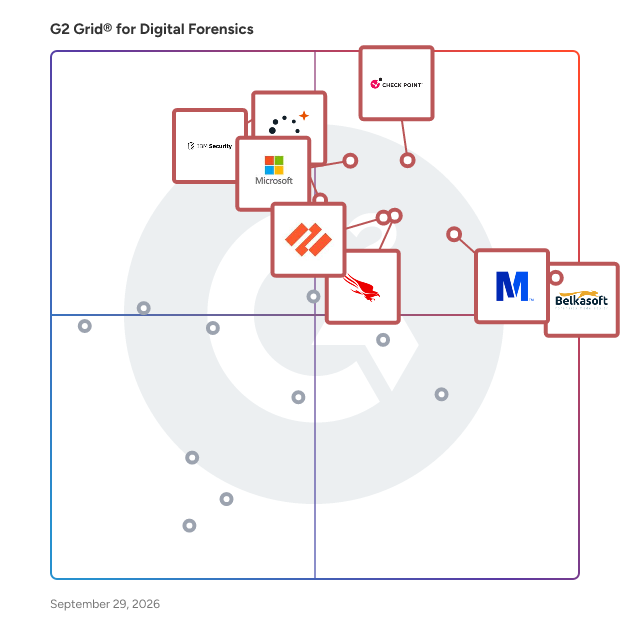
   Products classified in the overall Digital Forensics category are similar in many regards and help companies of all sizes solve their business problems. However, small business features, pricing, setup, and installation differ from businesses of other sizes, which is why we match buyers to the right Small Business Digital Forensics to fit their needs. Compare product ratings based on reviews from enterprise users or connect with one of G2&#39;s buying advisors to find the right solutions within the Small Business Digital Forensics category.

In addition to qualifying for inclusion in the Digital Forensics Software category, to qualify for inclusion in the Small Business Digital Forensics Software category, a product must have at least 10 reviews left by a reviewer from a small business.


## How Many Digital Forensics Software Products Does G2 Track?
**Total Products under this Category:** 61

### Category Stats (Jun 2026)
- **Average Rating**: 4.43/5 The average rating of products in this category, based on all submitted ratings
- **New Reviews This Quarter**: 59
- **Buyer Segments**: Small-Business 51% │ Mid-Market 38% │ Enterprise 12% Represents the distribution of reviewers across all products in this category.
- **Top Trending Product**: Parrot Security OS (+0.47%) - Among all products in this category, Parrot Security OS recorded the largest rating increase compared to last month
*Last updated: June 09, 2026*

  
## How Does G2 Rank Digital Forensics Software Products?

**Why You Can Trust G2's Software Rankings:**

- 30 Analysts and Data Experts
- 1,400+ Authentic Reviews
- 61+ Products
- Unbiased Rankings

G2's software rankings are built on verified user reviews, rigorous moderation, and a consistent research methodology maintained by a team of analysts and data experts. Each product is measured using the same transparent criteria, with no paid placement or vendor influence. While reviews reflect real user experiences, which can be subjective, they offer valuable insight into how software performs in the hands of professionals. Together, these inputs power the G2 Score, a standardized way to compare tools within every category.


---

**Sponsored**

### Oxygen Remote Explorer

Simplify your digital evidence collection Oxygen Remote Explorer helps businesses collect critical digital data. Whether investigating incidents and matters remotely or onsite, our tool provides powerful, targeted data collection capabilities designed for efficiency and accuracy. With features like automated task scheduling and comprehensive data access, you can ensure no detail is overlooked—no matter where the evidence resides. Targeted, remote data collection Easily collect critical data from anywhere, without the need for physical access to devices. Save time and resources by collecting data remotely. Speed up your investigations with quick, remote access to digital evidence. Keep data secure with our protected remote collection methods. Onsite data collection with full control For situations that require onsite presence, Oxygen Remote Explorer gives you complete control over the collection process. Ensure data integrity with full, unaltered device access. Collect data seamlessly without disrupting business operations. Gather evidence without impacting workflow, keeping everything on track. Automated task scheduling for continuous data collection Set it, customize it, and forget it. Automate data collection tasks to ensure evidence is gathered consistently and on time. Automate your workflows to gather data without manual intervention. Spend less time on routine tasks and get faster insights. Scale your data collection across multiple locations with ease.


[Visit website](https://www.g2.com/external_clickthroughs/record?secure%5Bad_program%5D=ppc&amp;secure%5Bad_slot%5D=category_product_list&amp;secure%5Bcategory_id%5D=2059&amp;secure%5Bdisplayable_resource_id%5D=2059&amp;secure%5Bdisplayable_resource_type%5D=Category&amp;secure%5Bmedium%5D=sponsored&amp;secure%5Bplacement_reason%5D=page_category&amp;secure%5Bplacement_resource_ids%5D%5B%5D=2059&amp;secure%5Bprioritized%5D=false&amp;secure%5Bproduct_id%5D=1862050&amp;secure%5Bresource_id%5D=2059&amp;secure%5Bresource_type%5D=Category&amp;secure%5Bsource_type%5D=category_page&amp;secure%5Bsource_url%5D=https%3A%2F%2Fwww.g2.com%2Fcategories%2Fdigital-forensics%3Fpage%3D5&amp;secure%5Btoken%5D=700f08f25b672199a6b13b06f5b2e611d161e528e5a651bc1a7edd6da1568458&amp;secure%5Burl%5D=https%3A%2F%2Fbit.ly%2F4xgSaGd&amp;secure%5Burl_type%5D=custom_url)

---

  ## What Are the Top-Rated Digital Forensics Software Products in 2026?
### 1. [Belkasoft](https://www.g2.com/products/belkasoft/reviews)
  Belkasoft X is a complete digital forensic and incident response solution for conducting in-depth investigations on all types of digital media devices and data sources, including computers, mobile devices, RAM, and the cloud. Designed for government and commercial organizations with in-house DFIR teams or those providing DFIR services, it ensures fast and reliable evidence collection, examination, and analysis. Key Features: • Supports computer, mobile, drone, car, and cloud forensics—all in a single product • Provides the Mobile Passcode Brute-Force module for unlocking iOS and Android smartphones and tablets • Automatically detects and extracts data from 1500+ digital artifacts, including email, browsers, mobile apps, system files, and more • Supplies efficient search and filter tools that help quickly find relevant evidence in data sources • Offers visual representation tools like ConnectionGraph, Timeline, and Map that facilitate data analysis • Delivers BelkaGPT—an innovative AI assistant that uses case data to help you uncover evidence through natural language queries, operating entirely offline and performing well on both GPU and CPU


  **Average Rating:** 4.7/5.0
  **Total Reviews:** 132
**How Do G2 Users Rate Belkasoft?**

- **Has the product been a good partner in doing business?:** 9.3/10 (Category avg: 9.1/10)
- **Continuous Analysis:** 7.9/10 (Category avg: 8.2/10)
- **Incident Alerts:** 8.0/10 (Category avg: 8.2/10)
- **Anomaly Detection:** 7.6/10 (Category avg: 8.2/10)

**Who Is the Company Behind Belkasoft?**

- **Seller:** [Belkasoft](https://www.g2.com/sellers/belkasoft)
- **Year Founded:** 2002
- **HQ Location:** Sunnyvale, California
- **Twitter:** @Belkasoft (11,028 Twitter followers)
- **LinkedIn® Page:** https://www.linkedin.com/company/belkasoft/about/ (36 employees on LinkedIn®)

**Who Uses This Product?**
  - **Who Uses This:** Student
  - **Top Industries:** Law Enforcement, Computer &amp; Network Security
  - **Company Size:** 59% Small-Business, 15% Mid-Market


#### What Are Belkasoft's Pros and Cons?

**Pros:**

- Ease of Use (43 reviews)
- Features (29 reviews)
- Product Innovation (18 reviews)
- User Interface (17 reviews)
- Setup Ease (16 reviews)

**Cons:**

- Slow Performance (13 reviews)
- Expensive (9 reviews)
- Learning Curve (7 reviews)
- Not Intuitive (5 reviews)
- Difficult Setup (4 reviews)

### 2. [Magnet Forensics](https://www.g2.com/products/magnet-forensics-magnet-forensics/reviews)
  Magnet Forensics solutions are designed for public safety, enterprise, federal, and military users. Public Sector - Magnet Graykey, which can provide same-day access to the latest iOS and Android devices—often in under one hour. - Magnet Axiom, which allows users to examine digital evidence from mobile, cloud, computer, and vehicle sources, alongside third-party extractions all in one case file. Plus, Axiom offers powerful and intuitive analytical tools to automatically surface case-relevant evidence quickly. - Magnet One, a revolutionary platform that gives forensics teams, investigators, prosecutors, and agency leadership an investigative edge, enabling them to work together to leverage all their digital evidence for stronger cases and greater impact. Private Sector - Magnet Verakey offers the most comprehensive data extraction from iOS and leading Android devices. - Magnet Axiom Cyber allows enterprise users to remotely collect data from computers and the cloud reliably, and analyze it alongside mobile, IoT, and third-party data for a complete picture of their case. - Magnet Nexus is a scalable remote endpoint investigation solution built to save users time and get forensic insights faster. A go-to partner for more than 5,000 public and private sector customers in over 100 countries, Magnet Forensics solutions are created by investigators for investigators as they fight crime, protect assets, and guard national security.


  **Average Rating:** 4.8/5.0
  **Total Reviews:** 101
**How Do G2 Users Rate Magnet Forensics?**

- **Has the product been a good partner in doing business?:** 9.2/10 (Category avg: 9.1/10)
- **Continuous Analysis:** 7.9/10 (Category avg: 8.2/10)
- **Incident Alerts:** 8.2/10 (Category avg: 8.2/10)
- **Anomaly Detection:** 6.9/10 (Category avg: 8.2/10)

**Who Is the Company Behind Magnet Forensics?**

- **Seller:** [Magnet Forensics](https://www.g2.com/sellers/magnet-forensics)
- **Company Website:** https://www.magnetforensics.com/
- **Year Founded:** 2009
- **HQ Location:** Waterloo, Ontario
- **Twitter:** @MagnetForensics (16,877 Twitter followers)
- **LinkedIn® Page:** https://www.linkedin.com/company/magnet-forensics/ (920 employees on LinkedIn®)

**Who Uses This Product?**
  - **Who Uses This:** Digital Forensic Examiner, Detective
  - **Top Industries:** Law Enforcement
  - **Company Size:** 45% Small-Business, 31% Mid-Market


### 3. [Microsoft Purview Audit](https://www.g2.com/products/microsoft-purview-audit/reviews)
  Efficiently respond to legal matters or internal investigations with intelligent capabilities that reduce data to only what’s relevant. Discover data where it lives: Discover and collect data in place, within your Microsoft Purview boundary. Manage workflows efficiently: Streamline your eDiscovery process with an end-to-end workflow from one platform. Accelerate your process: Get insights quickly with built-in capabilities, reducing review time and costs.


  **Average Rating:** 4.3/5.0
  **Total Reviews:** 32
**How Do G2 Users Rate Microsoft Purview Audit?**

- **Has the product been a good partner in doing business?:** 9.2/10 (Category avg: 9.1/10)
- **Continuous Analysis:** 7.5/10 (Category avg: 8.2/10)
- **Incident Alerts:** 8.3/10 (Category avg: 8.2/10)
- **Anomaly Detection:** 8.3/10 (Category avg: 8.2/10)

**Who Is the Company Behind Microsoft Purview Audit?**

- **Seller:** [Microsoft](https://www.g2.com/sellers/microsoft)
- **Year Founded:** 1975
- **HQ Location:** Redmond, Washington
- **Twitter:** @microsoft (13,095,907 Twitter followers)
- **LinkedIn® Page:** https://www.linkedin.com/company/microsoft/ (231,632 employees on LinkedIn®)
- **Ownership:** MSFT

**Who Uses This Product?**
  - **Company Size:** 44% Small-Business, 32% Enterprise


#### What Are Microsoft Purview Audit's Pros and Cons?

**Pros:**

- Collaboration (1 reviews)
- Data Management (1 reviews)
- Features (1 reviews)
- Navigation Ease (1 reviews)
- Reporting (1 reviews)

**Cons:**

- Complexity (1 reviews)
- Expensive (1 reviews)
- Learning Curve (1 reviews)

### 4. [Check Point Endpoint Security](https://www.g2.com/products/check-point-endpoint-security/reviews)
  Harmony Endpoint is a complete endpoint security solution offering a fleet of advanced endpoint threat prevention capabilities so you can safely navigate today’s menacing threat landscape. It provides a comprehensive system to proactively prevent, detect, and remediate evasive malware attacks.


  **Average Rating:** 4.5/5.0
  **Total Reviews:** 254
**How Do G2 Users Rate Check Point Endpoint Security?**

- **Has the product been a good partner in doing business?:** 8.8/10 (Category avg: 9.1/10)
- **Continuous Analysis:** 9.2/10 (Category avg: 8.2/10)
- **Incident Alerts:** 10.0/10 (Category avg: 8.2/10)
- **Anomaly Detection:** 10.0/10 (Category avg: 8.2/10)

**Who Is the Company Behind Check Point Endpoint Security?**

- **Seller:** [Check Point Software Technologies](https://www.g2.com/sellers/check-point-software-technologies)
- **Year Founded:** 1993
- **HQ Location:** Redwood City, CA
- **Twitter:** @CheckPointSW (70,970 Twitter followers)
- **LinkedIn® Page:** https://www.linkedin.com/company/check-point-software-technologies/ (8,554 employees on LinkedIn®)
- **Ownership:** NASDAQ:CHKP

**Who Uses This Product?**
  - **Who Uses This:** Network Engineer, Cyber Security Engineer
  - **Top Industries:** Information Technology and Services, Computer &amp; Network Security
  - **Company Size:** 54% Mid-Market, 27% Enterprise


#### What Are Check Point Endpoint Security's Pros and Cons?

**Pros:**

- Security (73 reviews)
- Features (56 reviews)
- Protection (50 reviews)
- Threat Detection (50 reviews)
- Ease of Use (46 reviews)

**Cons:**

- Slow Performance (27 reviews)
- High Resource Usage (25 reviews)
- Expensive (21 reviews)
- Difficult Configuration (20 reviews)
- Learning Curve (20 reviews)

### 5. [IBM QRadar SIEM](https://www.g2.com/products/ibm-ibm-qradar-siem/reviews)
  Outsmart threats with an end-to-end award-winning security suite; proven to prevent, endure and recover from both known &amp; unknown IT hazards faced by SoCs in the modern-day.


  **Average Rating:** 4.4/5.0
  **Total Reviews:** 280
**How Do G2 Users Rate IBM QRadar SIEM?**

- **Has the product been a good partner in doing business?:** 8.6/10 (Category avg: 9.1/10)
- **Continuous Analysis:** 8.5/10 (Category avg: 8.2/10)
- **Incident Alerts:** 8.7/10 (Category avg: 8.2/10)
- **Anomaly Detection:** 8.6/10 (Category avg: 8.2/10)

**Who Is the Company Behind IBM QRadar SIEM?**

- **Seller:** [IBM](https://www.g2.com/sellers/ibm)
- **Year Founded:** 1911
- **HQ Location:** Armonk, New York, United States
- **Twitter:** @IBMSecurity (74,700 Twitter followers)
- **LinkedIn® Page:** https://www.linkedin.com/company/1009/ (328,202 employees on LinkedIn®)
- **Ownership:** SWX:IBM

**Who Uses This Product?**
  - **Who Uses This:** SOC Analyst, Security Engineer
  - **Top Industries:** Computer &amp; Network Security, Information Technology and Services
  - **Company Size:** 53% Enterprise, 29% Mid-Market


#### What Are IBM QRadar SIEM's Pros and Cons?

**Pros:**

- Ease of Use (23 reviews)
- Integrations (19 reviews)
- Features (18 reviews)
- Easy Integrations (15 reviews)
- User Interface (15 reviews)

**Cons:**

- UX Improvement (11 reviews)
- Expensive (9 reviews)
- Cost (7 reviews)
- Dashboard Issues (7 reviews)
- Time-Consuming (7 reviews)

### 6. [Trace Direct](https://www.g2.com/products/trace-direct/reviews)
  Trace Direct specializes in digital investigations and scam intelligence analysis, helping individuals uncover the truth behind suspicious transactions, online fraud, and crypto-related scams. Using advanced data aggregation, OSINT techniques, and forensic analysis, we identify risk indicators, trace digital footprints, and map connections across multiple platforms. Our reports provide clear, structured insights designed to help victims understand what happened, assess the level of risk, and take informed next steps. We focus on transparency, speed, and actionable intelligence without false recovery promises or unrealistic claims. Specialties include cryptocurrency tracing, wallet risk analysis, scam pattern identification, breach and exposure checks, and cross-platform intelligence gathering.


  **Average Rating:** 5.0/5.0
  **Total Reviews:** 26

**Who Is the Company Behind Trace Direct?**

- **Seller:** [Cyberops systems](https://www.g2.com/sellers/cyberops-systems)
- **HQ Location:** N/A
- **LinkedIn® Page:** https://www.linkedin.com/company/cyberops-trace-direct/ (1 employees on LinkedIn®)

**Who Uses This Product?**
  - **Top Industries:** Information Technology and Services
  - **Company Size:** 58% Small-Business, 42% Mid-Market


### 7. [FTK Forensic Toolkit](https://www.g2.com/products/ftk-forensic-toolkit/reviews)
  FTK Forensic Toolkit (FTK) is a comprehensive digital investigations solution designed to facilitate efficient and thorough forensic analysis. Renowned for its speed, stability, and user-friendly interface, FTK enables investigators to process and analyze digital evidence swiftly, ensuring that critical information is uncovered and cases are resolved promptly. Key Features and Functionality: - Mobile Extraction Processing: FTK offers rapid and collaborative mobile data review capabilities. After imaging Android or iOS devices with a preferred tool, users can ingest the data into FTK for unified analysis alongside related computer evidence. - Entity Management and Social Analyzer: The software automatically identifies known aliases and reveals hidden communication patterns among device users, allowing investigators to visually pinpoint the most communicative entities and frequently used chat applications. - Advanced Multimedia Review: FTK streamlines the examination of multimedia evidence by providing advanced image and facial recognition, as well as similar face matching across datasets. This functionality reduces manual video review time by leveraging artificial intelligence to highlight key elements. - Comprehensive Reporting: Investigators can embed chats, files, emails, multimedia, and timelines directly into reports, facilitating clear and concise presentation of findings. - Timeline Analysis: FTK allows users to view evidence in a timeline format, helping to reveal patterns or events that occurred before or after key artifacts were created. Primary Value and User Solutions: FTK addresses the critical need for a reliable and efficient digital forensic tool that can handle complex investigations involving both mobile and computer data. By integrating advanced processing capabilities with intuitive analysis tools, FTK empowers law enforcement agencies, corporate security teams, and legal professionals to uncover crucial intelligence, establish connections between entities, and present findings effectively. This comprehensive approach ensures that users can conduct thorough investigations, maintain data integrity, and achieve faster case resolutions.


  **Average Rating:** 4.4/5.0
  **Total Reviews:** 36
**How Do G2 Users Rate FTK Forensic Toolkit?**

- **Has the product been a good partner in doing business?:** 8.2/10 (Category avg: 9.1/10)
- **Continuous Analysis:** 7.1/10 (Category avg: 8.2/10)
- **Incident Alerts:** 7.5/10 (Category avg: 8.2/10)
- **Anomaly Detection:** 7.1/10 (Category avg: 8.2/10)

**Who Is the Company Behind FTK Forensic Toolkit?**

- **Seller:** [Exterro](https://www.g2.com/sellers/exterro)
- **Year Founded:** 2004
- **HQ Location:** Portland, OR
- **Twitter:** @Exterro (3,568 Twitter followers)
- **LinkedIn® Page:** https://www.linkedin.com/company/135915/ (625 employees on LinkedIn®)

**Who Uses This Product?**
  - **Top Industries:** Computer &amp; Network Security, Law Enforcement
  - **Company Size:** 46% Small-Business, 35% Enterprise


### 8. [Parrot Security OS](https://www.g2.com/products/parrot-security-os/reviews)
  Parrot Security OS is a free and open-source GNU/Linux distribution based on Debian, tailored for security experts, developers, and privacy-conscious users. It offers a comprehensive suite of tools for penetration testing, digital forensics, reverse engineering, and software development, all within a lightweight and flexible environment. Key Features and Functionality: - Extensive Toolset: Parrot Security OS includes over 600 tools for various cybersecurity operations, such as penetration testing, vulnerability assessment, and digital forensics. - Multiple Editions: The distribution offers several editions to cater to different user needs: - Security Edition: Designed for penetration testing and red team operations, providing a full arsenal of ready-to-use tools. - Home Edition: Aimed at daily use, privacy, and software development, with the option to manually install security tools as needed. - IoT Edition: Compatible with Raspberry Pi devices, suitable for embedded systems. - Docker Images: Pre-packaged Docker images for easy deployment in containerized environments. - Lightweight and Modular: Parrot Security OS is efficient even on older hardware, allowing users to select and install only the components they need. - Rolling Release Model: The system follows a rolling release model, ensuring users have access to the latest updates and features. - Privacy and Anonymity Tools: Built-in tools like AnonSurf, Tor, and I2P facilitate anonymous web browsing and enhance user privacy. Primary Value and User Solutions: Parrot Security OS provides a robust and versatile platform for cybersecurity professionals and enthusiasts. Its extensive toolset and modular design allow users to conduct comprehensive security assessments, develop software, and maintain privacy without the need for additional installations. The lightweight nature of the OS ensures optimal performance across a wide range of hardware, making it accessible to a broad user base. By integrating privacy-focused tools, Parrot Security OS addresses the growing need for secure and anonymous computing environments.


  **Average Rating:** 4.4/5.0
  **Total Reviews:** 58
**How Do G2 Users Rate Parrot Security OS?**

- **Has the product been a good partner in doing business?:** 8.9/10 (Category avg: 9.1/10)
- **Continuous Analysis:** 8.9/10 (Category avg: 8.2/10)
- **Incident Alerts:** 8.7/10 (Category avg: 8.2/10)
- **Anomaly Detection:** 8.3/10 (Category avg: 8.2/10)

**Who Is the Company Behind Parrot Security OS?**

- **Seller:** [Parrot Security OS](https://www.g2.com/sellers/parrot-security-os)
- **Year Founded:** 2013
- **HQ Location:** Palermo, Italy
- **Twitter:** @ParrotSec (24,493 Twitter followers)
- **LinkedIn® Page:** https://www.linkedin.com/company/22287803/ (15 employees on LinkedIn®)

**Who Uses This Product?**
  - **Top Industries:** Computer &amp; Network Security, Information Technology and Services
  - **Company Size:** 69% Small-Business, 18% Mid-Market


#### What Are Parrot Security OS's Pros and Cons?

**Pros:**

- Lightweight Size (6 reviews)
- Privacy Focus (4 reviews)
- Speed/Performance (4 reviews)
- User-Friendly (4 reviews)
- Linux/Ubuntu OS (2 reviews)

**Cons:**

- Driver Issues (3 reviews)
- Skill Requirements (2 reviews)
- Time-Consuming (2 reviews)
- Compatibility Issues (1 reviews)
- Hardware Limitations (1 reviews)


    ## What Is Digital Forensics Software?
  [System Security Software](https://www.g2.com/categories/system-security)
  ## What Software Categories Are Similar to Digital Forensics Software?
    - [Incident Response Software](https://www.g2.com/categories/incident-response)
    - [Network Traffic Analysis (NTA) Software](https://www.g2.com/categories/network-traffic-analysis-nta)

  
---

## How Do You Choose the Right Digital Forensics Software?

### What You Should Know About Digital Forensics Software

### What is Digital Forensics Software?

Digital forensics is a branch of forensic science that focuses on recovering and investigating material found in digital devices related to cybercrime. Digital forensics software focuses on uncovering, interpreting, and preserving electronic data evidence while investigating security incidents.

#### What Types of Digital Forensics Software Exist?

Digital forensics software is part of digital forensic science. As electronic devices are taking a substantial space in modern lifestyles, knowingly or unknowingly, criminals or offenders use them in their malicious acts. This makes these devices solid pieces of evidence to support or refute an accused in criminal and civil courts. Various types of digital forensics software help investigate networks and devices.

**Network forensics software**

Network forensics software is related to monitoring and analyzing computer network traffic to collect important information and legal evidence. This software examines traffic across a network suspected of being involved in malicious activities, like spreading malware or stealing credentials.

**Wireless forensics software**

Wireless forensics software is a division of network forensics software. This software offers the tools needed to collect and analyze data from wireless network traffic that can be presented as valid digital evidence in a court of law.

**Database forensics software**

Database forensics software examines databases and their related metadata. Database forensics software applies investigative techniques such as analytic analysis to database contents and its metadata to find digital evidence.

**Malware forensics software**

Malware forensics software deals with identifying malicious code to study payload, viruses, worms, etc. Malware forensics software analyzes and investigates possible malware culprits and the source of the attack. It checks for malicious code and finds its entry, propagation method, and impact on the system.

**Email forensics software**

Email forensics software deals with the recovery and analysis of emails, including deleted emails, calendars, and contacts. Email forensics software also analyzes emails for content to determine the source, date, time, the actual sender, and recipients to find digital evidence. **&amp;nbsp;**

**Memory forensics software**

Memory forensics software collects data from system memory (system registers, cache, RAM) in raw form and then carves the data from the raw dump. Memory forensics software&#39;s primary application is the investigation of advanced computer attacks, which are stealthy enough to avoid leaving data on the computer&#39;s hard drive. In turn, the memory (RAM) must be analyzed for forensic information.

**Mobile phone forensics software**

Mobile phone forensic software examines and analyzes mobile devices. It retrieves phone and SIM contacts, call logs, incoming, and outgoing SMS/MMS, audio, videos, etc., from mobile phones. Most applications store their data in database files on a mobile phone.

**Disk and data capture forensics software**

Disk and data capture forensic software focuses on the core part of a computer system and extracts potential forensic artifacts such as files, emails, etc. Many times disk and data capture forensics software is used when a home or office environment is being investigated.

[File analysis software](https://www.g2.com/categories/file-analysis)

File analysis forensic software deals with files on media, deleted files, files in folders, or files in other files stored on or in some container. The goal of file analysis software is to identify, extract, and analyze these files and the file systems they lie upon to find data that might be valid evidence in a crime. **&amp;nbsp;**

**Registry analysis software**

Registry analysis forensics software automatically extracts crucial information from the live registry or the raw registry files found in digital evidence and displays it in user-understandable format. It performs time conversion and translation of binary and other non-ASCII data.&amp;nbsp;

### What are the Common Features of Digital Forensics Software?

The following are features of digital forensics software:

**Identification:** Digital forensics software recognizes the devices and resources containing the data that could be part of a forensics investigation. This data can be found on devices such as computers or laptops or users’ personal devices like mobile phones and tablets.

As part of the process, these devices are seized to eliminate the possibility of tampering. If the data is on a server, network, or housed on the cloud, the investigator must ensure no other investigating team has access to it.

**Extraction and preservation:** After devices have been seized, they must be stored in a secure location so the digital forensics investigator can use digital forensics software to extract relevant data.

This phase involves the creation of a digital copy of the relevant data, known as a “forensic image.” The digital copy is used for analysis and evaluation. This prevents any tampering with the original data, even if the investigation is compromised.

**Analysis:** Once the devices involved have been identified and isolated, and the data has been duplicated and stored securely, digital forensic software uses various techniques to extract relevant data and examine it, searching for clues or evidence that points to wrongdoing. This often involves recovering and examining deleted, damaged, or encrypted files.

**Documentation:** Post analysis, the resulting data of the digital forensics software investigation is presented in a way that makes it easy to visualize the entire investigative process and its conclusions. Proper documentation data helps to formulate a timeline of the activities involved in wrongdoing, such as embezzlement, data leakage, or network breaches.

### What are the Benefits of Digital Forensics Software?

Intellectual property (IP) and internal investigations are typical digital forensic software use cases. IP cases include theft, industrial espionage, IP misconduct, fraud, personal injury or death, or sexual harassment. Digital forensics software helps find evidence in such cases. Below are areas where digital forensics software is useful.

**Data recovery:** Data recovery is often the use of digital forensics software. It helps to recover stolen or lost information in devices people use.&amp;nbsp;

**Damage analysis:** Digital forensics software is used for damage analysis to discover vulnerabilities and remediate them to prevent cyber attacks.

### Who Uses Digital Forensics Software?

Digital forensics software is used for criminal, lawbreaking, and civil cases with contractual disputes between commercial parties. Digital forensics software helps examine digital evidence in these cases.

**Investigation agencies:** Digital forensic software is important in private corporate investigations. Using digital forensics software for incidents like network intrusion, authorities can attribute evidence to suspects, confirm alibis, identify intent or authenticate documents. Many agencies leverage a company’s intrusion detection and prevention system to explore crimes and use digital forensics to collect and analyze digital evidence.

**National security agencies:** National security agencies use digital forensics software to investigate emails from suspected terrorists.

### Challenges with Digital Forensics Software

Software solutions can come with their own set of challenges.&amp;nbsp;

**Technical challenges:** Digital forensics software may have challenges when identifying hidden data that may be encrypted on a device. While encryption ensures data privacy, attackers may also use it to hide their digital crimes. Cybercriminals can hide data inside storage and delete data from computer systems. Cyber attackers can also use a covert channel to conceal their connection to the compromised system.&amp;nbsp;

Below are some common challenges of digital forensics software:

- Cloud storage can complicate the investigation or make it hard to find the required data.
- The time it takes to archive data can cause delays in finding data relevant to an investigation.
- The investigator can have a knowledge or skills gap.
- Another challenge can be steganography or hiding information within a file while leaving its outer look the same.

**Legal challenges:** Legal challenges can be privacy concerns and data storage accessibility regulations. Some laws require corporations to delete personal information within a certain time frame after an incident, while other legal frameworks may not recognize every aspect of digital forensics software.

Below are some common legal challenges of digital forensics software:

- Devices must be securely stored once data is collected.
- Privacy rules prevent full access to data.
- Forensic investigators must have the proper authority to gather digital evidence.
- Some data may not be admissible or useful in court.

**Resource challenges:** As data flows across networks, it may increase in volume, making it difficult for digital forensics software to identify original and relevant data.&amp;nbsp;

Since technology is constantly changing, it may be challenging to read digital evidence since new versions of systems may not be compatible with old versions of software that don’t have backward compatibility support.