  # Best Digital Adoption Platforms

  *By [Nana Serwah Nkrahene](https://research.g2.com/insights/author/nana-nkrahene)*

   Digital adoption platform (DAP) software is an overlay that sits on top of other applications or websites to guide users through tasks and workflows with in-app prompts and tutorials. [Digital adoption platform (DAP) software](https://www.g2.com/categories/digital-adoption-platform) helps organizations onboard employees and customers more efficiently by delivering real-time guidance, reducing training time, and highlighting new or complex features within software tools.

### Core Capabilities of Digital Adoption Platform Software

To qualify for inclusion in the Digital Adoption Platform category, a product must:

- Integrate on top of a web-based software, website, or software application
- Offer cued prompts, messages, tooltips, smart tips, spotlights, notifications, pulses, modals, and tutorials to assist and guide users
- Collect and analyze user behavior data to improve the user experience

### How Digital Adoption Platform Software Differs from Other Tools

DAPs differ from tools like [product analytics software](https://www.g2.com/categories/product-analytics) or [customer self-service tools](https://www.g2.com/categories/customer-self-service) by delivering actionable, in-app guidance rather than primarily analyzing behavior or housing content libraries. They function as a live instructional layer that proactively supports users during real-time interactions with software, and often integrate with [product analytics software](https://www.g2.com/categories/product-analytics), [survey software](https://www.g2.com/categories/survey), and [knowledge base solutions](https://www.g2.com/categories/knowledge-base-software).

### Insights from G2 on Digital Adoption Platform Software

Based on category trends on G2, DAPs&#39; ability to streamline onboarding, surface bottlenecks in user journeys, and improve overall adoption of both internal and customer-facing tools, often noting time savings, reduced reliance on manual training, and improved clarity when navigating complex workflows.


## Category Overview

**Total Products under this Category:** 95

  
## Trust & Credibility Stats

**Why You Can Trust G2's Software Rankings:**

- 30 Analysts and Data Experts
- 19,100+ Authentic Reviews
- 95+ Products
- Unbiased Rankings

G2's software rankings are built on verified user reviews, rigorous moderation, and a consistent research methodology maintained by a team of analysts and data experts. Each product is measured using the same transparent criteria, with no paid placement or vendor influence. While reviews reflect real user experiences, which can be subjective, they offer valuable insight into how software performs in the hands of professionals. Together, these inputs power the G2 Score, a standardized way to compare tools within every category.

  
## Top Digital Adoption Platforms at a Glance
| # | Product | Rating | Best For | What Users Say |
|---|---------|--------|----------|----------------|
| 1 | [Pendo](https://www.g2.com/products/pendo-io-pendo/reviews) | 4.4/5.0 (1,741 reviews) | Product analytics with in-app guidance | "[Effective Onboarding, Needs Better Metrics](https://www.g2.com/survey_responses/pendo-review-11700777)" |
| 2 | [WalkMe](https://www.g2.com/products/walkme/reviews) | 4.5/5.0 (549 reviews) | Enterprise in-app guidance and change support | "[WalkMe’s Flexible, Enterprise-Ready Digital Adoption with Powerful Analytics](https://www.g2.com/survey_responses/walkme-review-12647033)" |
| 3 | [Whatfix](https://www.g2.com/products/whatfix/reviews) | 4.6/5.0 (516 reviews) | Contextual help for enterprise software adoption | "[AI Quick Capture and Summaries Help Us Create Content Faster and Save Time](https://www.g2.com/survey_responses/whatfix-review-12544309)" |
| 4 | [Userpilot](https://www.g2.com/products/userpilot/reviews) | 4.6/5.0 (977 reviews) | No-code onboarding and product usage insights | "[Ease of Use and Incredible Support](https://www.g2.com/survey_responses/userpilot-review-12607367)" |
| 5 | [UserGuiding](https://www.g2.com/products/userguiding/reviews) | 4.7/5.0 (756 reviews) | Product tours and update communication | "[Solid onboarding tools and developer-free NPS surveys that don&#39;t interrupt the user experience](https://www.g2.com/survey_responses/userguiding-review-12127965)" |
| 6 | [Tango](https://www.g2.com/products/tango-tango/reviews) | 4.7/5.0 (497 reviews) | Process documentation and interactive walkthroughs | "[Tango Makes Process Training Effortless](https://www.g2.com/survey_responses/tango-review-12665989)" |
| 7 | [ChurnZero](https://www.g2.com/products/churnzero/reviews) | 4.7/5.0 (1,575 reviews) | Customer success journeys and adoption tracking | "[Empowers Customer Management with Insights and Integrations](https://www.g2.com/survey_responses/churnzero-review-12793004)" |
| 8 | [Fullstory](https://www.g2.com/products/fullstory/reviews) | 4.5/5.0 (1,029 reviews) | Session replay for adoption friction | "[Helpful Support, Intuitive UI, and Powerful Session Summaries](https://www.g2.com/survey_responses/fullstory-review-12644392)" |
| 9 | [Product Fruits](https://www.g2.com/products/product-fruits/reviews) | 4.7/5.0 (218 reviews) | In-app onboarding and self-service support | "[Intuitive, Customer-First Design with Amazing Support and AI Help](https://www.g2.com/survey_responses/product-fruits-review-12076719)" |
| 10 | [Spekit](https://www.g2.com/products/spekit/reviews) | 4.7/5.0 (279 reviews) | In-workflow training and enablement guidance | "[Seamless Spekit Integration with Handy In‑Context Guidance](https://www.g2.com/survey_responses/spekit-review-12213104)" |

  
## Best Digital Adoption Platforms At A Glance

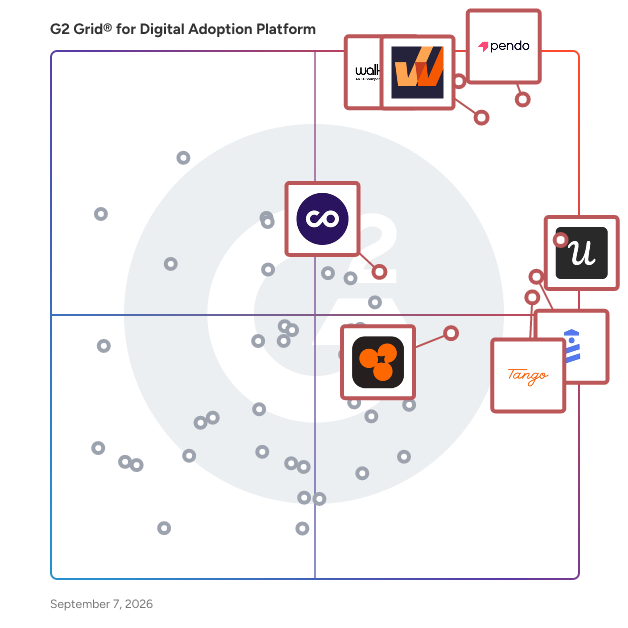
- **Leader:** [Pendo](https://www.g2.com/products/pendo-io-pendo/reviews)
- **Highest Performer:** [Product Fruits](https://www.g2.com/products/product-fruits/reviews)
- **Easiest to Use:** [Tango](https://www.g2.com/products/tango-tango/reviews)
- **Top Trending:** [Amplitude Guides and Surveys](https://www.g2.com/products/amplitude-guides-and-surveys/reviews)
- **Best Free Software:** [Pendo](https://www.g2.com/products/pendo-io-pendo/reviews)

  
## Which Type of Digital Adoption Platforms Tools Are You Looking For?
  - [Digital Adoption Platforms](https://www.g2.com/categories/digital-adoption-platform) *(current)*
  - [Customer Self-Service Software](https://www.g2.com/categories/customer-self-service)
  - [Mobile App Optimization Software](https://www.g2.com/categories/mobile-app-optimization)
  - [Product Analytics Software](https://www.g2.com/categories/product-analytics)

  
---

**Sponsored**

### Product Fruits

Adaptive onboarding and user enablement powered by AI Product Fruits helps product teams create onboarding experiences that guide users to value faster with AI-driven personalization and in-app support that scales. What it is Product Fruits is a user enablement platform that lets product teams onboard, guide, and support users directly inside their applications. The platform uses Elvin, an AI agent, to generate complete onboarding flows including copy, structure, and design that adapt in real time based on user behavior, role, and progress. Who it&#39;s for Product Fruits serves product managers, customer success teams, onboarding specialists, and support leads at SaaS companies of all sizes. Industries include financial services, education, healthcare, and e-commerce. What you can do with Product Fruits - Shorten time to value with personalized onboarding journeys - Increase feature adoption by guiding users to new capabilities - Reduce churn by addressing struggles before users disengage - Scale onboarding across thousands of users without manual effort - Lower support tickets with contextual answers where users need them How it works Setup takes two steps. First, install the Product Fruits Chrome extension to build tours and guidance flows visually. Then add a JavaScript snippet to your application to publish experiences live. Most teams complete setup in under an hour. What&#39;s included - AI-powered personalization: Automated flow design, structure, and copy that adapts to each user - Onboarding and guidance: Interactive tours, tooltips, beacons, and progress checklists for complex workflows - Communication: AI-generated announcements, banners, pop-ups, and newsfeeds that keep users informed about updates and features - Feedback and insights: Elvin creates contextual surveys and NPS surveys based on user behavior, capturing sentiment and identifying friction points - Knowledge and support: Centralized help center and Elvin Copilot answering questions from approved sources, reducing support tickets by 66% Why teams choose Product Fruits AI powers every feature in Product Fruits. From creating tours to answering support questions, the platform personalizes each step of the user journey. The result: faster adoption, higher user satisfaction, and fewer support escalations.


[Visit website](https://www.g2.com/external_clickthroughs/record?secure%5Bad_program%5D=ppc&amp;secure%5Bad_slot%5D=category_product_list&amp;secure%5Bcategory_id%5D=1561&amp;secure%5Bdisplayable_resource_id%5D=1561&amp;secure%5Bdisplayable_resource_type%5D=Category&amp;secure%5Bmedium%5D=sponsored&amp;secure%5Bplacement_reason%5D=page_category&amp;secure%5Bplacement_resource_ids%5D%5B%5D=1561&amp;secure%5Bprioritized%5D=false&amp;secure%5Bproduct_id%5D=146555&amp;secure%5Bresource_id%5D=1561&amp;secure%5Bresource_type%5D=Category&amp;secure%5Bsource_type%5D=category_page&amp;secure%5Bsource_url%5D=https%3A%2F%2Fwww.g2.com%2Fcategories%2Fdigital-adoption-platform%3Fpage%3D7&amp;secure%5Btoken%5D=9f872fb9b64bc8eef52cc7241822fb83a23f220c707ae4baca40acb64433980f&amp;secure%5Burl%5D=https%3A%2F%2Fproductfruits.com%2Fdemo%3Futm_medium%3Dpaid%26utm_source%3DG2%26utm_campaign%3Dclicks&amp;secure%5Burl_type%5D=book_demo)

---

  
## Buyer Guide: Key Questions for Choosing Digital Adoption Platforms Software
  ### What does Digital Adoption Platform software do?
  I describe Digital Adoption Platform software as a system that places guidance inside the applications people already use. These tools help teams create walkthroughs, tooltips, checklists, surveys, announcements, resource centers, and usage tracking. In the review patterns I evaluated, users connect the category with onboarding, product education, internal training, feature adoption, and self-serve support. It gives product, success, training, and operations teams a way to guide users through tasks at the moment they need help.


  ### Why do businesses use Digital Adoption Platform software?
  Across the review data I analyzed, businesses used Digital Adoption Platform software when onboarding, training, product education, or internal enablement needed to scale. Users describe fewer repeat questions, faster product messaging, and more control for non-technical teams.

The strongest benefits include:

- Reviewers like no-code builders for guides, tooltips, surveys, and announcements.
- Product teams value segmentation, behavior data, and feature adoption tracking.
- Customer success and education teams use guided flows for onboarding and self-serve help.
- Internal enablement teams use DAPs for CRM, HR, compliance, and process-heavy systems.

Common friction areas include setup, integrations, editor limits, advanced styling, analytics complexity, and guide maintenance.


  ### Who uses Digital Adoption Platform software primarily?
  After examining G2 reviewer profiles, I found that Digital Adoption Platform software supports teams responsible for onboarding, product education, and workflow guidance.

- **Product teams:** Explain features, announce changes, track adoption, and review user behavior.
- **Customer success teams:** Build onboarding flows and self-serve guidance for customers.
- **Product marketing teams:** Publish in-app announcements, tours, and release education.
- **UX teams:** Use behavior data and feedback to find product friction.
- **Training teams:** Guide employees through systems and process steps.
- **IT and operations teams:** Support internal tools, CRM workflows, compliance steps, and employee enablement.
- **Support teams:** Reduce repeat questions with in-app help and resource centers.


  ### What types of Digital Adoption Platform software should I consider?
  Based on the way reviewers describe the category, DAP software usually falls into these groups:

- **In-product onboarding tools:** Best for product tours, checklists, tooltips, and customer education.
- **Enterprise DAP tools:** Best for guiding employees through large internal systems and process-heavy applications.
- **Product analytics-led platforms:** Best for pairing usage data, user segments, and adoption guidance.
- **Documentation and step-capture tools:** Best for tutorials, process capture, screenshots, and quick training guides.
- **Browser-based workflow tools:** Best for teams guiding users across web apps and internal systems.


  ### What are the core features to look for in Digital Adoption Platform software?
  Looking at the G2 data I reviewed, the capabilities that drive the most value include:

- Walkthroughs, tooltips, modals, checklists, launchers, and resource centers for in-app guidance.
- Segmentation by role, account, plan, behavior, or lifecycle stage for targeted experiences.
- Triggers, surveys, NPS, in-app announcements, and feedback tools for user engagement.
- Product analytics, dashboards, tagging, and event tracking for visibility into adoption patterns.
- No-code editing, QA controls, permissions, and guide versioning for content management.
- Integrations with product analytics, CRM, support, and data tools.
- Browser support, app performance, and content maintenance workflows for reliable delivery.


  ### What trends are shaping Digital Adoption Platform software right now?
  From my analysis of review patterns and current DAP sources, these themes stand out:

- **AI-assisted content authoring:** DAP teams are using AI to create and update guidance faster.
- **Guidance tied to behavior data:** Analytics are being used to trigger help based on friction, drop-offs, or role.
- **Enterprise app adoption:** DAPs are being used across CRM, ERP, HR, and other internal tools.
- **Self-help inside the app:** Users expect answers without leaving the workflow.
- **Governance for AI guidance:** Large teams need approval, auditability, and access control before scaling AI-driven guidance.


  ### How should I choose Digital Adoption Platform software?
  As per my evaluation of G2 review patterns, I recommend starting with the audience that needs guidance the most. If the use case is customer onboarding, prioritize segmentation, tours, surveys, announcements, and usage analytics. If the use case is internal enablement, review role-based guidance, permissions, browser behavior, and performance inside CRM, HR, or operational systems. I also recommend checking how broken guides are flagged and how content is maintained after product changes.


---

  ## Top-Rated Products (Ranked by G2 Score)
### 1. [Pendo](https://www.g2.com/products/pendo-io-pendo/reviews)
**Average Rating:** 4.4/5.0
**Total Reviews:** 1,741
**Why buyers love it?:** After I reviewed Pendo’s G2 feedback, I placed it around product analytics that also helps teams guide users inside the product. Reviewers call out usage data, dashboards, funnels, session replays, onboarding guides, in-app feedback, and product roadmap decisions. A strong fit for product teams that need adoption signals and user guidance in one workflow.


### Quick AI Summary Based on G2 Reviews
*Generated from real user reviews*

**Pros:**

- Users appreciate the **ease of use** of Pendo, enabling seamless analytics integration and effortless setup for engagement tools.
- Users value the **seamless integration of analytics and in-app guidance** , enhancing user engagement and feedback collection.
- Users praise the **seamless connection of analytics and in-app guidance** , making it easy to understand and act on insights.
- Users rave about the **excellent customer support** and intuitive features, enhancing engagement and analytics efficiency.
- Users love Pendo&#39;s **seamless integration of analytics and in-app guidance** , enabling effective user engagement and training.

**Cons:**

- Users note **missing features** in Pendo, including inadequate filtering, limited NPS engagement tracking, and lack of automation.
- Users find it frustrating that there are **no easy recovery options** for deleted guides, complicating the cleanup process.
- Users find a **significant learning curve** with Pendo, complicating initial usage and affecting overall efficiency.
- Users note a **steep learning curve** for Pendo, making initial setup challenging and time-consuming.
- Users often face **data inaccuracy** , leading to frustration with unreliable insights and overall inefficiency in usage.

#### Key Features
  - Engagement
  - Real-Time Reporting
  - User Data
  - API / Integrations
  - Data Analysis

#### Recent Reviews

**"[Effective Onboarding, Needs Better Metrics](https://www.g2.com/survey_responses/pendo-review-11700777)"**

**Rating:** 4.0/5.0 stars
*— Emma P.*

[Read full review](https://www.g2.com/survey_responses/pendo-review-11700777)

---

**"[Pendo is Top Notch!](https://www.g2.com/survey_responses/pendo-review-8270697)"**

**Rating:** 5.0/5.0 stars
*— Zack H.*

[Read full review](https://www.g2.com/survey_responses/pendo-review-8270697)

---


#### Trending Discussions

- [How is feature adoption measured?](https://www.g2.com/discussions/how-is-feature-adoption-measured) - 1 comment
- [What is feature adoption?](https://www.g2.com/discussions/what-is-feature-adoption) - 1 comment
- [What is pendo used for?](https://www.g2.com/discussions/what-is-pendo-used-for) - 1 comment
### 2. [WalkMe](https://www.g2.com/products/walkme/reviews)
**Average Rating:** 4.5/5.0
**Total Reviews:** 549
**Why buyers love it?:** WalkMe’s G2 reviews led me to its strongest fit in helping employees complete tasks inside complex business systems. Users point to Smart Walk-Thrus, in-page help, targeted communication, process guidance, analytics, onboarding, and change management support. Works well for larger teams that need digital adoption tied to training, system rollout, and workflow consistency.


### Quick AI Summary Based on G2 Reviews
*Generated from real user reviews*

**Pros:**

- Users value the **ease of use** of WalkMe, enabling intuitive guidance that enhances task completion and reduces confusion.
- Users value WalkMe for its **real-time guidance** , enhancing user adoption and reducing errors effortlessly.
- Users commend WalkMe’s **top-notch customer support** , praising quick responses that effectively solve issues without delays.
- Users commend WalkMe for its **intuitive and flexible platform** , enabling quick building of in-app guidance without technical expertise.
- Users value WalkMe for its **effective training capabilities** , enabling seamless guidance and reduced need for support.

**Cons:**

- Users find the **learning curve challenging** , especially with navigation and inconsistencies when using WalkMe on Ariba.
- Users find the **complex setup process** of WalkMe challenging, requiring advanced skills and careful management for effective use.
- Users find the **steep learning curve** of WalkMe challenging, particularly for mastering advanced features and complex flows.
- Users find **limited customization options** frustrating as they navigate the learning curve and desire better branding integration.
- Users find WalkMe&#39;s setup process to be **time-consuming** , particularly for advanced configurations and ongoing maintenance.

#### Key Features
  - Reports and Dashboards
  - Performance and Reliability
  - Knowledge Base
  - Branding
  - Data Analysis

#### Recent Reviews

**"[WalkMe’s Flexible, Enterprise-Ready Digital Adoption with Powerful Analytics](https://www.g2.com/survey_responses/walkme-review-12647033)"**

**Rating:** 5.0/5.0 stars
*— Rohith N.*

[Read full review](https://www.g2.com/survey_responses/walkme-review-12647033)

---

**"[Should be used as a standard in Excellent Onboarding and change management Practices!](https://www.g2.com/survey_responses/walkme-review-7863130)"**

**Rating:** 5.0/5.0 stars
*— Betsy S.*

[Read full review](https://www.g2.com/survey_responses/walkme-review-7863130)

---


#### Trending Discussions

- [What is WalkMe used for?](https://www.g2.com/discussions/what-is-walkme-used-for)
### 3. [Whatfix](https://www.g2.com/products/whatfix/reviews)
**Average Rating:** 4.6/5.0
**Total Reviews:** 516
**Why buyers love it?:** In Whatfix’s G2 feedback, I noticed a strong pattern around guiding users through enterprise applications at the moment they need help. Reviewers call out pop-ups, smart tips, contextual overlays, self-help widgets, product usage data, support quality, and faster onboarding. A good match for teams that need in-app help to reduce support cases and make complex workflows easier to follow.


### Quick AI Summary Based on G2 Reviews
*Generated from real user reviews*

**Pros:**

- Users appreciate the **ease of use** of Whatfix, highlighting effortless content creation and excellent customer support.
- Users commend the **unmatched customer support** from Whatfix, enhancing the ease of implementation and learning.
- Users appreciate the **user-friendly navigation** of Whatfix, which streamlines training and enhances overall customer experience.
- Users appreciate the **ease of content creation** with Whatfix, benefiting from quick support and seamless implementation.
- Users value the **intuitive no-code authoring** of Whatfix, enabling non-technical teams to create effective in-app guides easily.

**Cons:**

- Users find the **learning curve steep** for Whatfix, requiring time and support for effective setup and customization.
- Users find the **complexity of setup and advanced features** to be a challenge, impacting overall usability.
- Users face a **steep learning curve** with Whatfix, requiring time and support for setup and advanced features.
- Users find the **management of large content libraries** and analytics dashboards to be inefficient and cumbersome.
- Users find the **translation process and enablement sessions tedious** , which affects overall efficiency and engagement.

#### Key Features
  - Knowledge Base
  - Branding
  - Survey Implementation
  - User Segmentation
  - Audio-visual Walkthroughs

#### Recent Reviews

**"[AI Quick Capture and Summaries Help Us Create Content Faster and Save Time](https://www.g2.com/survey_responses/whatfix-review-12544309)"**

**Rating:** 4.5/5.0 stars
*— Kate S.*

[Read full review](https://www.g2.com/survey_responses/whatfix-review-12544309)

---

**"[Outstanding Tool with Exceptional Support](https://www.g2.com/survey_responses/whatfix-review-12608679)"**

**Rating:** 5.0/5.0 stars
*— Ani C.*

[Read full review](https://www.g2.com/survey_responses/whatfix-review-12608679)

---


#### Trending Discussions

- [At what rate is Whatfix growing year on year?](https://www.g2.com/discussions/at-what-rate-is-whatfix-growing-year-on-year) - 1 comment, 1 upvote
- [Which of the following is a widget of Whatfix?](https://www.g2.com/discussions/which-of-the-following-is-a-widget-of-whatfix) - 1 comment, 1 upvote
- [Which one of them is a direct competitor of Whatfix?](https://www.g2.com/discussions/which-one-of-them-is-a-direct-competitor-of-whatfix) - 1 comment, 1 upvote
### 4. [Userpilot](https://www.g2.com/products/userpilot/reviews)
**Average Rating:** 4.6/5.0
**Total Reviews:** 977
**Why buyers love it?:** Userpilot’s G2 feedback gave me a clear read on product adoption work that combines onboarding flows, surveys, and usage analytics. Review sentiment points to in-app walkthroughs, NPS surveys, product announcements, top events, reports, segmentation, and reduced dependence on engineering. A practical choice for SaaS teams that need to guide users and learn from product behavior without waiting on developers.


### Quick AI Summary Based on G2 Reviews
*Generated from real user reviews*

**Pros:**

- Users find Userpilot to be **intuitive and easy to use** , streamlining updates and enhancing product adoption effectively.
- Users love the **intuitive interface** of Userpilot, making it easy to create journeys quickly and efficiently.
- Users highlight the **easy setup** of Userpilot, appreciating quick adjustments and helpful support for effective onboarding.
- Users commend the **responsive customer support** of Userpilot, ensuring quick resolutions and effective guidance throughout the process.
- Users value the **ease of updating and optimizing flows** in Userpilot, enhancing user guidance and product adoption.

**Cons:**

- Users find the **learning curve steep** , requiring time to navigate and master Userpilot&#39;s features effectively.
- Users experience a **steep learning curve** with Userpilot, finding it overwhelming but manageable with support resources.
- Users experience **limited customization** options, hindering flexibility in segment creation and triggering flows effectively.
- Users find the **reporting complexity** in Userpilot challenging, leading to a steep learning curve and integration issues.
- Users find Userpilot **expensive** , especially as costs increase with active users, impacting early-stage startups&#39; budgets.

#### Key Features
  - Survey Implementation
  - User Segmentation
  - Account-Level Analytics
  - Survey Builder
  - Branching/Skip Logic

#### Recent Reviews

**"[Ease of Use and Incredible Support](https://www.g2.com/survey_responses/userpilot-review-12607367)"**

**Rating:** 5.0/5.0 stars
*— Karla  C.*

[Read full review](https://www.g2.com/survey_responses/userpilot-review-12607367)

---

**"[Straightforward In-App Onboarding with Clear User Behavior Insights](https://www.g2.com/survey_responses/userpilot-review-12651132)"**

**Rating:** 4.5/5.0 stars
*— Elias R.*

[Read full review](https://www.g2.com/survey_responses/userpilot-review-12651132)

---


#### Trending Discussions

- [What is Userpilot used for?](https://www.g2.com/discussions/what-is-userpilot-used-for)
### 5. [UserGuiding](https://www.g2.com/products/userguiding/reviews)
**Average Rating:** 4.7/5.0
**Total Reviews:** 756
**Why buyers love it?:** Looking through UserGuiding’s G2 reviews, I placed it around no-code guides, product updates, and self-serve onboarding. Users highlight tours, checklists, spotlights, surveys, resource centers, product update pages, and quick changes without development support. A strong fit for teams that need to communicate product changes and onboard users with less engineering effort.


### Quick AI Summary Based on G2 Reviews
*Generated from real user reviews*

**Pros:**

- Users find the **ease of use** of UserGuiding exceptional, facilitating smooth customer onboarding with minimal effort.
- Users appreciate the **quick and reliable customer support** from UserGuiding, enhancing their overall experience and satisfaction.
- Users praise UserGuiding for its **intuitive platform** , enabling quick setup and easy navigation for onboarding tasks.
- Users find the **easy setup** of UserGuiding empowering, enabling efficient onboarding without technical expertise.
- Users highlight the **ease of implementation** with UserGuiding, facilitating rapid onboarding and increased customer engagement.

**Cons:**

- Users find that UserGuiding offers **limited customization** , hindering the ability to align with specific themes and expectations.
- Users face a **challenging learning curve** with UserGuiding, making the initial setup and feature comprehension difficult.
- Users find the **missing features** of UserGuiding limiting, desiring more templates and customization options.
- Users highlight **mobile app limitations** including language barriers and feature restrictions, which can hinder usability for some businesses.
- Users feel that **limited design options** and lack of mobile support hinder UserGuiding&#39;s overall effectiveness and adaptability.

#### Key Features
  - Knowledge Base
  - Branding
  - Survey Implementation
  - User Segmentation
  - Audio-visual Walkthroughs

#### Recent Reviews

**"[Solid onboarding tools and developer-free NPS surveys that don&#39;t interrupt the user experience](https://www.g2.com/survey_responses/userguiding-review-12127965)"**

**Rating:** 5.0/5.0 stars
*— Hani S.*

[Read full review](https://www.g2.com/survey_responses/userguiding-review-12127965)

---

**"[Makes Product Updates Much Easier to Communicate](https://www.g2.com/survey_responses/userguiding-review-12628183)"**

**Rating:** 4.0/5.0 stars
*— Marcelo Wesley L.*

[Read full review](https://www.g2.com/survey_responses/userguiding-review-12628183)

---


#### Trending Discussions

- [What is UserGuiding used for?](https://www.g2.com/discussions/what-is-userguiding-used-for) - 1 comment
### 6. [Tango](https://www.g2.com/products/tango-tango/reviews)
**Average Rating:** 4.7/5.0
**Total Reviews:** 497
**Why buyers love it?:** As I read Tango’s G2 feedback, its clearest fit came through in turning repeated processes into shareable guides and walkthroughs. Reviewers call out automatic step capture, screenshots, guide links, version control, training docs, process walkthroughs, and faster knowledge sharing. Works well for teams that need onboarding, SOPs, and software instructions created without manual documentation work.


### Quick AI Summary Based on G2 Reviews
*Generated from real user reviews*

**Pros:**

- Users find Tango&#39;s **ease of use** invaluable for creating guides and automating follow-ups effortlessly.
- Users love how Tango offers **time-saving solutions** , streamlining processes and allowing focus on what truly matters.
- Users love the **easy creation of tutorials** with Tango, enhancing efficiency in sharing workflows and instructions.
- Users love the **easy setup** of Tango, enjoying quick start instructions for hassle-free reward redemption.
- Users love the **ease of creating interactive guides** with Tango, enhancing productivity and collaboration effortlessly.

**Cons:**

- Users find Tango&#39;s **limited editing and capture options** hinder its effectiveness for more complex training needs.
- Users find the **limited options** for customization and advanced features restrictive, impacting their overall experience with Tango.
- Users find Tango&#39;s **limited features** hinder effective documentation and broader accessibility across different platforms and formats.
- Users express concern over the **limited customization options** in Tango, wishing for more flexibility in design and layout.
- Users face **editing difficulties** with Tango, particularly in manual cleanup and customization for complex workflows.

#### Key Features
  - Data Analysis
  - User Segmentation
  - Drag and Drop Editor
  - Prerequisites
  - Multi-Language Support

#### Recent Reviews

**"[Tango Makes Process Training Effortless](https://www.g2.com/survey_responses/tango-review-12665989)"**

**Rating:** 5.0/5.0 stars
*— Chayse C.*

[Read full review](https://www.g2.com/survey_responses/tango-review-12665989)

---

**"[Must-Have: Simple Guides That Save Teams Time](https://www.g2.com/survey_responses/tango-review-12618681)"**

**Rating:** 4.5/5.0 stars
*— Daniel R.*

[Read full review](https://www.g2.com/survey_responses/tango-review-12618681)

---

### 7. [ChurnZero](https://www.g2.com/products/churnzero/reviews)
**Average Rating:** 4.7/5.0
**Total Reviews:** 1,575
**Why buyers love it?:** ChurnZero’s G2 reviews pointed me toward adoption tracking inside customer success workflows. Users mention health scores, automated plays, customer journeys, Salesforce and Dialpad data, renewal tracking, task management, and usage visibility. A strong fit for customer success teams that need adoption signals tied to account health and proactive outreach.


### Quick AI Summary Based on G2 Reviews
*Generated from real user reviews*

**Pros:**

- Users find ChurnZero to be **intuitive and easy to use** , facilitating growth and efficient customer engagement.
- Users value the **helpful support** from ChurnZero, which enhances their workflow and improves client engagement tracking.
- Users love the **automation capabilities** of ChurnZero, simplifying task management and improving client organization.
- Users praise the **fantastic customer support** from ChurnZero, enabling efficient problem-solving and effective data management.
- Users value ChurnZero&#39;s **efficiency** in organizing data and streamlining workflows, enhancing customer success management significantly.

**Cons:**

- Users find the **learning curve steep** , requiring time and effort to become proficient with ChurnZero.
- Users find **navigating report creation** in ChurnZero challenging due to its complexity and numerous interconnected components.
- Users find ChurnZero **not intuitive** , struggling with its complex interface and cumbersome editing processes for messages and segments.
- Users find the **missing features** of ChurnZero frustrating, impacting their efficiency and customization needs.
- Users face a **steep learning curve** when using ChurnZero, requiring time and support to become proficient.

#### Key Features
  - Customer Health Scores
  - Churn Risk
  - API &amp; Integrations
  - Templates
  - Net Promoter Score (NPS)

#### Recent Reviews

**"[Empowers Customer Management with Insights and Integrations](https://www.g2.com/survey_responses/churnzero-review-12793004)"**

**Rating:** 5.0/5.0 stars
*— Phil M.*

[Read full review](https://www.g2.com/survey_responses/churnzero-review-12793004)

---

**"[Great tool to support our growing CS team](https://www.g2.com/survey_responses/churnzero-review-12781849)"**

**Rating:** 5.0/5.0 stars
*— Simon H.*

[Read full review](https://www.g2.com/survey_responses/churnzero-review-12781849)

---


#### Trending Discussions

- [What is ChurnZero used for?](https://www.g2.com/discussions/what-is-churnzero-used-for) - 1 comment
### 8. [Fullstory](https://www.g2.com/products/fullstory/reviews)
**Average Rating:** 4.5/5.0
**Total Reviews:** 1,029
**Why buyers love it?:** Fullstory’s G2 feedback led me to a focused fit around understanding where users struggle in digital experiences. Users point to session replays, heatmaps, dashboards, funnel views, technical session details, bug discovery, and shared clips for stakeholders. A practical choice for teams that need behavioral visibility before improving product flows or adoption paths.


### Quick AI Summary Based on G2 Reviews
*Generated from real user reviews*

**Pros:**

- Users value the **ease of use** of Fullstory, appreciating its intuitive design and responsive support team.
- Users value the **real-time validation of customer feedback** provided by Fullstory, enhancing their understanding of user behavior.
- Users value the **responsive customer support** from Fullstory, enhancing their experience with personalized and thoughtful assistance.
- Users value the **granular insights** that Fullstory provides, enhancing support and decision-making for product improvements.
- Users value the **granular data analytics** of Fullstory, enabling deep insights into user interactions and product growth.

**Cons:**

- Users experience a **significant learning curve** with FullStory, making initial navigation challenging despite good support.
- Users face **customization limitations** and challenges with performance and data management in Fullstory, impacting usability.
- Users find that the **setup process is quite difficult** , often requiring extensive exploration and internal communication.
- Users find the **missing features** in FullStory limit usability, particularly in analyzing time frames and historical metrics.
- Users find **limited features** in Fullstory, particularly in journey setup and data sharing, which reduces usability.

#### Key Features
  - Sessions - Digital Analytics
  - Retroactive Reporting
  - User Data
  - Mobile Device Analysis
  - Click Tracking

#### Recent Reviews

**"[Helpful Support, Intuitive UI, and Powerful Session Summaries](https://www.g2.com/survey_responses/fullstory-review-12644392)"**

**Rating:** 4.5/5.0 stars
*— Matthew K.*

[Read full review](https://www.g2.com/survey_responses/fullstory-review-12644392)

---

**"[An useful tool to track your users&#39; journey](https://www.g2.com/survey_responses/fullstory-review-9718865)"**

**Rating:** 4.5/5.0 stars
*— Federico M.*

[Read full review](https://www.g2.com/survey_responses/fullstory-review-9718865)

---


#### Trending Discussions

- [What is FullStory used for?](https://www.g2.com/discussions/what-is-fullstory-used-for) - 1 comment, 1 upvote
- [What is Usetiful used for?](https://www.g2.com/discussions/what-is-usetiful-used-for) - 1 comment
- [How does FullStory work?](https://www.g2.com/discussions/fullstory-how-does-fullstory-work)
### 9. [Product Fruits](https://www.g2.com/products/product-fruits/reviews)
**Average Rating:** 4.7/5.0
**Total Reviews:** 218
**Why buyers love it?:** Product Fruits stood out to me in G2 feedback for user onboarding that combines tours, help content, announcements, and feedback tools. Reviewers call out help centers, checklists, hints, tooltips, newsfeeds, AI helper features, user feedback, and quick setup without developer support. A good match for product teams that need in-app guidance and self-service help in a lighter adoption toolkit.


### Quick AI Summary Based on G2 Reviews
*Generated from real user reviews*

**Pros:**

- Users appreciate the **ease of use** of Product Fruits, finding it intuitive and flexible for diverse needs.
- Users commend the **excellent customer support** of Product Fruits, noting quick responses and helpful assistance throughout onboarding.
- Users find the **easy setup** of Product Fruits to be convenient and intuitive, enhancing their onboarding experience.
- Users find Product Fruits **intuitive and easy to learn** , making it an efficient no-code deployment tool.
- Users love the **intuitive UI/UX** and customization options of Product Fruits, enhancing their onboarding experience significantly.

**Cons:**

- Users find **limited customization** in Product Fruits, especially for complex use cases, impacting their experience and flexibility.
- Users find the **learning curve challenging** as advanced features require time to master, despite helpful documentation.
- Users find the **difficult customization** options limiting, often needing development to create suitable user attributes.
- Users feel that the **reporting functionality is lacking** , limiting insights into user behavior and performance tracking.
- Users find the pricing of Product Fruits to be **a bit steep** , particularly for smaller teams and startups.

#### Key Features
  - Knowledge Base
  - Branding
  - Survey Implementation
  - User Segmentation
  - Audio-visual Walkthroughs

#### Recent Reviews

**"[Intuitive, Customer-First Design with Amazing Support and AI Help](https://www.g2.com/survey_responses/product-fruits-review-12076719)"**

**Rating:** 5.0/5.0 stars
*— Jennifer H.*

[Read full review](https://www.g2.com/survey_responses/product-fruits-review-12076719)

---

**"[Great Help Center, Strong Support, and Easy User Onboarding](https://www.g2.com/survey_responses/product-fruits-review-12643800)"**

**Rating:** 5.0/5.0 stars
*— Lia G.*

[Read full review](https://www.g2.com/survey_responses/product-fruits-review-12643800)

---

### 10. [Spekit](https://www.g2.com/products/spekit/reviews)
**Average Rating:** 4.7/5.0
**Total Reviews:** 279
**Why buyers love it?:** After I reviewed Spekit’s G2 feedback, I kept its positioning centered on training content that appears inside the tools people already use. Reviewers call out Salesforce integration, in-app tips, quick content access, Sidekick search, process guidance, and fewer interruptions for repeated questions. A solid option for teams that need onboarding and enablement support delivered in the flow of work.


### Quick AI Summary Based on G2 Reviews
*Generated from real user reviews*

**Pros:**

- Users appreciate the **ease of use** of Spekit, finding navigation intuitive and integration seamless for everyday tasks.
- Users appreciate the **helpful in-context learning** from Spekit, making training and coaching efficient and accessible.
- Users value the **seamless integrations** of Spekit, enhancing efficiency with tools like Salesforce and Slack.
- Users appreciate the **intuitive navigation** of Spekit, enhancing quick access to training materials and content creation.
- Users value the **time-saving features** of Spekit, facilitating efficient training and instant access to crucial information.

**Cons:**

- Users experience **navigation difficulties** with slowdowns and challenges in finding specific Spekit resources effectively.
- Users find the **inefficient search functionality** of Spekit frustrating, often leading to wasted time without satisfactory results.
- Users find **missing features** in Spekit, such as limited analytics and custom field filtering, impacting usability.
- Users find the **search functionality inadequate** , often struggling to locate specific information effectively.
- Users note a significant **learning curve** with Spekit, requiring time for setup, training, and exploring its features.

#### Key Features
  - Advanced Search
  - Reporting
  - Data Analysis
  - Customizability
  - Monitoring

#### Recent Reviews

**"[Spekit Empowers Me to Make a Real Difference—Always Up-to-Date and Easy to Use](https://www.g2.com/survey_responses/spekit-review-11881252)"**

**Rating:** 5.0/5.0 stars
*— Richard  H.*

[Read full review](https://www.g2.com/survey_responses/spekit-review-11881252)

---

**"[Seamless Spekit Integration with Handy In‑Context Guidance](https://www.g2.com/survey_responses/spekit-review-12213104)"**

**Rating:** 4.0/5.0 stars
*— Sergio  O.*

[Read full review](https://www.g2.com/survey_responses/spekit-review-12213104)

---


#### Trending Discussions

- [What is Spekit used for?](https://www.g2.com/discussions/what-is-spekit-used-for)
### 11. [Chameleon](https://www.g2.com/products/chameleon/reviews)
**Average Rating:** 4.4/5.0
**Total Reviews:** 348
**Product Description:** Chameleon is the AI-first product adoption platform for modern SaaS teams. Build tours, checklists, embeddables, and surveys instantly with Copilot—our AI that creates campaigns, audiences, and analyzes data in seconds. Record interactive demos and auto-generate product launch content. Ranger, our governance agent, automatically maintains account health. Deeply native experiences with real-time personalization, smart triggers, and enterprise governance controls. Product teams trust Chameleon to drive activation and expansion while maintaining exceptional UX. Start free at chameleon.io/signup Need help deciding? Check out our Buyers&#39; Guide with tips on running a successful evaluation chameleon.io/buyers-guide


### Quick AI Summary Based on G2 Reviews
*Generated from real user reviews*

**Pros:**

- Users highlight the **clean and easy to use interface** of Chameleon, enhancing their overall experience effortlessly.
- Users love Chameleon for its **user-friendly platform** and exceptional support, enhancing onboarding and customer experiences effortlessly.
- Users love Chameleon&#39;s **flexibility and customization** , enabling tailored experiences and seamless onboarding for diverse user segments.
- Users appreciate the **intuitive interface** of Chameleon, enabling effortless creation of in-app guidance and feedback campaigns.
- Users praise Chameleon&#39;s **exceptional customer support** , highlighting delightful interactions and proactive assistance from their Success Managers.

**Cons:**

- Users find the **learning curve steep** with Chameleon, requiring time and effort to master its features.
- Users report encountering **frequent software bugs** in Chameleon, affecting usability and overall experience.
- Users find the **complex features** of Chameleon overwhelming, making onboarding and initial setup challenging.
- Users find the **limited features** of Chameleon hinder the integration and reporting capabilities they need.
- Users find the **learning difficulty** of Chameleon challenging, requiring time and guidance to master advanced features and customization.

#### Recent Reviews

**"[Easy, Self-Serve Product Tours and Micro-Surveys with Great Performance Insights](https://www.g2.com/survey_responses/chameleon-review-12660302)"**

**Rating:** 4.5/5.0 stars
*— Verified User in Computer Software*

[Read full review](https://www.g2.com/survey_responses/chameleon-review-12660302)

---

**"[Fantastic User Experience Builder with Room for AI Enhancement](https://www.g2.com/survey_responses/chameleon-review-12431160)"**

**Rating:** 4.5/5.0 stars
*— Daniel C.*

[Read full review](https://www.g2.com/survey_responses/chameleon-review-12431160)

---

### 12. [Nexthink](https://www.g2.com/products/nexthink/reviews)
**Average Rating:** 4.6/5.0
**Total Reviews:** 342
**Product Description:** Nexthink is the leader in digital employee experience management software. The company provides IT leaders with unprecedented insight allowing them to see, diagnose and fix issues at scale impacting employees anywhere, with any application or network, before employees notice the issue. Through agentic AI and cutting-edge solutions, Nexthink enables thousands of customers to provide better digital experiences and enhanced employee productivity to millions of employees. Dual headquartered in Lausanne, Switzerland and Boston, Massachusetts, Nexthink has 9 offices worldwide.


### Quick AI Summary Based on G2 Reviews
*Generated from real user reviews*

**Pros:**

- Users praise the **ease of use** of Nexthink, highlighting its intuitive interface and effective customer support.
- Users love the **excellent support and ease of use** of Nexthink, enhancing their experience and operational efficiency.
- Users value the **proactive insights** from Nexthink, enhancing productivity and improving end-user satisfaction effectively.
- Users appreciate Nexthink&#39;s **effective issue detection** , enabling proactive solutions and enhancing overall end-user experience.
- Users value the **automation capabilities** of Nexthink, enabling swift resolutions for issues and enhancing overall user experience.

**Cons:**

- Users find Nexthink&#39;s **difficult learning** curve and complex interface challenging, hindering effective use and understanding.
- Users find the **steep learning curve** of Nexthink challenging, complicating initial user experience and confidence in usage.
- Users find the **complexity** of Nexthink overwhelming, facing a steep learning curve and challenging language use.
- Users note the **high cost** of Nexthink, especially with additional licensing for new features and limited flexibility.
- Users face a **steep learning curve** with Nexthink, making initial setup and usage challenging for newcomers.

#### Recent Reviews

**"[Nexthink provides the visibility we were missing](https://www.g2.com/survey_responses/nexthink-review-9368174)"**

**Rating:** 5.0/5.0 stars
*— Matt F.*

[Read full review](https://www.g2.com/survey_responses/nexthink-review-9368174)

---

**"[Complete IT Visibility and Proactive DEX Insights with Nexthink](https://www.g2.com/survey_responses/nexthink-review-12540442)"**

**Rating:** 5.0/5.0 stars
*— Pardeep R.*

[Read full review](https://www.g2.com/survey_responses/nexthink-review-12540442)

---


#### Trending Discussions

- [What is Nexthink used for?](https://www.g2.com/discussions/what-is-nexthink-used-for) - 1 comment
- [What is the digital adoption process?](https://www.g2.com/discussions/what-is-the-digital-adoption-process) - 1 comment
- [What is a digital adoption platform?](https://www.g2.com/discussions/what-is-a-digital-adoption-platform) - 1 comment
### 13. [Fin](https://www.g2.com/products/fin/reviews)
**Average Rating:** 4.5/5.0
**Total Reviews:** 3,685
**Product Description:** Fin is the best performing AI Agent for customer service. It automates complex queries, improves resolution times, and delivers consistently high-quality support at scale. Key benefits of Fin AI Agent: - Automates complex tasks such as refunds, transaction disputes, and technical troubleshooting. - Easy to configure with a no-code experience that anyone on your team can manage. - Works with any helpdesk, including Salesforce, HubSpot, and Freshdesk – no migration required. - Affordable at scale with pricing starting at just $0.99 per outcome. - Provides complete visibility and control through tools to analyze, train, test, and deploy Fin across all channels. How it works: Fin combines generative AI with deterministic rules to act just like your best human agents. You can give Fin detailed, step-by-step instructions, and it will follow them with speed and reliability –&amp;nbsp;reducing time to resolution and improving customer satisfaction. Under the hood, Fin is powered by Fin APEX 1.0, the highest-performing, fastest model for customer service. Every layer is optimized for accuracy, speed, and reliability, so Fin can handle high volumes and complex queries with confidence. Proof of performance: - Fin resolves 67% of customer queries on average, with rates as high as 93% for some teams. - Trusted by 6,000+ customer service teams, including the world’s leading AI companies like Anthropic. - In independent tests, Fin consistently outperformed competitors, delivering higher resolution rates than Forethought, Decagon, and others. Ranked #1 AI Agent on G2, with the highest number of reviews.


### Quick AI Summary Based on G2 Reviews
*Generated from real user reviews*

**Pros:**

- Users find Fin to provide **quick and accurate answers** , greatly enhancing efficiency and reducing support workload.
- Users appreciate the **ease of use** of Fin by Intercom, enjoying its intuitive navigation and streamlined features.
- Users appreciate the **ease of use** of Fin by Intercom, enabling quick onboarding and efficient customer conversation management.
- Users value the **efficiency** of Fin by Intercom, enhancing onboarding and integration for a seamless workflow.
- Users value the **automation features** of Fin, enhancing client management and support efficiency significantly.

**Cons:**

- Users find **missing features** like conversation simulation and granular control limit Fin&#39;s effectiveness and usability.
- Users find Fin&#39;s **nuance limitations** frustrating, often requiring specific phrasing and leading to outdated information concerns.
- Users express concern over **limited features** in Fin, like restricted access to prompts and lack of resolution bots in basic plans.
- Users find the **learning curve steep** , requiring ongoing attention and lacking in advanced functionalities and insights.
- Users find the pricing of Fin by Intercom to be **excessively high** , especially with constant upselling of features.

#### Recent Reviews

**"[Seamless Help Centre + AI in One Responsive Fin Window](https://www.g2.com/survey_responses/fin-review-12611446)"**

**Rating:** 5.0/5.0 stars
*— Shaket C.*

[Read full review](https://www.g2.com/survey_responses/fin-review-12611446)

---

**"[Smarter Support, Less Effort](https://www.g2.com/survey_responses/fin-review-12624015)"**

**Rating:** 5.0/5.0 stars
*— Jagdish D.*

[Read full review](https://www.g2.com/survey_responses/fin-review-12624015)

---


#### Trending Discussions

- [How is Intercom reshaping the landscape of customer communication and engagement?](https://www.g2.com/discussions/how-is-intercom-reshaping-the-landscape-of-customer-communication-and-engagement) - 1 comment
- [What is Intercom used for?](https://www.g2.com/discussions/what-is-intercom-used-for) - 3 comments
- [Does intercom have live chat?](https://www.g2.com/discussions/does-intercom-have-live-chat) - 2 comments
### 14. [BrainStorm](https://www.g2.com/products/brainstorm-inc-brainstorm/reviews)
**Average Rating:** 4.5/5.0
**Total Reviews:** 31
**Product Description:** Equip your team with the only learning platform that’s purpose-built for software adoption. Accelerate onboarding, reduce support, deepen engagement, and grow usage. Whether you’re a Solution Provider onboarding new clients, an IT team needing a more scalable way to manage end-user training, or an L&amp;D team focused on onboarding employees to the company tech stack, BrainStorm will make your job easier, and your results better. Activate dark users – BrainStorm is the only learning platform that proactively targets licensed users who haven’t logged in yet. When you convert dark users, your usage impact moves from incremental to exponential. Accelerate adoption – Don’t just teach users how, teach them when and why to use features and applications. BrainStorm is built to automate training that gets people to change the way they work. Expand feature use – Drive deeper and broader feature adoption. Help more users move beyond the basics and integrate their tools into their daily work processes. BrainStorm Features: Targeted communications: Attract and activate unengaged learners through timely communications that inspires user action. Role-based learning: Custom-content flows organized by groups ensure the right content is teed up for the right audience. Course authoring: Upload and assemble your learning assets into BrainStorm Flows™, adaptive workflows that deliver relevant, timely learning to every learner. Branching: Add branching to any flow to create personalized learning experiences that aligns to what the user wants to learn next Content packs: BrainStorm has hundreds of pre-built learning experiences for you to use, or modify, so you can hit the ground running. Reporting: See what’s driving behavior change with dynamic reporting.


### Quick AI Summary Based on G2 Reviews
*Generated from real user reviews*

**Pros:**

- Users find BrainStorm to be **easy to use** , with user-friendly features and accessible training resources for effective learning.
- Users commend the **dynamic course creation** in BrainStorm, enhancing engagement and customization for effective learning experiences.
- Users appreciate the **exceptional customer support** from BrainStorm, making them feel valued and supported throughout their learning journey.
- Users appreciate how BrainStorm offers **efficient organization and idea generation** , making project planning smoother and saving time.
- Users praise the **effective training** provided by BrainStorm, enhancing software adoption and user engagement across organizations.

**Cons:**

- Users find the **learning curve challenging** due to confusion over content structure and navigation difficulties.
- Users feel the **missing features** in BrainStorm, like SCORM support and gamification, hinder a complete experience.
- Users face **navigation difficulties** with BrainStorm, finding the interface overly complex and challenging to manage effectively.
- Users find **reporting inadequate** , as it lacks depth for full LMS functionality and complicates content management efforts.
- Users find the **costly pricing** of BrainStorm challenging, especially with complex licensing and training expenses.

#### Recent Reviews

**"[Saves Time with Quick and Practical Ideas](https://www.g2.com/survey_responses/brainstorm-review-12216562)"**

**Rating:** 4.5/5.0 stars
*— harshit p.*

[Read full review](https://www.g2.com/survey_responses/brainstorm-review-12216562)

---

**"[Unnamed platform for solving complex problem](https://www.g2.com/survey_responses/brainstorm-review-12725511)"**

**Rating:** 5.0/5.0 stars
*— Vivek  B.*

[Read full review](https://www.g2.com/survey_responses/brainstorm-review-12725511)

---


#### Trending Discussions

- [What is BrainStorm QuickHelp used for?](https://www.g2.com/discussions/what-is-brainstorm-quickhelp-used-for) - 1 comment
### 15. [Netcore Customer Engagement Platform](https://www.g2.com/products/netcore-customer-engagement-platform/reviews)
**Average Rating:** 4.5/5.0
**Total Reviews:** 555
**Product Description:** With over 25+ years of experience and a global presence across Asia, Europe, and the USA, Netcore is an AI-powered platform designed to transform customer experience and personalization in the world of digital marketing. Its comprehensive suite of tools cater to various aspects of digital marketing, including omni-channel communication strategies, a customer data platform, personalization, and generative AI tools. This platform is tailored for marketers looking to elevate their brand’s presence, foster deeper customer relationships, and drive substantial growth through personalized customer journeys. With its robust analytics, Netcore helps brands understand their audience better, enabling targeted marketing campaigns that resonate with customers on a personal level. The platform’s AI and machine learning capabilities ensure that each customer interaction is optimized for engagement and conversion, making every touchpoint an opportunity to impress and retain. Serving over 6,500 brands across 40 countries, Netcore has proven its effectiveness in enhancing customer satisfaction and loyalty, ultimately contributing to increased revenue and market share for businesses. Whether you’re looking to refine your email marketing strategy, personalize your web experience, or engage customers across multiple channels seamlessly, Netcore offers the technology and expertise to achieve your goals. Don’t miss out on the opportunity to redefine your digital marketing strategy with Netcore. Learn more at https://netcorecloud.com/


### Quick AI Summary Based on G2 Reviews
*Generated from real user reviews*

**Pros:**

- Users appreciate the **ease of use** of Netcore Customer Engagement Platform, especially the intuitive drag-and-drop design feature.
- Users commend the **great customer support** of Netcore, ensuring effective use and seamless integration of the platform.
- Users find Netcore&#39;s **helpful support team** invaluable, providing proactive assistance that enhances their engagement strategies effectively.
- Users appreciate the **intelligent automation and personalization** features of Netcore, enhancing real-time engagement across channels.
- Users appreciate the **intelligent automation and personalization** capabilities of Netcore&#39;s Customer Engagement Platform for real-time customer interaction.

**Cons:**

- Users note the **missing features** like AI automation and detailed reporting, impacting campaign efficiency and clarity.
- Users experience **slow performance** with the reporting dashboard, facing delays and lack of detailed insights in campaigns.
- Users experience **slow loading** times for reports, causing frustration with data uploads and campaign error explanations.
- Users find a **slight learning curve** , noting the interface could be more intuitive for easier navigation and customization.
- Users find the **limited features** of Netcore frustrating, especially with integration speed and incomplete details.

#### Recent Reviews

**"[Netcore is a smart Email Software that makes customers nurturing engaging and effective](https://www.g2.com/survey_responses/netcore-customer-engagement-platform-review-9744485)"**

**Rating:** 4.5/5.0 stars
*— Surbhi A.*

[Read full review](https://www.g2.com/survey_responses/netcore-customer-engagement-platform-review-9744485)

---

**"[Unified Customer Data and AI Personalization That Boosts Engagement](https://www.g2.com/survey_responses/netcore-customer-engagement-platform-review-11460423)"**

**Rating:** 5.0/5.0 stars
*— Rishabh P.*

[Read full review](https://www.g2.com/survey_responses/netcore-customer-engagement-platform-review-11460423)

---


#### Trending Discussions

- [When was Netcore founded?](https://www.g2.com/discussions/when-was-netcore-founded)
- [What is Netcore email?](https://www.g2.com/discussions/what-is-netcore-email)
- [What is Smartech Netcore?](https://www.g2.com/discussions/what-is-smartech-netcore)
### 16. [Supered](https://www.g2.com/products/supered/reviews)
**Average Rating:** 4.9/5.0
**Total Reviews:** 73
**Product Description:** Supered is a sales enablement software platform based in the United States that helps sales teams improve sales playbook adoption and sales process execution directly inside their CRM. Designed primarily for sales enablement leaders, Supered also supports sales leaders, RevOps, and sales operations teams responsible for driving consistent execution across the sales organization. Supered works natively with HubSpot and Salesforce and addresses a common sales enablement challenge: playbooks and training materials that exist outside the CRM and are not consistently applied during live selling. As a CRM-native sales enablement platform, Supered embeds just-in-time, in-app guidance directly into HubSpot and Salesforce workflows so reps can learn while they sell. Rather than relying on static documentation or external training portals, Supered delivers contextual guidance during real deal execution based on CRM context such as deal stage, role, or activity. Core sales enablement functionality includes: - Executable sales playbooks that live inside the CRM - Contextual, in-app sales guidance delivered at the moment of need - Manager visibility into sales process adherence - Role-aware guidance aligned to CRM permissions Supered supports ongoing sales enablement instead of one-time onboarding. Because it operates entirely inside the CRM, reps do not log into a separate tool or change how they work. Sales enablement teams can update playbooks and guidance centrally and see changes reflected immediately in execution, without redistributing documents or retraining teams. Sales leaders and managers use Supered to inspect and coach deal execution based on observable behavior rather than self-reported updates. Managers can see whether key steps are followed, where processes break down, and where coaching is needed while deals are still active. Manager and leadership use cases include: - Coaching reps based on real execution, not anecdotes - Inspecting deal execution without manual audits or spreadsheets - Identifying process breakdowns before deals are lost Supered is commonly used to enforce sales playbooks, onboard new reps, and manage ongoing sales process changes. Sales enablement teams use it to reinforce best practices and reduce reliance on static content. RevOps and sales ops teams use Supered to standardize workflows, support CRM data integrity, and ensure sales processes are followed as designed across teams and regions. Operational value for enablement, RevOps, and sales ops teams includes: - Improved consistency across deals and teams - Reduced process drift over time - Cleaner CRM data through enforced execution - Less time maintaining documentation that goes unused The primary value of Supered is helping organizations shift sales enablement from content distribution to behavior change. By making sales processes observable and enforceable inside the CRM, Supered helps teams improve consistency, strengthen execution, and get more value from their sales enablement strategy and sales technology stack. Supered supports secure, enterprise-ready deployment, including SOC 2 compliance, GDPR alignment, and respect for existing CRM permissions. It is not a learning management system, content library, or offline training tool. Supered is built for teams that want sales enablement to happen where selling actually occurs and to drive consistent execution through real-time guidance and visibility.


### Quick AI Summary Based on G2 Reviews
*Generated from real user reviews*

**Pros:**

- Users highlight the **ease of use** of Supered, streamlining task management and improving onboarding experiences seamlessly.
- Users commend Supered’s **easy setup** , making onboarding seamless with valuable support and quick implementation of updates.
- Users praise Supered for its **CRM efficiency** , seamlessly integrating training and support into daily workflows.
- Users value the **data centralization** feature of Supered, enhancing communication and streamlining the onboarding process.
- Users value the **simplicity and efficiency** of Supered, enhancing task management and ensuring consistent processes.

**Cons:**

- Users experience a **steep learning curve** with Supered, needing time to adapt to its complex object interactions.
- Users face challenges with **update issues** , requiring constant attention to fully utilize Supered&#39;s frequent improvements and features.
- Users notice a **learning curve** with Supered, requiring time to understand object interactions and improve usability.
- Users find Supered&#39;s interface **not intuitive** , requiring time to understand object interactions and navigation complexities.
- Users find the **poor user experience** in Supered frustrating, needing more intuitive design and clearer object relationships.

#### Recent Reviews

**"[Improving employee experiences](https://www.g2.com/survey_responses/supered-review-12511757)"**

**Rating:** 5.0/5.0 stars
*— Ben W.*

[Read full review](https://www.g2.com/survey_responses/supered-review-12511757)

---

**"[Easy Compliance to Sales Process](https://www.g2.com/survey_responses/supered-review-12666277)"**

**Rating:** 5.0/5.0 stars
*— Bethany N.*

[Read full review](https://www.g2.com/survey_responses/supered-review-12666277)

---

### 17. [Userflow](https://www.g2.com/products/userflow/reviews)
**Average Rating:** 4.8/5.0
**Total Reviews:** 112
**Product Description:** Userflow is a Product Adoption Engine built for customer-obsessed SaaS teams running self-serve products. Many teams rely on engineering to ship in-app onboarding, announcements, and user education, slowing iteration and limiting visibility into what drives activation. Userflow removes those bottlenecks with a flexible, AI-powered platform for in-app onboarding and in-app guidance that helps turn users into champions. Build product tours, onboarding checklists, surveys, feature announcements, and a customizable resource center without code. Personalize experiences by behavior or segment to drive product adoption and feature adoption across the entire lifecycle. Userflow goes beyond surface-level guidance. Real-time product signals power segmentation, targeting, and continuous optimization. With built-in analytics and product analytics integrations— including Amplitude, Mixpanel, and cohort sync via Segment— teams can stream events, sync cohorts, and measure impact without stitching together multiple tools. The AI Assistant integrates with help center search (including Intercom and knowledge bases) to provide contextual, in-app answers while reducing support volume. Userflow installs as a lightweight layer on top of your app and supports modern data workflows with event streaming, two-way integrations, and CRM sync, helping teams close the loop between insight and action. Whether you’re improving trial-to-paid conversion, scaling onboarding across personas, or optimizing feature adoption in a complex product, Userflow helps teams move from guesswork to guided, measurable growth. Learn more at userflow.com.


### Quick AI Summary Based on G2 Reviews
*Generated from real user reviews*

**Pros:**

- Users highlight the **ease of use** of Userflow, enabling quick onboarding and empowering non-technical staff effectively.
- Users rave about the **excellent customer support** from Userflow, highlighting quick, friendly, and helpful assistance.
- Users value the **easy implementation** of Userflow, allowing for quick adjustments and team collaboration without coding efforts.
- Users highlight the **easy setup** of Userflow, enabling quick onboarding for support staff and enhancing engagement.
- Users value the **flexibility** of Userflow, allowing quick implementations and extensive customizability for enhanced productivity.

**Cons:**

- Users find the **missing functionality** limits access to important resources, affecting their overall experience with Userflow.
- Users find **difficult customization** challenging, yet consider it manageable compared to the overall benefits of Userflow.
- Users feel the **price of the pro plan** for Userflow is quite high and could be a concern.
- Users find that the **limited functionality** of Userflow&#39;s AI can simplify flows at the cost of necessary specificity.
- Users find the **poor reporting** capabilities of Userflow frustrating, longing for enhanced analytics functionality.

#### Recent Reviews

**"[Simplified Onboarding, Enhances User Engagement](https://www.g2.com/survey_responses/userflow-review-12215660)"**

**Rating:** 4.5/5.0 stars
*— Marcus P.*

[Read full review](https://www.g2.com/survey_responses/userflow-review-12215660)

---

**"[Seamless Setup, Intuitive UI Enhances Workflow](https://www.g2.com/survey_responses/userflow-review-12795720)"**

**Rating:** 5.0/5.0 stars
*— Boris O.*

[Read full review](https://www.g2.com/survey_responses/userflow-review-12795720)

---


#### Trending Discussions

- [What do you like most about Userflow for onboarding processes, and what improvements would you suggest?](https://www.g2.com/discussions/what-do-you-like-most-about-userflow-for-onboarding-processes-and-what-improvements-would-you-suggest)
- [What&#39;s the difference between sitemap and user flow?](https://www.g2.com/discussions/what-s-the-difference-between-sitemap-and-user-flow)
- [What is user flow?](https://www.g2.com/discussions/what-is-user-flow)
### 18. [Apty](https://www.g2.com/products/apty/reviews)
**Average Rating:** 4.7/5.0
**Total Reviews:** 138
**Product Description:** Apty is an enterprise-grade Digital Adoption Platform (DAP) built to work across your entire software stack—including custom apps. While other DAPs stop at tooltips and walkthroughs, Apty drives execution: faster onboarding, fewer errors, and measurable ROI in weeks. No guesswork. No bloat. No hand-holding required. Just software that works the way your business does—without retraining or IT overload.


### Quick AI Summary Based on G2 Reviews
*Generated from real user reviews*

**Pros:**

- Users appreciate the **ease of use** of Apty, enabling quick implementation of workflows without technical skills.
- Users praise the **easy implementation** of Apty, allowing quick setup and user-friendly workflow creation.
- Users value the **easy integrations** of Apty, enabling quick workflow setup without technical expertise.
- Users find the **easy setup** of Apty incredibly accessible, allowing quick implementation of workflows without technical skills.

**Cons:**

- Users experience occasional **compatibility issues** , such as glitches and the need for manual translation of workflows.
- Users experience **software glitches** occasionally, though the tool typically recovers and manual translation options exist.

#### Recent Reviews

**"[Love Using Apty- Everything Just Works](https://www.g2.com/survey_responses/apty-review-12469443)"**

**Rating:** 5.0/5.0 stars
*— Kajal M.*

[Read full review](https://www.g2.com/survey_responses/apty-review-12469443)

---

**"[Apty is a Gamechanger](https://www.g2.com/survey_responses/apty-review-11251416)"**

**Rating:** 5.0/5.0 stars
*— Dylan H.*

[Read full review](https://www.g2.com/survey_responses/apty-review-11251416)

---


#### Trending Discussions

- [What is Apty used for?](https://www.g2.com/discussions/what-is-apty-used-for)
### 19. [Appcues](https://www.g2.com/products/appcues/reviews)
**Average Rating:** 4.6/5.0
**Total Reviews:** 343
**Product Description:** Appcues is the experience orchestration engine that transforms how customers engage with products—and how businesses drive outcomes. The platform helps you turn real-time customer behavior into automated, personalized engagement across in-app, push, and email channels. Instead of relying on one-off tactics or manual outreach, Appcues enables you to act at the exact moments that matter. You can guide a trial user to their first “aha” moment, help new customers complete onboarding, encourage teams to invite colleagues, or step in when adoption starts to slip. You can also highlight features when users are ready to try them, prompt upgrades when usage exceeds plan limits, or reinforce value in the weeks leading up to renewal. With Appcues, you don’t have to choose between speed and scale. Teams can launch and optimize experiences independently—without waiting on engineering resources or adding more headcount. That means your expertise doesn’t just live in decks, spreadsheets, or 1:1 conversations. It’s embedded directly into the product experience and delivered to every customer, at exactly the right time. The results are measurable. Businesses see faster trial conversions and shorter time-to-value. Adoption of key features grows as users get timely nudges to take the next step. Retention improves because potential churn risks are addressed proactively. Expansion becomes easier as customers are guided toward higher-value plans and deeper product usage. By connecting engagement to these lifecycle moments, Appcues helps companies grow more efficiently and predictably. Trusted by leading companies like Airbase, HubSpot, G2, and Wayfair, Appcues has powered billions of experiences across thousands of products. Whether your goal is to activate new signups, drive adoption of underused features, reduce churn, or expand customer accounts, Appcues gives you the tools to deliver meaningful, measurable customer moments at scale.


### Quick AI Summary Based on G2 Reviews
*Generated from real user reviews*

**Pros:**

- Users find **Appcues remarkably easy to use** , facilitating quick onboarding and effective user feedback collection.
- Users find **Appcues easy to set up** , appreciating its intuitive interface and customizable features for various onboarding needs.
- Users praise the **outstanding customer support** of Appcues, highlighting its responsiveness and helpfulness in resolving issues.
- Users value the **easy creation** of well-designed Appcues, significantly improving trial conversion rates and user retention.
- Users love the **intuitive interface** of Appcues, making workflow building and product tours easy and effective.

**Cons:**

- Users note the **lack of customization** and poor integration features, hindering optimal use of Appcues.
- Users seek **missing notification and organization features** in Appcues, making management of flows challenging and inefficient.
- Users feel there&#39;s a **need for improvement** in metrics, organization, targeting, and overall user experience in Appcues.
- Users express concerns over **poor customer support** , citing slow responses and insufficient help when encountering issues.
- Users find the **poor UX** of Appcues frustrating, particularly with tracking, slow flow transitions, and domain management.

#### Recent Reviews

**"[Intuitive and Flexible Onboarding with Appcues](https://www.g2.com/survey_responses/appcues-review-10361949)"**

**Rating:** 5.0/5.0 stars
*— Verified User in Computer &amp; Network Security*

[Read full review](https://www.g2.com/survey_responses/appcues-review-10361949)

---


**Rating:** 4.5/5.0 stars
*— Jacopo Q.*

[Read full review](https://www.g2.com/survey_responses/appcues-review-12742756)

---


#### Trending Discussions

- [How do you use Appcues?](https://www.g2.com/discussions/how-do-you-use-appcues)
- [What is API Appcues net?](https://www.g2.com/discussions/what-is-api-appcues-net)
- [How do I use Appcues?](https://www.g2.com/discussions/how-do-i-use-appcues) - 3 comments
### 20. [Amplitude Guides and Surveys](https://www.g2.com/products/amplitude-guides-and-surveys/reviews)
**Average Rating:** 4.8/5.0
**Total Reviews:** 175
**Product Description:** Part of the Amplitude AI Analytics Platform, Amplitude Guides and Surveys uses actual user behavior to power smarter in-app engagement. Deliver help, collect feedback, and understand the issues your users are having, without making them rage quit. Guides and Surveys makes it easy for product teams, growth teams, marketing teams, or any team to engage with users: • Launch on-brand guides and messaging that direct your users to important features in your app, triggered by their behavior • Survey users when they’re most likely to give you qualitative feedback that’s actually quality • Provide better help with resource centers and an AI Assistant that understand your product docs as well as the user’s in-product behavior • Set guardrails to make sure users aren’t overwhelmed with back-to-back popups • Measure engagement to understand how users interact with your guides and surveys, as well as your product And with Guides and Surveys integrated in the rest of the Amplitude platform, engagement connects seamlessly with your analytics and experimentation. See the metrics and session replays behind every interaction, base engagement on your behavioral cohorts, and customize via A/B testing. Plus, you can consolidate your tech stack. Amplitude Guides and Surveys helps users feel like they’re interacting with bespoke assistance, not spammy popups. Use it to drive better engagement and fuel faster growth.


### Quick AI Summary Based on G2 Reviews
*Generated from real user reviews*

**Pros:**

- Users highlight the **ease of use** of Amplitude Guides and Surveys, enabling self-sufficient setup and user engagement.
- Users appreciate the **effective in-platform announcements and real-time feedback** that enhance user onboarding and feature adoption.
- Users value the **seamless integration** of Amplitude Guides &amp; Surveys for timely feedback and improved user experience.
- Users find the **easy setup** of Amplitude Guides &amp; Surveys allows for seamless implementation of features and user feedback collection.
- Users love the **timely in-platform messaging** of Amplitude Guides &amp; Surveys, enhancing user engagement and feedback collection.

**Cons:**

- Users find **limited customization** in Amplitude Guides and Surveys restricts their ability to tailor designs effectively.
- Users find the **missing features** frustrating, particularly regarding limitations on guides and surveys and lack of support.
- Users find **difficult customization** challenging, especially in styling and segmenting guides and surveys effectively.
- Users find the **customization options limited** , especially for advanced logic and complex user flows in Amplitude Guides and Surveys.
- Users find Amplitude Guides and Surveys to have **limited features** , particularly for complex onboarding and advanced logic needs.

#### Recent Reviews

**"[Closes the Analytics-Action Loop Efficiently](https://www.g2.com/survey_responses/amplitude-guides-and-surveys-review-12742274)"**

**Rating:** 4.0/5.0 stars
*— Chris J.*

[Read full review](https://www.g2.com/survey_responses/amplitude-guides-and-surveys-review-12742274)

---

**"[Effortless User Engagement with Quick Setup](https://www.g2.com/survey_responses/amplitude-guides-and-surveys-review-12301552)"**

**Rating:** 4.5/5.0 stars
*— Mariana M.*

[Read full review](https://www.g2.com/survey_responses/amplitude-guides-and-surveys-review-12301552)

---

### 21. [Lemon Learning](https://www.g2.com/products/lemon-learning/reviews)
**Average Rating:** 4.8/5.0
**Total Reviews:** 42
**Product Description:** Lemon Learning is a Digital Adoption Platform (DAP) that empowers millions users worldwide in their use of digital tools. Lemon Learning is like GPS navigation for any web-based software, whether market-leading solutions or unique tools developed in-house. Interactive, in-app walkthroughs guide users step by step through any business process or functionality. From small businesses to major global enterprises, Lemon Learning helps teams across the globe to boost adoption of digital tools. The international organizations and stock market leaders we work with include KPMG, Martin Bower, Chanel, Randstad, Aéroports de Paris, among many others.


#### Recent Reviews

**"[Solid tool for our SAP migration support](https://www.g2.com/survey_responses/lemon-learning-review-12785717)"**

**Rating:** 4.5/5.0 stars
*— Ather  K.*

[Read full review](https://www.g2.com/survey_responses/lemon-learning-review-12785717)

---

**"[Replaced 200 PDF tutorials in 3 months](https://www.g2.com/survey_responses/lemon-learning-review-12787025)"**

**Rating:** 5.0/5.0 stars
*— Petra  W.*

[Read full review](https://www.g2.com/survey_responses/lemon-learning-review-12787025)

---


#### Trending Discussions

- [What is Lemon Learning used for?](https://www.g2.com/discussions/what-is-lemon-learning-used-for)
### 22. [VisualSP](https://www.g2.com/products/visualsp/reviews)
**Average Rating:** 4.9/5.0
**Total Reviews:** 34
**Product Description:** VisualSP is a fully customizable digital adoption platform that provides in context learning as an overlay on top of your enterprise web applications like Microsoft 365, Dynamics 365, Salesforce, ServiceNow, Workday, SuccessFactors, NetSuite, Nintex, HubSpot and other custom web applications. VisualSP supports corporate employees at the moment of their need and when they are in the flow of their work by providing in-app contextual guidance and training. It delivers hundreds of regularly updated, and completely customizable, guided walkthroughs, tips, videos, and articles in their own web environment. Employees are empowered with readily available contextual training and guidance which in turn speeds up onboarding, and improves efficiency from within the digital workplace. Empowering employees with contextual microlearning increases user adoption of web applications while decreasing frustration and support tickets as a result. Learning by doing is at the core of how VisualSP provides the support to your employees for better utilization of enterprise web applications. VisualSP is available across the following countries: USA, Canada, Germany, France, UK, Bermuda, Switzerland, Netherlands, Belgium, Australia, and more.


### Quick AI Summary Based on G2 Reviews
*Generated from real user reviews*

**Pros:**

- Users find VisualSP&#39;s **ease of use** enhances onboarding with intuitive in-app guidance, boosting productivity and support.
- Users value the **efficiency** of VisualSP, enabling quick onboarding and improving productivity through in-app guidance.
- Users commend the **responsive and helpful customer support** from VisualSP, enhancing overall productivity and user experience.
- Users value the **streamlined onboarding and in-app guidance** of VisualSP, enhancing productivity and reducing support needs.
- Users appreciate the **deep integration** of VisualSP with Microsoft tools, enhancing productivity and support efficiency.

**Cons:**

- Users find **compatibility issues** as VisualSP is limited to web applications, excluding desktop and mobile platforms.
- Users note the **lack of integration with client applications** , but consider the browser functionality to mitigate this issue.
- Users note a **lack of integration** with client applications, but find the browser functionality makes up for it.
- Users find the **limited availability on mobile platforms** restricts the usability of VisualSP for web applications.
- Users find the **poor user experience** in VisualSP frustrating, needing improvements in navigation and window management.

#### Recent Reviews

**"[VisualSP: Essential In-App Guidance Boosts Productivity and Reduces Support Tickets](https://www.g2.com/survey_responses/visualsp-review-11815079)"**

**Rating:** 4.5/5.0 stars
*— Verified User in Information Technology and Services*

[Read full review](https://www.g2.com/survey_responses/visualsp-review-11815079)

---

**"[VisualSP Takes User Adoption Of SaaS Software To A New Plateau](https://www.g2.com/survey_responses/visualsp-review-12021604)"**

**Rating:** 4.5/5.0 stars
*— Russ E.*

[Read full review](https://www.g2.com/survey_responses/visualsp-review-12021604)

---


#### Trending Discussions

- [What is VisualSP used for?](https://www.g2.com/discussions/what-is-visualsp-used-for)
### 23. [MeltingSpot](https://www.g2.com/products/meltingspot/reviews)
**Average Rating:** 4.6/5.0
**Total Reviews:** 61
**Product Description:** MeltingSpot is the first Digital Adoption &amp; User Training Platform built to help every user master software and AI faster, with less friction, and with guidance and training that actually drives long-term adoption. While traditional Digital Adoption Platforms focus mainly on walkthroughs and tooltips, MeltingSpot goes further by combining guidance + real in-app learning. The platform delivers contextual, proactive, and personalized guidance and training experiences directly inside the software, where learning actually happens. Designed for both SaaS vendors and large enterprises, MeltingSpot adapts to two major adoption challenges: - Helping customers adopt and activate features inside SaaS products - Helping employees master internal tools like ERP, CRM and more… And leverage AI wherever it can be. MeltingSpot also includes an AI-powered content engine, enabling teams to instantly turn PDFs, videos, or documents into ready-to-use in-app learning modules. I - Key Use cases 🔵 For SaaS Vendors: Customer Software Adoption MeltingSpot helps Customer Success and Product Marketing teams scale digital customer success by delivering in-app guidance and training that make users autonomous. Use cases: - Customer Onboarding: Make onboarding effortless for every new customer with guided, in-product journeys. - Digital Customer Success: Scale your CS impact with in-app guidance and training, without adding headcount. - Customer Education: Keep your customers learning, engaged, and loyal with a continuous in-app education layer. - Product Marketing: Turn every feature launch into real product adoption with targeted in-app announcements and training. Typical outcomes: faster onboarding, higher feature adoption, and reduced support load. 🟣 For Large Enterprises: Employee Software Adoption MeltingSpot improves the way employees adopt mission-critical tools by delivering continuous, in-workflow training, far beyond one-off classroom sessions or lengthy documentation. Use cases: - Change Management: Support large-scale software rollouts with in-app training assistants that reduce friction. - AI Transformation: Accelerate AI features adoption where work gets done, inside the tools employees already use. - Sales Enablement: Train your sales teams where they sell, directly in their CRM. Typical outcomes: better tool mastery, improved productivity, and fewer errors or support escalations. II - What makes MeltingSpot unique - A next-gen DAP that combines guidance + training, not just step-by-step walkthroughs - AI-powered content creation (from PDFs, videos, articles…) - Personalized delivery based on user activity, behavior, and skills - Lightweight, no-code deployment with minimal setup - A cost-efficient adoption model: as user autonomy increases, reliance on live training, support tickets, and manual enablement decreases, helping teams control and reduce adoption and training costs over time - Designed for both customer and employee software adoption III - Results observed by customers - Accelerated software and feature adoption - Higher user satisfaction and autonomy - Significant reduction in support and training overhead - Improved data quality and process compliance for enterprises IV - Trusted by SaaS vendors and global enterprises MeltingSpot is trusted by software companies looking to reduce customer adoption friction, and by large enterprises seeking to improve employee mastery of business-critical tools.


### Quick AI Summary Based on G2 Reviews
*Generated from real user reviews*

**Pros:**

- Users find the **ease of use** of MeltingSpot beneficial for centralizing training and creating intuitive learning paths.
- Users love the **user-friendly interface** of MeltingSpot, making it easy to centralize resources and enhance engagement.
- Users love the **intuitive experience** of MeltingSpot, making engagement seamless and easy for all team members.
- Users value the **wide range of engaging content formats** on MeltingSpot, enhancing user experience and learning diversity.
- Users value the **responsive support** from MeltingSpot, enhancing their experience and meeting customer needs effectively.

**Cons:**

- Users find **limited customization** options frustrating, impacting their ability to tailor the platform effectively.
- Users note the **limited features** of MeltingSpot, with desires for more customization and effective training support.
- Users find the **lack of intuitiveness** in MeltingSpot&#39;s interface challenging, particularly in managing multilingual content.
- Users note **integration issues** , particularly with limited endpoints and incomplete statistics for better measurement.
- Users express concerns about **notification issues** , citing difficulty in managing emails and overall inconvenience in settings.

#### Recent Reviews

**"[MeltingSpot completely transformed our product education strategy](https://www.g2.com/survey_responses/meltingspot-review-11442119)"**

**Rating:** 5.0/5.0 stars
*— Antoine M.*

[Read full review](https://www.g2.com/survey_responses/meltingspot-review-11442119)

---

**"[a modern, smooth, and well-supported tool](https://www.g2.com/survey_responses/meltingspot-review-11347893)"**

**Rating:** 4.5/5.0 stars
*— Mélanie K.*

[Read full review](https://www.g2.com/survey_responses/meltingspot-review-11347893)

---

### 24. [iorad](https://www.g2.com/products/iorad/reviews)
**Average Rating:** 4.7/5.0
**Total Reviews:** 37
**Product Description:** iorad provides a simple solution for creating guided step-by-step tutorials, instructions and knowledgebase articles for any desktop or web application. Train employees on how to use the apps that power your organization or provide customers with guided tutorials on using a product, without ever having to take another screenshot. iorad captures everything the user does inside the capture frame and automatically breaks it down into step-by-step instructions. It knows where the actions took place, highlights them, and creates editable text instructions based on what the user clicked on. All text can be translated instantly with Google Translate by selecting a language from the list within the platform. iorad accommodates different learning styles by including methods such as try it - interactive, scroll it - list, watch it - video, slide it - slideshow, and do it - in app. There is also a mobile view for users who are on-the-go. All tutorials are automatically stored onto the iorad cloud, so users can copy and share the link or embed it on a website directly, with no uploading involved. Export as a Youtube video, word document, or link the tutorial to an integrated third party platform such as Seismic, Workramp, Zendesk, Salesforce, Guru, Freshdesk, Freshservice, ServiceNow, Atlassian, and several others.


#### Recent Reviews

**"[Easy to Use, Game-Changing Tutorial Creator for Training and SOPs](https://www.g2.com/survey_responses/iorad-review-12798707)"**

**Rating:** 5.0/5.0 stars
*— Corrie C.*

[Read full review](https://www.g2.com/survey_responses/iorad-review-12798707)

---

**"[IORAD, The Fastest Way to Build Step-by-Step Tutorials](https://www.g2.com/survey_responses/iorad-review-12772226)"**

**Rating:** 5.0/5.0 stars
*— Neal M.*

[Read full review](https://www.g2.com/survey_responses/iorad-review-12772226)

---


#### Trending Discussions

- [What is iorad used for?](https://www.g2.com/discussions/what-is-iorad-used-for)
### 25. [Tidio](https://www.g2.com/products/tidio/reviews)
**Average Rating:** 4.6/5.0
**Total Reviews:** 1,841
**Product Description:** Tidio is an all-in-one customer support software suite comprising (1) help desk, (2) live chat, (3) chatbot automation, and (4) AI agent features. Over 300,000 businesses across ecommerce, services, and tech use Tidio to streamline communication, resolve issues faster, and drive more sales. With Tidio, support teams can engage customers in real time via live chat, automate responses to FAQs with Flows (rules-based chatbots), and manage conversations from multiple channels like email, Messenger, Instagram, WhatsApp, and email in one unified dashboard. At the heart of the platform is Lyro, Tidio’s conversational AI agent and chatbot, capable of resolving up to 67% of common customer inquiries without human involvement. With a single click, Lyro starts using your company’s existing help content to provide accurate and brand-consistent responses without making up answers. When in doubt, the AI agent will hand over the ticket to your team, enhancing trust between users and your brand. Tidio empowers businesses to scale their support without overwhelming their teams. It reduces missed chats, shortens response times, and frees up agents to focus on complex issues. Start free and get 50 AI-powered conversations with Lyro. No credit card required. 💬 Live Chat • Real-Time Support – Engage with visitors instantly through a lightweight chat widget. • Live Typing Preview – See what users are typing before they hit send. • Canned Responses – Use pre-written replies for quick, consistent answers. • AI Reply Assistant – Enhance responses with GPT-4 suggestions. • User Management – Ban users by IP, view live visitor lists. • Chat Transcripts – Save or email conversation history. • Attachments – Support for sending files (images, docs, videos). ⚙️ Flows (Chatbot Automation) • Visual Automation Builder – No-code drag &amp; drop builder for custom flows. • Pre-designed Templates – 40+ templates designed for eCommerce. • Data Collection – Auto-capture contact info and feedback. • Abandoned Cart Recovery – Send timed offers/discounts. • Third-Party Integrations – Sync data with external tools and platforms. 🤖 Lyro (AI Agent) • Conversational AI – Automatically resolve up to 70% of questions. • Product Recommendations – Suggest items based on Shopify product data. • Multichannel Support – Works across live chat, WhatsApp, Instagram, Messenger. • Multilingual Capabilities – Respond in English, Spanish, French, Portuguese, German. • Analytics – Review AI performance and conversation stats. 🛒 Order Management (for Shopify) • Cart Preview – See what&#39;s in the customer&#39;s cart in real time. • Order History Access – View past orders for personalized help. • Direct Product Recommendations – Suggest products inside the chat. • Order Management – Cancel, update, or refund orders via chat. • Discount Offering – Share coupon codes live in conversation. 🎫 Ticketing System • Unified Ticket Creation – Convert emails/chats into support tickets. • Tagging and Prioritization – Organize and prioritize tasks. • Operator Tracking – Know who’s assigned to what. • Advanced Filtering – Quickly sort through tickets. • Spam Management – Auto-detect and filter irrelevant messages. 📡 Communication Channels Manage all in one dashboard: • Live Chat – Real-time website conversations. • Email – Integrate multiple inboxes. • Instagram – Reply to DMs and reactions. • Messenger – Chat with Facebook users. 🎨 Customization • Branding – Match chat widget to your site&#39;s look &amp; feel. • Visibility Settings – Customize widget display by time/device. • Offline Messaging – Capture leads when you&#39;re offline. 📊 Analytics • Performance Monitoring – Track response times, satisfaction, missed chats. • Team Insights – Evaluate individual/team productivity. • Flow Analysis – Optimize automations based on performance data. 🔒 Privacy &amp; Compliance • SOC 2 Type 2 • GDPR • CCPA • EU-US DPF • CPRA • AI Pact


### Quick AI Summary Based on G2 Reviews
*Generated from real user reviews*

**Pros:**

- Users commend the **ease of use** of Tidio, enhancing customer communication and simplifying implementation significantly.
- Users value the **immediate customer support** Tidio provides, enhancing engagement and service efficiency remarkably.
- Users value Tidio&#39;s **efficient AI chatbots** , enabling quick responses and seamless customer communication during peak times.
- Users find Tidio&#39;s **easy setup** process makes getting started seamless and efficient for engaging customers.
- Users love Tidio&#39;s **real-time engagement features** , easy setup, and comprehensive support for a seamless communication experience.

**Cons:**

- Users find Tidio **expensive** , especially the bundles, making it hard for freelancers to afford.
- Users find the **missing features** in Tidio, especially geolocation, costly and limiting for broader accessibility.
- Users desire **more customization options** in Tidio, such as mandatory fields and adjustable chat workflows.
- Users find Tidio&#39;s pricing to be **too expensive** , suggesting more affordable options would better suit smaller businesses.
- Users desire **enhanced features** in Tidio, including more styles, increased automation limits, and mobile capabilities.

#### Recent Reviews

**"[Easy setup, Lyro AI, and custom flows make Tidio great for customer support](https://www.g2.com/survey_responses/tidio-review-11581687)"**

**Rating:** 5.0/5.0 stars
*— Akarsh  B.*

[Read full review](https://www.g2.com/survey_responses/tidio-review-11581687)

---

**"[Helpful tool, but still has room for improvement](https://www.g2.com/survey_responses/tidio-review-11178693)"**

**Rating:** 4.0/5.0 stars
*— Mateusz N.*

[Read full review](https://www.g2.com/survey_responses/tidio-review-11178693)

---


#### Trending Discussions

- [How can I set up and optimize chatbots in Tidio for my e-commerce site?](https://www.g2.com/discussions/how-can-i-set-up-and-optimize-chatbots-in-tidio-for-my-e-commerce-site) - 3 comments
- [What is Tidio used for?](https://www.g2.com/discussions/what-is-tidio-used-for) - 4 comments, 1 upvote
- [How do I uninstall Tidio?](https://www.g2.com/discussions/how-do-i-uninstall-tidio) - 1 comment

  
## Parent Category

[Collaboration &amp; Productivity Software](https://www.g2.com/categories/collaboration-productivity)


## Related Categories

- [Customer Self-Service Software](https://www.g2.com/categories/customer-self-service)
- [Mobile App Optimization Software](https://www.g2.com/categories/mobile-app-optimization)
- [Product Analytics Software](https://www.g2.com/categories/product-analytics)


---

## Buyer Guide

### What You Should Know About Digital Adoption Platforms

### Digital Adoption Platforms: Analyst Takeaways from G2’s Review Data

Digital adoption platforms (DAPs) help people actually _use_ the software their company invests in. That’s the simplest way to put it. Whether it’s onboarding new employees, training users on updated features, or supporting customer self-service, DAPs reduce friction and make digital tools easier to understand and navigate, without relying on constant human intervention.

After reading through thousands of reviews in this category, what stands out is how much teams rely on these tools behind the scenes. What might seem like minor inefficiencies quickly add up, especially in fast-moving environments. That’s why DAPs often become foundational, whether you’re a [small business](https://www.g2.com/categories/digital-adoption-platform/small-business)trying to scale without expanding headcount or an[enterprise](https://www.g2.com/categories/digital-adoption-platform/enterprise) managing complex systems and global teams.

Digital adoption platforms are most common in SaaS, IT, healthcare, and finance, but any industry rolling out new tools or processes can benefit. Product teams use them to boost feature adoption. HR and L&amp;D teams use them for employee training. Customer success teams use them to reduce support tickets. The use cases are broad, but the goal is the same: help people do more, faster, with less confusion.

### What I Often See in Digital Adoption Platforms

#### Pros: What Users Consistently Appreciate

- **Built-in browser extensions:** Many users highlight the convenience of browser-based extensions that let them test flows directly within their own environments. This speeds up development and lowers the barrier for non-technical teams.

_“What you see is what you get. The Chrome add-on builder tool is exactly what our team was looking for in terms of creating new experiences, and it also allowed us to get a sense for the platform before we bought it. The analytics and A/B testing features are also giving us exactly what we need. We&#39;re new to the platform, but so far, so good!”_-[Lucas K., Appcues Review](https://www.g2.com/products/appcues/reviews/appcues-review-11103993)

- **Customization and flexibility:** I’ve seen strong appreciation for platforms that allow teams to tailor onboarding flows, tooltips, and user guides to fit their specific use cases, whether for internal employee training or customer onboarding.

_“We’re very pleased with our experience using Usetiful. The tool offers powerful capabilities for onboarding and integrates seamlessly with our existing systems. The level of customization available has allowed us to tailor the experience precisely to our needs, and overall, the platform has been smooth and reliable. We’ve also been impressed by the responsiveness of both the product and customer success teams—they’ve been quick to support and adapt to our requirements.”-_ [Emily S., Usetiful Review](https://www.g2.com/products/usetiful/reviews/usetiful-review-11095840)

- **No-code onboarding and checklist creation:** Ease of use is a big deal here. Users love being able to create onboarding checklists and tooltips without having to involve engineering, especially for fast-moving teams.

_“UserGuiding for me is a powerful and user-friendly tool that makes onboarding and user engagement seamless, even for non-technical teams. One of its advantages is its no-code setup, allowing me and my colleagues to create interactive product tours and onboarding checklists without needing developer resources. The drag-and-drop interface is very intuitive, making it easy to design and implement guides tailored to different user needs._

_Another highlight for us is its customisation and segmentation features, which let me personalize onboarding experiences based on user behavior. This ensures that new users receive relevant guidance, improving retention and reducing churn. Additionally, UserGuiding’s analytics provide valuable insights into how users interact with the guides, helping businesses optimize their onboarding flows and identify areas for improvement.”_ -[Onur N., UserGuiding Review](https://www.g2.com/products/userguiding/reviews/userguiding-review-10796423)

#### Cons: Where Many Platforms Fall Short

- **Limited or uneven analytics:** While most DAPs offer some reporting, users often feel it’s not deep or consistent enough across features.

_“We don&#39;t have access to the same analytics functionality in our launchpads - which would be nice to have.”_- [Lucas K., Appcues Review](https://www.g2.com/products/appcues/reviews/appcues-review-11103993)

- **Technical complexity:** While many tools claim to be no-code,&amp;nbsp;users find that advanced features still require IT support or come with a learning curve.

_“I graded Whatfix with 8 out of 10 on a satisfaction scale. While I appreciate the solution&#39;s analytics and real-time guidance, I dislike the very technical aspect of the process. It often requires IT support and cannot be completely standalone. From content creation with separators to analytics, it demands more learning by doing than I would prefer, given other business priorities.”_- [Helena D., Whatfix Review](https://www.g2.com/products/whatfix/reviews/whatfix-review-11103152)

- **Lack of templates:** Some users feel overwhelmed when getting started, especially if the platform lacks pre-built templates or intuitive flows.

_“It takes time to learn the flow creation process. Not enough pre-made templates to get an idea of how a flow should look.”_-[](https://www.g2.com/products/appcues/reviews/appcues-review-11106688)[Isaiah F., Appcues Review](https://www.g2.com/products/appcues/reviews/appcues-review-11106688)

### My Expert Takeaway on Digital Adoption Platforms in 2025

One of the most useful patterns I’ve seen in reviews is how digital adoption platforms evolve over time. They might start as onboarding tools, but the real value kicks in later, when teams use them to address recurring issues like support bottlenecks, unclear workflows, or underused features. What begins as a setup solution quickly becomes an ongoing support system that helps users navigate the product without always relying on engineering.

The numbers reflect that sustained value: a **4.66 average rating** , **6.28/7 for ease of use** , **6.6/7 for support** , and a **9.3/10 likelihood to recommend**. That’s impressive, especially for tools designed to run in the background.

I’ve seen these platforms work best in fast-changing environments, SaaS, IT, and healthcare, where the pace of product updates makes traditional training hard to keep up. When users need help, they need it in the product, in real time.

That said, digital adoption works best when it’s treated as an ongoing system, not a one-time setup. The more teams invest in keeping guidance relevant and responsive, the more impact they see on user satisfaction, support load, and product engagement.

[Jaya Bordoloi](https://learn.g2.com/author/jaya-bordoloi)


