Best Enterprise Browser Isolation Software

How Many Browser Isolation Software Products Does G2 Track?

Total Products under this Category: 47

Category Stats (Nov 2026)

  • Average Rating: 4.49/5 The average rating of products in this category, based on all submitted ratings
  • Top Trending Product: Venn (+6.72%) - Among all products in this category, Venn recorded the largest rating increase compared to last month

Last updated: November 01, 2026

How Does G2 Rank Browser Isolation Software Products?

Why You Can Trust G2's Software Rankings:

  • 30 Analysts and Data Experts
  • 1,200+ Authentic Reviews
  • 47+ Products
  • Unbiased Rankings

G2's software rankings are built on verified user reviews, rigorous moderation, and a consistent research methodology maintained by a team of analysts and data experts. Each product is measured using the same transparent criteria, with no paid placement or vendor influence. While reviews reflect real user experiences, which can be subjective, they offer valuable insight into how software performs in the hands of professionals. Together, these inputs power the G2 Score, a standardized way to compare tools within every category.

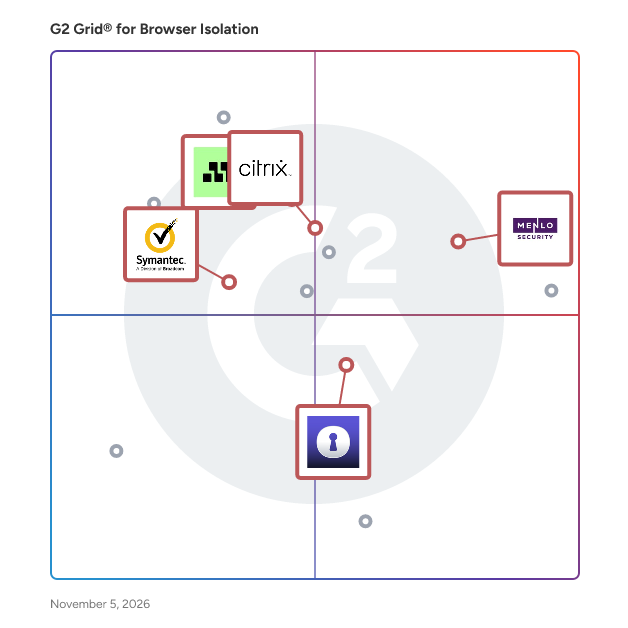
G2 Grid® for Browser Isolation Software

G2 Grid® for Browser Isolation Software plotting products by satisfaction and market presence

Highlighted products: Menlo Security, Citrix SecurAccess with Chrome Enterprise, Mimecast Advanced Email Security, Symantec Web Security Service, and Silo Workspace.

Underlying data: [Grid® JSON](https://www.g2.com/categories/browser-isolation/grids.json?focus%5B%5D=menlo-security&focus%5B%5D=citrix-securaccess-with-chrome-enterprise&focus%5B%5D=mimecast-advanced-email-security&focus%5B%5D=symantec-web-security-service&focus%5B%5D=silo-workspace&segment=enterprise)

Menlo Security

Founded over a decade ago, Menlo Security is a global cybersecurity leader. Trusted by over 1,000 enterprises—including Fortune 500 companies and large government agencies—to protect eight million users, Menlo created the industry's first Browser Security Platform. Our platform transforms standard browsers into secure enterprise browsers using a synergistic architecture that combines local controls with the Menlo Secure Cloud Browser. Key capabilities include Adaptive Clientless Rendering (ACR) for safe cloud execution, H.E.A.T Shield AI to block zero-hour phishing, clientless Zero Trust access, and Data Loss Prevention (DLP) with Content Disarm and Reconstruction (CDR). Menlo delivers architectural immunity against evasive threats for both humans and autonomous AI agents. By solving the "Agentic Paradox," we prevent data exfiltration and block zero-day ransomware. Organizations can safely govern Generative AI, secure unmanaged BYOD endpoints, and replace costly VDI and VPNs—all without disrupting user productivity.

Average Rating: 4.6/5.0

Total Reviews: 52

How Do G2 Users Rate Menlo Security?

  • Ease of Setup: 9.2/10 (Category avg: 8.8/10)
  • Quality of Support: 9.0/10 (Category avg: 8.7/10)
  • Has the product been a good partner in doing business?: 9.5/10 (Category avg: 9.1/10)
  • Ease of Use: 9.4/10 (Category avg: 8.9/10)

Who Is the Company Behind Menlo Security?

  • Seller: Menlo Security
  • Year Founded: 2012
  • HQ Location: Mountain View, California, United States
  • Twitter: @menlosecurity
    16,935 Twitter followers
  • LinkedIn® Page: www.linkedin.com
    503 employees on LinkedIn®

Who Uses This Product?

  • Top Industries: Banking, Financial Services
  • Company Size: 48% Large, 26% Medium

What Do G2 Reviewers Say About Menlo Security?

AI-generated summary from verified user reviews

Pros
  • Users commend the robust security features of Menlo Security, effectively protecting against phishing and modern threats.
  • Users value the strong protection against phishing and malware provided by Menlo Security, enhancing overall security effortlessly.
  • Users appreciate the ease of use with Menlo Security, highlighting quick setups and intuitive dashboards for management.
  • Users commend Menlo Security for its effective threat protection, ensuring safe browsing without disrupting normal workflows.
  • Users value the easy setup of Menlo Security, allowing quick implementation without major issues.
Cons
  • Users experience slow performance with Menlo Security, particularly on complex sites and during interactive sessions.
  • Users frequently experience access issues with Menlo Security, particularly with third-party sites and IP whitelisting challenges.
  • Users report performance issues with Menlo Security, particularly affecting interactive and complex web applications.
  • Users experience slowed internet browsing with Menlo Security, affecting performance and potentially causing user frustration.
  • Users experience technical issues with Menlo Security, including website functionality problems and slower file downloads at times.

What Are Recent G2 Reviews of Menlo Security?

Citrix SecurAccess with Chrome Enterprise

Citrix Secure Browser is service protects the corporate network from browser-based attacks by isolating web browsing. It delivers consistent, secure remote access to internet hosted web applications with zero end-point configuration.

Average Rating: 4.5/5.0

Total Reviews: 51

How Do G2 Users Rate Citrix SecurAccess with Chrome Enterprise?

  • Ease of Setup: 8.6/10 (Category avg: 8.8/10)
  • Quality of Support: 8.6/10 (Category avg: 8.7/10)
  • Has the product been a good partner in doing business?: 9.1/10 (Category avg: 9.1/10)
  • Ease of Use: 9.0/10 (Category avg: 8.9/10)

Who Is the Company Behind Citrix SecurAccess with Chrome Enterprise?

  • Seller: Citrix
  • Year Founded: 1989
  • HQ Location: Fort Lauderdale, FL
  • Twitter: @citrix
    197,812 Twitter followers
  • LinkedIn® Page: www.linkedin.com
    4,236 employees on LinkedIn®
  • Ownership: NASDAQ:CTXS

Who Uses This Product?

  • Top Industries: Information Technology and Services, Banking
  • Company Size: 48% Large, 37% Medium

What Are Recent G2 Reviews of Citrix SecurAccess with Chrome Enterprise?

What Are G2 Users Discussing About Citrix SecurAccess with Chrome Enterprise?

Mimecast Advanced Email Security

Email Security, Cloud Integrated (CI) protects organizations against all forms of email-based attacks, from phishing and credential theft to ransomware and zero-day threats. This solution deploys behind M365 to collect emails after they have passed through Microsoft security, reinspect them, and take action as needed. With a setup time of just four minutes and out-of-the-box settings designed to optimize security immediately, Email Security CI delivers best-in-class efficacy in the simplest way possible. Customers get the full power of Mimecast’s AI-powered detection and threat intelligence in a solution built for the reality of navigating today’s hostile threat landscape with limited time and resources. Email Security CI also offers a fully integrated Awareness Training solution to help organizations easily and effectively reduce the risk of human error.

Average Rating: 4.4/5.0

Total Reviews: 375

How Do G2 Users Rate Mimecast Advanced Email Security?

  • Ease of Setup: 8.0/10 (Category avg: 8.8/10)
  • Quality of Support: 8.4/10 (Category avg: 8.7/10)
  • Has the product been a good partner in doing business?: 8.7/10 (Category avg: 9.1/10)
  • Ease of Use: 8.0/10 (Category avg: 8.9/10)

Who Is the Company Behind Mimecast Advanced Email Security?

  • Seller: Mimecast
  • Company Website:
  • Year Founded: 2003
  • HQ Location: London
  • Twitter: @Mimecast
    18,007 Twitter followers
  • LinkedIn® Page: www.linkedin.com
    2,388 employees on LinkedIn®

Who Uses This Product?

  • Who Uses This: IT Manager, Systems Administrator
  • Top Industries: Legal Services, Information Technology and Services
  • Company Size: 65% Medium, 18% Small

What Do G2 Reviewers Say About Mimecast Advanced Email Security?

AI-generated summary from verified user reviews

Pros
  • Users value the advanced AI-driven threat protection of Mimecast, significantly enhancing email security and user awareness.
  • Users find Mimecast exceptionally easy to implement and manage, appreciating its seamless integration and reliability for email security.
  • Users commend Mimecast for its robust email security, effectively preventing spoofing and protecting against dangerous attachments.
  • Users praise the powerful security features of Mimecast Advanced Email Security, enhancing protection and ease of use.
  • Users appreciate the spam blocking capability of Mimecast, effectively preventing breaches and ensuring email security.
Cons
  • Users note the complexity of Mimecast's interface, making it challenging for new administrators to fully utilize.
  • Users face email filtering issues with Mimecast, struggling to locate emails and manage extensive policies effectively.
  • Users often face email policy configuration issues, leading to time-consuming adjustments and frustrations with usability.
  • Users struggle with configuration difficulties, as the setup is complex and requires significant fine-tuning and adjustment.
  • Users find the false positives in Mimecast frustrating, as they can delay important communications and require manual intervention.

What Are Recent G2 Reviews of Mimecast Advanced Email Security?

What Are G2 Users Discussing About Mimecast Advanced Email Security?

AI can help you find the answers. G2 helps you trust them.

Connect G2 to Claude or ChatGPT for answers grounded in G2's trusted reviews, comparisons, and pricing from real user insights.

How it works

Symantec Web Security Service

Symantec Web Security Service (WSS) provides the same proactive web protection capabilities delivered by the market’s leading on-premises Secure Web Gateway, Symantec ProxySG, but delivered as a resilient and performant cloud security service. Sitting between employees, wherever they are located, and the Internet, the service protects the enterprise from cyber threats, controls and protects corporate use of cloud applications and the web, prevents data leaks, and ensures compliance with all company information and web/cloud access policies. Symantec WSS delivers web and cloud security from a diversified network of certified global data centers. Universal Policy Enforcement (UPE) capabilities allow administrators to define protection policies once and distribute them to all of their gateways. Whether they are in the cloud or on-premises, enterprises can ensure consistent protection is in place. Its best-in-class feature set, combined with powerful integrated solution options, enterprise-class network security capabilities, and flexible subscription pricing model, has made WSS the smart choice for companies looking for enterprise-class security capabilities in a cloud-delivered service.

Average Rating: 4.4/5.0

Total Reviews: 109

How Do G2 Users Rate Symantec Web Security Service?

  • Ease of Setup: 8.9/10 (Category avg: 8.8/10)
  • Quality of Support: 8.4/10 (Category avg: 8.7/10)
  • Has the product been a good partner in doing business?: 8.8/10 (Category avg: 9.1/10)
  • Ease of Use: 8.9/10 (Category avg: 8.9/10)

Who Is the Company Behind Symantec Web Security Service?

  • Seller: Broadcom
  • Year Founded: 1991
  • HQ Location: San Jose, CA
  • Twitter: @broadcom
    63,909 Twitter followers
  • LinkedIn® Page: www.linkedin.com
    44,602 employees on LinkedIn®
  • Ownership: NASDAQ: CA

Who Uses This Product?

  • Top Industries: Information Technology and Services, Computer Software
  • Company Size: 48% Large, 28% Small

What Do G2 Reviewers Say About Symantec Web Security Service?

AI-generated summary from verified user reviews

Pros
  • Users appreciate the excellent security protection of Symantec Web Security Service, ensuring seamless access and peace of mind.
  • Users find the ease of deployment and seamless installation of Symantec Web Security Service highly beneficial for security management.
  • Users find the easy implementation and management of Symantec Web Security Service highly beneficial for their needs.
  • Users are impressed by the affordability of Symantec Web Security Service, finding it cost-effective with ample features.
  • Users praise the network analytics of Symantec Web Security Service, highlighting its effectiveness in enhancing access control.
Cons
  • Users find the notification issues frustrating, as they disrupt work and can lead to false alerts and site blocks.
  • Users find the cost of Symantec Web Security Service to be prohibitively high, impacting value perception.
  • Users frequently face integration issues with Symantec Web Security Service, complicating implementation and affecting overall satisfaction.
  • Users find the poor customer support lacking, impacting their overall experience with Symantec Web Security Service.
  • Users experience slow performance with the EDR function search and find XDR correlation to be manual and cumbersome.

What Are Recent G2 Reviews of Symantec Web Security Service?

What Are G2 Users Discussing About Symantec Web Security Service?

Silo Workspace

Silo Workspace is a digital investigation platform that helps users conduct secure, anonymous online research, collect source evidence, analyze findings, and produce intelligence within an isolated cloud environment. The platform is designed for teams that need to investigate online sources while separating analyst identity, organizational attribution, and endpoint systems from the activity being performed. Silo Workspace is used by cyber threat intelligence, SOC and incident response, OSINT, fraud, brand protection, financial crime, corporate security, trust and safety, and law enforcement teams. It provides a multi-application investigation workspace that includes the Silo for Research browser, communication tools, productivity applications, and managed attribution. Users can access the surface web, deep web, and dark web while routing activity through managed egress nodes and configurable geographic, network, and device attributes. Key capabilities include: Isolated investigation environments: Analysts can launch workspaces configured for specific missions, maintain persistent browsing data and app state when needed, or deprovision workspaces to reduce cross-contamination between investigations. Managed attribution and access: Users can operate through region-specific nodes, select connection types, and use controlled browser, device, language, and geolocation settings to support non-attributable research. Evidence capture and workflow support: Silo Workspace supports screenshots, video downloads, notes, translation, transcription, scheduled collection, case management, shared storage, and tools for preserving investigation artifacts. Integrated analysis tools: Silo Nexus AI is built into the investigation workflow to help surface leads, identify patterns, provide source-grounded responses, and support analysis without retaining prompts for model training. Governance and compliance controls: Administrators can manage role-based access, enforce policies, monitor activity, record sessions, and maintain audit logs. Silo also supports APIs, SSO, directory integration, and compliance needs for regulated organizations. Silo Workspace is cloud-native and accessible from a browser, with administrative oversight designed for individual teams, distributed departments, and larger intelligence programs.

Average Rating: 4.6/5.0

Total Reviews: 107

How Do G2 Users Rate Silo Workspace?

  • Ease of Setup: 9.0/10 (Category avg: 8.8/10)
  • Quality of Support: 9.3/10 (Category avg: 8.7/10)
  • Has the product been a good partner in doing business?: 9.7/10 (Category avg: 9.1/10)
  • Ease of Use: 8.9/10 (Category avg: 8.9/10)

Who Is the Company Behind Silo Workspace?

  • Seller: Authentic8
  • Company Website:
  • Year Founded: 2010
  • HQ Location: Redwood City, California, United States
  • Twitter: @Authentic8
    2,980 Twitter followers
  • LinkedIn® Page: www.linkedin.com
    128 employees on LinkedIn®

Who Uses This Product?

  • Who Uses This: Software Engineer
  • Top Industries: Information Technology and Services, Telecommunications
  • Company Size: 49% Medium, 29% Small

What Do G2 Reviewers Say About Silo Workspace?

AI-generated summary from verified user reviews

Pros
  • Users love the ease of use of Silo Workspace, enjoying a simple interface that enhances online safety.
  • Users value the strong security features of Silo Workspace, ensuring safer online research and protection from risks.
  • Users find implementation easy with Silo Workspace, enjoying smooth setup and user-friendly navigation across devices.
  • Users value the security protection of Silo Workspace, ensuring a safe and stress-free browsing experience.
  • Users find installation easy with Silo Workspace, enabling simple setup and seamless access across devices.
Cons
  • Users report slow performance in Silo Workspace, particularly with media-heavy sites and during less stable internet connections.
  • Users find the difficult learning curve of Silo Workspace challenging, making it hard for newcomers to adapt.
  • Users find Silo Workspace expensive, limiting access for employees outside the company to use it domestically.
  • Users experience occasional slow loading times in Silo Workspace, especially during fluctuating internet connections.
  • Users find the software outdated in design, suggesting a need for a more modern graphical update for better UX.

What Are Recent G2 Reviews of Silo Workspace?

What Are G2 Users Discussing About Silo Workspace?

Lauren Worth
LW
Researched and written by Lauren Worth
Updated