# Best Antivirus Software - Page 10

*By [Brandon Summers-Miller](https://research.g2.com/insights/author/brandon-summers-miller)*

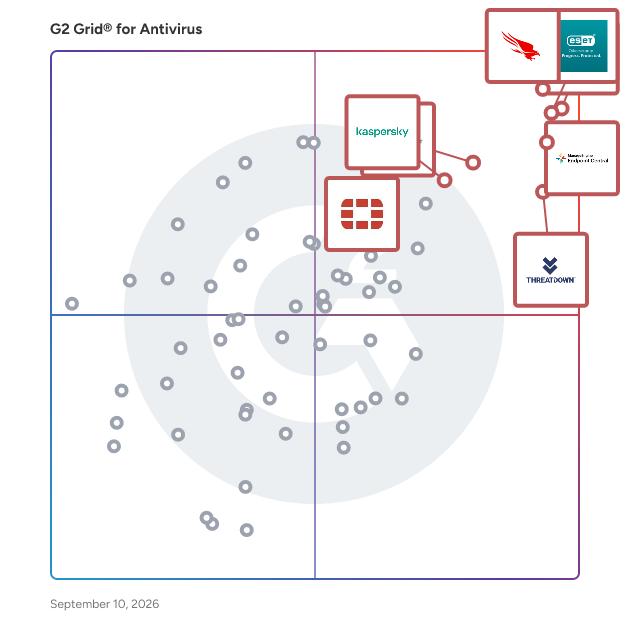
The best antivirus software in 2026 is Sophos Endpoint, rated 4.7 out of 5 on G2 based on 800+ verified reviews. CrowdStrike Falcon Endpoint Protection Platform edges ahead with the highest user rating at 4.7 stars, offering signature-less behavioral detection for organizations prioritizing lightweight performance.

1. Sophos Endpoint — 4.7/5 (800+ reviews): Ransomware rollback with centralized endpoint enforcement
2. ESET PROTECT — 4.6/5 (900+ reviews): Centralized endpoint protection with lightweight deployment
3. CrowdStrike Falcon Endpoint Protection Platform — 4.6/5 (400+ reviews): Behavioral endpoint protection with signature-less detection
4. ManageEngine Endpoint Central — 4.5/5 (1,100+ reviews): Endpoint vulnerability patching with centralized security enforcement
5. ThreatDown — 4.6/5 (1,000+ reviews): Centralized endpoint detection with ransomware rollback

*Updated June 2026. Based on 2026 G2 verified review data across 47 products.*


Endpoint antivirus software is any program that prevents and/or detects the presence of malicious software within an endpoint device. These tools typically contain detection features for identifying potential malware and computer viruses that attempt to, or actually penetrate, a device. Most tools possess some form of firewall to stop any virus, worm, trojan, or adware that attempts to penetrate the device. Companies use these tools to protect their devices and the sensitive information within them. These tools typically possess some feature to assess a device’s or network’s health and alert administrators of any infection present. This can help ensure each device in a company’s system is secure. These tools should not be confused with [firewall](https://www.g2.com/categories/firewall) tools, which may have the same features, but also prevent hackers and other parties from penetrating networks and devices. Other endpoint security tools include [endpoint detection and response (EDR)](https://www.g2.com/categories/endpoint-detection-response-edr) and [endpoint management](https://www.g2.com/categories/endpoint-management) software. EDR tools possess a wider range of capabilities for identifying malware and device penetration, along with tools to remove malicious elements. Endpoint management tools help users manage which devices are connected to networks and ensure the security features of those devices are up to date.

To qualify for inclusion in the Endpoint Antivirus category, a product must:

- Possess malware identification and/or removal features
- Possess anti-virus and/or antispyware features
- Show health status of individual devices
- Distribute updates as new virus signatures are detected


## Top Antivirus Software at a Glance
| # | Product | Rating | Best For | What Users Say |
|---|---------|--------|----------|----------------|
| 1 | [Sophos Endpoint](https://www.g2.com/products/sophos-endpoint/reviews) | 4.7/5.0 (789 reviews) | Ransomware rollback with centralized endpoint enforcement | "[Excellent fleet visibility through Sophos Central, but watch the initial policy exceptions&quot;](https://www.g2.com/survey_responses/sophos-endpoint-review-12955748)" |
| 2 | [ESET PROTECT](https://www.g2.com/products/eset-protect/reviews) | 4.6/5.0 (930 reviews) | Centralized endpoint protection with lightweight deployment | "[Clear, Centralized Console for Managing All Endpoints](https://www.g2.com/survey_responses/eset-protect-review-12826797)" |
| 3 | [CrowdStrike Falcon Endpoint Protection Platform](https://www.g2.com/products/crowdstrike-falcon-endpoint-protection-platform/reviews) | 4.6/5.0 (412 reviews) | Behavioral endpoint protection with signature-less detection | "[Lightweight Deployment, Powerful Incident Response Visibility](https://www.g2.com/survey_responses/crowdstrike-falcon-endpoint-protection-platform-review-12952621)" |
| 4 | [ManageEngine Endpoint Central](https://www.g2.com/products/manageengine-endpoint-central/reviews) | 4.5/5.0 (1,105 reviews) | Endpoint vulnerability patching with centralized security enforcement | "[Helpful Endpoint Management Platform](https://www.g2.com/survey_responses/manageengine-endpoint-central-review-12976569)" |
| 5 | [ThreatDown](https://www.g2.com/products/threatdown/reviews) | 4.6/5.0 (1,042 reviews) | Centralized endpoint detection with ransomware rollback | "[Excellent tool for End point defence as part of our Cyber Defence](https://www.g2.com/survey_responses/threatdown-review-9947439)" |
| 6 | [Check Point Endpoint Security](https://www.g2.com/products/check-point-endpoint-security/reviews) | 4.5/5.0 (254 reviews) | Multi-layered endpoint threat prevention with centralized enforcement | "[efficient, safe and friendly](https://www.g2.com/survey_responses/check-point-endpoint-security-review-7171717)" |
| 7 | [FortiClient](https://www.g2.com/products/forticlient/reviews) | 4.4/5.0 (268 reviews) | Fortinet-native endpoint protection with VPN-integrated antivirus | "[Seamless and Reliable Security Management](https://www.g2.com/survey_responses/forticlient-review-12727398)" |
| 8 | [Kaspersky AntiVirus](https://www.g2.com/products/kaspersky-antivirus/reviews) | 4.4/5.0 (90 reviews) | Real-time malware detection with lightweight endpoint footprint | "[Easy-to-Use UI/UX, Helpful Features, and Pocket-Friendly Pricing](https://www.g2.com/survey_responses/kaspersky-antivirus-review-11065735)" |
| 9 | [SentinelOne Singularity Endpoint](https://www.g2.com/products/sentinelone-singularity-endpoint/reviews) | 4.7/5.0 (195 reviews) | Autonomous endpoint threat detection with ransomware rollback | "[Strong - Reliable Endpoint Protection with Automation](https://www.g2.com/survey_responses/sentinelone-singularity-endpoint-review-12210547)" |
| 10 | [Webroot Business Endpoint Protection](https://www.g2.com/products/webroot-business-endpoint-protection/reviews) | 4.5/5.0 (483 reviews) | Cloud-native endpoint protection with RMM-integrated deployment | "[Lightweight, Reliable Endpoint Security](https://www.g2.com/survey_responses/webroot-business-endpoint-protection-review-11860852)" |


## How Many Antivirus Software Products Does G2 Track?
**Total Products under this Category:** 137

### Category Stats (Jul 2026)
- **Average Rating**: 4.37/5 The average rating of products in this category, based on all submitted ratings
- **Top Trending Product**: Datto AV (+9.09%) - Among all products in this category, Datto AV recorded the largest rating increase compared to last month
*Last updated: July 01, 2026*


## How Does G2 Rank Antivirus Software Products?

**Why You Can Trust G2's Software Rankings:**

- 30 Analysts and Data Experts
- 10,600+ Authentic Reviews
- 137+ Products
- Unbiased Rankings

G2's software rankings are built on verified user reviews, rigorous moderation, and a consistent research methodology maintained by a team of analysts and data experts. Each product is measured using the same transparent criteria, with no paid placement or vendor influence. While reviews reflect real user experiences, which can be subjective, they offer valuable insight into how software performs in the hands of professionals. Together, these inputs power the G2 Score, a standardized way to compare tools within every category.


## Which Antivirus Software Is Best for Your Use Case?

- **Leader:** [Sophos Endpoint](https://www.g2.com/products/sophos-endpoint/reviews)
- **Highest Performer:** [Heimdal](https://www.g2.com/products/heimdal/reviews)
- **Easiest to Use:** [Sophos Endpoint](https://www.g2.com/products/sophos-endpoint/reviews)
- **Top Trending:** [CrowdStrike Falcon Endpoint Protection Platform](https://www.g2.com/products/crowdstrike-falcon-endpoint-protection-platform/reviews)
- **Best Free Software:** [ESET PROTECT](https://www.g2.com/products/eset-protect/reviews)


---

**Sponsored**

### Prisma Browser for Business

Prisma Browser for Business is a secure web browser tailored for small businesses, integrating advanced security features directly into the browsing experience. Built on the Chromium platform, it offers a familiar interface while providing enterprise-grade protection against online threats such as phishing, ransomware, and data breaches. This solution enables teams to work seamlessly across various applications and AI tools, ensuring data security without the need for a dedicated IT team. Key Features and Functionality: - Proactive Threat Protection: Utilizes AI-powered threat scanning to detect and block phishing attempts, malware, and other cyber threats in real-time. - Data Loss Prevention: Implements controls to prevent accidental sharing of sensitive information, such as disabling copy/paste and file uploads to unauthorized platforms. - AI Interaction Management: Monitors and regulates AI tool usage to prevent unintended actions and data leaks, ensuring that business information remains secure. - User-Friendly Deployment: Offers a straightforward setup process with pre-configured security settings, allowing businesses to protect their teams without technical expertise. Primary Value and Problem Solved: Prisma Browser for Business addresses the critical need for robust cybersecurity in small businesses, which are increasingly targeted by sophisticated cyberattacks. By embedding security directly into the browser, it safeguards the primary workspace where employees spend the majority of their time. This solution not only protects against external threats but also mitigates risks associated with accidental data exposure through AI tools and other online platforms. By providing an easy-to-use, comprehensive security solution, Prisma Browser for Business empowers small businesses to focus on growth and productivity without compromising on security.


[Visit website](https://www.g2.com/external_clickthroughs/record?secure%5Bad_program%5D=ppc&amp;secure%5Bad_slot%5D=category_product_list&amp;secure%5Bcategory_id%5D=1160&amp;secure%5Bchosen_at%5D=2026-07-02T09%3A53%3A49Z&amp;secure%5Bdisplayable_resource_id%5D=1160&amp;secure%5Bdisplayable_resource_type%5D=Category&amp;secure%5Bmedium%5D=sponsored&amp;secure%5Bplacement_reason%5D=page_category&amp;secure%5Bplacement_resource_ids%5D%5B%5D=1160&amp;secure%5Bprioritized%5D=false&amp;secure%5Bproduct_id%5D=1806417&amp;secure%5Bresource_id%5D=1160&amp;secure%5Bresource_type%5D=Category&amp;secure%5Bsource_type%5D=category_page&amp;secure%5Bsource_url%5D=https%3A%2F%2Fwww.g2.com%2Fcategories%2Fantivirus%3Fpage%3D5&amp;secure%5Btoken%5D=08185ac20c30682ed92906d9e7155766703e426303e6af18ce0d32ab154d324e&amp;secure%5Burl%5D=https%3A%2F%2Fwww.paloaltonetworks.com%2Fprisma-browser-for-business%3Futm_source%3Dg2-panw_inhouse-amer-sase-smco-sfow%26utm_medium%3Ddisplay%26utm_campaign%3Dg2-sase-prisma_browser_smb-amer-us-awareness-en-native-cat_com%26utm_content%3D701Ki000000p2UKIAY&amp;secure%5Burl_type%5D=custom_url)

---


## What Is Antivirus Software?

[Endpoint Protection Software](https://www.g2.com/categories/endpoint-protection)

## What Software Categories Are Similar to Antivirus Software?

- [Endpoint Detection &amp; Response (EDR) Software](https://www.g2.com/categories/endpoint-detection-response-edr)
- [Endpoint Management Software](https://www.g2.com/categories/endpoint-management)
- [Patch Management Software](https://www.g2.com/categories/patch-management)
- [Endpoint Protection Platforms](https://www.g2.com/categories/endpoint-protection-platforms)
- [Email Anti-spam Software](https://www.g2.com/categories/email-anti-spam)
- [Managed Detection and Response (MDR)  Software](https://www.g2.com/categories/managed-detection-and-response-mdr)
- [Extended Detection and Response (XDR) Platforms](https://www.g2.com/categories/extended-detection-and-response-xdr-platforms)


---

## How Do You Choose the Right Antivirus Software?

### What You Should Know About Antivirus Software

### What is Antivirus Software?

Viruses are a specific type of malware that infects a computer, system or network and spreads like a contagion, hence the name. Most modern antivirus solutions protect against many types of malware including viruses, adware, spyware, trojans, and ransomware attacks.

Antivirus tools make up one component of the endpoint protection ecosystem. While antivirus covers malware protection, features for detection, remediation, and device governance may not be included. [EDR tools](https://www.g2.com/categories/endpoint-detection-response-edr) typically provide a wider breadth of features for incident detection, malware isolation, and infection remediation. Endpoint management tools will supply additional features such as asset management, system requirements updates, and network monitoring. Endpoint locations and technology infrastructure are key considerations for security software.

Antivirus solutions are a necessity, especially with the rise of bring-your-own-device (BYOD) policies. BYOD practices provide a wealth of benefits, but they can make it more difficult to close the security loop. Some antivirus apps will only support Windows or Mac devices; others support everything from tablets to smart devices. It’s important to pair your endpoint management policies with security tools that support the range of devices accessing your network. Since some employees are slow to update applications and operating systems, conflicts may arise and force administrators to regulate system requirements.

Key Benefits of Antivirus Software

- Block malware from infecting devices
- Protect against phishing, spam, and hackers
- Increase endpoint lifetime
- Reduce risk of data theft, loss, or corruption
- Regulate antivirus policies companywide

### Why Use Antivirus Software?

Antivirus software is an important component of a well-rounded security software stack and can be a valuable addition to existing software programs. These solutions effectively reduce the presence of malware able to gain access to your company’s sensitive information. Many antivirus vendors even offer free antivirus programs for personal use.

**Information security —** Companies are becoming more vigilant in protecting their sensitive business data. Industries such as financial services and banking are obvious places where it is important to keep data safe. But hackers target all kinds of companies and individuals, as almost all organizations and people have some level of valuable data stored on their networks.

**Device protection —** Endpoints are disparate and plentiful in the modern world. Companies often allow users to access business data and applications on whatever device they have on hand. It’s important, however, to ensure each of those endpoints is secure. Cross-platform availability is important for companies with BYOD practices. But antivirus tools help keep dangerous programs and hackers out of your business network, regardless of the type of device they’re using.

**Browsing safety —** Employees often surf the web and end up on potentially dangerous sites. If your company’s network doesn’t block unapproved sites or employees surf on their own network, it’s fairly likely they’ll end up encountering some kind of malware. Antivirus solutions are useful tools for identifying potentially dangerous material and preventing users from obtaining it. This includes clicking dangerous ads, downloading suspicious files, or getting caught in a phishing incident. All of these user behaviors can end up allowing malware entrance into a network and put business data at risk.

**Employee unreliability —** Like the browser issue, employees aren’t always skilled in best practices for internet security. Many users will download an extension or program simply because a site said they have to; antivirus solutions help make it more difficult, or even impossible, to download a malicious program. These downloads could very easily include malware and wreak havoc on a company’s network. That puts both the individual user’s data at risk. And because of a virus’ ability to replicate and spread, the company’s entire network becomes a target.

### What are the Different Kinds of Antivirus Software?

**Antivirus —** These are the longest-standing software type of the bunch. Viruses are the best-known and debatably the oldest forms of malware. Viruses differentiate themselves through their ability to replicate and spread. They can be attached to files from the internet, suspicious applications, and dangerous websites.

Once a virus is downloaded, it can replicate and distribute its copies across computer networks. These viruses can be used for a number of nefarious purposes, such as remote access and data theft. Antivirus solutions identify known variants of viral malware. Many antivirus solutions also cover a number of the following cyberthreats, but they have historically focused on viruses.

**Anti-malware —** Anti-malware solutions will cover most kinds of cyber threats that are delivered in the form of files or applications. There are millions of different malware forms that range from adware to ransomware; anti-malware software aims to prevent all kinds from harming your devices.

These dangerous programs can mutate and adapt to slip by traditional firewalls and discover new exploits and zero-day vulnerabilities. As a result, many are synced to threat intelligence networks in addition to malware libraries to identify evolving forms of malware and protect against zero-day attacks.

**Anti-spyware —** Spyware is a common form of malware used to secretly gather sensitive information from their targets. These can be used to track cookies, monitor systems, or harvest identity data.

The most common way to infect a device with spyware is through a program called adware. These usually create popups or windows within browsers that trigger downloads when the user attempts to close them. Other forms of spyware include systems monitors, cookie trackers, and trojans, which present themselves as harmless components, but secretly possess spyware within their files.

**Anti-worm —** A computer worm is a malware program that functions similarly to a virus in that it replicates itself and spreads within computer networks. Unlike viruses, worms typically don’t modify or corrupt the target’s files. They’re used for hacking practices such as creating backdoors and botnets, or launching ransomware attacks.

Worms are effective ransomware attack tools since they are designed to replicate and spread quickly across large networks. A worm will lock down a network’s endpoints and require payment in return for access to the end user’s files. If they refuse, the virus may destroy or harvest an entire network’s data.

**Anti-phishing —** Phishing is a common practice used to take advantage of human error. Attacks may come in the form of emails, ads, or other means of electronic communication. Phishing content mimics legitimate messages or websites and asks a user to submit credentials or banking information.

Many [email gateways](https://www.g2.com/categories/secure-email-gateway) have filters to prevent phishing content from reaching users. Some antivirus solutions will also identify suspicious websites and alert users if the programs suspects a site may contain phishing content.

### Antivirus Software Features

**Malware scanning —** Malware scanning features allow antivirus tools to scan devices, browsers and networks for the presence of malware. The tools will identify the location of the computer virus and alert either you or your IT administrator of its presence.

Some dangerous software programs may lay dormant for extended periods of time without displaying symptoms. Hackers could leave a backdoor to gain access to your systems; they could also be waiting to execute a dangerous application. Malware scanning will identify these threats and expedite the remediation process.

**Continuous scanning —** On-demand or periodic scans, while helpful, can miss malware for as long as your settings allow. Continuous scanning keeps your systems safer by constantly analyzing endpoints to identify threats as they arise.

Users may forget to run scans or the periodic scans may be poorly timed, allowing a virus to infect a network. Instead of finding out once you run the scan, a continuous scanning antivirus application will alert users of threats as they emerge.

**Firewall —** Firewalls provide an added layer of security by monitoring and filtering network traffic. These tools will prevent intrusions by identifying suspicious activity and either block access to the network or alert an administrator of the threat.

There are multiple kinds of firewalls built for specific uses or devices. Some are designed to protect applications, while others only support specific operating systems. However, just because an application says it has firewall features, does not mean it will be effective for your specific use case.

**Web protection —** Many antivirus solutions have features designed to identify potentially dangerous websites or online downloads. An antivirus program with web protection features may scan downloads before saving them or disable a site possessing adware.

There are a number of different browser-based threats that can automatically trigger downloads of dangerous malware. Some even automatically download files upon entering a website without the user ever clicking a button.

**Email protection —** Email protection features act like additional spam filters and file scanners. Emails from sites known to possess malware will be automatically moved to a spam folder or other isolated area.

Some tools will move files to an isolated environment and scan them for dangerous components prior to actually downloading them. Other tools may identify phishing attacks before a user can input sensitive information or be led to a dangerous website.

**Automatic updates —** Because there are millions of different computer viruses that could threaten your endpoints, antivirus programs must be frequently updated. These will inform the program of new threats and look out for them in the future.

Automatic updates increase the antivirus tool’s effectiveness by limiting potential human error. Some users may not understand the effects of not updating their security tools; others may simply forget. Automatic updates take the responsibility out of your employee’s hands and do the job for them.

**Cross-platform use —** If your company uses a variety of devices or hopes to add antivirus protection to different IT infrastructure components such as servers or computing appliances, a cross-platform tool is entirely necessary.

Some programs may only function as a Mac antivirus or a Windows antivirus program. Some tools might not cover mobile devices or Linux systems. Be sure the antivirus program system requirements are met by your array of devices.

### Potential Issues with Antivirus Software

**Updating software —** Employees are not always the most reliable users when it comes to keeping software applications up-to-date. Many don’t remember and others just don’t care. Failing to update antivirus software will prevent the tool from identifying new threats and informing users of potential vulnerabilities.

Updated software can improve the effectiveness of an antivirus program by adding malware signatures to its database. There are millions of unique malware programs threatening companies today. Without an up-to-date database, antivirus programs may miss new and existing malware and put companies at risk.

**Existing malware —** Antivirus programs provide a lot of features for analyzing systems, detecting the presence of malware, and preventing new viruses from infecting networks. But companies adopting antivirus software for the first time likely already have some malware on their devices. Antivirus software doesn’t always provide the tools necessary to remove complex forms of malware.

Without the ability to detect and remove malware, companies are susceptible to a wide range of programs hackers use to access networks and steal valuable information. As a result, some antivirus solutions should be paired with an [endpoint detection and response (EDR)](https://www.g2.com/categories/endpoint-detection-response-edr) or [incident response](https://www.g2.com/categories/incident-response) solution to investigate and remove existing threats.


---
## What Are the Most Common Questions About Antivirus Software?
*AI-generated · Last updated: June  3, 2026*
### Antivirus software with strong customer support and clear documentation for faster team adoption and productivity
According to verified users, antivirus software is easier to adopt when setup is straightforward, the admin console is intuitive, and support teams respond quickly with practical guidance. Recent reviews repeatedly mention value in clean dashboards, easy policy configuration, centralized management, and documentation that helps administrators handle setup, troubleshooting, and ongoing changes without unnecessary effort. Reviewers also highlight that fast, knowledgeable support matters most during initial rollout, policy tuning, and complex remediation steps. Products that reduce manual work through automated updates, clear alerts, and simple deployment tend to help teams become productive faster while keeping day-to-day security management manageable.


### Finding Antivirus tools that deliver measurable value without requiring extensive training or support
According to verified users, antivirus tools feel most valuable when they combine strong protection with low day-to-day overhead. Across recent reviews, buyers consistently point to centralized visibility, lightweight agents, quick deployment, and policy automation as the biggest drivers of value. Reviewers often describe the best outcomes as fewer manual checks, faster response to suspicious activity, simpler endpoint oversight, and less disruption to users. Products are also seen as more efficient when they manage updates, alerts, and remediation from a single console. At the same time, some reviews note that overly technical interfaces, weak reporting, or confusing policy settings can increase training needs and reduce the practical value teams get after implementation.


### Which Antivirus tools maintain strong user engagement and adoption rates even after the initial implementation phase
Based on G2 reviews, these antivirus tools are most often described as easy to manage over time.

- [Sophos Endpoint](https://www.g2.com/products/sophos-endpoint) — centralized management and simple deployment.
- [ESET PROTECT](https://www.g2.com/products/eset-protect) — clear console with strong visibility.
- [CrowdStrike Falcon Endpoint Protection Platform](https://www.g2.com/products/crowdstrike-falcon-endpoint-protection-platform) — lightweight agent with detailed visibility.
- [ThreatDown](https://www.g2.com/products/threatdown) — easy monitoring and unified controls.


### What features define modern antivirus software
According to verified users, modern antivirus software is expected to do more than basic malware blocking. Recent reviews most often describe modern products as combining real-time threat detection, ransomware protection, behavioral or AI-assisted detection, centralized management, and clear visibility across endpoints. Buyers also repeatedly mention policy control, web or URL filtering, application control, device control, patching support, and fast alerting as important capabilities. Another recurring theme is operational efficiency: teams want lightweight agents, automated updates, remote deployment, and incident response features that reduce manual work. Reviewers also value integrations with broader security tools when they improve investigation workflows and help security teams manage threats from one place.


### How do teams use Antivirus for centralized management
G2 reviewers mention that teams commonly use antivirus platforms for centralized management by monitoring endpoint health, pushing updates, applying security policies, and reviewing alerts from a single console. Recent reviews show this workflow is especially useful for managing distributed devices, remote users, and mixed environments without logging into each machine individually. Teams also use centralized management to control application access, isolate suspicious devices, track outdated endpoints, and simplify reporting for internal stakeholders. Buyers repeatedly describe this model as a way to reduce manual effort, improve consistency across devices, and speed up troubleshooting. The most valued experiences are those where dashboards are clear, policies are easy to maintain, and admins can act quickly when threats appear.


