Top Free Animation Software - Page 2

How Many Animation Software Products Does G2 Track?

Total Products under this Category: 139

Category Stats (Sep 2026)

  • Average Rating: 4.39/5 (↑0.01 vs Aug 2026) The average rating of products in this category, based on all submitted ratings
  • Top Trending Product: VideoScribe (+0.37%) - Among all products in this category, VideoScribe recorded the largest rating increase compared to last month

Last updated: September 01, 2026

How Does G2 Rank Animation Software Products?

Why You Can Trust G2's Software Rankings:

  • 30 Analysts and Data Experts
  • 10,000+ Authentic Reviews
  • 139+ Products
  • Unbiased Rankings

G2's software rankings are built on verified user reviews, rigorous moderation, and a consistent research methodology maintained by a team of analysts and data experts. Each product is measured using the same transparent criteria, with no paid placement or vendor influence. While reviews reflect real user experiences, which can be subjective, they offer valuable insight into how software performs in the hands of professionals. Together, these inputs power the G2 Score, a standardized way to compare tools within every category.

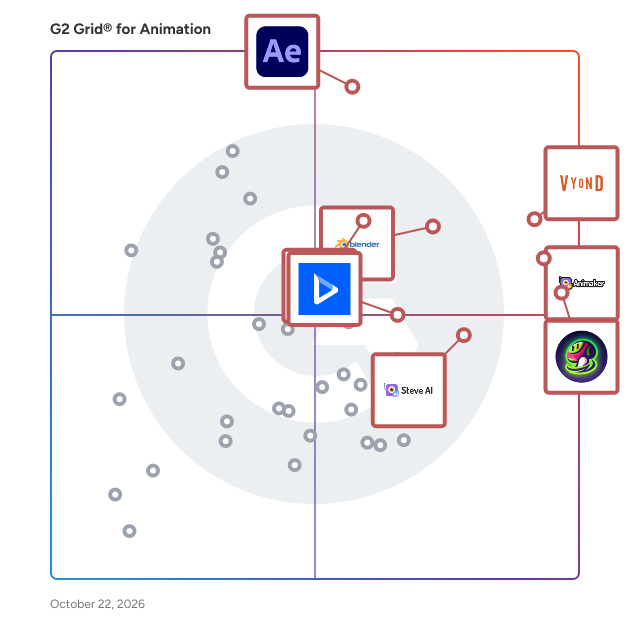
G2 Grid® for Animation Software

G2 Grid® for Animation Software plotting products by satisfaction and market presence

Highlighted products: Vyond, Animaker, Adobe After Effects, Meshy, Blender, Unity, Steve AI, and Powtoon.

Underlying data: [Grid® JSON](https://www.g2.com/categories/animation/grids.json?focus%5B%5D=vyond&focus%5B%5D=animaker&focus%5B%5D=adobe-after-effects&focus%5B%5D=meshy&focus%5B%5D=blender&focus%5B%5D=unity&focus%5B%5D=animaker-inc-steve-ai&focus%5B%5D=powtoon)

Autodesk Architecture, Engineering & Construction Collection

Integrated BIM tools for building design, civil infrastructure, and construction. Get access to a set of integrated tools that equip you to meet any project challenge – now and in the future. Use powerful BIM and CAD workflows enabled by a comprehensive set of software and services to deliver your best work and stay competitive. Why a collection? • Be ready for anything with a full set of BIM tools Get an essential set of tools, including Revit and AutoCAD, at a great price. And with access to over a dozen more tools, you can try new workflows or projects. • Easier software and license management Eliminate the headache of managing multiple product licenses. Get insights on product use. Easily download, install, and use as many products within the collection as you want, whenever you like. • Access the latest and previous releases Ensure software compatibility with all team members by accessing previous versions when you need them. Stay current with the latest releases. Deploy updates whenever you want. • Choose access for individuals or teams Choose between subscriptions that provide single-user access for an individual or give teams permission to share licenses with multi-user access.

Average Rating: 4.6/5.0

Total Reviews: 24

How Do G2 Users Rate Autodesk Architecture, Engineering & Construction Collection?

  • Has the product been a good partner in doing business?: 8.7/10 (Category avg: 8.7/10)
  • Quality of Support: 8.3/10 (Category avg: 8.2/10)
  • Ease of Setup: 8.3/10 (Category avg: 8.9/10)
  • Ease of Admin: 7.2/10 (Category avg: 8.6/10)

Who Is the Company Behind Autodesk Architecture, Engineering & Construction Collection?

  • Seller: Autodesk
  • Year Founded: 1982
  • HQ Location: San Francisco
  • Twitter: @autodesk
    273,215 Twitter followers
  • LinkedIn® Page: www.linkedin.com
    15,757 employees on LinkedIn®
  • Ownership: NASDAQ:ADSK

Who Uses This Product?

  • Top Industries: Architecture & Planning
  • Company Size: 40% Medium, 36% Large

What Are Recent G2 Reviews of Autodesk Architecture, Engineering & Construction Collection?

What Are G2 Users Discussing About Autodesk Architecture, Engineering & Construction Collection?

Saola Animate

Saola Animate is an ultimate tool to create HTML5 animations and interactive web content. Besides exporting to HTML5 output, the release of the latest version - Saola Animate 3.0 - allows you to export projects to video formats for demonstration purposes. With an intuitive editor, you can do almost everything with no coding skills required. Regarding animations, Saola Animate operates on a keyframe-based animation system that helps create animations more easily than ever. Saola Animate also offers Preset Effects and Auto-Keyframe mode that automatically generates keyframes when creating animations. This helps save your time and speed up your work. Furthermore, the perfect combination of the responsive layout, responsive scaling and flexible layout gives your animations the optimal viewing across any devices and browsers with different screen sizes.

Average Rating: 5.0/5.0

Total Reviews: 1

How Do G2 Users Rate Saola Animate?

  • Quality of Support: 8.3/10 (Category avg: 8.2/10)
  • Ease of Setup: 10.0/10 (Category avg: 8.9/10)

Who Is the Company Behind Saola Animate?

  • Seller: Atomi Systems
  • HQ Location: Vietnam
  • Twitter: @activepresenter
    500 Twitter followers
  • LinkedIn® Page: www.linkedin.com
    7 employees on LinkedIn®

Who Uses This Product?

  • Company Size: 100% Small

What Are Recent G2 Reviews of Saola Animate?

Animator

Animator.dev is a browser-first AI whiteboard animation maker designed to help educators, course creators, trainers, YouTubers and product teams turn ideas into clear, engaging videos. Users can begin with a topic, prompt or complete script. Animator AI helps organise the content into scenes, generate a visual storyboard and place editable elements onto the timeline. Unlike one-click video generators that produce a fixed result, Animator keeps scenes, narration, characters, captions, visuals, animations and timing editable. Animator combines whiteboard drawing animations, talking characters, text-to-speech, animated SVG illustrations, Lottie animations, shapes, images, audio, video and screen recordings in one workspace. Its multi-track timeline gives creators control over when every element appears, how long it remains visible and how it enters or exits the scene. The integrated screen recorder can capture a browser tab, application window or entire screen. Recordings can be added directly to the project timeline and combined with narration, captions, characters and whiteboard explanations. This makes Animator suitable for software tutorials, product demonstrations, online lessons and workplace training. Animator is browser-first - runs in a supported desktop browser, reducing the need to install and manage a large traditional animation application. Projects and imported media can remain in the browser, while supported Local AI features can run on the user’s device without consuming hosted AI credits. Animator Free includes unlimited video projects, the complete timeline editor, free visual assets, free talking characters, Local AI where supported and video export up to 720p with an Animator watermark. Animator Pro adds premium assets, AnimatorAI™ Credits, the screen recorder, Full HD 1920×1080 and 4K exports, bring-your-own-key API integrations and watermark-free exports. Animator is designed for: - Teachers and educators - Online course creators - Workplace trainers - YouTube creators - Product marketers - Customer education teams - Software tutorial creators - Small businesses - Presentation and explainer-video creators Primary use cases - Whiteboard explainer videos - Animated educational lessons - Employee training and onboarding - Product demonstrations - Software walkthroughs - Screen-recorded tutorials - YouTube educational content - Online course videos - Process and workflow explanations - Presenter-led visual stories Animator.dev is built for people who need to explain ideas visually without requiring advanced animation, design or video-editing experience.

Who Is the Company Behind Animator?

Expressive Animator

Expressive Animator is an SVG vector animation software that helps designers create and export animated icons, logos, and illustrations. It provides professional vector tools and keyframe-based timeline animation features for bringing motion to vector graphics. Users can import SVG, PDF, Adobe Illustrator files, and Figma designs, and animate them using easing controls, motion paths, masking, and other techniques. Expressive Animator also allow users to export their animations in other formats as Lottie, GIF, PNG, and video.

Who Is the Company Behind Expressive Animator?