# Best Analytics Platforms for Small Business

*By [Tian Lin](https://research.g2.com/insights/author/tian-lin)*

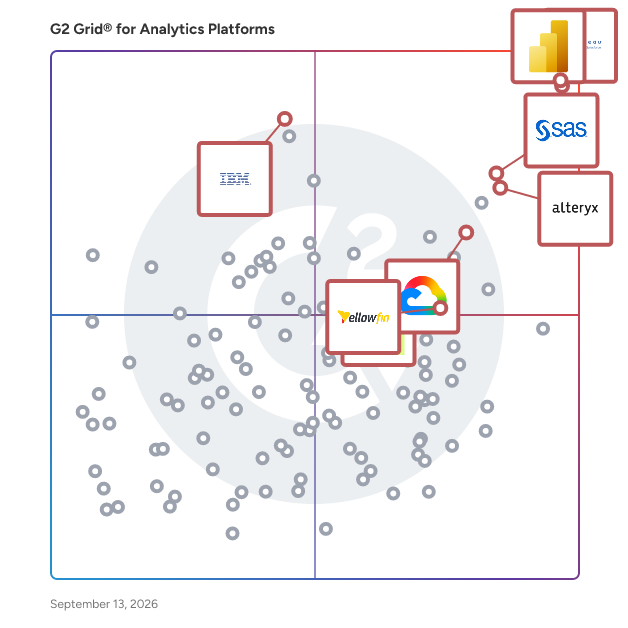
The best analytics platform in 2026 is Microsoft Power BI, rated 4.5 out of 5 on G2 based on 1,600+ verified reviews. For data engineering and machine learning workflows, Databricks and Alteryx both lead at 4.6 stars, with Databricks excelling in governed lakehouse analytics and Alteryx in no-code automation.

1. Microsoft Power BI — 4.5/5 (1,600+ reviews): Microsoft-connected interactive dashboards
2. Tableau — 4.4/5 (3,700+ reviews): Flexible visual dashboard exploration
3. Databricks — 4.6/5 (1,300+ reviews): Governed lakehouse analytics and ML workflows
4. SAS Viya — 4.3/5 (800+ reviews): Cloud analytics for governed data science
5. Alteryx — 4.6/5 (800+ reviews): No-code data preparation and automation

*Updated June 2026. Based on 2026 G2 verified review data across 6,100+ products.*


Products classified in the overall Analytics Platforms category are similar in many regards and help companies of all sizes solve their business problems. However, small business features, pricing, setup, and installation differ from businesses of other sizes, which is why we match buyers to the right Small Business Analytics Platforms to fit their needs. Compare product ratings based on reviews from enterprise users or connect with one of G2&#39;s buying advisors to find the right solutions within the Small Business Analytics Platforms category.

In addition to qualifying for inclusion in the Analytics Platforms category, to qualify for inclusion in the Small Business Analytics Platforms category, a product must have at least 10 reviews left by a reviewer from a small business.


## Top Analytics Platforms at a Glance
| # | Product | Rating | Best For | What Users Say |
|---|---------|--------|----------|----------------|
| 1 | [Microsoft Power BI](https://www.g2.com/products/microsoft-microsoft-power-bi/reviews) | 4.5/5.0 (1,589 reviews) | Microsoft-connected interactive dashboards | "[No-Code Microsoft Analytics with Easy Data Connections and Drag-and-Drop Dashboards](https://www.g2.com/survey_responses/microsoft-power-bi-review-12894515)" |
| 2 | [Tableau](https://www.g2.com/products/tableau/reviews) | 4.4/5.0 (3,630 reviews) | Flexible visual dashboard exploration | "[Tableau Makes Business Data Easy to Explore with Interactive Dashboards](https://www.g2.com/survey_responses/tableau-review-13037513)" |
| 3 | [Databricks](https://www.g2.com/products/databricks/reviews) | 4.6/5.0 (1,284 reviews) | Governed lakehouse analytics and ML workflows | "[Great Spark Scaling, But Slow Cluster Boot Times](https://www.g2.com/survey_responses/databricks-review-12905667)" |
| 4 | [SAS Viya](https://www.g2.com/products/sas-sas-viya/reviews) | 4.3/5.0 (758 reviews) | Cloud analytics for governed data science | "[SAS Viya is a Powerful Analytics](https://www.g2.com/survey_responses/sas-viya-review-11702846)" |
| 5 | [Alteryx](https://www.g2.com/products/alteryx/reviews) | 4.6/5.0 (830 reviews) | No-code data preparation and automation | "[Intuitive Drag-and-Drop Analytics That Speeds Up Data Prep and Insights](https://www.g2.com/survey_responses/alteryx-review-12983224)" |
| 6 | [Looker](https://www.g2.com/products/looker/reviews) | 4.4/5.0 (1,584 reviews) | Governed shared BI metrics | "[Transforms Data, But Challenging for Beginners](https://www.g2.com/survey_responses/looker-review-12784757)" |
| 7 | [Domo](https://www.g2.com/products/domo/reviews) | 4.3/5.0 (999 reviews) | Centralized self-service business dashboards | "[Domo Makes Real-Time Dashboards Effortless with Intuitive ETL and Mobile Metrics](https://www.g2.com/survey_responses/domo-review-13032278)" |
| 8 | [Kyvos Semantic Layer](https://www.g2.com/products/kyvos-semantic-layer/reviews) | 4.8/5.0 (265 reviews) | Semantic-layer acceleration for enterprise BI | "[Fast, Consistent Data Exploration Across Dimensions with Kyvos Semantic Layer](https://www.g2.com/survey_responses/kyvos-semantic-layer-review-12911098)" |
| 9 | [Hex](https://www.g2.com/products/hex-tech-hex/reviews) | 4.5/5.0 (399 reviews) | SQL and Python notebook analytics apps | "[Effortless Data Analysis with Powerful AI](https://www.g2.com/survey_responses/hex-review-12262172)" |
| 10 | [Sigma](https://www.g2.com/products/sigma-computing-sigma/reviews) | 4.4/5.0 (544 reviews) | Warehouse-native spreadsheet-style analytics | "[Easiest BI Tool: Live Snowflake Data in a Spreadsheet-Like Experience](https://www.g2.com/survey_responses/sigma-review-12573150)" |

---
## What Are the Most Common Questions About Analytics Platforms?
*AI-generated · Last updated: May 26, 2026*
### What analytics platforms with intuitive UI that non-technical users adopt without extensive training?
Based on G2 reviews, buyers looking for analytics platforms with an intuitive interface often prioritize drag-and-drop workflows, easy report creation, and minimal training overhead. According to verified users, Microsoft Power BI is frequently described as easy to use for dashboard creation, with non-technical teams able to navigate dashboards and build simple reports. Tableau reviewers also mention beginner-friendly dashboarding and drag-and-drop analysis, especially for quick visualization work. G2 reviewers mention that Looker can support self-service access once models are set up, though some users note a steeper learning curve for report creation. Across recent reviews, ease of use is strongest when teams need straightforward dashboard access, fast setup, and familiar visual exploration.


### What most trusted analytics solutions by data teams based on user reviews for teams with similar?
Based on G2 reviews, trust among data teams in this category often comes from reliability in handling large datasets, flexible workflows, and strong collaboration between technical and business users. According to verified users, Databricks is repeatedly trusted for unifying data engineering, analytics, and machine learning in one environment, which reduces tool sprawl. G2 reviewers mention Microsoft Power BI as dependable for centralizing reporting and sharing metrics across teams, especially in Microsoft-heavy environments. Tableau is also trusted for visual exploration and dashboard creation, particularly when teams need strong storytelling and flexible analysis. Recent reviews show that data teams value tools they can rely on for scaling workflows, consolidating sources, and keeping metrics accessible to stakeholders.


### Which analytics solutions integrate with data warehouses like snowflake, BigQuery, and Redshift seamlessly?
Based on G2 reviews, Databricks stands out for teams that need seamless integration with modern data warehouse and cloud data environments. According to verified users, Databricks brings data engineering, analytics, and machine learning into one platform while connecting well with tools such as Snowflake, BigQuery, and related cloud ecosystems. G2 reviewers mention native connectors, shared notebooks, workflow orchestration, and unified data handling as key reasons it simplifies work across warehouse-based stacks. Reviews also describe easier collaboration and fewer handoffs between teams because data processing and analysis stay in one environment. For buyers prioritizing warehouse-centric analytics, recent feedback most consistently points to Databricks as the strongest fit in this dataset.


### What top analytics platforms for mid-market companies building self-service dashboards across departments that scales with team?
Based on G2 reviews, mid-market teams building self-service dashboards across departments often look for tools that centralize reporting, support business users, and reduce dependence on manual spreadsheet work. G2 reviewers mention Microsoft Power BI as a strong fit for cross-functional KPI tracking, automated dashboards, and broad access across business users. According to verified users, Databricks supports scalable analytics workflows when teams need broader data engineering and analytics in one place. Tableau is also cited for interactive dashboards and accessible visual exploration, especially when organizations want polished reporting for multiple stakeholders. Across recent reviews, these platforms are described as helpful for scaling visibility across finance, operations, sales, and marketing without constantly rebuilding reports.

**Here are some of the top-rated products on G2:**

- [Microsoft Power BI](https://www.g2.com/products/microsoft-microsoft-power-bi/reviews) – used to centralize reporting and give business teams self-service dashboards across departments
- [Databricks](https://www.g2.com/products/databricks/reviews) – supports scalable data workflows that combine analytics, reporting, and shared access to large datasets
- [Tableau](https://www.g2.com/products/tableau/reviews) – helps teams build interactive dashboards and share visual insights across business functions


### Which analytics solutions provide fast query response and drill-down capability for ad-hoc exploration?
Based on G2 reviews, Microsoft Power BI is a strong choice when teams need fast query response and flexible drill-down for ad-hoc exploration. According to verified users, Power BI makes it easy to drill into numbers, filter data, and explore trends without writing repeated custom queries. G2 reviewers mention cross-filtering, interactive dashboards, and quick access to KPIs as key strengths for day-to-day analysis. Reviews also highlight its ability to centralize data from multiple sources and let business users navigate details on their own. While some reviewers mention performance slowdowns on especially large or complex datasets, recent feedback still shows Power BI as the most consistently referenced option here for accessible drill-down analysis.


### What analytics platforms supporting collaborative dashboards, annotations, and mobile access for on-the-go insights?
Based on G2 reviews, collaboration and mobile accessibility are recurring strengths for several analytics platforms. According to verified users, Domo supports sharing dashboards, discussing insights, and enabling collaboration across departments, with reviewers also highlighting its mobile experience. G2 reviewers mention Yellowfin BI for collaboration through comments, annotations, and shared reporting workflows that help teams discuss data in context. Microsoft Power BI is also noted for mobile and web access, along with easy dashboard sharing and centralized reporting. Recent reviews suggest these tools are most relevant when teams need analytics that travel beyond a desktop, allowing leaders and frontline users to access dashboards, review updates, and align on performance while moving between meetings or locations.


### Which analytics platforms prevent incorrect conclusions by enforcing data governance and preventing metric manipulation?
Based on G2 reviews, Looker is one of the strongest options for preventing incorrect conclusions through governed metrics and centralized definitions. According to verified users, its modeling approach helps define metrics once and apply them consistently across dashboards, reducing disagreements over what a number means. G2 reviewers mention that this centralized layer helps stop teams from pulling conflicting versions of the same metric and creates a more trusted reporting environment. Reviews also describe faster decision-making because teams are working from one shared definition instead of reconciling spreadsheets. For organizations focused on governance, consistency, and reducing metric drift, recent review language most directly supports Looker in this area.


### What is the best analytics platforms for business teams accessing insights without requiring SQL or data science skills?
Based on G2 reviews, Microsoft Power BI is the best-supported answer in this dataset for business teams that need insights without requiring SQL or data science skills. According to verified users, it is easy to use, supports drag-and-drop reporting, and helps non-technical users access dashboards and explore data without heavy training. G2 reviewers mention self-service dashboards, natural language features, and accessible visualizations that help staff make informed decisions without depending on technical teams for every question. Reviews also note strong integration with common business tools and data sources, which helps teams get started faster. For non-technical business users, Power BI is the most consistently referenced option in recent reviews.

**Here are some of the top-rated products on G2:**

- [Microsoft Power BI](https://www.g2.com/products/microsoft-microsoft-power-bi/reviews) – helps non-technical teams build and use dashboards with drag-and-drop reporting and familiar workflows
- [Tableau](https://www.g2.com/products/tableau/reviews) – supports quick visual exploration with an intuitive drag-and-drop interface for broad business use
- [Looker](https://www.g2.com/products/looker/reviews) – enables self-service exploration and shared dashboards once models are set up for business teams


### What highest rated analytics platform for enterprises democratizing data access across business functions?
Based on G2 reviews, enterprises democratizing data access across business functions often choose platforms that centralize metrics and make dashboards accessible to non-technical users. G2 reviewers mention Microsoft Power BI for unifying reporting across departments and helping business users explore dashboards directly. According to verified users, Looker supports centralized metric definitions and broader self-service analytics across organizations, reducing inconsistencies between teams. Tableau is also frequently cited for making complex datasets easier to communicate through interactive dashboards and visual storytelling. Across recent reviews, these platforms are associated with giving finance, operations, marketing, and leadership a common view of performance so teams can act without waiting on repeated manual reporting.

**Here are some of the top-rated products on G2:**

- [Microsoft Power BI](https://www.g2.com/products/microsoft-microsoft-power-bi/reviews) – centralizes dashboards and gives business teams direct access to live metrics across functions
- [Looker](https://www.g2.com/products/looker/reviews) – provides a centralized modeling layer that helps teams work from shared definitions across the organization
- [Tableau](https://www.g2.com/products/tableau/reviews) – makes cross-functional insights easier to share through interactive dashboards and visual exploration


### What analytics solutions with robust caching and performance optimization to maintain fast speeds at scale?
Based on G2 reviews, several analytics solutions stand out for maintaining speed at scale through performance optimization. According to verified users, Databricks is frequently praised for handling large-scale data processing efficiently and supporting complex analytics without major slowdowns when workflows are managed well. G2 reviewers mention Kyvos Semantic Layer for accelerating query response on very large datasets and improving dashboard responsiveness, especially in BI environments. Tableau and Microsoft Power BI are also noted for strong performance in many day-to-day scenarios, though reviewers sometimes mention tuning is important as complexity grows. Across recent reviews, the strongest performance-focused language centers on Databricks and Kyvos when buyers need fast access to large volumes of data.


## How Many Analytics Platforms Products Does G2 Track?
**Total Products under this Category:** 353

### Category Stats (Jul 2026)
- **Average Rating**: 4.49/5 (↑0.01 vs Jun 2026) The average rating of products in this category, based on all submitted ratings
- **Top Trending Product**: KNIME (+1.2%) - Among all products in this category, KNIME recorded the largest rating increase compared to last month
*Last updated: July 04, 2026*


## How Does G2 Rank Analytics Platforms Products?

**Why You Can Trust G2's Software Rankings:**

- 30 Analysts and Data Experts
- 28,500+ Authentic Reviews
- 353+ Products
- Unbiased Rankings

G2's software rankings are built on verified user reviews, rigorous moderation, and a consistent research methodology maintained by a team of analysts and data experts. Each product is measured using the same transparent criteria, with no paid placement or vendor influence. While reviews reflect real user experiences, which can be subjective, they offer valuable insight into how software performs in the hands of professionals. Together, these inputs power the G2 Score, a standardized way to compare tools within every category.


---

**Sponsored**

### SAS Viya

SAS Viya is a cloud-native data and AI platform that enables teams to build, deploy and scale explainable AI that drives trusted, confident decisions. It unites the entire data and AI life cycle and empowers teams to innovate quickly while balancing speed, automation and governance by design. Viya unifies data management, advanced analytics and decisioning in a single platform, so organizations can move from experimentation to production with confidence, delivering measurable business impact that is secure, explainable and scalable across any environment. Key capabilities required to deliver trusted decisions include: • End-to-end clarity across the data and AI life cycle, with built-in lineage, auditability and continuous monitoring to support defensible decisions. • Governance by design, enabling consistent oversight across data, models and decisions to reduce risk and accelerate adoption. • Explainable AI at scale, so insights and outcomes can be understood, validated and trusted by business and regulators alike. • Operationalized analytics, ensuring value continues beyond deployment through monitoring, retraining and life cycle management. • Flexible, cloud-native deployment, allowing organizations to start anywhere and scale everywhere while maintaining control.


[Visit website](https://www.g2.com/external_clickthroughs/record?secure%5Bad_program%5D=ppc&amp;secure%5Bad_slot%5D=category_product_list&amp;secure%5Bcategory_id%5D=620&amp;secure%5Bchosen_at%5D=2026-07-04T22%3A36%3A51Z&amp;secure%5Bdisplayable_resource_id%5D=620&amp;secure%5Bdisplayable_resource_type%5D=Category&amp;secure%5Bmedium%5D=sponsored&amp;secure%5Bplacement_reason%5D=page_category&amp;secure%5Bplacement_resource_ids%5D%5B%5D=620&amp;secure%5Bprioritized%5D=false&amp;secure%5Bproduct_id%5D=1327283&amp;secure%5Bresource_id%5D=620&amp;secure%5Bresource_type%5D=Category&amp;secure%5Bsource_type%5D=category_page&amp;secure%5Bsource_url%5D=https%3A%2F%2Fwww.g2.com%2Fcategories%2Fanalytics-platforms%2Fsmall-business%3Fpage%3D2&amp;secure%5Btoken%5D=586b197225fe509188ba92a3b0194ac3fffd813b5460f0306694d245cd278610&amp;secure%5Burl%5D=https%3A%2F%2Fwww.sas.com%2Fgms%2Fredirect.jsp%3Fdetail%3DPLN73455_275629423&amp;secure%5Burl_type%5D=custom_url)

---

## What Are the Top-Rated Analytics Platforms Products in 2026?
### 1. [Tableau](https://www.g2.com/products/tableau/reviews)
Tableau is the world’s leading AI-powered analytics platform. Whether you are a business user or an analyst, Tableau turns trusted data into actionable insights. With our flexible, interoperable platform, you can: Turn data into action at scale with human and agent collaboration. Tableau Next delivers agentic AI for faster data-insight-action workflows. It surfaces insights, provides proactive recommendations, and helps you take action in the flow of work. Scale data-driven insights with complete operational confidence. Tableau Cloud enables fully managed analytics at scale. It accelerates your time to value and gives you access to the latest AI-powered innovations. Deploy visual, self-service analytics with unmatched control and flexibility. Tableau Server meets your organization&#39;s governance and security needs. It provides enterprise-grade, self-service analytics on-premise or in your private cloud.


**Average Rating:** 4.4/5.0
**Total Reviews:** 3,630
**How Do G2 Users Rate Tableau?**

- **Has the product been a good partner in doing business?:** 8.6/10 (Category avg: 9.1/10)
- **Steps to Answer:** 8.3/10 (Category avg: 8.4/10)
- **Reports Interface:** 8.7/10 (Category avg: 8.7/10)
- **Calculated Fields:** 8.5/10 (Category avg: 8.5/10)

**Who Is the Company Behind Tableau?**

- **Seller:** [Salesforce](https://www.g2.com/sellers/salesforce)
- **Company Website:** https://www.salesforce.com/
- **Year Founded:** 1999
- **HQ Location:** San Francisco, CA
- **Twitter:** @salesforce (579,511 Twitter followers)
- **LinkedIn® Page:** https://www.linkedin.com/company/3185/ (83,223 employees on LinkedIn®)

**Who Uses This Product?**
- **Who Uses This:** Data Analyst, Business Analyst
- **Top Industries:** Information Technology and Services, Computer Software
- **Company Size:** 41% Enterprise, 36% Mid-Market


#### What Are Tableau's Pros and Cons?

**Pros:**

- Ease of Use (634 reviews)
- Data Visualization (544 reviews)
- Visualization (412 reviews)
- Features (340 reviews)
- Intuitive (309 reviews)

**Cons:**

- Learning Curve (275 reviews)
- Learning Difficulty (234 reviews)
- Expensive (217 reviews)
- Slow Performance (151 reviews)
- Difficulty (135 reviews)


### What Do G2 Reviewers Say About Tableau?
*AI-generated summary from verified user reviews*

**Pros:**

- Users appreciate the **ease of use** in Tableau for creating interactive dashboards and visualizing data effortlessly.
- Users value the **simplicity and versatility** of Tableau for creating interactive visuals from diverse data sources.
- Users appreciate the **intuitive and powerful data visualization** capabilities of Tableau for creating impactful dashboards easily.
- Users love Tableau for its **ease of use and high-quality reports** , making data visualization effortless and engaging.
- Users find Tableau&#39;s **intuitive interface** easy for creating powerful visualizations and dashboards without coding experience.

**Cons:**

- Users find the **learning curve steep** with Tableau, complicating onboarding and integration within the Salesforce ecosystem.
- Users find **learning difficulty** with Tableau due to complex features and a steep learning curve compared to other tools.
- Users highlight the **high cost** of Tableau, which raises concerns about its overall value and integration capabilities.
- Users experience **slow performance** with large datasets and lengthy data refresh processes, hindering efficiency and usability.
- Users find the **difficult onboarding process** of Tableau complicates usage and makes simple tasks unnecessarily challenging.

#### What Are Recent G2 Reviews of Tableau?

**"[Tableau Makes Business Data Easy to Explore with Interactive Dashboards](https://www.g2.com/survey_responses/tableau-review-13037513)"**

**Rating:** 4.0/5.0 stars
*— Vinodh Kumar E.*

[Read full review](https://www.g2.com/survey_responses/tableau-review-13037513)

---

**"[Tableau’s Flexible, Powerful Analytics with Deep Integrations and a Standout Community](https://www.g2.com/survey_responses/tableau-review-13060039)"**

**Rating:** 5.0/5.0 stars
*— Luigi C.*

[Read full review](https://www.g2.com/survey_responses/tableau-review-13060039)

---


#### What Are G2 Users Discussing About Tableau?

- [How are business intelligence professionals using Tableau&#39;s latest visualization tools to interpret complex data sets?](https://www.g2.com/discussions/how-are-business-intelligence-professionals-using-tableau-s-latest-visualization-tools-to-interpret-complex-data-sets) - 2 comments
- [What is Salesforce CRM Analytics (formerly Tableau CRM) used for?](https://www.g2.com/discussions/what-is-salesforce-crm-analytics-formerly-tableau-crm-used-for)
- [Do I need Tableau Desktop if I have Tableau Server?](https://www.g2.com/discussions/tableau-do-i-need-tableau-desktop-if-i-have-tableau-server) - 2 comments
- [Do I need Tableau Desktop if I have Tableau Server?](https://www.g2.com/discussions/do-i-need-tableau-desktop-if-i-have-tableau-server) - 2 comments
- [What&#39;s New in Tableau Server?](https://www.g2.com/discussions/what-s-new-in-tableau-server) - 1 comment

### 2. [Microsoft Power BI](https://www.g2.com/products/microsoft-microsoft-power-bi/reviews)
Power BI Desktop puts visual analytics at your fingertips. With this powerful authoring tool, you can create interactive data visualizations and reports. Connect, mash up, model, and visualize your data. Place visuals exactly where you want them, analyze and explore your data, and share content with others by publishing to the Power BI web service. Power BI Desktop is part of the Power BI product suite. To monitor key data and share dashboards and reports, use the Power BI web service. To view and interact with your data on any mobile device, get the Power BI Mobile app on the AppStore, Google Play or the Microsoft Store. To embed stunning, fully interactive reports and visuals into your applications use Power BI Embedded.


**Average Rating:** 4.5/5.0
**Total Reviews:** 1,589
**How Do G2 Users Rate Microsoft Power BI?**

- **Has the product been a good partner in doing business?:** 8.8/10 (Category avg: 9.1/10)
- **Steps to Answer:** 8.4/10 (Category avg: 8.4/10)
- **Reports Interface:** 8.9/10 (Category avg: 8.7/10)
- **Calculated Fields:** 8.6/10 (Category avg: 8.5/10)

**Who Is the Company Behind Microsoft Power BI?**

- **Seller:** [Microsoft](https://www.g2.com/sellers/microsoft)
- **Year Founded:** 1975
- **HQ Location:** Redmond, Washington
- **Twitter:** @microsoft (13,091,739 Twitter followers)
- **LinkedIn® Page:** https://www.linkedin.com/company/microsoft/ (231,632 employees on LinkedIn®)
- **Ownership:** MSFT

**Who Uses This Product?**
- **Who Uses This:** Data Analyst, Software Engineer
- **Top Industries:** Information Technology and Services, Computer Software
- **Company Size:** 42% Enterprise, 37% Mid-Market


#### What Are Microsoft Power BI's Pros and Cons?

**Pros:**

- Ease of Use (137 reviews)
- Data Visualization (125 reviews)
- Integrations (66 reviews)
- Powerful BI (63 reviews)
- Charting Features (49 reviews)

**Cons:**

- Learning Curve (75 reviews)
- Slow Performance (65 reviews)
- Performance Issues (29 reviews)
- Complex Data Modeling (27 reviews)
- Limited Customization (25 reviews)


### What Do G2 Reviewers Say About Microsoft Power BI?
*AI-generated summary from verified user reviews*

**Pros:**

- Users value the **ease of use** in Microsoft Power BI for creating insightful and interactive reports effortlessly.
- Users appreciate the **ease of data visualization** in Microsoft Power BI, enabling insightful analysis of large datasets.
- Users value the **seamless integrations** in Microsoft Power BI, enhancing data functionality and analysis across platforms.
- Users praise the **ease of transforming complex data** into interactive insights with Microsoft Power BI, enhancing decision-making capabilities.
- Users value the **powerful charting features** of Power BI, facilitating easy data visualization and report creation.

**Cons:**

- Users find the **learning curve steep** for Power BI, especially for beginners unfamiliar with DAX and data modeling.
- Users experience **slow performance** with Microsoft Power BI when managing large datasets, impacting efficiency and usability.
- Users experience **performance issues** with large datasets and complex reports, affecting the efficiency of Power BI.
- Users find the **complex data modeling** in Power BI poses a steep learning curve and performance issues with large datasets.
- Users express frustration with **limited customization options** for visuals, wishing for more free resources and improvements.

#### What Are Recent G2 Reviews of Microsoft Power BI?

**"[Zero-Code Dashboards with Easy Data Transformations and One-Click Publishing](https://www.g2.com/survey_responses/microsoft-power-bi-review-12864007)"**

**Rating:** 4.5/5.0 stars
*— Swati J.*

[Read full review](https://www.g2.com/survey_responses/microsoft-power-bi-review-12864007)

---

**"[No-Code Microsoft Analytics with Easy Data Connections and Drag-and-Drop Dashboards](https://www.g2.com/survey_responses/microsoft-power-bi-review-12894515)"**

**Rating:** 4.5/5.0 stars
*— Ashutha K.*

[Read full review](https://www.g2.com/survey_responses/microsoft-power-bi-review-12894515)

---


#### What Are G2 Users Discussing About Microsoft Power BI?

- [What is Microsoft Power BI Desktop used for?](https://www.g2.com/discussions/what-is-microsoft-power-bi-desktop-used-for) - 4 comments, 1 upvote
- [What are some of the top features of Microsoft BI?](https://www.g2.com/discussions/what-are-some-of-the-top-features-of-microsoft-bi) - 3 comments
- [Is Power BI a Microsoft tool?](https://www.g2.com/discussions/is-power-bi-a-microsoft-tool) - 5 comments, 3 upvotes
- [What can Microsoft Power BI do?](https://www.g2.com/discussions/what-can-microsoft-power-bi-do) - 2 comments, 2 upvotes
- [What is Microsoft Power BI desktop?](https://www.g2.com/discussions/what-is-microsoft-power-bi-desktop) - 2 comments

### 3. [SAS Viya](https://www.g2.com/products/sas-sas-viya/reviews)
SAS Viya is a cloud-native data and AI platform that enables teams to build, deploy and scale explainable AI that drives trusted, confident decisions. It unites the entire data and AI life cycle and empowers teams to innovate quickly while balancing speed, automation and governance by design. Viya unifies data management, advanced analytics and decisioning in a single platform, so organizations can move from experimentation to production with confidence, delivering measurable business impact that is secure, explainable and scalable across any environment. Key capabilities required to deliver trusted decisions include: • End-to-end clarity across the data and AI life cycle, with built-in lineage, auditability and continuous monitoring to support defensible decisions. • Governance by design, enabling consistent oversight across data, models and decisions to reduce risk and accelerate adoption. • Explainable AI at scale, so insights and outcomes can be understood, validated and trusted by business and regulators alike. • Operationalized analytics, ensuring value continues beyond deployment through monitoring, retraining and life cycle management. • Flexible, cloud-native deployment, allowing organizations to start anywhere and scale everywhere while maintaining control.


**Average Rating:** 4.3/5.0
**Total Reviews:** 758
**How Do G2 Users Rate SAS Viya?**

- **Has the product been a good partner in doing business?:** 8.2/10 (Category avg: 9.1/10)
- **Steps to Answer:** 8.1/10 (Category avg: 8.4/10)
- **Reports Interface:** 8.4/10 (Category avg: 8.7/10)
- **Calculated Fields:** 8.3/10 (Category avg: 8.5/10)

**Who Is the Company Behind SAS Viya?**

- **Seller:** [SAS Institute Inc.](https://www.g2.com/sellers/sas-institute-inc-df6dde22-a5e5-4913-8b21-4fa0c6c5c7c2)
- **Company Website:** https://www.sas.com/
- **Year Founded:** 1976
- **HQ Location:** Cary, NC
- **Twitter:** @SASsoftware (60,863 Twitter followers)
- **LinkedIn® Page:** https://www.linkedin.com/company/1491/ (18,638 employees on LinkedIn®)

**Who Uses This Product?**
- **Who Uses This:** Student, Statistical Programmer
- **Top Industries:** Pharmaceuticals, Banking
- **Company Size:** 33% Enterprise, 33% Small-Business


#### What Are SAS Viya's Pros and Cons?

**Pros:**

- Ease of Use (234 reviews)
- Features (218 reviews)
- Analytics (196 reviews)
- Data Analysis (166 reviews)
- User Interface (147 reviews)

**Cons:**

- Learning Difficulty (151 reviews)
- Learning Curve (144 reviews)
- Complexity (143 reviews)
- Difficult Learning (117 reviews)
- Expensive (108 reviews)


### What Do G2 Reviewers Say About SAS Viya?
*AI-generated summary from verified user reviews*

**Pros:**

- Users value the **ease of use** in SAS Viya, enabling effortless data visualization and enhancing decision-making efficiency.
- Users value the **advanced analytical capabilities** of SAS Viya, enhancing decision-making with a user-friendly interface.
- Users appreciate the **sophisticated analytical methods** in SAS Viya, enhancing decision-making and providing valuable business insights.
- Users value the **end-to-end data lifecycle tooling** of SAS Viya, enhancing insights and streamlining logistic data analysis.
- Users value the **user-friendly interface** of SAS Viya, making complex analytics accessible to all skill levels.

**Cons:**

- Users find it **difficult for non-technical users** to navigate reports and dashboards, impacting their overall experience.
- Users find the **learning curve challenging** , especially non-technical users struggling to access reports and dashboards.
- Users find the **complexity of visualization** in SAS Viya challenging, especially for newcomers and non-technical individuals.
- Users find the **difficult learning curve** of SAS Viya challenging, particularly for new and non-technical users.
- Users find the pricing of SAS Viya to be **expensive** and often confusing without extensive communication.

#### What Are Recent G2 Reviews of SAS Viya?

**"[SAS Viya is a Powerful Analytics](https://www.g2.com/survey_responses/sas-viya-review-11702846)"**

**Rating:** 5.0/5.0 stars
*— Deependra G.*

[Read full review](https://www.g2.com/survey_responses/sas-viya-review-11702846)

---

**"[Powerful &amp; Transforming Data into Decisions—Effortlessly and Intelligently.](https://www.g2.com/survey_responses/sas-viya-review-12682824)"**

**Rating:** 4.5/5.0 stars
*— Venkatesh D.*

[Read full review](https://www.g2.com/survey_responses/sas-viya-review-12682824)

---


#### What Are G2 Users Discussing About SAS Viya?

- [What is SAS Visual Data Mining and Machine Learning used for?](https://www.g2.com/discussions/what-is-sas-visual-data-mining-and-machine-learning-used-for) - 2 comments

### 4. [Amazon QuickSight](https://www.g2.com/products/amazon-quicksight/reviews)
Amazon QuickSight is a cloud-based unified business intelligence (BI) service at hyperscale. With QuickSight, all users can meet varying analytic needs from the same source of truth through modern interactive dashboards, paginated reports, natural language queries and embedded analytics. With Amazon Q in QuickSight, business analysts and business users can use natural language to build, discover, and share meaningful insights in seconds, turning insights into impact faster. Over 100,000 customers use Amazon QuickSight. Learn more at https://quicksight.aws


**Average Rating:** 4.3/5.0
**Total Reviews:** 675
**How Do G2 Users Rate Amazon QuickSight?**

- **Has the product been a good partner in doing business?:** 8.3/10 (Category avg: 9.1/10)
- **Steps to Answer:** 8.0/10 (Category avg: 8.4/10)
- **Reports Interface:** 8.2/10 (Category avg: 8.7/10)
- **Calculated Fields:** 8.0/10 (Category avg: 8.5/10)

**Who Is the Company Behind Amazon QuickSight?**

- **Seller:** [Amazon Web Services (AWS)](https://www.g2.com/sellers/amazon-web-services-aws-3e93cc28-2e9b-4961-b258-c6ce0feec7dd)
- **Year Founded:** 2006
- **HQ Location:** Seattle, WA
- **Twitter:** @awscloud (2,232,483 Twitter followers)
- **LinkedIn® Page:** https://www.linkedin.com/company/amazon-web-services/ (156,424 employees on LinkedIn®)
- **Ownership:** NASDAQ: AMZN

**Who Uses This Product?**
- **Who Uses This:** Data Analyst, Software Engineer
- **Top Industries:** Computer Software, Information Technology and Services
- **Company Size:** 40% Small-Business, 37% Mid-Market


#### What Are Amazon QuickSight's Pros and Cons?

**Pros:**

- Integrations (69 reviews)
- Ease of Use (62 reviews)
- Easy Integrations (57 reviews)
- Data Visualization (41 reviews)
- Dashboard Management (39 reviews)

**Cons:**

- Limited Customization (62 reviews)
- Learning Curve (36 reviews)
- Limited Visualization (26 reviews)
- Missing Features (20 reviews)
- Poor Interface Design (20 reviews)


### What Do G2 Reviewers Say About Amazon QuickSight?
*AI-generated summary from verified user reviews*

**Pros:**

- Users appreciate the **seamless integration with AWS services** in Amazon QuickSight, enhancing their dashboard creation experience.
- Users appreciate the **ease of use** of Amazon QuickSight, valuing its seamless integration with AWS and user-friendly interface.
- Users appreciate the **easy integrations** of Amazon QuickSight, enhancing convenience with AWS services and reducing development overhead.
- Users appreciate the **interactive dashboards and data visualization** capabilities of Amazon QuickSight for real-time insights and reporting.
- Users enjoy the **user-friendly dashboard management** in Amazon QuickSight, enabling efficient data visualization and insights sharing.

**Cons:**

- Users find **limited customization options** in Amazon QuickSight restrict their ability to tailor dashboards effectively.
- Users find the **learning curve steep** for Amazon QuickSight, requiring prior AWS knowledge for effective use.
- Users feel the **limited visualization options** in QuickSight hinder customization and advanced interactivity in dashboards.
- Users note the **missing features** in Amazon QuickSight compared to competitors like Power BI and Tableau, limiting customization.
- Users find the **poor interface design** of Amazon QuickSight hampers usability and limits deeper customization options.

#### What Are Recent G2 Reviews of Amazon QuickSight?

**"[Fast, Serverless BI with Seamless AWS Integration](https://www.g2.com/survey_responses/amazon-quicksight-review-11692248)"**

**Rating:** 4.5/5.0 stars
*— Jawher S.*

[Read full review](https://www.g2.com/survey_responses/amazon-quicksight-review-11692248)

---

**"[Turns Raw Data into Interactive Dashboards for Better Trend Monitoring](https://www.g2.com/survey_responses/amazon-quicksight-review-12740199)"**

**Rating:** 4.0/5.0 stars
*— Aviral G.*

[Read full review](https://www.g2.com/survey_responses/amazon-quicksight-review-12740199)

---


#### What Are G2 Users Discussing About Amazon QuickSight?

- [What is Amazon QuickSight used for?](https://www.g2.com/discussions/what-is-amazon-quicksight-used-for) - 2 comments, 1 upvote
- [What is new in QuickSight?](https://www.g2.com/discussions/what-is-new-in-quicksight) - 1 comment, 1 upvote
- [Is AWS QuickSight free?](https://www.g2.com/discussions/is-aws-quicksight-free) - 2 comments, 1 upvote
- [How does AWS QuickSight work?](https://www.g2.com/discussions/how-does-aws-quicksight-work) - 2 comments, 1 upvote
- [What is Amazon QuickSight?](https://www.g2.com/discussions/what-is-amazon-quicksight) - 2 comments, 1 upvote

### 5. [GoodData.AI](https://www.g2.com/products/gooddata-ai/reviews)
GoodData is the full-stack, AI-native decision intelligence platform that helps businesses turn data into actionable, enterprise-grade insights. Designed for governed, scalable analytics, GoodData enables organizations to build, operationalize, and embed decisions, workflows, and AI agents directly within products and business workflows. The platform combines Analytics as Code, a governed semantic and metrics layer, APIs, SDKs, and open AI interoperability to help teams create composable analytics and AI experiences across products, workflows, and customer environments. From embedded analytics and dashboards to assistants, AI workflows, and interoperable agents, GoodData gives teams the foundation to move from insight to action with governance, performance, and deployment flexibility built in. Today, GoodData serves over 140,000 companies and 3.2 million users worldwide.


**Average Rating:** 4.3/5.0
**Total Reviews:** 598
**How Do G2 Users Rate GoodData.AI?**

- **Has the product been a good partner in doing business?:** 8.4/10 (Category avg: 9.1/10)
- **Steps to Answer:** 8.3/10 (Category avg: 8.4/10)
- **Reports Interface:** 8.6/10 (Category avg: 8.7/10)
- **Calculated Fields:** 8.2/10 (Category avg: 8.5/10)

**Who Is the Company Behind GoodData.AI?**

- **Seller:** [GoodData.AI](https://www.g2.com/sellers/gooddata-ai)
- **Company Website:** https://www.gooddata.ai/
- **Year Founded:** 2007
- **HQ Location:** San Francisco, CA
- **Twitter:** @gooddata (1 Twitter followers)
- **LinkedIn® Page:** https://www.linkedin.com/company/202760/ (282 employees on LinkedIn®)

**Who Uses This Product?**
- **Who Uses This:** Data Analyst, Product Manager
- **Top Industries:** Computer Software, Consumer Services
- **Company Size:** 44% Mid-Market, 40% Small-Business


#### What Are GoodData.AI's Pros and Cons?

**Pros:**

- Ease of Use (51 reviews)
- Data Visualization (34 reviews)
- Integrations (33 reviews)
- Intuitive (29 reviews)
- Easy Integrations (27 reviews)

**Cons:**

- Learning Curve (27 reviews)
- Missing Features (19 reviews)
- Learning Difficulty (18 reviews)
- Complexity (12 reviews)
- Limited Customization (12 reviews)


### What Do G2 Reviewers Say About GoodData.AI?
*AI-generated summary from verified user reviews*

**Pros:**

- Users value the **ease of use** of GoodData.AI, facilitating quick report creation and seamless integration with data systems.
- Users value the **clean and customizable dashboards** of GoodData.AI, facilitating clear data presentation for all users.
- Users appreciate the **seamless integrations** of GoodData.AI, enabling quick deployment and effective data analysis.
- Users find GoodData.AI to be **easy and intuitive** , enabling quick familiarity and seamless data visualization creation.
- Users value the **easy integrations** of GoodData.AI, enabling swift data connection and streamlined analysis processes.

**Cons:**

- Users experience a **steep learning curve** with GoodData, making quick adaptations to business needs challenging.
- Users express frustration over **missing features** , especially in documentation and graphical reporting capabilities compared to competitors.
- Users find the **learning difficulty** of GoodData.AI challenging, particularly with database connections and data model complexities.
- Users find the **complexity** of GoodData.AI challenging, especially during initial setup and data modeling tasks.
- Users find the **limited customization options** of GoodData.AI frustrating, impacting their ability to tailor reports effectively.

#### What Are Recent G2 Reviews of GoodData.AI?

**"[Mosaic &amp; Semantic Layer Unite Our Data, Plus Helpful AI Dashboard Suggestions](https://www.g2.com/survey_responses/gooddata-ai-review-12912613)"**

**Rating:** 5.0/5.0 stars
*— Jeff P.*

[Read full review](https://www.g2.com/survey_responses/gooddata-ai-review-12912613)

---

**"[Embedded Dashboards and Consistent Metrics That Cut Support Tickets](https://www.g2.com/survey_responses/gooddata-ai-review-13032302)"**

**Rating:** 5.0/5.0 stars
*— Yash G.*

[Read full review](https://www.g2.com/survey_responses/gooddata-ai-review-13032302)

---


### 6. [Yellowfin BI](https://www.g2.com/products/yellowfin-bi/reviews)
Yellowfin is the only analytics suite that successfully combines action based dashboards with industry-leading automated analysis and data storytelling. By delivering the best analytical experience, Yellowfin provides your users with unique ways to engage with and act on their data, and addresses the needs of data analysts, business users, customers and developers who want to build, deploy or use amazing analytical experiences. Analytics for software companies Integrate and embed analytics with a difference into your app, your way \* Replace legacy or home grown reporting tools \* Embed a modern self-service analytics suite \* Deliver an exceptional customer experience Analytics for enterprise Get more value from your data in new and innovative ways \* Migrate from spreadsheets to a modern analytics platform \* Replace legacy BI applications \* Embed analytics into operational workflows Analytical Application Builders Leverage your domain expertise to create data products that delight \* Create unique data driven applications \* Close the loop on analytics \* Deliver insights as a service


**Average Rating:** 4.4/5.0
**Total Reviews:** 418
**How Do G2 Users Rate Yellowfin BI?**

- **Has the product been a good partner in doing business?:** 8.9/10 (Category avg: 9.1/10)
- **Steps to Answer:** 8.0/10 (Category avg: 8.4/10)
- **Reports Interface:** 8.6/10 (Category avg: 8.7/10)
- **Calculated Fields:** 8.2/10 (Category avg: 8.5/10)

**Who Is the Company Behind Yellowfin BI?**

- **Seller:** [Yellowfin](https://www.g2.com/sellers/yellowfin)
- **Year Founded:** 2003
- **HQ Location:** Austin, Texas
- **Twitter:** @YellowfinBI (5,783 Twitter followers)
- **LinkedIn® Page:** https://www.linkedin.com/company/358856/ (63 employees on LinkedIn®)

**Who Uses This Product?**
- **Who Uses This:** General Manager, Business Analyst
- **Top Industries:** Computer Software, Information Technology and Services
- **Company Size:** 46% Small-Business, 35% Mid-Market


#### What Are Yellowfin BI's Pros and Cons?

**Pros:**

- Ease of Use (98 reviews)
- Data Visualization (47 reviews)
- Dashboard Customization (35 reviews)
- Intuitive (32 reviews)
- Report Generation (32 reviews)

**Cons:**

- Learning Curve (42 reviews)
- Slow Performance (30 reviews)
- Large Data Handling (29 reviews)
- Performance Issues (22 reviews)
- Limited Customization (17 reviews)


### What Do G2 Reviewers Say About Yellowfin BI?
*AI-generated summary from verified user reviews*

**Pros:**

- Users appreciate the **user-friendly interface** of Yellowfin BI, enabling easy dashboard and report creation without technical expertise.
- Users commend the **stunning and customizable visualizations** of Yellowfin BI, enhancing their data communication and insights.
- Users appreciate the **intuitive dashboard customization** in Yellowfin BI, enhancing user experience and insightful reporting.
- Users find Yellowfin BI incredibly **intuitive** , enhancing their efficiency with clear insights and user-friendly design.
- Users value the **easy and powerful report generation** in Yellowfin BI, facilitating effortless data understanding and collaboration.

**Cons:**

- Users face a **steep learning curve** for advanced features, requiring technical skills for initial setup and customization.
- Users experience **slow performance** during report exports, often leading to crashes with large datasets.
- Users experience **performance issues** with large data handling, particularly during filter refresh and report exports.
- Users experience significant **performance issues** with Yellowfin BI, especially when managing large datasets and exporting reports.
- Users find Yellowfin BI has **limited customization** options, which may not meet the needs of advanced analytics enthusiasts.

#### What Are Recent G2 Reviews of Yellowfin BI?

**"[Brilliant Data Storytelling and Robust Dashboards with Yellowfin BI](https://www.g2.com/survey_responses/yellowfin-bi-review-12827644)"**

**Rating:** 4.5/5.0 stars
*— Luciana S.*

[Read full review](https://www.g2.com/survey_responses/yellowfin-bi-review-12827644)

---

**"[Yellowfin BI Excels at Data Storytelling, Collaboration, and AI-Assisted Insights](https://www.g2.com/survey_responses/yellowfin-bi-review-12809222)"**

**Rating:** 4.5/5.0 stars
*— Rinalon E.*

[Read full review](https://www.g2.com/survey_responses/yellowfin-bi-review-12809222)

---


#### What Are G2 Users Discussing About Yellowfin BI?

- [What is Yellowfin BI used for?](https://www.g2.com/discussions/what-is-yellowfin-bi-used-for)
- [What should I look for in a BI tool?](https://www.g2.com/discussions/what-should-i-look-for-in-a-bi-tool)
- [What is the best BI software?](https://www.g2.com/discussions/what-is-the-best-bi-software) - 1 comment
- [What are the benefits of business intelligence?](https://www.g2.com/discussions/what-are-the-benefits-of-business-intelligence)
- [What are the features of Business Intelligence?](https://www.g2.com/discussions/what-are-the-features-of-business-intelligence)

### 7. [IBM Cognos Analytics](https://www.g2.com/products/ibm-cognos-analytics/reviews)
IBM Cognos Analytics is a business intelligence and analytics solution that uses agentic AI to help teams transform trusted data into actionable insights, build governed analytical applications, and make better decisions. Teams can explore data, monitor KPIs, analyze performance, forecast trends, and share insights across the business. The solution is built for business leaders, analysts, report authors, IT teams, and data governance teams that need governed reporting, self-service analytics, data modeling, and flexible deployment options. Common use cases include enterprise reporting, operational reporting, financial reporting, dashboarding, performance management, forecasting, and governed self-service analytics. It supports both centralized BI teams and distributed users who need consistent access to trusted analytics. Key capabilities: 1. Create governed reports and dashboards: Build, schedule, distribute, and manage reports, dashboards, and visualizations for teams, executives, and stakeholders. Support routine reporting, business reviews, and purpose-built analytical applications with consistent information. 2. Explore data with control: Use self-service analytics, certified data models, governed metrics, access controls, and auditability to keep reporting consistent across teams and departments. 3. Analyze and forecast faster: Use natural-language assistance, automated insights, and forecasting to help users understand data faster in supported versions and deployments. 4. Put Reporting Agents to work: Use agentic AI capabilities in supported versions and deployments to find reports, summarize results, share insights, and create or refine reports using natural language. 5. Deploy where the business needs it: Run Cognos Analytics in on-premises, IBM-hosted, hybrid, or certified container environments to align with infrastructure, security, and governance requirements. Cognos Analytics helps organizations reduce repetitive reporting work, improve consistency across metrics and dashboards, and make governed data analytics easier to access across the business.


**Average Rating:** 4.1/5.0
**Total Reviews:** 438
**How Do G2 Users Rate IBM Cognos Analytics?**

- **Has the product been a good partner in doing business?:** 7.8/10 (Category avg: 9.1/10)
- **Steps to Answer:** 7.6/10 (Category avg: 8.4/10)
- **Reports Interface:** 8.0/10 (Category avg: 8.7/10)
- **Calculated Fields:** 8.1/10 (Category avg: 8.5/10)

**Who Is the Company Behind IBM Cognos Analytics?**

- **Seller:** [IBM](https://www.g2.com/sellers/ibm)
- **Company Website:** https://www.ibm.com
- **Year Founded:** 1911
- **HQ Location:** Armonk, New York, United States
- **Twitter:** @IBMSecurity (74,660 Twitter followers)
- **LinkedIn® Page:** https://www.linkedin.com/company/1009/ (328,202 employees on LinkedIn®)

**Who Uses This Product?**
- **Who Uses This:** Software Engineer, Analyst
- **Top Industries:** Information Technology and Services, Financial Services
- **Company Size:** 57% Enterprise, 26% Mid-Market


#### What Are IBM Cognos Analytics's Pros and Cons?

**Pros:**

- Ease of Use (20 reviews)
- Report Generation (11 reviews)
- Dashboard Management (9 reviews)
- Analytics (8 reviews)
- Dashboard Customization (8 reviews)

**Cons:**

- Learning Curve (9 reviews)
- Complexity (5 reviews)
- Complex Usage (5 reviews)
- Learning Difficulty (5 reviews)
- Report Issues (5 reviews)


### What Do G2 Reviewers Say About IBM Cognos Analytics?
*AI-generated summary from verified user reviews*

**Pros:**

- Users appreciate the **ease of use** of IBM Cognos Analytics, enabling quick data analysis and intuitive visualizations.
- Users value the **powerful report generation** capabilities of IBM Cognos Analytics, enhancing data analysis and usability.
- Users appreciate the **ease of building complex dashboards** with IBM Cognos Analytics, even for novice data users.
- Users value the **capability to build visualizations easily** , enabling swift data transformation into insights and reports.
- Users value the **dashboard customization** in Cognos Analytics, allowing them to create clear and impactful data visuals easily.

**Cons:**

- Users find the **learning curve steep** , requiring significant time and training to effectively utilize IBM Cognos Analytics.
- Users find IBM Cognos Analytics **complex to navigate** and challenging for building intricate reports without extensive training.
- Users find the **complex usage** of IBM Cognos Analytics challenging, making it difficult to learn and generate reports effectively.
- Users find it **difficult to learn and navigate** IBM Cognos Analytics, especially when creating complex reports.
- Users find it challenging to locate **historical reports** , particularly novices struggling with the reporting module.

#### What Are Recent G2 Reviews of IBM Cognos Analytics?

**"[Powerful Reporting, Less Modern Interface](https://www.g2.com/survey_responses/ibm-cognos-analytics-review-13048146)"**

**Rating:** 4.0/5.0 stars
*— Nunna Sai .*

[Read full review](https://www.g2.com/survey_responses/ibm-cognos-analytics-review-13048146)

---

**"[Powerful, Scalable Analytics with Interactive Dashboards and Strong Governance](https://www.g2.com/survey_responses/ibm-cognos-analytics-review-12770018)"**

**Rating:** 4.0/5.0 stars
*— Arkajit D.*

[Read full review](https://www.g2.com/survey_responses/ibm-cognos-analytics-review-12770018)

---


#### What Are G2 Users Discussing About IBM Cognos Analytics?

- [What is IBM Cognos Analytics with Watson used for?](https://www.g2.com/discussions/what-is-ibm-cognos-analytics-with-watson-used-for) - 1 comment

### 8. [Deepnote](https://www.g2.com/products/deepnote/reviews)
Deepnote is a data workspace where agents and humans work together. It&#39;s designed to simplify data exploration, accelerate analysis, and quickly deliver actionable insights for you and your team. Unlike outdated tools such as Jupyter, Deepnote is built with the next decade in mind. Deepnote gives anyone working with data superpowers. It unifies your data workflow through an integrated semantic layer, preparing your data for advanced AI applications. You can also leverage our AI data copilot to chat with your data, create charts, write code, or turn your AI notebooks into fully-fledged data dashboards or apps. Combine data, SQL or Python code, and visualizations side-by-side on a flexible canvas - enhanced with cutting-edge AI reasoning models. 🤖 Analyze with AI • Generate code and visualizations by describing your goal. • Auto-write, run, and debug code with AI. • Move faster with context-aware AI suggestions. 🔗 Unify • Connect to 60+ data sources like BigQuery, Snowflake, and PostgreSQL. • Combine Python and SQL in one notebook. • Build reusable ETL, analytics, and metric modules. • Create a semantic layer with shared definitions and trusted metrics. ⚖️ Scale • Instantly boost compute power, more included than Colab. • Schedule jobs and get notified with fresh results. • Organize work in projects and folders for team clarity. • Manage workflows via REST API. 🚀 Launch • Turn notebooks into dashboards or data apps, natively or with Streamlit. • Let users explore data with interactive inputs. • Share secure, live apps in one click.


**Average Rating:** 4.5/5.0
**Total Reviews:** 377
**How Do G2 Users Rate Deepnote?**

- **Has the product been a good partner in doing business?:** 8.6/10 (Category avg: 9.1/10)
- **Steps to Answer:** 7.7/10 (Category avg: 8.4/10)
- **Reports Interface:** 8.0/10 (Category avg: 8.7/10)
- **Calculated Fields:** 8.2/10 (Category avg: 8.5/10)

**Who Is the Company Behind Deepnote?**

- **Seller:** [Deepnote](https://www.g2.com/sellers/deepnote)
- **Company Website:** https://www.deepnote.com
- **Year Founded:** 2019
- **HQ Location:** San Francisco , US
- **Twitter:** @DeepnoteHQ (5,239 Twitter followers)
- **LinkedIn® Page:** https://www.linkedin.com/company/deepnote (17 employees on LinkedIn®)

**Who Uses This Product?**
- **Who Uses This:** Student, Data Analyst
- **Top Industries:** Computer Software, Higher Education
- **Company Size:** 68% Small-Business, 24% Mid-Market


#### What Are Deepnote's Pros and Cons?

**Pros:**

- Ease of Use (170 reviews)
- Collaboration (120 reviews)
- Easy Integrations (76 reviews)
- Team Collaboration (76 reviews)
- Data Management (67 reviews)

**Cons:**

- Slow Performance (61 reviews)
- Limited Features (32 reviews)
- Data Management Issues (29 reviews)
- Missing Features (26 reviews)
- Lagging Performance (25 reviews)


### What Do G2 Reviewers Say About Deepnote?
*AI-generated summary from verified user reviews*

**Pros:**

- Users appreciate the **ease of use** in Deepnote, enhancing collaboration and productivity with a simple, intuitive interface.
- Users value the **easy collaboration** features of Deepnote, enhancing teamwork through intuitive real-time notebook sharing.
- Users value the **easy integrations** of Deepnote with various tools, enhancing their data connectivity experience.
- Users highlight the **seamless team collaboration** in Deepnote, enhancing efficiency and productivity during data projects.
- Users love the **intuitive data management** of Deepnote, enhancing collaboration and simplifying workflow automation and visualization.

**Cons:**

- Users experience **slow performance** with Deepnote, especially when handling large datasets or in low-connectivity situations.
- Users find the **limited features** of Deepnote hinder their workflow and miss essential functionalities for data science.
- Users face **data management issues** with Deepnote, impacting context awareness and library import reliability during their workflow.
- Users find **missing features** in Deepnote, such as lacking SQL queries and Git integration, hinder overall usability.
- Users experience **lagging performance** with Deepnote, especially when handling large data sets and during collaborations.

#### What Are Recent G2 Reviews of Deepnote?

**"[Deepnote’s Real-Time Collaboration and Cloud Notebooks Shine](https://www.g2.com/survey_responses/deepnote-review-12687317)"**

**Rating:** 5.0/5.0 stars
*— Jolina Mae A.*

[Read full review](https://www.g2.com/survey_responses/deepnote-review-12687317)

---

**"[Clarity for complex nutrition work](https://www.g2.com/survey_responses/deepnote-review-12699174)"**

**Rating:** 5.0/5.0 stars
*— Marine A.*

[Read full review](https://www.g2.com/survey_responses/deepnote-review-12699174)

---


#### What Are G2 Users Discussing About Deepnote?

- [How do you use a deep note?](https://www.g2.com/discussions/how-do-you-use-a-deep-note)
- [Is Deepnote open source?](https://www.g2.com/discussions/is-deepnote-open-source)
- [Is Deepnote good?](https://www.g2.com/discussions/is-deepnote-good) - 1 comment
- [Is Deepnote better than Colab?](https://www.g2.com/discussions/is-deepnote-better-than-colab) - 1 comment

### 9. [Looker](https://www.g2.com/products/looker/reviews)
Looker, Google Cloud’s business intelligence platform, enables you to chat with your data. Organizations turn to Looker for self-service and governed BI, to build custom applications with trusted metrics, or to bring Looker modeling to their existing environment. The result is improved data engineering efficiency and true business transformation.


**Average Rating:** 4.4/5.0
**Total Reviews:** 1,584
**How Do G2 Users Rate Looker?**

- **Has the product been a good partner in doing business?:** 8.9/10 (Category avg: 9.1/10)
- **Steps to Answer:** 8.2/10 (Category avg: 8.4/10)
- **Reports Interface:** 8.6/10 (Category avg: 8.7/10)
- **Calculated Fields:** 8.4/10 (Category avg: 8.5/10)

**Who Is the Company Behind Looker?**

- **Seller:** [Google](https://www.g2.com/sellers/google)
- **Year Founded:** 1998
- **HQ Location:** Mountain View, CA
- **Twitter:** @google (31,899,995 Twitter followers)
- **LinkedIn® Page:** https://www.linkedin.com/company/1441/ (341,888 employees on LinkedIn®)
- **Ownership:** NASDAQ:GOOG

**Who Uses This Product?**
- **Who Uses This:** Data Analyst, Data Engineer
- **Top Industries:** Computer Software, Information Technology and Services
- **Company Size:** 60% Mid-Market, 20% Enterprise


#### What Are Looker's Pros and Cons?

**Pros:**

- Ease of Use (126 reviews)
- Insights (75 reviews)
- Easy Integrations (70 reviews)
- Integrations (70 reviews)
- Data Visualization (62 reviews)

**Cons:**

- Learning Curve (58 reviews)
- Learning Difficulty (42 reviews)
- Slow Loading (36 reviews)
- Slow Performance (36 reviews)
- Complexity (32 reviews)


### What Do G2 Reviewers Say About Looker?
*AI-generated summary from verified user reviews*

**Pros:**

- Users appreciate the **ease of use** in Looker, enabling quick setup and intuitive dashboard creation for better insights.
- Users appreciate the **centralized dashboards and real-time insights** of Looker, enabling faster, data-driven decisions across teams.
- Users value the **easy integrations** of Looker, which enhance collaboration and streamline data analysis across platforms.
- Users appreciate the **easy integrations** of Looker, enabling seamless connections to multiple data sources for effective collaboration.
- Users value the **flexibility in data visualization** with Looker, enabling tailored insights through customizable graphics and views.

**Cons:**

- The **learning curve** for Looker is challenging, particularly for users lacking IT literacy and experience.
- Users frequently experience a **steep learning curve** with Looker, struggling with its complex features and LookML language.
- Users find that **slow loading times** hinder their experience, especially with large datasets and queries in Looker.
- Users experience **slow performance** with Looker, citing long load times and a lagging interface affecting usability.
- Users find the **complexity of setup and steep learning curve** challenging, particularly for beginners and large datasets.

#### What Are Recent G2 Reviews of Looker?

**"[Transforms Data, But Challenging for Beginners](https://www.g2.com/survey_responses/looker-review-12784757)"**

**Rating:** 5.0/5.0 stars
*— Rahul S.*

[Read full review](https://www.g2.com/survey_responses/looker-review-12784757)

---

**"[Powerful once it&#39;s set up properly, that&#39;s once is doing a lot of work in that sentence](https://www.g2.com/survey_responses/looker-review-12863840)"**

**Rating:** 4.5/5.0 stars
*— Anurag S.*

[Read full review](https://www.g2.com/survey_responses/looker-review-12863840)

---


#### What Are G2 Users Discussing About Looker?

- [What is Looker used for?](https://www.g2.com/discussions/what-is-looker-used-for) - 1 comment
- [Why is looker so powerful?](https://www.g2.com/discussions/why-is-looker-so-powerful)
- [Is looker an ETL tool?](https://www.g2.com/discussions/is-looker-an-etl-tool) - 4 comments
- [What is Looker software?](https://www.g2.com/discussions/what-is-looker-software)

### 10. [Alteryx](https://www.g2.com/products/alteryx/reviews)
Alteryx, through it&#39;s Alteryx One platform, helps enterprises transform complex, disconnected data into a clean, AI-ready state. Whether you’re creating financial forecasts, analyzing supplier performance, segmenting customer data, analyzing employee retention, or building competitive AI applications from your proprietary data, Alteryx One makes it easy to cleanse, blend, and analyze data to unlock the unique insights that drive impactful decisions. AI-Guided Analytics Alteryx automates and simplifies every stage of data preparation and analysis, from validation and enrichment to predictive analytics and automated insights. Incorporate generative AI directly into your workflows to streamline complex data tasks and generate insights faster. Unmatched flexibility, whether you prefer code-free workflows, natural language commands, or low-code options, Alteryx adapts to your needs. Trusted. Secure. Enterprise-Ready. Alteryx is trusted by over half of the Global 2000 and 19 of the top 20 global banks. With built-in automation, governance, and security, your workflows can scale and maintain compliance while delivering consistent results. And it doesn’t matter if your systems are on-premises, hybrid, or in the cloud; Alteryx fits effortlessly into your infrastructure. Easy to Use. Deeply Connected. What truly sets Alteryx apart is our focus on efficiency and ease of use for analysts and our active community of 700,000 Alteryx users to support you at every step of your journey. With seamless integration to data everywhere including platforms like Databricks, Snowflake, AWS, Google, SAP, and Salesforce, our platform helps unify siloed data and accelerate getting to insights. Visit Alteryx.com for more information, and to start your free trial.


**Average Rating:** 4.6/5.0
**Total Reviews:** 830
**How Do G2 Users Rate Alteryx?**

- **Has the product been a good partner in doing business?:** 8.9/10 (Category avg: 9.1/10)
- **Steps to Answer:** 8.5/10 (Category avg: 8.4/10)
- **Reports Interface:** 8.0/10 (Category avg: 8.7/10)
- **Calculated Fields:** 8.9/10 (Category avg: 8.5/10)

**Who Is the Company Behind Alteryx?**

- **Seller:** [Alteryx](https://www.g2.com/sellers/alteryx)
- **Company Website:** https://www.alteryx.com
- **Year Founded:** 1997
- **HQ Location:** Irvine, CA
- **Twitter:** @alteryx (26,149 Twitter followers)
- **LinkedIn® Page:** https://www.linkedin.com/company/903031/ (2,304 employees on LinkedIn®)

**Who Uses This Product?**
- **Who Uses This:** Data Analyst, Analyst
- **Top Industries:** Financial Services, Accounting
- **Company Size:** 63% Enterprise, 21% Mid-Market


#### What Are Alteryx's Pros and Cons?

**Pros:**

- Ease of Use (333 reviews)
- Automation (148 reviews)
- Intuitive (132 reviews)
- Easy Learning (102 reviews)
- Efficiency (102 reviews)

**Cons:**

- Expensive (88 reviews)
- Learning Curve (80 reviews)
- Missing Features (62 reviews)
- Learning Difficulty (55 reviews)
- Slow Performance (41 reviews)


### What Do G2 Reviewers Say About Alteryx?
*AI-generated summary from verified user reviews*

**Pros:**

- Users love the **user-friendly interface** of Alteryx, making it easy for anyone to efficiently complete tasks.
- Users appreciate the **automation capabilities** of Alteryx, enhancing speed and efficiency in data processing tasks.
- Users find Alteryx **very intuitive and easy to learn** , making technology accessible for non-technical individuals.
- Users find Alteryx to be **very easy to learn and use** , enhancing their workflow automation and data analytics experience.
- Users value the **efficiency** of Alteryx, effortlessly managing and processing data for streamlined analysis and reporting.

**Cons:**

- Users find the **pricing excessively high** , making it challenging for small teams and startups to afford.
- Users face a **steep learning curve** with Alteryx, requiring time to master its advanced features and operations.
- Users highlight the **missing features** in Alteryx, notably lacking good reporting and direct database access.
- Users find the **learning difficulty** of Alteryx challenging, especially for those not familiar with RegEx or SQL.
- Users experience **slow performance** with Alteryx, especially during analysis of large workflows, impacting efficiency.

#### What Are Recent G2 Reviews of Alteryx?

**"[Intuitive Drag-and-Drop Analytics That Speeds Up Data Prep and Insights](https://www.g2.com/survey_responses/alteryx-review-12983224)"**

**Rating:** 4.5/5.0 stars
*— Akhil S.*

[Read full review](https://www.g2.com/survey_responses/alteryx-review-12983224)

---

**"[Alteryx Streamlines Data Prep with an Intuitive Drag-and-Drop Workflow Builder](https://www.g2.com/survey_responses/alteryx-review-13000974)"**

**Rating:** 4.5/5.0 stars
*— Ankit  K.*

[Read full review](https://www.g2.com/survey_responses/alteryx-review-13000974)

---


### 11. [Splunk Enterprise](https://www.g2.com/products/splunk-enterprise/reviews)
Find out what is happening in your business and take meaningful action quickly with Splunk Enterprise. Automate the collection, indexing and alerting of machine data that&#39;s critical to your operations. Uncover the actionable insights from all your data — no matter the source or format. Leverage artificial intelligence and machine learning for predictive and proactive business decisions.


**Average Rating:** 4.3/5.0
**Total Reviews:** 414
**How Do G2 Users Rate Splunk Enterprise?**

- **Has the product been a good partner in doing business?:** 8.7/10 (Category avg: 9.1/10)
- **Reports Interface:** 5.0/10 (Category avg: 8.7/10)
- **Calculated Fields:** 8.3/10 (Category avg: 8.5/10)

**Who Is the Company Behind Splunk Enterprise?**

- **Seller:** [Cisco](https://www.g2.com/sellers/cisco)
- **Year Founded:** 1984
- **HQ Location:** San Jose, CA
- **Twitter:** @Cisco (720,366 Twitter followers)
- **LinkedIn® Page:** https://www.linkedin.com/company/cisco/ (95,545 employees on LinkedIn®)
- **Ownership:** NASDAQ:CSCO

**Who Uses This Product?**
- **Who Uses This:** Software Engineer, Senior Software Engineer
- **Top Industries:** Information Technology and Services, Computer Software
- **Company Size:** 64% Enterprise, 27% Mid-Market


#### What Are Splunk Enterprise's Pros and Cons?

**Pros:**

- Ease of Use (46 reviews)
- Log Management (31 reviews)
- Integrations (26 reviews)
- Features (25 reviews)
- Dashboards (23 reviews)

**Cons:**

- Expensive (32 reviews)
- Learning Curve (29 reviews)
- Slow Performance (19 reviews)
- Complexity (18 reviews)
- Pricing Issues (18 reviews)


### What Do G2 Reviewers Say About Splunk Enterprise?
*AI-generated summary from verified user reviews*

**Pros:**

- Users value the **ease of use** of Splunk Enterprise, enabling quick access and seamless data analysis across large datasets.
- Users value the **robust data ingestion** capabilities of Splunk Enterprise, effectively managing diverse data sources with ease.
- Users praise the **seamless integrations** of Splunk Enterprise, enabling efficient data management across various platforms.
- Users appreciate the **flexibility and powerful analytics** of Splunk Enterprise, enabling efficient data handling and visualization.
- Users find the **powerful dashboards** of Splunk Enterprise essential for visualizing data and enhancing team collaboration.

**Cons:**

- Users find Splunk Enterprise **too expensive** for individual use, especially with limits on the free trial version.
- Users find the **learning curve steep** for Splunk Enterprise, making it challenging for new users to navigate effectively.
- Users often experience **slow performance** with Splunk Enterprise, leading to frustrating delays and challenges in troubleshooting issues.
- Users find **complex configuration** necessary for Splunk Enterprise, challenging to navigate and may hinder initial usability.
- Users find the **pricing issues** of Splunk Enterprise to be a major barrier due to high costs and limitations.

#### What Are Recent G2 Reviews of Splunk Enterprise?

**"[SPL search and dashboards are really useful](https://www.g2.com/survey_responses/splunk-enterprise-review-12547655)"**

**Rating:** 4.0/5.0 stars
*— Nishith J.*

[Read full review](https://www.g2.com/survey_responses/splunk-enterprise-review-12547655)

---

**"[Excellent Enterprise Observability and Log Management Solution for Hybrid Cloud Infrastructure](https://www.g2.com/survey_responses/splunk-enterprise-review-12045230)"**

**Rating:** 4.5/5.0 stars
*— RaviShankar S.*

[Read full review](https://www.g2.com/survey_responses/splunk-enterprise-review-12045230)

---


#### What Are G2 Users Discussing About Splunk Enterprise?

- [What is Splunk Enterprise used for?](https://www.g2.com/discussions/what-is-splunk-enterprise-used-for) - 1 comment
- [What is the difference between Splunk Enterprise and Splunk Enterprise Security?](https://www.g2.com/discussions/splunk-enterprise-what-is-the-difference-between-splunk-enterprise-and-splunk-enterprise-security) - 1 comment
- [What are Splunk Enterprise components?](https://www.g2.com/discussions/what-are-splunk-enterprise-components) - 1 comment
- [Which apps ship with Splunk Enterprise?](https://www.g2.com/discussions/which-apps-ship-with-splunk-enterprise) - 1 comment
- [What does Splunk Enterprise do?](https://www.g2.com/discussions/what-does-splunk-enterprise-do) - 1 comment

### 12. [Databricks](https://www.g2.com/products/databricks/reviews)
Databricks is a unified data and AI platform that helps organizations build, govern and scale data pipelines, analytics, machine learning, AI applications and agents. More than 20,000 organizations worldwide — including adidas, AT&amp;T, Bayer, Block, Mastercard, Rivian, Unilever, and 70% of the Fortune 500 — rely on Databricks to work with enterprise data and AI at scale. Headquartered in San Francisco with 30+ offices around the globe, Databricks offers a unified platform that includes Agent Bricks, Lakeflow, Lakehouse, Lakebase, Genie and Unity Catalog. Founded in 2013 by the original creators of Apache Spark™, Delta Lake, MLflow and Unity Catalog, Databricks is built on an open lakehouse architecture that brings data, analytics and AI together. The platform is used by data engineers, data scientists, analysts, developers, machine learning teams, AI teams and business users to collaborate across the full data and AI lifecycle. Key Databricks capabilities include: - Data engineering: Build, automate and manage reliable batch, streaming and real-time data pipelines. - Analytics and business intelligence: Run SQL analytics, create dashboards and enable business teams to explore data. - Data governance: Discover, secure and manage data and AI assets across teams, clouds and workloads. - Machine learning and AI: Develop models, build generative AI applications and create production-grade AI agents. - Data applications: Build and deploy data-driven applications using governed enterprise data. Available across AWS, Azure and Google Cloud, Databricks helps organizations work across clouds, reduce data silos and simplify collaboration across teams and tools. Customers use Databricks for use cases such as customer personalization, fraud detection, predictive maintenance, real-time analytics, cybersecurity, healthcare research, financial risk management, supply chain optimization and AI-powered decision-making. Databricks is used across industries including financial services, healthcare and life sciences, retail, manufacturing, energy and the public sector. Organizations use the platform to modernize data infrastructure, accelerate AI adoption and turn enterprise data into business value.


**Average Rating:** 4.6/5.0
**Total Reviews:** 1,284
**How Do G2 Users Rate Databricks?**

- **Has the product been a good partner in doing business?:** 8.9/10 (Category avg: 9.1/10)
- **Steps to Answer:** 8.4/10 (Category avg: 8.4/10)
- **Reports Interface:** 9.1/10 (Category avg: 8.7/10)
- **Calculated Fields:** 8.7/10 (Category avg: 8.5/10)

**Who Is the Company Behind Databricks?**

- **Seller:** [Databricks Inc.](https://www.g2.com/sellers/databricks-inc)
- **Company Website:** https://databricks.com
- **Year Founded:** 2013
- **HQ Location:** San Francisco, CA
- **Twitter:** @databricks (92,269 Twitter followers)
- **LinkedIn® Page:** https://www.linkedin.com/company/3477522/ (15,627 employees on LinkedIn®)

**Who Uses This Product?**
- **Who Uses This:** Data Engineer, Data Analyst
- **Top Industries:** Information Technology and Services, Financial Services
- **Company Size:** 48% Enterprise, 38% Mid-Market


#### What Are Databricks's Pros and Cons?

**Pros:**

- Features (288 reviews)
- Ease of Use (278 reviews)
- Integrations (189 reviews)
- Collaboration (150 reviews)
- Data Management (150 reviews)

**Cons:**

- Learning Curve (112 reviews)
- Expensive (97 reviews)
- Steep Learning Curve (96 reviews)
- Missing Features (69 reviews)
- Complexity (64 reviews)


### What Do G2 Reviewers Say About Databricks?
*AI-generated summary from verified user reviews*

**Pros:**

- Users highlight the **seamless integration** of Databricks with AWS, enhancing their data management and processing capabilities.
- Users love the **ease of use** of Databricks, seamlessly integrating with various services for efficient data management.
- Users appreciate the **seamless integration with AWS and Azure** , enhancing collaboration and efficiency in data management.
- Users value the **excellent collaboration** features of Databricks, enhancing teamwork and real-time project alignment.
- Users value the **effective data management features** of Databricks, simplifying their workflows and enhancing decision-making.

**Cons:**

- Users find the **steep learning curve** of Databricks challenging, impacting onboarding and widespread organizational use.
- Users find the **costs for Databricks quite high** , especially when working with large datasets, impacting overall satisfaction.
- Users face a **steep learning curve** with Databricks, making initial adoption and resource management challenging.
- Users express frustration over **missing features** in Databricks, limiting its effectiveness for complex deployments and custom setups.
- Users often face **complexity due to a steep learning curve** and challenges with integration and documentation in Databricks.

#### What Are Recent G2 Reviews of Databricks?

**"[Powerful Lakehouse for Big Data, Collaboration, and Efficient Pipelines](https://www.g2.com/survey_responses/databricks-review-12946286)"**

**Rating:** 4.5/5.0 stars
*— Konjengbam  M.*

[Read full review](https://www.g2.com/survey_responses/databricks-review-12946286)

---

**"[Great Spark Scaling, But Slow Cluster Boot Times](https://www.g2.com/survey_responses/databricks-review-12905667)"**

**Rating:** 5.0/5.0 stars
*— Raj P.*

[Read full review](https://www.g2.com/survey_responses/databricks-review-12905667)

---


#### What Are G2 Users Discussing About Databricks?

- [What does Databricks software do?](https://www.g2.com/discussions/what-does-databricks-software-do) - 3 comments
- [What is Databricks unified analytics platform?](https://www.g2.com/discussions/what-is-databricks-unified-analytics-platform) - 3 comments
- [What is Lakehouse in Databricks?](https://www.g2.com/discussions/what-is-lakehouse-in-databricks) - 4 comments, 2 upvotes
- [What are the features of Databricks?](https://www.g2.com/discussions/what-are-the-features-of-databricks) - 4 comments, 2 upvotes

### 13. [Hex](https://www.g2.com/products/hex-tech-hex/reviews)
Hex is the world’s favorite AI Analytics platform. With Hex, anyone can explore data using natural language, with or without code, all on trusted context, in one AI-powered platform. Get started now \&gt; https://app.hex.tech/signup?source=g2 Get a demo \&gt; https://hex.tech/request-a-demo/?source=g2


**Average Rating:** 4.5/5.0
**Total Reviews:** 399
**How Do G2 Users Rate Hex?**

- **Has the product been a good partner in doing business?:** 9.1/10 (Category avg: 9.1/10)
- **Steps to Answer:** 7.6/10 (Category avg: 8.4/10)
- **Reports Interface:** 8.3/10 (Category avg: 8.7/10)
- **Calculated Fields:** 7.7/10 (Category avg: 8.5/10)

**Who Is the Company Behind Hex?**

- **Seller:** [Hex Tech](https://www.g2.com/sellers/hex-tech)
- **Company Website:** https://hex.tech/
- **Year Founded:** 2019
- **HQ Location:** San Francisco, US
- **Twitter:** @_hex_tech (6,982 Twitter followers)
- **LinkedIn® Page:** https://www.linkedin.com/company/hex-technologies/ (249 employees on LinkedIn®)

**Who Uses This Product?**
- **Who Uses This:** Data Analyst, Data Scientist
- **Top Industries:** Computer Software, Information Technology and Services
- **Company Size:** 53% Mid-Market, 22% Small-Business


#### What Are Hex's Pros and Cons?

**Pros:**

- Ease of Use (114 reviews)
- SQL Queries (73 reviews)
- Data Management (69 reviews)
- SQL Querying (66 reviews)
- Data Analysis (55 reviews)

**Cons:**

- Limited Features (43 reviews)
- Missing Features (39 reviews)
- Lacking Features (35 reviews)
- Slow Performance (28 reviews)
- Data Management Issues (27 reviews)


### What Do G2 Reviewers Say About Hex?
*AI-generated summary from verified user reviews*

**Pros:**

- Users commend the **ease of use** in Hex, appreciating its seamless data integration and user-friendly setup.
- Users love the **s seamless integration of SQL and Python** , enhancing their analytical workflows effortlessly.
- Users highlight the **seamless data management** capabilities of Hex, enhancing collaboration and integration with multiple databases.
- Users appreciate the **effortless SQL and Python integration** in Hex, enhancing their data analysis experience significantly.
- Users appreciate the **seamless data analysis capabilities** of Hex, enabling complex tasks with interactive, user-friendly tools.

**Cons:**

- Users highlight the **limited features** of Hex, noting restrictions in editing capabilities and dashboard functionalities.
- Users find the **missing features** in Hex frustrating, particularly the lack of saved results and inadequate visualizations.
- Users find Hex **lacking essential features** , particularly in dashboarding and advanced data manipulation capabilities.
- Users often experience **slow performance** with Hex, including crashes and limitations in computational capacity.
- Users face **data management issues** with Hex, including failed runs and unhelpful customer support for troubleshooting.

#### What Are Recent G2 Reviews of Hex?

**"[Amazing AI and SQL Autocomplete That Speeds Up My Work](https://www.g2.com/survey_responses/hex-review-12687305)"**

**Rating:** 4.0/5.0 stars
*— Paco R.*

[Read full review](https://www.g2.com/survey_responses/hex-review-12687305)

---

**"[Effortless Data Analysis with Powerful AI](https://www.g2.com/survey_responses/hex-review-12262172)"**

**Rating:** 5.0/5.0 stars
*— Hunter P.*

[Read full review](https://www.g2.com/survey_responses/hex-review-12262172)

---


#### What Are G2 Users Discussing About Hex?

- [What is Hex Technologies used for?](https://www.g2.com/discussions/what-is-hex-technologies-used-for)

### 14. [ThoughtSpot](https://www.g2.com/products/thoughtspot/reviews)
ThoughtSpot is the Agentic Analytics Platform company for the enterprise. With natural language and AI, ThoughtSpot empowers everyone in an organization to ask data questions, get answers, and take action. Code-first for data teams and code-free for business users, ThoughtSpot is intuitive enough for anyone to use, yet built to handle large, complex cloud data at scale. Customers like Coca-Cola, Hilton Worldwide, and Capital One are unlocking the full potential of their data with ThoughtSpot.


**Average Rating:** 4.4/5.0
**Total Reviews:** 326
**How Do G2 Users Rate ThoughtSpot?**

- **Has the product been a good partner in doing business?:** 8.9/10 (Category avg: 9.1/10)
- **Steps to Answer:** 8.6/10 (Category avg: 8.4/10)
- **Reports Interface:** 8.7/10 (Category avg: 8.7/10)
- **Calculated Fields:** 8.2/10 (Category avg: 8.5/10)

**Who Is the Company Behind ThoughtSpot?**

- **Seller:** [ThoughtSpot](https://www.g2.com/sellers/thoughtspot)
- **Company Website:** https://www.thoughtspot.com
- **Year Founded:** 2012
- **HQ Location:** Mountain View, CA
- **Twitter:** @thoughtspot (10,975 Twitter followers)
- **LinkedIn® Page:** https://www.linkedin.com/company/2647843/ (1,695 employees on LinkedIn®)

**Who Uses This Product?**
- **Who Uses This:** Data Analyst
- **Top Industries:** Information Technology and Services, Computer Software
- **Company Size:** 44% Enterprise, 42% Mid-Market


#### What Are ThoughtSpot's Pros and Cons?

**Pros:**

- Ease of Use (63 reviews)
- Insights (43 reviews)
- Analytics (31 reviews)
- Intuitive (23 reviews)
- Data Visualization (21 reviews)

**Cons:**

- Learning Curve (23 reviews)
- Missing Features (13 reviews)
- Learning Difficulty (8 reviews)
- Complexity (7 reviews)
- Limited Customization (7 reviews)


### What Do G2 Reviewers Say About ThoughtSpot?
*AI-generated summary from verified user reviews*

**Pros:**

- Users value the **ease of use** of ThoughtSpot, making data insights accessible even for the inexperienced.
- Users value the **real-time insights** from ThoughtSpot, enhancing organizational growth through accurate data analysis and AI analytics.
- Users value the **comprehensive analytics** of ThoughtSpot, enabling in-depth data exploration and timely insights for better decision-making.
- Users value the **intuitive search-based interface** of ThoughtSpot, making data exploration easy for everyone.
- Users praise the **flexible data visualization** capabilities of ThoughtSpot, making analysis accessible and understandable.

**Cons:**

- Users note a **steep learning curve** for mastering ThoughtSpot&#39;s features, especially for those new to analytics.
- Users find **missing features** in ThoughtSpot, such as limited AI capabilities and non-reusable report components frustrating.
- Users note a **learning difficulty** with ThoughtSpot&#39;s advanced features, requiring time and support for effective use.
- Users find the **complex setup and configuration** challenging, particularly with large data sets in ThoughtSpot.
- Users note the **limited customization** of ThoughtSpot, especially in search visualization, which can hinder personalized experiences.

#### What Are Recent G2 Reviews of ThoughtSpot?

**"[Easy-to-Navigate Search with Powerful Filters and Helpful AI Query Tweaks](https://www.g2.com/survey_responses/thoughtspot-review-13035404)"**

**Rating:** 4.0/5.0 stars
*— Verified User in Leisure, Travel &amp; Tourism*

[Read full review](https://www.g2.com/survey_responses/thoughtspot-review-13035404)

---

**"[ThoughtSpot is one of the best tools on the market](https://www.g2.com/survey_responses/thoughtspot-review-12910262)"**

**Rating:** 4.0/5.0 stars
*— Murugan M.*

[Read full review](https://www.g2.com/survey_responses/thoughtspot-review-12910262)

---


#### What Are G2 Users Discussing About ThoughtSpot?

- [What is ThoughtSpot used for?](https://www.g2.com/discussions/thoughtspot-what-is-thoughtspot-used-for)
- [What does ThoughtSpot do?](https://www.g2.com/discussions/what-does-thoughtspot-do) - 1 comment
- [Is ThoughtSpot a public company?](https://www.g2.com/discussions/is-thoughtspot-a-public-company)
- [What is ThoughtSpot used for?](https://www.g2.com/discussions/what-is-thoughtspot-used-for)
- [What is ThoughtSpot software?](https://www.g2.com/discussions/what-is-thoughtspot-software)

### 15. [Sigma](https://www.g2.com/products/sigma-computing-sigma/reviews)
Sigma is the AI apps and analytics platform connected to the cloud data warehouse. Using Sigma, business and technical teams can build intelligent, production-ready AI apps that accelerate and automate operational workflows. Sigma provides a spreadsheet interface, SQL and Python editors, visual builders, and native AI to help teams turn live data into interactive applications, analysis, reports, and embedded experiences.


**Average Rating:** 4.4/5.0
**Total Reviews:** 544
**How Do G2 Users Rate Sigma?**

- **Has the product been a good partner in doing business?:** 9.1/10 (Category avg: 9.1/10)
- **Steps to Answer:** 8.4/10 (Category avg: 8.4/10)
- **Reports Interface:** 8.6/10 (Category avg: 8.7/10)
- **Calculated Fields:** 8.7/10 (Category avg: 8.5/10)

**Who Is the Company Behind Sigma?**

- **Seller:** [Sigma Computing](https://www.g2.com/sellers/sigma-computing)
- **Company Website:** https://www.sigmacomputing.com/
- **Year Founded:** 2014
- **HQ Location:** San Francisco, California
- **Twitter:** @sigmacomputing (1,556 Twitter followers)
- **LinkedIn® Page:** https://www.linkedin.com/company/7801411/ (1,415 employees on LinkedIn®)

**Who Uses This Product?**
- **Who Uses This:** Data Analyst, Customer Success Manager
- **Top Industries:** Information Technology and Services, Computer Software
- **Company Size:** 58% Mid-Market, 21% Enterprise


#### What Are Sigma's Pros and Cons?

**Pros:**

- Ease of Use (73 reviews)
- User Interface (29 reviews)
- Customer Support (27 reviews)
- Data Visualization (27 reviews)
- Data Handling (26 reviews)

**Cons:**

- Slow Loading (23 reviews)
- Slow Performance (22 reviews)
- Limited Customization (20 reviews)
- Learning Curve (17 reviews)
- Missing Features (14 reviews)


### What Do G2 Reviewers Say About Sigma?
*AI-generated summary from verified user reviews*

**Pros:**

- Users highlight Sigma&#39;s **simplicity and intuitiveness** , enabling a smooth learning experience and quick setup.
- Users value the **ease of integration** and intuitive interface of Sigma, enhancing collaboration and data accessibility.
- Users commend Sigma&#39;s **excellent customer support** , appreciating their quick responses and helpful assistance throughout the usage experience.
- Users find Sigma’s **data visualization capabilities** invaluable for creating critical dashboards and simplifying data processing.
- Users value the **easy data aggregation** capabilities of Sigma, enhancing their data processing and visualization experience.

**Cons:**

- Users experience **slow loading times** with Sigma, leading to inefficiencies and frustrations compared to other products.
- Users experience **slow performance** with Sigma, facing glitches and delays when working with large data sources.
- Users find **limited customization** frustrating, wishing for more flexibility in visuals, layouts, and data handling.
- Users note a **steep learning curve** initially, requiring guidance to create dashboards effectively in Sigma.
- Users find the **missing features** in Sigma, such as limited visualizations and functionality, can hinder their workflow.

#### What Are Recent G2 Reviews of Sigma?

**"[Easiest BI Tool: Live Snowflake Data in a Spreadsheet-Like Experience](https://www.g2.com/survey_responses/sigma-review-12573150)"**

**Rating:** 4.0/5.0 stars
*— Keerthan P.*

[Read full review](https://www.g2.com/survey_responses/sigma-review-12573150)

---

**"[Sigma unlocks data value for our organization](https://www.g2.com/survey_responses/sigma-review-10895340)"**

**Rating:** 5.0/5.0 stars
*— Austin M.*

[Read full review](https://www.g2.com/survey_responses/sigma-review-10895340)

---


#### What Are G2 Users Discussing About Sigma?

- [What is Sigma used for?](https://www.g2.com/discussions/what-is-sigma-used-for) - 1 comment

### 16. [Coefficient](https://www.g2.com/products/coefficient/reviews)
Coefficient is a new way to work with your company data better, faster, and more accurately without ever leaving your spreadsheet, integrating with the tools you already use. Install the Coefficient Excel or Google Sheets extension and use it in a new or existing sheet in seconds. Once installed, Coefficient lives as a sidebar companion so your company data is only a couple of clicks away at any time. Any data source that you work with is available directly in your Coefficient sidebar – such as Salesforce, HubSpot, Snowflake, NetSuite, QuickBooks, MySQL, and Looker – with the ability to consolidate your data from multiple systems into one spreadsheet. Use Coefficient filters to easily customize your imports to only work with the data you need, keeping your spreadsheets performant. Quickly go back anytime to add more data in the same report. Never rebuild the same analysis twice by keeping your data up to date with scheduled updates. And, use Coefficient alerts to trigger Slack or email messages anytime your spreadsheet updates. Now, you can turn your spreadsheet into the most flexible, powerful monitoring system across all of your company data. Say “goodbye” to manual data workflows and “hello” to connected spreadsheets.


**Average Rating:** 4.7/5.0
**Total Reviews:** 190
**How Do G2 Users Rate Coefficient?**

- **Has the product been a good partner in doing business?:** 9.0/10 (Category avg: 9.1/10)
- **Reports Interface:** 10.0/10 (Category avg: 8.7/10)
- **Calculated Fields:** 10.0/10 (Category avg: 8.5/10)

**Who Is the Company Behind Coefficient?**

- **Seller:** [Coefficient](https://www.g2.com/sellers/coefficient)
- **Company Website:** https://coefficient.io/
- **Year Founded:** 2020
- **HQ Location:** Palo Alto, CA
- **Twitter:** @coefficient_io (346 Twitter followers)
- **LinkedIn® Page:** https://www.linkedin.com/company/coefficientworks/ (71 employees on LinkedIn®)

**Who Uses This Product?**
- **Top Industries:** Computer Software, Information Technology and Services
- **Company Size:** 47% Mid-Market, 36% Small-Business


#### What Are Coefficient's Pros and Cons?

**Pros:**

- Ease of Use (111 reviews)
- Automation (61 reviews)
- Integrations (47 reviews)
- Easy Integrations (42 reviews)
- Time-saving (42 reviews)

**Cons:**

- Feature Limitations (33 reviews)
- Limited Features (21 reviews)
- Missing Features (15 reviews)
- Limitations (14 reviews)
- Integration Issues (13 reviews)


### What Do G2 Reviewers Say About Coefficient?
*AI-generated summary from verified user reviews*

**Pros:**

- Users appreciate the **ease of use** of Coefficient, finding it seamless and hassle-free for data extraction.
- Users highlight the **automation capabilities** of Coefficient, significantly saving time and streamlining data management processes.
- Users value the **seamless integrations** of Coefficient that enhance productivity between Salesforce, QuickBooks, and Google Sheets.
- Users love the **easy integrations** of Coefficient, enabling seamless syncing between Postgres and Google Sheets effortlessly.
- Users enjoy the **time-saving automation** of Coefficient, regaining hours weekly with effortless data management.

**Cons:**

- Users find **feature limitations** in Coefficient, such as missing multiple filters and frustrating data formatting issues.
- Users note the **limited features** of Coefficient, especially regarding filtering and importing restrictions.
- Users miss the **missing features** like advanced filtering options and seamless chart integration with sheets.
- Users find the **row and filter limitations** of Coefficient restricts their data management and analysis capabilities.
- Users face **integration issues** with Coefficient, including missing features and frustrating data import processes.

#### What Are Recent G2 Reviews of Coefficient?

**"[Effortless Salesforce to Sheets Integration](https://www.g2.com/survey_responses/coefficient-review-12701723)"**

**Rating:** 5.0/5.0 stars
*— Ellen Dericks C.*

[Read full review](https://www.g2.com/survey_responses/coefficient-review-12701723)

---

**"[Effortless Scheduled Refreshes. Eliminates Manual Exports and Makes Revenue Data Actionable](https://www.g2.com/survey_responses/coefficient-review-12318636)"**

**Rating:** 5.0/5.0 stars
*— Jacob R.*

[Read full review](https://www.g2.com/survey_responses/coefficient-review-12318636)

---


### 17. [KNIME](https://www.g2.com/products/knime-analytics-platform/reviews)
KNIME helps everybody make sense of data. Its free and open source KNIME Analytics Platform enables anyone — whether they come from a business, technical or data background — to intuitively work with data, every day. KNIME Business Hub is the commercial complement to KNIME Analytics Platform and enables users to collaborate on data science and share insights across the organization. Together, the products support the complete data science lifecycle, allowing teams at all levels of analytics readiness to support the operationalization of data and to build a scalable data science practice.


**Average Rating:** 4.5/5.0
**Total Reviews:** 90
**How Do G2 Users Rate KNIME?**

- **Has the product been a good partner in doing business?:** 8.2/10 (Category avg: 9.1/10)
- **Steps to Answer:** 8.3/10 (Category avg: 8.4/10)
- **Reports Interface:** 8.1/10 (Category avg: 8.7/10)
- **Calculated Fields:** 8.9/10 (Category avg: 8.5/10)

**Who Is the Company Behind KNIME?**

- **Seller:** [KNIME](https://www.g2.com/sellers/knime)
- **Company Website:** https://knime.com
- **Year Founded:** 2008
- **HQ Location:** Zurich, Switzerland
- **Twitter:** @knime (7,998 Twitter followers)
- **LinkedIn® Page:** https://www.linkedin.com/company/692207?trk=tyah&amp;trkInfo=clickedVertical%3Acompany%2CclickedEntityId%3A692207%2Cidx%3A2-1-4%2CtarId%3A1454002156993%2Ctas%3Aknime (241 employees on LinkedIn®)

**Who Uses This Product?**
- **Top Industries:** Information Technology and Services, Higher Education
- **Company Size:** 44% Enterprise, 33% Mid-Market


#### What Are KNIME's Pros and Cons?

**Pros:**

- Ease of Use (7 reviews)
- Coding Ease (4 reviews)
- Ease of Learning (4 reviews)
- Learning (4 reviews)
- Data Visualization (3 reviews)

**Cons:**

- Learning Difficulty (3 reviews)
- Memory Usage (3 reviews)
- Storage Limitations (3 reviews)
- Data Management Issues (2 reviews)
- Insufficient Learning Resources (2 reviews)


### What Do G2 Reviewers Say About KNIME?
*AI-generated summary from verified user reviews*

**Pros:**

- Users find KNIME **extremely easy to use** , appreciating its intuitive interface and point-and-click workflow capabilities.
- Users appreciate the **coding ease** of KNIME, allowing non-coders to build powerful workflows effortlessly.
- Users appreciate the **ease of learning** with KNIME, allowing beginners to quickly start delivering results.
- Users find KNIME to be **easy to learn** , enabling quick delivery of data solutions and enhancing workflow efficiency.
- Users praise the **user-friendly data visualization tools** of KNIME, which simplify complex analyses for everyone.

**Cons:**

- Users find the **initial learning curve challenging** , especially for those new to data science or visual programming.
- Users experience **memory availability issues** with KNIME, especially when handling large files, impacting performance and efficiency.
- Users often face **storage limitations** with KNIME, experiencing slow performance and memory issues, especially with large datasets.
- Users find that **data management issues** hinder their experience, particularly with file handling and database readability.
- Users find the **lack of learning resources** frustrating, impacting their ability to fully utilize KNIME&#39;s features.

#### What Are Recent G2 Reviews of KNIME?

**"[KNIME’s Visual Workflows - One of the best tool for Auditing, Accounting &amp; Finance Professionals](https://www.g2.com/survey_responses/knime-review-12976842)"**

**Rating:** 5.0/5.0 stars
*— Charm M.*

[Read full review](https://www.g2.com/survey_responses/knime-review-12976842)

---

**"[KNIME’s Free No-Code Drag-and-Drop Analytics, from Descriptive to Agentic AI](https://www.g2.com/survey_responses/knime-review-12992618)"**

**Rating:** 5.0/5.0 stars
*— Guylaine B.*

[Read full review](https://www.g2.com/survey_responses/knime-review-12992618)

---


#### What Are G2 Users Discussing About KNIME?

- [What is KNIME Analytics Platform used for?](https://www.g2.com/discussions/what-is-knime-analytics-platform-used-for)
- [Is Knime easy to use?](https://www.g2.com/discussions/is-knime-easy-to-use) - 1 comment
- [How do I use Knime Analytics?](https://www.g2.com/discussions/how-do-i-use-knime-analytics)
- [Is Knime any good?](https://www.g2.com/discussions/is-knime-any-good)
- [What is Knime analytics platform?](https://www.g2.com/discussions/what-is-knime-analytics-platform)

### 18. [SAP Analytics Cloud](https://www.g2.com/products/sap-analytics-cloud/reviews)
With the SAP Analytics Cloud solution, you can bring together analytics and planning with unique integration to SAP applications and smooth access to heterogenous data sources. As the analytics and planning solution within SAP Business Technology Platform, SAP Analytics Cloud supports trusted insights and integrated planning processes enterprise-wide to help you make decisions without doubt.


**Average Rating:** 4.2/5.0
**Total Reviews:** 750
**How Do G2 Users Rate SAP Analytics Cloud?**

- **Has the product been a good partner in doing business?:** 8.3/10 (Category avg: 9.1/10)
- **Steps to Answer:** 8.0/10 (Category avg: 8.4/10)
- **Reports Interface:** 8.3/10 (Category avg: 8.7/10)
- **Calculated Fields:** 7.9/10 (Category avg: 8.5/10)

**Who Is the Company Behind SAP Analytics Cloud?**

- **Seller:** [SAP](https://www.g2.com/sellers/sap)
- **Company Website:** https://www.sap.com/
- **Year Founded:** 1972
- **HQ Location:** Walldorf
- **Twitter:** @SAP (297,052 Twitter followers)
- **LinkedIn® Page:** https://www.linkedin.com/company/sap/ (141,955 employees on LinkedIn®)

**Who Uses This Product?**
- **Who Uses This:** Senior Consultant, Consultant
- **Top Industries:** Information Technology and Services, Computer Software
- **Company Size:** 49% Enterprise, 28% Mid-Market


#### What Are SAP Analytics Cloud's Pros and Cons?

**Pros:**

- Ease of Use (68 reviews)
- Data Analysis (52 reviews)
- Data Visualization (51 reviews)
- Easy Integrations (40 reviews)
- Analytics (39 reviews)

**Cons:**

- Slow Performance (36 reviews)
- Learning Curve (35 reviews)
- Learning Difficulty (33 reviews)
- Performance Issues (32 reviews)
- Large Dataset Handling (30 reviews)


### What Do G2 Reviewers Say About SAP Analytics Cloud?
*AI-generated summary from verified user reviews*

**Pros:**

- Users love the **ease of use** in SAP Analytics Cloud, enabling quick data understanding and efficient reporting.
- Users value the **wide range of data connectivity options** in SAP Analytics Cloud, facilitating seamless integrations and enhanced analytics.
- Users value the **interactive dashboards** of SAP Analytics Cloud, making data visualization intuitive and accessible for all skill levels.
- Users value the **easy integrations** of SAP Analytics Cloud, allowing seamless connections with tools like SAP S/4HANA for efficient data analysis.
- Users value the **wide range of data connectivity options** in SAP Analytics Cloud that enhance their decision-making capabilities.

**Cons:**

- Users report **slow performance** with large datasets in SAP Analytics Cloud, causing frustration during data analysis and modeling.
- Users face a **steep learning curve** with SAP Analytics Cloud, especially those unfamiliar with SAP products.
- Users find the **learning difficulty** significant, particularly for those unfamiliar with SAP products, complicating initial usage.
- Users experience **performance issues** when analyzing complex datasets, causing slow dashboards and lag in updates.
- Users face **performance issues** with SAP Analytics Cloud when handling large datasets, affecting efficiency and speed.

#### What Are Recent G2 Reviews of SAP Analytics Cloud?

**"[SAP Analytics Cloud Clean Dashboards and Powerful Real Time Analytics in One Place](https://www.g2.com/survey_responses/sap-analytics-cloud-review-12817514)"**

**Rating:** 5.0/5.0 stars
*— Muzammil M.*

[Read full review](https://www.g2.com/survey_responses/sap-analytics-cloud-review-12817514)

---

**"[Reliable &amp; User-Friendly Analytics Tool](https://www.g2.com/survey_responses/sap-analytics-cloud-review-12885706)"**

**Rating:** 4.0/5.0 stars
*— sagar i.*

[Read full review](https://www.g2.com/survey_responses/sap-analytics-cloud-review-12885706)

---


#### What Are G2 Users Discussing About SAP Analytics Cloud?

- [What is SAP Analytics Cloud used for?](https://www.g2.com/discussions/what-is-sap-analytics-cloud-used-for) - 2 comments
- [What is SAP Lumira used for?](https://www.g2.com/discussions/sap-lumira-what-is-sap-lumira-used-for) - 1 comment, 1 upvote
- [What is SAP Analytics Hub used for?](https://www.g2.com/discussions/what-is-sap-analytics-hub-used-for) - 1 comment
- [How does SAP Analytics calculate average cloud?](https://www.g2.com/discussions/how-does-sap-analytics-calculate-average-cloud)
- [What is predictive analytics software?](https://www.g2.com/discussions/sap-predictive-analytics-what-is-predictive-analytics-software) - 1 comment

### 19. [Domo](https://www.g2.com/products/domo/reviews)
Domo&#39;s AI and Data Products Platform empowers organizations to turn data into actionable insights and solutions. It allows users to seamlessly connect diverse data sources, prepare data for use, and generate dynamic reports and visualizations—all within a single interface. With built-in AI and automation capabilities, teams can easily build and use AI agents, streamline workflows, and create tailored solutions.


**Average Rating:** 4.3/5.0
**Total Reviews:** 999
**How Do G2 Users Rate Domo?**

- **Has the product been a good partner in doing business?:** 8.8/10 (Category avg: 9.1/10)
- **Steps to Answer:** 7.9/10 (Category avg: 8.4/10)
- **Reports Interface:** 8.5/10 (Category avg: 8.7/10)
- **Calculated Fields:** 8.2/10 (Category avg: 8.5/10)

**Who Is the Company Behind Domo?**

- **Seller:** [Domo](https://www.g2.com/sellers/domo)
- **Company Website:** https://www.domo.com
- **Year Founded:** 2010
- **HQ Location:** American Fork, UT
- **Twitter:** @Domotalk (63,513 Twitter followers)
- **LinkedIn® Page:** https://www.linkedin.com/company/25237/ (1,305 employees on LinkedIn®)

**Who Uses This Product?**
- **Who Uses This:** Data Analyst, Business Analyst
- **Top Industries:** Computer Software, Marketing and Advertising
- **Company Size:** 49% Mid-Market, 29% Enterprise


#### What Are Domo's Pros and Cons?

**Pros:**

- Ease of Use (247 reviews)
- Data Visualization (116 reviews)
- Intuitive (95 reviews)
- Easy Integrations (92 reviews)
- Integrations (88 reviews)

**Cons:**

- Learning Curve (66 reviews)
- Missing Features (59 reviews)
- Data Management Issues (55 reviews)
- Expensive (44 reviews)
- Complexity (43 reviews)


### What Do G2 Reviewers Say About Domo?
*AI-generated summary from verified user reviews*

**Pros:**

- Users find Domo&#39;s **ease of use** beneficial, allowing non-tech savvy individuals to access and utilize data efficiently.
- Users love the **flexible dashboards** of Domo, which simplify data visualization and enhance decision-making processes.
- Users appreciate the **intuitive design** of Domo, making data management accessible for all skill levels.
- Users value the **easy integrations** of Domo, allowing seamless data connectivity across various platforms for enhanced management.
- Users value the **seamless integration** capabilities of Domo, enhancing their data management and decision-making processes.

**Cons:**

- Users find the **learning curve steep** , often needing to adapt to new features and manage glitches effectively.
- Users find Domo lacks **key features** like flexible pivot charts and a clear consumption model, hindering usability.
- Users face **data management issues** with Domo, citing unreliable connectors and challenges in generating accurate reports.
- Users express concern about Domo&#39;s **expensive pricing** , citing drastic increases and lack of transparency in billing.
- Users find Domo to be **complex and rigid** , making fast dataset changes and management difficult and time-consuming.

#### What Are Recent G2 Reviews of Domo?

**"[Interactive Real-Time Dashboards That Make Complex Data Easy](https://www.g2.com/survey_responses/domo-review-13003120)"**

**Rating:** 5.0/5.0 stars
*— Anil B.*

[Read full review](https://www.g2.com/survey_responses/domo-review-13003120)

---

**"[Domo Makes Real-Time Dashboards Effortless with Intuitive ETL and Mobile Metrics](https://www.g2.com/survey_responses/domo-review-13032278)"**

**Rating:** 5.0/5.0 stars
*— Karthik S.*

[Read full review](https://www.g2.com/survey_responses/domo-review-13032278)

---


#### What Are G2 Users Discussing About Domo?

- [What is Domo used for?](https://www.g2.com/discussions/what-is-domo-used-for) - 1 comment
- [How much does Domo cost?](https://www.g2.com/discussions/how-much-does-domo-cost)
- [What is Domo data?](https://www.g2.com/discussions/what-is-domo-data)
- [Is Domo any good?](https://www.g2.com/discussions/is-domo-any-good)
- [What does Domo software do?](https://www.g2.com/discussions/what-does-domo-software-do)

### 20. [HockeyStack](https://www.g2.com/products/hockeystack/reviews)
HockeyStack connects every data source across your go-to-market motion and turns scattered marketing and sales data into clear answers about what drives revenue, and the actions to double down on it. Key capabilities include: Odin (AI Analyst): Ask questions in plain English and get instant analysis, the reasoning behind the numbers, and recommended next steps, plus automated insights on your key metrics with no dashboards to build. Attribution Reporting: Out-of-the-box dashboard templates from day one, then custom no-code reports across 9 attribution models, showing the campaigns and channels driving pipeline from first impression to closed-won. Lift Reporting: Measure the true incremental impact of every campaign, so you know what actually caused revenue rather than what just appeared in the journey. Buyer Journeys: See every interaction in one time-stamped view from first touch to close, powered by cookieless tracking that captures the full journey. Account Intelligence &amp; ABM/ABX: Identify anonymous visitors, build target lists with first- and third-party intent, run ads, and sync it all to your CRM, backed by best-in-class account and lead scoring. Achieve defensible attribution, more efficient growth, and confident budget decisions, without code or an analyst queue. Get started with HockeyStack today!


**Average Rating:** 4.5/5.0
**Total Reviews:** 80
**How Do G2 Users Rate HockeyStack?**

- **Has the product been a good partner in doing business?:** 9.8/10 (Category avg: 9.1/10)
- **Steps to Answer:** 8.9/10 (Category avg: 8.4/10)
- **Reports Interface:** 9.1/10 (Category avg: 8.7/10)
- **Calculated Fields:** 8.4/10 (Category avg: 8.5/10)

**Who Is the Company Behind HockeyStack?**

- **Seller:** [HockeyStack](https://www.g2.com/sellers/hockeystack)
- **Company Website:** https://www.hockeystack.com
- **Year Founded:** 2021
- **HQ Location:** San Francisco, US
- **LinkedIn® Page:** https://www.linkedin.com/company/hockeystack/ (98 employees on LinkedIn®)

**Who Uses This Product?**
- **Top Industries:** Computer Software, Information Technology and Services
- **Company Size:** 61% Mid-Market, 34% Small-Business


#### What Are HockeyStack's Pros and Cons?

**Pros:**

- Insights (35 reviews)
- Analytics (30 reviews)
- Ease of Use (27 reviews)
- Helpful (26 reviews)
- Customer Support (24 reviews)

**Cons:**

- Learning Curve (24 reviews)
- Steep Learning Curve (20 reviews)
- Complexity (14 reviews)
- Difficult Learning (11 reviews)
- Learning Difficulty (8 reviews)


### What Do G2 Reviewers Say About HockeyStack?
*AI-generated summary from verified user reviews*

**Pros:**

- Users praise the **flexibility and detailed insights** of HockeyStack, enhancing their marketing campaign strategies effectively.
- Users value the **flexibility and detailed insights** of HockeyStack, enhancing marketing campaign performance and ROI analysis.
- Users value the **ease of use** of HockeyStack, appreciating its simple setup and seamless integrations for analytics.
- Users applaud HockeyStack for its **exceptional support** , noting thorough and timely responses that enhance their experience.
- Users commend the **exceptional customer support** from HockeyStack, noting thorough and timely responses to all inquiries.

**Cons:**

- Users find the **learning curve challenging** , especially for those unfamiliar with attribution tools, despite useful support available.
- Users note a **steep learning curve** for beginners, but support resources help simplify the experience.
- Users note a **complexity in usage** that requires time to learn and implement effectively.
- Users find HockeyStack&#39;s **difficult learning curve** challenging but acknowledge valuable support helps them gain proficiency.
- Users note a **steep learning curve** with HockeyStack, requiring time and experimentation to become proficient.

#### What Are Recent G2 Reviews of HockeyStack?

**"[Broad Capabilities, Some Complexity in Setup](https://www.g2.com/survey_responses/hockeystack-review-12701250)"**

**Rating:** 4.0/5.0 stars
*— Carmine M.*

[Read full review](https://www.g2.com/survey_responses/hockeystack-review-12701250)

---

**"[Promising Tool, Some Drawbacks](https://www.g2.com/survey_responses/hockeystack-review-12260402)"**

**Rating:** 4.0/5.0 stars
*— Verified User*

[Read full review](https://www.g2.com/survey_responses/hockeystack-review-12260402)

---


#### What Are G2 Users Discussing About HockeyStack?

- [What is HockeyStack used for?](https://www.g2.com/discussions/what-is-hockeystack-used-for)

### 21. [Knowi](https://www.g2.com/products/knowi/reviews)
Knowi is an end-to-end AI-powered analytics platform designed for modern data, enabling enterprises of all sizes to dramatically accelerate the journey from raw data to actionable insights. With native integration to virtually any data source—including SQL, NoSQL (MongoDB, Elasticsearch, InfluxDB), REST APIs, cloud databases, and documents—Knowi eliminates the need for complex data transformation processes required by alternative solutions. Data teams can integrate, blend, visualize, and analyze data from any source 10X faster, all within a single platform. They can then leverage AI to uncover insights, embed analytics into applications, share dashboards with business users, and automate reporting.


**Average Rating:** 4.9/5.0
**Total Reviews:** 27
**How Do G2 Users Rate Knowi?**

- **Has the product been a good partner in doing business?:** 9.7/10 (Category avg: 9.1/10)
- **Steps to Answer:** 9.3/10 (Category avg: 8.4/10)
- **Reports Interface:** 9.7/10 (Category avg: 8.7/10)
- **Calculated Fields:** 9.0/10 (Category avg: 8.5/10)

**Who Is the Company Behind Knowi?**

- **Seller:** [Knowi](https://www.g2.com/sellers/knowi)
- **Year Founded:** 2015
- **HQ Location:** Oakland, California
- **Twitter:** @knowico (2,636 Twitter followers)
- **LinkedIn® Page:** https://www.linkedin.com/company/3675224/ (23 employees on LinkedIn®)

**Who Uses This Product?**
- **Company Size:** 48% Small-Business, 37% Mid-Market


#### What Are Knowi's Pros and Cons?

**Pros:**

- Customer Support (4 reviews)
- Business Growth (3 reviews)
- AI Capabilities (2 reviews)
- Automation (2 reviews)
- Ease of Use (2 reviews)

**Cons:**

- Learning Curve (2 reviews)
- Lack of Guidance (1 reviews)
- Lack of Tutorials (1 reviews)


### What Do G2 Reviewers Say About Knowi?
*AI-generated summary from verified user reviews*

**Pros:**

- Users rave about Knowi&#39;s **exceptional customer support** , highlighting their responsive, knowledgeable, and proactive team that ensures success.
- Users commend Knowi for its **exceptional onboarding experience** and dedicated support, greatly enhancing business growth potential.
- Users commend Knowi for its **exceptional AI-driven analytics capabilities** , enhancing data integration and reporting efficiency.
- Users value the **automation** features of Knowi, eliminating manual tasks and enhancing efficiency in data reporting.
- Users appreciate the **ease of use** with Knowi, benefiting from intuitive dashboarding and exceptional onboarding support.

**Cons:**

- Users find the **learning curve steep** , especially for advanced features and API connections, before fully benefiting from Knowi.
- Users feel there&#39;s a **lack of guidance** for API connections, making initial setups time-consuming with Knowi.
- Users feel there is a **lack of tutorials** , making initial setup of API connections challenging and time-consuming.

#### What Are Recent G2 Reviews of Knowi?

**"[Chief Executive Officer](https://www.g2.com/survey_responses/knowi-review-12447928)"**

**Rating:** 5.0/5.0 stars
*— Paul N.*

[Read full review](https://www.g2.com/survey_responses/knowi-review-12447928)

---

**"[Intuitive Dashboarding with Exceptional Support](https://www.g2.com/survey_responses/knowi-review-12378559)"**

**Rating:** 5.0/5.0 stars
*— Jose D.*

[Read full review](https://www.g2.com/survey_responses/knowi-review-12378559)

---


### 22. [Cube](https://www.g2.com/products/cube-2023-07-31/reviews)
Cube Cloud is a universal semantic layer that makes it easy to connect siloed data and create consistent metrics that are accessible to any data consumer–AI, BI, spreadsheets, and embedded analytics. The solution provides unmatched integrations and interoperability, supporting a robust set of deployment options, data connectivity, coding languages, and native APIs so that you can build solutions to fit your unique requirements on the modern data stack. With Cube Cloud, business data becomes consistent, accurate, easy to access, and most importantly, trusted. Data engineers and application developers use Cube Cloud’s code-first, developer-oriented platform to: - Organize and govern data from cloud data warehouses into centralized, consistent, and reusable data models and business definitions. - Apply software engineering best practices and processes to data management: CI/CD, isolated environments, and version control with Git integration. - Use intelligent capabilities like data model code generation and front-end embedded analytics code generation to increase productivity. - Optimize query performance and save on cloud data usage with pre-aggregation caching capabilities. - Deliver data to any downstream tool via data APIs: SQL, REST, GraphQL, AI, and MDX. Cube accelerates trusted data-driven decisions, delivering better experiences to employees inside the organization, customers outside the organization, and even machines with our native OpenAI integrations. Build Generative AI experiences with the AI API. For internal BI use cases, Cube Cloud provides a semantic catalog and Generative AI capabilities to simplify discovery, exploration, and access to modeled data and downstream, connected BI content for data analysts and business users. You can add unlimited named user accounts to allow anyone to search and reuse trusted data products and perform natural language queries in a simplified, business user-friendly interface.


**Average Rating:** 4.5/5.0
**Total Reviews:** 27
**How Do G2 Users Rate Cube?**

- **Has the product been a good partner in doing business?:** 9.7/10 (Category avg: 9.1/10)
- **Steps to Answer:** 8.9/10 (Category avg: 8.4/10)
- **Reports Interface:** 9.0/10 (Category avg: 8.7/10)
- **Calculated Fields:** 8.9/10 (Category avg: 8.5/10)

**Who Is the Company Behind Cube?**

- **Seller:** [Cube](https://www.g2.com/sellers/cube-637927e0-6501-4673-89d8-4d5ecadb4f96)
- **Year Founded:** 2019
- **HQ Location:** San Francisco, CA
- **Twitter:** @the_cube_dev (2,215 Twitter followers)
- **LinkedIn® Page:** https://www.linkedin.com/company/cube-dev/ (47 employees on LinkedIn®)

**Who Uses This Product?**
- **Top Industries:** Computer Software
- **Company Size:** 52% Small-Business, 37% Mid-Market


#### What Are Cube's Pros and Cons?

**Pros:**

- Ease of Use (5 reviews)
- Customization (4 reviews)
- Powerful BI (4 reviews)
- Customer Support (3 reviews)
- Flexibility (3 reviews)

**Cons:**

- Missing Features (4 reviews)
- Bugs (3 reviews)
- Data Integration (2 reviews)
- Limited Features (2 reviews)
- Software Bugs (2 reviews)


### What Do G2 Reviewers Say About Cube?
*AI-generated summary from verified user reviews*

**Pros:**

- Users praise Cube for its **ease of use** , simplifying development and maintenance for small teams without DevOps support.
- Users love the **flexibility and customization** Cube offers for tailored embedded analytic applications, enhancing development speed.
- Users value Cube&#39;s **powerful BI capabilities** , enabling scalable, composable metrics and fast data querying for analytics.
- Users commend the **fast and proactive customer support** of Cube, enhancing the overall user experience significantly.
- Users value the **flexibility** of CubeJS, making it easy to customize and integrate data applications seamlessly.

**Cons:**

- Users feel that Cube lacks **essential features** like seamless BI tool integration and a more comprehensive semantic layer.
- Users report encountering **bugs and confusing documentation** in Cube, hindering their experience and scalability efforts.
- Users find **data integration challenging** , citing difficulties with BI tool connections and complex query aggregations.
- Users find Cube to have **limited features** , lacking essential tools like data visualization and comprehensive documentation.
- Users report experiencing **software bugs** that cause confusion and complicate interactions with Cube&#39;s functionality and features.

#### What Are Recent G2 Reviews of Cube?

**"[Super Easy Access to the DEV team](https://www.g2.com/survey_responses/cube-review-11700913)"**

**Rating:** 5.0/5.0 stars
*— Verified User in Real Estate*

[Read full review](https://www.g2.com/survey_responses/cube-review-11700913)

---

**"[Great for AI applications and general data apps!](https://www.g2.com/survey_responses/cube-review-10751001)"**

**Rating:** 4.5/5.0 stars
*— Verified User in Commercial Real Estate*

[Read full review](https://www.g2.com/survey_responses/cube-review-10751001)

---


### 23. [Strategy One (formerly MicroStrategy ONE)](https://www.g2.com/products/strategy-one-formerly-microstrategy-one/reviews)
🚀 Strategy One – the AI+BI Platform for Enterprise Analytics at Scale What is Strategy One? Strategy One is the enterprise AI + BI platform that powers data-driven decision-making at scale. Built for complex enterprises, it unifies business intelligence, advanced analytics, and governed data modeling into a single, open platform. With native AI-powered workflows, pixel-perfect dashboards, modern self-service tools, and seamless integrations with Excel, Power BI, and Tableau, Strategy One delivers trusted insights wherever decisions are made. Why Strategy One? Unlike fragmented BI stacks or limited legacy tools, Strategy One provides an end-to-end platform with one trusted semantic core. Business users get governed self-service. Analysts get powerful modeling tools. Executives get real-time answers they can trust. And IT retains full control over data access, definitions, and lineage. Whether you’re creating executive dashboards, deploying embedded analytics, scaling AI copilots, or consolidating BI tools—Strategy One meets the moment with: ✅ Cloud-native architecture ✅ Open integrations with 200+ data sources ✅ Enterprise-grade security and governance ✅ Industry-leading performance and scale ✅ Built-in support for AI copilots, agents, and models Strategy One is trusted by global enterprises in banking, retail, healthcare, and government to turn data into decisions—fast, securely, and at scale.


**Average Rating:** 4.2/5.0
**Total Reviews:** 529
**How Do G2 Users Rate Strategy One (formerly MicroStrategy ONE)?**

- **Has the product been a good partner in doing business?:** 7.7/10 (Category avg: 9.1/10)
- **Steps to Answer:** 7.5/10 (Category avg: 8.4/10)
- **Reports Interface:** 8.2/10 (Category avg: 8.7/10)
- **Calculated Fields:** 8.0/10 (Category avg: 8.5/10)

**Who Is the Company Behind Strategy One (formerly MicroStrategy ONE)?**

- **Seller:** [Strategy (formerly MicroStrategy)](https://www.g2.com/sellers/strategy-formerly-microstrategy)
- **Company Website:** https://www.strategy.com/software
- **Year Founded:** 1989
- **HQ Location:** Tysons Corner, VA
- **Twitter:** @MicroStrategy (303,456 Twitter followers)
- **LinkedIn® Page:** https://www.linkedin.com/company/strategy/ (3,457 employees on LinkedIn®)

**Who Uses This Product?**
- **Who Uses This:** Manager, Business Intelligence Developer
- **Top Industries:** Retail, Financial Services
- **Company Size:** 62% Enterprise, 29% Mid-Market


#### What Are Strategy One (formerly MicroStrategy ONE)'s Pros and Cons?

**Pros:**

- Ease of Use (7 reviews)
- Innovation (7 reviews)
- Easy Setup (6 reviews)
- Customization (4 reviews)
- Dashboard Customization (4 reviews)

**Cons:**

- Learning Difficulty (5 reviews)
- Learning Curve (4 reviews)
- Missing Features (4 reviews)
- Complex Usage (3 reviews)
- Access Restrictions (2 reviews)


### What Do G2 Reviewers Say About Strategy One (formerly MicroStrategy ONE)?
*AI-generated summary from verified user reviews*

**Pros:**

- Users appreciate the **ease of use** of Strategy One, facilitating quick insights and efficient data analysis.
- Users admire the **commitment to innovation** in Strategy One, appreciating the consistent enhancements that surpass expectations.
- Users find the **easy setup** of Strategy One to be effective for new users and reporting needs.
- Users value the **customization options** of Strategy One, enhancing report creation and dashboard flexibility for their needs.
- Users appreciate the **flexible dashboard customization** of Strategy One, enabling easy data access and insightful reporting.

**Cons:**

- Users find the **learning difficulty** daunting, feeling overwhelmed by the complex software and insufficient training support.
- Users find the **steep learning curve** of Strategy One challenging, requiring time to become comfortable with the product.
- Users find **missing features** in Strategy One, specifically noting inadequate Copilot integration compared to competitors like Power BI.
- Users find the **complex usage** of Strategy One overwhelming, resulting in a steep learning curve and navigation challenges.
- Users note that **access restrictions** make the product less readily available, limiting customization and whitelabeling options.

#### What Are Recent G2 Reviews of Strategy One (formerly MicroStrategy ONE)?

**"[Scalable, Enterprise-Ready BI with Strong Governance and Reliable Performance](https://www.g2.com/survey_responses/strategy-one-formerly-microstrategy-one-review-12406962)"**

**Rating:** 5.0/5.0 stars
*— Carlos G.*

[Read full review](https://www.g2.com/survey_responses/strategy-one-formerly-microstrategy-one-review-12406962)

---

**"[Empowers Data Accessibility, with Minor Transition Hiccups](https://www.g2.com/survey_responses/strategy-one-formerly-microstrategy-one-review-12417688)"**

**Rating:** 4.0/5.0 stars
*— Van V. T.*

[Read full review](https://www.g2.com/survey_responses/strategy-one-formerly-microstrategy-one-review-12417688)

---


#### What Are G2 Users Discussing About Strategy One (formerly MicroStrategy ONE)?

- [What is MicroStrategy used for?](https://www.g2.com/discussions/what-is-microstrategy-used-for)
- [What is the difference between tableau and MicroStrategy?](https://www.g2.com/discussions/what-is-the-difference-between-tableau-and-microstrategy)
- [How much does MicroStrategy cost?](https://www.g2.com/discussions/how-much-does-microstrategy-cost) - 1 comment
- [Why is MicroStrategy used?](https://www.g2.com/discussions/why-is-microstrategy-used)
- [What is MicroStrategy software?](https://www.g2.com/discussions/what-is-microstrategy-software)

### 24. [Teradata Autonomous Knowledge Platform](https://www.g2.com/products/teradata-autonomous-knowledge-platform/reviews)
Teradata Autonomous Knowledge Platform activates enterprise intelligence by unifying data, knowledge and business context to achieve tangible outcomes. With Teradata, organizations can provide agents with full context for impact when it matters. Our solution lets businesses connect and scale on premises, in the cloud, or through a hybrid approach. Teradata delivers real business value with AI. Learn more at Teradata.com.


**Average Rating:** 4.3/5.0
**Total Reviews:** 357
**How Do G2 Users Rate Teradata Autonomous Knowledge Platform?**

- **Has the product been a good partner in doing business?:** 8.2/10 (Category avg: 9.1/10)
- **Steps to Answer:** 8.1/10 (Category avg: 8.4/10)
- **Reports Interface:** 7.7/10 (Category avg: 8.7/10)
- **Calculated Fields:** 8.4/10 (Category avg: 8.5/10)

**Who Is the Company Behind Teradata Autonomous Knowledge Platform?**

- **Seller:** [Teradata Autonomous Knowledge Platform](https://www.g2.com/sellers/teradata-autonomous-knowledge-platform)
- **Company Website:** https://www.teradata.com
- **Year Founded:** 1979
- **HQ Location:** San Diego, CA
- **Twitter:** @Teradata (93,113 Twitter followers)
- **LinkedIn® Page:** https://www.linkedin.com/company/1466/ (9,880 employees on LinkedIn®)

**Who Uses This Product?**
- **Who Uses This:** Data Engineer, Software Engineer
- **Top Industries:** Information Technology and Services, Financial Services
- **Company Size:** 68% Enterprise, 22% Mid-Market


#### What Are Teradata Autonomous Knowledge Platform's Pros and Cons?

**Pros:**

- Performance (16 reviews)
- Speed (13 reviews)
- Analytics (11 reviews)
- Scalability (11 reviews)
- Large Datasets (9 reviews)

**Cons:**

- Learning Curve (10 reviews)
- Steep Learning Curve (5 reviews)
- Complexity (4 reviews)
- Not User-Friendly (4 reviews)
- Poor UI Design (4 reviews)


### What Do G2 Reviewers Say About Teradata Autonomous Knowledge Platform?
*AI-generated summary from verified user reviews*

**Pros:**

- Users commend the **high performance and accuracy** of Teradata Autonomous Knowledge Platform in data analysis.
- Users appreciate the **fast data handling** of Teradata Autonomous Knowledge Platform, enhancing their analytical efficiency.
- Users find the **advanced analytics** of Teradata Autonomous Knowledge Platform highly effective for detailed business insights.
- Users appreciate the **scalability** of Teradata Autonomous Knowledge Platform, enabling efficient handling of large datasets seamlessly.
- Users value the **powerful performance with large datasets** of Teradata, enabling fast and efficient complex analyses.

**Cons:**

- Users find the **steep learning curve** challenging, with advanced features being complex for new users to navigate.
- Users find the **steep learning curve** challenging, making it difficult for new users to navigate advanced features.
- Users find the **complexity** of Teradata&#39;s platform challenging, especially for non-technical and new users.
- Users find the platform **not user-friendly** , particularly citing its steep learning curve and outdated interface.
- Users find the **outdated user interface** difficult to navigate, hindering usability and efficient data management.

#### What Are Recent G2 Reviews of Teradata Autonomous Knowledge Platform?

**"[Teradata Vantage Fast Query Performance and Strong Analytics for Big Data](https://www.g2.com/survey_responses/teradata-autonomous-knowledge-platform-review-12821668)"**

**Rating:** 5.0/5.0 stars
*— Muzammil M.*

[Read full review](https://www.g2.com/survey_responses/teradata-autonomous-knowledge-platform-review-12821668)

---

**"[Teradata Vantage Excels at Big Data Processing and Advanced Analytics](https://www.g2.com/survey_responses/teradata-autonomous-knowledge-platform-review-12739181)"**

**Rating:** 4.5/5.0 stars
*— Nijat I.*

[Read full review](https://www.g2.com/survey_responses/teradata-autonomous-knowledge-platform-review-12739181)

---


#### What Are G2 Users Discussing About Teradata Autonomous Knowledge Platform?

- [What does Teradata Data Lab do?](https://www.g2.com/discussions/what-does-teradata-data-lab-do)
- [Is Teradata a premiership?](https://www.g2.com/discussions/is-teradata-a-premiership)
- [What is Teradata Vantage?](https://www.g2.com/discussions/what-is-teradata-vantage)
- [How much does Teradata cost?](https://www.g2.com/discussions/how-much-does-teradata-cost)
- [What is Sandbox in Teradata?](https://www.g2.com/discussions/what-is-sandbox-in-teradata)

### 25. [Bold BI](https://www.g2.com/products/bold-bi/reviews)
Bold BI® by Syncfusion® is a modern, flexible analytics platform that empowers everyone—from business users to developers—to turn raw data into meaningful insights, fast. Whether you&#39;re embedding analytics into your application or building dashboards from scratch, Bold BI makes it easy to deliver powerful, interactive data experiences without compromising on performance or security. With an intuitive no-code, drag-and-drop interface, even non-technical users can create stunning dashboards in minutes. Meanwhile, developers enjoy deep customization through robust APIs, SDKs, and white-labeling options, making it simple to integrate analytics seamlessly into any application. With support for 130+ data sources, including Microsoft SQL Server, Azure SQL Data Warehouse, Oracle, REST APIs, Bold Datahub, and more, Bold BI offers unmatched data flexibility and connectivity. Designed for secure, scalable deployments, the platform’s multi-tenant architecture and enterprise-grade security features single sign-on (SSO) via OAuth2 and OpenID and role-based access control to ensure data protection and simplified user management. Real-time dashboard sharing, scheduled alerts, and export options make collaboration effortless, helping teams stay aligned and make faster, data-driven decisions. Backed by Syncfusion, Bold BI offers end-to-end expert support, ideal for organizations looking to scale their analytics. Customers benefit from 24/5 assistance through free scheduled support calls, live chat, and email—from onboarding to full implementation. NOTE: Older reviews may reference the historical product name, &quot;Syncfusion Dashboard Platform.&quot;


**Average Rating:** 4.4/5.0
**Total Reviews:** 88
**How Do G2 Users Rate Bold BI?**

- **Has the product been a good partner in doing business?:** 8.9/10 (Category avg: 9.1/10)
- **Steps to Answer:** 7.9/10 (Category avg: 8.4/10)
- **Reports Interface:** 8.4/10 (Category avg: 8.7/10)
- **Calculated Fields:** 8.3/10 (Category avg: 8.5/10)

**Who Is the Company Behind Bold BI?**

- **Seller:** [Syncfusion](https://www.g2.com/sellers/syncfusion)
- **Company Website:** https://www.syncfusion.com
- **Year Founded:** 2001
- **HQ Location:** Morrisville, North Carolina
- **Twitter:** @Syncfusion (11,907 Twitter followers)
- **LinkedIn® Page:** https://www.linkedin.com/company/123064/ (2,611 employees on LinkedIn®)

**Who Uses This Product?**
- **Top Industries:** Computer Software, Information Technology and Services
- **Company Size:** 51% Small-Business, 32% Mid-Market


#### What Are Bold BI's Pros and Cons?

**Pros:**

- Customer Support (17 reviews)
- Ease of Use (16 reviews)
- Integrations (12 reviews)
- Dashboard Customization (8 reviews)
- Embedding Features (8 reviews)

**Cons:**

- Bugs (8 reviews)
- Learning Curve (7 reviews)
- Difficult Setup (6 reviews)
- Software Bugs (5 reviews)
- Dashboard Issues (4 reviews)


### What Do G2 Reviewers Say About Bold BI?
*AI-generated summary from verified user reviews*

**Pros:**

- Users praise the **exceptional customer support** from Bold BI, highlighting prompt assistance and expert guidance throughout the experience.
- Users value the **ease of use** of Bold BI, appreciating its intuitive design and seamless integration with data sources.
- Users value the **ease of integration** with various data sources, enhancing their analytics experience effortlessly.
- Users find Bold BI&#39;s **dashboard customization** intuitive and powerful, enabling quick creation of impressive, secure dashboards.
- Users value the **seamless embedding capabilities** of Bold BI, enabling quick integration of analytics in various platforms.

**Cons:**

- Users report several **bugs** in Bold BI, particularly during updates, affecting overall application stability and performance.
- Users note a challenging **learning curve** with Bold BI, requiring technical knowledge for advanced features and setups.
- Users face a **difficult setup** process initially, requiring tutorials and technical knowledge for advanced customization.
- Users report **numerous software bugs** in Bold BI, especially with Docker and Kubernetes compatibility, causing frustration.
- Users often face **dashboard issues** related to setup time, complexity, and performance, impacting their overall experience.

#### What Are Recent G2 Reviews of Bold BI?

**"[Simple, Powerful, and Works Well](https://www.g2.com/survey_responses/bold-bi-review-10818671)"**

**Rating:** 5.0/5.0 stars
*— muhdin m.*

[Read full review](https://www.g2.com/survey_responses/bold-bi-review-10818671)

---

**"[Powerful, Flexible Analytics Platform with Intuitive Design and Excellent Support](https://www.g2.com/survey_responses/bold-bi-review-12016141)"**

**Rating:** 5.0/5.0 stars
*— Mohamed zulfadli A.*

[Read full review](https://www.g2.com/survey_responses/bold-bi-review-12016141)

---


#### What Are G2 Users Discussing About Bold BI?

- [What is Bold BI used for?](https://www.g2.com/discussions/what-is-bold-bi-used-for)
- [What are Microsoft BI tools?](https://www.g2.com/discussions/what-are-microsoft-bi-tools)
- [What are examples of BI tools?](https://www.g2.com/discussions/bold-bi-what-are-examples-of-bi-tools)
- [What is the most popular BI tool?](https://www.g2.com/discussions/what-is-the-most-popular-bi-tool)
- [What is bold bi?](https://www.g2.com/discussions/what-is-bold-bi)


## What Is Analytics Platforms?

[Analytics Tools &amp; Software](https://www.g2.com/categories/analytics-tools-software)

## What Software Categories Are Similar to Analytics Platforms?

- [Data Visualization Tools](https://www.g2.com/categories/data-visualization-tools)
- [Predictive Analytics Software](https://www.g2.com/categories/predictive-analytics)
- [Embedded Business Intelligence Software](https://www.g2.com/categories/embedded-business-intelligence)
- [Marketing Analytics Software](https://www.g2.com/categories/marketing-analytics)
- [Data Science and Machine Learning Platforms](https://www.g2.com/categories/data-science-and-machine-learning-platforms)
- [ETL Tools](https://www.g2.com/categories/etl-tools)
- [Data Preparation Software](https://www.g2.com/categories/data-preparation)


---

## How Do You Choose the Right Analytics Platforms?

### What You Should Know About Analytics Platforms

### What are analytics software platforms?

Analytics platforms, also known as business intelligence (BI) platforms, enable companies to gain visibility into their data through data integration, cleansing, blending, enrichment, discovery, and more. These tools are robust systems that sometimes require IT and data science skills to access and decipher company data through custom queries.&amp;nbsp;

Analytics platforms offer a comprehensive look into a company’s data by pulling from structured and unstructured data sources through detailed queries. Casual business users also benefit from analytics platforms, which offer customizable dashboards and the ability to drill into particular data points and trends.

### What types of analytics tools and platforms exist?

#### **All-in-one software**

##### **Self-service analytics platforms**

Self-service analytics platforms do not require coding knowledge, so business end users can use them for data needs. Cloud-based business analytics software often provides drag-and-drop functionality for building dashboards, prebuilt templates for querying data, and, occasionally, natural language querying for data discovery.&amp;nbsp;

##### **Embedded BI software**

Embedded BI software can integrate proprietary analytics functionality within other business applications. Businesses may choose an embedded product to promote user adoption; by placing the analytics inside regularly used software, companies enable employees to take advantage of available data. These solutions provide self-service functionality so average business end users can use data for improved decision-making.

#### **Point solutions**

##### **Root cause analysis**

Companies of all sizes produce vast amounts of data from a host of different sources. It can be difficult to keep track of the ebbs and flows of data and to spot outliers and trends across tens if not hundreds (sometimes even thousands) of data sources. Some solutions provide the user with a bird&#39; s-eye view of their data and intelligently alert them to changes in real time. Once alerted, they are able to dive in to evaluate the situation and solve it.

### What are the common features of analytics solutions?

Analytics software platforms are a great aid to any organization needing timely data visualization of high-level analytics. The following are some core features within analytics platforms that can help users make the most of them:

**Data preparation:** &amp;nbsp;Although standalone&amp;nbsp;[data preparation software](https://www.g2.com/categories/data-preparation)&amp;nbsp;exists that assists in discovering, blending, combining, cleansing, and enriching data—so large datasets can be easily integrated, consumed, and analyzed—analytics platforms must incorporate these functionalities into their core offering. In particular, analytics platforms must support data blending and modeling, allowing the end user to combine data across different databases and other data sources and to develop robust data models of this data. This is a critical step in making meaning out of the chaos by combining data from various sources.

**Data management:** Once the data is properly integrated, it must be managed. This includes restricting data access to certain users, for example. Although some companies opt for a standalone data management solution, such as a data warehouse, analytics platforms must, by definition, provide some level of data management.

**Data modeling and blending:** As mentioned, it is not efficient and often not effective to examine data when it is sprawled across many systems. As a business cloud, analytics platforms help businesses consolidate data and combine data points to understand the relationship between data and derive deep insights.

**Reports and dashboards:** Multilayered, real-time dashboards are a central feature of analytics platforms. Users can program their analytics software to display metrics of their choice and create multiple dashboards that show analytics related to specific teams or initiatives. From predictive website traffic analytics to customer conversion rates over a specified period, users can choose their preferred metrics to feature in dashboards and create as many dashboards as necessary.&amp;nbsp;

Administrators can adjust the permissions of different dashboards so they are accessible to the users in the company who need them the most. Users can share specific dashboards on office monitors or take screengrabs of dashboards to save and share as needed. Some analytics platform products may allow users to explore dashboards on their mobile devices.

[**Self service**](https://www.g2.com/categories/analytics-platforms/f/self-service) **:** Organizations use these tools to build interactive dashboards for discovering actionable insights. This enables business users like sales representatives, human resource managers, marketers, and other non-data team members to make decisions based on relevant business data.

**Advanced analytics:** Many analytics solutions are incorporating advanced features, sometimes called augmented analytics, to better understand a business’s data, even without IT support. These can include predictive analytics capabilities and data discovery, which includes intelligent suggestions for data visualization and machine learning-powered suggestions for deeper insights.

Other features include [Anomaly detection](https://www.g2.com/categories/analytics-platforms/f/anomaly-detection), [Query based](https://www.g2.com/categories/analytics-platforms/f/query-based), [Search](https://www.g2.com/categories/analytics-platforms/f/search), [Traditional](https://www.g2.com/categories/analytics-platforms/f/traditional)

### What are the benefits of using analytics platforms?

**Replace old or disparate software:** Businesses can replace outdated data storage solutions and reporting tools and migrate to an all-inclusive business cloud as an analytics platform. However, data migration is not essential for deploying an analytics solution, as businesses may not have the time or resources to do so. Therefore, it should be noted that these platforms can integrate with a whole host of solutions, such as [enterprise resource planning (ERP)](https://www.g2.com/categories/erp-systems) and [customer relationship management (CRM) software](https://www.g2.com/categories/crm).

**Improve productivity:** The days of sorting through tens, if not hundreds, of systems and needing immense support from IT have passed. With analytics platforms (especially those that are self-service and have features such as natural language search), anyone looking for data and data analysis, including average business users, can derive insights from their data.

**Save time (automation):** For most analytics platforms, users no longer need a strong background in query languages. Instead, data discovery and root cause analysis allow users to automatically receive alerts and insights into their data and get notified if the data has changed meaningfully.

**Reduce errors:** Although standalone data preparation tools may be the right solution for businesses with particularly complex data, analytics platforms allow users to clean and prepare their data through data mapping and deduplication methods.

**Consolidate data:** In this data-driven era, essentially every program and device a business has produces massive data. To understand this diverse data in the best way possible, combining it through methods such as data blending, which allows users to integrate data from multiple sources into a functioning dataset, is often necessary.

**Improve processes:** Without an analytics platform to be used across a business, processes can be slow and inefficient as interested parties seek data from disparate sources and request data from various people. Analytics platforms can help a business user quickly access data and data analysis and share it with internal and external stakeholders.

### **Who uses analytics tools?**

Analytics platforms can have both internal and external users.&amp;nbsp;

#### **Internal users**

**Data analysts and data scientists:** These employees are generally the power users of analytics tools, creating complex queries inside the platforms to gather a deeper understanding of business-critical data. These teams may also be tasked with building self-service dashboards to distribute to other teams.

**Sales teams:** Sales teams use self-service analytics tools and embedded analytics solutions to obtain insights into prospective accounts, sales performance, and pipeline forecasting, among many other use cases. Using analytics tools in a sales team can help businesses optimize their sales processes and influence revenue.

**Marketing teams:** Marketing teams often run different types of campaigns, including email marketing, digital advertising, or even traditional advertising campaigns. Analytics tools allow marketing teams to track the performance of those campaigns in one central location.

**Finance teams:** Finance teams leverage analytics software to gain insight into the factors impacting an organization&#39;s bottom line. By integrating financial data with sales, marketing, and other operations data, accounting and finance teams pull actionable insights that might not have been uncovered using traditional tools.

**Operations and supply chain teams:** Analytics solutions often utilize a company&#39;s ERP system as a data source. These applications track everything from accounting to supply chain and distribution; supply chain managers can optimize several processes to save time and resources by inputting supply chain data into an analytics platform.&amp;nbsp;

#### **External users**

**Consultants:** Businesses, especially larger ones, do not always understand the breadth and depth of their data, perhaps not even knowing where to begin. An external consultant wielding a powerful analytics platform can help businesses better understand their data and, as a result, make more informed business decisions.&amp;nbsp;

Users may consider contacting [BI consulting partners](https://www.g2.com/categories/business-intelligence-bi-consulting) to help determine the most relevant analytics and data to capture about their company’s overall success. Following a proper consultation, these agencies may offer assistance with setting up or choosing BI tools. A number of these agencies can assist businesses with the entire BI process, from complete data analysis to the shaping of processes or protocols related to data collection. A relationship with these consultants can prove highly beneficial for users who have never performed data analysis before or want to optimize their company’s reporting.

**Partners:** Partnerships between companies often involve data sharing and cross-company collaboration. As a result, a centralized repository of data, which would allow for data management, data querying, and data insights, can provide an essential tool for these businesses to succeed together, providing them with a birds-eye view of their data.

### **What are the alternatives to analytics platforms?**

Alternatives to analytics platforms can replace this type of software, either partially or completely:

[**Marketing analytics software**](https://www.g2.com/categories/marketing-analytics) **:** Businesses looking for tools geared toward marketing use cases and marketing data (e.g., related to targeting prospects) should look at marketing analytics solutions that are purpose-built for this.

[**Sales analytics software**](https://www.g2.com/categories/sales-analytics) **:** Although sales data such as revenue forecasts and closed deals can be imported and analyzed in general-purpose analytics platforms, sales analytics platforms can provide a more granular analysis of sales-related data and might have better integrations with sales tools such as CRMs.&amp;nbsp;

[**Log analysis software**](https://www.g2.com/categories/log-analysis) **:** &amp;nbsp;If a business wants to focus on analyzing its log data from applications and systems, it could benefit from log analysis software, which helps enable the documentation of application log files for records and analytics.

[**Predictive analytics software**](https://www.g2.com/categories/predictive-analytics) **:** Broad-purpose analytics platforms allow businesses to conduct various forms of analysis, such as prescriptive, descriptive, and predictive. Since analytics platforms allow for these different types of analyses, they might not provide the most robust features for any type. Therefore, businesses focused on looking at past and present data to predict future outcomes can use predictive analytics software for a more fine-tuned solution.&amp;nbsp;

[**Text analysis software**](https://www.g2.com/categories/text-analysis) **:** Analytics platforms are focused on structured or numerical data, allowing users to drill down and dig into numbers to inform business decisions. Text analysis solutions are the best bet if the user is looking to focus on unstructured or text data. These tools help users quickly understand and pull sentiment analysis, key phrases, themes, and other insights from unstructured text data.

[**Data visualization software**](https://www.g2.com/categories/data-visualization) **:** Data visualization tools can be an excellent place for businesses to start when looking to better understand their data. With capabilities including dashboards and reporting, data visualization software can often be quick and easy to set up and is frequently cheaper than more robust analytics platforms.&amp;nbsp;

However, it is essential to recognize their limitations. Data visualization solutions do what they say on the box: visualization. They do not give the user an end-to-end analytics solution from data preparation to data insights, nor do they provide significant data management capabilities.

### **Software and services related to analytics platforms**

Related solutions that can be used together with analytics platforms include:

[**Embedded business intelligence software**](https://www.g2.com/categories/embedded-business-intelligence) **:** Analytics platforms are standalone platforms that help companies analyze data. Businesses who want to build analytics capabilities into applications, whether that be for internal or external use, can use embedded BI software to accomplish this goal.

[**Database software**](https://www.g2.com/categories/database-software) **:** There are a plethora of solutions for storing, organizing, and sharing large amounts of data that can later be accessed and analyzed by analytics tools. Database software includes everything from&amp;nbsp;[big data software](https://www.g2.com/categories/big-data)&amp;nbsp;to traditional table-based&amp;nbsp;[relational databases](https://www.g2.com/categories/relational-databases). Businesses should research and implement whichever database tools make the most sense for their particular data types or analytical needs.&amp;nbsp;

When considering an analytics solution, users should investigate which databases can integrate with the tool to make the most logical product choice for their situation. Analytics products would not serve much purpose without one or more company databases to pull data from when the time comes.

### Challenges with analytics platforms

**Configuration:** Analytics solutions may have a highly technical setup process, requiring IT or developmental expertise. When trying to implement one of these platforms without an in-house data scientist or IT professional, users may struggle with getting the technology off the ground, integrating it with the appropriate solutions, and creating queries for data collection. This could mean a significant loss of resources and an inability to use the tool as intended. Users can contact BI consulting providers for assistance setting up a program or, in some cases, for handling the entirety of BI reporting.

**Overreliance:** Focusing too much on data and analytics can also be problematic. Data-driven decisions are critical to a business’s success, but data-only decisions ignore the various voices from within and without the organization. Successful companies combine rigorous analytics with anecdotal storytelling and thoughtful conversations about the business&#39;s success and components.

**Integrations:** If the analytics tool does not fully integrate with existing software, getting a complete view of a business’s operational performance becomes challenging. Similarly, if an integration experiences a communication error or other issue during a data query, it causes an incorrect or incomplete reading. Users should make a point to monitor these connections and any potential performance issues throughout their software stack to ensure that correct, complete, and up-to-date information is being processed and displayed on dashboards.

**Data security:** Companies must consider security options to ensure the right users see the correct data and guarantee strict data security. Effective analytics solutions should offer security options that enable administrators to assign verified users different levels of access to the platform based on their security clearance or level of seniority.

### How to choose the best analytics tools

#### Requirements Gathering (RFI/RFP) for Analytics Platforms

If a company is just starting and looking to purchase the first analytics platform, or maybe an organization needs to update a legacy system--wherever a business is in its buying process, g2.com can help select the best analytics platform.

The particular business pain points might be related to all the manual work that must be completed. If the company has amassed a lot of data, it needs to look for a solution that can grow with the organization. Users should think about the pain points and jot them down; these should be used to help create a checklist of criteria. Additionally, the buyer must determine the number of employees needing this software, as this drives the number of licenses they will likely buy.

Taking a holistic overview of the business and identifying pain points can help the team springboard into creating a checklist of criteria. The checklist is a detailed guide with necessary and nice-to-have features, including budget, features, number of users, integrations, security requirements, cloud or on-premises solutions, and more.

Depending on the deployment scope, producing an RFI, a one-page list with a few bullet points describing what is needed from an analytics platform might be helpful.

#### Compare Analytics Platforms Products

**Create a long list**

From meeting the business functionality needs to implementation, vendor evaluations are essential to the software buying process. For ease of comparison, after all demos are complete, it helps to prepare a consistent list of questions regarding specific needs and concerns to ask each vendor.

**Create a short list**

From the long list of vendors, it is helpful to narrow the list of vendors and come up with a shorter list of contenders, preferably no more than three to five. With this list, businesses can produce a matrix to compare the features and pricing of the various solutions.

**Conduct demos**

To ensure the comparison is thoroughgoing, the user should demo each solution on the shortlist with the same use case and datasets. This will allow the business to evaluate like for like and see how each vendor stacks up against the competition.&amp;nbsp;

#### Selection of analytics platforms

**Choose a selection team**

Before getting started, creating a winning team that will work together throughout the process, from identifying pain points to implementation, is crucial. The software selection team should consist of organization members with the right interests, skills, and time to participate in this process. A good starting point is to aim for three to five people who fill roles such as the primary decision maker, project manager, process owner, system owner, or staffing subject matter expert, as well as a technical lead, IT administrator, or security administrator. The vendor selection team may be more minor in smaller companies, with fewer participants, multitasking, and taking on more responsibilities.

**Analyze the data**

As analytics platforms are all about the data, the user must ensure that the selection process is also data-driven. The selection team should compare notes and facts and figures that they noted during the process, such as time to insight, number of visualizations, and availability of advanced analytics capabilities.

**Negotiation**

Just because something is written on a company’s pricing page does not mean it is gospel (although some companies will not budge). It is imperative to open up a conversation regarding pricing and licensing. For example, the vendor may be willing to discount multiyear contracts or recommend the product to others.

**Final decision**

After this stage, and before going all in, it is recommended to roll out a test run or pilot program to test adoption with a small sample size of users. If the tool is well used and received, the buyer can be confident that the selection was correct. If not, it might be time to return to the drawing board.

### How much do analytics software platforms cost?

As mentioned above, analytics platforms come as both on-premises and cloud solutions. Pricing between the two might differ, with the former often coming with more upfront costs for setting up the infrastructure.&amp;nbsp;

As with any software, analytics platforms are frequently available in different tiers, with the more entry-level solutions costing less than the enterprise-scale ones. The former will often not have as many features and may have caps on usage. Vendors may have tiered pricing, in which the price is tailored to the users’ company size, the number of users, or both. This pricing strategy may come with some support, which might be unlimited or capped at a certain number of hours per billing cycle.

Once set up, analytics platforms, especially those deployed in the cloud, do not often require significant maintenance costs.

As these platforms often come with many additional features, businesses looking to maximize the value of their software can contract third-party consultants to help them derive insights from their data and get the most out of the software.

#### Return on Investment (ROI)

Businesses deploy analytics platforms to derive a return on investment (ROI). As they are looking to recoup the losses they spent on the software, it is critical to understand its costs. As mentioned above, analytics platforms are typically billed per user, sometimes tiered, depending on the company size. More users will generally translate into more licenses, which means more money.

Users must consider how much is spent and compare that to what is gained in terms of efficiency and revenue. Therefore, businesses can compare processes between pre- and post-deployment software to understand better how processes have been improved and how much time has been saved. They can even produce a case study (either for internal or external purposes) to demonstrate the gains they have seen from using an analytics tool.

### Implementation of analytics software solutions

**How are analytics software Implemented?**

Implementation differs drastically depending on the complexity and scale of the data. In organizations with vast amounts of data in disparate sources (e.g., applications, databases, etc.), it is often wise to utilize an external party, whether an implementation specialist from the vendor or a third-party consultancy. With vast experience under their belts, they can help businesses understand how to connect and consolidate their data sources and use the software efficiently and effectively.

**Who is responsible for analytics platform implementation?**

Properly deploying an analytics platform may require many people or teams. This is because, as mentioned, data can cut across teams and functions. As a result, one person or even one team rarely has a complete understanding of all of a company’s data assets. With a cross-functional team, a business can begin to piece together its data and begin the analytics journey, starting with proper data preparation and management.

### Emerging trends related to analytics platforms

**Increase data accessibility**

Business data is no longer locked up in silos. With analytics platforms, more users across a business can find, access, and analyze this data. In addition, [artificial intelligence (AI) tools](https://www.g2.com/categories/artificial-intelligence) such as [natural language processing (NLP) software](https://www.g2.com/categories/natural-language-processing-nlp) help make searching through and for data more accessible and powerful, providing more accurate results.

With the amount of data accessible to businesses today, it is a near necessity that they implement some type of analytics software to understand and act on that data better. Implementing analytics software has been a significant initiative for companies undergoing digital transformation, as these tools offer deeper visibility into an organization&#39;s data. Companies adopt these solutions to make sense of large datasets collected from various sources.

**Shift from on-premises to cloud**

The move from on-premises data analytics to the cloud has been underway for several years, with more and more businesses moving their data and data insights into the cloud. This is taking place for various reasons, such as time to insight. Moving away from on-premises infrastructure has helped many companies enable data work anywhere one has access to the cloud—anywhere with internet access. However, not all data users have the luxury of working in the cloud for several reasons, including data security and issues related to latency. In industries such as health care, strict regulations such as the [Health Insurance Portability and Accountability Act (HIPAA)](https://learn.g2.com/health-insurance-portability-and-accountability-act) require data to be secure. Although it is possible to ensure this security in the cloud, it can be more complicated.

**Conversational AI**

Historically, to query data within an analytics solution, users needed to master a query language like SQL. With the rise of conversational interfaces, users uncover the data and insights they seek using intuitive language. Intuitive methods of querying data enable a larger user base to access and make sense of company data.

**Machine learning**

AI is quickly becoming a promising feature of analytics solutions throughout the data journey, from ingestion to insights. From AI-powered data preparation to smart insights, in which the platform suggests visualizations to the end user, analytics platforms are quickly becoming more powerful. Machine learning is helping end users discover hidden insights, allowing them to make sense of data and understand what they are seeing.

### Analytics Platforms FAQs

#### **Which analytics platforms have an intuitive UI that non-technical users adopt without extensive training?**

I looked for analytics platforms that make it easy to find what you need also enable easy collaboration.

- [Microsoft Power BI](https://www.g2.com/products/microsoft-microsoft-power-bi/reviews) **:** Has a drag-and-drop chart building without SQL or code that makes it user-friendly. Users can connect Excel, SharePoint, and emails without technical help.&amp;nbsp;
- [Tableau](https://www.g2.com/products/tableau/reviews) **:** Users can create dashboards with limited use and no deep technical background. Onboarding is as simple as sharing the links and giving the right access.
- [Sigma](https://www.g2.com/products/sigma-computing-sigma/reviews) **:** Spreadsheet-like UI provides the most distinctive non-technical adoption story. Users can pull in data and work with it in complicated ways that don&#39;t require coding.
- [Kyvos Semantic Layer](https://www.g2.com/products/kyvos-semantic-layer/reviews) **:** The semantic layer approach means business users interact with pre-defined, plain-language metrics rather than raw tables or SQL, which is the foundational mechanism for non-technical adoption.&amp;nbsp;

#### **What are the best analytics platforms for business teams accessing insights without SQL or data science skills?**

SQL-free access means business users can explore, filter, and create their own views without analyst dependency.&amp;nbsp;

- [Microsoft Power BI](https://www.g2.com/products/microsoft-microsoft-power-bi/reviews) **:** Non-technical users can build powerful dashboards quickly without SQL. Power BI&#39;s Power Query Editor handles data transformations through button clicks. The DAX layer exists for advanced users but is not required for standard self-service reporting.
- [Sigma](https://www.g2.com/products/sigma-computing-sigma/reviews) **:** Sigma&#39;s specific differentiator for SQL-free access is its spreadsheet-like interface on live warehouse data. For teams already on Snowflake or cloud warehouses, Sigma eliminates the SQL barrier entirely at the analysis layer.
- [Domo](https://www.g2.com/products/domo/reviews) **:** The no-code platform is easy to use for non-technical teams. Users can apply filtering and date range changes without any coding. The 1000+ connector ecosystem means data arrives automatically, so business users interact with dashboards rather than queries.&amp;nbsp;
- [Kyvos Semantic Layer](https://www.g2.com/products/kyvos-semantic-layer/reviews) **:** The semantic model defines metrics in plain language; business users query pre-built dimensions and measures without writing a single line of SQL.&amp;nbsp;

#### **Which analytics platforms support collaborative dashboards, annotations, and mobile access for on-the-go insights?**

I looked for tools with collaborative analytics, shared dashboards, in-platform discussion, annotations, and mobile-ready access.

- [Domo](https://www.g2.com/products/domo/reviews) **:** Sales teams can access data and contacts in real-time on their phones. Has platform-native discussion, report sharing, and insight annotation as part of the daily workflow.&amp;nbsp;
- [Microsoft Power BI](https://www.g2.com/products/microsoft-microsoft-power-bi/reviews) **:** Web and mobile access are daily-use features. The platform enables collaboration so everyone can see the same report at the same time, updated in real time.
- [Yellowfin BI](https://www.g2.com/products/yellowfin-bi/reviews) **:** Designed around collaborative BI with built-in story, annotation, and broadcast features for sharing insights with business audiences.&amp;nbsp;
- [Looker](https://www.g2.com/products/looker/reviews) **:** Comes with scheduled report delivery, so automated weekly numbers land in inboxes without anyone manually running anything. Email reports and metric notifications can be set up as daily workflow features.&amp;nbsp;

#### **Which analytics solutions provide fast query response and drill-down capability for ad-hoc exploration?**

Fast ad-hoc exploration means users can drill down, pivot, and filter without waiting and without writing a new query every time.

- [Tableau](https://www.g2.com/products/tableau/reviews) **:** Users can drill down on data without writing queries. Extracted datasets perform significantly better for ad-hoc work.
- [Kyvos Semantic Layer](https://www.g2.com/products/kyvos-semantic-layer/reviews) **:** The semantic layer pre-aggregates at the warehouse layer so ad-hoc queries against massive datasets return fast without full table scans.&amp;nbsp;
- [Incorta](https://www.g2.com/products/incorta/reviews) **:** Its direct data mapping approach eliminates the aggregation layer that slows most BI platforms during ad-hoc queries. For organizations where query latency on complex, multi-source datasets is the primary pain, Incorta is a good choice.
- [Microsoft Power BI](https://www.g2.com/products/microsoft-microsoft-power-bi/reviews) **:** Provides intuitive filtering across countries, teams, and time periods within existing dashboards without analyst involvement. The Direct Lake connection mode specifically reduces ad-hoc query latency.

#### **Which analytics solutions integrate with Snowflake, BigQuery, and Redshift seamlessly?**

Native, live connections to modern data warehouses — where queries run in the warehouse rather than in the BI tool are what seamless integration actually means for data teams.

- [Microsoft Power BI](https://www.g2.com/products/microsoft-microsoft-power-bi/reviews) **:** Integration with Active Directory, SharePoint, and the Microsoft Fabric ecosystem is described as genuinely seamless for organizations already in the Microsoft stack.
- [Sigma](https://www.g2.com/products/sigma-computing-sigma/reviews) **:** Built to run directly on Snowflake (and BigQuery/Redshift) without extracting data. The architecture means live warehouse queries are the default mode, not an optional feature.
- [Databricks](https://www.g2.com/products/databricks/reviews) **:** It is the warehouse-layer itself for many organizations, not a BI tool connecting to a warehouse, which means integration is inherently native. For organizations that treat Databricks as the processing layer and BI tools as the visualization layer on top, Databricks&#39; own analytics features (via SQL Warehouses and notebooks) eliminate the need for a separate integration layer.
- [Looker](https://www.g2.com/products/looker/reviews) **:** BigQuery is the most-named data warehouse in Looker&#39;s review base. LookML&#39;s push-down SQL architecture means all queries run in the warehouse (Snowflake, BigQuery, Redshift) rather than being extracted into Looker.

#### **Which analytics solutions come with robust caching and performance optimization to maintain fast speeds at scale?**

Caching and performance optimization matter when datasets are large, dashboards are complex, and business users can&#39;t wait for queries to resolve.

- [Kyvos Semantic Layer](https://www.g2.com/products/kyvos-semantic-layer/reviews) **:** The semantic layer pre-aggregates at the warehouse layer specifically to make large dataset queries fast. For organizations where query latency on multi-billion row datasets is the blocking problem, Kyvos is the most purpose-built and best-validated option in the category on these dimensions.
- [Databricks](https://www.g2.com/products/databricks/reviews) **:** Photon engine, Delta Lake caching, and auto-scaling compute architecture are the performance mechanisms at scale.&amp;nbsp;
- [Microsoft Power BI](https://www.g2.com/products/microsoft-microsoft-power-bi/reviews) **:** Row Level Security, Premium capacity, and aggregation tables are the scale optimization toolkit. Performance at scale in Power BI is achievable but requires deliberate architecture, not automatic.
- [Incorta](https://www.g2.com/products/incorta/reviews) **:** Direct data mapping eliminates the pre-aggregation step that creates scale bottlenecks in most BI tools, allowing ad-hoc queries against large transactional datasets to run without a separate aggregation cache.&amp;nbsp;

#### **Which analytics platforms prevent incorrect conclusions by enforcing data governance and preventing metric manipulation?**

I looked for analytics platforms with strong data governance features.&amp;nbsp;

- [Looker](https://www.g2.com/products/looker/reviews) **:** LookML governance, real-time data access, and seamless integration with modern data warehouses together create the governed analytics environment enterprises need to prevent metric drift across teams.
- [Microsoft Power BI](https://www.g2.com/products/microsoft-microsoft-power-bi/reviews) **:** Addresses governance through Row Level Security, workspace permissions, and certified datasets, which restrict what data individual users can see and prevent unauthorized metric redefinition.
- [Kyvos Semantic Layer](https://www.g2.com/products/kyvos-semantic-layer/reviews) **:** It defines metrics once at the semantic model level and enforces those definitions for every downstream query and dashboard.&amp;nbsp;
- [Tableau](https://www.g2.com/products/tableau/reviews) **:** Governance approach is built around Tableau Server and Tableau Cloud — where published data sources become the certified metric layer that individual report builders consume rather than create.&amp;nbsp;


